platform security
14 TopicsModernizing Terraform Pipelines on Azure: OIDC Federation for GitHub Actions and Azure DevOps
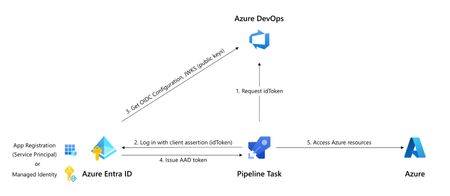
The secret nobody wants to rotate Most Terraform-on-Azure pipelines we see still authenticate the same way they did three years ago. A long-lived ARM_CLIENT_SECRET sitting in GitHub Actions or Azure DevOps, set once, copied around, and rotated only when something breaks. It's the most ignored credential in the cloud, and statistically the most likely one to leak. A developer screenshots a variable group. A pipeline log echoes a value. A fork inherits a secret. Or the secret simply expires on a Friday evening and takes production deployments with it. Workload Identity Federation (WIF) makes this whole class of problem go away. The pipeline mints a short-lived token at runtime, exchanges it for an Azure access token via Microsoft Entra, and never touches a secret. GitHub Actions has supported it since 2021. Azure DevOps service connections went GA with WIF in February 2024. The azurerm Terraform provider has supported it since v3.7. This post walks through the pattern end-to-end, for both GitHub Actions and Azure DevOps, the way I've rolled it out across multiple customer estates. How the exchange actually works Before any YAML, it helps to picture what's happening: The CI system (GitHub or ADO) signs a short-lived JWT describing exactly what's running- which repo, which branch, which environment, which service connection. The pipeline sends that JWT to Microsoft Entra ID. Entra checks it against a federated identity credential you've configured on a managed identity or app registration. The iss, sub, and aud claims must match case-sensitively. If it matches, Entra returns an Azure access token valid for the duration of the job. Terraform uses it. The job ends. The token expires. Nothing persists. The token is bound to a specific subject like repo:contoso/platform:environment:prod or sc://contoso/platform/azure-prod. It can't be reused from another repo, branch, or pipeline. Recommended Architecture A few choices that usually hold up in production: Decision Choice Identity type User-assigned managed identity (UAMI), not app registration Identity granularity One UAMI per environment (not per pipeline) Trust scope Pinned to the environment claim, not the branch RBAC scope Resource group, not subscription Remote state OIDC + use_azuread_auth = true, shared key access disabled Why UAMIs? They live in your subscription, don't need Application Administrator rights to manage, and follow the lifecycle of the resource group they belong to. Why one per environment? Pipeline-per-identity explodes into hundreds of identities. Environment-per-identity maps cleanly to deployment scopes. Part 1 - GitHub Actions Step 1: Create the identity and federate it Two commands per environment. That's it. az identity create -g rg-platform-identity -n id-tf-prod -l eastus az identity federated-credential create \ --name github-prod \ --identity-name id-tf-prod \ --resource-group rg-platform-identity \ --issuer https://token.actions.githubusercontent.com \ --subject repo:contoso/platform:environment:prod \ --audiences api://AzureADTokenExchange Repeat for nonprod. No secret is created anywhere. Step 2: Wire it up in GitHub In repo Settings → Environments, create nonprod and prod. On prod, add required reviewers and a branch rule restricting deployments to main. Then add three environment variables (not secrets - these aren't sensitive): AZURE_CLIENT_ID, AZURE_TENANT_ID, AZURE_SUBSCRIPTION_ID. The workflow itself stays small: permissions: id-token: write contents: read jobs: apply: runs-on: ubuntu-latest environment: prod env: ARM_USE_OIDC: "true" ARM_CLIENT_ID: ${{ vars.AZURE_CLIENT_ID }} ARM_TENANT_ID: ${{ vars.AZURE_TENANT_ID }} ARM_SUBSCRIPTION_ID: ${{ vars.AZURE_SUBSCRIPTION_ID }} steps: - uses: actions/checkout@v4 - uses: hashicorp/setup-terraform@v3 - run: terraform init && terraform apply -auto-approve Three things make this secure: id-token: write is the only elevated permission, and it doesn't grant write access to anything in GitHub, it just lets the runner mint a JWT. The environment: line picks the right AZURE_CLIENT_ID and drives the sub claim. The federation refuses anything else. No azure/login step is needed for Terraform. The azurerm provider reads GitHub's OIDC environment variables automatically. Part 2 - Azure DevOps The model is identical. The mechanics are different. ADO offers two creation paths for a WIF service connection: automatic (it creates an app registration for you) and manual (you bring your own UAMI). For platform teams, manual + UAMI is almost always the better choice to ensure identity lives where governance lives. The flow is a small dance between the two portals: In Azure DevOps, create a new ARM service connection → choose Workload Identity Federation (manual) → fill in your UAMI's client ID, tenant ID, and subscription. Save as draft. ADO shows you an issuer URL and a subject identifier. In Azure, on the UAMI, add a federated credential using the values ADO showed you. The subject looks like sc://contoso/platform/azure-prod. Back in ADO, click Verify and save. In the pipeline, the service connection only "activates" if a task in the job loads it. The simplest way is the AzureCLI@2 task: - task: AzureCLI@2 inputs: azureSubscription: azure-prod # the WIF service connection scriptType: bash scriptLocation: inlineScript inlineScript: | terraform init && terraform apply -auto-approve env: ARM_USE_OIDC: "true" ARM_CLIENT_ID: $(AZURE_CLIENT_ID) ARM_TENANT_ID: $(AZURE_TENANT_ID) ARM_SUBSCRIPTION_ID: $(AZURE_SUBSCRIPTION_ID) ARM_ADO_PIPELINE_SERVICE_CONNECTION_ID: $(SERVICE_CONNECTION_ID) SYSTEM_ACCESSTOKEN: $(System.AccessToken) SYSTEM_OIDCREQUESTURI: $(System.OidcRequestUri) For teams converting dozens of legacy connections, the Azure DevOps team published a PowerShell helper that walks every ARM service connection in a project and converts them in place. There's a 7-day rollback window on each connection, which makes the migration genuinely low-risk. Don't forget the state file The Terraform state is your real blast radius. With OIDC, it's almost free to lock it down too. The same UAMI can read and write blob data without the storage account key: backend "azurerm" { resource_group_name = "rg-tfstate" storage_account_name = "sttfstateprodeastus" container_name = "platform-prod" key = "platform.tfstate" use_oidc = true use_azuread_auth = true } Grant the UAMI Storage Blob Data Contributor on the container (not the account), disable shared key access on the storage account, and you've removed the last secret in the pipeline. RBAC and break-glass Federation removes a credential, not a privilege. A few habits worth keeping: Scope role assignments to resource groups, not subscriptions. The whole point of federation is that scoping is now trivially easy. Use Role Based Access Control Administrator instead of User Access Administrator if your Terraform creates role assignments. It's a more recent, narrower role. Have a documented break-glass. If GitHub or ADO has a token-service incident, you still need a path to ship a hotfix. A single hardware-key-protected emergency app registration in a separate identity boundary works well, audited monthly. Monitor sign-ins. Every federated exchange shows up in Entra sign-in logs as a service principal sign-in. Pipe these to Sentinel and alert on anomalies like sign-ins outside expected hours, or from IPs outside GitHub's published ranges. The errors you will hit (and what they really mean) Symptom What it actually is AADSTS70021: No matching federated identity record found Case-sensitive mismatch in iss, sub, or aud. Almost always a trailing slash or a capitalised character AADSTS700016: Application not found in directory Wrong client ID or tenant. Not a federation problem 403 on a resource even though token exchange worked Federation is fine. Your RBAC isn't. Check the exact scope Unable to determine OIDC token (ADO) No task in the job loaded the service connection. Add an AzureCLI@2 step Works on main, fails on tags You pinned sub to a branch ref. Add a second federated credential for tags, or move to environment-based scoping Migrating without a maintenance window You almost never get to do this on a greenfield repo. The order that has worked for me on legacy estates: Create the new UAMI alongside the old service principal, with the same role assignments. Federate one canary pipeline. Verify it deploys equivalently. Cut over pipelines in waves, lowest-risk environment first. Once a full release cycle passes cleanly, disable the old SP's secret. Wait another cycle. Then delete the SP entirely. Add a CI gate that fails any new pipeline introducing ARM_CLIENT_SECRET. The old and new auth methods coexist on the same subscription throughout. There's no hard cutover and no maintenance window, just a steady drift toward zero secrets. Wrapping up If you do nothing else after reading this, do one thing: search your CI variable groups for ARM_CLIENT_SECRET. Every result is an outage or a breach waiting to happen. Federation is one of those rare changes that's both more secure and less work to operate. Once you've set it up, you stop thinking about credential rotation, secret expiry, and quarterly access reviews for service principals. The pipeline simply runs, and the audit trail is in Entra where it belongs. That's a good trade.1.8KViews17likes10CommentsMicrosoft Azure Cloud HSM is now generally available
Microsoft Azure Cloud HSM is now generally available. Azure Cloud HSM is a highly available, FIPS 140-3 Level 3 validated single-tenant hardware security module (HSM) service designed to meet the highest security and compliance standards. With full administrative control over their HSM, customers can securely manage cryptographic keys and perform cryptographic operations within their own dedicated Cloud HSM cluster. In today’s digital landscape, organizations face an unprecedented volume of cyber threats, data breaches, and regulatory pressures. At the heart of securing sensitive information lies a robust key management and encryption strategy, which ensures that data remains confidential, tamper-proof, and accessible only to authorized users. However, encryption alone is not enough. How cryptographic keys are managed determines the true strength of security. Every interaction in the digital world from processing financial transactions, securing applications like PKI, database encryption, document signing to securing cloud workloads and authenticating users relies on cryptographic keys. A poorly managed key is a security risk waiting to happen. Without a clear key management strategy, organizations face challenges such as data exposure, regulatory non-compliance and operational complexity. An HSM is a cornerstone of a strong key management strategy, providing physical and logical security to safeguard cryptographic keys. HSMs are purpose-built devices designed to generate, store, and manage encryption keys in a tamper-resistant environment, ensuring that even in the event of a data breach, protected data remains unreadable. As cyber threats evolve, organizations must take a proactive approach to securing data with enterprise-grade encryption and key management solutions. Microsoft Azure Cloud HSM empowers businesses to meet these challenges head-on, ensuring that security, compliance, and trust remain non-negotiable priorities in the digital age. Key Features of Azure Cloud HSM Azure Cloud HSM ensures high availability and redundancy by automatically clustering multiple HSMs and synchronizing cryptographic data across three instances, eliminating the need for complex configurations. It optimizes performance through load balancing of cryptographic operations, reducing latency. Periodic backups enhance security by safeguarding cryptographic assets and enabling seamless recovery. Designed to meet FIPS 140-3 Level 3, it provides robust security for enterprise applications. Ideal use cases for Azure Cloud HSM Azure Cloud HSM is ideal for organizations migrating security-sensitive applications from on-premises to Azure Virtual Machines or transitioning from Azure Dedicated HSM or AWS Cloud HSM to a fully managed Azure-native solution. It supports applications requiring PKCS#11, OpenSSL, and JCE for seamless cryptographic integration and enables running shrink-wrapped software like Apache/Nginx SSL Offload, Microsoft SQL Server/Oracle TDE, and ADCS on Azure VMs. Additionally, it supports tools and applications that require document and code signing. Get started with Azure Cloud HSM Ready to deploy Azure Cloud HSM? Learn more and start building today: Get Started Deploying Azure Cloud HSM Customers can download the Azure Cloud HSM SDK and Client Tools from GitHub: Microsoft Azure Cloud HSM SDK Stay tuned for further updates as we continue to enhance Microsoft Azure Cloud HSM to support your most demanding security and compliance needs.7.3KViews3likes2CommentsKubernetes Center: Security & LTS/Out-of-Support Version Insights Now Available
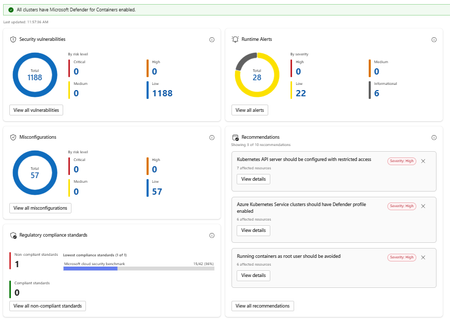
What's New Security Insights: The new Security page in Kubernetes Center gives you an immediate, all clusters or Kubernetes Fleet Manager-wide view of your security posture without leaving the portal. At the summary level you can see: Security vulnerabilities broken down by risk level Runtime alerts categorized by severity Non-compliant regulatory standards, with visibility into which benchmarks your clusters are falling short on Drilling deeper into the security detail view exposes four distinct panels: Security Vulnerabilities show a total count of vulnerabilities across all clusters, broken down by risk tier. Runtime Alerts surfaces live alerts from Defender for Containers categorized by High, Medium, Low, and Informational severity. You can see at a glance whether any active threats require immediate attention, and drill into the full alert list with one click. Misconfigurations show a count of configuration issues detected across your clusters, again broken down by risk level. Regulatory Compliance Standards lets you see which compliance standards your clusters are enrolled in, which are passing, and which are failing. The view surfaces the lowest-performing standard with its pass rate, so you know exactly where to focus remediation effort. Recommendations are shown alongside these panels, providing actionable and prioritized guidance. Each recommendation shows affected resource counts and links directly to remediation details. Note: Security insights require Microsoft Defender for Containers to be enabled. Kubernetes Center will confirm at a glance whether all your clusters have it enabled. Cluster Version Support Status: Stay Ahead of End-of-Support Running an out-of-support Kubernetes version is one of the most common and preventable sources of risk in production environments. The new Cluster Version Support Status panel in Kubernetes Center gives you a clear picture of where every cluster stands. The view breaks your clusters down into four states: Status What it means In support Running a supported Kubernetes version. No action needed. Expiring soon Version support is ending soon. Plan your upgrade. Out of support (LTS eligible) Out of support but eligible for Long Term Support. An easy path to extend coverage. Out of support No longer supported and not LTS eligible. Upgrade required. You can filter the view by cluster tier (Premium, Standard, or Free) to understand exposure by tier and prioritize accordingly. For clusters that are out of support but LTS eligible, a single Enable LTS for Eligible Clusters button lets you act immediately without navigating away. Kubernetes Center brings this into a single, always-on view so platform teams can: Catch version drift before it becomes an incident Spot misconfiguration patterns across clusters, not just within one Act on recommendations without switching tools Report on compliance posture without manual aggregation Try It Out These features are available now in Kubernetes Center in the Azure portal. → Open Security -Kubernetes Center in the Azure portal We'd love to hear what you think. Try the new security and version views with your clusters and share your feedback directly through the portal using the feedback button. FAQ Do I need Microsoft Defender for Containers enabled to use the security features? Yes. Security vulnerabilities, runtime alerts, and misconfiguration data are powered by MS Defender for Containers. Kubernetes Center will show you if any clusters don't have it enabled so you can quickly close that gap. Does this work across all my subscriptions and clusters? Kubernetes Center aggregates data across all AKS clusters you have access to. Make sure you have the appropriate RBAC permissions across the subscriptions you want visibility into. What is LTS and should I enable it for eligible clusters? Long Term Support (LTS) extends the supported lifecycle of a Kubernetes version beyond its standard window. It's available for clusters on eligible versions running the Premium tier. If you have clusters showing "Out of support, LTS eligible," enabling LTS is the fastest way to restore support coverage while you plan a full version upgrade. Is there a cost to use Kubernetes Center? Kubernetes Center itself is part of the Azure portal experience and there is no additional charge. Note that Microsoft Defender for Containers, which powers the security features, is a paid add-on. See the Defender for Containers pricing page for details. Where can I learn more about the Kubernetes version lifecycle? See the AKS Kubernetes version support policy documentation for full details on version support windows, LTS eligibility, and upgrade guidance.652Views1like0CommentsProactive Resiliency in Azure for Specialized Workload i.e. Citrix VDI on Azure Design Framework.
In this post, I’ll share my perspective on designing cloud architectures for near-zero downtime. We’ll explore how adopting multi-region strategies and other best practices can dramatically improve reliability. The discussion will be technically and architecturally driven covering key decisions around network architecture, data replication, user experience continuity, and cost management but also touch on the business angle of why this matters. The goal is to inform and inspire you to strengthen your own systems, and guide you toward concrete actions such as engaging with Microsoft Cloud Solution Architects (CSAs), submitting workloads for resiliency reviews, and embracing multi-region design patterns. Resilience as a Shared Responsibility One fundamental truth in cloud architecture is that ensuring uptime is a shared responsibility between the cloud provider and you, the customer. Microsoft is responsible for the reliability of the cloud in other words, we build and operate Azure’s core infrastructure to be highly available. This includes the physical datacenters, network backbone, power/cooling, and built-in platform features for redundancy. We also provide a rich toolkit of resiliency features (think availability sets, Availability Zones, geo-redundant storage, service failover capabilities, backup services, etc.) that you can leverage to increase the reliability of your workloads. However, the reliability in the cloud of your specific applications and data is up to you. You control your application architecture, deployment topology, data replication, and failover strategies. If you run everything in a single region with no backups or fallbacks, even Azure’s rock-solid foundation can’t save you from an outage. On the other hand, if you architect smartly (using multiple regions, zones, and Azure resiliency features properly), you can achieve end-to-end high availability even through major platform incidents. In short: Microsoft ensures the cloud itself is resilient, but you must design resilience into your workload. It’s a true partnership one where both sides play a critical role in delivering robust, continuous services to end-users. I emphasize this because it sets the mindset: proactive resiliency is something we do with our customers. As you’ll see, Microsoft has programs and people (like CSAs) dedicated to helping you succeed in this shared model. Six Layers of Resilient Cloud Architecture for Citrix VDI workloads To systematically approach multi-region resiliency, it helps to break the problem down into layers. In my work, I arrived at a six-layer decision framework for designing resilient architectures. This was originally developed for a global Citrix DaaS deployment on Azure (hence some VDI flavor in the examples), but the principles apply broadly to cloud solutions. The layers ensure we cover everything from the ground-up network connectivity to the operational model for failover. 1. Network Fabric (the global backbone) Establish high-performance, low-latency links between regions. Preferred: Use Global VNet Peering for simplified any-to-any connectivity with minimal latency over Microsoft’s backbone (ideal for point-to-point replication traffic), rather than a more complex Azure Virtual WAN unless your topology demands it. 2. Storage Foundation (the bedrock ) In any distributed computing environment, storage is the "heaviest" component. Moving compute (VDAs) is instantaneous; moving data (profiles, user layers) is governed by bandwidth and the speed of light. The success of a multi-region DaaS deployment hinges on the performance and synchronization of the underlying storage subsystem. Use storage that can handle cross-region workload needs, especially for user data or state. In case of Citrix Daas, preferred approach is Azure NetApp Files (ANF) for consistent sub-millisecond latency and high throughput. ANF provides enterprise-grade performance (critical during “login storms” or peak I/O) and features like Cool Access tiering to optimize cost, outperforming standard Azure Files for this scenario. 3. User Profile & State (solving data gravity) Enable active-active availability of user data or application state across regions. Solution: FSLogix Cloud Cache (in a VDI context) or similar distributed caching/replication tech, which allows simultaneous read/write of profile data in multiple regions. In our case, Cloud Cache insulates the user session from WAN latency by writing to a local cache and asynchronously replicating to the secondary region, overcoming the challenge of traditional file locking. The principle extends to databases or state stores: use geo-replication or distributed databases to avoid any single-region state. 4. Access & Ingress (the intelligent front door) Ensure users/customers connect to the right region and can fail over seamlessly. Preferred: Deploy a global traffic management solution under your control e.g. customer-managed NetScaler (Citrix ADC) with Global Server Load Balancing (GSLB) to direct users to the nearest available datacenter. In our design, NetScaler’s GSLB uses DNS-based geo-routing and supports Local Host Cache for Citrix, meaning even if the cloud control plane (Citrix Cloud) is unreachable, users can still connect to their desktop apps. The general point: use Azure Front Door, Traffic Manager, or third-party equivalents to steer traffic, and avoid any solution that introduces a new single point of failure in the authentication or gateway path. 5. Master Image (ensuring global consistency) : If you rely on VM images or similar artifacts, replicate them globally. Use: Azure Compute Gallery (ACG) to manage and distribute images across regions. In our case, we maintain a single “golden” image for virtual desktops: it’s built once, then the Compute Gallery replicates it from West Europe to East US (and any other region) automatically. This ensures that when we scale out or recover in Region B, we’re launching the exact same app versions and OS as Region A. Consistency here prevents failover from causing functionality regressions. 6. Operations & Cost (smart economics at scale) Run an efficient DR strategy you want readiness without paying 2x all the time. Approach: Warm Standby with autoscaling. That means the secondary region isn’t serving full traffic during normal operations (some resources can be scaled down or even deallocated), but it can scale up rapidly when needed. For our scenario, we leverage Citrix Autoscale to keep the DR site in a minimal state only a small buffer of machines is powered on, just enough to handle a sudden failover until load-based scaling brings up the rest. This “active/passive” model (or hot-warm rather than hot-hot) strikes a balance: you pay only for what you use, yet you can meet your RTO (Recovery Time Objective) because resources spin up automatically on trigger. In cloud-native terms, you might use Azure Automation or scale sets to similar effect. The key is to avoid having an idle full duplicate environment incurring full costs 24/7, while still being prepared. Each of these layers corresponds to critical architectural choices that determine your overall resiliency. Neglect any one layer, and that’s where Murphy’s Law will strike next. For example, you might perfectly replicate your data across regions, but if you forgot about network connectivity, a regional hub outage could still cut off access. Or you have every system duplicated, but if users can’t be rerouted to the backup region in time, the benefit is lost. The six-layer framework helps make sure we cover all bases. Notably, these design best practices align very closely with Azure’s Well-Architected Framework (especially the Reliability pillar), and they’re exactly the kind of prescriptive guidance we provide through programs like the Proactive Resiliency Initiative. In fact, the PRI playbook essentially prioritizes these same steps for customers: First, harden the network foundation e.g. ensure ExpressRoute gateways are zone-redundant and circuits are “multi-homed” in at least two locations (so no single datacenter failure breaks connectivity). Next, address in-region resiliency – make sure critical workloads are distributed across Availability Zones and not vulnerable to a single zone outage. (As an aside: Microsoft’s internal data shows a huge payoff here; when we configured our top Azure services for zonal resilience, we saw a 68% reduction in platform outages that lead to support incidents!) Then, enable multi-region continuity (BCDR) – for those tier-0 and tier-1 workloads, set up cross-regional failover so even a region-wide disruption won’t take you down. Multi-region is described as the complement to (not a substitute for) zonal design: it’s about surviving the “black swan” of a region-level event, and also about supporting geo-distributed users and future growth. In other words, if you follow the six-layer approach, you’re doing exactly what our structured resiliency programs recommend.519Views1like0CommentsSecuring the digital future: Advanced firewall protection for all Azure customers
Introduction In today's digital landscape, rapid innovation—especially in areas like AI—is reshaping how we work and interact. With this progress comes a growing array of cyber threats and gaps that impact every organization. Notably, the convergence of AI, data security, and digital assets has become particularly enticing for bad actors, who leverage these advanced tools and valuable information to orchestrate sophisticated attacks. Security is far from an optional add-on; it is the strategic backbone of modern business operations and resiliency. The evolving threat landscape Cyber threats are becoming more sophisticated and persistent. A single breach can result in costly downtime, loss of sensitive data, and damage to customer trust. Organizations must not only detect incidents but also proactively prevent them –all while complying with regulatory standards like GDPR and HIPAA. Security requires staying ahead of threats and ensuring that every critical component of your digital environment is protected. Azure Firewall: Strengthening security for all users Azure Firewall is engineered and innovated to benefit all users by serving as a robust, multifaceted line of defense. Below are five key scenarios that illustrate how Azure Firewall provides security across various use cases: First, Azure Firewall acts as a gateway that separates the external world from your internal network. By establishing clearly defined boundaries, it ensures that only authorized traffic can flow between different parts of your infrastructure. This segmentation is critical in limiting the spread of an attack, should one occur, effectively containing potential threats to a smaller segment of the network. Second, the key role of the Azure Firewall is to filter traffic between clients, applications, and servers. This filtering capability prevents unauthorized access, ensuring that hackers cannot easily infiltrate private systems to steal sensitive data. For instance, whether protecting personal financial information or health data, the firewall inspects and controls traffic to maintain data integrity and confidentiality. Third, beyond protecting internal Azure or on-premises resources, Azure Firewall can also regulate outbound traffic to the Internet. By filtering user traffic from Azure to the Internet, organizations can prevent employees from accessing potentially harmful websites or inadvertently downloading malicious content. This is supported through FQDN or URL filtering, as well as web category controls, where administrators can filter traffic to domain names or categories such as social media, gambling, hacking, and more. In addition, security today means staying ahead of threats, not just controlling access. It requires proactively detecting and blocking malicious traffic before it even reaches the organization’s environment. Azure Firewall is integrated with Microsoft’s Threat Intelligence feed, which supplies millions of known malicious IP addresses and domains in real time. This integration enables the firewall to dynamically detect and block threats as soon as they are identified. In addition, Azure Firewall IDPS (Intrusion Detection and Prevention System) extends this proactive defense by offering advanced capabilities to identify and block suspicious activity by: Monitoring malicious activity: Azure Firewall IDPS rapidly detects attacks by identifying specific patterns associated with malware command and control, phishing, trojans, botnets, exploits, and more. Proactive blocking: Once a potential threat is detected, Azure Firewall IDPS can automatically block the offending traffic and alert security teams, reducing the window of exposure and minimizing the risk of a breach. Together, these integrated capabilities ensure that your network is continuously protected by a dynamic, multi-layered defense system that not only detects threats in real time but also helps prevent them from ever reaching your critical assets. Image: Trend illustrating the number of IDPS alerts Azure Firewall generated from September 2024 to March 2025 Finally, Azure Firewall’s cloud-native architecture delivers robust security while streamlining management. An agile management experience not only improves operational efficiency but also frees security teams to focus on proactive threat detection and strategic security initiatives by providing: High availability and resiliency: As a fully managed service, Azure Firewall is built on the power of the cloud, ensuring high availability and built-in resiliency to keep your security always active. Autoscaling for easy maintenance: Azure Firewall automatically scales to meet your network’s demands. This autoscaling capability means that as your traffic grows or fluctuates, the firewall adjusts in real time—eliminating the need for manual intervention and reducing operational overhead. Centralized management with Azure Firewall Manager: Azure Firewall Manager provides centralized management experience for configuring, deploying, and monitoring multiple Azure Firewall instances across regions and subscriptions. You can create and manage firewall policies across your entire organization, ensuring uniform rule enforcement and simplifying updates. This helps reduce administrative overhead while enhancing visibility and control over your network security posture. Seamless integration with Azure Services: Azure Firewall’s strong integration with other Azure services, such as Microsoft Sentinel, Microsoft Defender, and Azure Monitor, creates a unified security ecosystem. This integration not only enhances visibility and threat detection across your environment but also streamlines management and incident response. Conclusion Azure Firewall's combination of robust network segmentation, advanced IDPS and threat intelligence capabilities, and cloud-native scalability makes it an essential component of modern security architectures—empowering organizations to confidently defend against today’s ever-evolving cyber threats while seamlessly integrating with the broader Azure security ecosystem.2KViews1like0CommentsLearn to elevate security and resiliency of Azure and AI projects with skilling plans
In an era where organizations are increasingly adopting a cloud-first approach to support digital transformation and AI-driven innovation, learning skills to enhance cloud resilience and security has become a top priority. By 2025, an estimated 85% of companies will have embraced a cloud-first strategy, according to research by Gartner, marking a significant shift toward reliance on platforms like Microsoft Azure for mission-critical workloads. Yet according to a recent Flexera survey, 78% of respondents found a lack of skilled people and expertise to be one of their top three cloud challenges along with optimizing costs and boosting security. To help our customers unlock the full potential of their Azure investments, Microsoft introduced Azure Essentials, a single destination for in-depth skilling, guidance and support for elevating reliability, security, and ongoing performance of their cloud and AI investments. In this blog we’ll explore this guidance in detail and introduce you to two new free, self-paced skilling resource Plans on Microsoft Learn to get your team skilled on building resiliency into your Azure and AI environments. Empower your team: Learn proactive resiliency for critical workloads in Azure Azure offers a resilient foundation to reliably support workloads in the cloud, and our Well-Architected Framework helps teams design systems to recover from failures with minimal disruption. Figure 1: Design your critical workloads for resiliency, and assess existing workloads for ongoing performance, compliance and resiliency. The new resiliency-focused Microsoft Learn skilling plan helps teams learn to “Elevate reliability, security, and ongoing performance of Azure and AI projects”, and they see how the Well-Architected Framework, coupled with the Cloud Adoption Framework, provides actionable guidelines to enhance resilience, optimize security measures, and ensure consistent, high-performance for Azure workloads and AI deployments. The Plan also covers cost optimization through the FinOps Framework, ensuring that security and reliability measures are implemented within budget. This training also emphasizes Azure AI Foundry, a tool that allows teams to work on AI-driven projects while maintaining security and governance standards, which are critical to reducing vulnerabilities and ensuring long-term stability. The plan guides learners in securely developing, testing, and deploying AI solutions, empowering them to build resilient applications that can support sustained performance and data integrity. The impact of Azure’s resiliency guidance is significant. According to Forrester, following this framework reduces planned downtime by 30%, prevents 15% of revenue loss due to resilience issues, and achieves an 18% ROI through rearchitected workloads. Given that 60% of reliability failures result in losses of at least $100,000, and 15% of failures cost upwards of $1 million, these preventative measures underscore the financial value of resilient architecture. Ensuring security in Azure AI workloads AI adds complexity to security considerations in cloud environments. AI applications often require significant data handling, which introduces new vulnerabilities and compliance considerations. Microsoft’s guidance focuses on integrating robust security practices directly into AI project workflows, ensuring that organizations adhere to stringent data protection regulations. Azure’s tools, including multi-zone deployment options, network security solutions, and data protection services, empower customers to create resilient and secure workloads. Our new training on proactive resiliency and reliability of critical Azure and AI workloads guides you in building fault-tolerant systems and managing risks in your environments. This plan teaches users how to assess workloads, identify vulnerabilities, and deploy prioritized resiliency strategies, equipping them to achieve optimal performance even under adverse conditions. Maximizing business value and ROI through resiliency and security Companies that prioritize resiliency and security in their cloud strategies enjoy multiple benefits beyond reduced downtime. Forrester’s findings suggest that a commitment to resilience has a three-year financial impact, with significant cost savings from avoided outages, higher ROI from optimized workloads, and increased productivity. Organizations can reinvest these savings into further modernization efforts, expanding their capabilities in AI and data analytics. Azure’s tools, frameworks, and Microsoft’s shared responsibility model give businesses the foundation to build resilient, secure, and high-performing applications that align with their goals. Microsoft Learn’s structured learning Plans provide self-paced modules to help you “Elevate Azure Reliability and Performance” and “Improve resiliency of critical workloads on Azure,” provide essential training to build skills in designing and maintaining reliable and secure cloud projects. As more companies embrace cloud-first strategies, Microsoft’s commitment to proactive resiliency, architectural guidance, and cost management tools will empower organizations to realize the full potential of their cloud and AI investments. Start your journey to a reliable and secure Azure cloud today. Resources: Visit Microsoft Learn Plans475Views1like0Comments