platform security
14 TopicsModernizing Terraform Pipelines on Azure: OIDC Federation for GitHub Actions and Azure DevOps
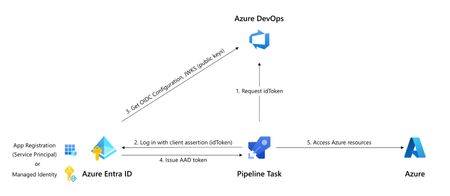
The secret nobody wants to rotate Most Terraform-on-Azure pipelines we see still authenticate the same way they did three years ago. A long-lived ARM_CLIENT_SECRET sitting in GitHub Actions or Azure DevOps, set once, copied around, and rotated only when something breaks. It's the most ignored credential in the cloud, and statistically the most likely one to leak. A developer screenshots a variable group. A pipeline log echoes a value. A fork inherits a secret. Or the secret simply expires on a Friday evening and takes production deployments with it. Workload Identity Federation (WIF) makes this whole class of problem go away. The pipeline mints a short-lived token at runtime, exchanges it for an Azure access token via Microsoft Entra, and never touches a secret. GitHub Actions has supported it since 2021. Azure DevOps service connections went GA with WIF in February 2024. The azurerm Terraform provider has supported it since v3.7. This post walks through the pattern end-to-end, for both GitHub Actions and Azure DevOps, the way I've rolled it out across multiple customer estates. How the exchange actually works Before any YAML, it helps to picture what's happening: The CI system (GitHub or ADO) signs a short-lived JWT describing exactly what's running- which repo, which branch, which environment, which service connection. The pipeline sends that JWT to Microsoft Entra ID. Entra checks it against a federated identity credential you've configured on a managed identity or app registration. The iss, sub, and aud claims must match case-sensitively. If it matches, Entra returns an Azure access token valid for the duration of the job. Terraform uses it. The job ends. The token expires. Nothing persists. The token is bound to a specific subject like repo:contoso/platform:environment:prod or sc://contoso/platform/azure-prod. It can't be reused from another repo, branch, or pipeline. Recommended Architecture A few choices that usually hold up in production: Decision Choice Identity type User-assigned managed identity (UAMI), not app registration Identity granularity One UAMI per environment (not per pipeline) Trust scope Pinned to the environment claim, not the branch RBAC scope Resource group, not subscription Remote state OIDC + use_azuread_auth = true, shared key access disabled Why UAMIs? They live in your subscription, don't need Application Administrator rights to manage, and follow the lifecycle of the resource group they belong to. Why one per environment? Pipeline-per-identity explodes into hundreds of identities. Environment-per-identity maps cleanly to deployment scopes. Part 1 - GitHub Actions Step 1: Create the identity and federate it Two commands per environment. That's it. az identity create -g rg-platform-identity -n id-tf-prod -l eastus az identity federated-credential create \ --name github-prod \ --identity-name id-tf-prod \ --resource-group rg-platform-identity \ --issuer https://token.actions.githubusercontent.com \ --subject repo:contoso/platform:environment:prod \ --audiences api://AzureADTokenExchange Repeat for nonprod. No secret is created anywhere. Step 2: Wire it up in GitHub In repo Settings → Environments, create nonprod and prod. On prod, add required reviewers and a branch rule restricting deployments to main. Then add three environment variables (not secrets - these aren't sensitive): AZURE_CLIENT_ID, AZURE_TENANT_ID, AZURE_SUBSCRIPTION_ID. The workflow itself stays small: permissions: id-token: write contents: read jobs: apply: runs-on: ubuntu-latest environment: prod env: ARM_USE_OIDC: "true" ARM_CLIENT_ID: ${{ vars.AZURE_CLIENT_ID }} ARM_TENANT_ID: ${{ vars.AZURE_TENANT_ID }} ARM_SUBSCRIPTION_ID: ${{ vars.AZURE_SUBSCRIPTION_ID }} steps: - uses: actions/checkout@v4 - uses: hashicorp/setup-terraform@v3 - run: terraform init && terraform apply -auto-approve Three things make this secure: id-token: write is the only elevated permission, and it doesn't grant write access to anything in GitHub, it just lets the runner mint a JWT. The environment: line picks the right AZURE_CLIENT_ID and drives the sub claim. The federation refuses anything else. No azure/login step is needed for Terraform. The azurerm provider reads GitHub's OIDC environment variables automatically. Part 2 - Azure DevOps The model is identical. The mechanics are different. ADO offers two creation paths for a WIF service connection: automatic (it creates an app registration for you) and manual (you bring your own UAMI). For platform teams, manual + UAMI is almost always the better choice to ensure identity lives where governance lives. The flow is a small dance between the two portals: In Azure DevOps, create a new ARM service connection → choose Workload Identity Federation (manual) → fill in your UAMI's client ID, tenant ID, and subscription. Save as draft. ADO shows you an issuer URL and a subject identifier. In Azure, on the UAMI, add a federated credential using the values ADO showed you. The subject looks like sc://contoso/platform/azure-prod. Back in ADO, click Verify and save. In the pipeline, the service connection only "activates" if a task in the job loads it. The simplest way is the AzureCLI@2 task: - task: AzureCLI@2 inputs: azureSubscription: azure-prod # the WIF service connection scriptType: bash scriptLocation: inlineScript inlineScript: | terraform init && terraform apply -auto-approve env: ARM_USE_OIDC: "true" ARM_CLIENT_ID: $(AZURE_CLIENT_ID) ARM_TENANT_ID: $(AZURE_TENANT_ID) ARM_SUBSCRIPTION_ID: $(AZURE_SUBSCRIPTION_ID) ARM_ADO_PIPELINE_SERVICE_CONNECTION_ID: $(SERVICE_CONNECTION_ID) SYSTEM_ACCESSTOKEN: $(System.AccessToken) SYSTEM_OIDCREQUESTURI: $(System.OidcRequestUri) For teams converting dozens of legacy connections, the Azure DevOps team published a PowerShell helper that walks every ARM service connection in a project and converts them in place. There's a 7-day rollback window on each connection, which makes the migration genuinely low-risk. Don't forget the state file The Terraform state is your real blast radius. With OIDC, it's almost free to lock it down too. The same UAMI can read and write blob data without the storage account key: backend "azurerm" { resource_group_name = "rg-tfstate" storage_account_name = "sttfstateprodeastus" container_name = "platform-prod" key = "platform.tfstate" use_oidc = true use_azuread_auth = true } Grant the UAMI Storage Blob Data Contributor on the container (not the account), disable shared key access on the storage account, and you've removed the last secret in the pipeline. RBAC and break-glass Federation removes a credential, not a privilege. A few habits worth keeping: Scope role assignments to resource groups, not subscriptions. The whole point of federation is that scoping is now trivially easy. Use Role Based Access Control Administrator instead of User Access Administrator if your Terraform creates role assignments. It's a more recent, narrower role. Have a documented break-glass. If GitHub or ADO has a token-service incident, you still need a path to ship a hotfix. A single hardware-key-protected emergency app registration in a separate identity boundary works well, audited monthly. Monitor sign-ins. Every federated exchange shows up in Entra sign-in logs as a service principal sign-in. Pipe these to Sentinel and alert on anomalies like sign-ins outside expected hours, or from IPs outside GitHub's published ranges. The errors you will hit (and what they really mean) Symptom What it actually is AADSTS70021: No matching federated identity record found Case-sensitive mismatch in iss, sub, or aud. Almost always a trailing slash or a capitalised character AADSTS700016: Application not found in directory Wrong client ID or tenant. Not a federation problem 403 on a resource even though token exchange worked Federation is fine. Your RBAC isn't. Check the exact scope Unable to determine OIDC token (ADO) No task in the job loaded the service connection. Add an AzureCLI@2 step Works on main, fails on tags You pinned sub to a branch ref. Add a second federated credential for tags, or move to environment-based scoping Migrating without a maintenance window You almost never get to do this on a greenfield repo. The order that has worked for me on legacy estates: Create the new UAMI alongside the old service principal, with the same role assignments. Federate one canary pipeline. Verify it deploys equivalently. Cut over pipelines in waves, lowest-risk environment first. Once a full release cycle passes cleanly, disable the old SP's secret. Wait another cycle. Then delete the SP entirely. Add a CI gate that fails any new pipeline introducing ARM_CLIENT_SECRET. The old and new auth methods coexist on the same subscription throughout. There's no hard cutover and no maintenance window, just a steady drift toward zero secrets. Wrapping up If you do nothing else after reading this, do one thing: search your CI variable groups for ARM_CLIENT_SECRET. Every result is an outage or a breach waiting to happen. Federation is one of those rare changes that's both more secure and less work to operate. Once you've set it up, you stop thinking about credential rotation, secret expiry, and quarterly access reviews for service principals. The pipeline simply runs, and the audit trail is in Entra where it belongs. That's a good trade.2.1KViews17likes11CommentsKubernetes Center: Security & LTS/Out-of-Support Version Insights Now Available
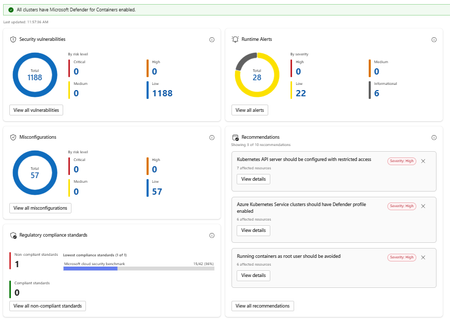
What's New Security Insights: The new Security page in Kubernetes Center gives you an immediate, all clusters or Kubernetes Fleet Manager-wide view of your security posture without leaving the portal. At the summary level you can see: Security vulnerabilities broken down by risk level Runtime alerts categorized by severity Non-compliant regulatory standards, with visibility into which benchmarks your clusters are falling short on Drilling deeper into the security detail view exposes four distinct panels: Security Vulnerabilities show a total count of vulnerabilities across all clusters, broken down by risk tier. Runtime Alerts surfaces live alerts from Defender for Containers categorized by High, Medium, Low, and Informational severity. You can see at a glance whether any active threats require immediate attention, and drill into the full alert list with one click. Misconfigurations show a count of configuration issues detected across your clusters, again broken down by risk level. Regulatory Compliance Standards lets you see which compliance standards your clusters are enrolled in, which are passing, and which are failing. The view surfaces the lowest-performing standard with its pass rate, so you know exactly where to focus remediation effort. Recommendations are shown alongside these panels, providing actionable and prioritized guidance. Each recommendation shows affected resource counts and links directly to remediation details. Note: Security insights require Microsoft Defender for Containers to be enabled. Kubernetes Center will confirm at a glance whether all your clusters have it enabled. Cluster Version Support Status: Stay Ahead of End-of-Support Running an out-of-support Kubernetes version is one of the most common and preventable sources of risk in production environments. The new Cluster Version Support Status panel in Kubernetes Center gives you a clear picture of where every cluster stands. The view breaks your clusters down into four states: Status What it means In support Running a supported Kubernetes version. No action needed. Expiring soon Version support is ending soon. Plan your upgrade. Out of support (LTS eligible) Out of support but eligible for Long Term Support. An easy path to extend coverage. Out of support No longer supported and not LTS eligible. Upgrade required. You can filter the view by cluster tier (Premium, Standard, or Free) to understand exposure by tier and prioritize accordingly. For clusters that are out of support but LTS eligible, a single Enable LTS for Eligible Clusters button lets you act immediately without navigating away. Kubernetes Center brings this into a single, always-on view so platform teams can: Catch version drift before it becomes an incident Spot misconfiguration patterns across clusters, not just within one Act on recommendations without switching tools Report on compliance posture without manual aggregation Try It Out These features are available now in Kubernetes Center in the Azure portal. → Open Security -Kubernetes Center in the Azure portal We'd love to hear what you think. Try the new security and version views with your clusters and share your feedback directly through the portal using the feedback button. FAQ Do I need Microsoft Defender for Containers enabled to use the security features? Yes. Security vulnerabilities, runtime alerts, and misconfiguration data are powered by MS Defender for Containers. Kubernetes Center will show you if any clusters don't have it enabled so you can quickly close that gap. Does this work across all my subscriptions and clusters? Kubernetes Center aggregates data across all AKS clusters you have access to. Make sure you have the appropriate RBAC permissions across the subscriptions you want visibility into. What is LTS and should I enable it for eligible clusters? Long Term Support (LTS) extends the supported lifecycle of a Kubernetes version beyond its standard window. It's available for clusters on eligible versions running the Premium tier. If you have clusters showing "Out of support, LTS eligible," enabling LTS is the fastest way to restore support coverage while you plan a full version upgrade. Is there a cost to use Kubernetes Center? Kubernetes Center itself is part of the Azure portal experience and there is no additional charge. Note that Microsoft Defender for Containers, which powers the security features, is a paid add-on. See the Defender for Containers pricing page for details. Where can I learn more about the Kubernetes version lifecycle? See the AKS Kubernetes version support policy documentation for full details on version support windows, LTS eligibility, and upgrade guidance.705Views1like0Comments
CHERIoT-Ibex: Closing the door on memory safety vulnerabilities with hardware-enforced protection
Memory safety vulnerabilities—largely arising from widely used programming languages such as C and C++—remain a leading cause of exploitable software defects across systems, from embedded devices to cloud-scale infrastructure. In simple terms, memory safety ensures that software accesses only the data it is intended to use; when this protection fails, attackers can exploit these defects to gain control of devices or disrupt critical services. Industry data shows that about 70 percent of the vulnerabilities Microsoft assigns as Common Vulnerabilities and Exposures (CVE) each year are memory safety issues, highlighting how frequently these software defects translate into real-world security risk (CISA – The Urgent Need for Memory Safety in Software Products). Hardware-enforced protections such as CHERIoT-Ibex can help eliminate these vulnerabilities at their source, reducing the likelihood that low-level software flaws can be exploited to compromise devices or disrupt workloads, supporting more trustworthy infrastructure by design. An open and certified foundation for memory-safe embedded systems CHERIoT-Ibex is the first open-source production-quality implementation of the CHERIoT instruction set architecture and among the first cores certified by the CHERI Alliance (CHERI Alliance – CHERIoT). CHERIoT is an extension of the CHERI (Capability Hardware Enhanced RISC Instructions) instruction set, with a focus on embedded and Internet of Things (IoT) applications. Ibex is an open‑source 32‑bit RISC‑V core developed by LowRISC. CHERIoT‑Ibex builds on Ibex by including CHERIoT capability extensions to provide hardware‑enforced memory safety and fine‑grained compartmentalization. It is the result of a close partnership between Microsoft Research and Azure Hardware Systems & Infrastructure, combining advanced research innovation with industry-leading silicon IP development expertise. In 2023, Microsoft open-sourced the CHERIoT Platform to bring hardware-enforced memory safety to embedded systems, including an instruction set architecture, toolchain, real-time operating system, and the RTL implementation of the CHERIoT-Ibex core. The CHERI Alliance certification recognizes its ability to provide spatial and temporal memory safety, fine-grained compartmentalization, and compatibility with the broader CHERI ecosystem. Critically, CHERIoT-Ibex achieves these security guarantees with power and area efficiency comparable to low-cost microcontrollers, demonstrating that security doesn’t have to come at a premium. Why memory safety remains a foundational security challenge Traditional embedded and microcontroller-class designs rely on software hardening and coarse-grained hardware protections that struggle to prevent attacks such as buffer overflows and use-after-free vulnerabilities, often adding complexity while still leaving gaps in protection. Consider a controller that runs privileged firmware responsible for device initialization, telemetry, and system health monitoring, while also hosting networking functionality exposed to external inputs. A memory-safe vulnerability in the networking stack could allow attackers to execute unauthorized code within the firmware environment, potentially affecting other critical services on the device. In tightly integrated systems, these failures can propagate beyond a single component, increasing overall risk. Constraining failures with hardware-enforced isolation CHERIoT-Ibex enables hardware-enforced isolation between these components, helping ensure that even if the networking stack is compromised, its ability to impact system initialization or telemetry functions remains constrained. By limiting the blast radius of software failures, CHERIoT-Ibex supports a system-level approach to security rather than relying on individual components to defend themselves in isolation. Advancing memory-safe infrastructure by design CHERIoT-Ibex’s certification by the CHERI Alliance marks an important milestone for open-source memory-safe solutions. It validates that strong security guarantees can coexist with efficiency and transparency, reflecting Microsoft’s broader silicon-to-systems strategy of embedding security into the foundational hardware infrastructure. Explore and engage with the open-source CHERIoT ecosystem by visiting the CHERIoT Platform and the CHERIoT-Ibex GitHub repository (microsoft/cheriot-ibex). The repositories enable developers and researchers to experiment with, contribute to, and build on memory-safe hardware and software foundations.679Views0likes0Comments
How AI Agents Are Turning Threat Intelligence Into Validated Detections
The promise of AI-assisted cybersecurity has long been hampered by a fundamental measurement problem: how do organizations validate whether an AI agent can actually perform the complex, multi-step work that security analysts do every day? Traditional benchmarks test whether models can recall MITRE ATT&CK techniques or classify threat actor tactics, but they miss the harder question—can an agent translate raw threat intelligence into production-ready detection rules that find real attacks?microsoft Microsoft Research has addressed this gap with CTI-REALM (Cyber Threat Intelligence Real World Evaluation and LLM Benchmarking), an open-source benchmark that evaluates AI agents on end-to-end detection engineering workflows. Released in March 2026, CTI-REALM measures whether agents can read threat intelligence reports, explore telemetry schemas, iteratively refine KQL queries, and produce validated Sigma rules and KQL detection logic—exactly the workflow security analysts follow when building detections for platforms like Microsoft Sentinel.microsoft Why Traditional Benchmarks Fall Short Existing cybersecurity AI benchmarks primarily test parametric knowledge—can a model name the technique behind a log entry, or correctly label a tactic from a threat report? While useful, these assessments evaluate isolated skills rather than the operational capability security teams actually need: translating narrative threat intelligence into working detection logic that identifies attacks in production environments.microsoft CTI-REALM fills this gap by measuring three critical dimensions that earlier benchmarks overlook:microsoft Operationalization over recall: Agents must produce working Sigma rules and KQL queries validated against real attack telemetry, not just answer multiple-choice questions about threat actors. Complete workflow evaluation: The benchmark scores intermediate decision quality—CTI report selection, MITRE technique mapping, data source identification, and iterative query refinement—not just final output. Realistic tooling: Agents use the same tools security analysts rely on: CTI repositories, schema explorers, Kusto query engines, and MITRE ATT&CK databases. This granular, checkpoint-based scoring reveals precisely where AI agents struggle in the detection pipeline, helping security leaders understand whether performance gaps stem from comprehension failures, query construction issues, or detection specificity problems.microsoft The Benchmark: Real Threat Intelligence, Real Azure Environments Microsoft curated 37 CTI reports from public sources including Microsoft Security, Datadog Security Labs, Palo Alto Networks, and Splunk, selecting scenarios that could be faithfully simulated in sandboxed environments with telemetry suitable for detection development.microsoft The benchmark spans three Azure-relevant platforms: Linux endpoints: Traditional host-based detection scenarios Azure Kubernetes Service (AKS): Container and orchestration layer attacks Azure cloud infrastructure: Multi-source, APT-style attack chains requiring correlation across identity, resource, and network logs Ground-truth scoring validates detection rules at every workflow stage, from technique identification through final KQL query accuracy.microsoft Key Findings: What Works, What Doesn't Microsoft evaluated multiple frontier AI models on CTI-REALM-50, a subset spanning all three platforms. The results reveal both promise and clear limitations:microsoft Performance drops sharply across platform complexity: Linux endpoint detections scored 0.585, AKS scenarios dropped to 0.517, and Azure cloud infrastructure plummeted to 0.282. This reflects the reality that multi-source correlation across identity logs, Azure Activity, and resource-specific telemetry remains exceptionally difficult for AI agents—precisely the scenario SOC teams working in Microsoft Sentinel face when investigating sophisticated, multi-stage cloud attacks.microsoft More reasoning isn't always better: Within model families, medium reasoning configurations consistently outperformed high reasoning modes, suggesting that overthinking hurts performance in tool-rich, iterative agentic environments.microsoft Structured guidance closes performance gaps: Providing smaller models with human-authored workflow guidance improved threat technique identification and closed approximately one-third of the performance gap to much larger models.microsoft What This Means for Azure Security Operations For security architects and SOC teams working with Microsoft Sentinel, CTI-REALM's findings have immediate practical implications: Traditional Detection Engineering AI-Assisted Detection Engineering Analyst reads threat report manually AI agent parses CTI report and extracts techniques Analyst identifies relevant MITRE techniques Agent maps techniques to data sources automatically Analyst explores schema, writes KQL queries Agent iterates on KQL queries using schema tools Analyst validates detection against test data Agent generates Sigma rule + KQL validated against telemetry Process takes hours to days per report Process completes in minutes with human validation The benchmark demonstrates that AI agents can meaningfully accelerate detection development, particularly for Linux and AKS scenarios where success rates exceed 50%. However, the 28% success rate for Azure cloud infrastructure detections underscores a critical reality: human expertise remains essential for validating complex, multi-source detections before operational deployment.microsoft+1 Security teams should view AI agents as analyst augmentation tools rather than replacements. The checkpoint-based scoring in CTI-REALM helps organizations identify where human review is most critical—typically in cloud correlation logic, detection specificity tuning, and false positive reduction. Responsible Adoption: Human-in-the-Loop Remains Non-Negotiable Microsoft's research reinforces that AI-generated detection rules require validation before production use. Organizations adopting AI-assisted detection workflows should implement structured governance:microsoft Validate AI-generated KQL queries against test datasets before enabling in Sentinel analytics rules Require peer review for detections targeting cloud infrastructure, where AI performance is weakest Benchmark models using CTI-REALM before considering downstream operational use Maintain detection metadata tracking whether rules originated from AI or human analysts to support incident response context The benchmark's open-source availability on the Inspect AI repository enables security teams to test models against their own operational requirements before adoption.microsoft The Path Forward CTI-REALM represents a foundational shift in how the security industry evaluates AI capabilities—moving from knowledge recall to operational competence. For Azure practitioners, this matters because the benchmark's platforms (Linux, AKS, Azure cloud) and output formats (Sigma rules, KQL queries) directly mirror working with Microsoft Sentinel's analytics engine.microsoft As Microsoft continues integrating AI capabilities into Security Copilot and the broader unified SIEM+XDR vision, benchmarks like CTI-REALM provide the measurement framework security leaders need to adopt AI responsibly—understanding both capabilities and limitations before operationalizing agent-assisted workflows. The benchmark is freely available to model developers and security teams. Organizations interested in contributing, benchmarking, or exploring partnership opportunities can access the repository and contact Microsoft Research at msecaimrbenchmarking@microsoft.com.microsoft About the Research: CTI-REALM was developed by Microsoft Research and announced March 20, 2026. The full technical paper is available at CTI-REALM: A new benchmark for end-to-end detection rule generation with AI agents | Microsoft Security Blog966Views0likes0Comments
Guardrails for Generative AI: Securing Developer Workflows
Generative AI is revolutionizing software development that accelerates delivery but introduces compliance and security risks if unchecked. Tools like GitHub Copilot empower developers to write code faster, automate repetitive tasks, and even generate tests and documentation. But speed without safeguards introduces risk. Unchecked AI‑assisted development can lead to security vulnerabilities, data leakage, compliance violations, and ethical concerns. In regulated or enterprise environments, this risk multiplies rapidly as AI scales across teams. The solution? Guardrails—a structured approach to ensure AI-assisted development remains secure, responsible, and enterprise-ready. In this blog, we explore how to embed responsible AI guardrails directly into developer workflows using: Azure AI Content Safety GitHub Copilot enterprise controls Copilot Studio governance Azure AI Foundry CI/CD and ALM integration The goal: maximize developer productivity without compromising trust, security, or compliance. Key Points: Why Guardrails Matter: AI-generated code may include insecure patterns or violate organizational policies. Azure AI Content Safety: Provides APIs to detect harmful or sensitive content in prompts and outputs, ensuring compliance with ethical and legal standards. Copilot Studio Governance: Enables environment strategies, Data Loss Prevention (DLP), and role-based access to control how AI agents interact with enterprise data. Azure AI Foundry: Acts as the control plane for Generative AI turning Responsible AI from policy into operational reality. Integration with GitHub Workflows: Guardrails can be enforced in IDE, Copilot Chat, and CI/CD pipelines using GitHub Actions for automated checks. Outcome: Developers maintain productivity while ensuring secure, compliant, and auditable AI-assisted development. Why Guardrails Are Non-Negotiable AI‑generated code and prompts can unintentionally introduce: Security flaws — injection vulnerabilities, unsafe defaults, insecure patterns Compliance risks — exposure of PII, secrets, or regulated data Policy violations — copyrighted content, restricted logic, or non‑compliant libraries Harmful or biased outputs — especially in user‑facing or regulated scenarios Without guardrails, organizations risk shipping insecure code, violating governance policies, and losing customer trust. Guardrails enable teams to move fast—without breaking trust. The Three Pillars of AI Guardrails Enterprise‑grade AI guardrails operate across three core layers of the developer experience. These pillars are centrally governed and enforced through Azure AI Foundry, which provides lifecycle, evaluation, and observability controls across all three. 1. GitHub Copilot Controls (Developer‑First Safety) GitHub Copilot goes beyond autocomplete and includes built‑in safety mechanisms designed for enterprise use: Duplicate Detection: Filters code that closely matches public repositories. Custom Instructions: Enhance coding standards via .github/copilot-instructions.md. Copilot Chat: Provides contextual help for debugging and secure coding practices. Pro Tip: Use Copilot Enterprise controls to enforce consistent policies across repositories and teams. 2. Azure AI Content Safety (Prompt & Output Protection) This service adds a critical protection layer across prompts and AI outputs: Prompt Injection Detection: Blocks malicious attempts to override instructions or manipulate model behaviour. Groundedness Checks: Ensures outputs align with trusted sources and expected context. Protected Material Detection: Flags copyrighted or sensitive content. Custom Categories: Tailor filters for industry-specific or regulatory requirements. Example: A financial services app can block outputs containing PII or regulatory violations using custom safety categories. 3. Copilot Studio Governance (Enterprise‑Scale Control) For organizations building custom copilots, governance is non‑negotiable. Copilot Studio enables: Data Loss Prevention (DLP): Prevent sensitive data leaks from flowing through risky connectors or channels. Role-Based Access (RBAC): Control who can create, test, approve, deploy and publish copilots. Environment Strategy: Separate dev, test, and production environments. Testing Kits: Validate prompts, responses, and behavior before production rollout. Why it matters: Governance ensures copilots scale safely across teams and geographies without compromising compliance. Azure AI Foundry: The Platform That Operationalizes the Three Pillars While the three pillars define where guardrails are applied, Azure AI Foundry defines how they are governed, evaluated, and enforced at scale. Azure AI Foundry acts as the control plane for Generative AI—turning Responsible AI from policy into operational reality. What Azure AI Foundry Adds Centralized Guardrail Enforcement: Define guardrails once and apply them consistently across: Models, Agents, Tool calls and Outputs. Guardrails specify: Risk types (PII, prompt injection, protected material) Intervention points (input, tool call, tool response, output) Enforcement actions (annotate or block) Built‑In Evaluation & Red‑Teaming: Azure AI Foundry embeds continuous evaluation into the GenAIOps lifecycle: Pre‑deployment testing for safety, groundedness, and task adherence Adversarial testing to detect jailbreaks and misuse Post‑deployment monitoring using built‑in and custom evaluators Guardrails are measured and validated, not assumed. Observability & Auditability: Foundry integrates with Azure Monitor and Application Insights to provide: Token usage and cost visibility Latency and error tracking Safety and quality signals Trace‑level debugging for agent actions Every interaction is logged, traceable, and auditable—supporting compliance reviews and incident investigations. Identity‑First Security for AI Agents: Each AI agent operates as a first‑class identity backed by Microsoft Entra ID: No secrets embedded in prompts or code Least‑privilege access via Azure RBAC Full auditability and revocation Policy‑Driven Platform Governance: Azure AI Foundry aligns with the Azure Cloud Adoption Framework, enabling: Azure Policy enforcement for approved models and regions Cost and quota controls Integration with Microsoft Purview for compliance tracking How to Implement Guardrails in Developer Workflows Shift-Left Security Embed guardrails directly into the IDE using GitHub Copilot and Azure AI Content Safety APIs—catch issues early, when they’re cheapest to fix. Automate Compliance in CI/CD Integrate automated checks into GitHub Actions to enforce policies at pull‑request and build stages. Monitor Continuously Use Azure AI Foundry and governance dashboards to track usage, violations, and policy drift. Educate Developers Conduct readiness sessions and share best practices so developers understand why guardrails exist—not just how they’re enforced. Implementing DLP Policies in Copilot Studio Access Power Platform Admin Center Navigate to Power Platform Admin Centre Ensure you have Tenant Admin or Environment Admin role Create a DLP Policy Go to Data Policies → New Policy. Define data groups: Business (trusted connectors) Non-business Blocked (e.g., HTTP, social channels) Configure Enforcement for Copilot Studio Enable DLP enforcement for copilots using PowerShell Set-PowerVirtualAgentsDlpEnforcement ` -TenantId <tenant-id> ` -Mode Enabled Modes: Disabled (default, no enforcement) SoftEnabled (blocks updates) Enabled (full enforcement) Apply Policy to Environments Choose scope: All environments, specific environments, or exclude certain environments. Block channels (e.g., Direct Line, Teams, Omnichannel) and connectors that pose risk. Validate & Monitor Use Microsoft Purview audit logs for compliance tracking. Configure user-friendly DLP error messages with admin contact and “Learn More” links for makers. Implementing ALM Workflows in Copilot Studio Environment Strategy Use Managed Environments for structured development. Separate Dev, Test, and Prod clearly. Assign roles for makers and approvers. Application Lifecycle Management (ALM) Configure solution-aware agents for packaging and deployment. Use Power Platform pipelines for automated movement across environments. Govern Publishing Require admin approval before publishing copilots to organizational catalog. Enforce role-based access and connector governance. Integrate Compliance Controls Apply Microsoft Purview sensitivity labels and enforce retention policies. Monitor telemetry and usage analytics for policy alignment. Key Takeaways Guardrails are essential for safe, compliant AI‑assisted development. Combine GitHub Copilot productivity with Azure AI Content Safety for robust protection. Govern agents and data using Copilot Studio. Azure AI Foundry operationalizes Responsible AI across the full GenAIOps lifecycle. Responsible AI is not a blocker—it’s an enabler of scale, trust, and long‑term innovation.2.8KViews0likes0CommentsProactive Resiliency in Azure for Specialized Workload i.e. Citrix VDI on Azure Design Framework.
In this post, I’ll share my perspective on designing cloud architectures for near-zero downtime. We’ll explore how adopting multi-region strategies and other best practices can dramatically improve reliability. The discussion will be technically and architecturally driven covering key decisions around network architecture, data replication, user experience continuity, and cost management but also touch on the business angle of why this matters. The goal is to inform and inspire you to strengthen your own systems, and guide you toward concrete actions such as engaging with Microsoft Cloud Solution Architects (CSAs), submitting workloads for resiliency reviews, and embracing multi-region design patterns. Resilience as a Shared Responsibility One fundamental truth in cloud architecture is that ensuring uptime is a shared responsibility between the cloud provider and you, the customer. Microsoft is responsible for the reliability of the cloud in other words, we build and operate Azure’s core infrastructure to be highly available. This includes the physical datacenters, network backbone, power/cooling, and built-in platform features for redundancy. We also provide a rich toolkit of resiliency features (think availability sets, Availability Zones, geo-redundant storage, service failover capabilities, backup services, etc.) that you can leverage to increase the reliability of your workloads. However, the reliability in the cloud of your specific applications and data is up to you. You control your application architecture, deployment topology, data replication, and failover strategies. If you run everything in a single region with no backups or fallbacks, even Azure’s rock-solid foundation can’t save you from an outage. On the other hand, if you architect smartly (using multiple regions, zones, and Azure resiliency features properly), you can achieve end-to-end high availability even through major platform incidents. In short: Microsoft ensures the cloud itself is resilient, but you must design resilience into your workload. It’s a true partnership one where both sides play a critical role in delivering robust, continuous services to end-users. I emphasize this because it sets the mindset: proactive resiliency is something we do with our customers. As you’ll see, Microsoft has programs and people (like CSAs) dedicated to helping you succeed in this shared model. Six Layers of Resilient Cloud Architecture for Citrix VDI workloads To systematically approach multi-region resiliency, it helps to break the problem down into layers. In my work, I arrived at a six-layer decision framework for designing resilient architectures. This was originally developed for a global Citrix DaaS deployment on Azure (hence some VDI flavor in the examples), but the principles apply broadly to cloud solutions. The layers ensure we cover everything from the ground-up network connectivity to the operational model for failover. 1. Network Fabric (the global backbone) Establish high-performance, low-latency links between regions. Preferred: Use Global VNet Peering for simplified any-to-any connectivity with minimal latency over Microsoft’s backbone (ideal for point-to-point replication traffic), rather than a more complex Azure Virtual WAN unless your topology demands it. 2. Storage Foundation (the bedrock ) In any distributed computing environment, storage is the "heaviest" component. Moving compute (VDAs) is instantaneous; moving data (profiles, user layers) is governed by bandwidth and the speed of light. The success of a multi-region DaaS deployment hinges on the performance and synchronization of the underlying storage subsystem. Use storage that can handle cross-region workload needs, especially for user data or state. In case of Citrix Daas, preferred approach is Azure NetApp Files (ANF) for consistent sub-millisecond latency and high throughput. ANF provides enterprise-grade performance (critical during “login storms” or peak I/O) and features like Cool Access tiering to optimize cost, outperforming standard Azure Files for this scenario. 3. User Profile & State (solving data gravity) Enable active-active availability of user data or application state across regions. Solution: FSLogix Cloud Cache (in a VDI context) or similar distributed caching/replication tech, which allows simultaneous read/write of profile data in multiple regions. In our case, Cloud Cache insulates the user session from WAN latency by writing to a local cache and asynchronously replicating to the secondary region, overcoming the challenge of traditional file locking. The principle extends to databases or state stores: use geo-replication or distributed databases to avoid any single-region state. 4. Access & Ingress (the intelligent front door) Ensure users/customers connect to the right region and can fail over seamlessly. Preferred: Deploy a global traffic management solution under your control e.g. customer-managed NetScaler (Citrix ADC) with Global Server Load Balancing (GSLB) to direct users to the nearest available datacenter. In our design, NetScaler’s GSLB uses DNS-based geo-routing and supports Local Host Cache for Citrix, meaning even if the cloud control plane (Citrix Cloud) is unreachable, users can still connect to their desktop apps. The general point: use Azure Front Door, Traffic Manager, or third-party equivalents to steer traffic, and avoid any solution that introduces a new single point of failure in the authentication or gateway path. 5. Master Image (ensuring global consistency) : If you rely on VM images or similar artifacts, replicate them globally. Use: Azure Compute Gallery (ACG) to manage and distribute images across regions. In our case, we maintain a single “golden” image for virtual desktops: it’s built once, then the Compute Gallery replicates it from West Europe to East US (and any other region) automatically. This ensures that when we scale out or recover in Region B, we’re launching the exact same app versions and OS as Region A. Consistency here prevents failover from causing functionality regressions. 6. Operations & Cost (smart economics at scale) Run an efficient DR strategy you want readiness without paying 2x all the time. Approach: Warm Standby with autoscaling. That means the secondary region isn’t serving full traffic during normal operations (some resources can be scaled down or even deallocated), but it can scale up rapidly when needed. For our scenario, we leverage Citrix Autoscale to keep the DR site in a minimal state only a small buffer of machines is powered on, just enough to handle a sudden failover until load-based scaling brings up the rest. This “active/passive” model (or hot-warm rather than hot-hot) strikes a balance: you pay only for what you use, yet you can meet your RTO (Recovery Time Objective) because resources spin up automatically on trigger. In cloud-native terms, you might use Azure Automation or scale sets to similar effect. The key is to avoid having an idle full duplicate environment incurring full costs 24/7, while still being prepared. Each of these layers corresponds to critical architectural choices that determine your overall resiliency. Neglect any one layer, and that’s where Murphy’s Law will strike next. For example, you might perfectly replicate your data across regions, but if you forgot about network connectivity, a regional hub outage could still cut off access. Or you have every system duplicated, but if users can’t be rerouted to the backup region in time, the benefit is lost. The six-layer framework helps make sure we cover all bases. Notably, these design best practices align very closely with Azure’s Well-Architected Framework (especially the Reliability pillar), and they’re exactly the kind of prescriptive guidance we provide through programs like the Proactive Resiliency Initiative. In fact, the PRI playbook essentially prioritizes these same steps for customers: First, harden the network foundation e.g. ensure ExpressRoute gateways are zone-redundant and circuits are “multi-homed” in at least two locations (so no single datacenter failure breaks connectivity). Next, address in-region resiliency – make sure critical workloads are distributed across Availability Zones and not vulnerable to a single zone outage. (As an aside: Microsoft’s internal data shows a huge payoff here; when we configured our top Azure services for zonal resilience, we saw a 68% reduction in platform outages that lead to support incidents!) Then, enable multi-region continuity (BCDR) – for those tier-0 and tier-1 workloads, set up cross-regional failover so even a region-wide disruption won’t take you down. Multi-region is described as the complement to (not a substitute for) zonal design: it’s about surviving the “black swan” of a region-level event, and also about supporting geo-distributed users and future growth. In other words, if you follow the six-layer approach, you’re doing exactly what our structured resiliency programs recommend.575Views1like0CommentsMicrosoft Azure Cloud HSM is now generally available
Microsoft Azure Cloud HSM is now generally available. Azure Cloud HSM is a highly available, FIPS 140-3 Level 3 validated single-tenant hardware security module (HSM) service designed to meet the highest security and compliance standards. With full administrative control over their HSM, customers can securely manage cryptographic keys and perform cryptographic operations within their own dedicated Cloud HSM cluster. In today’s digital landscape, organizations face an unprecedented volume of cyber threats, data breaches, and regulatory pressures. At the heart of securing sensitive information lies a robust key management and encryption strategy, which ensures that data remains confidential, tamper-proof, and accessible only to authorized users. However, encryption alone is not enough. How cryptographic keys are managed determines the true strength of security. Every interaction in the digital world from processing financial transactions, securing applications like PKI, database encryption, document signing to securing cloud workloads and authenticating users relies on cryptographic keys. A poorly managed key is a security risk waiting to happen. Without a clear key management strategy, organizations face challenges such as data exposure, regulatory non-compliance and operational complexity. An HSM is a cornerstone of a strong key management strategy, providing physical and logical security to safeguard cryptographic keys. HSMs are purpose-built devices designed to generate, store, and manage encryption keys in a tamper-resistant environment, ensuring that even in the event of a data breach, protected data remains unreadable. As cyber threats evolve, organizations must take a proactive approach to securing data with enterprise-grade encryption and key management solutions. Microsoft Azure Cloud HSM empowers businesses to meet these challenges head-on, ensuring that security, compliance, and trust remain non-negotiable priorities in the digital age. Key Features of Azure Cloud HSM Azure Cloud HSM ensures high availability and redundancy by automatically clustering multiple HSMs and synchronizing cryptographic data across three instances, eliminating the need for complex configurations. It optimizes performance through load balancing of cryptographic operations, reducing latency. Periodic backups enhance security by safeguarding cryptographic assets and enabling seamless recovery. Designed to meet FIPS 140-3 Level 3, it provides robust security for enterprise applications. Ideal use cases for Azure Cloud HSM Azure Cloud HSM is ideal for organizations migrating security-sensitive applications from on-premises to Azure Virtual Machines or transitioning from Azure Dedicated HSM or AWS Cloud HSM to a fully managed Azure-native solution. It supports applications requiring PKCS#11, OpenSSL, and JCE for seamless cryptographic integration and enables running shrink-wrapped software like Apache/Nginx SSL Offload, Microsoft SQL Server/Oracle TDE, and ADCS on Azure VMs. Additionally, it supports tools and applications that require document and code signing. Get started with Azure Cloud HSM Ready to deploy Azure Cloud HSM? Learn more and start building today: Get Started Deploying Azure Cloud HSM Customers can download the Azure Cloud HSM SDK and Client Tools from GitHub: Microsoft Azure Cloud HSM SDK Stay tuned for further updates as we continue to enhance Microsoft Azure Cloud HSM to support your most demanding security and compliance needs.7.4KViews3likes2CommentsSo, you want to have a public IP Address for your application?
In Microsoft Azure, a public IP address is a fundamental component for enabling internet-facing services, such as hosting a web application, facilitating remote access, or exposing an API endpoint. While this connectivity drives functionality, it also exposes resources to the unpredictable and often hostile expanse of the internet. This blog dives deep into the security implications of a public IP in Azure, using a detailed scenario to illustrate potential threats and demonstrating how Azure’s robust toolkit—Network Security Groups (NSGs), Azure DDoS Protection, Azure Firewall, Web Application Firewall (WAF), Private Link, and Azure Bastion—can safeguard against them. Scenario: The exposed e-commerce platform Imagine a small e-commerce business launching its online store on Azure. The infrastructure includes an application gateway hosting a web server with a public IP (e.g., 20.55.123.45), an Azure SQL Database for inventory and customer data, and a load balancer distributing traffic. Initially, the setup works flawlessly, customers browse products, place orders, and the business grows. But one day, the IT team notices unusual activity: failed login attempts spike, site performance dips, and a customer reports a suspicious pop-up on the checkout page. The public IP left with minimal protection has become a target. The threats of public IP exposure A public IP is like an open address in a bustling digital city. It’s visible to anyone with the means to look, and without proper safeguards, it invites a variety of threats: Brute Force Attacks: Exposed endpoints, such as a VM with Remote Desktop Protocol (RDP) or SSH enabled, become prime targets for attackers attempting to guess credentials. With enough attempts, weak passwords can crumble, granting unauthorized access to sensitive systems. Exploitation of Vulnerabilities: Unpatched software or misconfigured services behind a public IP can be exploited. Attackers regularly scan for known vulnerabilities—like outdated web servers or databases—using automated tools to infiltrate systems and extract data or plant malware. Distributed Denial of Service (DDoS) Attacks: A public IP can attract floods of malicious traffic designed to overwhelm resources, rendering services unavailable. For businesses relying on uptime, this can lead to lost revenue and damaged trust. Application-Layer Attacks: Web applications exposed via a public IP are susceptible to threats like SQL injection, cross-site scripting (XSS), or other exploits that manipulate poorly secured code, potentially compromising data integrity or user privacy. Left unprotected, a public IP becomes a liability, amplifying the attack surface and inviting persistent threats from the internet’s darker corners. Azure’s Security Arsenal Azure provides a layered approach to securing resources with public IPs. By leveraging its built-in services, organizations can transform that open gateway into a fortified checkpoint. Here’s how these tools work together to mitigate risks: Azure DDoS Protection Azure DDoS Protection protects from overwhelming public IPs with malicious traffic. Azure DDoS Protection, available for infrastructure protection and as Network & IP Protection SKUs, monitors and mitigates these threats. The Network and IP Protection SKUs uses machine learning to profile normal traffic patterns, automatically detecting and scrubbing malicious floods—such as SYN floods or UDP amplification attacks—before they impact application availability. Azure Web Application Firewall (WAF) When a public IP fronts a web application (e.g., via Azure Application Gateway), the WAF adds application-layer protection. It inspects HTTP/HTTPS traffic, thwarting attacks like SQL injection or XSS by applying OWASP core rule sets. This is critical for workloads where the public IP serves as the entry point to customer-facing services. Network Security Groups (NSGs) NSGs act as a virtual firewall at the subnet or network interface level, filtering traffic based on predefined rules. For the specific scenario above, an NSG should be used to restrict inbound traffic to an Application Gateway’s public IP, allowing only specific ports (e.g., HTTPS on port 443) from trusted sources while blocking unsolicited RDP or SSH attempts. This reduces the attack surface by ensuring only necessary traffic reaches the resource. Azure Private Link Sometimes, the best defense is to avoid public exposure entirely. Azure Private Link allows resources—like Azure SQL Database or Storage—to be accessed over a private endpoint within a virtual network, bypassing the public internet. By pairing a public IP with Private Link for internal services, organizations can limit external exposure while maintaining secure, private connectivity. Azure Bastion For administrative access to backend VMs, exposing RDP or SSH ports via a public IP is a common risk. Azure Bastion eliminates this need by providing a fully managed, browser-based jump box. Admins connect securely through the Azure portal over TLS, reducing the chance of brute force attacks on open ports. Building a Secure Foundation A public IP in Azure doesn’t have to be a vulnerability, it can be a controlled entryway when paired with the right defenses. Start by applying the principle of least privilege with NSGs, restricting traffic to only what’s necessary. Layer on DDoS Protection and Azure Firewall for network-level resilience and add WAF for web-specific threats. Where possible, shift sensitive services to Private Link, and use Bastion for secure management. Together, these services create a multi-tiered shield, turning a potential weakness into a strength. In today’s threat landscape, a public IP is inevitable for many workloads. But leveraging Azure’s built in security tools, your organization can embrace the cloud’s connectivity while keeping threats at bay, allowing you to embrace the cloud without compromising security.1.5KViews0likes0CommentsEnhancing VM security: Azure's approach to safer connectivity for all users
When it comes to cloud security, one of the most critical aspects is managing connectivity to your virtual machines (VMs) without exposing them to unnecessary risks. To help you with this, Azure provides secure and seamless remote access to your Azure VMs over TLS – at no added cost - through Azure Bastion Developer, a fully managed, platform-native service. Enabling secure connectivity goes beyond just securing remote access to VMs; it plays an integral role in a broader security strategy for Azure customers under the “Secure-By-Default” initiative. By eliminating the need for public IPs on your VMs and the complexities associated with traditional remote access methods, Bastion Developer fundamentally changes how Azure customers approach security. In this blog, we will discuss how secure connectivity via Bastion Developer enhances security for all Azure customers. Reduced attack surface Public IPs and open ports are significant vulnerabilities in traditional remote access methods. They can be exploited by attackers to gain unauthorized access to your VMs, leading to data breaches, malware infections, and other security incidents. Open ports can also be scanned and targeted by malicious actors, increasing the likelihood of successful attacks. By eliminating the need for public IPs, Bastion Developer minimizes these risks and enhances the overall security of your Azure environment. This secure-by-default approach ensures that your VMs are only accessible through a secure connection to a private IP, safeguarding your sensitive data and resources from external threats. Simplified security management Bastion Developer simplifies security by removing the need for complex VPN configurations, public IPs, and agent-based installation. It’s a centralized, managed solution that integrates directly into your Azure environment, making security management much more straightforward. Additionally, Bastion Developer offers a one-click connection feature, allowing users to securely access their virtual machines without the need for any deployment. This feature enables developers and IT teams to connect to their VMs in just seconds, streamlining the process and enhancing productivity. With no additional infrastructure required, users can enter their VM credentials, click “Connect,” and gain secure access almost instantly in the Azure portal. Bastion Developer also offers CLI-based connectivity for SSH connections. Reduced risk of misconfigurations Bastion Developer's automated and streamlined approach eliminates the risks of human error and configuration mistakes, which can be common source of security vulnerabilities. By eliminating the need for manual configuration or deployment, Azure Bastion Developer eliminates the risks of human error and configuration mistakes that could otherwise lead to insecure access points, making it an accessible option for all Azure customers, regardless of their level of networking expertise. No added cost The best part? Azure Bastion Developer is 100% free with every Azure subscription. This lightweight connectivity offering was made free under Microsoft’s “Secure-by-Default” initiative to ensure that security is accessible and affordable for all Azure users. Unlike traditional public IP methods, which can cost more than $4 per IP address per month, Bastion Developer offers secure connections to one VM at a time at zero additional cost. This affordability removes barriers to robust security by making it more economically viable for developers and IT teams. Additionally, the cost-effectiveness of this service encourages widespread adoption, ensuring that even smaller organizations with limited budgets can benefit from enhanced security measures. This seamless and cost-effective approach ensures that all Azure customers can easily enhance their security posture without incurring extra expenses. Conclusion In Azure, our goal is to offer the most secure platform for our customers as the default. Cyberattacks are becoming more and more common, and exposing VM ports with public IPs increases their vulnerability. Our approach with Bastion Developer is to enable secure connectivity by default without exposing public endpoints -- at no additional cost. We received this feedback from our users, especially developers who need to make brief and limited persistent connections to VMs regularly. With its ability to reduce your attack surface, simplify security management, and integrate seamlessly with the Azure ecosystem, Bastion Developer is a must-have tool for any developer looking to improve their cloud security. Start using Azure Bastion Developer today to secure your Azure VMs and improve your overall security posture at no extra cost.1.1KViews0likes2CommentsSecuring the digital future: Advanced firewall protection for all Azure customers
Introduction In today's digital landscape, rapid innovation—especially in areas like AI—is reshaping how we work and interact. With this progress comes a growing array of cyber threats and gaps that impact every organization. Notably, the convergence of AI, data security, and digital assets has become particularly enticing for bad actors, who leverage these advanced tools and valuable information to orchestrate sophisticated attacks. Security is far from an optional add-on; it is the strategic backbone of modern business operations and resiliency. The evolving threat landscape Cyber threats are becoming more sophisticated and persistent. A single breach can result in costly downtime, loss of sensitive data, and damage to customer trust. Organizations must not only detect incidents but also proactively prevent them –all while complying with regulatory standards like GDPR and HIPAA. Security requires staying ahead of threats and ensuring that every critical component of your digital environment is protected. Azure Firewall: Strengthening security for all users Azure Firewall is engineered and innovated to benefit all users by serving as a robust, multifaceted line of defense. Below are five key scenarios that illustrate how Azure Firewall provides security across various use cases: First, Azure Firewall acts as a gateway that separates the external world from your internal network. By establishing clearly defined boundaries, it ensures that only authorized traffic can flow between different parts of your infrastructure. This segmentation is critical in limiting the spread of an attack, should one occur, effectively containing potential threats to a smaller segment of the network. Second, the key role of the Azure Firewall is to filter traffic between clients, applications, and servers. This filtering capability prevents unauthorized access, ensuring that hackers cannot easily infiltrate private systems to steal sensitive data. For instance, whether protecting personal financial information or health data, the firewall inspects and controls traffic to maintain data integrity and confidentiality. Third, beyond protecting internal Azure or on-premises resources, Azure Firewall can also regulate outbound traffic to the Internet. By filtering user traffic from Azure to the Internet, organizations can prevent employees from accessing potentially harmful websites or inadvertently downloading malicious content. This is supported through FQDN or URL filtering, as well as web category controls, where administrators can filter traffic to domain names or categories such as social media, gambling, hacking, and more. In addition, security today means staying ahead of threats, not just controlling access. It requires proactively detecting and blocking malicious traffic before it even reaches the organization’s environment. Azure Firewall is integrated with Microsoft’s Threat Intelligence feed, which supplies millions of known malicious IP addresses and domains in real time. This integration enables the firewall to dynamically detect and block threats as soon as they are identified. In addition, Azure Firewall IDPS (Intrusion Detection and Prevention System) extends this proactive defense by offering advanced capabilities to identify and block suspicious activity by: Monitoring malicious activity: Azure Firewall IDPS rapidly detects attacks by identifying specific patterns associated with malware command and control, phishing, trojans, botnets, exploits, and more. Proactive blocking: Once a potential threat is detected, Azure Firewall IDPS can automatically block the offending traffic and alert security teams, reducing the window of exposure and minimizing the risk of a breach. Together, these integrated capabilities ensure that your network is continuously protected by a dynamic, multi-layered defense system that not only detects threats in real time but also helps prevent them from ever reaching your critical assets. Image: Trend illustrating the number of IDPS alerts Azure Firewall generated from September 2024 to March 2025 Finally, Azure Firewall’s cloud-native architecture delivers robust security while streamlining management. An agile management experience not only improves operational efficiency but also frees security teams to focus on proactive threat detection and strategic security initiatives by providing: High availability and resiliency: As a fully managed service, Azure Firewall is built on the power of the cloud, ensuring high availability and built-in resiliency to keep your security always active. Autoscaling for easy maintenance: Azure Firewall automatically scales to meet your network’s demands. This autoscaling capability means that as your traffic grows or fluctuates, the firewall adjusts in real time—eliminating the need for manual intervention and reducing operational overhead. Centralized management with Azure Firewall Manager: Azure Firewall Manager provides centralized management experience for configuring, deploying, and monitoring multiple Azure Firewall instances across regions and subscriptions. You can create and manage firewall policies across your entire organization, ensuring uniform rule enforcement and simplifying updates. This helps reduce administrative overhead while enhancing visibility and control over your network security posture. Seamless integration with Azure Services: Azure Firewall’s strong integration with other Azure services, such as Microsoft Sentinel, Microsoft Defender, and Azure Monitor, creates a unified security ecosystem. This integration not only enhances visibility and threat detection across your environment but also streamlines management and incident response. Conclusion Azure Firewall's combination of robust network segmentation, advanced IDPS and threat intelligence capabilities, and cloud-native scalability makes it an essential component of modern security architectures—empowering organizations to confidently defend against today’s ever-evolving cyber threats while seamlessly integrating with the broader Azure security ecosystem.2KViews1like0Comments