passwords
5 Topics
Edge Sync stuck in Initializing with Backend Uninitialized
Hello, I am hoping to get feedback from people familiar with Edge Sync internals, synchronization failures, or similar cases. OVERVIEW Around October 13, 2026, I discovered that my Favorites and saved Passwords were no longer visible in Microsoft Edge. The issue is present on both my desktop PC and my laptop using the same personal Microsoft account. Approximately two weeks later, the issue remains unchanged. What makes this case unusual is that authentication appears to work correctly, Edge Sync servers respond successfully, and encryption keys download successfully, yet the sync engine never completes initialization. ENVIRONMENT Microsoft Edge Windows 11 Personal Microsoft account Desktop PC Laptop The same symptoms occur on both devices. SYNC INTERNALS edge://sync-internals consistently reports: Transport State = Initializing Sync Engine State = Stopped Backend Status = Uninitialized Sync Feature Enabled = True Bookmarks = 0 Passwords = 0 Additional values: Download Key Result = Fail Set Key Result = Fail SIGN-IN STATUS edge://signin-internals reports: Successful authentication Successful token retrieval No authentication errors There is no indication of a Microsoft account sign-in problem. SYNC DIAGNOSTICS sync_diagnostic.log repeatedly shows: SyncState after authenticated = FeatureCanStart Try to start sync engine Load and connect Nigori controller Update key data credentials Reset engine The sync engine repeatedly attempts initialization but never reaches a running state. SERVER COMMUNICATION cv_debug.log reports: SYNC_SERVER_OK EncryptionKeysFetcher.DownloadKeys = Success Key count = 10 SetEncryptionKeys = Success This confirms that sync servers respond and encryption keys can be downloaded successfully. One unusual observation is that Sync Internals reports: Download Key Result = Fail Set Key Result = Fail while the logs simultaneously report successful key download and processing. PROFILE VERIFICATION Active profile: ...\Microsoft\Edge\User Data\Default During troubleshooting, a file named "Bookmarks" could not be located within the active profile. The following sync-related components remain present: Sync Data LevelDB Nigori.bin Logs MULTI-DEVICE IMPACT The same behavior is present on both desktop and laptop using the same Microsoft account. This makes a single-device profile corruption scenario seem less likely. NEW OBSERVATION After the initial failure, I created a new Favorites folder named: After Edge Sync Failure 20261013 The folder appeared correctly in the Favorites Bar. After Microsoft Edge and Windows were closed and restarted, the folder was no longer present. This suggests the issue may still be actively affecting local Favorites persistence and is not limited to historical sync data. ACTIONS NOT PERFORMED Based on recommendations received in Microsoft Q&A, I have intentionally avoided: Reset Sync Deleting the Edge profile Clearing all Edge data Reinstalling Edge The goal has been to avoid overwriting potentially recoverable sync data. PRIMARY QUESTION My main question is not whether synchronization currently works. My main question is whether the original Favorites and Password records may still exist within the Edge Sync service and whether there is any supported way to determine that before attempting potentially destructive recovery actions. QUESTIONS Has anyone seen this exact combination of Transport State = Initializing, Sync Engine State = Stopped, and Backend Status = Uninitialized persisting for weeks? Can a corrupted Nigori or encryption-key state cause Favorites and Passwords to report zero items despite successful authentication and successful key download? Has anyone recovered Favorites or Passwords after a similar state? Is there any supported method to determine whether the original sync data still exists on the sync backend before attempting Reset Sync? Does this pattern suggest an account-level sync corruption, backend corruption, or another known Edge Sync failure mode? Any technical insight would be greatly appreciated. Thank you.405Views0likes1Comment
When is Microsoft going to bring Microsoft Authenticator windows aka desktop or within edge itself?
When is Microsoft going to bring Microsoft Authenticator windows aka desktop or within edge itself? (People like me lose mobiles) Isn't Windows device considered anything? Only mobiles and android and iOS devices matter? People like don't store important info on Windows devices? Edge has support for in-built password manager like chrome with chrome and google passwords then why is edge not having 2fa support on windows yet in 2024? Is windows still usable if my phones goes for service center, dies randomly, or is stolen? Can I consider windows devices to be of valuable in 2024 or should I shift 100 percent to android and MacOS and ios? Should I throw my windows devices out of window since it is not dependent device when any other fails? On a sidenote, I tried checking out but WinAuth Authenticator exists for Windows PC is open-source & offers 2-step verification (but unfortunately not updated since 2016) so why Microsoft which focuses so much of AI of everything has been able to bring desktop version for windows users? Or am I asking too much in the name of security and privacy that big tech promotes all the time? Can we trust microsoft and windows devices? Or is everything going to be done by google and chrome?2.1KViews0likes2CommentsI have 1 hidden extra password in Edge and i can't find it!
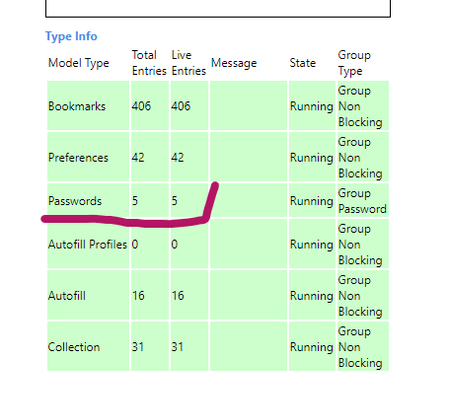
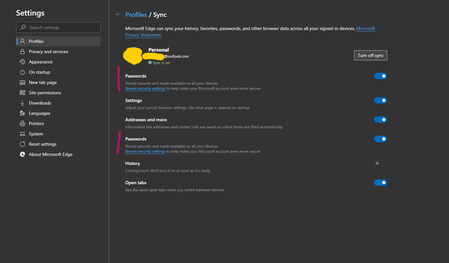
This is on Edge Stable Version 81.0.416.58 (Official build) (64-bit) And this is on Edge Canary Version 84.0.488.0 (Official build) canary (64-bit) they are in sync connected to my MSFT account. when i check them in here: edge://settings/passwords i see the same 4 saved passwords in both instances. what is the 5th password in Edge stable? can't find that extra one.783Views1like0Comments