oracle database@azure
39 TopicsBringing Azure Applications Closer to Oracle AI Database@Azure with Proximity Placement Groups
Azure proximity placement group (PPG) integration is now generally available for Exadata Database Service on Dedicated Infrastructure in Oracle AI Database@Azure. New PPG-enabled deployments can place supported Azure application virtual machines (VMs) close to Oracle-managed Exadata infrastructure through an integrated Azure portal flow. Bringing Azure compute and Oracle databases into close proximity gives interactive transaction processing, real-time analytics, and batch and extract, transform and load (ETL) pipelines processing millions of transactions a stronger performance foundation. Repeated or response-dependent application-to-database exchanges can make network latency important: even microsecond-scale improvements can help shorten completion times, depending on the workload’s communication patterns and other bottlenecks. Design for closer connections Azure Compute placement, Azure Advanced Networking and Oracle Exadata placement work as one connected flow. Oracle infrastructure anchors placement first; application VMs follow. This database-first design anchors application VMs to the Exadata infrastructure. That places them physically closer than sharing a region or availability zone would, instead of relocating Exadata to VMs you've already deployed. Promising network results Oracle internal testing across multiple regional configurations recorded median regional reductions of 54% in average network round-trip time (RTT) and 52% in p50 RTT compared with non-PPG-aligned deployments.[1] These measurements cover the VM-to-Exadata network path, not application response times, throughput or job runtimes. They support evaluating proximity, not predicting the same improvement for every workload. Build proximity in from the start Start by confirming Azure and Oracle onboarding, Oracle service limits, Azure Advanced Networking and permissions, with an active Resource Anchor and a new virtual network and delegated subnet ready. Create a new, empty Azure PPG, then associate it with a new Network Anchor. Select the same PPG for the new Exadata infrastructure and create its Exadata VM cluster with the matching Network Anchor. Deploy supported Azure application VMs into that PPG and a compatible availability zone, enabling Accelerated Networking where supported. Verify the resource associations before testing. Keep capacity and resilience in view PPGs constrain placement; they do not reserve Azure VM capacity. A preferred VM size may be unavailable at the anchored location, even when it is offered elsewhere in the zone, so plan supported sizing alternatives. Oracle service limits and Azure capacity are distinct checks. A PPG cannot be added retroactively to an existing Network Anchor. For existing Exadata infrastructure, contact Oracle Support about available options. A single PPG is not a multi-zone resilience strategy: retain your application and database high-availability and disaster-recovery designs. Evaluate a representative workload and measure what matters: application response time or end-to-end job completion, alongside network latency. Use the documentation below to plan a new deployment and assess the benefit for your environment. [1] Internal measurements across a few Azure regional configurations. Actual performance may vary with physical placement, topology, configuration, workload, and network conditions. These observations are not an SLA or guarantee. Learn more Use Azure proximity placement groups with Oracle AI Database@Azure — Microsoft Learn Create a Network Anchor — Oracle documentation Create Exadata infrastructure — Oracle documentation Create an Exadata VM cluster — Oracle documentation262Views0likes0CommentsSovereign controls for Oracle AI Database@Azure
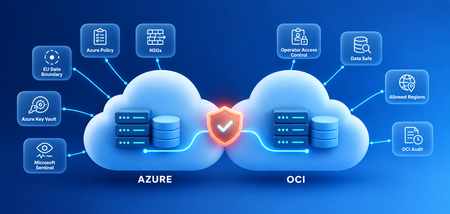
Regulated industries like banking, healthcare, and government face non-negotiable requirements for data localization, privacy, operational control, and compliance. Building on the controls already in Oracle AI Database@Azure, the Oracle Azure Resource Provider now supports the EU Data Boundary, so customers can deploy in the European Union (EU) and the European Free Trade Association (EFTA) with less friction, and Azure Policy support makes sure every deployment follows the rules from day one. Oracle AI Database@Azure runs Oracle database services in Azure datacenters, with an Oracle-operated control plane in Oracle Cloud Infrastructure (OCI). So sovereignty spans both clouds: the Azure region you deploy in, the connected OCI tenancy, and how you set up the services around your database. Use the Azure controls you already trust Keep data where it belongs. Oracle databases deploy in the Azure region you choose. The EU Data Boundary covers all EU member states plus the four EFTA countries: Iceland, Liechtenstein, Norway, and Switzerland. Backups stay in Azure when you pick it as the Oracle Database Autonomous Recovery Service location, and Oracle Data Guard between two Azure regions in the same geography keeps standby and replication traffic inside it too. Own your encryption. Encryption at rest is enforced automatically on Exadata, and connections use Transport Layer Security (TLS). Customer-managed keys work with Azure Key Vault Standard, Premium, and Managed HSM (hardware security module), so you control the key lifecycle. Revoke the key and the database can't use it to start, recover, or restore a backup. Stay private by default. Oracle AI Database@Azure runs inside your Azure Virtual Network on private IP addresses. With advanced networking on new deployments, your Network Security Groups, user-defined routes, Azure Firewall, and VNet flow logs apply to the database subnet. Enforce the rules automatically. Azure Policy and Sovereign Landing Zone guidance let you codify requirements such as approved regions or mandatory customer-managed keys, so every Oracle AI Database@Azure deployment stays compliant from day one. Be ready for an audit at any time. Azure Monitor captures database and infrastructure telemetry, and OCI Audit keeps up to 365 days of administrative activity. Send both to Microsoft Sentinel or the security information and event management (SIEM) tool you already use, and give security teams read-only roles. Stay in control of the Oracle-managed side Decide who gets operator access, and see everything they do. Oracle Operator Access Control lets you approve, time-limit, and revoke Oracle operator access to your infrastructure, with keystroke and activity logs and audit reports for every request. Decide when maintenance happens. For Exadata Database Service on Dedicated Infrastructure, you set and can reschedule the quarterly maintenance window, and Oracle posts monthly security maintenance at least a week ahead. Control where your tenancy can expand. OCI permissions and an Allowed regions rule in OCI Organizations limit which new regions a tenancy can subscribe to. They don't remove regions you're already subscribed to, so check the home region and existing subscriptions. OCI's Default identity domain also replicates to every subscribed region, so the tenancy's footprint matters even when the database sits inside the EU Data Boundary. Keep databases running if the control plane is unreachable. If the OCI control plane is unreachable, existing databases keep serving reads and writes. Provisioning, scaling, configuration changes, and maintenance wait until it's back. Govern your data with Oracle Data Safe. Sovereignty also means knowing what sensitive data you hold and who touches it. Oracle Data Safe, included with Exadata Database Service, finds and classifies sensitive data, masks it for development and test copies, flags risky configurations and users, and audits database activity. It reaches your databases through a secured private endpoint. Know what the boundary cover. The EU Data Boundary applies within its documented service scope and exceptions. On its own, it doesn't mean every data flow tied to the connected OCI tenancy stays in the EU and EFTA. Where backups, diagnostic and support data, operational data, and your own exports end up, depends on your configuration and the applicable terms. Oracle subscription, multicloud link, and resource anchor resources are global, so keep personal or confidential information out of their names and labels. Oracle's contract and privacy terms govern Oracle processing and support. Controls you can't check directly, like back-end operations and physical security, are covered by Oracle and Microsoft assurance reports and certifications, including SOC 1, 2, and 3, ISO 27001, PCI DSS, CSA STAR, and C5. There's no single sovereign certification, so map these to your own requirements. Plan your deployment Confirm the supported database service and Azure region, review your OCI tenancy's home region, subscriptions, and identity setup, check where backups and exports land, and register your databases with Data Safe. Oracle AI Database@Azure gives customers cloud-scale innovation along with the sovereignty assurances their regulators and customers expect. Learn more Read what's new for Oracle AI Database@Azure at Oracle AI World 2026: [Add link to Oracle AI World blog] Microsoft EU Data Boundary overview: https://learn.microsoft.com/en-us/privacy/eudb/eu-data-boundary-learn Microsoft EU Data Boundary continuing transfers: https://learn.microsoft.com/en-us/privacy/eudb/eu-data-boundary-transfers-for-all-services Oracle Database@Azure security and compliance guidance: https://docs.oracle.com/en-us/iaas/Content/database-at-azure/azusr-security-compliance.html Oracle Data Safe: https://docs.oracle.com/en/cloud/paas/data-safe/ OCI organization governance (Allowed regions): https://docs.oracle.com/en-us/iaas/Content/General/organization/add-governance.htm Oracle AI Database@Azure compliance programs: https://docs.oracle.com/en-us/iaas/Content/database-at-azure/compliance.htm67Views0likes0CommentsWhat’s new for Oracle AI Database@Azure at Oracle AI World 2026
The newest wave of enhancements includes plans to bring Oracle AI Database@Azure to Microsoft Azure Government Cloud, new sovereign controls, like EU Data Boundary and Azure Policy support, and Proximity Placement Group. These new capabilities offer customers more control over where and how they run their most demanding Oracle workloads. Here's what's new: Expanding to US government: Oracle plans to obtain FedRAMP Class D certification for Oracle AI Database@Azure in Azure Government. Sovereign controls in the public cloud: EU Data Boundary and Azure Policy support for the most regulated customers. Proximity Placement Groups: place Azure applications closer to Oracle database for lower latency. Oracle AI Database@Azure is coming to Azure Government For many government agencies and public sector organizations, strict compliance requirements have kept their most critical Oracle workloads out of the cloud. Oracle has announced plans to obtain FedRAMP Class D (formerly FedRAMP High) certification for Oracle AI Database@Azure in Microsoft Azure Government. Once certified, US government and public sector organizations with FedRAMP requirements will be able to: Run regulated Oracle workloads in Azure Government. Deploy Oracle Exadata Database Service on dedicated Exadata infrastructure in US Gov Virginia and US Gov Arizona. Build on a cloud they already trust. The service builds on Azure Government's existing FedRAMP-certified environment and is provisioned through customers' existing Azure Government tenancies and purchase through Microsoft Marketplace or qualified channel partners. Modernize and put government data to work with AI. Customers can move on-premises Oracle databases with minimal application changes, keep the same architecture as their existing Oracle deployments, and build AI-powered solutions with the AI and analytics services available in Azure Government. EU Data Boundary and Azure Policy support strengthen sovereign controls for Oracle AI Database@Azure Regulated industries like banking, healthcare, and government face non-negotiable requirements for data localization, privacy, operational control, and compliance. The Oracle Azure Resource Provider now supports the EU Data Boundary, so customers can deploy in the EU and EFTA with less friction, and Azure Policy support makes sure every deployment follows the rules from day one. These build on the controls already in Oracle AI Database@Azure: customer-managed keys in Azure Key Vault, private networking inside your virtual network, Oracle Operator Access Control, and audit data in Azure Monitor and Microsoft Sentinel. Because Oracle runs the control plane in OCI, sovereignty spans both clouds. Our sovereign controls blog covers the Azure and OCI controls and what the boundary does and doesn't cover Bring Azure applications closer to Oracle AI Database@Azure with Proximity Placement Groups When applications make thousands of calls to an Oracle database, delays add up. Azure Proximity Placement Group (PPG) integration is now generally available for Exadata Database Service on Dedicated Infrastructure in Oracle AI Database@Azure, so you can place application VMs close to your Exadata infrastructure for a predictable lower sub-millisecond latencies. PPG support is available for new deployments, and customers with existing Exadata infrastructure can contact Oracle Support about their options. Read the PPG blog for how it works and how to get started. Get started with Oracle AI Database@Azure today Explore Oracle AI Database@Azure. Visit https://aka.ms/oracleand technical docs pages to learn more. Learn more about using Azure proximity placement groups with Oracle AI Database@Azure Connect with your Microsoft sales team. Work with Microsoft and certified partners to plan, deploy, and optimize Oracle Database@Azure solutions tailored to your business. Stay up to date on what’s new. Follow the Oracle AI Database@Azure TechCommunity page for the latest updates, announcements, and learning resources. Get skilled on the Oracle solutions on Azure with the free skilling challenge - Challenge | Microsoft Learn Engage with the community. Sign up to be a Microsoft Valued Professional Join the Oracle AI Database@Azure LinkedIn community71Views0likes0Comments
Meet Microsoft at Oracle AI World 2026
Where your Oracle data meets Microsoft AI Most enterprise AI runs into the same wall: the data lives in Oracle, and the AI lives somewhere else. Oracle AI Database@Azure closes that gap, running Oracle data alongside Microsoft’s trusted AI platform. Microsoft is a sponsor at Oracle AI World 2026 — register now to reserve your seat and stop by booth #10028 to talk to experts and win prizes! Hear from Microsoft’s Brett Tanzer Four Clouds, One Conversation: OCI, AWS, Azure, and Google Leaders on What's Next [LRN1134] Join Microsoft Vice President Brett Tanzer for a four-cloud panel discussion exploring what’s next for multicloud data and AI, and why the decisions being made today will shape tomorrow’s cloud strategy. October 26 | 11:30AM Microsoft sessions you won't want to miss Monday, Oct 26 12:45 PM - 1:30 PM PDT Mission-Critical Modernization with Oracle Database@AnyCloud [LRN2573] See how Talcott Financial Group and Citizens Bank modernized mission-critical platforms on a secure, audit-ready multicloud foundation — Talcott moved 50+ databases and cut operational TCO by 70%. Tuesday, Oct 27 8:00 AM - 8:45 AM PDT From Oracle Data to AI Innovation with Oracle AI Database@Azure [LRN2247] See how Oracle AI Database@Azure connects Oracle data to Fabric, Foundry, Copilot, and AI agents without moving or rebuilding what works — plus, hear directly from customers as they discuss their Azure journey, the decisions that shaped their transformation, and the results they’re achieving today. Tuesday, Oct 27 1:00 PM - 1:45 PM PDT Connected Agents Across the Enterprise, Built with Microsoft Foundry [LRN2274] See how the Agent2Agent (A2A) protocol connects Oracle Private Agent Factory and Microsoft Foundry so agents collaborate across cloud boundaries. Tuesday, Oct 27 1:50 PM - 2:10 PM PDT Build an AI Agent on Oracle Data with Microsoft AI in 20 Minutes [THR2275] What can you do in 20 minutes? Watch an Oracle workload go from migration to AI agent in a single demo, proving you don’t have to rearchitect to start putting enterprise data to work with AI. Check out additional sessions featuring Microsoft and Oracle product experts. Tuesday, Oct 27 1:00 PM - 1:45 PM PDT AI Without Cloud Boundaries: Autonomous AI Database on AWS, Azure, Google Cloud [LRN6082] Tuesday, Oct 27 2:15 PM - 3:00 PM PDT Breaking the Walled Garden: The Engineering Behind Oracle Database@Everywhere [LRN2423] Wednesday, Oct 28 1:40 PM - 2:00 PM PDT Oracle AI Database@Azure: Real-World Multicloud Patterns from an Oracle ACE [THR6094] Stop by the Microsoft booth (#10028) in the hub – where innovation meets fun! Connect with Microsoft and explore how Oracle AI Database@Azure can help accelerate your cloud strategy and unlock new possibilities with Microsoft AI. We're running live demos with our experts throughout the day, so come see the platform in action and bring the questions you can't get answered anywhere else. Enter our raffle for a chance to win– all while exploring the most innovative Azure solutions driving enterprise transformation.293Views1like0CommentsOracle AI Database@Azure Expands with Azure Native Oracle GoldenGate User Experience, Observability
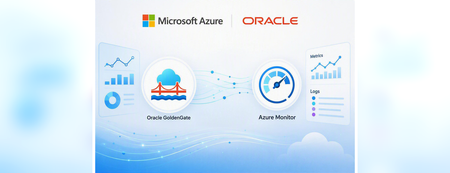
Customers running mission-critical Oracle workloads on Azure want more than database infrastructure in an Azure datacenter. They want their Oracle environments to fit naturally into the way their teams already build, govern, monitor, and purchase services on Azure. Today, Oracle AI Database@Azure takes another step in that direction with a native Azure experience for Oracle GoldenGate. Customers can provision and manage GoldenGate resources through the Azure portal and APIs, configure connections across databases, clouds, streaming platforms, and Microsoft Fabric, and bring GoldenGate metrics and operational logs into Azure Monitor and Azure Log Analytics. Together, these capabilities reduce the boundaries between Oracle data replication and the Azure applications, analytics services, operational tools, and governance processes that surround it. Oracle GoldenGate as a native Azure experience Oracle GoldenGate helps enterprises keep operational systems, analytics platforms, and AI workloads synchronized through real-time data replication. The native Azure experience brings GoldenGate provisioning, resource management, connectivity, automation, governance, and observability into the Oracle AI Database@Azure environment. Customers can create, list, pair, manage, and delete GoldenGate deployments and connections through the Azure portal and incorporate the same lifecycle operations into automated workflows through APIs. Resources are discoverable from the Oracle AI Database@Azure overview and through Microsoft Marketplace search. Because these objects participate in the Azure control plane, teams can apply familiar Azure capabilities such as role-based access control, tags, sizing choices, and Activity Log auditing across the GoldenGate lifecycle. Provisioning is handled through the Azure experience, while administrators can open the GoldenGate console for detailed replication configuration after deployment. This approach keeps resource deployment, ownership, automation, governance, and auditability in Azure while preserving the specialized GoldenGate experience for configuring replication processes. Connect Oracle data to the platforms where teams use it The native Azure experience also reflects the breadth of systems that GoldenGate can connect. Customers can configure connections for Oracle Database, Oracle Exadata, OCI Autonomous Database, and Amazon RDS for Oracle, along with Exadata and Autonomous Database services running across Azure, Google Cloud, and AWS. For streaming scenarios, supported connection options include Azure Event Hubs, Apache Kafka, Confluent Kafka, Microsoft Fabric Eventstream, and OCI Streaming. GoldenGate can also synchronize Oracle data with Microsoft Fabric destinations including Fabric Lakehouse and Fabric Mirror expediting your ongoing journey of AI solutioning to build Data agents in Fabric more seamlessly. These connection options make GoldenGate a practical bridge between operational Oracle data and the analytics, streaming, and AI services that depend on continuously updated information. Observe GoldenGate with Azure Monitor and Log Analytics Provisioning GoldenGate in Azure is only part of the operational experience. As replication environments grow, teams also need a consistent way to monitor service health, identify lag, and investigate operational changes alongside the rest of their Azure estate. Oracle GoldenGate deployment metrics and operational logs are now generally available in Azure Monitor and Azure Log Analytics for Oracle AI Database@Azure customers. Teams can monitor replication health, create alerts, analyze lifecycle events, and correlate GoldenGate telemetry with Azure applications and infrastructure using the Azure tools they already rely on. Metrics for health, resource use, lag, and process status Azure Monitor provides 18 GoldenGate metrics organized around three operational needs. Deployment health and resource metrics cover CPU, memory, OCPU consumption, file system usage, temporary space, swap space, and overall deployment health. Replication-lag metrics provide visibility across the deployment and its components, including inbound and outbound deployment lag, Extract and Replicat lag, distribution and receiver path lag, and heartbeat lag. Status metrics show the state of Extract, Replicat, distribution paths, and receiver paths. Teams can use these signals in Azure alerts, dashboards, workbooks, and queries, helping them spot replication delays or unavailable processes before those issues affect downstream applications and data consumers. Operational events in Azure Log Analytics GoldenGate lifecycle and operational events can also be sent to an Azure Log Analytics workspace through diagnostic settings. The release includes event categories for deployment updates, deletions, restore workflows, maintenance activity, critical service conditions, and informational state transitions. Bringing both metrics and operational events into Azure gives operations teams a more complete view. They can see when behavior changed, review the lifecycle or maintenance activity around that change, and correlate the result with signals from Azure applications and infrastructure. A more connected Oracle and Azure experience The native GoldenGate experience brings provisioning, API-driven lifecycle management, connectivity, governance, metrics, and operational logs together as part of Oracle AI Database@Azure. Customers can manage replication resources through Azure, connect Oracle data to the services and platforms where teams use it, and incorporate GoldenGate telemetry into day-to-day Azure operations. The result is less operational friction for customers building applications, data platforms, analytics, and AI solutions around Oracle databases on Azure. Oracle AI Database@Azure continues to evolve as an experience that is managed, governed, automated, and observed through the Azure tools customers already use. Learn more Get started with Oracle AI Database@Azure Learn about the native Azure experience for Oracle GoldenGate283Views0likes0CommentsBuild Enterprise-Ready Agents with Microsoft IQ and Oracle AI Database@Azure — now with Oracle MCP
We’re making it easier to bring Oracle data into intelligent applications with Microsoft IQ and Oracle AI Database@Azure. Oracle Managed Database MCP (Model Context Protocol) remote servers are now available in Microsoft Foundry—introducing a fully managed option that simplifies AI integration without disrupting existing MCP workflows. This builds on the momentum with Oracle AI Database@Azure, where enterprises are already pushing the boundaries of what's possible with Oracle data in the Microsoft Cloud. In just one year, we've shipped capabilities like: Oracle data mirrored into Microsoft Fabric — near real-time replication of Oracle data into OneLake for Analytics and AI. Fabric Data Agents — query mirrored Oracle data in natural language, then publish those agents as MCP servers, Teams apps, Copilot Studio connectors, or Microsoft Foundry tools. Custom copilots built with Microsoft Copilot Studio — secure, no-code access to Oracle data directly within Microsoft 365. Blueprints for enterprise-grade agents with Oracle data in Microsoft Cloud— blueprints for production‑grade, business‑aware AI agents powered by LLM of your choice, grounded in Oracle data, and enriched by the Microsoft IQ stack, with identity, governance, and compliance built-in. For developers, Oracle Database MCP server can already be enabled locally on VS Code through Oracle SQLcl MCP Server Integration available as part of the Oracle SQL Developer extension or hosted on Azure services such as Azure Functions and Azure Container Apps — providing direct, protocol-based interaction with Oracle databases. What changes now is how simple this becomes. With a fully managed OCI MCP discoverable in Microsoft Foundry tools catalog, developers can reduce operational overhead and focus on building intelligent, data-driven applications without sacrificing flexibility or control. We are excited about what this protocol unlocks: Oracle MCP is the connective tissue that lets Microsoft IQ bring its full intelligence to bear on Oracle enterprise data. “AI agents are exploding in the enterprise, but to create real value they need secure, governed access to trusted business data. With OCI Managed MCP Service for Oracle AI Database@Azure, customers can connect Microsoft IQ and agentic applications to Oracle Database with strict access governance and deep data security down to the cell level—bringing together Oracle’s database innovation with Microsoft’s AI innovation.” - Nathan Thomas, SVP Multicloud, Oracle The Magic: Unified Intelligence with Microsoft IQ The real value is agents that reason across every layer of organizational intelligence — structured, unstructured, and real-time: Fabric IQ — mirrored Oracle data analytics with ontology and graph, via OneLake Foundry IQ — knowledge grounding from documents in SharePoint, Blob, and Fabric Work IQ — M365 work signals (email, meetings, Teams) correlated with Oracle business data Oracle live data — transactional insights at runtime, via Oracle MCP That combination answers questions no single system can: "APAC meeting frequency dropped 30% last month — how did that affect Q1 sales, and does our SOP require escalation?" One agent. Live Oracle data, mirrored analytics, policy documents, and work signals — reasoned together. That's the magic Oracle MCP makes possible. Three paths to production with Oracle MCP All three deployment models remain available. Customers choose what fits their architecture, governance, and operational needs. Path 1: Local MCP via VS Code — Developer Productivity Run MCP on your laptop for rapid prototyping and developer inner-loop productivity. The SQL Developer Extension for VS Code automatically registers an SQLcl MCP Server for GitHub Copilot Agent Mode — zero setup beyond installing the extension and configuring a database connection. Best for: individual developers exploring schemas, generating SQL from natural language, prototyping agent interactions, and automating DBA tasks — all from within VS Code. Path 2: Self-Hosted MCP on Azure — Enterprise Control Deploy Oracle's Database MCP server on Azure Functions (serverless scaling, pay-per-execution) or Azure Container Apps (always-on, full container control, KEDA autoscaling). Both options support VNET integration with private endpoints to Oracle AI Database@Azure, Managed Identity for Key Vault credential access, and Azure API Management for rate limiting and OAuth2 enforcement. Best for: teams that need full infrastructure control, custom runtime dependencies, lower latency, enterprise networking (private endpoints, NSGs), and centralized governance — one MCP server shared by many agents. Path 3: Fully Managed Oracle MCP in OCI — NEW Register a production-grade, Oracle-managed database tools remote MCP server with zero infrastructure to manage. Browse the Foundry tools catalog, select Oracle remote MCP, authenticate and register your remote database tools MCP server pre-configured in OCI as a tool, and your agents in Microsoft foundry can now use this as a tool connection to fetch live Oracle data insights. Oracle handles deployment, patching, and scale. Best for: teams that want the fastest path to production with no servers to deploy. You focus on the agent logic. What you can build: live data agents The managed MCP option slots directly into the patterns developers are already using to put Oracle data to work in Foundry — querying live at runtime, with zero data movement: Blueprint AI Platform Connection Method Best For Foundry + Oracle MCP Microsoft Foundry Self-hosted or Managed MCP (NEW) Full model & tool control, multi-agent orchestration Foundry + ORDS + Vector Search Microsoft Foundry ORDS REST APIs + Oracle 26ai vectors RAG-powered agents, governed REST endpoints Power Apps + Oracle Connector Power Platform Gateway Modernize workflows, AI Builder predictions With the Microsoft Foundry Catalog, the “Foundry + Oracle MCP” blueprint now has a new deployment option —managed MCP— that eliminates infrastructure overhead while preserving the same agent capabilities. For analytics-heavy scenarios, you can also mirror Oracle data into Fabric (via Oracle Database Mirror or Open Mirror + GoldenGate service running on Oracle Database@azure) and expose it through Fabric Data Agents. Security and governance, built-in Enterprise agents are only useful if they're trustworthy. Regardless of which MCP path you choose, the security and governance model is consistent: Layer Control Identity Microsoft Entra ID — SSO, MFA, Conditional Access across all paths Network VNET integration, Private Endpoints, NSGs — no public IP on Oracle Secrets Azure Key Vault with Managed Identity — credentials never in code Data governance Microsoft Purview — scan, classify, and label Oracle data Access control Least-privilege Oracle DB users (read-only for agents), RBAC at every layer Audit Oracle Unified Audit + Azure Monitor + Log Analytics — full observability API governance Azure API Management — rate limiting, OAuth2 validation, WAF For the managed MCP path, Oracle adds authentication via OAuth2 client credentials, server-side logging, and OCI-native security policies. Tying it all together, the A365 Control Plane manages every IQ layer, agent publishing, DLP, sensitivity labels (MIP), Conditional Access, and centralized audit from a single pane of glass — so agents stay governed as they move from prototype to production. To tie it all together, Microsoft IQ delivers unified, governed intelligence across your enterprise. Oracle AI Database@Azure brings your Oracle data into the Microsoft ecosystem. And Oracle MCP — now fully managed in Microsoft Foundry — is the enabler that makes building enterprise-ready agents effortless. What's Next Coming Soon: The Complete Oracle AI Database@Azure AI Agent Playbook We're building a comprehensive playbook of 14 blueprints for building AI solutions on Oracle AI Database@Azure — from low-code and no-code patterns with Microsoft Copilot Studio and Power Apps, to full agentic AI solutioning with Microsoft Foundry, Oracle MCP, and the Microsoft IQ intelligence layers across three categories: Zero Data Movement (Live Oracle Data) — Copilot Studio, Microsoft Foundry + MCP, Microsoft Foundry + ORDS, Power Apps, Logic Apps Managed Replication (Mirrored Data Analytics) — Fabric Mirroring, GoldenGate CDC, Data Agents published as MCP/Teams/Copilot Studio/Microsoft Foundry tools AI Enrichment (IQ Layers) — Fabric IQ, Foundry IQ, Work IQ, Unified IQ Stay tuned. Catch us at these Microsoft Build sessions to see it all in action. Catch Us at Microsoft Build Build AI Apps with Oracle AI Database@Azure, MCP, and GitHub Copilot — Wed Jun 3, 2:30 PM PDT — Rajya Laxmi Yellajosyula (Microsoft) & Partha Srinivasan (Oracle). Live demo: MCP + Copilot orchestrating workflows across Oracle and Fabric using natural language. Move from Data to Intelligence with Oracle MCP and Microsoft IQ — Pre-recorded, Online — Ram Kakani (Microsoft) & Jeff Smith (Oracle). OCI Managed MCP + Work IQ, Fabric IQ, and Foundry IQ powering enterprise agentic experiences at scal...823Views0likes0CommentsYour Oracle Data Is Sitting Next to Microsoft AI. Are You Using It?
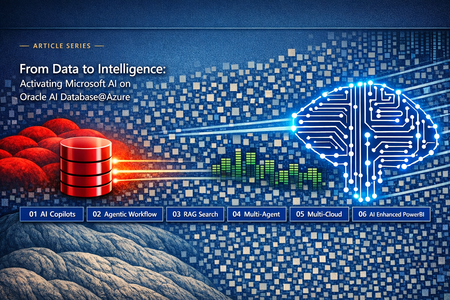
"Your organization runs Oracle on Azure. You've purchased Microsoft Foundry & OpenAI licenses. Why are your AI projects still stuck in proof-of-concept? "Your employees spend hours every week entering or reconciling data from documents, copying information into ERP systems. What would it mean if that information could be automatically gathered and processed in sub-millisecond level? "You have contracts, policies, SOPs, and compliance documents buried across Oracle modules that nobody can find fast enough to use. What decisions are being made on guesswork because the right answer was technically there but practically invisible? "Your data science team built a churn model, an equipment failure predictor, a demand forecast. Those predictions live in a Python notebook. When did your executives last act on one of them before the thing it predicted had already happened? If these feel familiar, the issue is not your models. It is the distance between your Data and your AI. Here's a scenario that plays out in enterprise after enterprise: The CIO has a mandate to deploy AI. The business runs on Oracle On-Premise or other Hyperscaler — ERP, EBS, financials, operations, the whole estate. Microsoft 365, Microsoft Fabric Power BI is popular choice of tool for Data Analytics and AI. Azure OpenAI licenses are purchased. Proof-of-concepts perform beautifully in demos and collapse in production cross-cloud boundaries. Copilots return stale data. Agents time out. Dashboards refresh so slowly that executives print them out and trust the paper more than the screen. The culprit is almost never the AI model. It's perhaps 200–300 milliseconds of latency between your Oracle data and your Microsoft AI platform cloud services. That gap — caused by Oracle sitting on-premises, in OCI, or in a different cloud — literally kills enterprise AI on Oracle workloads. It makes real-time copilots impractical, autonomous agents commercially unviable, and hourly AI-enriched dashboards technically impossible. Until that distance is removed, Azure AI in Oracle environments remains a demo. It does not become a production capability. WHERE THESE PATTERNS COME FROM? These six patterns in the article series were not invented for this article. They were discovered — built pattern by pattern, deployment by deployment, by Oracle customers and teams working on real enterprise problems against real Oracle databases. The original implementations ran on Oracle Cloud Infrastructure: Oracle's converged database handling JSON, vectors, graphs and relational data together; Oracle Integration Cloud orchestrating workflows; Oracle APEX delivering low-code applications; Oracle GenAI Service providing the intelligence layer. Real problems. Real Oracle customers. Real production deployments. Then something changed. Oracle AI Database@Azure arrived — and with it, a question nobody had been able to answer cleanly before: what happens when you take these proven Oracle patterns and surround them with the full Microsoft AI stack? Not as a replacement. Not as a migration away from Oracle. But as a surrounding activation layer — Microsoft Foundry, Azure Open AI, Power Platform, Copilot Studio, Power BI, Microsoft Fabric as well as Microsoft IQ Intelligence layer (Work IQ + Fabric IQ + Foundry IQ) — all now living in the same Azure region, same datacenter fabric, same network switch as Oracle AI Database@Azure. Sub-millisecond latency away from your Oracle data. Zero egress between them. The same tenancy, effectively. Oracle AI Database@Azure collapses the distance between your data and your models to zero. With Oracle Exadata and Microsoft AI platform sharing the same physical datacenter fabric — same building, same top-of-rack switch — the network hop becomes negligible. Latency falls to milliseconds. Cross-cloud egress charges vanish entirely. The patterns didn't change. The physics did. What changed is the underlying infrastructure. Microsoft AI sitting close to Oracle Data. This shift moves AI from possibility into practicality. These patterns already worked. What changed is that they now work fast enough, cheap enough, and simply enough to deploy at scale. NOTE: Based on the desired degree of customization and deployment flexibility, the six patterns described in this series may be realized using Microsoft 365, Power Platform, Copilot Studio, Microsoft Fabric, and associated services. The scope of this article series is limited to illustrating the Agent‑to‑Oracle AI Database@Azure integration paths through which these patterns are enabled. Six High‑Impact AI Use Cases for Oracle Estate Modernization on Azure with Microsoft AI Your Oracle data answers questions in plain English, without touching a line of code or a single schema object in Oracle. Your application runs on Oracle AI Database@Azure — the data is co-located, the latency is gone, the infrastructure is ready. But your teams are still spending the first hour of every shift logging into Oracle screens, toggling between systems, and manually looking up the numbers they need before they can start working. Relationship managers, care coordinators, and field engineers switch between multiple applications during a single interaction. The data is right there in Oracle. The friction is in how people reach it. This pattern removes that friction entirely. For sake of illustrating the end-to-end integration flows we will focus on Foundry which helps build custom agents get request from users and connect to Oracle. THE PATTERN IN-PLACE AI ENABLEMENT HIGH LEVEL DESCRIPTION Your Agents connects to Oracle AI Database@Azure, treating your Oracle schema as a live service endpoint. Users ask questions in plain English and because Microsoft AI and database share the same datacenter at sub-millisecond latency, responses are real-time - no stale or timeouts. AI doesn’t replace Oracle access. It removes the 40-minute overhead of logging in, navigating screens, and running reports — so teams focus on decisions, not data retrieval. The question for your architecture team: how does Agents reach Oracle AI Database@Azure? There are six distinct paths. All six end at the same place. The path you choose determines who builds the integration and how much control you have. SIX PATHS AT A GLANCE Path In plain language Who builds it Best for Oracle requirement 1. Oracle Connector Point-and-click chatbot for Teams Business analyst Fastest start Any Oracle 19c+ 2. ORDS + PL/SQL Secure web service, your own SQL DBA + developer Max control Any Oracle 3. ORDS + Select AI NL2SQL inside Oracle via Azure OpenAI DBA + developer Production NL2SQL Autonomous DB only 4. JDBC Functions Custom code, any language Developer Custom logic Any Oracle 5. Logic Apps Low-code workflow orchestration Citizen dev Multi-system Any Oracle 6. MCP + AI Agent Oracle reasons autonomously DBA + developer Complex reasoning Autonomous 26ai Your Oracle data answers questions in plain English, without touching a line of code or a single schema object in Oracle. Think of this as giving your agent the ability to look things up in your Oracle database — without anyone writing code. Microsoft Copilot Studio is a drag-and-drop tool where a business analyst points a chatbot at specific Oracle tables and says “these are your knowledge sources.” From that moment, any employee in Teams can type a question like “What’s the status of PO 4872?” and the chatbot answers instantly by reading live Oracle data. HOW IT WORKS Copilot Studio using the Native Oracle connector. Best separation of concerns. User → Teams→ Copilot Studio Agent → Oracle: The user interacts with Teams and asks plain English question. Copilot Agent with the native Oracle Database connector as knowledge source to query live Oracle AI Database@Azure data tables. Oracle → Copilot Agent: Returns live, governed data based on user context and access controls. Returns structured results to Copilot Agent for response assembly and formatting. Copilot Agent→ Teams → User: Delivers the final response back to the user in Teams, web app, or chatbot. STRENGTHS Accelerates AI deployment with minimal engineering overhead, enabling rapid rollout of enterprise copilots and agents without custom application development. Democratizes agent creation across business units through low‑code conversational interfaces — expanding AI innovation beyond centralized data science teams. Enterprise identity governance built‑in via Microsoft Entra ID with MFA, conditional access, and centralized authentication. Aligned to Responsible AI and data governance mandates through Microsoft Purview, Entra ID, and RBAC‑based access enforcement. Native integration across Microsoft 365 and Power Platform enables AI experiences to be embedded directly into existing workforce workflows. Data‑in‑place architecture: Oracle data remains at the source, eliminating duplication risks and enabling real‑time AI grounded in operational truth. Flexible agent development paths: Both Copilot Studio (low‑code) and Microsoft Foundry Agent Builders (pro‑code) can be leveraged to build enterprise agents using standardized Oracle connectors/tools. CONSIDERATIONS NL2SQL generation is mediated by Copilot Studio’s AI engine rather than Oracle Select AI — reducing direct control over SQL generation logic. Knowledge grounding is limited to table‑level data sources, restricting reuse of custom PL/SQL‑based business logic within agent interactions. Key Takeaway — Oracle AI Database@Azure Deployment Compatibility Base DB Service: Fully supported. Exadata DB Service: Fully supported. Same direct table access as Base DB. Exascale DB Service: Fully supported. ADB Serverless: Fully supported. Note that NL2SQL still comes from Copilot Studio, not Oracle Select AI. ADB Dedicated: Fully supported. This is the most universally compatible path. It works on every Oracle Database@Azure deployment type because the Copilot Studio connector reads tables directly — no dependency on Select AI or any Autonomous-only feature. On-premises Oracle (11g+) is also reachable via the Power Platform on-premises data gateway. You define exactly what goes back to the user — every SQL statement, every business rule, every byte of data is governed by your PL/SQL logic. This is the path for users that need deterministic, predictable responses from Oracle. Your Oracle DBA writes the exact stored procedures that retrieve and transform data. These procedures are exposed as secure REST endpoints via ORDS. Foundry calls them like any other API. You control the SQL, the business logic, the validation, and the shape of every response. HOW IT WORKS Microsoft Foundry Agents invoke ORDS REST endpoints that execute custom PL/SQL — no AI-generated SQL involved. User → Teams -> Foundry: The user interacts with Teams and asks plain English question that gets submitted to a structured intent request to a Foundry agent. Foundry → ORDS REST Endpoint: Foundry is the authoritative control plane: it validates the intent and route calls a pre-defined ORDS endpoint using OAuth 2.0 or Entra ID managed identity authentication with structured parameters. It accesses ORDS the same way it accesses any external API: thru tool connection. Best patterns for ORDS are Open API or a wrapped as Azure Functions/APIM. ORDS → PL/SQL Stored Procedure: ORDS routes the call to a PL/SQL stored procedure. The procedure executes your hand-crafted SQL with full RLS/VPD enforcement. Oracle → ORDS: Oracle executes the query, applies Row-Level Security, runs business validation, returns structured results. ORDS → Foundry: ORDS formats the result as JSON. Rate limiting and audit logging applied automatically. Foundry → Teams → User: Foundry assembles the response, optionally enriches with Azure OpenAI narration, delivers the answer back to user. STRENGTHS Deterministic AI‑to‑data interaction layer: Every SQL statement is explicitly defined — eliminating autonomous query generation and enabling policy‑driven data access. Enterprise‑grade identity and access controls through OAuth 2.0, Microsoft Entra ID managed identities. Embedded data‑level governance: Enforces Row‑Level Security (RLS) and Virtual Private Database (VPD) policies on every agent‑initiated query. Consistent deployment across database estates: ORDS is natively integrated with Autonomous Database and deployable on Base Database and Exadata. Agent‑ready API abstraction: ORDS endpoints can be registered as Open API tools/specs within Foundry Agent Service or Copilot Studio for controlled agent access. Enterprise AI control plane integration: Azure API Management (APIM) and Azure Functions introduce centralized authentication, policy enforcement, and abstraction of Oracle‑specific logic. Improved AI observability and governance posture across agent‑mediated database interactions. CONSIDERATIONS Requires PL/SQL development expertise to build and maintain stored procedure wrappers for agent access. ORDS endpoints must be explicitly defined and lifecycle‑managed, including versioning. New data use cases typically require endpoint or stored procedure updates, increasing operational overhead. Does not leverage Oracle Select AI, limiting ad hoc natural language query flexibility at the database layer. Key Takeaway — Oracle AI Database@Azure Deployment Compatibility Base DB Service: Fully supported. ORDS is installable. Full PL/SQL control with no Autonomous features required. Exadata DB Service: Fully supported. ORDS installable. Ideal for EBS/ERP workloads with custom stored procedures. Exascale DB Service: Fully supported. ADB Serverless: Fully supported. ORDS is built-in with zero setup — the best developer experience. ADB Dedicated: Fully supported. ORDS built-in. This is the most universally deployable path for controlled data access. It works on every Oracle Database@Azure service including Base DB (19c). No Autonomous-only features required. If your organization demands complete control over SQL generation and data exposure, this is the production-recommended starting point. Users ask plain English questions — Oracle’s own AI engine translates them into SQL, executes them, and returns governed answers, all within the database boundary. Your Oracle DBA creates a secure REST endpoint that accepts a plain-English question and returns an answer. Inside Oracle, Select AI reads your table structures, asks Azure OpenAI to generate the right SQL, runs it, and returns the result — all within the database boundary. Your data never leaves Oracle. HOW IT WORKS Microsoft Foundry Agents invoke ORDS REST endpoints that call Oracle’s Select AI engine (DBMS_CLOUD_AI). User → Teams -> Foundry: The user interacts with Teams and asks plain English question that gets submitted to a structured intent request to a Foundry agent. Foundry → ORDS REST Endpoint: Foundry is the authoritative control plane: it validates the intent and route calls a pre-defined ORDS endpoint Calls ORDS using OAuth 2.0 / Entra ID. Payload: {"question": "Avg salary by dept?", "action": "narrate"}. ORDS → DBMS_CLOUD_AI.GENERATE: PL/SQL wrapper invokes Select AI. Reads schema metadata, sends augmented prompt to Azure OpenAI (sub-ms latency). Azure OpenAI → Select AI: Returns generated SQL. Select AI validates, executes inside Oracle with RLS/VPD. Data never leaves Oracle. Oracle → Foundry: Select AI narrates the result. ORDS formats as JSON. Foundry → Team →User: Delivers the natural language answer with full audit trail. STRENGTHS In‑database natural language query capability through Select AI (NL→SQL engine in 26ai) enables governed, conversational access to enterprise data for ad hoc analysis and BI‑style exploration. Agent interaction occurs via curated query intelligence endpoints, ensuring controlled invocation from any agent orchestration layers like Microsoft Foundry or Power Platform. Governed data exposure model: Curated object_list definitions prevent unintended access to sensitive datasets. Enterprise‑grade identity and access controls via OAuth 2.0, Microsoft Entra ID, and ORDS rate limiting. NL2SQL execution remains fully contained within the Oracle database boundary, with Row‑Level Security (RLS) and Virtual Private Database (VPD) policies enforced at runtime. Native ORDS integration within Autonomous Database eliminates the need for separate deployment layers. Multi‑modal Select AI interaction support including showsql, runsql, narrate, chat, and summarize for agent‑mediated reasoning workflows. CONSIDERATIONS Requires PL/SQL expertise to implement stored procedure wrappers for agent invocation. Schema changes necessitate Select AI profile updates to maintain alignment with governed query surfaces. Select AI is limited to Autonomous Database deployments, and is not available on Base Database or Exadata Database Service environments. Key Takeaway — Oracle AI Database@Azure Deployment Compatibility Base DB Service: Not supported for Select AI. DBMS_CLOUD_AI is not available on Base DB. Use Path 2 (ORDS + PL/SQL) instead, or deploy a sidecar ADB instance to unlock NL2SQL capabilities. Exadata DB Service: Not supported for Select AI. Same limitation as Base DB. Deploy a sidecar ADB Serverless that reaches Exadata data via Database Links. Exascale DB Service: Not supported for Select AI. Same sidecar approach applies. ADB Serverless: Fully supported. Full Select AI, ORDS built-in, Azure OpenAI integration. This is the production-recommended deployment for Path 3. ADB Dedicated: Fully supported. Full Select AI and ORDS built-in. ORDS itself works on every deployment type — you can always expose PL/SQL as REST endpoints. But Select AI (the NL2SQL engine) is exclusively Autonomous Database. For Base DB, Exadata, or Exascale, the sidecar pattern (see Sidecar section below) unlocks Select AI without modifying your production systems. Your developers write the integration code — any language, any framework, any logic — connecting directly to Oracle using traditional database drivers. Your engineering team writes a small Azure Function that connects directly to Oracle using JDBC or Python. Maximum flexibility: custom logic, combining Oracle results with other data sources, retry policies, caching, and batching. HOW IT WORKS Microsoft Foundry Agents invoke Azure Functions that connect to Oracle via JDBC/python-oracledb. User → Teams-> Foundry: The user interacts with Teams and asks plain English question submitted to Foundry agent. Foundry → Azure Function: Calls the Azure Function’s HTTP endpoint as a custom tool. Azure Function → Oracle (JDBC): Opens JDBC/python-oracledb connection using wallet or token auth. Calls DBMS_CLOUD_AI.GENERATE, custom PL/SQL, or direct SQL. Oracle → Azure Function: Executes with RLS/VPD. Function can then enrich, transform, cache, or combine with other sources. Azure Function → Foundry: Formats and returns response. Your code controls error handling and retries. Foundry → Teams → User: Delivers the final answer. STRENGTHS Maximum engineering flexibility: Full developer control across any language and framework, enabling teams to standardize on existing enterprise development patterns. Leverages existing Azure app infrastructure: Runs cleanly on established Azure Functions and Azure App Service footprints. Operational resilience patterns under your control: Supports batching, retries, caching, and multi‑source aggregation to optimize performance and reliability. Broad driver ecosystem: Works with standard Oracle drivers including python-oracledb, JDBC (Java), and ODP.NET (.NET). CONSIDERATIONS Higher build-and-run burden: More custom code to develop, test, secure, maintain, and operate compared to an ORDS-based API approach. Key Takeaway — Oracle AI Database@Azure Deployment Compatibility Base DB Service: Supported for custom PL/SQL via JDBC. Not supported for Select AI — your Function would call Azure OpenAI directly for NL2SQL, then execute the generated SQL against Oracle. Exadata DB Service: Supported for custom PL/SQL via JDBC. Same external NL2SQL approach for Select AI. Exascale DB Service: Supported for custom PL/SQL. Same limitation for Select AI. ADB Serverless: Fully supported. ADB Dedicated: Fully supported. JDBC connectivity works with every Oracle Database@Azure service. You can always call custom PL/SQL from an Azure Function. However, calling DBMS_CLOUD_AI.GENERATE (Select AI) is Autonomous only. Low-code workflow orchestration that bridges Oracle into the broader Azure ecosystem — CRUD operations, stored procedures, conditional logic, and multi-system integration. Azure Logic Apps or Power Automate provides a visual workflow designer with a pre-built Oracle connector. Ideal when Oracle is one component of a larger multi-system workflow — invoice processing, approval chains, scheduled synchronization, cross-system orchestration. HOW IT WORKS Microsoft Foundry Agents invoke Azure Logic Apps workflows that orchestrate Oracle alongside other enterprise systems. User → Teams -> Foundry: The user interacts with Microsoft 365 Copilot or Teams and asks plain English question. Copilot interprets user intent and available Microsoft 365 context, then submits a structured intent request to a Foundry agent. Foundry → Logic Apps: Invokes a Logic Apps workflow as a tool — visual, low-code canvas. Logic Apps → Oracle (Connector): Uses pre-built Oracle connector for CRUD and stored procedures. Supports on-prem via data gateway. Oracle → Logic Apps: Returns results. Workflow applies conditional logic, routes to approvals, calls additional systems. Logic Apps → Foundry: Returns orchestrated result — may combine Oracle + other system data. Foundry → User: Delivers the final response or workflow status. STRENGTHS Low‑code orchestration model: Enables business teams to design workflows using a visual interface without requiring PL/SQL development. Pre‑built Oracle connectivity: Native connector manages authentication, connection handling, and CRUD operations out of the box. Supports invocation of stored procedures for integration with existing business logic and transactional workflows. Enterprise integration layer: Integrates Oracle into cross‑platform workflows spanning SAP, Salesforce, ServiceNow, and other enterprise systems via the same connector framework. Hybrid deployment support: Enables access to on‑premises Oracle environments (11g+) through the on‑premises data gateway without modifying the source database. CONSIDERATIONS Connector does not natively invoke Select AI or DBMS_CLOUD_AI, limiting direct access to in‑database NL2SQL capabilities. On‑premises data gateway may introduce an additional runtime component requiring installation, security assessment, and lifecycle management Key Takeaway — Oracle Database@Azure Deployment Compatibility Base DB Service: Fully supported. Full CRUD + stored procedure invocation via the Oracle connector. Exadata DB Service: Fully supported. Ideal for EBS workflow automation. Exascale DB Service: Fully supported. ADB Serverless: Fully supported. Can invoke Select AI indirectly by calling an ORDS endpoint as one workflow step. ADB Dedicated: Fully supported. Logic Apps works with every Oracle deployment type including on-premises Oracle (11g+) via the data gateway. For NL2SQL, combine Logic Apps with an ORDS endpoint (Path 2 or 3) as one step in the workflow. ORDS gives you control; Logic Apps give you speed and multi-system orchestration. The latest advanced path — the Oracle database itself becomes an AI agent that reasons, calls tools, reflects, and chains multi-step business logic autonomously. While Select AI is a stateless NL→SQL capability that handles a single query and returns a single result, Select AI Agent provides context-aware, multi-step agentic reasoning to support workflows—effectively acting as an agent wrapper that uses Select AI (or a data agent endpoint) as one of its tools. Oracle Private Agent Factory ("PAF") may be used to build agent that run inside the Oracle database which can query data (SQL, vector), analyze, reason, research and execute workflow. *MCP (Model Context Protocol) is an open standard — a “USB-C port” for AI agents. Oracle now offers a built-in MCP server on Autonomous Database (GA March 2026). HOW IT WORKS Microsoft Foundry Agents invoke Oracle’s Select AI Agent via ORDS or the built-in ADB MCP Server. User → Teams -> Foundry: The user interacts with Teams and asks plain English question submitted to Foundry agent. Foundry → Oracle (MCP/ORDS/REST API): Calls Oracle’s Select AI Agent. Oracle → ReAct Loop: Select AI Agent reasons about data needs, calls NL2SQL, Vector Search, PL/SQL business rules, external APIs. Agent → Tools (Iterative): Calls tools, evaluates results, iterates 3–10 times. All within Oracle’s security boundary. Oracle → Foundry: Formulates comprehensive narrated answer with citations. Foundry → User: Delivers the answer with full audit trail of every reasoning step STRENGTHS Advanced agentic execution capability: Supports multi‑step reasoning workflows where agents can invoke tools, maintain conversational context, and orchestrate actions across turns. Business logic executes natively within Oracle at sub‑millisecond latency — minimizing external orchestration overhead. Data remains within the database boundary, supporting structural compliance requirements for regulated industries. Select Agent execution path: ORDS invokes the Oracle in‑database agent runtime, enabling multi‑step reasoning workflows prior to returning results. Oracle Private Agent Factory agents may be exposed through ORDS endpoints or optionally surfaced via an Oracle MCP Server for agent‑based tool invocation. CONSIDERATIONS Requires Oracle 26ai Autonomous Database deployments to support in‑database agent runtime capabilities. Configuration complexity may be higher relative to lower‑capability integration patterns. Agent‑based reasoning may increase token consumption, resulting in higher per‑query costs compared to direct Select AI NL2SQL execution. Model Context Protocol (MCP) support remains in preview, and enterprise orchestration platform integrations continue to mature. Key Takeaway — Oracle Database@Azure Deployment Compatibility Base DB Service: Not supported. Exadata DB Service: Not supported. Exascale DB Service: Not supported. ADB Serverless: Fully supported. Built-in MCP server (GA March 2026), ReAct reasoning, Private Agent Factory, multi-turn memory. Requires 19.29+ or 26ai. ADB Dedicated: Fully supported. Full agent capabilities. Requires 26ai. Path 6 is exclusively Autonomous Database. The agentic runtime is deeply integrated into the ADB kernel. For non-Autonomous deployments, deploy a sidecar ADB instance to unlock agent capabilities. If your priority is… Start with… Oracle requirement Fastest time-to-value, M365 Path 1 — Copilot Studio Any Oracle 19c+ Complete SQL control, regulated Path 2 — ORDS + PL/SQL Any Oracle Natural language with Oracle NL2SQL Path 3 — ORDS + Select AI Autonomous DB Custom integration, multi-source Path 4 — JDBC Functions Any Oracle Multi-system orchestration Path 5 — Logic Apps Any Oracle Complex reasoning, agentic AI Path 6 — ORDS/MCP + AI Agent Autonomous 26ai Key principle All six paths can coexist. Most enterprises will run Path 1 (Copilot Studio) for rapid Teams access, Path 2 or 3 (ORDS) for production, and Path 6 (Select AI Agent) for complex reasoning — all against the same Oracle database, same security model, same audit trail. Now imagine your company has years of critical data sitting in Oracle databases. You want AI to answer business questions — "What were our top 10 customers last quarter?" or "Why did revenue dip in March?" — but you can't afford the risk, cost, or time of migrating your data to a Oracle Database At Azure system. The sidecar solves this. It's a small, lightweight AI database you park next to your existing Oracle environment. Your data never moves. Your production systems are never touched. You simply get AI-powered answers on top of what you already own — in minutes, not months. The sidecar can be an Autonomous Database instance (Serverless or Dedicated) running on Oracle Database@Azure. It does not store your production data — it connects to your existing databases (Exadata, Base DB, on-premises Oracle). What it IS: A smart AI assistant sitting beside your data, reading and answering questions on demand. Additionally enterprises can adopt a Fabric-centric, sidecar architecture that integrates Microsoft Fabric OneLake and Oracle Database@Azure. What it IS NOT: A replacement for your existing databases, a data warehouse, or a migration project. It does not own your data — it borrows a view of it. Everything in this article comes down to one physical reality: when Oracle AI Database@Azure and Microsoft AI share the same datacenter, the economics of enterprise AI don't just improve — they flip entirely. Latency disappears. Egress disappears. Complexity disappears. What we discussed today - PATTERN #01 of #06 - "AI In-Place Enablement" was never the hard part. The distance was. This only works because the AI and Oracle data now sit within milliseconds of each other. Previously, this interaction would time out or return stale results. For years, the gap between your Oracle data and your AI ambitions wasn't a technology problem — it was both physics and geography problem. That gap is now closed. Permanently. So now the only question left is this: "Do you want to be early — or do you want to be catching up?" Because Frontier organizations are not experimenting. They are building the next version of how their business runs. If you’re already running Oracle AI Database@Azure, you’re closer than you think. The only thing left is deciding where to start. If this resonates, you already know where to start. Pattern 1 of 6 is live and Oracle AI Database@Azure is live across 40+ regions. Remaining five patterns drop in over next series of this blog. Which one are you most curious about? We would love to know where you are headed. Drop it in the comments - we read every comment. 🔜 Next up — Pattern #02 of #06: Smart Agentic Workflow Automation and Document Intelligence. READING REFERENCES — Build Copilots with Copilot Studio + Oracle Database@Azure (Microsoft) Add Oracle as a knowledge source in Copilot Studio (Microsoft Learn) Unlocking Data for AI for Sidecar - Empowering Business Users with AI Driven Insights | autonomous ai database (Oracle) - Use Autonomous AI Database as an AI Proxy for Select AI (Oracle) Use AI Proxy Database for Select AI NL2SQL Oracle REST Data Services documentation hub (Oracle) Connect Logic Apps to Azure OpenAI and AI Search (Microsoft Learn) ORDS POST/PUT handlers for write-back to Oracle (Oracle community) Oracle AI Database 26ai announcement Microsoft Foundry Agent Service overview (Microsoft Learn) ORDS download page listing Oracle MCP Servers (Oracle) Extend agents with REST APIs / OpenAPI specs from ORDS (Microsoft Learn) Copilot Studio integration strategies including MCP and connectors (Microsoft Learn) Oracle Database@Azure multicloud overview (Oracle) Power BI Oracle Database Connector (Microsoft Learn) IMPORTANT DISCLAIMER: Before making architectural decisions or production commitments based on any pattern or paths described here, we strongly recommend validating the latest capabilities, version compatibility, regional availability, licensing, and support status directly with Oracle and Microsoft. This includes confirming Select AI feature availability, MCP server GA status, Copilot Studio connector regional rollout, Logic Apps connector capabilities, and sidecar Database compatibility for your specific Oracle version and deployment type. The assumptions, figures, and concepts presented in this blog are directional; each requires validation through a proof-of-concept or pilot before production commitment. The intent is not to prescribe a final architecture, but to map the art of the possible: identifying feasible, high-value AI use cases worth carrying forward into deeper design and execution. This blog is for educational purposes only. It does not constitute a product commitment, service guarantee, or contractual obligation from Oracle, Microsoft, or the authors. ## Acknowledgements This work reflects a collaborative "Art of Possible" effort between Microsoft Global Black Belt, Oracle Tiger Team and Cloud Engineering teams. Special thanks to Chip Baber, Dennis Var, John Andrew Prabaharan, Don Kidwell, Heema Satapathy and Johnnie Konstantas from Oracle Corporation for their valuable input and contributions to validating the real-world implementation scenarios, sidecar AI database activation patterns, Select AI Engine, Private Agent Factory with in-database agent orchestration, and hybrid multi-agent integration approaches that helped shape several of the multi-cloud architecture patterns discussed in this blog series.1.1KViews2likes0Comments
New Oracle Autonomous AI Database - Dedicated option on Oracle AI Database@Azure
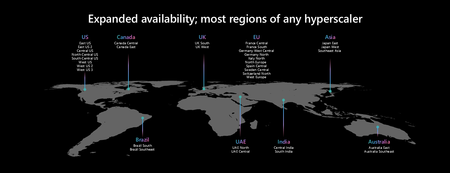
At Microsoft, our partnership with Oracle reflects a shared commitment to meeting customers where they are — helping them modernize mission-critical workloads on Azure without sacrificing the performance, control, or compliance posture they've built over years. As part of this continued evolution, Oracle Database@Azure has expanded and is now called Oracle AI Database@Azure — reflecting the broader portfolio of Oracle AI‑enabled database services available natively on Microsoft Azure, and the growing role these databases play as the foundation for analytics and AI. Today, we're thrilled to announce the general availability of Oracle Autonomous AI Database on Dedicated Exadata Infrastructure on Oracle AI Database@Azure, giving enterprises a new level of infrastructure exclusivity and operational control on Microsoft Azure. What's New: Autonomous AI Database on Dedicated Exadata Infrastructure Oracle Autonomous AI Database on Dedicated Exadata Infrastructure on Oracle AI Database@Azure gives organizations exclusive cloud resources for their databases — with greater control over maintenance windows, resource allocation, security boundaries, and lifecycle management policies, while Oracle continues to handle database administration. This is purpose-built for enterprises in highly regulated industries — financial services, healthcare, government, and defense — where resource isolation, audit trail requirements, and strict SLA obligations demand infrastructure that is exclusively theirs. Dedicated architecture reserves an entire Exadata cluster for a single customer, ensuring no shared tenancy, predictable performance, and full operational control without the complexity of managing the database layer. For organizations that prioritize agility over isolation, Oracle Autonomous AI Database on Serverless architecture remains available on Oracle AI Database@Azure — offering elastic scaling, rapid provisioning, and hands-off management on Oracle-managed infrastructure, with minimal administrative overhead. Together, both deployment options are available within the same Azure environment, giving every organization a path to run Oracle's most advanced autonomous database technology — at the right level of control for their needs. The Microsoft IQ Stack: Enabling Frontier Transformation The race to become an AI-powered enterprise starts with data — and for many of the world's largest organizations, Oracle isn't just a database — it's the system of record for their most critical data: financials, supply chains, ERP, and customer operations. That makes Oracle the foundation — and the gateway — to Frontier Transformation. Frontier Transformation isn't about replacing what works. It's about owning the autonomous intelligence layer above every system — Oracle included. That means transforming static enterprise data into active, agent-driven intelligence that reasons, acts, and continuously improves — with less manual intervention and faster time to value. The Microsoft IQ Stack is how that becomes real: Infrastructure— Azure is the hyperscaler substrate. Oracle AI Database@Azure runs Oracle's Exadata hardware natively inside Azure datacenters, bringing Oracle's systems of record into direct, low-latency proximity with Microsoft’s cloud services. Data — Oracle remains the authoritative system of record. Microsoft Fabric and OneLake activates that data to be governed, unified, and AI-ready. Models (IQ Core) — Work IQ, Foundry IQ, and Fabric IQ sit above the data layer, grounding Azure OpenAI and Microsoft Foundry in real business context that lives inside Oracle. Applications — Oracle apps remain systems of record. Microsoft Copilot and agents become the system of intelligence — embedded in the workflows where work happens. Oracle AI Database@Azure — and today's dedicated infrastructure expansion — directly strengthens the Data layer of the IQ Stack. Enterprises can now bring their Oracle data from anywhere — on-premises, Oracle Cloud Infrastructure (OCI), AWS, Google Cloud, or other environments — and land it on Azure, connecting decades of mission-critical data to the full power of Microsoft AI. Once on Azure, that data becomes active intelligence. It flows into Microsoft Fabric for governed analytics and unified data insights. It feeds Microsoft Foundry to power autonomous agents that don't just surface information — they reason over it, take action, and reduce operational overhead. And through Work IQ — via Microsoft 365 Copilot, Copilot in Teams, and Copilot Studio — it surfaces in the tools your people already use: meeting prep grounded in live financials, decisions informed by real ERP data, and custom agents built directly on your Oracle systems of record. The result is faster innovation, fewer operational bottlenecks, and a new generation of agent-driven processes built on the data your organization has trusted for decades. This is where the Microsoft IQ Stack becomes the strategic imperative for your Oracle workloads. Customer Spotlight: Activision Blizzard Modernizes Oracle E‑Business Suite and Activates AI on Azure Global gaming leader Activision Blizzard is using Oracle Database@Azure to modernize its Oracle E‑Business Suite (EBS) environment while laying the foundation for AI‑driven insights across the Microsoft cloud ecosystem. By running Oracle Exadata natively inside Azure datacenters, Activision Blizzard was able to move its EBS‑backed Oracle databases to the cloud without compromise—preserving the performance, reliability, and governance required for core financial and operational systems, while gaining direct proximity to Microsoft’s data and AI services. With Oracle EBS data available natively on Azure, Activision Blizzard gained real‑time access to its systems of record from Azure services and seamless integration across Oracle and non‑Oracle data sources. This enables faster insight delivery to business stakeholders and creates new opportunities to analyze and act on operational and financial data without costly data movement. Crucially, Oracle Database@Azure allows Activision Blizzard to extend the value of its EBS data using Microsoft Fabric, Power BI, and Copilot Studio—transforming traditional ERP data into AI‑ready intelligence. This provides a practical foundation for agent‑driven workflows, where AI can reason over trusted EBS data to support decision‑making, streamline processes, and accelerate innovation while maintaining strong governance and security controls. This customer story demonstrates how Oracle Database@Azure helps organizations modernize EBS‑based systems of record and connect them directly to the Microsoft IQ Stack—bridging enterprise ERP data with analytics, AI, and Copilot experiences to prepare for an AI‑first future. Learn more: https://www.microsoft.com/en/customers/story/26227-activision-blizzard-oracle-database-at-azure Generally Available Across All 33 Azure Regions Oracle AI Database@Azure is now generally available in all 33 Azure regions — making it most broadly available service amongst all hyperscalers. Each supported region includes multiple Availability Zones (AZs), enabling customers to architect highly available, resilient deployments that maximize uptime and protect against zone-level failures. These 33 regions span the globe across every major geography: Americas East US · East US 2 · West US · West US 2 · West US 3 · South Central US · Canada Central · Brazil South Europe UK South · North Europe · West Europe · France Central · Germany West Central · Switzerland North · Sweden Central · Norway East · Poland Central · Italy North Middle East & Africa UAE North · Qatar Central · Israel Central · South Africa North Asia Pacific East Asia · Southeast Asia · Japan East · Japan West · Australia East · Australia Southeast · Korea Central · Central India · South India · West India This global footprint ensures that enterprises — regardless of where their data must reside — can deploy Oracle AI Database@Azure with the data residency, latency, and compliance characteristics they require. A Comprehensive Oracle Database Portfolio on Azure Oracle AI Database@Azure is designed to give customers the same broad set of Oracle AI Database capabilities they rely on today — fully available on Azure. The portfolio includes: Exadata Database Service on Dedicated Infrastructure — for mission-critical OLTP workloads Exadata Database Service on Exascale Infrastructure — for cost-efficient, burstable enterprise workloads Oracle Autonomous AI Database (serverless and dedicated) Oracle Base Database Service — for flexible, customer-managed Oracle DB deployments Oracle Autonomous AI Lakehouse — for unified analytics and data warehousing Oracle GoldenGate — for real-time data replication and integration Oracle Database Zero Data Loss Autonomous Recovery Service — for enterprise-grade backup and recovery Customers can migrate to Azure without rearchitecting their existing solutions. Oracle Zero Downtime Migration automates the migration process to minimize disruption, and customers can implement Oracle Maximum Availability Architecture (MAA) Silver and Gold reference architectures within Azure for high availability and disaster recovery — all while keeping existing Oracle licenses (BYOL) or choosing a license-included model. Next Steps Whether you're migrating Oracle workloads to Azure, building AI-powered applications on top of enterprise data, or architecting for the highest levels of compliance and availability, Oracle AI Database@Azure gives you the foundation to move fast without compromise. Here's how to get started: Learn more at aka.ms/oracle Attend the Oracle + Azure Technical Webinar Series from our technical experts to go deeper on Oracle AI Database@Azure Join the Oracle AI Database@Azure community on LinkedIn to connect with peers and get the latest updates Talk to your Microsoft or Oracle account team to discuss architecture options, migration planning, licensing, and how to get started677Views1like1CommentOracle Database@Azure Is Now Generally Available in West Europe (Amsterdam)
As organizations across Europe accelerate their cloud modernization and AI adoption, data locality, compliance, and performance remain critical decision factors. Over the past year, Microsoft and Oracle have worked closely to rapidly expand the global footprint of Oracle Database@Azure, bringing Oracle’s enterprise‑grade database services natively into Azure datacenters around the world. Today, we are excited to announce that Oracle Database@Azure is now generally available in the West Europe (Amsterdam) Azure region. This new region enables customers across Western Europe to run mission‑critical Oracle databases closer to their Azure applications—meeting stringent regional compliance requirements while benefiting from ultra‑low latency and a fully integrated Azure experience. Why West Europe (Amsterdam) matters Regional availability is essential for enterprises operating in regulated industries and distributed geographies. With Oracle Database@Azure now available in West Europe, customers can: Meet EU data residency and sovereignty requirements by keeping Oracle data within the Netherlands Reduce application latency by colocating Oracle databases and Azure services within the same Azure datacenter region Simplify compliance and risk management for industries such as financial services, public sector, utilities, retail, and healthcare Design resilient architectures with regional and in‑country disaster recovery options This expansion builds on the growing European footprint of Oracle Database@Azure and complements existing regions across EMEA, North America, APAC, and Brazil. A unified Oracle and Azure data platform—without re‑architecting Oracle Database@Azure delivers a unique architecture that colocates Oracle‑managed database services on Oracle Exadata infrastructure directly inside Azure datacenters. This allows Azure applications to access Oracle databases over Azure’s internal network fabric, delivering predictable performance and microsecond‑level latency—without the complexity of cross‑cloud networking. In the West Europe region, customers can run: Oracle Exadata Database Service (Dedicated and Exascale Infrastructure) Oracle Autonomous Database Oracle Base Database Service Oracle GoldenGate and Autonomous Recovery Services These services integrate natively with Azure identity, networking, security, and management services, enabling customers to modernize at their own pace while preserving existing Oracle investments and operational practices. Built for European enterprise workloads For many organizations, migrating Oracle databases has historically required complex re‑architecture or compromises on performance and governance. With Oracle Database@Azure in West Europe, customers can: Migrate existing Oracle databases to Azure without code changes Use familiar Oracle tools and skills while adopting Azure AI, analytics, and application services Preserve licensing flexibility through BYOL or license‑included options Accelerate modernization initiatives while minimizing risk and disruption This architecture is particularly well‑suited for enterprises running applications in Azure alongside deeply customized Oracle databases that are difficult to replace or refactor. Get started in West Europe today Oracle Database@Azure is now available in 33 regions worldwide, including West Europe (Amsterdam). Customers can deploy Oracle database services directly from Azure and begin modernizing their Oracle workloads with confidence. Learn more: https://aka.ms/oracle Attend the EMEA webinar on March 4th: Unlock the Future of Oracle Workloads: Oracle Database@Azure Read the blog: Microsoft at Oracle AI World Tour Technical documentation: Overview - Oracle Database@Azure | Microsoft Learn Get skilled: https://aka.ms/ODAA_Learn Microsoft Azure Region policy: Azure region pairs and nonpaired regions | Microsoft Learn336Views0likes0Comments