operational excellence
28 TopicsFour Strategies for Cost-Effective Azure Monitoring and Log Analytics
Embark on a journey through the labyrinth of Azure's cost management with this blog. Dive deep into the art of balancing expenditures with performance in Azure Monitor and Azure Log Analytics. Discover the strategies that blend smart data ingestion with careful retention tactics, and learn how to employ the finesse of Kusto Query Language to transform data tables into bastions of efficiency. Peek inside for an in-depth exploration of the four pillars that will fortify your cloud environment against unnecessary spending while maintaining data integrity and high performance.Azure Monitor Baseline Alerts (Preview)
We are pleased to announced the public preview of Azure Monitor Baseline Alerts for Azure and Azure landing zone customers built by the Azure landing zone product group. The Baseline alerts 'framework' is built using Azure Policy with a predefined list of platform / infrastructure alerts that provides a flexible, scalable and consistent way to deploy alerts into your Azure environment.Mastering your cloud journey: Essentials to Innovating, Migrating and Modernizing, on Azure
Master your cloud journey with this comprehensive guidance that brings together Microsoft's best practices, product experiences, reference architectures, skilling and an array of resources to support your innovation, migration and modernization projects on Azure.
Exciting News: AMBA Portal Accelerator is now Generally Available!
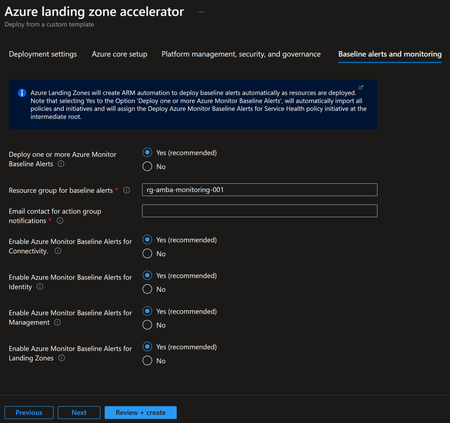
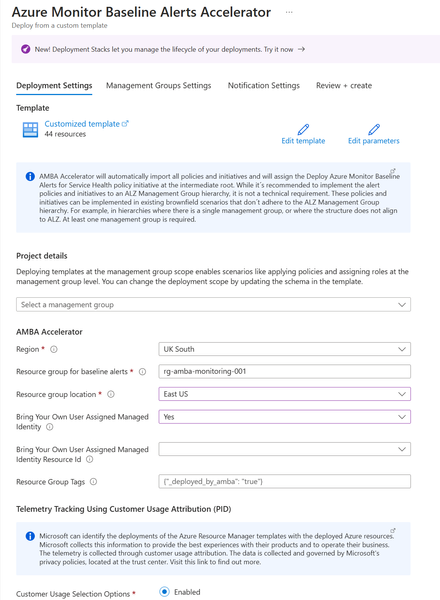
We are thrilled to announce that the Azure Monitor Baseline Alerts-Azure Landing Zones (AMBA-ALZ) Portal Accelerator has officially reached General Availability (GA). This achievement is a big step forward in our goal to make onboarding and simplify monitoring your Azure environment regardless of whether or not you are fully aligned to Azure Landing Zones. Screenshot of Azure Landing Zone portal Accelerator What is the AMBA Portal Accelerator? As we introduced AMBA into the ALZ portal experience (not to be confused with this accelerator!) and with the increased flexibility AMBA-ALZ provided for the preferred action notification types, this introduced a need to provide a post ALZ-AMBA Portal to accommodate those notification types that required an existing resource (Azure Function, Event Hub, and Logic App) and in the case of deploying ALZ possibly for the first time these resources may not be present. The AMBA-ALZ Portal Accelerator is designed to simplify the process of setting up baseline alerts, helping you boost your observability maturity in your Azure environment with minimal effort or expertise. You can set up alerts faster and with more confidence. You'll get timely notifications about critical metrics and log anomalies that might signal potential issues with your Azure workloads. What Scenarios Does The Accelerator Help Address? There are a few scenarios as to where the Accelerator can help meet you where you are in your journey: You are an existing Azure customer and looking to mature your observability posture (and at the same time with low effort move one step closer to being aligned to Azure Landing Zones You have an existing Azure Landing Zones implementation prior to AMBA being released and are looking to update your environment to include AMBA-ALZ You may be new to Azure and deploying Azure Landing Zones (the recommended way to onboard to Azure) and wanting to use Azure Function, Event Hub, and Logic App Notification Types Getting Started To begin using the AMBA-ALZ Portal Accelerator, navigate to https://aka.ms/amba/alz/portal or click the "Deploy to Azure" button on the documentation page. Detailed deployment instructions and further guidance are available to help you get started quickly and efficiently. If you have any further feedback please use the following links: 💬 - Feedback GitHub Issues: https://aka.ms/amba/issues 💬 - Feedback survey: https://aka.ms/ambaSurveyIntroducing the Azure Resource Manager MCP Server!
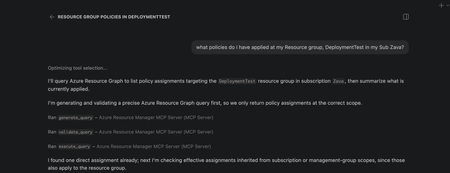
We're super excited to announce the public preview of the Azure Resource Manager MCP Server! This is a remote MCP server that provides tools to give AI agents first-class access to Azure infrastructure operations through Azure Resource Manager (ARM). AI agents can now be equipped with tools to generate, validate, execute Azure Resource Graph (ARG) queries and tools to deploy and manage ARM template deployments. This server is able to generate and execuite queries that return data across all your Azure resource types! At its core, this server is built to help AI agents interact with Azure resources seamlessly. What this means for you Ask natural language questions about your Azure estate to your agents and get real time, accurate answers backed with an ARG query Deploy and manage infrastructure easily by having AI deploy ARM templates for you Monitor deployment status and catch issues before they escalate Ability to build more advanced AI agents that understand your Azure environment What You Can Do Today Generate, Validate, and Execute Azure Resource Graph Queries from Natural Language No need to struggle with writing KQL from stratch! Describe what you need, and the MCP server tool generates Azure Resource Graph queries that match your intent. You ask an AI Agent: "Find all virtual machines in my subscription that don't have managed disks". It uses the tool and returns: A ready-to-execute ARG query without manual KQL writing. These queries spans across all your azure resource types so can learn and navigate across any type! Deploy, monitor and cancel ARM Templates Pass an ARM template, and the MCP server kicks off the deployment targeted to an existing resource group scope. Monitor the deployment by getting status about it and even cancel it if you decide its not doing what you need it to. Here is the complete list of the tool available in this preview: generate_query validate_query execute_query create_template_deployment get_arm_template_deployment_status cancel_arm_template_deployment Real-World Scenarios Infrastructure Compliance Audit "Show me all resources created in the last 30 days that don't have required tags." - The MCP server generates and executes the query, returning resources that need remediation. Your team can then fix them programmatically or through Copilot. Rapid Infrastructure Provisioning "Using this ARM template <path to template>, deploy a secure storage account with HTTPS-only access, private endpoints, and Standard_LRS replication to my production resource group." This will take an existing ARM template and deploy it to a resource group scope. Policy Compliance Check "Check if all resources in my subscription comply with the latest policy applied to it." - The MCP server generates and executes the query, returning resources that are non-compliant. Your team can then take corrective actions programmatically or through Copilot. Building Agents with Azure Resource Manager MCP Server The MCP server's tools can be integrated into custom agents you build with GitHub Copilot. What this means is you can create custom agents that automatically check compliance, track changes in a scope, or ensure all resources have a particular tag applied to them! Getting Started Prerequisites VS Code installed Valid Azure account with appropriate permissions GitHub Copilot subscription Installation Install the MCP Server Open https://aka.ms/JoinARMMCP VS Code launches automatically Click Install under Azure Resource Manager MCP Server Sign in with your Azure credentials If you hit any authentication issues see Troubleshooting Guide in our repo Check tools are enabled in Chat Open Chat in VS Code (View > Chat) Click Configure Tools Ensure the six Azure Resource Manager MCP Server tools are enabled Start Using It Ask Copilot a question about your Azure resources or infrastructure needs The MCP server handles the rest Governance & Security The Azure Resource Manager MCP Server respects your Azure permissions and governance policies. All operations run in the context of your signed-in user. Additionally you can apply Azure Policies to prevent deployments via the MCP Server. Find more details in the README of our documentation repo. What's Next? We are actively expanding the capabilities of the Azure Resource Manager MCP Server! The Server will expand to include: Additional ARM API capabilities with ARM Enhanced query generation and optimization Support for additional MCP clients beyond VS Code, next up: Claude Get Feedback We want to hear from you. Try the public preview and share your feedback. Found a bug? Or have a feature request? Open an issue on GitHub at https://aka.ms/ARMMCPIssue Resources - 📖 Full Documentation – Complete setup and usage guide - 🔗 Install Now – Get started with the public preview - 🐛 Report Issues – Share feedback and bugs - ❓ FAQ – Common questions answered - 🛠️ Troubleshooting – Resolve common issues Try It Today The Azure Resource Manager MCP Server public preview is available now. Visit https://aka.ms/JoinARMMCP to install and start automating your Azure infrastructure with AI. What agents will you build with these tools? We can't wait to see how you'll use this. Steven Bucher PM on Azure Resource Manager and Azure Governance