operational excellence
32 TopicsIntroducing the Azure Resource Manager MCP Server!
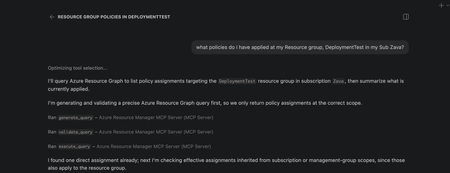
We're super excited to announce the public preview of the Azure Resource Manager MCP Server! This is a remote MCP server that provides tools to give AI agents first-class access to Azure infrastructure operations through Azure Resource Manager (ARM). AI agents can now be equipped with tools to generate, validate, execute Azure Resource Graph (ARG) queries and tools to deploy and manage ARM template deployments. This server is able to generate and execuite queries that return data across all your Azure resource types! At its core, this server is built to help AI agents interact with Azure resources seamlessly. What this means for you Ask natural language questions about your Azure estate to your agents and get real time, accurate answers backed with an ARG query Deploy and manage infrastructure easily by having AI deploy ARM templates for you Monitor deployment status and catch issues before they escalate Ability to build more advanced AI agents that understand your Azure environment What You Can Do Today Generate, Validate, and Execute Azure Resource Graph Queries from Natural Language No need to struggle with writing KQL from stratch! Describe what you need, and the MCP server tool generates Azure Resource Graph queries that match your intent. You ask an AI Agent: "Find all virtual machines in my subscription that don't have managed disks". It uses the tool and returns: A ready-to-execute ARG query without manual KQL writing. These queries spans across all your azure resource types so can learn and navigate across any type! Deploy, monitor and cancel ARM Templates Pass an ARM template, and the MCP server kicks off the deployment targeted to an existing resource group scope. Monitor the deployment by getting status about it and even cancel it if you decide its not doing what you need it to. Here is the complete list of the tool available in this preview: generate_query validate_query execute_query create_template_deployment get_arm_template_deployment_status cancel_arm_template_deployment Real-World Scenarios Infrastructure Compliance Audit "Show me all resources created in the last 30 days that don't have required tags." - The MCP server generates and executes the query, returning resources that need remediation. Your team can then fix them programmatically or through Copilot. Rapid Infrastructure Provisioning "Using this ARM template <path to template>, deploy a secure storage account with HTTPS-only access, private endpoints, and Standard_LRS replication to my production resource group." This will take an existing ARM template and deploy it to a resource group scope. Policy Compliance Check "Check if all resources in my subscription comply with the latest policy applied to it." - The MCP server generates and executes the query, returning resources that are non-compliant. Your team can then take corrective actions programmatically or through Copilot. Building Agents with Azure Resource Manager MCP Server The MCP server's tools can be integrated into custom agents you build with GitHub Copilot. What this means is you can create custom agents that automatically check compliance, track changes in a scope, or ensure all resources have a particular tag applied to them! Getting Started Prerequisites VS Code installed Valid Azure account with appropriate permissions GitHub Copilot subscription Installation Install the MCP Server Open https://aka.ms/JoinARMMCP VS Code launches automatically Click Install under Azure Resource Manager MCP Server Sign in with your Azure credentials If you hit any authentication issues see Troubleshooting Guide in our repo Check tools are enabled in Chat Open Chat in VS Code (View > Chat) Click Configure Tools Ensure the six Azure Resource Manager MCP Server tools are enabled Start Using It Ask Copilot a question about your Azure resources or infrastructure needs The MCP server handles the rest Governance & Security The Azure Resource Manager MCP Server respects your Azure permissions and governance policies. All operations run in the context of your signed-in user. Additionally you can apply Azure Policies to prevent deployments via the MCP Server. Find more details in the README of our documentation repo. What's Next? We are actively expanding the capabilities of the Azure Resource Manager MCP Server! The Server will expand to include: Additional ARM API capabilities with ARM Enhanced query generation and optimization Support for additional MCP clients beyond VS Code, next up: Claude Get Feedback We want to hear from you. Try the public preview and share your feedback. Found a bug? Or have a feature request? Open an issue on GitHub at https://aka.ms/ARMMCPIssue Resources - 📖 Full Documentation – Complete setup and usage guide - 🔗 Install Now – Get started with the public preview - 🐛 Report Issues – Share feedback and bugs - ❓ FAQ – Common questions answered - 🛠️ Troubleshooting – Resolve common issues Try It Today The Azure Resource Manager MCP Server public preview is available now. Visit https://aka.ms/JoinARMMCP to install and start automating your Azure infrastructure with AI. What agents will you build with these tools? We can't wait to see how you'll use this. Steven Bucher PM on Azure Resource Manager and Azure Governance
Protect Azure Cosmos DB with vaulted backups using Azure Backup (public preview)
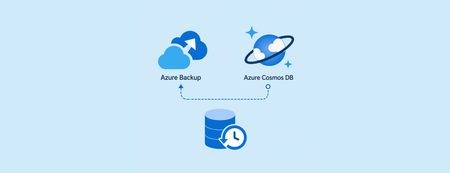
As organizations increasingly rely on Azure Cosmos DB to power mission‑critical, globally distributed applications, protecting this data from accidental deletion, malicious activity, and ransomware has become more important than ever. At MS Build 2026, we’re excited to announce the preview of Azure Backup for Cosmos DB, which introduces vaulted backups—a secure, isolated, and fully managed backup solution designed to strengthen cyber‑resilience and support compliance requirements. Why vaulted backups for Azure Cosmos DB? Azure Cosmos DB already provides built‑in data protection capabilities such as replication and availability features to help ensure application uptime. However, these capabilities alone may not be sufficient to protect against scenarios such as: Accidental or malicious deletion of data or accounts Compromised credentials or insider threats Ransomware attacks targeting production environments Compliance requirements that mandate off‑site, immutable backups Vaulted backups add an independent protection layer by storing backup copies in an Azure Backup vault, isolated from the source Cosmos DB account and managed through Azure Backup. How vaulted backups protect your Cosmos DB data With this preview, Azure Backup enables you to protect Azure Cosmos DB using a policy‑driven, automated backup experience. Once configured, Azure Backup manages backup scheduling, retention, and lifecycle without manual intervention. Key protection capabilities include: Isolation from production data: Vaulted backups are stored in a separate, Microsoft‑managed backup vault, ensuring that backup data remains protected even if the source Cosmos DB account is deleted or compromised. Resilience against ransomware and malicious attacks: Because backups are isolated and protected by Azure Backup security controls, attackers cannot directly access or tamper with recovery points, helping ensure reliable recovery when it matters most. Policy‑based backups with long‑term retention: Define backup schedules and retention periods using Azure Backup policies to support long‑term compliance and audit requirements. Security‑first design: Azure Backup safeguards vaulted backups using encryption, soft delete, immutability, and role‑based access control, helping protect backup data against unauthorized deletion or modification. Designed for compliance and enterprise resilience Vaulted backups for Azure Cosmos DB help organizations align with industry and regulatory expectations that require: Off‑site and isolated backup copies Strong access controls and separation of duties Protection against premature deletion Long‑term retention of critical data By integrating Cosmos DB protection into Azure Backup, customers can manage backups centrally alongside other Azure workloads using a consistent governance and monitoring experience. Getting started with the preview Please refer to the product documentation for details on supported scenarios, limitations, and onboarding steps. For Cosmos DB vaulted backup (preview), you incur charges from, 1 July 2026. Refer to Azure Backup pricing page and pricing calculator for more details.Kepner‑Tregoe: A Structured and Rational Approach to Problem Solving and Decision‑Making
In complex, distributed systems—such as cloud platforms, high‑availability databases, and mission‑critical applications—effective problem solving requires more than intuition or experience. Incidents often involve multiple variables, incomplete signals, and tight timelines, making unstructured analysis both risky and inefficient. This is where Kepner‑Tregoe (KT) methodology proves its value. Developed in the 1960s by Charles Kepner and Benjamin Tregoe, the Kepner‑Tregoe approach provides a structured, rational framework for problem solving and decision‑making that remains highly relevant in modern technical environments. Why Kepner‑Tregoe Still Matters in Modern Systems Today’s platforms are: Distributed across regions and zones Built on asynchronous replication and eventual consistency Highly automated, yet deeply interconnected When something goes wrong, teams often face: Conflicting metrics Partial outages Transient or self‑healing behaviors Pressure to “fix fast” rather than “fix correctly” KT helps teams: Separate facts from assumptions Avoid premature conclusions Reach defensible, repeatable outcomes Communicate findings clearly across roles and time zones Most importantly, it replaces reactive troubleshooting with disciplined analytical thinking. The Four Core Kepner‑Tregoe Processes Kepner‑Tregoe is built around four complementary thinking processes. Each serves a distinct purpose and can be applied independently or together. 1. Situation Appraisal – Where Should We Focus? In high‑pressure environments, teams rarely face a single issue. Situation Appraisal helps answer: What is happening right now? What needs attention first? What can wait? This process enables teams to: List concerns objectively Identify priorities Allocate resources deliberately In practice: During a multi‑signal incident, Situation Appraisal helps distinguish between impact, cause, and noise, preventing teams from chasing symptoms. 2. Problem Analysis – What Is Causing This? Problem Analysis is the most commonly used KT process. It focuses on identifying the true cause of a deviation. Key principles include: Clearly defining the problem (what is happening vs. what should be happening) Comparing where the problem occurs vs. does not occur Analyzing differences across time, location, and conditions Eliminating causes that don’t fit the facts In technical scenarios, this avoids conclusions like: “It must be the network” “It’s a platform issue” “It always happens during peak load” Instead, teams arrive at causes supported by evidence—not intuition. 3. Decision Analysis – What Should We Do? When multiple options are available, Decision Analysis ensures the chosen path aligns with business and technical goals. This process involves: Defining the decision scope Identifying must‑have requirements Defining wants and weighting them Evaluating alternatives objectively In operations, this is especially useful when deciding between: Scaling vs. optimizing Failing over vs. waiting Short‑term mitigation vs. long‑term correction The result is a traceable, justifiable decision—even under pressure. 4. Potential Problem Analysis – What Could Go Wrong Next? Potential Problem Analysis helps teams anticipate and prevent future issues by asking: What could go wrong? How likely is it? What would the impact be? How can we prevent or detect it early? This is highly effective for: Change deployments Architecture reviews Maintenance planning Major configuration updates Instead of reacting to incidents, teams proactively reduce risk. Key Principles Behind the KT Methodology Across all four processes, Kepner‑Tregoe emphasizes: Clarity – precise definitions and shared understanding Logic – cause‑and‑effect reasoning Objectivity – evidence over opinion Discipline – following structured steps These principles make KT especially effective in cross‑functional, globally distributed teams. Applying KT in Technical and Cloud Environments Kepner‑Tregoe is widely applicable across modern IT scenarios, including: Incident and outage investigations Performance degradation analysis High availability and replication issues Change management and release planning Post‑incident reviews and retrospectives KT does not replace tools or metrics—it structures how we interpret them. Final Thoughts Kepner‑Tregoe is not a legacy methodology; it is a timeless framework for structured thinking in complex systems. In environments where availability, reliability, and correctness matter, KT enables teams to: Solve problems faster and more accurately Reduce repeat incidents Improve collaboration and communication Make confident, fact‑based decisions Whether you’re troubleshooting a production issue or planning a critical change, Kepner‑Tregoe provides a reliable foundation for clarity and control. References Kepner, C. H., & Tregoe, B. B. The Rational Manager Kepner‑Tregoe official methodology overview2.4KViews3likes1CommentBYO Thread Storage in Azure AI Foundry using Python
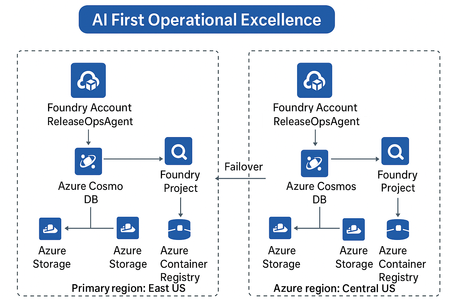
Build scalable, secure, and persistent multi-agent memory with your own storage backend As AI agents evolve beyond one-off interactions, persistent context becomes a critical architectural requirement. Azure AI Foundry’s latest update introduces a powerful capability — Bring Your Own (BYO) Thread Storage — enabling developers to integrate custom storage solutions for agent threads. This feature empowers enterprises to control how agent memory is stored, retrieved, and governed, aligning with compliance, scalability, and observability goals. What Is “BYO Thread Storage”? In Azure AI Foundry, a thread represents a conversation or task execution context for an AI agent. By default, thread state (messages, actions, results, metadata) is stored in Foundry’s managed storage. With BYO Thread Storage, you can now: Store threads in your own database — Azure Cosmos DB, SQL, Blob, or even a Vector DB. Apply custom retention, encryption, and access policies. Integrate with your existing data and governance frameworks. Enable cross-region disaster recovery (DR) setups seamlessly. This gives enterprises full control of data lifecycle management — a big step toward AI-first operational excellence. Architecture Overview A typical setup involves: Azure AI Foundry Agent Service — Hosts your multi-agent setup. Custom Thread Storage Backend — e.g., Azure Cosmos DB, Azure Table, or PostgreSQL. Thread Adapter — Python class implementing the Foundry storage interface. Disaster Recovery (DR) replication — Optional replication of threads to secondary region. Implementing BYO Thread Storage using Python Prerequisites First, install the necessary Python packages: pip install azure-ai-projects azure-cosmos azure-identity Setting Up the Storage Layer from azure.cosmos import CosmosClient, PartitionKey from azure.identity import DefaultAzureCredential import json from datetime import datetime class ThreadStorageManager: def __init__(self, cosmos_endpoint, database_name, container_name): credential = DefaultAzureCredential() self.client = CosmosClient(cosmos_endpoint, credential=credential) self.database = self.client.get_database_client(database_name) self.container = self.database.get_container_client(container_name) def create_thread(self, user_id, metadata=None): """Create a new conversation thread""" thread_id = f"thread_{user_id}_{datetime.utcnow().timestamp()}" thread_data = { 'id': thread_id, 'user_id': user_id, 'messages': [], 'created_at': datetime.utcnow().isoformat(), 'updated_at': datetime.utcnow().isoformat(), 'metadata': metadata or {} } self.container.create_item(body=thread_data) return thread_id def add_message(self, thread_id, role, content): """Add a message to an existing thread""" thread = self.container.read_item(item=thread_id, partition_key=thread_id) message = { 'role': role, 'content': content, 'timestamp': datetime.utcnow().isoformat() } thread['messages'].append(message) thread['updated_at'] = datetime.utcnow().isoformat() self.container.replace_item(item=thread_id, body=thread) return message def get_thread(self, thread_id): """Retrieve a complete thread""" try: return self.container.read_item(item=thread_id, partition_key=thread_id) except Exception as e: print(f"Thread not found: {e}") return None def get_thread_messages(self, thread_id): """Get all messages from a thread""" thread = self.get_thread(thread_id) return thread['messages'] if thread else [] def delete_thread(self, thread_id): """Delete a thread""" self.container.delete_item(item=thread_id, partition_key=thread_id) Integrating with Azure AI Foundry from azure.ai.projects import AIProjectClient from azure.identity import DefaultAzureCredential class ConversationManager: def __init__(self, project_endpoint, storage_manager): self.ai_client = AIProjectClient.from_connection_string( credential=DefaultAzureCredential(), conn_str=project_endpoint ) self.storage = storage_manager def start_conversation(self, user_id, system_prompt): """Initialize a new conversation""" thread_id = self.storage.create_thread( user_id=user_id, metadata={'system_prompt': system_prompt} ) # Add system message self.storage.add_message(thread_id, 'system', system_prompt) return thread_id def send_message(self, thread_id, user_message, model_deployment): """Send a message and get AI response""" # Store user message self.storage.add_message(thread_id, 'user', user_message) # Retrieve conversation history messages = self.storage.get_thread_messages(thread_id) # Call Azure AI with conversation history response = self.ai_client.inference.get_chat_completions( model=model_deployment, messages=[ {"role": msg['role'], "content": msg['content']} for msg in messages ] ) assistant_message = response.choices[0].message.content # Store assistant response self.storage.add_message(thread_id, 'assistant', assistant_message) return assistant_message Usage Example # Initialize storage and conversation manager storage = ThreadStorageManager( cosmos_endpoint="https://your-cosmos-account.documents.azure.com:443/", database_name="conversational-ai", container_name="threads" ) conversation_mgr = ConversationManager( project_endpoint="your-project-connection-string", storage_manager=storage ) # Start a new conversation thread_id = conversation_mgr.start_conversation( user_id="user123", system_prompt="You are a helpful AI assistant." ) # Send messages response1 = conversation_mgr.send_message( thread_id=thread_id, user_message="What is machine learning?", model_deployment="gpt-4" ) print(f"AI: {response1}") response2 = conversation_mgr.send_message( thread_id=thread_id, user_message="Can you give me an example?", model_deployment="gpt-4" ) print(f"AI: {response2}") # Retrieve full conversation history history = storage.get_thread_messages(thread_id) for msg in history: print(f"{msg['role']}: {msg['content']}") Key Highlights: Threads are stored in Cosmos DB under your control. You can attach metadata such as region, owner, or compliance tags. Integrates natively with existing Azure identity and Key Vault. Disaster Recovery & Resilience When coupled with geo-replicated Cosmos DB or Azure Storage RA-GRS, your BYO thread storage becomes resilient by design: Primary writes in East US replicate to Central US. Foundry auto-detects failover and reconnects to secondary region. Threads remain available during outages — ensuring operational continuity. This aligns perfectly with the AI-First Operational Excellence architecture theme, where reliability and observability drive intelligent automation. Best Practices Area Recommendation Security Use Azure Key Vault for credentials & encryption keys. Compliance Configure data residency & retention in your own DB. Observability Log thread CRUD operations to Azure Monitor or Application Insights. Performance Use async I/O and partition keys for large workloads. DR Enable geo-redundant storage & failover tests regularly. When to Use BYO Thread Storage Scenario Why it helps Regulated industries (BFSI, Healthcare, etc.) Maintain data control & audit trails Multi-region agent deployments Support DR and data sovereignty Advanced analytics on conversation data Query threads directly from your DB Enterprise observability Unified monitoring across Foundry + Ops The Future BYO Thread Storage opens doors to advanced use cases — federated agent memory, semantic retrieval over past conversations, and dynamic workload failover across regions. For architects, this feature is a key enabler for secure, scalable, and compliant AI system design. For developers, it means more flexibility, transparency, and integration power. Summary Feature Benefit Custom thread storage Full control over data Python adapter support Easy extensibility Multi-region DR ready Business continuity Azure-native security Enterprise-grade safety Conclusion Implementing BYO thread storage in Azure AI Foundry gives you the flexibility to build AI applications that meet your specific requirements for data governance, performance, and scalability. By taking control of your storage, you can create more robust, compliant, and maintainable AI solutions.1.1KViews4likes3Comments
Improve your resiliency posture with new capabilities and intelligent assistance
At Microsoft Ignite 2025, Azure introduces intelligent automation and expanded capabilities to keep your business running—no matter what. From zonal protection and disaster recovery to ransomware defense, discover how the new AI innovations in Azure Copilot helps you move from reactive recovery to proactive resilience.
Optimize Your Cloud Environment Using Agentic AI
In today’s cloud-first world, optimization is no longer a luxury—it’s a strategic imperative. As IT professionals and developers navigate increasingly complex environments, the need to reduce costs, improve sustainability, and accelerate decision-making has never been more urgent. At Ignite 2025, Microsoft is introducing a new wave of agentic capabilities within Azure Copilot—one of the key capabilities includes the optimization agent, designed to help you identify, validate, and act on opportunities to streamline cloud operations. For FinOps teams, this agent becomes especially powerful, enabling cost governance, carbon insights, and actionable recommendations to maximize financial efficiency at scale. From Complexity to Clarity For users familiar with Azure’s cost and performance tools, the new operations center experience in the Azure Portal provides a unified agentic experience to monitor spend and carbon emissions side by side, surface the most critical optimization opportunities, and seamlessly trigger actions by invoking the Optimization agent—bringing governance, efficiency, and sustainability into one streamlined experience. What’s New in Optimization The optimization agent in Azure Copilot empowers teams to: Identify top actions prioritized by impact, cost savings, and ease of implementation. Evaluate cost and carbon impacts side-by-side, helping you make informed decisions that align with financial and sustainability goals. Validate recommendations with supporting evidence, current / projected utilization trends, and alternative SKU choices. Accelerate implementation with step-by-step guidance and agentic workflows that reduce toil and increase confidence. These capabilities are designed to scale FinOps impact, enabling collaboration across engineering, finance, procurement, and sustainability teams—all within a unified experience. A Day in the Life: FinOps in Action Let’s step into the shoes of a FinOps practitioner at a large enterprise navigating the complexities of cost management. It’s Monday morning. Over the weekend, a set of development VMs were left running, quietly accumulating costs. The optimization agent—a capability within Azure Copilot—surfaces a top action: resize or shut down the idle resources. With a few clicks, the practitioner reviews the supporting evidence, including usage trends, cost impact, and carbon footprint. The agent offers visibility over alternative SKUs and guides the practitioner through a step-by-step implementation—all within the same interface. But it doesn’t stop there. For teams that prefer automation or scripting, the agent also generates Azure CLI and PowerShell scripts tailored to the recommended action. This gives practitioners flexibility: they can execute changes directly in the portal or integrate scripts into their existing workflows for repeatability and scale. The experience is seamless—every recommendation is actionable, verifiable, and aligned with enterprise policy. By midweek, the practitioner has implemented multiple optimizations without leaving the console or writing custom code. Each action is logged for audit visibility, ensuring compliance and transparency across the organization. What used to take hours of manual investigation and coordination now happens in minutes, freeing the team to focus on strategic initiatives rather than firefighting cost overruns. Why It Matters These aren’t just features—they’re answers to the pain points customers have been voicing for years. Cost visibility and predictability: Azure Copilot centralizes insights across subscriptions, helping teams avoid surprise bills and understand where every dollar goes. Resource inefficiencies: The optimization agent proactively identifies underutilized resources and guide teams to act before costs escalate. Scalability and complexity: Azure Copilot’s unified experience simplifies operations for even the most complex setups. Azure Copilot isn’t just simplifying cloud operations—it’s transforming how teams collaborate, govern, and optimize. Get Started at Ignite At Ignite 2025, you’ll get hands-on with Azure Copilot’s optimization capabilities. Explore how intelligent assistance can help you: Reduce cloud costs Improve sustainability metrics Strengthen governance and compliance Drive better outcomes—faster Azure Copilot: turning cloud operations into intelligent collaboration. Sign up for the Agents in Azure Copilot Limited (Preview) and try the experience today.Empower Smarter AI Agent Investments
This curated series of modules is designed to equip technical and business decision-makers, including IT, developers, engineers, AI engineers, administrators, solution architects, business analysts, and technology managers, with the practical knowledge and guidance needed to make cost-conscious decisions at every stage of the AI agent journey. From identifying high-impact use cases and understanding cost drivers, to forecating ROI, adopting best practices, designing scalable and effective architectures, and optimizing ongoing investments, this learning path provides actionable guidance for building, deploying, and managing AI agents on Azure with confidence. Whether you’re just starting your AI journey or looking to scale enterprise adoption, these modules will help you align innovation with financial discipline, ensuring your AI agent initiatives deliver sustainable value and long-term success. Discover the full learning path here: aka.ms/Cost-Efficient-AI-Agents Explore the sections below for an overview of each module included in this learning path, highlighting the core concepts, practical strategies, and actionable insights designed to help you maximize the value of AI agent investments on Azure: Module 1: Identify and Prioritize High-Impact, Cost-Effective AI Agent Use Cases The journey begins with a strategic approach to selecting AI agent use cases that maximize business impact and cost efficiency. This module introduces a structured framework for researching proven use cases, collaborating across teams, and defining KPIs to evaluate feasibility and ROI. You’ll learn how to target “quick wins” while ensuring alignment with organizational goals and resource constraints. Explore this module Module 2: Understand the Key Cost Drivers of AI Agents Building on the foundation of use case selection, Module 2 dives into the core cost drivers of AI agent development and operations on Azure. It covers infrastructure, integration, data quality, team expertise, and ongoing operational expenses, offering actionable strategies to optimize spending at every stage. The module emphasizes right-sizing resources, efficient data preparation, and leveraging Microsoft tools to streamline development and ensure sustainable, scalable success. Explore this module Module 3: Forecast the Return on Investment (ROI) of AI agents With a clear understanding of costs, the next step is to quantify value. Module 3 empowers both business and technical leaders with practical frameworks for forecasting and communicating ROI, even without a finance background. Through step-by-step guides and real-world examples, you’ll learn to measure tangible and intangible outcomes, apply NPV calculations, and use sensitivity analysis to prioritize AI investments that align with broader organizational objectives. Explore this module Module 4: Implement Best Practices to Empower AI Agent Efficiency and Ensure Long-Term Success To drive efficiency and governance at scale, Module 4 introduces essential frameworks such as the AI Center of Excellence (CoE), FinOps, GenAI Ops, the Cloud Adoption Framework (CAF), and the Well-Architected Framework (WAF). These best practices help organizations accelerate adoption, optimize resources, and foster operational excellence, ensuring AI agents deliver measurable value, remain secure, and support sustainable enterprise growth. Explore this module Module 5: Maximize Cost Efficiency by Choosing the Right AI Agent Development Approach Selecting the right development approach is critical for balancing speed, customization, and cost. In Module 5, you’ll learn how to align business needs and technical skills with SaaS, PaaS, or IaaS options, empowering both business users and developers to efficiently build, deploy, and manage AI agents. The module also highlights how Microsoft Copilot Studio, Visual Studio, and Azure AI Foundry can help your organization achieve its goals. Explore this module Module 6: Architect Scalable and Cost-Efficient AI Agent Solutions on Azure As your AI initiatives grow, architectural choices become paramount. Module 6 explores how to leverage Azure Landing Zones and reference architectures for secure, well-governed, and cost-optimized deployments. It compares single-agent and multi-agent systems, highlights strategies for cost-aware model selection, and details best practices for governance, tagging, and pricing, ensuring your AI solutions remain flexible, resilient, and financially sustainable. Explore this module Module 7: Manage and Optimize AI Agent Investments on Azure The learn path concludes with a focus on operational excellence. Module 7 provides guidance on monitoring agent performance and spending using Azure AI Foundry Observability, Azure Monitor Application Insights, and Microsoft Cost Management. Learn how to track key metrics, set budgets, receive real-time alerts, and optimize resource allocation, empowering your organization to maximize ROI, stay within budget, and deliver ongoing business value. Explore this module Ready to accelerate your AI agent journey with financial confidence? Start exploring the new learning path and unlock proven strategies to maximize the cost efficiency of your AI agents on Azure, transforming innovation into measurable, sustainable business success. Get started todayCloud and AI Cost Efficiency: A Strategic Imperative for Long-Term Business Growth
In this blog, we’ll explore why cost efficiency is a top priority for organizations today, how Azure Essentials can help address this challenge, and provide an overview of Microsoft’s solutions, tools, programs, and resources designed to help organizations maximize the value of their cloud and AI investments.
GA: Enhanced Audit in Azure Security Baseline for Linux
We’re thrilled to announce the General Availability (GA) of the Enhanced Azure Security Baseline for Linux—a major milestone in cloud-native security and compliance. This release brings powerful, audit-only capabilities to over 1.6 million Linux devices across all Azure regions, helping enterprise customers and IT administrators monitor and maintain secure configurations at scale. What Is the Azure Security Baseline for Linux? The Azure Security Baseline for Linux is a set of pre-configured security recommendations delivered through Azure Policy and Azure Machine Configuration. It enables organizations to continuously audit Linux virtual machines and Arc-enabled servers against industry-standard benchmarks—without enforcing changes or triggering auto-remediation. This GA release focuses on enhanced audit capabilities, giving teams deep visibility into configuration drift and compliance gaps across their Linux estate. For our remediation experience, there is a limited public preview available here: What is the Azure security baseline for Linux? | Microsoft Learn Why Enhanced Audit Matters In today’s hybrid environments, maintaining compliance across diverse Linux distributions is a challenge. The enhanced audit mode provides: Granular insights into each configuration check Industry aligned benchmark for standardized security posture Detailed rule-level reporting with evidence and context Scalable deployment across Azure and Arc-enabled machines Whether you're preparing for an audit, hardening your infrastructure, or simply tracking configuration drift, enhanced audit gives you the clarity and control you need—without enforcing changes. Key Features at GA ✅ Broad Linux Distribution Support 📘 Full distro list: Supported Client Types 🔍 Industry-Aligned Audit Checks The baseline audits over 200+ security controls per machine, aligned to industry benchmarks such as CIS. These checks cover: OS hardening Network and firewall configuration SSH and remote access settings Logging and auditing Kernel parameters and system services Each finding includes a description and the actual configuration state—making it easy to understand and act on. 🌐 Hybrid Cloud Coverage The baseline works across: Azure virtual machines Arc-enabled servers (on-premises or other clouds) This means you can apply a consistent compliance standard across your entire Linux estate—whether it’s in Azure, on-prem, or multi-cloud. 🧠 Powered by Azure OSConfig The audit engine is built on the open-source Azure OSConfig framework, which performs Linux-native checks with minimal performance impact. OSConfig is modular, transparent, and optimized for scale—giving you confidence in the accuracy of audit results. 📊 Enterprise-Scale Reporting Audit results are surfaced in: Azure Policy compliance dashboard Azure Resource Graph Explorer Microsoft Defender for Cloud (Recommendations view) You can query, export, and visualize compliance data across thousands of machines—making it easy to track progress and share insights with stakeholders. 💰 Cost There’s no premium SKU or license required to use the audit capabilities with charges only applying to the Azure Arc managed workloads hosted on-premises or other CSP environments—making it easy to adopt across your environment. How to Get Started Review the Quickstart Guide 📘 Quickstart: Audit Azure Security Baseline for Linux Assign the Built-In Policy Search for “Linux machines should meet requirements for the Azure compute security baseline” in Azure Policy and assign it to your desired scope. Monitor Compliance Use Azure Policy and Resource Graph to track audit results and identify non-compliant machines. Plan Remediation While this release does not include auto-remediation, the detailed audit findings make it easy to plan manual or scripted fixes. Final Thoughts This GA release marks a major step forward in securing Linux workloads at scale. With enhanced audit now available, enterprise teams can: Improve visibility into Linux security posture Align with industry benchmarks Streamline compliance reporting Reduce risk across cloud and hybrid environments