operational excellence
32 TopicsAzure Monitor Baseline Alerts (Preview)
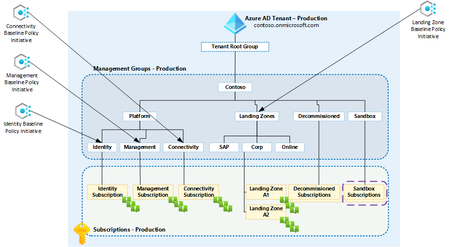
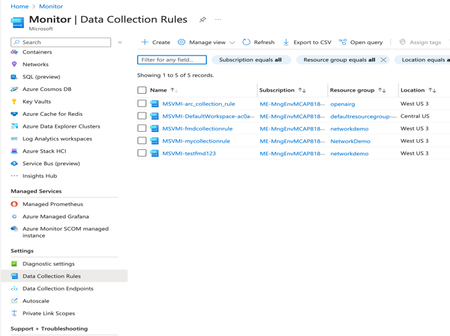
We are pleased to announced the public preview of Azure Monitor Baseline Alerts for Azure and Azure landing zone customers built by the Azure landing zone product group. The Baseline alerts 'framework' is built using Azure Policy with a predefined list of platform / infrastructure alerts that provides a flexible, scalable and consistent way to deploy alerts into your Azure environment.
Exciting News: AMBA Portal Accelerator is now Generally Available!
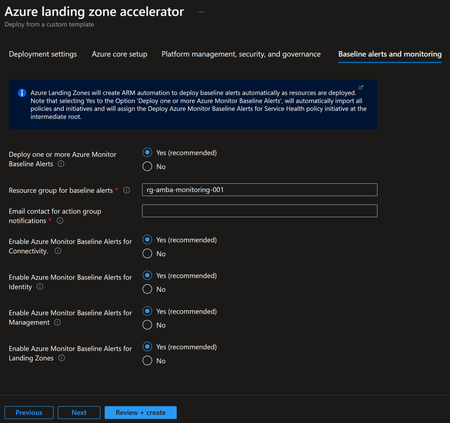
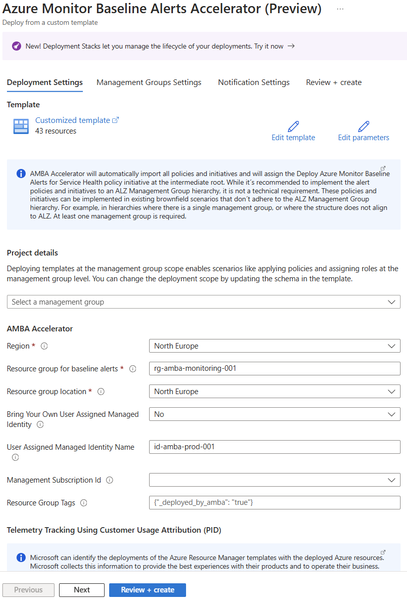
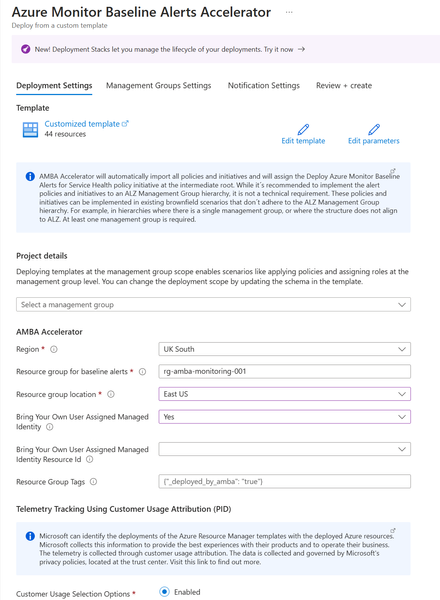
We are thrilled to announce that the Azure Monitor Baseline Alerts-Azure Landing Zones (AMBA-ALZ) Portal Accelerator has officially reached General Availability (GA). This achievement is a big step forward in our goal to make onboarding and simplify monitoring your Azure environment regardless of whether or not you are fully aligned to Azure Landing Zones. Screenshot of Azure Landing Zone portal Accelerator What is the AMBA Portal Accelerator? As we introduced AMBA into the ALZ portal experience (not to be confused with this accelerator!) and with the increased flexibility AMBA-ALZ provided for the preferred action notification types, this introduced a need to provide a post ALZ-AMBA Portal to accommodate those notification types that required an existing resource (Azure Function, Event Hub, and Logic App) and in the case of deploying ALZ possibly for the first time these resources may not be present. The AMBA-ALZ Portal Accelerator is designed to simplify the process of setting up baseline alerts, helping you boost your observability maturity in your Azure environment with minimal effort or expertise. You can set up alerts faster and with more confidence. You'll get timely notifications about critical metrics and log anomalies that might signal potential issues with your Azure workloads. What Scenarios Does The Accelerator Help Address? There are a few scenarios as to where the Accelerator can help meet you where you are in your journey: You are an existing Azure customer and looking to mature your observability posture (and at the same time with low effort move one step closer to being aligned to Azure Landing Zones You have an existing Azure Landing Zones implementation prior to AMBA being released and are looking to update your environment to include AMBA-ALZ You may be new to Azure and deploying Azure Landing Zones (the recommended way to onboard to Azure) and wanting to use Azure Function, Event Hub, and Logic App Notification Types Getting Started To begin using the AMBA-ALZ Portal Accelerator, navigate to https://aka.ms/amba/alz/portal or click the "Deploy to Azure" button on the documentation page. Detailed deployment instructions and further guidance are available to help you get started quickly and efficiently. If you have any further feedback please use the following links: 💬 - Feedback GitHub Issues: https://aka.ms/amba/issues 💬 - Feedback survey: https://aka.ms/ambaSurveyIntroducing the Azure Resource Manager MCP Server!
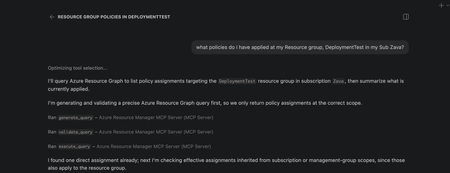
We're super excited to announce the public preview of the Azure Resource Manager MCP Server! This is a remote MCP server that provides tools to give AI agents first-class access to Azure infrastructure operations through Azure Resource Manager (ARM). AI agents can now be equipped with tools to generate, validate, execute Azure Resource Graph (ARG) queries and tools to deploy and manage ARM template deployments. This server is able to generate and execuite queries that return data across all your Azure resource types! At its core, this server is built to help AI agents interact with Azure resources seamlessly. What this means for you Ask natural language questions about your Azure estate to your agents and get real time, accurate answers backed with an ARG query Deploy and manage infrastructure easily by having AI deploy ARM templates for you Monitor deployment status and catch issues before they escalate Ability to build more advanced AI agents that understand your Azure environment What You Can Do Today Generate, Validate, and Execute Azure Resource Graph Queries from Natural Language No need to struggle with writing KQL from stratch! Describe what you need, and the MCP server tool generates Azure Resource Graph queries that match your intent. You ask an AI Agent: "Find all virtual machines in my subscription that don't have managed disks". It uses the tool and returns: A ready-to-execute ARG query without manual KQL writing. These queries spans across all your azure resource types so can learn and navigate across any type! Deploy, monitor and cancel ARM Templates Pass an ARM template, and the MCP server kicks off the deployment targeted to an existing resource group scope. Monitor the deployment by getting status about it and even cancel it if you decide its not doing what you need it to. Here is the complete list of the tool available in this preview: generate_query validate_query execute_query create_template_deployment get_arm_template_deployment_status cancel_arm_template_deployment Real-World Scenarios Infrastructure Compliance Audit "Show me all resources created in the last 30 days that don't have required tags." - The MCP server generates and executes the query, returning resources that need remediation. Your team can then fix them programmatically or through Copilot. Rapid Infrastructure Provisioning "Using this ARM template <path to template>, deploy a secure storage account with HTTPS-only access, private endpoints, and Standard_LRS replication to my production resource group." This will take an existing ARM template and deploy it to a resource group scope. Policy Compliance Check "Check if all resources in my subscription comply with the latest policy applied to it." - The MCP server generates and executes the query, returning resources that are non-compliant. Your team can then take corrective actions programmatically or through Copilot. Building Agents with Azure Resource Manager MCP Server The MCP server's tools can be integrated into custom agents you build with GitHub Copilot. What this means is you can create custom agents that automatically check compliance, track changes in a scope, or ensure all resources have a particular tag applied to them! Getting Started Prerequisites VS Code installed Valid Azure account with appropriate permissions GitHub Copilot subscription Installation Install the MCP Server Open https://aka.ms/JoinARMMCP VS Code launches automatically Click Install under Azure Resource Manager MCP Server Sign in with your Azure credentials If you hit any authentication issues see Troubleshooting Guide in our repo Check tools are enabled in Chat Open Chat in VS Code (View > Chat) Click Configure Tools Ensure the six Azure Resource Manager MCP Server tools are enabled Start Using It Ask Copilot a question about your Azure resources or infrastructure needs The MCP server handles the rest Governance & Security The Azure Resource Manager MCP Server respects your Azure permissions and governance policies. All operations run in the context of your signed-in user. Additionally you can apply Azure Policies to prevent deployments via the MCP Server. Find more details in the README of our documentation repo. What's Next? We are actively expanding the capabilities of the Azure Resource Manager MCP Server! The Server will expand to include: Additional ARM API capabilities with ARM Enhanced query generation and optimization Support for additional MCP clients beyond VS Code, next up: Claude Get Feedback We want to hear from you. Try the public preview and share your feedback. Found a bug? Or have a feature request? Open an issue on GitHub at https://aka.ms/ARMMCPIssue Resources - 📖 Full Documentation – Complete setup and usage guide - 🔗 Install Now – Get started with the public preview - 🐛 Report Issues – Share feedback and bugs - ❓ FAQ – Common questions answered - 🛠️ Troubleshooting – Resolve common issues Try It Today The Azure Resource Manager MCP Server public preview is available now. Visit https://aka.ms/JoinARMMCP to install and start automating your Azure infrastructure with AI. What agents will you build with these tools? We can't wait to see how you'll use this. Steven Bucher PM on Azure Resource Manager and Azure GovernanceBYO Thread Storage in Azure AI Foundry using Python
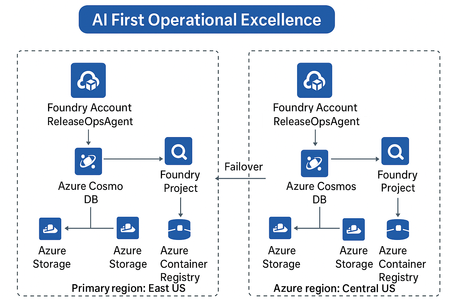
Build scalable, secure, and persistent multi-agent memory with your own storage backend As AI agents evolve beyond one-off interactions, persistent context becomes a critical architectural requirement. Azure AI Foundry’s latest update introduces a powerful capability — Bring Your Own (BYO) Thread Storage — enabling developers to integrate custom storage solutions for agent threads. This feature empowers enterprises to control how agent memory is stored, retrieved, and governed, aligning with compliance, scalability, and observability goals. What Is “BYO Thread Storage”? In Azure AI Foundry, a thread represents a conversation or task execution context for an AI agent. By default, thread state (messages, actions, results, metadata) is stored in Foundry’s managed storage. With BYO Thread Storage, you can now: Store threads in your own database — Azure Cosmos DB, SQL, Blob, or even a Vector DB. Apply custom retention, encryption, and access policies. Integrate with your existing data and governance frameworks. Enable cross-region disaster recovery (DR) setups seamlessly. This gives enterprises full control of data lifecycle management — a big step toward AI-first operational excellence. Architecture Overview A typical setup involves: Azure AI Foundry Agent Service — Hosts your multi-agent setup. Custom Thread Storage Backend — e.g., Azure Cosmos DB, Azure Table, or PostgreSQL. Thread Adapter — Python class implementing the Foundry storage interface. Disaster Recovery (DR) replication — Optional replication of threads to secondary region. Implementing BYO Thread Storage using Python Prerequisites First, install the necessary Python packages: pip install azure-ai-projects azure-cosmos azure-identity Setting Up the Storage Layer from azure.cosmos import CosmosClient, PartitionKey from azure.identity import DefaultAzureCredential import json from datetime import datetime class ThreadStorageManager: def __init__(self, cosmos_endpoint, database_name, container_name): credential = DefaultAzureCredential() self.client = CosmosClient(cosmos_endpoint, credential=credential) self.database = self.client.get_database_client(database_name) self.container = self.database.get_container_client(container_name) def create_thread(self, user_id, metadata=None): """Create a new conversation thread""" thread_id = f"thread_{user_id}_{datetime.utcnow().timestamp()}" thread_data = { 'id': thread_id, 'user_id': user_id, 'messages': [], 'created_at': datetime.utcnow().isoformat(), 'updated_at': datetime.utcnow().isoformat(), 'metadata': metadata or {} } self.container.create_item(body=thread_data) return thread_id def add_message(self, thread_id, role, content): """Add a message to an existing thread""" thread = self.container.read_item(item=thread_id, partition_key=thread_id) message = { 'role': role, 'content': content, 'timestamp': datetime.utcnow().isoformat() } thread['messages'].append(message) thread['updated_at'] = datetime.utcnow().isoformat() self.container.replace_item(item=thread_id, body=thread) return message def get_thread(self, thread_id): """Retrieve a complete thread""" try: return self.container.read_item(item=thread_id, partition_key=thread_id) except Exception as e: print(f"Thread not found: {e}") return None def get_thread_messages(self, thread_id): """Get all messages from a thread""" thread = self.get_thread(thread_id) return thread['messages'] if thread else [] def delete_thread(self, thread_id): """Delete a thread""" self.container.delete_item(item=thread_id, partition_key=thread_id) Integrating with Azure AI Foundry from azure.ai.projects import AIProjectClient from azure.identity import DefaultAzureCredential class ConversationManager: def __init__(self, project_endpoint, storage_manager): self.ai_client = AIProjectClient.from_connection_string( credential=DefaultAzureCredential(), conn_str=project_endpoint ) self.storage = storage_manager def start_conversation(self, user_id, system_prompt): """Initialize a new conversation""" thread_id = self.storage.create_thread( user_id=user_id, metadata={'system_prompt': system_prompt} ) # Add system message self.storage.add_message(thread_id, 'system', system_prompt) return thread_id def send_message(self, thread_id, user_message, model_deployment): """Send a message and get AI response""" # Store user message self.storage.add_message(thread_id, 'user', user_message) # Retrieve conversation history messages = self.storage.get_thread_messages(thread_id) # Call Azure AI with conversation history response = self.ai_client.inference.get_chat_completions( model=model_deployment, messages=[ {"role": msg['role'], "content": msg['content']} for msg in messages ] ) assistant_message = response.choices[0].message.content # Store assistant response self.storage.add_message(thread_id, 'assistant', assistant_message) return assistant_message Usage Example # Initialize storage and conversation manager storage = ThreadStorageManager( cosmos_endpoint="https://your-cosmos-account.documents.azure.com:443/", database_name="conversational-ai", container_name="threads" ) conversation_mgr = ConversationManager( project_endpoint="your-project-connection-string", storage_manager=storage ) # Start a new conversation thread_id = conversation_mgr.start_conversation( user_id="user123", system_prompt="You are a helpful AI assistant." ) # Send messages response1 = conversation_mgr.send_message( thread_id=thread_id, user_message="What is machine learning?", model_deployment="gpt-4" ) print(f"AI: {response1}") response2 = conversation_mgr.send_message( thread_id=thread_id, user_message="Can you give me an example?", model_deployment="gpt-4" ) print(f"AI: {response2}") # Retrieve full conversation history history = storage.get_thread_messages(thread_id) for msg in history: print(f"{msg['role']}: {msg['content']}") Key Highlights: Threads are stored in Cosmos DB under your control. You can attach metadata such as region, owner, or compliance tags. Integrates natively with existing Azure identity and Key Vault. Disaster Recovery & Resilience When coupled with geo-replicated Cosmos DB or Azure Storage RA-GRS, your BYO thread storage becomes resilient by design: Primary writes in East US replicate to Central US. Foundry auto-detects failover and reconnects to secondary region. Threads remain available during outages — ensuring operational continuity. This aligns perfectly with the AI-First Operational Excellence architecture theme, where reliability and observability drive intelligent automation. Best Practices Area Recommendation Security Use Azure Key Vault for credentials & encryption keys. Compliance Configure data residency & retention in your own DB. Observability Log thread CRUD operations to Azure Monitor or Application Insights. Performance Use async I/O and partition keys for large workloads. DR Enable geo-redundant storage & failover tests regularly. When to Use BYO Thread Storage Scenario Why it helps Regulated industries (BFSI, Healthcare, etc.) Maintain data control & audit trails Multi-region agent deployments Support DR and data sovereignty Advanced analytics on conversation data Query threads directly from your DB Enterprise observability Unified monitoring across Foundry + Ops The Future BYO Thread Storage opens doors to advanced use cases — federated agent memory, semantic retrieval over past conversations, and dynamic workload failover across regions. For architects, this feature is a key enabler for secure, scalable, and compliant AI system design. For developers, it means more flexibility, transparency, and integration power. Summary Feature Benefit Custom thread storage Full control over data Python adapter support Easy extensibility Multi-region DR ready Business continuity Azure-native security Enterprise-grade safety Conclusion Implementing BYO thread storage in Azure AI Foundry gives you the flexibility to build AI applications that meet your specific requirements for data governance, performance, and scalability. By taking control of your storage, you can create more robust, compliant, and maintainable AI solutions.1.1KViews4likes3Comments[Public Preview] Dynamically organize your cloud resources with Azure Service Groups!
[Public Preview] Dynamically organize your cloud resources with Azure Service Groups! With Service Groups, you can now leverage flexible cross-subscription grouping, low privilege management, nested resource hierarchies, and data aggregation for practical workloads and application monitoring.Four Strategies for Cost-Effective Azure Monitoring and Log Analytics
Embark on a journey through the labyrinth of Azure's cost management with this blog. Dive deep into the art of balancing expenditures with performance in Azure Monitor and Azure Log Analytics. Discover the strategies that blend smart data ingestion with careful retention tactics, and learn how to employ the finesse of Kusto Query Language to transform data tables into bastions of efficiency. Peek inside for an in-depth exploration of the four pillars that will fortify your cloud environment against unnecessary spending while maintaining data integrity and high performance.Kepner‑Tregoe: A Structured and Rational Approach to Problem Solving and Decision‑Making
In complex, distributed systems—such as cloud platforms, high‑availability databases, and mission‑critical applications—effective problem solving requires more than intuition or experience. Incidents often involve multiple variables, incomplete signals, and tight timelines, making unstructured analysis both risky and inefficient. This is where Kepner‑Tregoe (KT) methodology proves its value. Developed in the 1960s by Charles Kepner and Benjamin Tregoe, the Kepner‑Tregoe approach provides a structured, rational framework for problem solving and decision‑making that remains highly relevant in modern technical environments. Why Kepner‑Tregoe Still Matters in Modern Systems Today’s platforms are: Distributed across regions and zones Built on asynchronous replication and eventual consistency Highly automated, yet deeply interconnected When something goes wrong, teams often face: Conflicting metrics Partial outages Transient or self‑healing behaviors Pressure to “fix fast” rather than “fix correctly” KT helps teams: Separate facts from assumptions Avoid premature conclusions Reach defensible, repeatable outcomes Communicate findings clearly across roles and time zones Most importantly, it replaces reactive troubleshooting with disciplined analytical thinking. The Four Core Kepner‑Tregoe Processes Kepner‑Tregoe is built around four complementary thinking processes. Each serves a distinct purpose and can be applied independently or together. 1. Situation Appraisal – Where Should We Focus? In high‑pressure environments, teams rarely face a single issue. Situation Appraisal helps answer: What is happening right now? What needs attention first? What can wait? This process enables teams to: List concerns objectively Identify priorities Allocate resources deliberately In practice: During a multi‑signal incident, Situation Appraisal helps distinguish between impact, cause, and noise, preventing teams from chasing symptoms. 2. Problem Analysis – What Is Causing This? Problem Analysis is the most commonly used KT process. It focuses on identifying the true cause of a deviation. Key principles include: Clearly defining the problem (what is happening vs. what should be happening) Comparing where the problem occurs vs. does not occur Analyzing differences across time, location, and conditions Eliminating causes that don’t fit the facts In technical scenarios, this avoids conclusions like: “It must be the network” “It’s a platform issue” “It always happens during peak load” Instead, teams arrive at causes supported by evidence—not intuition. 3. Decision Analysis – What Should We Do? When multiple options are available, Decision Analysis ensures the chosen path aligns with business and technical goals. This process involves: Defining the decision scope Identifying must‑have requirements Defining wants and weighting them Evaluating alternatives objectively In operations, this is especially useful when deciding between: Scaling vs. optimizing Failing over vs. waiting Short‑term mitigation vs. long‑term correction The result is a traceable, justifiable decision—even under pressure. 4. Potential Problem Analysis – What Could Go Wrong Next? Potential Problem Analysis helps teams anticipate and prevent future issues by asking: What could go wrong? How likely is it? What would the impact be? How can we prevent or detect it early? This is highly effective for: Change deployments Architecture reviews Maintenance planning Major configuration updates Instead of reacting to incidents, teams proactively reduce risk. Key Principles Behind the KT Methodology Across all four processes, Kepner‑Tregoe emphasizes: Clarity – precise definitions and shared understanding Logic – cause‑and‑effect reasoning Objectivity – evidence over opinion Discipline – following structured steps These principles make KT especially effective in cross‑functional, globally distributed teams. Applying KT in Technical and Cloud Environments Kepner‑Tregoe is widely applicable across modern IT scenarios, including: Incident and outage investigations Performance degradation analysis High availability and replication issues Change management and release planning Post‑incident reviews and retrospectives KT does not replace tools or metrics—it structures how we interpret them. Final Thoughts Kepner‑Tregoe is not a legacy methodology; it is a timeless framework for structured thinking in complex systems. In environments where availability, reliability, and correctness matter, KT enables teams to: Solve problems faster and more accurately Reduce repeat incidents Improve collaboration and communication Make confident, fact‑based decisions Whether you’re troubleshooting a production issue or planning a critical change, Kepner‑Tregoe provides a reliable foundation for clarity and control. References Kepner, C. H., & Tregoe, B. B. The Rational Manager Kepner‑Tregoe official methodology overview2.4KViews3likes1Comment