open-source
15 TopicsDeploying Third-Party Firewalls in Azure Landing Zones: Design, Configuration, and Best Practices
As enterprises adopt Microsoft Azure for large-scale workloads, securing network traffic becomes a critical part of the platform foundation. Azure’s Well-Architected Framework provides the blueprint for enterprise-scale Landing Zone design and deployments, and while Azure Firewall is a built-in PaaS option, some organizations prefer third-party firewall appliances for familiarity, feature depth, and vendor alignment. This blog explains the basic design patterns, key configurations, and best practices when deploying third-party firewalls (Palo Alto, Fortinet, Check Point, etc.) as part of an Azure Landing Zone. 1. Landing Zone Architecture and Firewall Role The Azure Landing Zone is Microsoft’s recommended enterprise-scale architecture for adopting cloud at scale. It provides a standardized, modular design that organizations can use to deploy and govern workloads consistently across subscriptions and regions. At its core, the Landing Zone follows a hub-and-spoke topology: Hub (Connectivity Subscription): Central place for shared services like DNS, private endpoints, VPN/ExpressRoute gateways, Azure Firewall (or third-party firewall appliances), Bastion, and monitoring agents. Provides consistent security controls and connectivity for all workloads. Firewalls are deployed here to act as the traffic inspection and enforcement point. Spokes (Workload Subscriptions): Application workloads (e.g., SAP, web apps, data platforms) are placed in spoke VNets. Additional specialized spokes may exist for Identity, Shared Services, Security, or Management. These are isolated for governance and compliance, but all connectivity back to other workloads or on-premises routes through the hub. Traffic Flows Through Firewalls North-South Traffic: Inbound connections from the Internet (e.g., customer access to applications). Outbound connections from Azure workloads to Internet services. Hybrid connectivity to on-premises datacenters or other clouds. Routed through the external firewall set for inspection and policy enforcement. East-West Traffic: Lateral traffic between spokes (e.g., Application VNet to Database VNet). Communication across environments like Dev → Test → Prod (if allowed). Routed through an internal firewall set to apply segmentation, zero-trust principles, and prevent lateral movement of threats. Why Firewalls Matter in the Landing Zone While Azure provides NSGs (Network Security Groups) and Route Tables for basic packet filtering and routing, these are not sufficient for advanced security scenarios. Firewalls add: Deep packet inspection (DPI) and application-level filtering. Intrusion Detection/Prevention (IDS/IPS) capabilities. Centralized policy management across multiple spokes. Segmentation of workloads to reduce blast radius of potential attacks. Consistent enforcement of enterprise security baselines across hybrid and multi-cloud. Organizations May Choose Depending on security needs, cost tolerance, and operational complexity, organizations typically adopt one of two models for third party firewalls: Two sets of firewalls One set dedicated for north-south traffic (external to Azure). Another set for east-west traffic (between VNets and spokes). Provides the highest security granularity, but comes with higher cost and management overhead. Single set of firewalls A consolidated deployment where the same firewall cluster handles both east-west and north-south traffic. Simpler and more cost-effective, but may introduce complexity in routing and policy segregation. This design choice is usually made during Landing Zone design, balancing security requirements, budget, and operational maturity. 2. Why Choose Third-Party Firewalls Over Azure Firewall? While Azure Firewall provides simplicity as a managed service, customers often choose third-party solutions due to: Advanced features – Deep packet inspection, IDS/IPS, SSL decryption, threat feeds. Vendor familiarity – Network teams trained on Palo Alto, Fortinet, or Check Point. Existing contracts – Enterprise license agreements and support channels. Hybrid alignment – Same vendor firewalls across on-premises and Azure. Azure Firewall is a fully managed PaaS service, ideal for customers who want a simple, cloud-native solution without worrying about underlying infrastructure. However, many enterprises continue to choose third-party firewall appliances (Palo Alto, Fortinet, Check Point, etc.) when implementing their Landing Zones. The decision usually depends on capabilities, familiarity, and enterprise strategy. Key Reasons to Choose Third-Party Firewalls Feature Depth and Advanced Security Third-party vendors offer advanced capabilities such as: Deep Packet Inspection (DPI) for application-aware filtering. Intrusion Detection and Prevention (IDS/IPS). SSL/TLS decryption and inspection. Advanced threat feeds, malware protection, sandboxing, and botnet detection. While Azure Firewall continues to evolve, these vendors have a longer track record in advanced threat protection. Operational Familiarity and Skills Network and security teams often have years of experience managing Palo Alto, Fortinet, or Check Point appliances on-premises. Adopting the same technology in Azure reduces the learning curve and ensures faster troubleshooting, smoother operations, and reuse of existing playbooks. Integration with Existing Security Ecosystem Many organizations already use vendor-specific management platforms (e.g., Panorama for Palo Alto, FortiManager for Fortinet, or SmartConsole for Check Point). Extending the same tools into Azure allows centralized management of policies across on-premises and cloud, ensuring consistent enforcement. Compliance and Regulatory Requirements Certain industries (finance, healthcare, government) require proven, certified firewall vendors for security compliance. Customers may already have third-party solutions validated by auditors and prefer extending those to Azure for consistency. Hybrid and Multi-Cloud Alignment Many enterprises run a hybrid model, with workloads split across on-premises, Azure, AWS, or GCP. Third-party firewalls provide a common security layer across environments, simplifying multi-cloud operations and governance. Customization and Flexibility Unlike Azure Firewall, which is a managed service with limited backend visibility, third-party firewalls give admins full control over operating systems, patching, advanced routing, and custom integrations. This flexibility can be essential when supporting complex or non-standard workloads. Licensing Leverage (BYOL) Enterprises with existing enterprise agreements or volume discounts can bring their own firewall licenses (BYOL) to Azure. This often reduces cost compared to pay-as-you-go Azure Firewall pricing. When Azure Firewall Might Still Be Enough Organizations with simple security needs (basic north-south inspection, FQDN filtering). Cloud-first teams that prefer managed services with minimal infrastructure overhead. Customers who want to avoid manual scaling and VM patching that comes with IaaS appliances. In practice, many large organizations use a hybrid approach: Azure Firewall for lightweight scenarios or specific environments, and third-party firewalls for enterprise workloads that require advanced inspection, vendor alignment, and compliance certifications. 3. Deployment Models in Azure Third-party firewalls in Azure are primarily IaaS-based appliances deployed as virtual machines (VMs). Leading vendors publish Azure Marketplace images and ARM/Bicep templates, enabling rapid, repeatable deployments across multiple environments. These firewalls allow organizations to enforce advanced network security policies, perform deep packet inspection, and integrate with Azure-native services such as Virtual Network (VNet) peering, Azure Monitor, and Azure Sentinel. Note: Some vendors now also release PaaS versions of their firewalls, offering managed firewall services with simplified operations. However, for the purposes of this blog, we will focus mainly on IaaS-based firewall deployments. Common Deployment Modes Active-Active Description: In this mode, multiple firewall VMs operate simultaneously, sharing the traffic load. An Azure Load Balancer distributes inbound and outbound traffic across all active firewall instances. Use Cases: Ideal for environments requiring high throughput, resilience, and near-zero downtime, such as enterprise data centers, multi-region deployments, or mission-critical applications. Considerations: Requires careful route and policy synchronization between firewall instances to ensure consistent traffic handling. Typically involves BGP or user-defined routes (UDRs) for optimal traffic steering. Scaling is easier: additional firewall VMs can be added behind the load balancer to handle traffic spikes. Active-Passive Description: One firewall VM handles all traffic (active), while the secondary VM (passive) stands by for failover. When the active node fails, Azure service principals manage IP reassignment and traffic rerouting. Use Cases: Suitable for environments where simpler management and lower operational complexity are preferred over continuous load balancing. Considerations: Failover may result in a brief downtime, typically measured in seconds to a few minutes. Synchronization between the active and passive nodes ensures firewall policies, sessions, and configurations are mirrored. Recommended for smaller deployments or those with predictable traffic patterns. Network Interfaces (NICs) Third-party firewall VMs often include multiple NICs, each dedicated to a specific type of traffic: Untrust/Public NIC: Connects to the Internet or external networks. Handles inbound/outbound public traffic and enforces perimeter security policies. Trust/Internal NIC: Connects to private VNets or subnets. Manages internal traffic between application tiers and enforces internal segmentation. Management NIC: Dedicated to firewall management traffic. Keeps administration separate from data plane traffic, improving security and reducing performance interference. HA NIC (Active-Passive setups): Facilitates synchronization between active and passive firewall nodes, ensuring session and configuration state is maintained across failovers. This design choice is usually made during Landing Zone design, balancing security requirements, budget, and operational maturity. : NICs of Palo Alto External Firewalls and FortiGate Internal Firewalls in two sets of firewall scenario 4. Key Configuration Considerations When deploying third-party firewalls in Azure, several design and configuration elements play a critical role in ensuring security, performance, and high availability. These considerations should be carefully aligned with organizational security policies, compliance requirements, and operational practices. Routing User-Defined Routes (UDRs): Define UDRs in spoke Virtual Networks to ensure all outbound traffic flows through the firewall, enforcing inspection and security policies before reaching the Internet or other Virtual Networks. Centralized routing helps standardize controls across multiple application Virtual Networks. Depending on the architecture traffic flow design, use appropriate Load Balancer IP as the Next Hop on UDRs of spoke Virtual Networks. Symmetric Routing: Ensure traffic follows symmetric paths (i.e., outbound and inbound flows pass through the same firewall instance). Avoid asymmetric routing, which can cause stateful firewalls to drop return traffic. Leverage BGP with Azure Route Server where supported, to simplify route propagation across hub-and-spoke topologies. : Azure UDR directing all traffic from a Spoke VNET to the Firewall IP Address Policies NAT Rules: Configure DNAT (Destination NAT) rules to publish applications securely to the Internet. Use SNAT (Source NAT) to mask private IPs when workloads access external resources. Security Rules: Define granular allow/deny rules for both north-south traffic (Internet to VNet) and east-west traffic (between Virtual Networks or subnets). Ensure least privilege by only allowing required ports, protocols, and destinations. Segmentation: Apply firewall policies to separate workloads, environments, and tenants (e.g., Production vs. Development). Enforce compliance by isolating workloads subject to regulatory standards (PCI-DSS, HIPAA, GDPR). Application-Aware Policies: Many vendors support Layer 7 inspection, enabling controls based on applications, users, and content (not just IP/port). Integrate with identity providers (Azure AD, LDAP, etc.) for user-based firewall rules. : Example Configuration of NAT Rules on a Palo Alto External Firewall Load Balancers Internal Load Balancer (ILB): Use ILBs for east-west traffic inspection between Virtual Networks or subnets. Ensures that traffic between applications always passes through the firewall, regardless of origin. External Load Balancer (ELB): Use ELBs for north-south traffic, handling Internet ingress and egress. Required in Active-Active firewall clusters to distribute traffic evenly across firewall nodes. Other Configurations: Configure health probes for firewall instances to ensure faulty nodes are automatically bypassed. Validate Floating IP configuration on Load Balancing Rules according to the respective vendor recommendations. Identity Integration Azure Service Principals: In Active-Passive deployments, configure service principals to enable automated IP reassignment during failover. This ensures continuous service availability without manual intervention. Role-Based Access Control (RBAC): Integrate firewall management with Azure RBAC to control who can deploy, manage, or modify firewall configurations. SIEM Integration: Stream logs to Azure Monitor, Sentinel, or third-party SIEMs for auditing, monitoring, and incident response. Licensing Pay-As-You-Go (PAYG): Licenses are bundled into the VM cost when deploying from the Azure Marketplace. Best for short-term projects, PoCs, or variable workloads. Bring Your Own License (BYOL): Enterprises can apply existing contracts and licenses with vendors to Azure deployments. Often more cost-effective for large-scale, long-term deployments. Hybrid Licensing Models: Some vendors support license mobility from on-premises to Azure, reducing duplication of costs. 5. Common Challenges Third-party firewalls in Azure provide strong security controls, but organizations often face practical challenges in day-to-day operations: Misconfiguration Incorrect UDRs, route tables, or NAT rules can cause dropped traffic or bypassed inspection. Asymmetric routing is a frequent issue in hub-and-spoke topologies, leading to session drops in stateful firewalls. Performance Bottlenecks Firewall throughput depends on the VM SKU (CPU, memory, NIC limits). Under-sizing causes latency and packet loss, while over-sizing adds unnecessary cost. Continuous monitoring and vendor sizing guides are essential. Failover Downtime Active-Passive models introduce brief service interruptions while IPs and routes are reassigned. Some sessions may be lost even with state sync, making Active-Active more attractive for mission-critical workloads. Backup & Recovery Azure Backup doesn’t support vendor firewall OS. Configurations must be exported and stored externally (e.g., storage accounts, repos, or vendor management tools). Without proper backups, recovery from failures or misconfigurations can be slow. Azure Platform Limits on Connections Azure imposes a per-VM cap of 250,000 active connections, regardless of what the firewall vendor appliance supports. This means even if an appliance is designed for millions of sessions, it will be constrained by Azure’s networking fabric. Hitting this cap can lead to unexplained traffic drops despite available CPU/memory. The workaround is to scale out horizontally (multiple firewall VMs behind a load balancer) and carefully monitor connection distribution. 6. Best Practices for Third-Party Firewall Deployments To maximize security, reliability, and performance of third-party firewalls in Azure, organizations should follow these best practices: Deploy in Availability Zones: Place firewall instances across different Availability Zones to ensure regional resilience and minimize downtime in case of zone-level failures. Prefer Active-Active for Critical Workloads: Where zero downtime is a requirement, use Active-Active clusters behind an Azure Load Balancer. Active-Passive can be simpler but introduces failover delays. Use Dedicated Subnets for Interfaces: Separate trust, untrust, HA, and management NICs into their own subnets. This enforces segmentation, simplifies route management, and reduces misconfiguration risk. Apply Least Privilege Policies: Always start with a deny-all baseline, then allow only necessary applications, ports, and protocols. Regularly review rules to avoid policy sprawl. Standardize Naming & Tagging: Adopt consistent naming conventions and resource tags for firewalls, subnets, route tables, and policies. This aids troubleshooting, automation, and compliance reporting. Validate End-to-End Traffic Flows: Test both north-south (Internet ↔ VNet) and east-west (VNet ↔ VNet/subnet) flows after deployment. Use tools like Azure Network Watcher and vendor traffic logs to confirm inspection. Plan for Scalability: Monitor throughput, CPU, memory, and session counts to anticipate when scale-out or higher VM SKUs are needed. Some vendors support autoscaling clusters for bursty workloads. Maintain Firmware & Threat Signatures: Regularly update the firewall’s software, patches, and threat intelligence feeds to ensure protection against emerging vulnerabilities and attacks. Automate updates where possible. Conclusion Third-party firewalls remain a core building block in many enterprise Azure Landing Zones. They provide the deep security controls and operational familiarity enterprises need, while Azure provides the scalable infrastructure to host them. By following the hub-and-spoke architecture, carefully planning deployment models, and enforcing best practices for routing, redundancy, monitoring, and backup, organizations can ensure a secure and reliable network foundation in Azure.4.3KViews5likes2CommentsPostgres speakers - POSETTE 2026 CFP is closing soon!
Guidelines for submitting a proposal to the POSETTE CFP POSETTE: An Event for Postgres is back for its 5th year, and the excitement is already building. Scheduled for June 16 – June 18, 2026, this free and virtual developer event brings together the global Postgres community for three days of learning, sharing, and deep technical storytelling. Whether you're a first-time speaker or a seasoned contributor, your story matters and the Call for Proposals (CFP) closes on February 1, 2026. If you’re considering submitting a proposal (or encouraging someone else to), in this post I will walk you through everything you need to know to craft a strong, compelling submission before the deadline arrives. 1. Key Dates to Know CFP Deadline: February 1, 2026 @ 11:59 PM PST Talk Acceptance Notifications: February 11, 2026 Event Dates: June 16 – June 18, 2026 (includes four unique livestreams, live text chat, and speaker Q&A) Schedule & sessions announced: Feb 25, 2026 Pre-record all talks: Weeks of April 20 & April 27 Tip: Add a calendar reminder, this deadline arrives quickly, and no late submissions are accepted. 2. Why Submit a Talk to POSETTE? Submitting a talk for a conference can seem like a difficult task at the start, but this guide can help you come up with potential ideas that can be used to submit a talk for the conference. Share your story with the global Postgres community Your experience, whether it’s a deep dive into query planning, a migration journey, or lessons learned from scaling can help thousands of developers. Grow your professional visibility POSETTE is a high‑reach, virtual event that enables your content to live on well after the livestream. First‑time speakers are welcomed and encouraged POSETTE is not an exclusive club. If you have a story to tell, this is a supportive, welcoming place to tell it. 3. What Makes a Strong Proposal? First‑time speaker? Don’t worry. The guidelines below cover the key elements you’ll need to craft a strong, successful proposal. Make your proposal focused, not broad: Many proposals try to cover too much. The strongest ones zoom in on a specific challenge, insight, or transformation. A narrow, well‑defined topic reads more clearly and creates a stronger takeaway for attendees. Clearly identify the target audience: State who the talk is for: Beginner Postgres developers Cloud architects DBAs focusing on performance Engineers migrating from Oracle/MySQL This helps the selection team understand fit and event balance. Demonstrate real‑world value, not generic theory: Talks rooted in hands‑on experience tend to perform best. Strong abstracts answer: What problem did we face? What did we try? What worked (or didn’t)? What can you replicate in your environment? POSETTE audiences love actionable content. 4. Show how attendees will grow from your talk: Selection committees love when speakers articulate transformation. Clarify what people will gain: “Improve query execution time by…” “Avoid common replication pitfalls…” “Design HA setups more confidently…” The reviewers want talks with practical outcomes. 5. Highlight what makes your talk unique Is your approach unconventional? Did you migrate at massive scale? Did you build or extend an OSS tool? Did you learn something the hard way? Emphasize novelty POSETTE gets many submissions, so originality matters. 6. Use a storytelling angle: Human brains love stories. Strong abstracts often follow a mini narrative: Problem Tension Turning point Solution Lessons This makes your proposal memorable and relatable. 7. Keep the abstract concise and structured: Avoid long, meandering paragraphs. A clear structure like this works well: Topic summary (one sentence) Problem + context (two–three sentences) Solution or insights (two–three sentences) What attendees will learn (one–two sentences) 4. Ideas for Topics That Work Well Not every proposal needs to be a deep internal dive real‑world stories resonate. Consider topics like: Migrating to Postgres (cloud or on‑prem) Performance tuning adventures and lessons Postgres extensions and ecosystem tooling Operational best practices, HA architecture, or incident learnings Developer productivity with Postgres Novel patterns or creative uses of Postgres internals Azure Database for PostgreSQL customer stories Community‑focused topics, such as how to start a PGDay event, how to begin contributing to open source, or how to engage with the Postgres community effectively. Look at POSETTE 2024 or 2025 talk titles to calibrate tone and depth. 5. What Happens If Your Talk Is Accepted? Good news: the speaker experience is designed to be smooth and supportive. Talks are 25 minutes long and pre‑recorded, with professional production support from the POSETTE organizing team at an agreed-upon time during the weeks of April 20 & April 27 Speakers join live text chat during the session to interact with attendees No travel required the event is fully virtual All you need is a good microphone, a quiet space, and a story worth telling. 6. How to Submit Your Proposal Here are the official links you’ll want handy: 📄 CFP Page: https://posetteconf.com/2026/cfp/ ❓ FAQ: https://posetteconf.com/2026/faq/ 📝 Submit on Sessionize: https://sessionize.com/posette2026/ Submission Checklist Before hitting "submit," make sure you have: A strong, interesting title A clear and concise abstract Defined takeaways for attendees An understanding of your target audience Submission completed before Feb 1 @ 11:59 PM PST POSETTE is built by and for the Postgres community and your experience, whether small or monumental, has the potential to help others. With the CFP deadline approaching fast on February 1, now is the perfect time to refine your idea, shape your abstract, and submit your talk. This could be the year your story gets shared with thousands. Take the leap the community will be glad you did.418Views4likes0CommentsUse cases of Advanced Network Observability for your Azure Kubernetes Service clusters
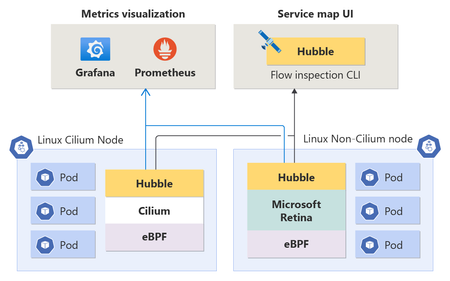
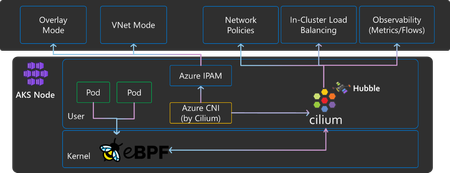
The blog explores the use cases of Advanced Network Observability for Azure Kubernetes Service (AKS) clusters. It introduces the Advanced Network Observability feature, which brings Hubble's control plane to both Cilium and Non-Cilium Linux data planes. This feature provides deep insights into containerized workloads, enabling precise detection and root-cause analysis of network-related issues in Kubernetes clusters. The document also includes customer scenarios that demonstrate the benefits of Advanced Network Observability, such as DNS metrics, network policy drops at the pod level, and traffic imbalance for pods within a workload4.4KViews4likes2Comments
Multi-NIC Support on AKS powered by DRANET – Now in Public Preview
Kubernetes was designed around a simple networking model, every pod gets one network interface, and every pod on a node shares the same flat network. For most stateless microservices, this works well as it keeps the model simple and the platform portable. But a large class of workloads don't fit that shape. Some need network separation, with management, control, and data traffic on separate and isolated networks rather than multiplexed over one interface. Other workloads need predictable performance, a dedicated path for high-throughput or latency-sensitive traffic. Until now, meeting these requirements on Kubernetes meant adding and manually integrating multiple components, or keeping the workload on VMs. Today we're announcing the public preview of multi-NIC support for pods on AKS, powered by the AKS managed DRANET driver. You can now provision worker nodes with multiple network interfaces connected to different subnets, and attach a dedicated interface directly to a pod using standard upstream Kubernetes APIs, with no Multus, no custom CNI extensions, and no manual interface wiring. Two ways to use multi-NIC on AKS Use case 1: A dedicated NIC attached directly to a pod “As a networking engineer, I want to attach a dedicated network interface directly to a Kubernetes pod so the workload can connect to different networks and route traffic natively, without relying on host-level DPDK/VPP forwarding, custom routing rules, or gateway-based NAT.” “I also want the secondary interface on my pod to send and receive traffic on a specific, known public IP address, so that downstream partners can allow-list my traffic by IP and no NAT hop adds latency to time-sensitive streams." This is the pattern where the workload itself expects to see multiple interfaces. The pod asks for a network device the same way it would ask for any other resource, and the interface shows up inside the container alongside the standard CNI interface. No host-level forwarding layer, no NAT gateway in the middle. What you get The DRANET driver is deployed automatically. Once a node pool is configured with secondary interfaces, AKS installs and manages the driver for you; there is no add-on to install and no CRDs to author by hand. Declarative, scheduler-aware requests. Interfaces are advertised to Kubernetes as allocatable devices, so a pod that asks for one is placed on a node that can actually provide it, using standard Dynamic Resource Allocation (DRA) objects rather than vendor-specific annotations. A predictable interface lifecycle. The driver handles attach, release, and recovery as pods are rescheduled or restarted. A public IP address can be assigned directly to a secondary interface, configured at node pool creation time using IP tags. The pod's secondary interface talks to the outside world without going through the load balancer or any address translation layer. Both IPv4 and IPv6 addresses are supported on the secondary interface. What to plan around Interfaces are dedicated, not shared. When a NIC is attached to a pod, it moves into that pod's network namespace and is no longer available to the node or to any other pod. Sharing a secondary NIC across pods isn't supported in this release. Because of that, pod density on a multi-NIC node pool is bounded by the number of interfaces on the node. All interfaces must be attached to the same virtual network as the primary NIC. On a bring-your-own VNet cluster, different subnets within that VNet are supported, but different VNets are not, in this preview. On an AKS-managed VNet, secondary interfaces are currently limited to the same subnet as the primary NIC , since creating a new subnet on a managed VNet isn't supported yet. Each pod's secondary interface gets its own dedicated public IP, so plan node pool sizing around how many pods need a tagged public IP of their own. Public IP assignment is configured at node pool creation time through IP tags, so decide your IP range and tagging strategy before you provision the node pool. Kubernetes network policy is enforced on the primary interface only. Plan isolation for secondary interfaces at the subnet and NSG layer. Use Case 2: Multi-NIC nodes with your own NIC management “As a platform/networking engineer, I want to provision Kubernetes worker nodes with multiple network interfaces connected to different networks and use my own VPP, DPDK, or any custom routing logic to steer traffic at the node level, without attaching additional interfaces to pods.” This is the pattern for teams who already own their dataplane. The node is multi-homed, each interface lands on its own subnet, and your own software decides which traffic goes where. Pods keep a single CNI-assigned interface and stay unaware of the underlying topology. What you get Depending on the selected SKU size, you can configure nodes with multiple network interfaces. Full control, and full ownership of the additional nics. AKS provisions the interfaces and keeps them attached to the node. How traffic is steered across them is entirely yours to design, configure, operate, and support. That includes your routing rules, your userspace dataplane, and any troubleshooting of the forwarding path itself. The same-VNet constraint applies here too, secondary interfaces can span subnets, but not virtual networks. This applies to bring-your-own VNet clusters. On an AKS-managed VNet, secondary interfaces are restricted to the primary NIC's subnet for now. Both patterns start from the same node pool configuration. The difference is whether you stop there and manage the interfaces yourself, or let the DRANET hand them to your pods. How it works Multi-NIC on AKS starts with a single configuration step: you add secondary network interfaces to a node pool. AKS provisions the NICs on every VM in the pool and installs the DRANET driver alongside them. From there, what happens to those NICs depends on your workload. Reference a resource claim in your pod spec, and DRANET moves an interface into the pod Or Leave them on the node and steer traffic yourself with VPP, DPDK, or custom routing. Step 1: Provision the node pools with secondary NICs Secondary interfaces are declared when you create the node pool. The agent pool's network profile carries a secondaryNetworkInterfaces array, and each entry points at a subnet in the same virtual network as the primary NIC: "networkProfile": { "secondaryNetworkInterfaces": [ { "type": "Standard", "vnetSubnetId": "<VNET_SUBNET_ID>" } { "type": "Standard", "vnetSubnetId": "<VNET_SUBNET_ID>" } ] } AKS extends VMSS provisioning to attach those NICs to every VM in the pool. Add more entries for more interfaces, up to what the VM SKU allows. The array length is validated against the SKU at creation time, so a pool with mixed sizes has to be planned around the smallest one. The node is now multi-homed and the interfaces are visible on the host. If you are building for use case 2, this is where you stop. AKS provisions and keeps the interfaces attached to the node, and how traffic is steered across them, the routing rules, the userspace dataplane, the troubleshooting of the forwarding path, is yours to design, operate, and support. Step 2: Using AKS managed DRANET driver to hand an interface to the pod Once a node pool has secondary interfaces configured, and the cluster is using AKS-managed CNI (Azure CNI or Azure CNI Powered by Cilium), AKS automatically installs the DRANET driver as a DaemonSet, packaged and delivered through an AKS-managed Helm chart. There is nothing to deploy yourself and no CRDs to author by hand. If you're running a BYO CNI cluster, AKS still provisions the secondary NICs, but you're responsible for deploying DRANET (or your own driver of choice) yourself. The driver does three things: Discovers the additional interfaces present on each node. Advertises them to Kubernetes as allocatable DRA devices, published in a ResourceSlice. Manages the lifecycle: exclusive per-pod allocation, attachment, release, and recovery as pods move or restart. Inspect the DRANET deamonset, pods, and deviceclass using the following commands: kubectl get deviceclasses kubectl get daemonset -A kubectl get pods -A -o wide Now you can create a “ResourceClaimTemplate” that defines how each pod requests a device. apiVersion: resource.k8s.io/v1 kind: ResourceClaimTemplate metadata: name: nic-dev-template spec: spec: devices: requests: - name: nic exactly: deviceClassName: standard-secondary-nic allocationMode: ExactCount count: 1 Configure the pod references the template, and the scheduler places it on a node that has a matching NIC available: apiVersion: v1 kind: Pod metadata: name: multi-nic-test spec: containers: - name: multi-nic image: nicolaka/netshoot resources: claims: - name: nic resourceClaims: - name: nic resourceClaimTemplateName: nic-dev-template A pod referencing a claim comes up with its usual CNI-assigned eth0 plus the allocated secondary interface, and you can confirm both from inside the container. When DRANET attaches a secondary NIC to a pod, that interface moves into the pod's network namespace and is no longer available on the node or to any other pod. It returns to the node's pool of available devices when the pod terminates. That gives you a clean isolation boundary and deterministic performance, with the trade-off that pod density on a multi-NIC pool is bounded by interface count, not just CPU and memory. For the full walkthrough including feature flag registration, more examples visit https://aka.ms/aks/multi-nic. Try it now Multi-NIC support for pods on AKS is available now in public preview. Start with the documentation for the full walkthrough: provisioning a node pool with secondary interfaces, defining a resource claim, and validating that both interfaces appear inside the pod. Documentation: https://aka.ms/aks/multi-nic Upstream project: DRANET on GitHub Preview is when your input can actually shape the feature. If you hit a limitation or have a use case we haven’t covered, comment below and share your feedback. 834Views3likes0Comments
Announcing public preview: Cilium mTLS encryption for Azure Kubernetes Service
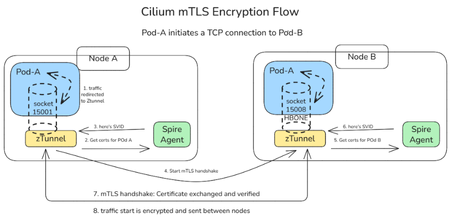
We are thrilled to announce the public preview of Cilium mTLS encryption in Azure Kubernetes Service (AKS), delivered as part of Advanced Container Networking Services and powered by the Azure CNI dataplane built on Cilium. This capability is the result of a close engineering collaboration between Microsoft and Isovalent (now part of Cisco). It brings transparent, workload‑level mutual TLS (mTLS) to AKS without sidecars, without application changes, and without introducing a separate service mesh stack. This public preview represents a major step forward in delivering secure, high‑performance, and operationally simple networking for AKS customers. In this post, we’ll walk through how Cilium mTLS works, when to use it, and how to get started. Why Cilium mTLS encryption matters Traditionally, teams looking to in-transit traffic encryption in Kubernetes have had two primary options: Node-level encryption (for example, WireGuard or virtual network encryption), which secures traffic in transit but lacks workload identity and authentication. Service meshes, which provide strong identity and mTLS guarantees but introduce operational complexity. This trade‑off has become increasingly problematic, as many teams want workload‑level encryption and authentication, but without the cost, overhead, and architectural impact of deploying and operating a full-service mesh. Cilium mTLS closes this gap directly in the dataplane. It delivers transparent, inline mTLS encryption and authentication for pod‑to‑pod TCP traffic, enforced below the application layer. And implemented natively in the Azure CNI dataplane built on Cilium, so customers gain workload‑level security without introducing a separate service mesh, resulting in a simpler architecture with lower operational overhead. To see how this works under the hood, the next section breaks down the Cilium mTLS architecture and follows a pod‑to‑pod TCP flow from interception to authentication and encryption. Architecture and design: How Cilium mTLS works Cilium mTLS achieves workload‑level authentication and encryption by combining three key components, each responsible for a specific part of the authentication and encryption lifecycle. Cilium agent: Transparent traffic interception and wiring Cilium agent which already exists on any cluster running with Azure CNI powered by cilium, is responsible for making mTLS invisible to applications. When a namespace is labelled with “io.cilium/mtls-enabled=true”, The Cilium agent enrolls all pods in that namespace. It enters each pod's network namespace and installs iptables rules that redirect outbound traffic to ztunnel on port 15001. It is also responsible for passing workload metadata (such as pod IP and namespace context) to ztunnel. Ztunnel: Node‑level mTLS enforcement Ztunnel is an open source, lightweight, node‑level Layer 4 proxy that was originally created by Istio. Ztunnel runs as a DaemonSet, on the source node it looks up the destination workload via XDS (streamed from the Cilium agent) and establishes mutually authenticated TLS 1.3 sessions between source and destination nodes. Connections are held inline until authentication is complete, ensuring that traffic is never sent in plaintext. The destination ztunnel decrypts the traffic and delivers it into the target pod, bypassing the interception rules via an in-pod mark. The application sees a normal plaintext connection — it is completely unaware encryption happened. SPIRE: Workload identity and trust SPIRE (SPIFFE Runtime Environment) provides the identity foundation for Cilium mTLS. SPIRE acts as the cluster Certificate Authority, issuing short‑lived X.509 certificates (SVIDs) that are automatically rotated and validated. This is a key design principle of Cilium mTLS - trust is based on workload identity, not network topology. Each workload receives a cryptographic identity derived from: Kubernetes namespace Kubernetes ServiceAccount These identities are issued and rotated automatically by SPIRE and validated on both sides of every connection. As a result: Identity remains stable across pod restarts and rescheduling Authentication is decoupled from IP addresses Trust decisions align naturally with Kubernetes RBAC and namespace boundaries This enables a zero‑trust networking model that fits cleanly into existing AKS security practices. End‑to‑End workflow example To see how these components work together, consider a simple pod‑to‑pod connection: A pod initiates a TCP connection to another pod. Traffic intercepted inside the pod network namespace and redirected to the local ztunnel instance. ztunnel retrieves the workload identity using certificates issued by SPIRE. ztunnel establishes a mutually authenticated TLS session with the destination node’s ztunnel. Traffic is encrypted and sent between pods. The destination ztunnel decrypts the traffic and delivers it to the target pod. Every packet from an enrolled pod is encrypted. There is no plaintext window, and no dropped first packets. The connection is held inline by ztunnel until the mTLS tunnel is established, then traffic flows bidirectionally through an HBONE (HTTP/2 CONNECT) tunnel. Workload enrolment and scope Cilium mTLS in AKS is opt‑in and scoped at the namespace level. Platform teams enable mTLS by applying a single label to a namespace. From that point on: All pods in that namespace participate in mTLS Authentication and encryption are mandatory between enrolled workloads Non-enrolled namespaces continue to operate unchanged Encryption is applied only when both pods are enrolled. Traffic between enrolled and non‑enrolled workloads continues in plaintext without causing connectivity issues or hard failures. This model enables gradual rollout, staged migrations, and low-risk adoption across environments. Getting started in AKS Cilium mTLS encryption is available in public preview for AKS clusters that use: Azure CNI powered by Cilium Advanced Container Networking Services You can enable mTLS: When creating a new cluster, or On an existing cluster by updating the Advanced Container Networking Services configuration Once enabled, enrolling workloads is as simple as labelling a namespace. 👉 Learn more Concepts: How Cilium mTLS works, architecture, and trust boundaries How-to guide: Step-by-step instructions to enable and verify mTLS in AKS Looking ahead This public preview represents an important step forward in simplifying network security for AKS and reflects a deep collaboration between Microsoft and Isovalent to bring open, standards‑based innovation into production‑ready cloud platforms. We’re continuing to work closely with the community to improve the feature and move it toward general availability. If you’re looking for workload‑level encryption without the overhead of a traditional service mesh, we invite you to try Cilium mTLS in AKS and share your experience.1.8KViews3likes0Comments
Introducing Container Network Logs with Advanced Container Networking Services for AKS
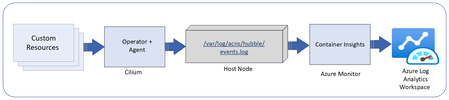
Overview of container network logs Container network logs offer a comprehensive way to monitor network traffic in AKS clusters. Two modes of support, stored-logs and on-demand logs, provides debugging flexibility with cost optimization. The on-demand mode provides a snapshot of logs with queries and visualization with Hubble CLI UI for specific scenarios and does not use log storage to persist the logs. The stored-logs mode when enabled continuously collects and persists logs based on user-defined filters. Logs can be stored either in Azure Log Analytics (managed) or locally (unmanaged). Managed storage: Logs are forwarded to Azure Log Analytics for secure, scalable, and compliant storage. This enables advanced analytics, anomaly detection, and historical trend analysis. Both basic and analytics table plans are supported for storage. Unmanaged storage: Logs are stored locally on the host nodes under /var/log/acns/hubble. These logs are rotated automatically at 50 MB to manage storage efficiently. These logs can be exported to external logging systems or collectors for further analysis. Use cases Connectivity monitoring: Identify and visualize how Kubernetes workloads communicate within the cluster and with external endpoints, helping to resolve application connectivity issues efficiently. Troubleshooting network errors: Gain deep granular visibility into dropped packets, misconfigurations, or errors with details on where and why errors are occurring (TCP/UDP, DNS, HTTP) for faster root cause analysis. Security policy enforcement: Detect and analyze suspicious traffic patterns to strengthen cluster security and ensure regulatory compliance. How it works Container network logs use eBPF technology with Cilium to capture network flows from AKS nodes. Log collection is disabled by default. Users can enable log collection by defining custom resources (CRs) to specify the types of traffic to monitor, such as namespaces, pods, services, or protocols. The Cilium agent collects and processes this traffic, storing logs in JSON format. These logs can either be retained locally or integrated with Azure Monitoring for long-term storage and advanced analytics and visualization with Azure managed Grafana. Fig1: Container network logs overview If using managed storage, users will enable Azure monitor log collection using Azure CLI or ARM templates. Here’s a quick example of enabling container network logs on Azure monitor using the CLI: az aks enable-addons -a monitoring --enable-high-log-scale-mode -g $RESOURCE_GROUP -n $CLUSTER_NAME az aks update --enable-acns \ --enable-retina-flow-logs \ -g $RESOURCE_GROUP \ -n $CLUSTER_NAME Key benefits Faster issue resolution: Detailed logs enable quick identification of connectivity and performance issues. Operational efficiency: Advanced filtering reduces data management overhead. Enhanced application reliability: Proactive monitoring ensures smoother operations. Cost optimization: Customized logging scopes minimize storage and data ingestion costs. Streamlined compliance: Comprehensive logs support audits and security requirements. Observing logs in Azure managed Grafana dashboards Users can visualize container network logs in Azure managed Grafana dashboards, which simplify monitoring and analysis: Flow logs dashboard: View internal communication between Kubernetes workloads. This dashboard highlights metrics such as total requests, dropped packets, and error rates. Error logs dashboard: Easily zoom in only on the logs which show errors for faster log parsing. Service dependency graph: Visualize relationships between services, detect bottlenecks, and optimize network flows. These dashboards provide filtering options to isolate specific logs, such as DNS errors or traffic patterns, enabling efficient root cause analysis. Summary statistics and top-level metrics further enhance understanding of cluster health and activity. Fig 2: Azure managed Grafana dashboard for container network logs Conclusion Container network logs for AKS offer a powerful and cost optimized way to monitor and analyze network activity, enhance troubleshooting, security, and ensure compliance. To get started, enable Advanced Container Networking Services in your AKS cluster and configure custom resources for logging. Visualize your logs in Grafana dashboards and Azure Log Analytics to unlock actionable insights. Learn more here.1.7KViews3likes0CommentsSecuring Microservices with Cilium and Istio
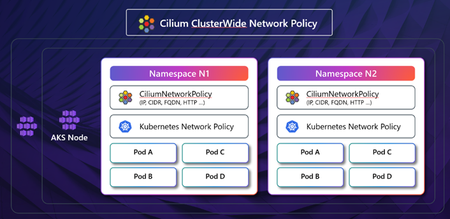
The adoption of Kubernetes and containerized applications is booming, leading to new challenges in visibility and security. As the landscape of cloud-native applications is rapidly evolving so are the number of sophisticated attacks targeting containerized workloads. Traditional tools often fall short in tracking the usage and traffic flows within these applications. The immutable nature of container images and the short lifespan of containers further necessitate addressing vulnerabilities early in the delivery pipeline. Comprehensive Security Controls in Kubernetes Microsoft Azure offers a range of security controls to ensure comprehensive protection across various layers of the Kubernetes environment. These controls include but are not limited to: Cluster Security: Features such as private clusters, managed cluster identity, and API server authorized ranges enhance security at the cluster level. Node and Pod Security: Hardened bootstrapping, confidential nodes, and pod sandboxing are implemented to secure the nodes and pods within a cluster. Network Security: Advanced Container Networking Services and Cilium Network policies offer granular control over network traffic. Authentication and Authorization: Azure Policy in-cluster enforcement, Entra authentication, and Istio mTLS and authorization policies provide robust identity and access management. Image Scanning: Microsoft Defender for Cloud provides both image and runtime scanning to identify vulnerabilities and threats. Let’s highlight how you can secure micro services while scaling your applications running on Azure Kubernetes Service (AKS) using service mesh for robust traffic management, and network policies for security. Micro segmentation with Network Policies Micro segmentation is crucial for enhancing security within Kubernetes clusters, allowing for the isolation of workloads and controlled traffic between microservices. Azure CNI by Cilium leverages eBPF to provide high-performance networking, security, and observability features. It dynamically inserts eBPF bytecode into the Linux kernel, offering efficient and flexible control over network traffic. Cilium Network Policies enable network isolation within and across Kubernetes clusters. Cilium also provides an identity-based security model, offering Layer 7 (L7) traffic control, and integrates deep observability for L4 to L7 metrics in Kubernetes clusters. A significant advantage of using Azure CNI based on Cilium is its seamless integration with existing AKS environments, requiring minimal modifications to your infrastructure. Note that Cilium Clusterwide Network Policy (CCNP) is not supported at the time of writing this blog post. FQDN Filtering with Advanced Container Networking Services (ACNS) Traditional IP-based policies can be cumbersome to maintain. ACNS allows for DNS-based policies, providing a more granular and user-friendly approach to managing network traffic. This is supported only with Azure CNI powered by Cilium and includes a security agent DNS proxy for FQDN resolution even during upgrades. It’s worth noting that with Cilium’s L7 enforcement, you can control traffic based on HTTP methods, paths, and headers, making it ideal for APIs, microservices, and services that use protocols like HTTP, gRPC, or Kafka. At the time of writing this blog, this capability is not supported via ACNS. More on this in a future blog! AKS Istio Add-On: Mutual TLS (mTLS) and Authorization Policy Istio enhances the security of microservices through its built-in features, including mutual TLS (mTLS) and authorization policies. The Istiod control plane, acting as a certificate authority, issues X.509 certificates to the Envoy sidecar proxies via the Secret Discovery Service (SDS). Integration with Azure Key Vault allows for secure management of root and intermediate certificates. The PeerAuthentication Custom Resource in Istio controls the traffic accepted by workloads. By default, it is set to PERMISSIVE to facilitate migration but can be set to STRICT to enforce mTLS across the mesh. Istio also supports granular authorization policies, allowing for control over IP blocks, namespaces, service accounts, request paths, methods, and headers. The Istio add-on also supports integration with Azure Key Vault (AKV) and the AKV Secrets Store CSI Driver Add-On for plug-in CA certificates, where the root CA lives on a secure machine offline, and the intermediate certs for the Istiod control plane are synced to the cluster by the CSI Driver Add-On. Additionally, certificates for the Istio ingress gateway for TLS termination or SNI passthrough can also be stored in AKV. Defense-In-Depth with Cilium, ACNS and Istio Combining the capabilities of Cilium's eBPF technologies through ACNS and AKS managed Istio addon, AKS provides a defense-in-depth strategy for securing Kubernetes clusters. Azure CNI's Cilium Network Policies and ACNS FQDN filtering enforce Pod-to-Pod and Pod-to-egress policies at Layer 3 and 4, while Istio enforces STRICT mTLS and Layer 7 authorization policies. This multi-layered approach ensures comprehensive security coverage across all layers of the stack. Now, let’s highlight the key steps in achieving this: Step 1: Create an AKS Cluster with Azure CNI (by Cilium), ACNS and Istio Addon enabled. az aks create \ --resource-group $RESOURCE_GROUP \ --name $CLUSTER_NAME \ --location $LOCATION \ --kubernetes-version 1.30.0 \ --node-count 3 \ --node-vm-size standard_d16_v3 \ --enable-managed-identity \ --network-plugin azure \ --network-dataplane cilium \ --network-plugin-mode overlay \ --pod-cidr 192.168.0.0/16 \ --enable-asm \ --enable-acns \ --generate-ssh-keys Step 2: Create Cilium FQDN policy that allows egress traffic to google.com while blocking traffic to httpbin.org. Sample Policy (fqdn-filtering-policy.yaml): apiVersion: cilium.io/v2 kind: CiliumNetworkPolicy metadata: name: sleep-network-policy namespace: foo spec: endpointSelector: matchLabels: app: sleep egress: - toFQDNs: - matchPattern: "*.google.com" - toEndpoints: - matchLabels: "k8s:io.kubernetes.pod.namespace": foo "k8s:app": helloworld - toEndpoints: - matchLabels: "k8s:io.kubernetes.pod.namespace": kube-system "k8s:k8s-app": kube-dns toPorts: - ports: - port: "53" protocol: ANY Apply policy: kubectl apply -f fqdn-filtering-policy.yaml Step 3: Create an Istio deny-by-default AuthorizationPolicy. This denies all requests across the mesh unless specifically authorized with an “ALLOW” policy. Sample Policy (istio-deny-all-authz.yaml): apiVersion: security.istio.io/v1 kind: AuthorizationPolicy metadata: name: allow-nothing namespace: aks-istio-system spec: {} Apply policy: kubectl apply -f istio-deny-all-authz.yaml Step 4: Deploy an Istio L7 AuthorizationPolicy to explicitly allow traffic to the “sample” pod in namespace foo for http “GET” requests. Sample Policy (istio-L7-allow-policy.yaml): apiVersion: security.istio.io/v1 kind: AuthorizationPolicy metadata: name: allow-get-requests namespace: foo spec: selector: matchLabels: app: sample action: ALLOW rules: - to: - operation: methods: [“GET”] Apply policy: kubectl apply -f istio-L7-allow-policy.yaml Step 5: Deploy an Istio strict mTLS PeerAuthentication Resource to enforce that all workloads in the mesh only accept Istio mTLS traffic. Sample PeerAuthentication (istio-peerauth.yaml): apiVersion: security.istio.io/v1 kind: PeerAuthentication metadata: name: strict-mtls namespace: aks-istio-system spec: mtls: mode: STRICT Apply policy: kubectl apply -f istio-peerauth.yaml These examples demonstrate how you can manage traffic to specific FQDNs and enforce L7 authorization rules in your AKS cluster. Conclusion Traditional IP and perimeter security models are insufficient for the dynamic nature of cloud-native environments. More sophisticated security mechanisms, such as identity-based policies and DNS names, are required. Azure CNI, powered by Cilium and ACNS, provides robust FQDN filtering and Layer 3/4 Network Policy enforcement. The Istio add-on offers mTLS for identity-based encryption and Layer7 authorization policies. A defense-in-depth model, incorporating both Azure CNI and service mesh mechanisms, is recommended for maximizing security posture. So, give these a try and let us know (Azure Kubernetes Service Roadmap (Public)) how we can evolve our roadmap to help you build the best with Azure. Credit(s): Niranjan Shankar, Sr. Software Engineer, Microsoft2.7KViews3likes0CommentsJuly 2025 Recap: Azure Database for PostgreSQL
Hello Azure Community, July delivered a wave of exciting updates to Azure Database for PostgreSQL! From Fabric mirroring support for private networking to cascading read replicas, these new features are all about scaling smarter, performing faster, and building better. This blog covers what’s new, why it matters, and how to get started. Catch Up on POSETTE 2025 In case you missed POSETTE: An Event for Postgres 2025 or couldn't watch all of the sessions live, here's a playlist with the 11 talks all about Azure Database for PostgreSQL. And, if you'd like to dive even deeper, the Ultimate Guide will help you navigate the full catalog of 42 recorded talks published on YouTube. Feature Highlights Upsert and Script activity in ADF and Azure Synapse – Generally Available Power BI Entra authentication support – Generally Available New Regions: Malaysia West & Chile Central Latest Postgres minor versions: 17.5, 16.9, 15.13, 14.18 and 13.21 Cascading Read Replica – Public Preview Private Endpoint and VNet support for Fabric Mirroring - Public Preview Agentic Web with NLWeb and PostgreSQL PostgreSQL for VS Code extension enhancements Improved Maintenance Workflow for Stopped Instances Upsert and Script activity in ADF and Azure Synapse – Generally Available We’re excited to announce the general availability of Upsert method and Script activity in Azure Data Factory and Azure Synapse Analytics for Azure Database for PostgreSQL. These new capabilities bring greater flexibility and performance to your data pipelines: Upsert Method: Easily merge incoming data into existing PostgreSQL tables without writing complex logic reducing overhead and improving efficiency. Script Activity: Run custom SQL scripts as part of your workflows, enabling advanced transformations, procedural logic, and fine-grained control over data operations. Together, these features streamline ETL and ELT processes, making it easier to build scalable, declarative, and robust data integration solutions using PostgreSQL as either a source or sink. Visit our documentation guide for Upsert Method and script activity to know more. Power BI Entra authentication support – Generally Available You can now use Microsoft Entra ID authentication to connect to Azure Database for PostgreSQL from Power BI Desktop. This update simplifies access management, enhances security, and helps you support your organization’s broader Entra-based authentication strategy. To learn more, please refer to our documentation. New Regions: Malaysia West & Chile Central Azure Database for PostgreSQL has now launched in Malaysia West and Chile Central. This expanded regional presence brings lower latency, enhanced performance, and data residency support, making it easier to build fast, reliable, and compliant applications, right where your users are. This continues to be our mission to bring Azure Database for PostgreSQL closer to where you build and run your apps. For the full list of regions visit: Azure Database for PostgreSQL Regions. Latest Postgres minor versions: 17.5, 16.9, 15.13, 14.18 and 13.21 PostgreSQL latest minor versions 17.5, 16.9, 15.13, 14.18 and 13.21 are now supported by Azure Database for PostgreSQL flexible server. These minor version upgrades are automatically performed as part of the monthly planned maintenance in Azure Database for PostgreSQL. This upgrade automation ensures that your databases are always running on the most secure and optimized versions without requiring manual intervention. This release fixes two security vulnerabilities and over 40 bug fixes and improvements. To learn more, please refer PostgreSQL community announcement for more details about the release. Cascading Read Replica – Public Preview Azure Database for PostgreSQL supports cascading read replica in public preview capacity. This feature allows you to scale read-intensive workloads more effectively by creating replicas not only from the primary database but also from existing read replicas, enabling two-level replication chains. With cascading read replicas, you can: Improve performance for read-heavy applications. Distribute read traffic more efficiently. Support complex deployment topologies. Data replication is asynchronous, and each replica can serve as a source for additional replicas. This setup enhances scalability and flexibility for your PostgreSQL deployments. For more details read the cascading read replicas documentation. Private Endpoint and VNET Support for Fabric Mirroring - Public Preview Microsoft Fabric now supports mirroring for Azure Database for PostgreSQL flexible server instances deployed with Virtual Network (VNET) integration or Private Endpoints. This enhancement broadens the scope of Fabric’s real-time data replication capabilities, enabling secure and seamless analytics on transactional data, even within network-isolated environments. Previously, mirroring was only available for flexible server instances with public endpoint access. With this update, organizations can now replicate data from Azure Database for PostgreSQL hosted in secure, private networks, without compromising on data security, compliance, or performance. This is particularly valuable for enterprise customers who rely on VNETs and Private Endpoints for database connectivity from isolated networks. For more details visit fabric mirroring with private networking support blog. Agentic Web with NLWeb and PostgreSQL We’re excited to announce that NLWeb (Natural Language Web), Microsoft’s open project for natural language interfaces on websites now supports PostgreSQL. With this enhancement, developers can leverage PostgreSQL and NLWeb to transform any website into an AI-powered application or Model Context Protocol (MCP) server. This integration allows organizations to utilize a familiar, robust database as the foundation for conversational AI experiences, streamlining deployment and maximizing data security and scalability. For more details, read Agentic web with NLWeb and PostgreSQL blog. PostgreSQL for VS Code extension enhancements PostgreSQL for VS Code extension is rolling out new updates to improve your experience with this extension. We are introducing key connections, authentication, and usability improvements. Here’s what we improved: SSH connections - You can now set up SSH tunneling directly in the Advanced Connection options, making it easier to securely connect to private networks without leaving VS Code. Clearer authentication setup - A new “No Password” option eliminates guesswork when setting up connections that don’t require credentials. Entra ID fixes - Improved default username handling, token refresh, and clearer error feedback for failed connections. Array and character rendering - Unicode and PostgreSQL arrays now display more reliably and consistently. Azure Portal flow - Reuses existing connection profiles to avoid duplicates when launching from the portal. Don’t forget to update to the latest version in the Marketplace to take advantage of these enhancements and visit our GitHub to learn more about this month’s release. Improved Maintenance Workflow for Stopped Instances We’ve improved how scheduled maintenance is handled for stopped or disabled PostgreSQL servers. Maintenance is now applied only when the server is restarted - either manually or through the 7-day auto-restart rather than forcing a restart during the scheduled maintenance window. This change reduces unnecessary disruptions and gives you more control over when updates are applied. You may notice a slightly longer restart time (5–8 minutes) if maintenance is pending. For more information, refer Applying Maintenance on Stopped/Disabled Instances. Azure Postgres Learning Bytes 🎓 Set Up HA Health Status Monitoring Alerts This section will talk about setting up HA health status monitoring alerts using Azure Portal. These alerts can be used to effectively monitor the HA health states for your server. To monitor the health of your High Availability (HA) setup: Navigate to Azure portal and select your Azure Database for PostgreSQL flexible server instance. Create an Alert Rule Go to Monitoring > Alerts > Create Alert Rule Scope: Select your PostgreSQL Flexible Server Condition: Choose the signal from the drop down (CPU percentage, storage percentage etc.) Logic: Define when the alert should trigger Action Group: Specify where the alert should be sent (email, webhook, etc.) Add tags Click on “Review + Create” Verify the Alert Check the Alerts tab in Azure Monitor to confirm the alert has been triggered. For deeper insight into resource health: Go to Azure Portal > Search for Service Health > Select Resource Health. Choose Azure Database for PostgreSQL Flexible Server from the dropdown. Review the health status of your server. For more information, check out the HA Health status monitoring documentation guide. Conclusion That’s a wrap for our July 2025 feature updates! Thanks for being part of our journey to make Azure Database for PostgreSQL better with every release. We’re always working to improve, and your feedback helps us do that. 💬 Got ideas, questions, or suggestions? We’d love to hear from you: https://aka.ms/pgfeedback 📢 Want to stay on top of Azure Database for PostgreSQL updates? Follow us here for the latest announcements, feature releases, and best practices: Azure Database for PostgreSQL Blog Stay tuned for more updates in our next blog!826Views2likes0CommentsSecure, High-Performance Networking for Data-Intensive Kubernetes Workloads
In today’s data-driven world, AI and high-performance computing (HPC) workloads demand a robust, scalable, and secure networking infrastructure. As organizations rely on Kubernetes to manage these complex workloads, the need for advanced network performance becomes paramount. In this blog series, we explore how Azure CNI powered by Cilium, built on eBPF technology, is transforming Kubernetes networking. From high throughput and low latency to enhanced security and real-time observability, discover how these cutting-edge advancements are paving the way for secure, high-performance AI workloads. Ready to optimize your Kubernetes clusters?1.9KViews2likes0CommentsWhat’s new in AKS networking: Connectivity, performance, and observability
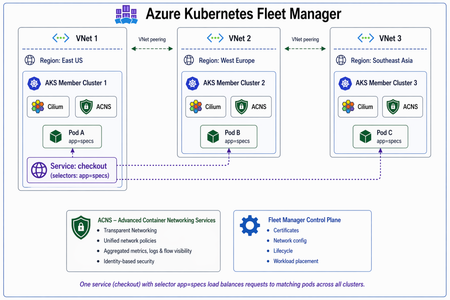
As organizations scale their cloud-native applications, networking requirements continue to evolve. AI and high-performance computing workloads demand high-throughput, low-latency connectivity, applications increasingly span multiple Kubernetes clusters and enterprises need greater control over how workload traffic is routed and isolated. At the same time, platform teams need deeper network visibility that is customizable without the complexity and cost of collecting unnecessary data. At Microsoft, our focus is to simplify these AKS networking challenges, enabling customers to build and scale AI applications without having to manage increasingly complex networking infrastructure. This November, container networking in Azure is introducing four capabilities designed to help customers build, scale, and operate the next generation of applications on AKS. These advancements address three key customer scenarios: · Connect distributed applications: Simplify connectivity and service discovery across Kubernetes clusters, making it easier to build and manage distributed applications. · Enable AI and specialized workloads: Support high-performance networking for distributed AI training and HPC, along with flexible network configurations for data-intensive and specialized applications. · Operate with customizable visibility and control: Gain deeper insights into application networking, troubleshoot issues faster, and manage observability costs through targeted telemetry collection. Together, these capabilities expand what customers can run on AKS while reducing the complexity of the underlying networking infrastructure. Connect distributed applications Cross-cluster networking for Azure Kubernetes Fleet Manager | Generally Available As enterprises scale their applications across multiple Kubernetes clusters, connecting services across cluster boundaries often requires additional networking infrastructure, complex configurations, and operational overhead. With the general availability of cross-cluster networking for Azure Kubernetes Fleet Manager, part of Advanced Container Networking Services, customers can connect workloads across AKS clusters without deploying and managing gateways or proxies. For example, an enterprise running applications across multiple AKS clusters can enable services to discover and communicate with each other as though they were running within a single cluster. Built on Cilium, this capability also extends network policy enforcement and observability across cluster boundaries. The result is simpler multi-cluster application architectures, reduced operational complexity, and greater visibility into application connectivity as environments scale. Learn more about cross-cluster networking at: https://learn.microsoft.com/en-us/azure/kubernetes-fleet/concepts-cross-cluster-networking Enable AI and specialized workloads Multi-NIC pods for AKS | Public Preview Traditional Kubernetes networking provides a single primary network interface for application traffic. However, enterprises running specialized workloads often need to separate different types of network traffic to meet their performance, connectivity, and isolation requirements. With Multi-NIC pods support in AKS, customers can attach multiple network interfaces to Kubernetes nodes and workloads, enabling greater control over how traffic is routed. For example, an enterprise running data-intensive applications can use separate network interfaces for application communication and storage traffic, helping isolate workloads and optimize network resource utilization. Multi-NIC pods give customers greater flexibility to design Kubernetes networking architectures around their application requirements, without having to manage additional networking components themselves. Learn more about Multi-NIC pods at: https://learn.microsoft.com/en-us/azure/aks/multiple-network-interfaces-for-pods-overview Managed support for DRANET for RDMA | Generally Available AI training, machine learning, and high-performance computing workloads require fast, efficient communication between GPUs and compute resources. Configuring and managing the specialized networking infrastructure needed for these workloads can introduce significant operational complexity. With Managed support for DRANET for RDMA NICs in AKS, we're simplifying access to high-throughput, low-latency networking through a managed experience that supports topology-aware resource allocation. For example, organizations running distributed AI training workloads can more easily provision RDMA networking resources to support accelerated communication between compute nodes, without taking on the complexity of managing the underlying networking configuration. This enables customers to focus on scaling their AI and HPC workloads while taking advantage of the performance capabilities of RDMA-enabled Azure infrastructure. Learn more about managed support for DRANET for RDMA at: https://learn.microsoft.com/en-gb/azure/aks/managed-support-for-dranet?tabs=add-ubuntu-rdma-node-pool Operate with customizable visibility and control Configurable dimensions in Advanced Container Networking Services observability | Generally Available Performance and connectivity are only part of operating cloud-native applications at scale. Platform, security, and SRE teams also need the right level of network visibility to troubleshoot applications, investigate threats, and meet compliance requirements. With configurable dimensions for container network observability in Advanced Container Networking Services, customers can now scope the traffic they care about and choose the level of detail to retain. For example, a security team investigating suspicious outbound traffic can retain the DNS query, source pod IP, and destination IP for the affected workload. A security engineer can collect detailed records for a failing namespace, while a compliance team can retain FQDN information for selected egress-facing applications. Customers can now also select network observations by Cilium security identity to deeply investigate unexpected outbound activity and filter logs with external destination IPs and destination port-distribution metrics. These capabilities help platform engineers understand outbound communication patterns and give application teams more context when investigating changes in how a service communicates. The result is persistent, actionable network visibility for security, troubleshooting, and compliance, with control over the scope and cost of the data collected. Learn more about configuring Container Network Logs at: https://learn.microsoft.com/en-us/azure/aks/container-network-observability-logs These announcements reflect our continued investment in making Azure Kubernetes networking simpler to consume while supporting an increasingly diverse set of workloads. Whether customers are connecting applications across clusters, isolating network traffic for specialized workloads, accelerating communication for AI and HPC applications, or building deeper observability, our focus remains the same: deliver the networking capabilities customers need, with less infrastructure to manage and greater flexibility to scale. We're excited to bring these capabilities to our customers and look forward to connecting with the cloud-native community at KubeCon and Ignite.741Views1like1Comment