open at microsoft
20 Topics
URGENT: Microsoft Edge incorrectly flags paytracc.com as typosquatting after multiple reports
Microsoft Edge Website Typo Protection incorrectly flags https://paytracc.com as a possible misspelling of paytrace.com. Paytracc.com is the legitimate official domain of PayTracc, an independent financial technology product. “PayTracc” is the intentional registered brand spelling and is not impersonating or affiliated with PayTrace. The warning has continued despite repeated reports through the “Report that this site URL is not a misspelling” option. Technical verification: • https://paytracc.com returns HTTP 200 OK. • http://paytracc.com returns HTTP 301 and redirects to HTTPS. • A valid TLS certificate and HSTS are enabled. • Chrome and other browsers do not display this warning. • The issue is reproducible only in Microsoft Edge Website Typo Protection. This false positive is discouraging customers from accessing the website. Anyways to resolve this please? Affected domain: https://paytracc.com Incorrect suggested domain: paytrace.com5Views0likes0Comments
Is there no way to get better support for Azure - esp for SEV A tickets
We have had a sev A ticket open for over 5 days, and are incurring thousands in losses every day, and despite assurances from the Azure Support that it is being solved in hours and then having confirmations that it is solved, the issue is still not solved. I have asked numerous times to get our teams in touch with actual microsoft employees, not front end contractors, who is more like level 1 support, and just running messages between customer and back end team, and really are powerless to handle any suport issues themselves, and they are on complete mercy of "other teams" yet as a customer, apparantly we cant even get on a call with these other teams, and the poor front end contractors are getting the brunt of our pain. Absolutely are in the dark, as to what is actually happening in the back end, other than "trust me bro" we are working on it. No eta, no explanation.. hard to fathom how this can go on like this530Views3likes6CommentsApplying DevOps Principles on Lean Infrastructure. Lessons From Scaling to 102K Users.
Hi Azure Community, I'm a Microsoft Certified DevOps Engineer, and I want to share an unusual journey. I have been applying DevOps principles on traditional VPS infrastructure to scale to 102,000 users with 99.2% uptime. Why am I posting this in an Azure community? Because I'm planning migration to Azure in 2026, and I want to understand: What mistakes am I already making that will bite me during migration? THE CURRENT SETUP Platform: Social commerce (West Africa) Users: 102,000 active Monthly events: 2 million Uptime: 99.2% Infrastructure: Single VPS Stack: PHP/Laravel, MySQL, Redis Yes - one VPS. No cloud. No Kubernetes. No microservices. WHY I HAVEN'T USED AZURE YET Honest answer: Budget constraints in emerging market startup ecosystem. At our current scale, fully managed Azure services would significantly increase monthly burn before product-market expansion. The funding we raised needs to last through growth milestones. The trade: I manually optimize what Azure would auto-scale. I debug what Application Insights would catch. I do by hand what Azure Functions would automate. DEVOPS PRACTICES THAT KEPT US RUNNING Even on single-server infrastructure, core DevOps principles still apply: CI/CD Pipeline (GitHub Actions) • 3-5 deployments weekly • Zero-downtime deploys • Automated rollback on health check failures • Feature flags for gradual rollouts Monitoring & Observability • Custom monitoring (would love Application Insights) • Real-time alerting • Performance tracking and slow query detection • Resource usage monitoring Automation • Automated backups • Automated database optimization • Automated image compression • Automated security updates Infrastructure as Code • Configs in Git • Deployment scripts • Environment variables • Documented procedures Testing & Quality • Automated test suite • Pre-deployment health checks • Staging environment • Post-deployment verification KEY OPTIMIZATIONS Async Job Processing • Upload endpoint: 8 seconds → 340ms • 4x capacity increase Database Optimization • Feed loading: 6.4 seconds → 280ms • Strategic caching • Batch processing Image Compression • 3-8MB → 180KB (94% reduction) • Critical for mobile users Caching Strategy • Redis for hot data • Query result caching • Smart invalidation Progressive Enhancement • Server-rendered pages • 2-3 second loads on 4G WHAT I'M WORRIED ABOUT FOR AZURE MIGRATION This is where I need your help: Architecture Decisions • App Service vs Functions + managed services? • MySQL vs Azure SQL? • When does cost/benefit flip for managed services? Cost Management • How do startups manage Azure costs during growth? • Reserved instances vs pay-as-you-go? • Which Azure services are worth the premium? Migration Strategy • Lift-and-shift first, or re-architect immediately? • Zero-downtime migration with 102K active users? • Validation approach before full cutover? Monitoring & DevOps • Application Insights - worth it from day one? • Azure DevOps vs GitHub Actions for Azure deployments? • Operational burden reduction with managed services? Development Workflow • Local development against Azure services? • Cost-effective staging environments? • Testing Azure features without constant bills? MY PLANNED MIGRATION PATH Phase 1: Hybrid (Q1 2026) • Azure CDN for static assets • Azure Blob Storage for images • Application Insights trial • Keep compute on VPS Phase 2: Compute Migration (Q2 2026) • App Service for API • Azure Database for MySQL • Azure Cache for Redis • VPS for background jobs Phase 3: Full Azure (Q3 2026) • Azure Functions for processing • Full managed services • Retire VPS QUESTIONS FOR THIS COMMUNITY Question 1: Am I making migration harder by waiting? Should I have started with Azure at higher cost to avoid technical debt? Question 2: What will break when I migrate? What works on VPS but fails in cloud? What assumptions won't hold? Question 3: How do I validate before cutting over? Parallel infrastructure? Gradual traffic shift? Safe patterns? Question 4: Cost optimization from day one? What to optimize immediately vs later? Common cost mistakes? Question 5: DevOps practices that transfer? What stays the same? What needs rethinking for cloud-native? THE BIGGER QUESTION Have you migrated from self-hosted to Azure? What surprised you? I know my setup isn't best practice by Azure standards. But it's working, and I've learned optimization, monitoring, and DevOps fundamentals in practice. Will those lessons transfer? Or am I building habits that cloud will expose as problematic? Looking forward to insights from folks who've made similar migrations. --- About the Author: Microsoft Certified DevOps Engineer and Azure Developer. CTO at social commerce platform scaling in West Africa. Preparing for phased Azure migration in 2026. P.S. I got the Azure certifications to prepare for this migration. Now I need real-world wisdom from people who've actually done it!388Views0likes1CommentBurst / B series VMs
Hi everyone, in Cost Management reports I see a line item called “Windows Server Burst” associated with B-Series VMs. I’ve been trying to understand this for a while, but I haven’t been able to find any official Microsoft documentation that clearly explains what this charge covers. My assumption is that it refers to the Windows Server license cost for burstable VMs, and not an additional variable charge when the CPU actually goes into burst mode but I’d like to confirm. Has anyone found an official Microsoft reference or can provide clarification? Thanks a lot!233Views0likes1Comment
Scaling Smart with Azure: Architecture That Works
Hi Tech Community! I’m Zainab, currently based in Abu Dhabi and serving as Vice President of Finance & HR at Hoddz Trends LLC a global tech solutions company headquartered in Arkansas, USA. While I lead on strategy, people, and financials, I also roll up my sleeves when it comes to tech innovation. In this discussion, I want to explore the real-world challenges of scaling systems with Microsoft Azure. From choosing the right architecture to optimizing performance and cost, I’ll be sharing insights drawn from experience and I’d love to hear yours too. Whether you're building from scratch, migrating legacy systems, or refining deployments, let’s talk about what actually works.391Views0likes1Comment
Former Employer Abuse
My former employer, Albert Williams, president of American Security Force Inc., keeps adding my outlook accounts, computers and mobile devices to the company's azure cloud even though I left the company more than a year ago. What can I do to remove myself from his grip? Does Microsoft have a solution against abusive employers?169Views0likes0Comments
Conditional access policy or User risk policy set to force password at high risk doesnt work
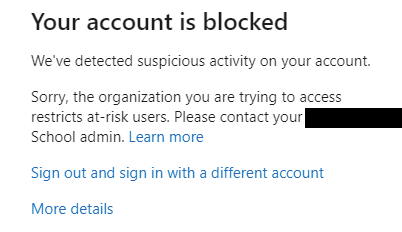
Hi all, When setting Conditional access policy or User risk policy set to force password at high risk doesn't work instead I get a blocked windows on users. I have set SSPR too and I think this is a requirement What am I doing wrong?720Views0likes0Comments
Azure Sentinel Updates
Hello Folks !! I am back with a new blog , with a new update related to azure security related component - "Azure Sentinel". Here I will share the latest updates related to azure sentinel . We all know how important is security related aspect this day's . So frequent changes are needed related to security in cloud. To protect our data and infrastructure. First let us understand what actually is Azure sentinel and how it works. What is Microsoft Azure sentinel Microsoft Sentinel is a scalable, cloud-native, security native and data delivery tool . It delivers security analytics data of your infrastructure and also threat related issue's across the enterprise, it provides a good solution for attack detection, threat visibility, and threat response. Some of the most common use of Azure sentinel is as follows - 1) It collects data from your infrastructure and native applications and provide a proper UI for this. 2) It detects the thread and act accordingly. 3) Investigates threat with Azure AI. 4) Responds to threat actively with automation acts. How to install or activate azure sentinel for your use - Yo can use this Microsoft link to get started - https://docs.microsoft.com/en-us/azure/sentinel/quickstart-onboard It will help you!! Now lets move to our headline , what are the updates that Azure sentinel have - 1) New automation rules - They have now automated runbooks that are built on alert trigger . Previously this can be run only by attaching them to analytics rules on an individual basis. With this alert trigger a single automation rule can be attached to many analytics rules .It will allow you manage playbooks and analytics in a centralized way. 2) Integrated Data loss prevention in Microsoft sentinel - You can view all the DLP alerts under incidents in Microsoft 365 defender incident queue. You can retain the alerts in 180 day's . You can also hunt for compliance logs for the security logs under advance hunting. 3) Custom Log ingestion - It allows you to send custom-format logs from any data source to your Log Analytics workspace, and store those logs either in certain specific standard tables, or in custom-formatted tables that you create. 4) View MITRE support - Microsoft Sentinel now provides a new MITRE page, which highlights the MITRE tactic and technique coverage you currently have, and can configure, for your organization. Select items from the Active menus at the top of the page to view the detections currently active in your workspace, and the simulated detections available for you to configure. 5) Restore archive logs from search - When you need to do a full investigation on data stored in archived logs, restore a table from the search page in Microsoft Sentinel. It Specifies a target table and time range for the data you want to restore. Within a few minutes, the log data is restored and available within the Log Analytics workspace. Thanks!! That's all for this updates, will be back with another blog for further updates..Solved3.4KViews1like3CommentsAzureFunBytes - Episode 1 - Jay covers Azure Storage and solves three problems using it.
AzureFunBytes - A Twitch show on how to use all the fundamentals that are Microsoft Azure. Today Jay covers Azures Storage and solves three problems using it. How can I store objects for my app in the cloud? How do I create a static web site using blob storage? How do I increase storage on an Azure Linux Virtual Machine? Jay takes questions and gives you a start with code and procedure to deploy it. Follow AzureFunBytes on Twitter and Twitch for updates on future episodes. Links for you! Introduction to the core Azure Storage services What is Azure Blob storage? Introduction to Azure managed disks Use the portal to attach a data disk to a Linux VM - Microsoft Learn: Core Cloud Services - Azure data storage options Microsoft Learn: Azure Fundamentals Microsoft LearnTV 24*7 streaming Azure content Get $200 in free Azure credit along with 12 months of free services734Views0likes0CommentsAzure Web App Service and GitHub Actions (Video Tutorial)
The last time we met, I spent some time showing you how to deploy an application using Azure DevOps and Azure Web App Service. It's helpful to watch the last video to get you some context on how to create a Web App Service in Azure. Today we'll add a new step by introducing the same process of deploying from the master branch of the react-block-basic GitHub repository. GitHub Actions GitHub Actions is an API for cause and effect on GitHub: orchestrate any workflow, based on any event, while GitHub manages the execution, provides rich feedback and secures every step along the way. With GitHub Actions, workflows and steps are just code in a repository, so you can create, share, reuse, and fork your software development practices. Get Fast CI/CD - Any language or platform. YAML builds Live logging Workflows are reusable - like code! (Hello fellow StackOverflow Devs!) Simple stateless react app I love to use this app, react-clock-basic to help people learn with. It's simple has minimal dependencies and is stateless. There's no data source to configure for this, we just simply want a clock to tell us the time. jaydestro / react-clock-basic A basic clock that displays the current date and time React Clock This is a fork of this clock app that includes deployments for Azure Kubernetes Service and Docker. App Service Deployment Method: In Azure cloud shell: git clone https://github.com/jaydestro/react-clock-basic.git az group create --name $NAME --location eastus az network vnet create --name $nameVNET --resource-group $NAME --subnet-name default az acr create --resource-group $NAME--name $NAMEacr --sku Basic --admin-enabled true az acr build --registry $NAMEacr --image react-clock-basic:v1 . Go to portal in Azure, create a new app service, select your resource group, pick linux, pick docker container, create a new service plan, select dev/test - click Docker Drop down source, select Azure Container Registry. Click the registry you created above then select the image name and version. Click Review and create. A basic clock that displays the current date and time Go here for live demo. Component Diagram This project also demonstrates: a typcial React project layout structure babel setup and configuration webpack… View on GitHub Your links to start The video should help provide you with a great start on using this service with your Azure Web App Service. Utilizing resources like GitHub actions can help you on your journey to becoming a Microsoft DevOps Certified Expert. Here are links to documentation and guidance on the next steps including Microsoft Learn, Learn TV, and more! Microsoft Learn: Azure Fundamentals Microsoft Learn: Host a web application with Azure App service Microsoft Docs: App Service Documentation GitHub Actions Documentation react-clock-basic demo app Get 12 Months of free service and $200 for Microsoft Azure If you need more help, reach out in the comments or send me a tweet or find me on LinkedIn. Make sure you like and subscribe to my channel on YouTube and stay up to date on my new tutorials. See you next time as we learn Azure together.1.1KViews0likes0Comments