onboarding
27 Topics
Easy Auth Configuration for Logic App Standard through CI/CD
Problem Statement When Easy Auth (Azure App Service’s built-in authentication and authorization) is enabled on a Logic App Standard, users frequently report that they cannot open the run history. Specifically, the inputs and outputs of the trigger and actions fail to load on the run details page, even though the workflow itself runs and the user has access to the resource. Background — How Easy Auth Interacts with Logic Apps Easy Auth is a feature of Azure App Service. Every request that reaches a Logic App Standard is first routed through the App Service layer, and only then handed off to the Logic App runtime for further processing. When Easy Auth is enabled, App Service authenticates each incoming request and decides whether it should be allowed or blocked — before the Logic App runtime ever sees it. This dual-layer model is what causes the run-history symptom: The Logic App runtime authenticates run-history requests using a SAS token specific to that run, generated from the Logic App access keys. The portal calls that load the inputs and outputs of historical runs do not carry a bearer token — they carry the SAS. Because App Service only knows how to validate Easy Auth tokens (not SAS), it blocks these requests whenever unauthenticatedClientAction is set to disallow unauthenticated traffic. The request never reaches the runtime, so the runtime cannot apply its SAS validation, and the inputs/outputs panel stays empty. Solution There are two ways to fix this, depending on what your security policy allows. Option 1 — Allow unauthenticated requests The simplest fix is to configure Easy Auth to allow unauthenticated requests. This does not mean anyone can invoke the workflow. Instead, all calls (failed and successful) are routed through to the Logic App runtime, and the runtime decides how to handle them: A workflow trigger call with no token → the runtime applies its own auth (SAS, AAD, etc.) and rejects unauthorized invocations. A run-history call carrying a valid SAS → App Service marks it as “failed Easy Auth” but still forwards it; the runtime sees the valid SAS and returns the data. The underlying App Service platform has no knowledge of SAS or any other Logic-App-specific auth scheme, so letting the runtime arbitrate is what makes the run-history experience work. Option 2 — Keep Easy Auth strict, but exclude the runtime paths In many enterprises the security team will not permit “Allow unauthenticated requests.” For those cases, you can leave authentication required but add the runtime endpoints to the excludedPaths list, so App Service skips Easy Auth specifically for those calls. The Logic App runtime continues to authenticate them via SAS. Important: The Azure portal lets you toggle Easy Auth, but it does not expose the excludedPaths setting. You must configure it through ARM, Bicep, the REST API, or CLI — which is exactly why this needs to live in your CI/CD pipeline. There are two ways to apply this through CI/CD. Approach 1 — ARM Template ( Microsoft.Web/sites/config ) Add a Microsoft.Web/sites/config resource of type authsettingsV2 to the same ARM template that deploys the Logic App. Below is the sample template: { "$schema": "https://schema.management.azure.com/schemas/2019-04-01/deploymentTemplate.json#", "contentVersion": "1.0.0.0", "parameters": { "logicAppName": { "type": "string" }, "location": { "type": "string", "defaultValue": "[resourceGroup().location]" }, "tenantID": { "type": "string" }, "ClientID": { "type": "string" } }, "variables": {}, "resources": [ { "type": "Microsoft.Web/sites", "apiVersion": "2022-03-01", "name": "[parameters('logicAppName')]", "location": "[parameters('location')]", "kind": "functionapp,workflowapp", "identity": { "type": "SystemAssigned" }, "properties": { "serverFarmId": "<App Service Plan ID>", "siteConfig": { "appSettings": [ { "name": "FUNCTIONS_EXTENSION_VERSION", "value": "~4" }, { "name": "FUNCTIONS_WORKER_RUNTIME", "value": "dotnet" }, { "name": "AzureWebJobsStorage", "value": "<Storage Account Connection String>" }, { "name": "APP_KIND", "value": "workflowApp" } ] }, "httpsOnly": true } }, { "type": "Microsoft.Web/sites/config", "apiVersion": "2021-02-01", "name": "[concat(parameters('logicAppName'), '/authsettingsV2')]", "location": "[parameters('location')]", "properties": { "platform": { "enabled": true, "runtimeVersion": "~1" }, "globalValidation": { "requireAuthentication": true, "unauthenticatedClientAction": "Return401", "excludedPaths": ["/runtime/*"] }, "identityProviders": { "azureActiveDirectory": { "enabled": true, "registration": { "openIdIssuer": "[concat('https://sts.windows.net/', parameters('tenantID'), '/v2.0')]", "clientId": "parameters('ClientID')", "clientSecretSettingName": "OVERRIDE_USE_MI_FIC_ASSERTION_CLIENTID" }, "login": { "disableWWWAuthenticate": false }, "validation": { "jwtClaimChecks": {}, "allowedAudiences": [], "defaultAuthorizationPolicy": { "allowedPrincipals": {}, "allowedApplications": ["<LIST OF ALLOWED APPLICATIONS ID>"] } } } } }, "dependsOn": [ "[resourceId('Microsoft.Web/sites', parameters('logicAppName'))]" ] } ], "outputs": {} } Key things to notice in the template: requireAuthentication: true and unauthenticatedClientAction: Return401 keep Easy Auth strict for the public surface. excludedPaths: ["/runtime/*"] carves out the runtime endpoints so the SAS-authenticated run-history calls aren’t blocked. allowedApplications lets you whitelist specific AAD app IDs that are allowed to call the workflow. Reference: Microsoft.Web/sites/config — authsettingsV2 (ARM template) · Bicep variant This is the easiest way to add or update Easy Auth on a new or existing Logic App. Approach 2 — REST API call as a post-deployment pipeline step If you’d rather keep your infra template lean (or you’re updating Easy Auth on a Logic App that already exists), add a step to your CI/CD pipeline that calls the App Service authsettingsV2 REST API after the Logic App infra deployment completes. The payload mirrors the properties block from the ARM example above — including excludedPaths: ["/runtime/*"] . This approach is useful when: The Logic App is provisioned by a different pipeline or team than the one owning auth configuration. You need to update Easy Auth settings without redeploying the site. You want to apply environment-specific values (tenant ID, client ID, allowed application list) at release time rather than template-compile time. Reference: Web Apps - Update Auth Settings V2 - REST API (Azure App Service) | Microsoft Learn · GlobalValidation Summary The “inputs/outputs don’t load on run history” symptom after enabling Easy Auth is caused by App Service blocking SAS-authenticated runtime calls before the Logic App runtime can see them. Either allow unauthenticated requests (and let the runtime do all the auth), or keep Easy Auth strict and exclude /runtime/* . Because the portal doesn’t expose excludedPaths , the production-grade fix is to deploy it through CI/CD — either by adding an authsettingsV2 config resource to your ARM template or by calling the App Service auth REST API as a pipeline step after deployment.481Views0likes0CommentsTemplates for Azure Logic Apps Standard: Seeking Your Feedback on UI Wireframes
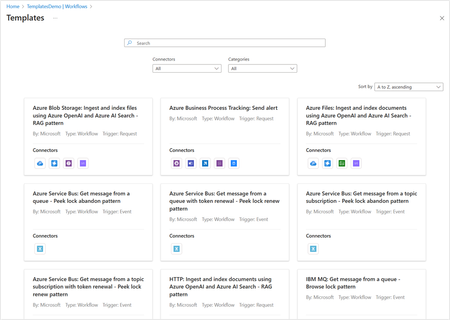
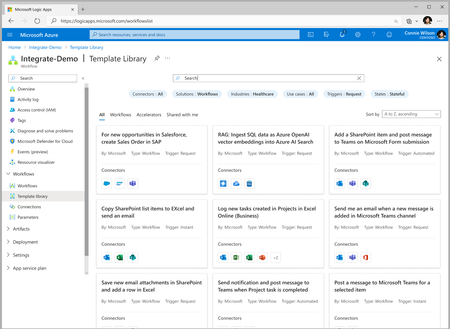
Templates are a great way to accelerate developer productivity and onboard new workloads quickly thereby reducing time to market. As we bring Templates to Logic Apps Standard, we seek your early feedback...2.7KViews0likes0CommentsIskender Dirik’s ScaleUp Masterclass
A transformational hands-on guide to scale your business When: April 09, 2019 9:00 AM Pacific Iskender Dirik invites you to join his Masterclass, a hands-on guide to scaling your business. In this session, Iskender Dirik will deliver a transformational lecture fully packed with his most important learnings from over 20 years of experience as an entrepreneur and VC. He will also share best practices from Andreessen Horowitz, Sequoia Capital, First Round Capital, Y Combinator and more as part of a 360 degree view on all things crucial to scaling your company: Leadership, hiring, sales, marketing, productivity, pitching, and more. Please be sure to register for hands-on best practices that will help you transform your company, scale your business, and improve your overall performance. https://microsoftcloudpartner.eventbuilder.com/event/2848?source=919Views0likes0CommentsReminders – webinars in the last week of March!
5 Essential Capabilities to Effectively Secure Azure with Fortinet When: March 28, 2019 10:00 AM Pacific Architecting a secure cloud infrastructure is crucial to your cloud migration journey. Tune into this exciting webinar to learn about the most important capabilities you need to confidently run any workload on Azure with best in class security using FortiGate-VM and Fortinet Security Fabric. Don't miss out! Register today. https://microsoftcloudpartner.eventbuilder.com/event/3569?source= The "Missing Piece" for Azure Deployments When: March 28, 2019 2:00 PM Pacific Security is the #1 blocker to Azure deployments. Organizations see themselves exposed or compromised, and don’t have the cycles nor in-house expertise to navigate security in the cloud, so they throttle back their cloud deployments. Barracuda’s successfully changed that for thousands of Azure deployments. We’ll focus this webinar on web-facing applications – the most successfully-deployed Azure workloads – and how Barracuda makes it simple to secure those, helps manage costs, and enables customers’ journeys to the cloud. Register Now! https://microsoftcloudpartner.eventbuilder.com/event/3578?source=811Views0likes0CommentsApril webinars - week 1
Leadership and Talent Development in the Digital Age When: April 02, 2019 9:00 AM Pacific Talent development is one of the most important success factors in the digital age, especially for fast-growing companies. Join this exciting webinar to learn more about "Designing Talent," a state-of-the art leadership and talent development framework based on Design Thinking, and discover how to optimally leverage your and your people´s talent and potential. In this session, you will have the opportunity to gain cutting-edge insights to accelerate growth and establish leadership structures, foster an entrepreneurial mindset to get things done with limited resources, and learn to apply a simple, yet highly efficient process to solve all kinds of challenges on an individual, team, and company level. Get ready to get results: Bring your challenge to this webinar and find solutions that work. Register now! https://microsoftcloudpartner.eventbuilder.com/event/2847 Microsoft's Marketplace Vision and Roadmap When: April 03, 2019 10:00 AM Microsoft’s marketplace investments are designed to serve customers of all sizes with the broadest catalog of enterprise software solutions from both Microsoft and our extensive partner ecosystem. Offerings are published into the Azure Marketplace, AppSource, and Cloud Solution Provider catalogues with a variety of business models and deployment methodologies, and we are introducing new capabilities and expanded geographic availability in March. Join product managers Ryan Storgaard and Brian Levenson for an exciting presentation on Microsoft’s vision, roadmap, and recent releases for the marketplace. Be sure to register today! https://microsoftcloudpartner.eventbuilder.com/event/3198 Show Your Influence on Azure Consumption Through Your Customer Deployments When: April 04, 2019 10:00 AM Pacific Do you build a solution on or for Azure that is deployed in a customer's subscription? If so, come and learn about customer usage attribution, a method you can use to measure your impact on Azure consumption and provide a holistic view on your customer deployments within or outside of Azure Marketplace. In this session, we will arm you with more information on how to show your impact on the Azure business from a revenue perspective and how to increase your visibility within the Microsoft Field Sellers team. Don't miss out and register today! https://microsoftcloudpartner.eventbuilder.com/event/3027821Views0likes0CommentsJoin Trend Micro, Qualys, and XentIT to learn about their Healthcare Cloud Security Stack Integrated
When: Wednesday, March 27, 2019 11:00 AM Pacific You know that security and compliance are paramount in the healthcare industry, and are especially top of mind when it comes to moving to the cloud. By being able to proactively manage vulnerabilities, maintain HIPAA compliance, and simplify security management, resources can be freed up to focus on other priorities in your organization’s growth and transformation. The Healthcare Cloud Security Stack is key to IT modernization, helping organizations use cloud services without losing focus on cybersecurity and HIPAA compliance. Healthcare Cloud Security Stack uses the Qualys Cloud Agent, Trend Micro Deep Security, and XentIT Executive Dashboard as a unified Cloud Threat Management solution. Join us to learn about this integrated solution, which brings together best of breed technologies from Trend Micro and Qualys, along with the services and expertise from XentIT into one unified offer for your security and compliance needs. Register now! https://microsoftcloudpartners.eventbuilder.com/event?eventid=x7l3p6&source=841Views0likes0CommentsThe "Missing Piece" for Azure Deployments
When: March 28, 2019 2:00 PM Pacific Security is the #1 blocker to Azure deployments. Organizations see themselves exposed or compromised, and don’t have the cycles nor in-house expertise to navigate security in the cloud, so they throttle back their cloud deployments. Barracuda’s successfully changed that for thousands of Azure deployments. We’ll focus this webinar on web-facing applications – the most successfully-deployed Azure workloads – and how Barracuda makes it simple to secure those, helps manage costs, and enables customers’ journeys to the cloud. Register Now! https://microsoftcloudpartner.eventbuilder.com/event/3578?source=877Views0likes0Comments5 Essential Capabilities to Effectively Secure Azure with Fortinet
When: March 28, 2019 10:00 AM Pacific Architecting a secure cloud infrastructure is crucial to your cloud migration journey. Tune into this exciting webinar to learn about the most important capabilities you need to confidently run any workload on Azure with best in class security using FortiGate-VM and Fortinet Security Fabric. Don't miss out! Register today. https://microsoftcloudpartner.eventbuilder.com/event/3569?source=823Views0likes0CommentsReminders - March webinars!
Commandments of Outstanding Presentation Slides When: March 21, 2019 9:00 AM Pacific Register Now! https://microsoftcloudpartner.eventbuilder.com/event/2786?source= Launching the New H Series of High Performance Computing (HPC) Clusters Tuesday, March 26, 2019 10:00 AM Pacific Don't miss out! Register today. https://microsoftcloudpartners.eventbuilder.com/event?eventid=p9q1p9&source= Securely Migrating to Azure with F5 When: March 27, 2019 10:00 AM Pacific Register Now! https://microsoftcloudpartner.eventbuilder.com/event/3022?source=785Views0likes0Comments