office graph
18 TopicsDelve roadmap?
Delve was kind of the first pass at a display interface for all the cool things happening in the Graph, but there seems to be a slowdown in new development and extending the functionality. I could be imagining that or reading too much into this, but I suspect that Delve's replacement (Delve 2.0 if there is one) is where the development efforts are being placed. Can anyone else confirm this? Are new and better interfaces for the Graph on the horizon?Solved11KViews0likes4Comments
How to show a pop-up when change the profile photo in delve
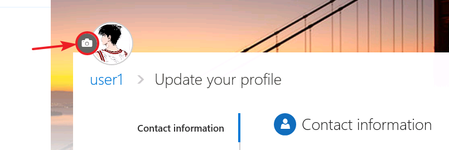
Hi Guys! I found that when user click the camera icon for uploading a new photo in delve , the two users have the different scenario below. So I want to know what's the difference between user1 and user2? How can I make use2 show a pop-up as the same as use1 when he clicks the camera icon? User1: then the pop-up is shown to upload a new photo. User2: then redirect to my-site Edit Details page… I don't like this... Thanks! Tobey1.1KViews0likes1CommentUser / Project Directory Options
We have a very outdated employee directory here that we are looking to update. We're a construction company so it's important that we are not only keeping track of employee contact information, but also current projects, past projects, and project addresses. The ideal scenario is one where you could easily find all the projects a user has worked on as well as find all the users that are working on or have worked on a project. The project information would most likely come from our Oracle HR system or Salesforce. I don't think Delve the way it is, is a good fit, but wondering if anyone has done something similar by perhaps extending Delve (if even possible) in some way or creating some other search based directory that puts these two pieces of information together. Any thoughts? Ideas?1.3KViews0likes3CommentsOffice Graph Disabled, Office Delve features have been enabled automatically
Customer O365 Production is configured to disable Office Graph, hence Delve is not available. However in recent days we are seeing content, that was not showing up for the users on desktop browsers and mobile apps. In browser we can see News from sites on the /sharepoint.aspx page Following Suggested sites From iOS Mobile SharePoint app we can see Frequent From a SharePoint Site on the app, we can see Activity Content in the News Tab What has changed in recent days to exhibit such behaviour? Office Graph is definitely disabled in SharePoint admin center. Any one seen or experienced this? From end user perspective it means that SharePoint App (mobile) is now not showing Office Graph is required messages, but from security and compliance perspective we do need to understand, how/why this content is visible even when Office Graph is disabled.4.8KViews0likes1Comment
Private documents visible but access denied?
Got a client where they were using Delve and not paying much attention, then one day noticed users could see content not shared with them when browing to other users Delve pages. They see a card for a document, but when they click it, they get access denied. If they go to the user's actual OneDrive, they do not see the content, but it shows in Delve. This is not how it's supposed to work and causing some huge worry about security. They chose to disable the Office Graph until we get to the bottom of this. Anyone else seen this?1.4KViews0likes3CommentsUpcoming Webinar: Managers Matter: How Data Science Reveals Good Manager Behaviors
Webinar: June 14 10:00 AM PT | 1:00 PM ET Registration What do managers of highly engaged teams do differently every day? Today, Fortune 100 organizations around the world rely heavily on rich analytics to inform their business decisions about products, markets, and operations. But what about measuring leader behaviors that drive employee engagement and productivity? A Gallup study found that manager behaviors drive at least 70% of the variance in employee engagement. While executives can quantify discrete business outcomes like revenue and profitability, manager behaviors that contribute to those outcomes often remain unclear, unquantified, and unseen. Until now. In this webinar, attendees will learn specific behavior changes that make managers more effective and learn how behavioral analysis of the digital signals from the collaboration systems we use every day can reveal specific behavior changes that make managers more effective. Microsoft executives Ryan Fuller and Nina Shikaloff, published authors in Harvard Business Review, will share insights and best practices based on research conducted by Microsoft for Fortune 100 companies. They will highlight how analysis of collaboration data revealed unique manager behaviors and how those insights can increase manager effectiveness and employee engagement. Register now for this session on June 14 10:00 AM PT | 1:00 PM ET to find out more.1.3KViews0likes1Comment
It's just a feeling
Hello, It's been some time now since Delve was released and most recently the UI was changed. The only down side from my experience was how it removed the ability to rename columns used in the User Profile, About me, Skills, interest etc. the only way for someone to add a PA for exmaple is going to the old UI, if you had custom fields before you have to click the elipses, then go custom to add data...... This is horrible, anyone else growing increasingly annoyed with Delve and the ability to change the Column titles to something that is more related to your Business? I'd be interested in hearing how people are using Delve, how did you sell it to the business, what benefit was the greatest received? Many thanks1.3KViews0likes1CommentDelve questions
When I click on the "waffle" menu in O365 for Delve it takes me to nam.delve.office.com which I think is new. I assume "nam" means North America? We have been using delve.office.com as the URL in our documentation, that will still always work fine, correct? Also, can the Delve Search box exist on a page outside of Delve? Is it a Web Part on its own right? If not, is that in the plans? Thanks, Rob.1.2KViews0likes1CommentCustomizing Delve profile
We have a customized version of SharePoint profiles along with the OOTB Delve profiles. Doing a comparison, this is what we don't find in the Delve profiles: 1. Skype for Business - possibility to initiate a call (you can initiate a chat but not a call). 2. Section - this is a customized field that displays the section we work in, not available in Delve. 3. Yammer - our cusomtized SP profiles include links to people's Yammer profiles and the list of groups they belong to. 4. Presence indicator - strangely not presence indicator enabled in Delve. My question: Is it possible to add custom fields in Delve profiles? and if not, is it on the roadmap?Solved21KViews0likes4CommentsNew Delve User Profile and OneDrive assumptions revisited
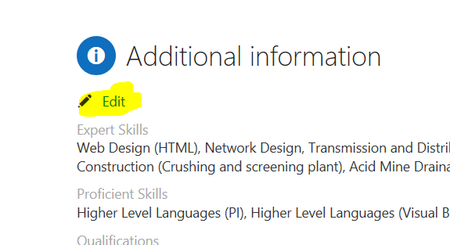
A while back I logged an issue with the behaviour of user profiles and the (false) assumptions that users have their personal OneDrive provisioned. This issue was confirmed and resolved very quickly, which is a testament to the team. https://techcommunity.microsoft.com/t5/Delve/New-Delve-User-Profile-experience-falsely-assumes-OneDrive-is/m-p/53648 I just want to raise a similar issue here that I added to the end of that thread. In hindsight I suspect I should have made it a new thread in the first place. The new issue is this: Today on my clients tenant the "edit" link that allows you to edit "Additional Properties" in the profile has stopped working. I have highlighted below... the link looks like a valid hyperlink but nothing happens when one clicks it. This is a big problem as users have no means to edit custom profile properties. Also note that the users avatar. Unaffected users see the camera icon in the avatar picture but affected users do not. It smells like the same issue as previously reported... javascript not properly testing assumptions about OneDrive (which many enterprises will roll out slowly) Paul1.6KViews0likes3Comments