office add-ins ux
81 Topics
Word on Mac: bring Range.insertText() performance in line with Windows and Web
Summary Word.Range.insertText(text, "Replace") followed by context.sync() takes ~300 ms on Word for Mac desktop, versus ~4.5 ms on Windows and ~16 ms on Word on the web running on the same Mac. Full repro and measurements: OfficeDev/office-js#6721. Why it matters The cost is per round trip, not per character, so it scales with the number of edits. Add-ins that apply many individual range replacements — proofreading, terminology enforcement, review passes, template population — are fast on Windows and unusable on Mac from the exact same codebase. We build a writing-assistance add-in where a single correction pass means hundreds of replacements, and this gap is what currently prevents us from shipping it to our Mac users. Why we don't think this is expected behaviour This was filed as a bug and we were told it's by design and belongs here as an idea. We'd like to challenge that: Word on the web, in a browser, on the very same Mac, is roughly 19x faster than the native Mac host. That rules out hardware, macOS, and the general cost of the Office.js bridge, and points at the Mac host's insert/sync round trip specifically. What we're asking for Bring Range.insertText() round-trip latency on Mac into the same order of magnitude as Windows and the web. Failing that, publish the supported pattern for applying many replacements on Mac without paying the per-sync()cost. Document the current Mac performance characteristics in the Office.js docs.
Office.js API Request: Context-Anchored Sandboxed Web Surfaces for Excel, Word, and PowerPoint
Office Add-ins currently provide cross-platform task panes, dialogs, and add-in commands. However, developers cannot display sandboxed and interactive web content anchored to a selected document object without inserting a native shape, image, text box, content control, or other persistent Office object. I propose a cross-platform Context-Anchored Web Surface API for Excel, Word, and PowerPoint. The API should allow an Office Add-in to attach a sandboxed web card to the current selection or to a supported document object, including: Excel ranges, table cells, charts, images, or shapes Word text ranges, paragraphs, table cells, images, or content controls PowerPoint text ranges, shapes, images, table cells, or slides The surface should not become part of the native document drawing layer unless the developer explicitly requests conversion to a document object. Office should manage: Position relative to the anchor Focus and keyboard interaction Security boundaries Z-order and clipping Scrolling and zoom behavior Word document reflow PowerPoint editing and presentation modes Surface lifetime and restoration Cross-platform behavior The proposed API should provide: A unified cross-host anchor abstraction Persistent anchor identifiers Selection, session, document, and manual lifetime modes Preview, interactive, and editor interaction modes Sandboxed iframe or WebView content Automatic viewport-aware placement Host-managed repositioning during scrolling, zooming, layout changes, or document reflow Explicit print, PDF export, image export, and presentation rendering policies Message passing between the Office Add-in runtime and the contextual surface Requirement-set detection across Windows, macOS, Office on the web, and supported mobile clients An example API could look like: Office.context.ui.contextualSurfaces.create({ anchor: Office.context.document.getSelectionAnchor(), source: { url: “https://example.com/context-card” }, placement: { preferred: “right”, keepInViewport: true, followAnchor: true }, interaction: { mode: “interactive”, dismissOnEscape: true }, lifetime: { mode: “document”, restoreOnOpen: true }, rendering: { mode: “authoringOnly”, includeInPrint: false, includeInExport: false } }); This would enable contextual experiences such as: Chemical compound and molecular structure cards Biomedical annotations Citation and literature tools Translation and terminology previews Financial and company data cards Educational explanations AI-assisted review tools Domain-specific document annotations Today, developers must choose between a fixed task pane and native document objects. A host-managed contextual web surface would provide a secure and consistent middle layer while preserving document integrity and cross-platform compatibility.53Views0likes0Comments
Support custom functions downstream of iterative (circular) calculation - currently return #CALC!
Office.js custom functions in Excel return #CALC! whenever any of their precedents involve a circular reference chain resolved by iterative calculation, even when the function itself is not part of the loop. (Tracked in https://github.com/OfficeDev/office-js/issues/4738, open since July 2024.) Many common financial usecases require iterative calculations as part of standard practices. As an example, average-balance interest with iterative calculation is the mainstream convention in leveraged-finance modeling. Interest expense depends on the average debt balance, which depends on cash paydown, which depends on interest expense. Analysts across banking and private equity resolve this loop with Excel's iterative calculation setting. The same pattern appears in revolver/cash-sweep modeling and fund fee/NAV calculations. These workbooks worked for decades with XLL and VBA UDFs. Any custom function consuming a model's outputs (e.g. an add-in function that writes results back to an external platform) is by definition downstream of the circular chain, so it always fails in these models. We've verified: a custom function with literal arguments works; the same function with an argument fed from the converged loop returns #CALC!; severing the dependency with IF(TRUE, value, FN(...)) makes it work again. This blocks migration from legacy XLL/VBA add-ins to the modern Custom Functions API for financial-modeling users. The ask: custom functions downstream of a circular chain should evaluate against the loop's converged values after the iteration pass completes — matching legacy XLL/VBA UDF behavior. Custom functions don't need to participate in the iteration itself.
Show "Loading add-in" before the task pane web app is available
Product Office.js / Outlook Classic (Task Pane Add-ins) Problem Description When a task pane add-in is opened in Outlook Classic, there can be a significant delay before the add-in's web application is displayed. During this phase, users often see a blank or empty task pane without any indication that the add-in is still loading. Based on our observations, this delay frequently occurs before the add-in page itself is loaded and before any JavaScript code can be executed. The startup time appears to be heavily influenced by the underlying Chromium/WebView network initialization and page-loading process. As add-in developers, we currently have no opportunity to provide feedback to the user during this early loading phase because the web application has not yet started executing. User Impact A blank task pane creates the impression that: Outlook has frozen. The add-in has crashed. The add-in failed to load. The user needs to close and reopen the add-in. This leads to confusion, unnecessary support requests, and a poor user experience, especially in environments with slow network conditions, security software, proxy servers, or delayed WebView initialization. Proposed Enhancement Provide a native Outlook-hosted loading screen that is displayed immediately when the task pane is opened and remains visible until the add-in page has started loading successfully. Example messages: "Preparing add-in..." "Loading add-in..." "Initializing add-in environment..." The loading screen could optionally include: A progress indicator or spinner. Diagnostic information for troubleshooting. A timeout message if loading exceeds a configurable threshold. Alternative Proposal Expose an API that allows developers to define static HTML content that Outlook can display before the actual add-in page is loaded. Since displaying simple HTML content is possible without waiting for the complete network stack and WebView page initialization, this would allow developers to provide immediate visual feedback while the Chromium/WebView infrastructure is still preparing the add-in. Benefits Improved user experience. Reduced perception of application hangs. Fewer support tickets related to slow add-in startup. Better transparency during WebView initialization. Improved reliability perception for Office Add-ins in enterprise environments. Environment Outlook Classic for Windows Office.js Task Pane Add-ins Chromium-based WebView runtime The issue is most noticeable in environments where WebView initialization or network-related startup operations are delayed.
Outlook 365 for Mobile app - Compose window support for Office JS add-ins
We are exploring the new Office JS add-ons model for Outlook for mobile apps and wanted to integrate our product with iOS/Android apps. While exploring the new Office JS model, we didn't see any way to integrate the product with compose window. Task-pane or commandBar way of integration is missing for compose window. Compose window task-pane or commandBar integration is common use case among iOS/Android users. While composing emails, the following use cases are common in industry: Users want to insert documents or attach emails from 3rd part repository or storage or from content management software. When user sends an email, they want to keep a copy of the email in the repository also Currently these use cases are not possible with add-in model. But it is supported in desktop version as well as web version of add-ins. Without these use cases support, users wont adapt our solutions. So this is required for more user adaptability.
No programmatic way to pin the task pane for users
Your Environment Platform: PC desktop, Mac, Office on the web Host: Outlook Office version number: All supported versions Operating System: Windows, macOS Expected behavior The Office JS API should provide a programmatic mechanism to pin the task pane on behalf of the user — for example, via a manifest setting or a runtime API call — so that the task pane remains open and pinned without requiring manual action from each user. Current behavior There is no programmatic way to pin the task pane for users. Users must pin it manually via the UI. This results in an inconsistent experience, particularly for enterprise deployments where we need to ensure the add-in remains accessible without relying on individual user action. Context We need the task pane to remain pinned for all users automatically upon install or first launch. The current lack of a programmatic pin mechanism creates friction and support overhead, as users frequently close the task pane and do not know how to re-pin it. We are looking for either an existing API we may have missed, or confirmation that this is a platform gap so we can raise a feature request through the appropriate channel.
Support for Split Button in ribbon
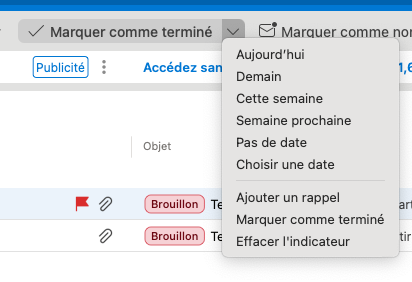
We need a way to declare a split button (an action button with a drop down menu accessible by clicking the down arrow next to the button. (like. the Flags split menu in Outlook (button can clear the flag while dropdown menu can select a flag). The manifest could be a menu with an ExecuteFunction at the item level. If an execute function is present, the rendering is a Split-Button otherwise it's a classic menu. A example taken from New Outlook for MacOS. The split button exists, but it's unavailable to office.js add-ins.
Gracefully handle unavailability of Office.js
The reliance on Office.js (and its dependencies) delivered from the network proves to be challenging in some scenarios. While ideally the platform would support full offline use, I'm hopeful that there are some incremental improvements that could be made to address some of our challenges in the shorter term. As an example, our add-in hooks into Outlook's OnMessageSend, which inherently puts it on the critical path of the user experience when sending emails. In scenarios where the user's network is slow or unreliable, or in an event of an Azure CDN outage that makes Office.js unavailable or slow to be delivered, the user experiences a long wait while Office.js is loaded on message send. I should highlight that Outlook attributes this delay to the add-in: "Add-in X is taking longer than expected". I'd like to propose that the platform gives the add-in more control over the user experience in these cases. What this would look like for our OnMessageSend add-in is that the add-in would execute some code outside of the event handler (before Office.js finishes loading) to start a timer, and if the loading phase exceeds a timeout value defined in the add-in code then the add-in would instruct Outlook to conclude the processing of the event (similarly to how event.completed() is invoked inside an event handler). That last part would require some interface with Outlook that is available even if Office.js hasn't been fully loaded.109Views1like0CommentsFeature Request for Enhanced Outlook Add-in Surfaces
Feature Request for Enhanced Outlook Add-in Surfaces Request Title: Expandable/Pop-out Outlook Add-ins with Inline Compose/Reply Integration Products/Platforms: Microsoft Outlook Add-ins (Office.js) across Classic Outlook for Windows, New Outlook for Windows, Outlook for Mac, and Outlook on the web (OWA) Request Type: New extensibility capabilities / UI host surfaces for Outlook add-ins Priority: High (end-user productivity + adoption + enterprise usability) Background We use an Outlook add-in to integrate additional productivity tools into the email workflow to help users save time, reduce context switching, and improve execution quality. This is a core enablement pattern for enterprise users who spend significant time in Outlook. Today, our add-in runs primarily in the task pane, which has notable limitations in flexibility and available space. The current experience is increasingly cluttered and not user-friendly, especially for workflows that require richer UI, multiple steps, or contextual data. Additionally, the add-in is not seamlessly integrated into the new message compose and reply experience (i.e., the workflow is not inline with the compose/reply window), which limits usability for scenarios that must occur at the moment a user is authoring a message. Problem Statement Current task pane constraints lead to: Limited UI real estate (narrow layout, heavy scrolling, cramped forms, poor readability) No user-friendly expand/enlarge options to fit different workflows and screen sizes Reduced usability during compose/reply, where users need the tool inline with message authoring Lower adoption and productivity because the add-in experience feels disconnected and cumbersome In practice, users need more space and tighter integration at the exact point of work (compose/reply), without leaving Outlook or juggling multiple windows. Requested Features We request Microsoft to support the following add-in UI capabilities, ideally consistently across Classic Windows, New Outlook, and OWA: A) Expandable / Resizable Task Pane Allow users to resize/expand the add-in pane (wider layout; optional full-height behavior) Support a compact vs expanded mode with user preference persistence Outcome: Richer workflows become usable without redesigning into cramped layouts. B) Pop-out Add-in Experience Provide a supported pop-out window for the add-in (while maintaining context to the current item) Ensure pop-out works smoothly with enterprise policies and does not break the add-in lifecycle Outcome: Users can work with complex UI without sacrificing mail reading/authoring space. C) Inline Add-in Integration with Compose and Reply Enable add-in UI to appear inline within the compose/reply window (not just as a separate side pane) Support contextual actions/data entry during authoring (e.g., insert content, validate, attach artifacts, update records) Ensure consistent behavior for new compose and reply experiences Outcome: The tool is available at the moment users need it while writing responses, driving adoption and reducing errors. D) Add-in as a Mail Tab Provide a supported extension point for an add-in to appear as a tab in Mail, similar to “Focused/Other” Tab hosts a larger workspace for add-in workflows (e.g., triage/queue/workbench views) Outcome: A first-class workspace in Mail for workflows that don’t fit the task pane model. Key Enterprise Use Cases Multi-step workflows triggered from emails (triage, intake, approvals, routing) Rich forms and guided actions that are impractical in a narrow pane Compose/reply-time actions: insert approved templates/snippets, validate recipients/content, capture metadata, create/update tasks/records Dedicated mail workbench views via a tab for operational roles Acceptance Criteria Cross-client consistency: Classic Windows, New Outlook, and OWA supported with minimal divergence Next Steps for Microsoft Confirm roadmap/feasibility for: expandable task pane, add-in pop-out, inline compose/reply surface, and mail tab surface Provide recommended implementation model/APIs and opportunities for preview/early access for enterprise validation Screenshots for ReferenceAdd a Range API for Outlook add-ins
Word add-ins provide the Word.Range API, which allows precise manipulation of document content (selection, insertion, replacement, formatting). Outlook add-ins currently lack an equivalent API, making fine-grained interaction with the message body difficult or impossible. We propose adding a Range-like API for Outlook add-ins to enable: • Access to the current selection in the message body • Insert or replace text at a specific position This would significantly improve advanced authoring, productivity, and AI-assisted scenarios in Outlook. Example (conceptual) const range = Outlook.context.mailbox.item.getSelectedRange(); range.insertText("Hello world", Outlook.InsertLocation.replace); Reference Word Range API : https://learn.microsoft.com/en-us/javascript/api/word/word.range?view=word-js-preview