office add-ins ux
81 Topics
Customize default task pane width for Excel add-ins
The default width of the task pane in Office add-ins is quite small, making styling difficult when you want to display more content in it. At a 1366x768 resolution, for Excel desktop the width of the task pane is 320 pixels. It would be nice if we could customize the default width of the task pane from the manifest or via the Office JS API.6.9KViews103likes22Comments
Office.js API — Open OneDrive Files in Current Word/PPT Instance
Currently, Office.js does not provide an API to directly open a OneDrive (or SharePoint Online) file in the current Word/PPT desktop instance. For add-ins that integrate with external systems, this creates a significant limitation. Users often need to: Access Word/PPT documents stored in OneDrive/SharePoint directly from an add-in. Ensure the file opens seamlessly in the same Word/PPT session, without forcing them to manually download or open a new instance. Why this is important Improves user workflow and productivity. Essential for add-ins that sync or integrate with cloud storage and external systems. Avoids user confusion from multiple Word windows or manual file handling. Requested capability An Office.js API such as: Office.context.document.openFileFromUrl(fileUrl, options); where fileUrl is a OneDrive/SharePoint URL and options could specify whether to open in the current instance or a new one. This would align Office.js capabilities more closely with real-world workflows and reduce friction for both developers and end-users.Backstage New extensibility in Office
Ask: Make Backstage-New and the Office Welcome screen extensible so that add-ins like the officeatwork Template Chooser can serve custom organizational templates to users. Currently, a new empty document is created before an extensibility surface can be presented to the users. This for instance leads to many unwanted ‘empty’ documents stored in OneDrive for Office online. Additionally, think about allowing M365 admins to switch off any other template provider to avoid presenting non-brand compliant templates to Office users.3.1KViews28likes4Comments
Implement Office.context.mailbox.item.getAsFileAsync for draft messages
We have a requirement in an Office.js add-in to do the following: Automatically send a message Save the sent message The functionality was previously implemented using EWS and Office.context.mailbox.getCallbackTokenAsync. However, both are being phased out. Office.auth.getAccessToken is supposed to replace Office.context.mailbox.getCallbackTokenAsync, but we did not manage to get it to work in my add-in. To send the mail, Office.context.mailbox.item.sendAsync is now available, but it currently does not allow to execute code after sending. So we want to collect the draft before sending and process it in the back-end of our web app. We are hindered here by the fact that Office.context.mailbox.item.getAsFileAsync cannot be used on a draft. The function is currently not available for a draft message, we get the error message `Office.context.mailbox.item.getAsFileAsync is not a function` when trying to use it. The same works fine for messages in other Outlook folders like Inbox or Sent Items. To assemble eml-like text for the draft message so that we can save it in the back end of our add-in requires quite a lot of code. Also, img nodes reference external content, e.g., they have a src like `src="https://attachments.office.net/owa/.../service.svc/s/GetAttachmentThumbnail?id=` with id being a base64 string, where an eml should have `src="cid:` with cid referencing to a short id of a mime part in the same eml. There is no straightforward way to resolve all images when building an eml client-side.
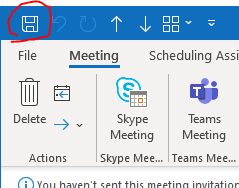
Handler to detect Save event on Office Addin API
I would like to send some data to a server, said data fetched from the Outlook event, and I would like to have the latest updated data on the server. In https://docs.microsoft.com/en-us/javascript/api/outlook/office.appointmentcompose?view=outlook-js-preview interface from Microsoft Office Addin JS API, there is no handler to detect when the user clicks the Save button or when presses CTRL+S, in an Outlook Event. I found https://docs.microsoft.com/en-us/javascript/api/office/office.addincommands.event?view=common-js-preview, but this is only applicable to buttons inside the Add-in // In this example, consider a button defined in an add-in manifest as follows: //<Control xsi:type="Button" id="eventTestButton"> // <Label resid="eventButtonLabel" /> // <Tooltip resid="eventButtonTooltip" /> // <Supertip> // <Title resid="eventSuperTipTitle" /> // <Description resid="eventSuperTipDescription" /> // </Supertip> // <Icon> // <bt:Image size="16" resid="blue-icon-16" /> // <bt:Image size="32" resid="blue-icon-32" /> // <bt:Image size="80" resid="blue-icon-80" /> // </Icon> // <Action xsi:type="ExecuteFunction"> // <FunctionName>testEventObject</FunctionName> // </Action> //</Control> // The button has an id attribute set to eventTestButton, and will invoke // the testEventObject function defined in the add-in. // That function looks like this: function testEventObject(event) { // The event object implements the Event interface. // This value will be "eventTestButton". var buttonId = event.source.id; // Signal to the host app that processing is complete. event.completed(); } I also found this https://docs.microsoft.com/en-us/office/dev/add-ins/reference/objectmodel/preview-requirement-set/office.context.mailbox.item#events of events, but they don't include save event.1.1KViews16likes1CommentUndo stack shouldn't get cleared when you invoke Office.ribbon.requestUpdate
We discovered that invoking Office.ribbon.requestUpdate to set visibility to a contextual tab unnecessarily clears the Undo stack. Please lift this limitation if possible. Our customers complained about this issue, which does not exist on the legacy COM-based product. Consider the following ScriptLab snippet: https://gist.github.com/wh1t3cAt1k/c1e74f7de3a447a8018549ffee177152 Steps to reproduce: Part 1: Create a workbook with two worksheets, Sheet1 and Sheet2 On Sheet1, enter "foo" in A1 and enter "bar" in A2. Activate Sheet2 Press Undo Validate that Excel switched back to Sheet1 and the "bar" value disappeared Part 2: Register the ScriptLab snippet above ("Run in this tab") and press the "Register ribbon and worksheet change listener" button in the side panel to invoke requestCreateControls and register the worksheet change listener. On Sheet1, enter "foo" in A1 and enter "bar" in A2. Activate Sheet2 Limitation: Undo is not available anymore In this scenario, we performed a harmless operation that simply made a ribbon tab visible. The customers do not expect the Undo stack to be cleared in this scenario. Note: the Undo stack gets cleared regardless if there is any effective change to the ribbon item visibility/enabled state. Simply calling the API seems to clear the stack.105Views13likes0CommentsOutlook 365 for Mobile app - Compose window support for Office JS add-ins
We are exploring the new Office JS add-ons model for Outlook for mobile apps and wanted to integrate our product with iOS/Android apps. While exploring the new Office JS model, we didn't see any way to integrate the product with compose window. Task-pane or commandBar way of integration is missing for compose window. Compose window task-pane or commandBar integration is common use case among iOS/Android users. While composing emails, the following use cases are common in industry: Users want to insert documents or attach emails from 3rd part repository or storage or from content management software. When user sends an email, they want to keep a copy of the email in the repository also Currently these use cases are not possible with add-in model. But it is supported in desktop version as well as web version of add-ins. Without these use cases support, users wont adapt our solutions. So this is required for more user adaptability.
Context menus in Outlook Web Add-ins
As it seems, currently Outlook Web Add-ins do not support context menus (e.g. the menu which appears when the user right clicks on an appointment). However, native Add-ins seem to support this (There is a "Send to Onenote" button which appears on Outlook). This functionality is very useful, especially since Web Add-ins also do not support tasks panes to stay always open. This causes that the user needs to reopen the task pane again and again every time he opens an appointment. Our use case would be: right click "Take Notes" which opens a Task Pane where the user can take meeting notes. Looking forward to get the OfficeDev's feedback on this! Thank you Lukas6.3KViews11likes10Commentsclient-side ribbon manipulation
I'd like to see the ability to register ribbon items (tabs and their children) dynamically on the client-side via my app or some tenant scoped javascript that I can register (needs to work with SharePoint Online and should not block submittal to the store). Right now the only way to register a ribbon item of any sort is to do so during the app installation which doesn’t allow us to extend the ribbon over time (either with our own service adding items or by allowing the user to add their own items via an app or whatever).2.3KViews11likes11Comments