nps
18 Topics
Windows 11 clients cannot authenticate to NPS server using computer authentication
We have a Windows server 2019 datacenter server running NPS. Our WiFi Office clients authenticate to this server for access to the corporate WiFi network. We use computer authentication, so members of the "domain computers" group are allowed access in the policy (we only want domain computers on this network and we don't want users to need to enter their user credentials). We use GPO to provision a WiFi profile to the domain computers, in which we configure that computer authentication is needed. Our Windows 10 clients (literally all of them) are connecting nicely (I have anonimized the event log for security purposes: Network Policy Server granted access to a user. User: Security ID: DOMAIN\COMPUTER$ Account Name: host/COMPUTER.domain.nl Account Domain: DOMAIN Fully Qualified Account Name: DOMAIN\COMPUTER$ Client Machine: Security ID: NULL SID Account Name: - Fully Qualified Account Name: - Called Station Identifier: xx-xx-xx-xx-xx-xx:SSID Calling Station Identifier: XX-XX-XX-XX-XX-XX NAS: NAS IPv4 Address: x.x.x.x NAS IPv6 Address: - NAS Identifier: AP01 NAS Port-Type: Wireless - IEEE 802.11 NAS Port: 1 RADIUS Client: Client Friendly Name: SonicPoint HQ 1 Client IP Address: x.x.x.x Authentication Details: Connection Request Policy Name: NAP 802.1X (Wireless) Network Policy Name: NAP 802.1X (Wireless) Non NAP-Capable Authentication Provider: Windows Authentication Server: NPS.DOMAIN.nl Authentication Type: PEAP EAP Type: Microsoft: Secured password (EAP-MSCHAP v2) Account Session Identifier: "edited" Logging Results: Accounting information was written to the local log file. When a Windows 11 client (all of them actually) tries to connect, we see the following logged (again, anonimized): Network Policy Server denied access to a user. Contact the Network Policy Server administrator for more information. User: Security ID: NULL SID Account Name: host/COMPUTER.domain.nl Account Domain: DOMAIN Fully Qualified Account Name: DOMAIN\COMPUTER$ Client Machine: Security ID: NULL SID Account Name: - Fully Qualified Account Name: - Called Station Identifier: XX-XX-XX-XX-XX-XX:SSID Calling Station Identifier: XX-XX-XX-XX-XX-XX NAS: NAS IPv4 Address: x.x.x.x NAS IPv6 Address: - NAS Identifier: AP01 NAS Port-Type: Wireless - IEEE 802.11 NAS Port: 1 RADIUS Client: Client Friendly Name: SonicPoint HQ 1 Client IP Address: x.x.x.x Authentication Details: Connection Request Policy Name: NAP 802.1X (Wireless) Network Policy Name: - Authentication Provider: Windows Authentication Server: NPS.domain.nl Authentication Type: PEAP EAP Type: - Account Session Identifier: "edited" Logging Results: Accounting information was written to the local log file. Reason Code: 16 Reason: Authentication failed due to a user credentials mismatch. Either the user name provided does not map to an existing user account or the password was incorrect. The only real difference I see is that for the Windows 11 client, NULL SID is provided as "Security ID". Could it be that this is causing NPS to not be able to verify that the machine that is attempting to connect is a member of the security group which is allowed to connect (the default group "Domain Computers")? Looking forward to either a quick bug fix or a configuration change I need to make. Maybe other Windows Server admins are also experiencing this issue?Solved163KViews2likes20Comments
Remote Dekstop Connection using Azure MFA
Hello Everyone, I am facing a little problem now. We are thinking to implement MFA to login in to our servers on-prem from internal network. Obviously we can use some third party tools such us DUO or AD Professional Plus. However from what I can see there is a possibility to use RD Gateway with NPS that will have MFA plugin on it. I just need to understand something correctly - am I right saying that I can handle all RDP traffic to all the servers through RD Gateway that will be redirecting authentication through NPS to Azure MFA or it is no go? Regards, Wojciech29KViews0likes8Comments
Certificate selection when using 802.1x authentication
Hello I have a question on how a certificate is selected from a computers personal certificates when using 802.1x for wireless authentication using Windows NPS server as RADIUS. I have been having issues with users not being able to authenticate to the office WiFi, and after looking at the logs on the NPS server it shows that the computer is giving the NPS server a certificate other than the one belonging to the computer account. There is a list of certificates in the personal certificate store, and the one certificate for the computer account (given by the on prem PKI) is at the bottom of the list. So it looks like it is just choosing the first certificate in the list, and then failing authentication and not giving the correct cert. Shouldn't it go down the list of certs and eventually giving the correct cert instead of the first one in the list and causing authentication to fail? Hope this make sense any insight is appreciated! Thanks.17KViews0likes1Comment
Use AD to restrict access for VPN users
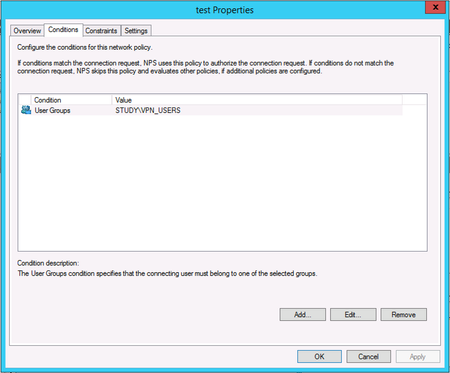
I'm a network technician, working mostly with campus networks (Cisco mostly) and security appliances like firewalls. I'm not very good at Windows Server configuration, so I need a bit of help solving an issue with AD and NPS that google does not solve for me. :) I'm setting up Remote Access VPN (it's not Direct Access or any other Microsoft VPN solution). When user A connects via VPN, he should not be able to access everything though the VPN tunnel, it should be locked down to a few IP addresses and port numbers, like: 192.168.40.0/24, port 80 172.16.55.43, port 22 User A might be member of a group, and others in that group should have the same restriction. The general idea is that an organisation should be able to configure this access restriction in AD and not have to log on to the firewall to do this. My question is how you configure this. The only way I have found is to create a separate Network Profile for every Group, and in that profile set group membership as a condition and a Cisco-AV-Pair specifying the ACL in the settings (pictures below). That's not a very scalable solution for large organizations. Is there a better way? I've set up a lab environment for this, based on a DC and a NPS server. I'm not sure if NPS is needed but it seemed reasonable (maybe there is an LDAP solution?). I've configured RADIUS authentication via the NPS server and it works, it's just the ACL bit on AD that's missing.6.6KViews0likes0Comments
Looking for assistance with NPS cert based Wifi for Macs and PCs
So we have a somewhat unique situation that I am trying to figure out any solution that works.. We are currently using Meraki hardware for our wireless system and we have a directive from management to work to integrate out various systems so that we can deploy a company-wide wireless network(s) that used cert based authentication instead of the current username/password that times out every couple weeks. For further context, we have windows based servers with a local AD domain synced to Office 365. We are also using one of our DCs as a CA, but it is not being used for anything. We have several NPS servers setup and we can get our windows, domain joined machines to work fairly well on the Meraki System. The problem comes in with our Mac users. Our AD domain was setup moons ago when using a .int TLD for the domain name along with other best practice issues that would be too disruptive to properly fix. As of now, we can't get our Mac machines to properly authenticate or trust the Wi-Fi networks when we use the NPS profiles/certs. We did recently get invested in a PKI system through digicert that we are currently using for our Client VPN and have been trying to use auto-enrolled certs from that, but similarly to no avail. The final nail in the coffin is that we are under a budget crunch, so investing in something like JumpCloud or some other online hosted RADIUS service is not happening anytime soon. I have looked at the documentation for Setting up 802.1x and we can do user authentication fairly well, but we have been instructed to get machine/certificate based authentication working. Long story short, what I am hoping to find is an article or video or something that discusses setting up windows NPS to interact with Meraki SSIDs so that both domain joined PCs and non-domain joined Macs can use one or more SSIDs to do cert based authentication.4.5KViews0likes2Comments
User or computer certificate selection for 802.1x
I've set up an NPS, on windows 2019, to be used as Radius server for 802.1x certificate-based autentication. On NPS I made a connection profile with both Domain Users And Domain Computer so that belonging to one of them should enable to connect to wi-fi, provided that the computer OR the user has a valid Cert. I found, however, that it seems that the connection only works if "at least" there's the computer certificate. If a computer has not the certificate but the user does it does not connect. What is wrong ? thanks3.6KViews0likes1CommentHybrid to Entra ID WiFi Certificate Authentication NPS via WHfB Cloud Trust & Cloud PKI-Replace ADCS
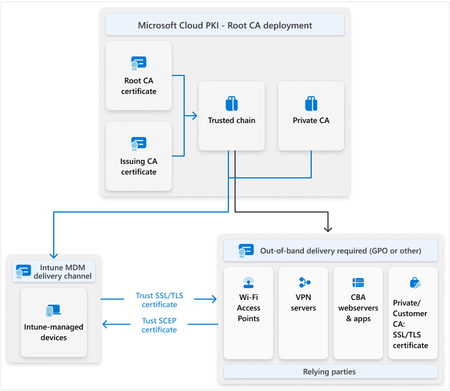
Hello Team, We are working in moving our devices Hybrid Entra ID Joined to Intune autopilot Entra ID Joined Current scenario: Hybrid Entra ID Joined devices (joined to both on-prem AD and Entra ID) Active Directory with Entra ID Connect for object synchronization AD Certificate Services (ADCS) issuing user and device certificates via GPO auto-enrollment Group Policies to push Wi-Fi configuration (EAP-TLS using device certificate) NPS RADIUS server using EAP-TLS ("Smart Card or Other Certificate") for secure 802.1X authentication On-prem SSO enabled through standard Kerberos authentication Now, I am testing Autopilot Win11 Entra ID Joined with WHfB using Cloud trust to SSO to on-prem resources. The autopilot is working, however, the WIFI is not working as the autopilot device doesn't have any certificate from the on-prem ADCS. What is the best practice to try be as much cloud and begin to decommision on-prem services. I have 2 options to push the User and computer certificate to the AUtopilot device: Option 1: Intune Certificate Connector that will bridge on-prem ADCS and Intune, In Intune a PKCS profile to install the certificate to the autopilot device. Option 2: Intune Cloud PKI and configuration profile PKCS profile to install the certificate to the autopilot device. on-prem install the root CA from the Intune cloud PKI. https://learn.microsoft.com/en-us/intune/intune-service/protect/microsoft-cloud-pki-deployment For the on-prem SSO I will contine using Cloud Trust. Component Target Device Identity Autopilot + Entra ID Joined only (no domain join) User Sign-In Windows Hello for Business (WHfB) with Cloud Kerberos Trust Certificate Issuance Replace ADCS/GPO with Microsoft Cloud PKI and Intune PKCS Wi-Fi Authentication Retain existing NPS RADIUS using EAP-TLS, but trust both ADCS and Cloud PKI root CAs On-prem SSO Enabled by AzureADKerberos on domain controllers Hybrid Devices Continue current operation during the transition — no immediate impact The 2 network environment needs to coexist: the on-prem and the cloud. Device Type Certificate Issuer Wi-Fi Auth SSO Hybrid AD-joined ADCS via GPO EAP-TLS (device cert) Native Kerberos Autopilot Entra ID Joined Cloud PKI via Intune EAP-TLS (device cert) WHfB + Cloud Trust (AzureADKerberos) How the New Wi-Fi Auth Works: Autopilot devices receive: A device certificate from Cloud PKI via Intune A Wi-Fi profile using EAP-TLS authentication NPS RADIUS server: Validates the device cert Issues access to Wi-Fi WHfB Cloud Trust provides a Kerberos ticket from AzureADKerberos, enabling seamless access to file shares, print servers, etc. This allows Autopilot Entra ID Joined devices to: Connect to Wi-Fi without GPO Access on-prem resources without passwords High-Level Implementation Steps Deploy Microsoft Cloud PKI in Intune Configure PKCS profiles for user and device certificates Deploy WHfB Cloud Trust via Intune + Entra ID (no AD join needed) Configure AzureADKerberos on domain controllers Install Cloud PKI Root CA in NPS server trust store Update NPS policy to accept certificates from both ADCS and Cloud PKI Deploy Wi-Fi profiles to Autopilot devices via Intune (EAP-TLS using device cert) Based on it, what is the best practice to move the device to the cloud as much possible.2.7KViews0likes4CommentsMFA and Azure IKEv2 P2S VPN Failing - Timeout Issue?
Hi, I'm having trouble getting MFA working with an Azure P2S IKEv2 VPN using RADIUS auth. It seems that the auth response timeout on the gateway is set so low (looks like 5 sec) that I don't have enough time to authenticate using MFA. I've verified this both with DUO Auth and Azure MFA; both have the same result. I initiate the VPN connection, enter credentials, and before I can answer the phone call to verify MFA, another request is initiated and a second call comes through. If I successfully verify either or both calls, the connection fails. However, if I use a push notification to the cell phone for verification and I can verify in under 5 sec, the connection is completed. I've also pointed my Palo Alto VPN device (where I have a specified timeout of 60 sec) at my MFA server and was able to log in successfully to that VPN - this determines the issue is not with my MFA server setup. I've created a bug request with Microsoft on this as there doesn't seem to be a way to change the timeout. Has anyone else encountered this issue or found a workaround??1.9KViews0likes0CommentsNPS connectivity to DC
Hello, I have been reading through https://docs.microsoft.com/en-us/windows-server/networking/technologies/nps/nps-top and either can't see it or completely missed it. What are the network port requirements for the NPS server to access AD DC? How does NPS talks to DC? Over what protocols and ports? Thank you.Solved1.5KViews0likes3CommentsNetwork Policy Server 2016 RADIUS logs
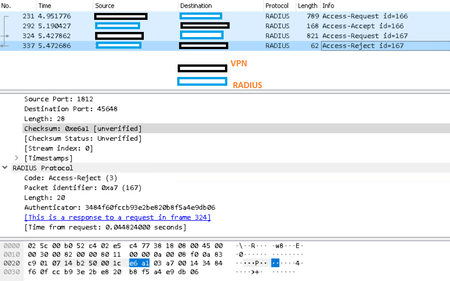
Hello, I'm seeing something strange in Wireshark when user successfully authenticates through CISCO VPN. The connection policy specifies RAS VPN-Dial up as NAS, in the conditions - NAS Port Type - Virtual (VPN), the rest is at the default. Network Policy below: What could be causing the error?1.4KViews0likes0Comments