notebooks
63 TopicsWhat’s new in Microsoft Sentinel: RSAC 2026
Security is entering a new era, one defined by explosive data growth, increasingly sophisticated threats, and the rise of AI-enabled operations. To keep pace, security teams need an AI-powered approach to collect, reason over, and act on security data at scale. At RSA Conference 2026 (RSAC), we’re unveiling the next wave of Sentinel innovations designed to help organizations move faster, see deeper, and defend smarter with AI-ready tools. These updates include AI-driven playbooks that accelerate SOC automation, Granular Delegated Admin Privileges (GDAP) and granular role-based access controls (RBAC) that let you scale your SOC, accelerated data onboarding through new connectors, and data federation that enables analysis in place without duplication. Together, they give teams greater clarity, control, and speed. Come see us at RSAC to view these innovations in action. Hear from Sentinel leaders during our exclusive Microsoft Pre-Day, then visit Microsoft booth #5744 for demos, theater sessions, and conversations with Sentinel experts. Read on to explore what’s new. See you at RSAC! Sentinel feature innovations: Sentinel SIEM Sentinel data lake Sentinel graph Sentinel MCP Threat Intelligence Microsoft Security Store Sentinel promotions Sentinel SIEM Playbook generator [Now in public preview] The Sentinel playbook generator delivers a new era of automation capabilities. You can vibe code complex automations, integrate with different tools to ensure timely and compliant workflows throughout your SOC and feel confident in the results with built in testing and documentation. Customers and partners are already seeing benefit from this innovation. “The playbook generator gives security engineers the flexibility and speed of AI-assisted coding while delivering the deterministic outcomes that enterprise security operations require. It's the best of both worlds, and it lives natively in Defender where the engineers already work.” – Jaime Guimera Coll | Security and AI Architect | BlueVoyant Learn more about playbook generator. SIEM migration experience [General availability now] The Sentinel SIEM migration experience helps you plan and execute SIEM migrations through a guided, in-product workflow. You can upload Splunk or QRadar exports to generate recommendations for best‑fit Sentinel analytics rules and required data connectors, then assess migration scope, validate detection coverage, and migrate from Splunk or QRadar to Sentinel in phases while tracking progress. “The tool helps turn a Splunk to Sentinel migration into a practical decision process. It gives clear visibility into which detections are relevant, how they align to real security use cases, and where it makes sense to enable or prioritize coverage—especially with cost and data sources in mind.” – Deniz Mutlu | Director | Swiss Post Cybersecurity Ltd Learn more about SIEM migration experience. GDAP, unified RBAC, and row-level RBAC for Sentinel [Public preview, April 1] As Sentinel environments grow for enterprises, MSSPs, hyperscalers, and partners operating across shared or multiple environments, the challenge becomes managing access control efficiently and consistently at scale. Sentinel’s expanded permissions and access capabilities are designed to meet these needs. Granular Delegated Admin Privileges (GDAP) lets you streamline management across multiple governed tenants using your primary account, based on existing GDAP relationships. Unified RBAC allows you to opt in to managing permissions for Sentinel workspaces through a single pane of glass, configuring and enforcing access across Sentinel experiences in the analytics tier and data lake in the Defender portal. This simplifies administration and improves operational efficiency by reducing the number of permission models you need to manage. Row-level RBAC scoping within tables enables precise, scoped access to data in the Sentinel data lake. Multiple SOC teams can operate independently within a shared Sentinel environment, querying only the data they are authorized to see, without separating workspaces or introducing complex data flow changes. Consistent, reusable scope definitions ensure permissions are applied uniformly across tables and experiences, while maintaining strong security boundaries. To learn more, read our technical deep dives on RBAC and GDAP. Sentinel data lake Sentinel data federation [Public preview, April 1] Sentinel data federation lets you analyze security data in place without copying or duplicating your data. Powered by Microsoft Fabric, you can now federate data from Fabric, Azure Data Lake Storage (ADLS), and Azure Databricks into Sentinel data lake. Federated data appears alongside native Sentinel data, so you can use familiar tools like KQL hunting, notebooks, and custom graphs to correlate signals and investigate across your entire digital estate, all while preserving governance and compliance. You can start analyzing data in place and progressively ingest data into Sentinel for deeper security insights, advanced automation, and AI-powered defense at scale. You are billed only when you run analytics on federated data using existing Sentinel data lake query and advanced insights meters. les for unified investigation and hunting Sentinel cost estimation tool [Public Preview, April 9] The new Sentinel cost estimation tool offers all Microsoft customers and partners a guided, meter-level cost estimation experience that makes pricing transparent and predictable. A built-in three-year cost projection lets you model data growth and ramp-up over time, anticipate spend, and avoid surprises. Get transparent estimates into spend as you scale your security operations. All other customers can continue to use the Azure calculator for Sentinel pricing estimates. See the Sentinel pricing page for more information. Sentinel data connectors A365 connector [Public preview, May 5] Bring AI agent telemetry into the Sentinel data lake to investigate agent behavior, tool usage, prompts, reasoning and execution using hunting, graph, and MCP workflows. GitHub audit log connector using API polling [General availability, March 6] Ingest GitHub enterprise audit logs into Sentinel to monitor user and administrator activity, detect risky changes, and investigate security events across your development environment. Google Kubernetes Engine (GKE) connector [General availability, March 6] Collect Google Kubernetes Engine (GKE) audit and workload logs in Sentinel to monitor cluster activity, analyze workload behavior, and detect security threats across Kubernetes environments. Microsoft Entra and Azure Resource Graph (ARG) connector enhancements [Public preview, April 15] Enable new Entra assets (EntraDevices, EntraOrgContacts) and ARG assets (ARGRoleDefinitions) in existing asset connectors, expanding inventory coverage and powering richer, built‑in graph experiences for greater visibility. With over 350 Sentinel data connectors, customers achieve broad visibility into complex digital environments and can expand their security operations effectively. “Microsoft Sentinel data lake forms the core of our agentic SOC. By unifying large volumes of Microsoft and third-party data, enabling graph-based analysis, and supporting MCP-driven workflows, it allows us to investigate faster, at lower cost, and with greater confidence.” – Øyvind Bergerud | Head of Security Operations | Storebrand Learn more about Sentinel data connectors. Sentinel connector builder agent using Sentinel Visual Studio Code extension [Public preview, March 31] Build Sentinel data connectors in minutes instead of weeks using the AI‑assisted Connector Builder agent in Visual Studio Code. This low‑code experience guides developers and ISVs end-to-end, automatically generating schemas, deployment assets, connector UI, secure secret handling, and polling logic. Built‑in validation surfaces issues early, so you can validate event logs before deployment and ingestion. Example prompt in GitHub Copilot Chat: @sentinel-connector-builder Create a new connector for OpenAI audit logs using https://api.openai.com/v1/organization/audit_logs Get started with custom connectors and learn more in our blog. Data filtering and splitting [Public preview, March 30] As security teams ingest more data, the challenge shifts from scale to relevance. With filtering and splitting now built into the Defender portal, teams can shape data before it lands in Sentinel, without switching tools or managing custom JSON files. Define simple KQL‑based transformations directly in the UI to filter low‑value events and intelligently route data, making ingestion optimization faster, more intuitive, and easier to manage at scale. Filtering at ingest time allows you to remove low-value or benign events to reduce noise, cut unnecessary processing, and ensure that high-signal data drives detections and investigations. Splitting enables intelligent routing of data between the analytics tier and the data lake tier based on relevance and usage. Together, these two capabilities help you balance cost and performance while scaling data ingestion sustainably as your digital estate grows. Create workbook reports directly from the data lake [Public preview, April 1] Sentinel workbooks can now directly run on the data lake using KQL, enabling you to visualize and monitor security data straight from the data lake. By selecting the data lake as the workbook data source, you can now create trend analysis and executive reporting. Sentinel graph Custom graphs [Public preview, April 1] Custom graphs let you build tailored security graphs tuned to your unique security scenarios using data from Sentinel data lake as well as non-Microsoft sources. With custom graph, powered by Fabric, you can build, query, and visualize connected data, uncover hidden patterns and attack paths, and help surface risks that are hard to detect when data is analyzed in isolation. These graphs provide the knowledge context that enables AI-powered agent experiences to work more effectively, speeding investigations, revealing blast radius, and helping you move from noisy, disconnected alerts to confident decisions at scale. In the words of our preview customers: “We ingested our Databricks management-plane telemetry into the Sentinel data lake and built a custom security graph. Without writing a single detection rule, the graph surfaced unusual patterns of activity and overprivileged access that we escalated for investigation. We didn't know what we were looking for, the graph surfaced the risk for us by revealing anomalous activity patterns and unusual access combinations driven by relationships, not alerts.” – SVP, Security Solutions | Financial Services organization Custom graph API usage for creating graph and querying graph will be billed starting April 1, 2026, according to the Sentinel graph meter. Creating custom graph Using the Sentinel VS Code extension, you can generate graphs to validate hunting hypotheses, such as understanding attack paths and blast radius of a phishing campaign, reconstructing multi‑step attack chains, and identifying structurally unusual or high‑risk behavior, making it accessible to your team and AI agents. Once persisted via a schedule job, you can access these custom graphs from the ready-to-use section in the graph experience in the Defender portal. Graphs experience in the Microsoft Defender portal After creating your custom graphs, you can access them in the graphs section of the Defender portal under Sentinel. From there, you’ll be able to perform interactive graph-based investigations, such as using a graph built for phishing analysis to help you quickly evaluate the impact of a recent incident, profile the attacker, and trace its paths across Microsoft telemetry and third-party data. The new graph experience lets you run Graph Query Language (GQL) queries, view the graph schema, visualize the graph, view graph results in tabular format, and interactively travers the graph to the next hop with a simple click. Sentinel MCP Sentinel MCP entity analyzer [General availability, April 1] Entity analyzer provides reasoned, out-of-the-box risk assessments that help you quickly understand whether a URL or user identity represents potential malicious activity. The capability analyzes data across modalities including threat intelligence, prevalence, and organizational context to generate clear, explainable verdicts you can trust. Entity analyzer integrates easily with your agents through Sentinel MCP server connections to first-party and third-party AI runtime platforms, or with your SOAR workflows through Logic Apps. The entity analyzer is also a trusted foundation for the Defender Triage Agent and delivers more accurate alert classifications and deeper investigative reasoning. This removes the need to manually engineer evaluation logic and creates trust for analysts and AI agents to act with higher accuracy and confidence. Learn more about entity analyzer and in our blog here. Entity analyzer will be billed starting April 1, 2026, based on Security Compute Units (SCU) consumption. Learn more about MCP billing. Sentinel MCP graph tool collection [Public preview, May 20] Graph tool collection helps you visualize and explore relationships between identities and device assets, threats and activities signals ingested by data connectors and alerted by analytic rules. The tool provides a clear graph view that highlights dependencies and configuration gaps, which makes it easier to understand how content interacts across your environment. This helps security teams assess coverage, optimize content deployment, and identify areas that may need tuning or additional data sources, all from a single, interactive workspace. Executing graph queries via the MCP tools will trigger the graph meter. Claude MCP connector [Public preview, April 1] Anthropic Claude can connect to Sentinel through a custom MCP connector, giving you AI-assisted analysis across your Sentinel environment. Microsoft provides step-by-step guidance for configuring a custom connector in Claude that securely connects to a Sentinel MCP server. With this connection you can summarize incidents, investigate alerts, and reason over security signals while keeping data inside Microsoft's security boundary. Access to large language models (LLMs) is managed through Microsoft authentication and role-based controls, supporting faster triage and investigation workflows while maintaining compliance and visibility. Threat Intelligence CVEs of interest in the Threat Intelligence Briefing Agent [Public preview in April] The Threat Intelligence Briefing Agent delivers curated intelligence based on your organization’s configuration, preferences, and unique industry and geographic needs. CVEs of interest which highlights vulnerabilities actively discussed across the security landscape and assesses their potential impact on your environment, delivering more timely threat intelligence insights. The agent automatically incorporates internet exposure data powered by the Sentinel platform to surface threats targeting technologies exposed in your organization. Together, these enhancements help you focus faster on the threats that matter most, without manual investigation. Microsoft Security Store Security Store embedded in Entra [General availability, March 23] As identity environments grow more complex, teams need to move faster and extend Entra with trusted third‑party capabilities that address operational, compliance, and risk challenges. The Security Store embedded directly into Entra lets you discover and adopt Entra‑ready agents and solutions in your workflow. You can extend Entra with identity‑focused agents that surface privileged access risk, identity posture gaps, network access insights, and overall identity health, turning identity data into clear recommendations and reports teams can use immediately. You can also enhance Entra with Verified ID and External ID integrations that strengthen identity verification, streamline account recovery, and reduce fraud across workforce, consumer, and external identities. Security Store embedded in Microsoft Purview [General availability, March 31] Extending data security across the digital estate requires visibility and enforcement into new data sources and risk surfaces, often requiring a partnered approach. The Security Store embedded directly into Purview lets you discover and evaluate integrated solutions inside your data security workflows. Relevant partner capabilities surface alongside context, making it easier to strengthen data protection, address regulatory requirements, and respond to risk without disrupting existing processes. You can quickly assess which solutions align to data security scenarios, especially with respect to securing AI use, and how they can leverage established classifiers, policies, and investigation workflows in Purview. Keeping integration discovery in‑flow and purchases centralized through the Security Store means you move faster from evaluation to deployment, reducing friction and maintaining a secure, consistent transaction experience. Security Store Advisor [General availability, March 23] Security teams today face growing complexity and choice. Teams often know the security outcome they need, whether that's strengthening identity protection, improving ransomware resilience, or reducing insider risk, but lack a clear, efficient way to determine which solutions will help them get there. Security Store Advisor provides a guided, natural-language discovery experience that shifts security evaluation from product‑centric browsing to outcome‑driven decision‑making. You can describe your goal in plain language, and the Advisor surfaces the most relevant Microsoft and partner agents, solutions, and services available in the Security Store, without requiring deep product knowledge. This approach simplifies discovery, reduces time spent navigating catalogs and documentation, and helps you understand how individual capabilities fit together to deliver meaningful security outcomes. Sentinel promotions Extending signups for promotional 50 GB commitment tier [Through June 2026] The Sentinel promotional 50 GB commitment tier offers small and mid-sized organizations a cost-effective entry point into Sentinel. Sign up for the 50 GB commitment tier until June 30, 2026, and maintain the promotional rate until March 31, 2027. This promotion is available globally with regional variations in pricing and accessible through EA, CSP, and Direct channels. Visit the Sentinel pricing page for details and to get started. Sentinel RSAC 2026 sessions All week – Sentinel product demos, Microsoft Booth #5744 Mon Mar 23, 3:55 PM – RSAC 2026 main stage Keynote with CVP Vasu Jakkal [KEY-M10W] Ambient and autonomous security: Building trust in the agentic AI era Tue Mar 24, 10:30 AM – Live Q&A session, Microsoft booth #5744 and online Ask me anything with Microsoft Security SMEs and real practitioners Tue Mar 24, 11 AM – Sentinel data lake theater session, Microsoft booth #5744 From signals to insights: How Microsoft Sentinel data lake powers modern security operations Tue Mar 24, 2 PM – Sentinel SIEM theater session, Microsoft booth #5744 Vibe-coding SecOps automations with the Sentinel playbook generator Wed Mar 25, 12 PM – Executive event at Palace Hotel with Threat Protection GM Scott Woodgate The AI risk equation: Visibility, control, and threat acceleration Wed Mar 25, 1:30 PM – Sentinel graph theater session, Microsoft booth #5744 Bringing knowledge-driven context to security with Microsoft Sentinel graph Wed Mar 25, 5 PM – MISA theater session, Microsoft booth #5744 Cut SIEM costs without reducing protection: A Sentinel data lake case study Thu Mar 26, 1 PM – Security Store theater session, Microsoft booth #5744 What's next for Security Store: Expanding in portal and smarter discovery All week – 1:1 meetings with Microsoft security experts Meet with Microsoft Defender and Sentinel SIEM and Defender Security Operations Additional resources Sentinel data lake video playlist Explore the full capabilities of Sentinel data lake as a unified, AI-ready security platform that is deeply integrated into the Defender portal Sentinel data lake FAQ blog Get answers to many of the questions we’ve heard from our customers and partners on Sentinel data lake and billing AI‑powered SIEM migration experience ninja training Walk through the SIEM migration experience, see how it maps detections, surfaces connector requirements, and supports phased migration decisions SIEM migration experience documentation Learn how the SIEM migration experience analyzes your exports, maps detections and connectors, and recommends prioritized coverage Accenture collaborates with Microsoft to bring agentic security and business resilience to the front lines of cyber defense Stay connected Check back each month for the latest innovations, updates, and events to ensure you’re getting the most out of Sentinel. We’ll see you in the next edition!12KViews6likes0CommentsMSTIC Notebooklets - Fast Tracking CyberSec Jupyter Notebooks
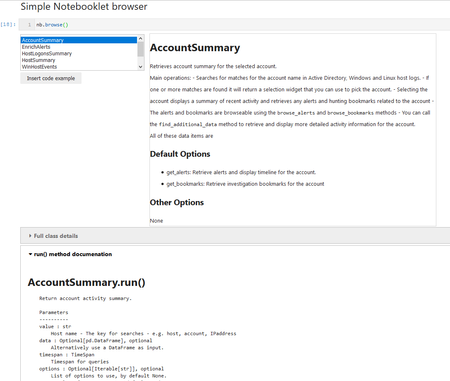
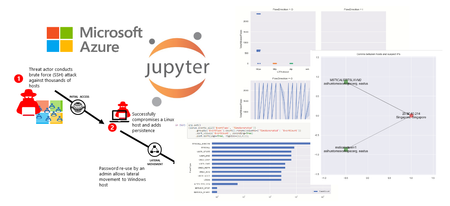
MSTICnb is a companion package to MSTICpy. It is designed to be used in Jupyter notebooks by security operations engineers and analysts, to allow them to quickly, and easily, run common notebook patterns such as retrieving summary information about a host, an account or IP address.5.1KViews5likes0CommentsUsing Threat Intelligence in your Jupyter Notebooks
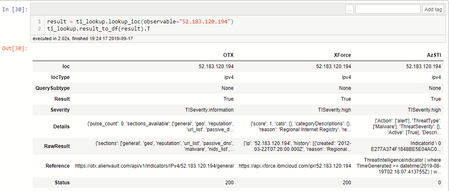
Use Threat Intelligence in your hunting/investigation notebooks? Ever wanted to lookup an IoC in multiple TI providers without installing a bunch of packages or hand-crafting HTTP requests? TILookup is a multi-provider TI query module. It supports multiple providers like OTX, VirusTotal, Azure Sentinel and XForce (others in the pipeline and you can add your own).17KViews4likes0CommentsCopilot Notebooks and Study guide now available to Copilot Chat users
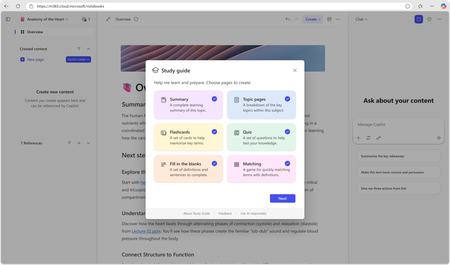
Every student knows the feeling: the test is coming, the materials are everywhere— and the hardest part is not finding information, it is knowing where to start. There is a PDF from the teacher. Slides from last week. A Word document with notes. Each piece has value. But studying means turning all of it into something usable: what to review first, what connects together, what still feels fuzzy, and what to practice learning. That is why we are excited to share two updates for education. First, Copilot Notebooks is now rolling out to Copilot Chat users, available with Microsoft 365 Education licenses. Copilot Notebooks are AI-powered workspaces for a subject or group project built on reference materials—bringing together all context behind a topic in one place for you or your study group and Copilot to collaborate on. This addresses one of the top asks we have heard from Microsoft 365 Education customers: bring the power of Copilot Notebooks to the education licenses schools already use. This education expansion builds on the broader Copilot Notebooks announcement that brings Notebooks to all education and enterprise Copilot Chat users, including new ways to work with your own materials in Notebooks with mind maps, Study Guides, and coming soon - the ability to create Word documents, Excel spreadsheets, and PowerPoint presentations. You can read that announcement in the broader commercial Copilot Notebooks blog. Copilot Notebooks are available in the Microsoft 365 Copilot web and desktop versions for Education users. Expect them to be available in Education tenants in the next two weeks. They will be available in OneNote in the weeks to follow. Get started: Find Copilot Notebooks located in the Microsoft 365 Copilot app waffle. Second, Copilot Notebook Study Guide is now generally available both for education and enterprise users. Study Guide is an AI-powered feature in Notebooks that turns the learning materials you provide into a complete, interactive study companion. Organized, editable, grounded in your references. Ready when you are. For Education IT admins - what you need to know Study guide lives inside Copilot Notebooks. Copilot Notebooks are available in the Microsoft 365 Copilot app. Copilot Notebooks are located in the Microsoft 365 Copilot app waffle. With this update, Copilot Notebooks are available to Microsoft 365 Education A1, A3, and A5 users. Study guide is available for education users ages 13+. Student accounts need the right Age Group in Microsoft Entra ID, and K-12 students ages 13-17 need Microsoft 365 Copilot Chat enabled by an IT admin before they can use Copilot Notebooks and Study Guide. No additional deployment is needed for Study Guide. Study Guide is rolling out to enterprise and education customers starting June 11. It may take a few days to show up in your account. What Study guide does Study Guide takes the materials learners already have and helps turn them into a collection of organized study topics and activities of your choice. Drop in PDFs, Word documents, PowerPoint presentations, or Excel files. Study Guide reads across those references, identifies the key ideas, and creates a multi-page study guide inside the notebook. The important part: it is grounded in the sources you provide. It is not pulling random facts from the internet. Summary pages and Topic pages include citations back to the original materials, so learners can check where information came from and return to the source when something needs a closer look. That matters for learning. It helps students stay connected to the actual course materials. It helps educators trust what students are practicing from turns citation-checking into a habit, not an afterthought. What is available in Study guide Study Guide creates materials that span all phases of learning: understand, practice, and test. Understand: deepen your knowledge of the material Summary page: Start with a high-level overview of the materials you added. The Summary includes an overview, why the topic matters, key topics, a glossary, common misconceptions, and citations back to the source materials. Topic pages: Study Guide creates deeper pages for the major topics it finds in your content. These pages work like mini-chapters that cover content across all your references. They include explanations, sub-topic deep dives, worked examples, questions that make you think critically and analyze concepts, short exercises, and citations throughout. Practice: strengthen recall, and make connections Flashcards: Study Guide generates interactive cards from the learner's materials. Learners can flip cards, use hints, and edit the set so the wording matches how they think about the concept. Fill in the blanks: Key terms are removed from important sentences, and learners choose from a set of distraction answers to complete sentences. It is especially useful for processes, and sequences of events where the order and relationships matter. Matching: Study Guide creates matching tiles that ask learners to connect related ideas: terms to definitions, causes to effects, structures to functions, or concepts to examples. Test: check what is sticking Quiz: Study Guide creates a Microsoft Forms-powered quiz with questions generated from the materials. Learners can answer directly from the page, review results, and see explanations for multiple-choice answers. Results are private to the learner unless they choose to share them. Every one of these formats is designed to move studying from passive review to active practice. Not just rereading or highlighting. Actually trying to remember, connect, explain, and check. Study Guide supports 21 languages at launch: Arabic, Chinese (Simplified), Chinese (Traditional), Danish, Dutch, English (US), Estonian, French (Canada), French (France), German, Hebrew, Italian, Japanese, Korean, Norwegian Bokmal, Portuguese (Brazil), Spanish (Mexico), Spanish (Spain), Swedish, Ukrainian, and Vietnamese. That means students can study from the materials they already use, in the language they already learn in, without having to move everything into a separate tool. For educators A few ways you can bring Study guide to your students or use it yourself: Get started by taking the Microsoft Learn course. Available now at aka.ms/notebooksandstudyguidemodule Point learners to a specific study moment. "Before Friday's quiz, add this week's slides and generate flashcards" is more useful than "use AI to study." Encourage active practice. Flashcards, fill-in-the-blanks, matching, and quizzes help your students retrieve information from memory instead of only rereading it. Use citations as an AI literacy moment. Study Guide shows where information came from. That opens a natural classroom conversation about checking sources, verifying AI-generated content, and staying grounded in the material. Keep assessment separate from practice. Study Guide quizzes are for self-checking. They are not a gradebook, and quiz results are private unless a student chooses to share them. Keep building your own AI fluency. Study Guide is built with privacy, safety, and learner control in mind. Study Guide pages are private by default, stored in the learner's Microsoft 365 notebook, and can be edited or deleted by the learner. Prompts and outputs are not used to train AI models, and quiz results are private unless a learner chooses to share them. Get started Take the professional development course at aka.ms/notebooksandstudyguidemodule Learn more about Study guide Anoo Padte is Principal Product Manager for AI in Education at Microsoft.13KViews4likes11CommentsData Science Day 2024 , 14th March 2024 - Schedule Announcement
We are thrilled to announce Python Data Science Day will be taking place March 14th, 2024 with talks all day; a "PyDay" on Pi Day: 3.14. If you're a Python developer, entrepreneur, data scientist, student, or researcher working on projects from hobbyist and start up to enterprise level, you'll find solutions to modernize your data pipelines and answer complex queries with data.2.2KViews4likes0Comments