ninja training
49 TopicsMonthly news - May 2026
Microsoft Defender Monthly news - May 2026 Edition This is our monthly "What's new" blog post, summarizing product updates and various new assets we released over the past month across our Defender products. In this edition, we are looking at all the goodness from April 2026. We are now including news related to Defender for Cloud in the Defender portal. For all other Defender for Cloud news, have a look at the dedicated Defender for Cloud Monthly News here. 🚀 New Virtual Ninja Show episode: The future of identity protection with Predictive Shielding Network-layer data protection with Microsoft Entra GSA and Purview DLP Data lake federation: hunt across external data without ingesting it Weekly Security News: We publish a short 1ish minute video every week with updates across our Microsoft Security stack. Subscribe to our YouTube channel, so you don't miss the next episode. Actionable threat insights CVE-2026-31431: Copy Fail vulnerability enables Linux root privilege escalation across cloud environments Email threat landscape: Q1 2026 trends and insights Cross‑tenant helpdesk impersonation to data exfiltration: A human-operated intrusion playbook Detection strategies across cloud and identities against infiltrating IT workers Dissecting Sapphire Sleet’s macOS intrusion from lure to compromise Microsoft Defender Blog post: Containing a domain compromise: How predictive shielding shut down lateral movement (Public Preview) You can now view the current status of automatic attack disruption and predictive shielding actions related to a specific incident. You view this data in the Activities tab of the incident page. Learn more We made several enhancements across the Advanced hunting experience, read this blog post for all the details. (Public Preview) The AIAgentsInfo table in advanced hunting now includes additional columns that provide deeper visibility into AI agents operating in your Microsoft 365 environment. These fields expand coverage beyond Copilot Studio to all agent types, including Microsoft Foundry, third-party marketplace, and custom line-of-business agents. (Generally Available) Built-in alert tuning rules are now generally available. Built-in alert tuning rules suppress alerts from common benign activity in Defender for Endpoint and Defender for Office 365 without affecting Automated Investigation and Response (AIR) investigations and email notifications. Microsoft Defender Experts for XDR customers can now see Defender Experts as a distinct entry in the Microsoft Defender portal navigation menu. This feature adds to the existing home page status card as in-portal experiences that provide consistent and predictable access to the service. Learn more Blog post: Simplifying AWS defense with Microsoft Sentinel UEBA Call to action: update automation by July 1, 2026 - Account Name is now consistently the UPN prefix for analytics rule alerts! Microsoft Sentinel is updating how the account entity's Account Name value is populated for analytics rule alerts when the full UPN is mapped into Account Name. This change improves consistency for downstream automation rules and Logic Apps playbooks. For more information, including before and after examples, read the blog article Update: Changing the Account Name Entity Mapping in Microsoft Sentinel. For all other Sentinel News, have a look at the "What's new in Microsoft Sentinel blog post - April edition" Microsoft Defender for Endpoint / Microsoft Defender Vulnerability Management (Public Preview) You can now view the current status of automatic attack disruption and predictive shielding actions related to a specific incident. You view this data in the Activities tab of the incident page. Learn more Microsoft Secure Score now includes the Ensure devices are updated to Secure Boot 2023 certificates and boot manager, which helps identify devices that haven't yet transitioned to the new Secure Boot 2023 certificates required ahead of the June 2026 expiration. To learn more about the recommendation, see Assess Secure Boot status with Microsoft Defender (blog). Microsoft Defender for Identity (Public Preview) Custom account correlation rules. Custom account correlation rules let you link accounts that belong to the same identity, such as privileged accounts with unique naming conventions. You can correlate accounts that don't share strong identifiers such as account ID, SID, object ID, or UPN by defining rules based on UPN prefix, UPN suffix, domain UPN, or employee ID. For more information, see Create custom account correlation rules. (Generally Available) The Automatic Windows event-auditing configuration for sensors v3.x is now generally available. Automatic Windows event-auditing streamlines deployment by automatically applying the required auditing settings to new sensors and correcting misconfigurations on existing ones.3.2KViews1like0CommentsMonthly news - January 2026
Microsoft Defender Monthly news - January 2026 Edition This is our monthly "What's new" blog post, summarizing product updates and various new assets we released over the past month across our Defender products. In this edition, we are looking at all the goodness from December 2025. Defender for Cloud has its own Monthly News post, have a look at their blog space. 🚀 New Virtual Ninja Show episode: Advancements in Attack Disruption Vulnerability Remediation Agent in Microsoft Intune Microsoft Defender (Public Preview) The following advanced hunting schema tables are now available for preview: The CampaignInfo table contains contains information about email campaigns identified by Microsoft Defender for Office 365 The FileMaliciousContentInfo table contains information about files that were processed by Microsoft Defender for Office 365 in SharePoint Online, OneDrive, and Microsoft Teams General Availability of the Security Alert Triage Agent (previously named Phishing Triage Agent): this agent autonomously analyzes user‑reported phishing emails to determine whether they’re true threats or false positives, dramatically reducing manual triage workload. It continuously learns from analyst feedback and provides clear, natural‑language explanations for every verdict, giving SOC teams both speed and transparency. We're excited to share it is now generally available and, very soon, will expand to also triage cloud and identity alerts! Learn more on our docs. Public Preview of Dynamic Threat Detection Agent: Announced at Ignite, this always‑on agent hunts for unseen threats by continuously correlating telemetry and creating new, context‑aware detections on the fly—closing gaps traditional rules can’t see. We're excited to share it is now in Public Preview! Learn more on our docs. Public Preview of Threat Hunting Agent: Announced at Ignite, this agent gives every analyst the power to investigate like an expert by turning natural‑language questions into guided, real‑time hunts that surface hidden patterns, reveal meaningful pivots, and eliminate the need to write complex queries. We're excited to share it is now in Public Preview! Learn more on our docs. General Availability of the Threat Intelligence Briefing Agent: this agent delivers daily, tailored intelligence briefings directly in Microsoft Defender—automatically synthesizing Microsoft’s global threat insights with your organization’s context to surface prioritized risks, clear recommendations, and relevant assets so teams can shift from reactive research to proactive defense in minutes. We're excited to share it is now generally available! Learn more on our docs. (General Availability) The hunting graph in advanced hunting is now generally available. It also now has two new predefined threat scenarios that you can use to render your hunts as interactive graphs. (General Availability) Advanced hunting now supports custom functions that use tabular parameters. With tabular parameters, you can pass entire tables as inputs. This approach lets you build more modular, reusable, and expressive logic across your hunting queries. Learn more Note: The Phishing Triage Agent has since been expanded and is now called the Security Alert Triage Agent. Learn more at aka.ms/SATA Microsoft Defender for Endpoint (Public Preview) Triage collection: Use triage collection to prioritize incidents and hunt threats with the Sentinel Model Context Protocol (MCP) server. Microsoft Defender for Identity New ADWS LDAP search activity is now available in the 'IdentityQueryEvents' table in Advanced Hunting. This can provides visibility into directory queries performed through ADWS, helping customers track these operations and create custom detection based on this data. (Public Preview) New properties for 'sensorCandidate' resource type in Graph-API. Learn more here. Microsoft Defender for Cloud Apps Integration of Defender for Cloud Apps permissions with Microsoft Defender XDR Unified RBAC is now available worldwide. For more information, see Map Microsoft Defender for Cloud Apps permissions to the Microsoft Defender XDR Unified RBAC permissions. To activate the Defender for Cloud Apps workload, see Activate Microsoft Defender XDR Unified RBAC. (Public Preview) The Defender for Cloud Apps app governance unused app insights feature helps administrators identify and manage unused Microsoft 365-connected OAuth apps, enforce policy-based governance, and use advanced hunting queries for better security. This feature is now available for most commercial cloud customers. For more information, see Secure apps with app hygiene features.4.9KViews2likes1CommentMonthly news - October 2025
Microsoft Defender Monthly news - October 2025 Edition This is our monthly "What's new" blog post, summarizing product updates and various new assets we released over the past month across our Defender products. In this edition, we are looking at all the goodness from September 2025. Defender for Cloud has it's own Monthly News post, have a look at their blog space. ⏰ Microsoft Ignite 2025 November 18-20, register now! 🚀 New Virtual Ninja Show episodes: Defender for Endpoint: Customize settings for optimum performance The new Defender for Identity sensor explained Expanding Microsoft Sentinel UEBA Transitioning the Sentinel SIEM experience from Azure to the Defender portal Microsoft Defender Move your Microsoft Sentinel experience into Microsoft Defender to streamline security operations into a single, AI-powered interface. This move enhances analyst efficiency, integrates threat insights, and improves response times through automation and advanced posture management. Customers are encouraged to begin planning their migration now to ensure a smooth transition and maximize the benefits of the new experience. Learn more about panning your move to the Defender portal here. Microsoft Defender delivered 242% return on investment over three years. The latest 2025 commissioned Forrester Consulting Total Economic Impact™ (TEI) study reveals a 242% ROI over three years for organizations that chose Microsoft Defender. Read more in our blog. Custom detection rules get a boost. If you are a Microsoft Sentinel user and have connected your Sentinel workspace to Microsoft Defender, you are probably more familiar with analytics rules in Microsoft Sentinel and are looking to explore the capabilities and benefits of custom detections. Understanding and leveraging custom detection rules can significantly enhance your organization's security posture. This blog will delve into the benefits of custom detections and showcase scenarios that highlight their capabilities, helping you make the most of this robust feature. (Public Preview) In advanced hunting, you can now hunt using the hunting graph, which renders rendering predefined threat scenarios as interactive graphs. (Public Preview) You can investigate incidents using Blast radius analysis, which is an advanced graph visualization built on the Microsoft Sentinel data lake and graph infrastructure. This feature generates an interactive graph showing possible propagation paths from the selected node to predefined critical targets scoped to the user’s permissions. Microsoft Defender for Cloud Apps (Public Preview) Protect Copilot Studio AI Agents in Real Time with Microsoft Defender. Microsoft Defender offers real-time protection during runtime for AI agents built with Microsoft Copilot Studio. This capability automatically blocks the agent’s response during runtime if a suspicious behavior like a prompt injection attack is detected, and notifies security teams with a detailed alert in the Microsoft Defender portal. Learn more about it in this blog. Protect against OAuth Attacks in Salesforce with Microsoft Defender. In this blog, we will delve only into one of the Salesforce OAuth attack campaign and provide guidance on how organizations can use Microsoft Defender to protect against this and similar SaaS attack campaigns. Microsoft Defender for Identity Defender for Identity data centers are now also deployed in the United Arab Emirates, North and Central regions. For the most current list of regional deployments, see Defender for Identity data locations. (Public Preview) We are excited to announce the availability of a new Graph-based API for managing unified agent server actions in Defender for Identity. This capability is currently in preview and available in API Beta version. This API allows customers to: Monitor the status of unified agent servers Enable or disable the automatic activation of eligible servers Activate or deactivate the agent on eligible servers For more information, see Managing unified agent actions through Graph API. Several Defender for Identity detections are being updated to reduce noise and improve accuracy, making alerts more reliable and actionable. As the rollout continues, you might see a decrease in the number of alerts raised. Learn more on our docs page. We've added a new tab on the Identity profile page that contains all active identity-related identity security posture assessments (ISPMs). This feature consolidates all identity-specific security posture assessments into a single contextual view, helping security teams quickly spot weaknesses and take targeted actions. Learn more on our docs page. (Public Preview) Defender for Identity supports the Unified connectors experience, starting with the Okta Single Sign-On connector. This enables Defender for Identity to collect Okta system logs once and share them across supported Microsoft security products, reducing API usage and improving connector efficiency. For more information, see: Connect Okta to Microsoft Defender for Identity Microsoft Defender for Office 365 Near real-time URL protection in Teams messages: - Known, malicious URLs in Teams messages are delivered with a warning. Messages found to contain malicious URLs up to 48 hours after delivery also receive a warning. The warning is added to messages in internal and external chats and channels for all URL verdicts (not just malware or high confidence phishing). Users can report external and intra-org Microsoft Teams messages as non-malicious (not a security risk) from the following locations: Chats Standard, shared, and private channels Meeting conversations User reported settings determine whether reported messages are sent to the specified reporting mailbox, to Microsoft, or both. Also added support for Teams message reporting on Teams mobile client. Microsoft Security Exposure Management Cloud Attack Paths now reflect real, externally driven and exploitable risks that adversaries could use to compromise your organization, helping you cut through the noise and act faster. The paths now focus on external entry points and how attackers could progress through your environment reaching business-critical targets. Read more about it in this blog: Refining Attack Paths: Prioritizing Real-World, Exploitable Threats The legacy Azure AD Connect asset rule has been removed from Critical Assets. Its associated device role, AzureADConnectServer, will be deprecated in December 2025. Ensure all relevant custom rules are transitioned to use the new device role, EntraConnectServer, to maintain compliance and visibility. For more information, see Predefined classification. New predefined classifications: predefined Device classification rules for SharePoint Server and Microsoft Entra ID Cloud Sync were added to the critical assets list. For more information, see Predefined classification. We have added new data connectors for Wiz and Palo Alto Prisma. These connectors enable seamless integration of vulnerability and asset data from leading cloud security platforms into Microsoft Security Exposure Management, providing enhanced visibility and context for your environments. For more information, see: Wiz data connector, Palo Alto Prisma data connector. Microsoft Security Blogs https://www.microsoft.com/en-us/security/blog/2025/09/24/ai-vs-ai-detecting-an-ai-obfuscated-phishing-campaign/ Microsoft Threat Intelligence recently detected and blocked a credential phishing campaign that likely used AI-generated code to obfuscate its payload and evade traditional defenses, demonstrating a broader trend of attackers leveraging AI to increase the effectiveness of their operations and underscoring the need for defenders to understand and anticipate AI-driven threats. XCSSET evolves again: Analyzing the latest updates to XCSSET’s inventory Microsoft Threat Intelligence has uncovered a new variant of the XCSSET malware, which is designed to infect Xcode projects, typically used by software developers building Apple or macOS-related applications.2.3KViews2likes0CommentsMonthly news - April 2025
Microsoft Defender XDR Monthly news April 2025 Edition This is our monthly "What's new" blog post, summarizing product updates and various new assets we released over the past month across our Defender products. In this edition, we are looking at all the goodness from March 2025. Defender for Cloud has it's own Monthly News post, have a look at their blog space. ⏰ April 9th & 10th is Microsoft Secure! Make sure you join this virtual event to hear about our latest product announcements. Three broadcast times are available, offering opportunities to get your questions answered by subject matter experts at a time that suits you best. April 9, 2025 | 8:00 AM – 9:00 AM PT (UTC-7) | Americas broadcast April 10, 2025 | 10:00 AM – 11:00 AM CET (UTC+1) | Europe, Middle East, Africa broadcast April 10, 2025 | 12:00 PM – 1:00 PM SGT (UTC+8) | Asia broadcast Microsoft Secure - Home - Microsoft Secure registration home page. New episodes of the Virtual Ninja Show has been published, covering various products and scenarios. Microsoft's Zero Trust approach Resolving high CPU utilization in Microsoft Defender Antivirus Microsoft Defender for Endpoint Client Analyzer overview Mastering onboarding issues with Defender for Endpoint Client Analyzer Mastering endpoint security settings issues with Defender for Endpoint Client Analyzer Connecting your Apps to Defender for Cloud Apps Unified Security Operations Platform: Microsoft Defender XDR & Microsoft Sentinel What’s new in Microsoft Defender XDR at Secure 2025 (Webinar) Microsoft Sentinel Repositories: Manage Your SIEM Content as code Like a Pro (GA Announcement) The content hub offers the best way to find new content or manage the solutions you already installed, now with granular AI search. (Public Preview) The Microsoft Sentinel agentless data connector for SAP and related security content is now included, as public preview, in the solution for SAP applications. Blog post: Transforming public sector security operations in the AI era Discover how Microsoft's AI-powered, unified SecOps can revolutionize public sector security operations and safeguard multiplatform, multi-cloud environments with industry-leading innovation and seamless integration. Ready to elevate your cyber defense? (Public Preview) The incident description has moved within the incident page. The incident description is now displayed after the incident details. For more information, see Incident details. The Microsoft 365 alert policies can now only be managed in the Microsoft Defender portal. For more information, see Alert policies in Microsoft 365. You can now link Threat analytics reports when setting up custom detections. Learn more Microsoft Defender for Endpoint Update to the Microsoft Defender Antivirus group policies documentation. Learn more Addition of the default settings for Potentially Unwanted Applications (PUA) documentation. Learn more New video (9 mins): How Microsoft is redefining endpoint security New documentation: Troubleshoot Microsoft Defender Antivirus scan issues Microsoft Defender for Office 365 User reported messages by third-party add-ins can be sent to Microsoft for analysis: In user reported settings, admins can select Monitor reported messages in Outlook > Use a non-Microsoft add-in button. In the Reported message destination section, select Microsoft and my reporting mailbox, and then provide the email address of the internal Exchange Online mailbox where user-reported messages by the third-party add-in are routed to. Microsoft analyzea these reported messages and provides result on the User reported tab of Submissions page at https://security.microsoft.com/reportsubmission?viewid=user. Create allow entries directly in the Tenant Allow/Block List: You can now create allow entries for domains & addresses and URLs directly in the Tenant Allow/Block List. This capability is available in Microsoft 365 Worldwide, GCC, GCC High, DoD, and Office 365 operated by 21Vianet. Microsoft Defender for Cloud Apps (GA) Unified Identity inventory now general available. Learn more Defending against OAuth based attacks with automatic attack disruption. Microsoft’s Automatic attack disruption capabilities disrupt sophisticated in-progress attacks and prevent them from spreading, now including OAuth app-based attacks. Attack disruption is an automated response capability that stops in-progress attacks by analyzing the attacker’s intent, identifying compromised assets, and containing them in real time. Level Up Your App Governance With Microsoft Defender for Cloud Apps Workshop Series. Join one of these workshops to learn: Real-world examples of OAuth attacks New pre-built templates and custom rules to simplify app governance How to quickly identify and mitigate risks from high-risk or suspicious apps Best practices for operationalizing app governance to improve your security posture These workshops are designed to accommodate global participation, with flexible date and time options. Protecting SaaS apps from OAuth threats with attack path, advanced hunting and more. Read this blog post to learn about various new capabilities rolling out over the next few weeks. Microsoft Defender for Identity Blog post: Discover and protect Service Accounts with Microsoft Defender for Identity Microsoft Defender for Identity now includes a Service Account Discovery capability, offering you centralized visibility into service accounts across your Active Directory environment. New health issue for cases where sensors running on VMware have network configuration mismatch. The Identities page under Assets has been updated to provide better visibility and management of identities across your environment. New LDAP query events were added to the IdentityQueryEvents table in Advanced Hunting to provide more visibility into additional LDAP search queries running in the customer environment. Microsoft Security Blogs Silk Typhoon targeting IT supply chain Malvertising campaign leads to info stealers hosted on GitHub New XCSSET malware adds new obfuscation, persistence techniques to infect Xcode projects Phishing campaign impersonates Booking .com, delivers a suite of credential-stealing malware StilachiRAT analysis: From system reconnaissance to cryptocurrency theft Analyzing open-source bootloaders: Finding vulnerabilities faster with AI Threat Analytics (Access to the Defender Portal needed) Vulnerability Profile: CVE-2024-40711 – Veeam Backup Activity profile: Moonstone Sleet using Qilin ransomware [TA update] Actor Profile: Secret Blizzard Actor profile: Berry Sandstorm Activity profile: DarkGate malware samples delivered through fake Notion websites followed by ClickFix technique Activity profile: Secret Blizzard and Aqua Blizzard collaborate to target Ukrainian military devices [TA update] Actor profile - Swirl Typhoon Vulnerability profile: CVE-2024-57726 Multiple vulnerabilities found in SimpleHelp Remote Support Software Activity profile: Lumma Stealer spreads via YouTube video descriptions [TA update] Actor profile: Aqua Blizzard Tool profile: Latrodectus Vulnerability profile: CVE-2025-26633 Tool profile: WinRing0 Activity profile: Storm-0485 phishing activity Activity profile: Silk Typhoon targeting IT supply chain Activity profile: Storm-1877 evolving tactics to target users with ClickFix attacks Threat overview: Business Email Compromise [Snapshot] Actor profile: Storm-2372 [TA update] Actor profile: ZigZag Hail Actor profile: Storm-0287 Activity profile: Secret Blizzard abusing Visual Studio Code tunneling service Activity Profile: Clickfix and Malvertising campaigns leveraging node.exe application Actor profile: Yulong Flood Vulnerability profile: CVE-2024-43451- NTLM Hash Disclosure Spoofing Vulnerability Tool profile: FrostyStash [TA update] Tool profile: Mimikatz Tool profile: Mamba 2FA Activity profile: Phishing campaign deploying PureLogStealer targets users in Central America [TA update] Vulnerability profile: CVE 2025-0282: Ivanti Connect Secure, Policy Secure, and ZTA Gateway [TA update] Actor profile: Silk Typhoon Seamless SSO Abuse via AADInternals [TA update] SystemBC Tool Profile Vulnerability profile: CVE-2025-22224 – VMware3.4KViews1like1CommentMicrosoft Defender for Cloud Apps - Ninja Training
Welcome to our Ninja Training for Microsoft Defender for Cloud Apps! Are you trying to protect your SaaS applications? Are you concerned about the posture of the apps you are using? Is shadow IT or AI a concern of yours? Then you are in the right place. The training below will aggregate all the relevant resources in one convenient location for you to learn from. Let’s start here with a quick overview of Microsoft Defender for Cloud Apps’ capabilities. Microsoft Defender for Cloud Apps | Microsoft Security Overview of Microsoft Defender for Cloud Apps and the capability of a SaaS Security solution. Overview - Microsoft Defender for Cloud Apps | Microsoft Learn Understand what Microsoft Defender for Cloud Apps is and read about its main capabilities. Quick Start The basic features of Defender for Cloud Apps require almost no effort to deploy. The recommended steps are to: Connect your apps Enable App Discovery Enable App Governance After enabling these features, all default detections and alerts will start triggering in the Microsoft Defender XDR console, and give you tremendous value with minimal configuration. Simplified SaaS Security Deployment with Microsoft Defender for Cloud Apps | Virtual Ninja Training Step-by-step video on how to quickly deploy Defender for Cloud Apps Get started - Microsoft Defender for Cloud Apps This quickstart describes how to start working with Microsoft Defender for Cloud Apps on the Microsoft Defender Portal. Review this if you prefer text to video Basic setup - Microsoft Defender for Cloud Apps The following procedure gives you instructions for customizing your Microsoft Defender for Cloud Apps environment. Connect apps to get visibility and control - Microsoft Defender for Cloud Apps App connectors use the APIs of app providers to enable greater visibility and control by Microsoft Defender for Cloud Apps over the apps you connect to. Make sure to connect all your available apps as you start your deployment Turn on app governance in Microsoft Defender for Cloud Apps App governance in Defender for Cloud Apps is a set of security and policy management capabilities designed for OAuth-enabled apps registered on Microsoft Entra ID, Google, and Salesforce. App governance delivers visibility, remediation, and governance into how these apps and their users access, use, and share sensitive data in Microsoft 365 and other cloud platforms through actionable insights out-of-the box threat detections, OAuth apps attack disruption, automated policy alerts and actions. It only takes a few minutes to enable and provide full visibility on your users’ Oauth app consents Shadow IT Discovery - Integrate with Microsoft Defender for Endpoint This article describes the out-of-the-box integration available between Microsoft Defender for Cloud Apps and Microsoft Defender for Endpoint, which simplifies cloud discovery and enabling device-based investigation. Control cloud apps with policies Policies in Microsoft Defender for Cloud Apps help define user behavior in the cloud, detect risky activities, and enable remediation workflows. There are various types of policies, such as Activity, Anomaly Detection, OAuth App, Malware Detection, File, Access, Session, and App Discovery policies. These policies help mitigate risks like access control, compliance, data loss prevention, and threat detection. Detect Threats and malicious behavior After connecting your cloud apps in Defender for Cloud Apps, you will start seeing alerts in your XDR portal. Here are resources to learn more about these alerts and how to investigate them. Note that we are constantly adding new built-in detections, and they are not necessarily part of our public documentation. How to manage incidents - Microsoft Defender XDR Learn how to manage incidents, from various sources, using Microsoft Defender XDR. How to investigate anomaly detection alerts Microsoft Defender for Cloud Apps provides detections for malicious activities. This guide provides you with general and practical information on each alert, to help with your investigation and remediation tasks. Note that detections are added on a regular basis, and not all of them will have entries in this guide. Configure automatic attack disruption in Microsoft Defender XDR - Microsoft Defender XDR | Microsoft Learn Learn how to take advantage of XDR capabilities to automatically disrupt high confidence attacks before damage is done. OAuth apps are natively integrated as part of Microsoft XDR. Create activity policies - Microsoft Defender for Cloud Apps | Microsoft Learn In addition to all the built-in detections as part of Microsoft Defender for Cloud Apps, you can also create your own policies, including Governance actions, based on the Activity log captured by Defender for Cloud Apps. Create and manage custom detection rules in Microsoft Defender XDR - Microsoft Defender XDR | Microsoft Learn Learn how to leverage XDR custom detection rules based on hunting data in the platform. CloudAppEvents table in the advanced hunting schema - Microsoft Defender XDR | Microsoft Learn Learn about the CloudAppEvents table which contains events from all connected applications with data enriched by Defender for Cloud Apps in a common schema. This data can be hunted across all connected apps and your separate XDR workloads. Investigate behaviors with advanced hunting - Microsoft Defender for Cloud Apps | Microsoft Learn Learn about behaviors and how they can help with security investigations. Investigate activities - Microsoft Defender for Cloud Apps | Microsoft Learn Learn how to search the activity log and investigate activities with a simple UI without the need for KQL App Governance – Protect from App-to-App attack scenario App governance in Microsoft Defender for Cloud Apps is crucial for several reasons. It enhances security by identifying and mitigating risks associated with OAuth-enabled apps, which can be exploited for privilege escalation, lateral movement, and data exfiltration. Organizations gain clear visibility into app compliance, allowing them to monitor how apps access, use, and share sensitive data. It provides alerts for anomalous behaviors, enabling quick responses to potential threats. Automated policy alerts and remediation actions help enforce compliance and protect against noncompliant or malicious apps. By governing app access, organizations can better safeguard their data across various cloud platforms. These features collectively ensure a robust security posture, protecting both data and users from potential threats. Get started with App governance - Microsoft Defender for Cloud Apps Learn how app governance enhances the security of SaaS ecosystems like Microsoft 365, Google Workspace, and Salesforce. This video details how app governance identifies integrated OAuth apps, detects and prevents suspicious activity, and provides in-depth monitoring and visibility into app metadata and behaviors to help strengthen your overall security posture. App governance in Microsoft Defender for Cloud Apps and Microsoft Defender XDR - Microsoft Defender for Cloud Apps | Microsoft Learn Defender for Cloud Apps App governance overview Create app governance policies - Microsoft Defender for Cloud Apps | Microsoft Learn Many third-party productivity apps request access to user data and sign in on behalf of users for other cloud apps like Microsoft 365, Google Workspace, and Salesforce. Users often accept these permissions without reviewing the details, posing security risks. IT departments may lack insight into balancing an app's security risk with its productivity benefits. Monitoring app permissions provides visibility and control to protect your users and applications. App governance visibility and insights - Microsoft Defender for Cloud Apps | Microsoft Learn Managing your applications requires robust visibility and insight. Microsoft Defender for Cloud Apps offers control through in-depth insights into user activities, data flows, and threats, enabling effective monitoring, anomaly detection, and compliance Reduce overprivileged permissions and apps Recommendations for reducing overprivileged permissions App Governance plays a critical role in governing applications in Entra ID. By integrating with Entra ID, App Governance provides deeper insights into application permissions and usage within your identity infrastructure. This correlation enables administrators to enforce stringent access controls and monitor applications more effectively, ensuring compliance and reducing potential security vulnerabilities. This page offers guidelines for reducing unnecessary permissions, focusing on the principle of least privilege to minimize security risks and mitigate the impact of breaches. Investigate app governance threat detection alerts List of app governance threat detection alerts classified according to MITRE ATT&CK and investigation guidance Manage app governance alerts Learn how to govern applications and respond to threat and risky applications directly from app governance or through policies. Hunt for threats in app activities Learn how to hunt for app activities directly form the XDR console (Microsoft 365 Connector required as discussed in quick start section). How to Protect Oauth Apps with App Governance in Microsoft Defender for Cloud Apps Webinar | How to Protect Oauth Apps with App Governance in Microsoft Defender for Cloud Apps. Learn how to protect Oauth applications in your environment, how to efficiently use App governance within Microsoft Defender for Cloud Apps to protect your connected apps and raise your security posture. App Governance is a Key Part of a Customers' Zero Trust Journey Webinar| learn about how the app governance add-on to Microsoft Defender for Cloud Apps is a key component of customers' Zero Trust journey. We will examine how app governance supports managing to least privilege (including identifying unused permissions), provides threat detections that are able and have already protected customers, and gives insights on risky app behaviors even for trusted apps. App Governance Inclusion in Defender for Cloud Apps Overview Webinar| App governance overview and licensing requirements. Frequently asked questions about app governance App governance FAQ Manage the security Posture of your SaaS (SSPM) One of the key components of Microsoft Defender for Cloud Apps is the ability to gain key information about the Security posture of your applications in the cloud (AKA: SaaS). This can give you a proactive approach to help avoid breaches before they happen. SaaS Security posture Management (or SSPM) is part the greater Exposure Management offering, and allows you to review the security configuration of your key apps. More details in the links below: Transform your defense: Microsoft Security Exposure Management | Microsoft Secure Tech Accelerator Overview of Microsoft Exposure Management and it’s capabilities, including how MDA & SSPM feed into this. SaaS Security Posture Management (SSPM) - Overview - Microsoft Defender for Cloud Apps | Microsoft Learn Understand simply how SSPM can help you increase the safety of your environment Turn on and manage SaaS security posture management (SSPM) - Microsoft Defender for Cloud Apps | Microsoft Learn Enabling SSPM in Defender for Cloud Apps requires almost no additional configuration (as long as your apps are already connected), and no extra license. We strongly recommend turning it on, and monitoring its results, as the cost of operation is very low. SaaS Security Initiative - Microsoft Defender for Cloud Apps | Microsoft Learn The SaaS Security Initiative provides a centralized place for software as a service (SaaS) security best practices, so that organizations can manage and prioritize security recommendations effectively. By focusing on the most impactful metrics, organizations can enhance their SaaS security posture. Secure your usage of AI applications AI is Information technologies’ newest tool and strongest innovation area. As we know it also brings its fair share of challenges. Defender for Cloud Apps can help you face these from two different angles: - First, our App Discovery capabilities give you a complete vision of all the Generative AI applications in use in an environment - Second, we provide threat detection capabilities to identify and alert from suspicious usage of Copilot for Microsoft 365, along with the ability to create custom detection using KQL queries. Secure AI applications using Microsoft Defender for Cloud Apps Overview of Microsoft Defender for Cloud Apps capabilities to secure your usage of Generative AI apps Step-by-Step: Discover Which Generative AI Apps Are Used in Your Environment Using Defender for Cloud Apps Detailed video-guide to deploy Discovery of Gen AI apps in your environment in a few minutes Step-by-Step: Protect Your Usage of Copilot for M365 Using Microsoft Defender for Cloud Apps Instructions and examples on how to leverage threat protection and advanced hunting capabilities to detect any risky or suspicious usage of Copilot for Microsoft 365 Get visibility into DeepSeek with Microsoft Defender for Cloud Apps Understand how fast the Microsoft Defender for Cloud Apps team can react when new apps or new threats come in the market. Discover Shadow IT applications Shadow IT and Shadow AI are two big challenges that organizations face today. Defender for Cloud Apps can help give you visibility you need, this will allow you to evaluate the risks, assess for compliance and apply controls over what can be used. Getting started The first step is to ensure the relevant data sources are connected to Defender for Cloud Apps to provide you the required visibility: Integrate Microsoft Defender for Endpoint - Microsoft Defender for Cloud Apps | Microsoft Learn The quickest and most seamless method to get visibility of cloud app usage is to integrate MDA with MDE (MDE license required). Create snapshot cloud discovery reports - Microsoft Defender for Cloud Apps | Microsoft Learn A sample set of logs can be ingested to generate a Snapshot. This lets you view the quality of the data before long term ingestion and also be used for investigations. Configure automatic log upload for continuous reports - Microsoft Defender for Cloud Apps | Microsoft Learn A log collector can be deployed to facilitate the collection of logs from your network appliances, such as firewalls or proxies. Defender for Cloud Apps cloud discovery API - Microsoft Defender for Cloud Apps | Microsoft Learn MDA also offers a Cloud Discovery API which can be used to directly ingest log information and mitigate the need for a log collector. Evaluate Discovered Apps Once Cloud Discovery logs are being populated into Defender for Cloud Apps, you can start the process of evaluating the discovered apps. This includes reviewing their usage, user count, risk scores and compliance factors. View discovered apps on the Cloud discovery dashboard - Microsoft Defender for Cloud Apps | Microsoft Learn View & evaluate the discovered apps within Cloud Discovery and Generate Cloud Discovery Executive Reports Working with the app page - Microsoft Defender for Cloud Apps | Microsoft Learn Investigate app usage and evaluate their compliance and risk factors Discovered app filters and queries - Microsoft Defender for Cloud Apps | Microsoft Learn Apply granular filtering and app tagging to focus on apps that are important to you Work with discovered apps via Graph API - Microsoft Defender for Cloud Apps | Microsoft Learn Investigate discovered apps via the Microsoft Graph API Add custom apps to cloud discovery - Microsoft Defender for Cloud Apps | Microsoft Learn You can add custom apps to the catalog which can then be matched against log data. This is useful for LOB applications. Govern Discovered Apps Having evaluated your discovered apps, you can then take some decisions on what level of governance and control each of the applications require and whether you want custom policies to help govern future applications: Govern discovered apps using Microsoft Defender for Endpoint - Microsoft Defender for Cloud Apps | Microsoft Learn Setup governance enforcement actions when using Microsoft Defender for Endpoint Govern discovered apps - Microsoft Defender for Cloud Apps | Microsoft Learn Apply governance actions to discovered apps from within the Cloud Discovery area Create cloud discovery policies - Microsoft Defender for Cloud Apps | Microsoft Learn Create custom Cloud Discovery policies to identify usage, alert and apply controls Operations and investigations - Sample AH queries - Tips on investigation - (section for SOC) Advanced Hunting Compromised and malicious applications investigation | Microsoft Learn Investigate anomalous app configuration changes Impersonation and EWS in Exchange | Microsoft Learn Audits impersonate privileges in Exchange Online Advanced Hunting Queries Azure-Sentinel/Solutions/Microsoft Entra ID/Analytic Rules/ExchangeFullAccessGrantedToApp.yaml at master · Azure/Azure-Sentinel · GitHub This detection looks for the full_access_as_app permission being granted to an OAuth application with Admin Consent. This permission provide access to all Exchange mailboxes via the EWS API can could be exploited to access sensitive data by being added to a compromised application. The application granted this permission should be reviewed to ensure that it is absolutely necessary for the applications function Azure-Sentinel/Solutions/Microsoft Entra ID/Analytic Rules/AdminPromoAfterRoleMgmtAppPermissionGrant.yaml at master · Azure/Azure-Sentinel · GitHub This rule looks for a service principal being granted permissions that could be used to add a Microsoft Entra ID object or user account to an Admin directory role. Azure-Sentinel/Solutions/Microsoft Entra ID/Analytic Rules/SuspiciousOAuthApp_OfflineAccess.yaml at master · Azure/Azure-Sentinel · GitHub Offline access will provide the Azure App with access to the listed resources without requiring two-factor authentication. Consent to applications with offline access and read capabilities should be rare, especially as the known Applications list is expanded Best Practice recommendations Common threat protection policies - Microsoft Defender for Cloud Apps | Microsoft Learn Common Defender for Cloud Apps Threat Protection policies Recommended Microsoft Defender for Cloud Apps policies for SaaS apps | Microsoft Learn Recommended Microsoft Defender for Cloud Apps policies for SaaS apps Best practices for protecting your organization - Microsoft Defender for Cloud Apps | Microsoft Learn Best practices for protecting your organization with Defender for Cloud Apps Completion certificate! Click here to get your shareable completion certificate!! Advanced configuration Training Title Description Importing user groups from connect apps This article outlines the steps on how to import user groups from connected apps Manage Admin Access This article describes how to manage admin access in Microsoft Defender for Cloud Apps. Configure MSSP Access In this video, we walk through the steps on adding Managed Security Service Provider (MSSP) access to Microsoft Defender for Cloud Apps. Provide managed security service provider (MSSP) access - Microsoft Defender XDR | Microsoft Learn Provide managed security service provider (MSSP) access Integrate with Secure Web Gateways Microsoft Defender for Cloud Apps integrates with several secure web gateways available in the market. Here are the links to configure this integration. Integrate with Zscaler Integrate with iboss Integrate with Corrata Integrate with Menlo Additional resources Microsoft Defender for Cloud Apps Tech Community This is a Microsoft Defender for Cloud Apps Community space that allows users to connect and discuss the latest news, upgrades, and best practices with Microsoft professionals and peers.
I am learning to build Logic Apps working with Sentinel inc
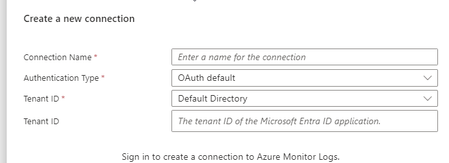
Hello I am learning to build Logic Apps. The tasks will mainly involve querying Log Analytics and writing comments in incidents. How can I do this securely? I understand that I need to add the Sentinel Contributor role for the Logic App, but what next? If I need the Logic App to be able to query, do I need to give it additional access, such as Log Analytics Contributor or Reader? When I want to create a connection, I have three options: OAuth - I see that I log in with my account, and then the Logic App has access to what I have access to. Is this secure? Service Principal - I need to register an application and create a secret for it, then grant this application access to Sentinel. Can I use a single Service Principal for all Logic Apps? I understand that secrets need to be rotated – does this affect my Logic Apps? Will I need to update something to ensure everything works properly? Managed Identity - This only works within the specific Logic App? This seems like the best solution, but I managed to add a new Managed Identity to query Log Analytics, and in the next step, I wanted it to add tasks to an incident in Sentinel, and unfortunately, it didn't work. (However, I changed the last step and added it via OAuth, and it worked, allowing the Logic App to add tasks to the incident in Sentinel.) this is one of example i am working on. https://github.com/Azure/Azure-Sentinel/blob/master/Playbooks/Get-SOCTasks/readme.md adding role assignment I would be great if you can share your experiences! thank you494Views0likes1Comment
Unified Security Operation Sentinel Vs Defender Tables
I have a question regarding the Unified SOC portal. In the session below, they highlighted one advantage: the ability to use Defender and Sentinel Tables together. However, both the SignInLogs and DeviceLogonEvents tables are already accessible in Sentinel through the Defender connector. Am I missing something, or did they use an incorrect example to demonstrate an advantage that Sentinel already provides? https://www.youtube.com/live/ndAKk8l5VMo?si=ZvUh21DaknXRYgXr&t=12231.2KViews0likes4CommentsMonthly news - June 2024
Microsoft Defender XDR Monthly news June 2024 Edition This is our monthly "What's new" blog post, summarizing product updates and various new assets we released over the past month across our Defender products. In this edition, we are looking at all the goodness from May 2024.9.9KViews4likes1CommentMonthly news - May 2024
Microsoft Defender XDR Monthly news May 2024 Edition This is our monthly "What's new" blog post, summarizing product updates and various new assets we released over the past month across our Defender products. In this edition, we are looking at all the goodness from April 2024.7.6KViews3likes0CommentsMonthly news - May 2024
Microsoft Defender XDR Monthly news May 2024 Edition This is our monthly "What's new" blog post, summarizing product updates and various new assets we released over the past month across our Defender products. In this edition, we are looking at all the goodness from April 2024.9.6KViews8likes1Comment