neural tts
47 Topics
Azure Neural Text-to-Speech updates: 51 new voices added to the portfolio
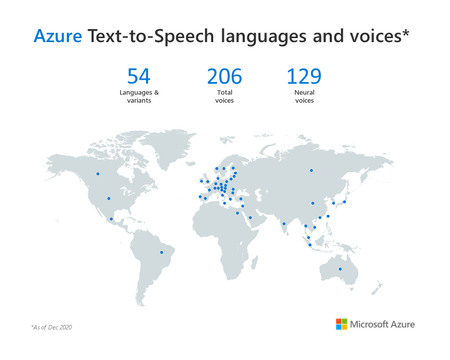
Today, we are excited to announce that Azure Neural TTS has added 51 new voices for a total of 129 neural voices across 54 languages/locales. With this release, we provide at least one male and one female voice for customers to choose in each language/locale. In total, Azure TTS now enables developers to reach millions more people with more than 200 voices available in standard and neural TTS.27KViews8likes11Comments
Azure AI Speech launches Personal Voice in preview
Today at Ignite 2023 conference, Microsoft is taking customization one step further with its new 'Personal Voice' feature. This innovation is specifically designed to enable customers to build apps that allow their users to easily create their own AI voice, resulting in a fully personalized voice experience.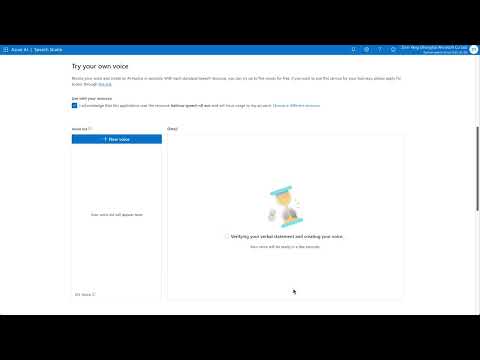 29KViews6likes3Comments
Introducing AI-generated voices for Azure neural text to speech service
In this blog, we introduce two new voices created using the latest controllable new voice generation technology, a masculine voice named AIGenerate1 and a feminine voice named AIGenerate2, and provide a deeper view on the technology behind.13KViews4likes9CommentsBuild a natural custom voice for your brand
Today, we are excited to announce that Custom Neural Voice is now generally available (GA). In this blog, we’ll introduce how Custom Neural Voice works and share best practices in responsibly creating a highly natural brand voice for your apps. 39KViews4likes1Comment
Neural Text to Speech extends support to 15 more languages with state-of-the-art AI quality
To make it possible for more developers to add natural-sounding voices to their applications and solutions, today, we’re building on our language support with 15 new Neural TTS voices along with significant voice quality improvements.37KViews4likes0Comments
Interactive AI Avatars: Building Voice Agents with Azure Voice Live API
Azure Voice Live API recently reached General Availability, marking a significant milestone in conversational AI technology. This unified API surface doesn't just enable speech-to-speech capabilities for AI agents—it revolutionizes the entire experience by streaming interactions through lifelike avatars. Built on the powerful speech-to-speech capabilities of the GPT-4 Realtime model, Azure Voice Live API offers developers unprecedented flexibility: - Out-of-the-box or custom avatars from Azure AI Services - Wide range of neural voices, including Indic languages like the one featured in this demo - Single API interface that handles both audio processing and avatar streaming - Real-time responsiveness with sub-second latency In this post, I'll walk you through building a retail e-commerce voice agent that demonstrates this technology. While this implementation focuses on retail apparel, the architecture is entirely generic and can be adapted to any domain—healthcare, banking, education, or customer support—by simply changing the system prompt and implementing domain-specific tools integration. The Challenge: Navigating Uncharted Territory At the time of writing, documentation for implementing avatar features with Azure Voice Live API is minimal. The protocol-specific intricacies around avatar video streaming and the complex sequence of steps required to establish a live avatar connection were quite overwhelming. This is where Agent mode in GitHub Copilot in Visual Studio Code proved extremely useful. Through iterative conversations with the AI agent, I successfully discovered the approach to implement avatar streaming without getting lost in low-level protocol details. Here's how different AI models contributed to this solution: - Claude Sonnet 4.5: Rapidly architected the application structure, designing the hybrid WebSocket + WebRTC architecture with TypeScript/Vite frontend and FastAPI backend - GPT-5-Codex (Preview): Instrumental in implementing the complex avatar streaming components, handling WebRTC peer connections, and managing the bidirectional audio flow Architecture Overview: A Hybrid Approach The architecture comprises of these components 🐳 Container Application Architecture Vite Server: Node.js-based development server that serves the React application. In development, it provides hot module replacement and proxies API calls to `FastAPI`. In production, the React app is built into static files served by FastAPI. FastAPI with ASGI: Python web framework running on `uvicorn ASGI server`. ASGI (Asynchronous Server Gateway Interface) enables handling multiple concurrent connections efficiently, crucial for WebSocket connections and real-time audio processing. 🤖 AI & Voice Services Integration Azure Voice Live API: Primary service that manages the connection to GPT-4 Realtime Model, provides avatar video generation, neural text-to-speech, and WebSocket gateway functionality GPT-4 Realtime Model: Accessed through Azure Voice Live API for real-time audio processing, function calling, and intelligent conversation management 🔄 Communication Flows Audio Flow: Browser → WebSocket → FastAPI → WebSocket → Azure Voice Live API → GPT-4 Realtime Model Video Flow: Browser ↔ WebRTC Direct Connection ↔ Azure Voice Live API (bypasses backend for performance) Function Calls: GPT-4 Realtime (via Voice Live) → FastAPI Tools → Business APIs → Response → GPT-4 Realtime (via Voice Live) 🤖 Business process automation Workflows / RAG Shipment Logic App Agent: Analyzes orders, validates data, creates shipping labels, and updates tracking information Conversation Analysis Agent: Azure Logic App Reviews complete conversations, performs sentiment analysis, generates quality scores with justification, and stores insights for continuous improvement Knowledge Retrieval: Azure AI Search is used to reason over manuals and help respond to Customer queries on policies, products The solution implements a hybrid architecture that leverages both WebSocket proxying and direct WebRTC connections for optimal performance. This design ensures the conversational audio flow remains manageable and secure through the backend, while the bandwidth-intensive avatar video streams directly to the browser for optimal performance. The flow used in the Avatar communication: ``` Frontend FastAPI Backend Azure Voice Live API │ │ │ │ 1. Request Session │ │ │─────────────────────────►│ │ │ │ 2. Create Session │ │ │─────────────────────────►│ │ │ │ │ │ 3. Session Config │ │ │ (with avatar settings)│ │ │─────────────────────────►│ │ │ │ │ │ 4. session.updated │ │ │ (ICE servers) │ │ 5. ICE servers │◄─────────────────────────│ │◄─────────────────────────│ │ │ │ │ │ 6. Click "Start Avatar" │ │ │ │ │ │ 7. Create RTCPeerConn │ │ │ with ICE servers │ │ │ │ │ │ 8. Generate SDP Offer │ │ │ │ │ │ 9. POST /avatar-offer │ │ │─────────────────────────►│ │ │ │ 10. Encode & Send SDP │ │ │─────────────────────────►│ │ │ │ │ │ 11. session.avatar. │ │ │ connecting │ │ │ (SDP answer) │ │ 12. SDP Answer │◄─────────────────────────│ │◄─────────────────────────│ │ │ │ │ │ 13. setRemoteDescription │ │ │ │ │ │ 14. WebRTC Handshake │ │ │◄─────────────────────────┼─────────────────────────►│ │ (Direct Connection) │ │ │ │ │ │ 15. Video/Audio Stream │ │ │◄────────────────────────────────────────────────────│ │ (Bypasses Backend) │ │ ``` For more technical details, refer to the technical details behind the implementation, refer to the GitHub Repo shared in this post. Here is a video of the demo of the application in action.3.5KViews3likes0Comments