multicloud
78 TopicsReplicating your AWS application to Azure: key resources for software development companies
Azure offers a broad global footprint, strong security and compliance foundations, flexible cost options, and the ability to deploy your solution directly into a customer’s subscription for tighter integration with their environment. While Microsoft Marketplace expands your reach instantly by connecting your solution to millions of customers across Microsoft’s global ecosystem. It also provides deeper integration with Azure services and a unified experience that makes it easier for organizations to discover, purchase, and deploy your app. You can scale with channel-led sales by extending your reach through an ecosystem of 500K+ partners through a variety of sales models. With ISV Success, you can also accelerate replication with cloud credits, AI services, and hands on technical guidance. Understanding how AWS and Azure services align — across networking, storage, identity, regions, and marketplace requirements — helps ensure a smooth replication process. This post highlights key resources that compare AWS and Azure components, outline migration considerations, and guide you through preparing an Azure‑ready version of your application. Essential guides for AWS‑to‑Azure replication To get started, here is a curated set of resources that cover architecture differences, identity, security, networking, regions, and marketplace publishing — all designed to help you build an Azure‑ready version of your existing AWS application. App replication foundations Advantages of replicating your app from AWS to Azure Guide to replicating your app from AWS to Azure Quick‑start toolkit for AWS‑to‑Azure replication Architecture & service mapping AWS to Azure service comparisons Storage migration paths AWS‑to‑Azure network design Region selection for AWS developers Identity & Security Identity and Access Management AWS‑to‑Azure security model comparison Marketplace Enablement Publishing and selling through Marketplace Step-by-step curated guidance through App Advisor These resources provide a complete starting point for understanding how to replicate your AWS‑based application to Azure, from comparing services and configuring infrastructure to preparing your Marketplace listing and extending your multi-cloud reach. Want more? Start coding in minutes with code templates, solution architecture, and how-to articles to start coding in minutes? Visit the AWS to Azure replication code library in the Quick-Start Development Toolkit.76Views4likes0CommentsAzure Arc Server Forum: 2026 Updates
We are excited to announce the fourth calendar year of the Azure Arc Server Forum. We are incredibly thankful to all the customers and community members, who have joined our forum and newsletter from our start back in the Fall of 2023. From January 2026, the monthly Azure Arc Server Forum will be hosted on the third Thursday of each month from 9:30 – 10:15 AM PST. Each Arc Server Forum includes live demos of new capabilities, question and answer sessions with the product group, and feedback opportunities covering Windows, Linux, and SQL Server management, licensing, and connectivity across hybrid, multicloud, and edge environments. Sessions are skipped in July and December for summer and winter holidays respectively. Forum participants also receive a monthly newsletter summarizing updates including: Announcements of General Availability, Public Preview, and Private Previews capabilities including key details and documentation Updates on agent improvements and updates on experience changes Opportunities to provide feedback to and influence the product group’s roadmap or engage in ongoing customer research studies Updates on the invitation and timing of the Arc Server Forum Recordings from the Arc Server Forum are periodically uploaded to the Azure Arc Server Forum YouTube channel: Azure Arc Server Forum - YouTube typically within 2-3 weeks of the Forum. To sign up for the Azure Arc Server Forum and newsletter, please register with contact details at https://aka.ms/arcserverforumsignup/. Thank you!832Views3likes2Comments
Workload Identity support for Azure Arc-enabled Kubernetes clusters now Generally Available!
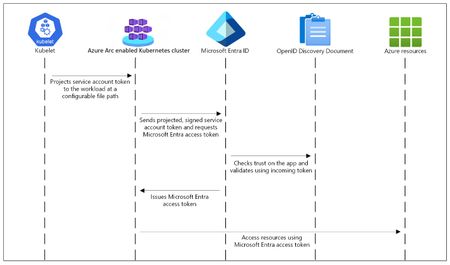
We’re excited to announce that Workload Identity support for Azure Arc-enabled Kubernetes is now Generally Available (GA)! This milestone brings a secure way for applications running on Arc-connected clusters running outside of Azure to authenticate to Azure services without managing secrets. Traditionally, workloads outside Azure relied on static credentials or certificates to access Azure resources like Event Hubs, Azure Key Vault, and Azure Storage. Managing these secrets introduces operational overhead and security risks. With Microsoft Entra Workload ID federation, your Kubernetes workloads can now: Authenticate securely using OpenID Connect (OIDC) without storing secrets. Exchange trusted tokens for Azure access tokens to interact with services securely. This means no more manual secret rotation and reduced attack surface, all while maintaining compliance and governance. How It Works The integration uses Service Account Token Volume Projection and aligns with Kubernetes best practices for identity federation. The process involves a few concise steps: Enable OIDC issuer and workload identity on your Arc-enabled cluster using Azure CLI. az connectedk8s connect --name "${CLUSTER_NAME}" --resource-group "${RESOURCE_GROUP}" --enable-oidc-issuer –-enable-workload-identity Configure a user-assigned managed identity in Azure to trust tokens from your Azure Arc enabled Kubernetes cluster's OIDC issuer URL. This involves creating a federated identity credential that links the Azure identity with the Kubernetes service account. Applications running in pods, using the annotated Kubernetes service account, can then request Azure tokens via Microsoft Entra ID and access resources they’re authorized for (e.g., Azure Storage, Azure Key Vault). This integration uses Kubernetes-native construct of Service Account Token Volume Projection and aligns with Kubernetes best practices for identity federation. Supported platforms We support a broad ecosystem of distributions, including: Red Hat OpenShift Rancher K3s AKS-Arc (In preview) VMware Tanzu Kubernetes Grid (TKGm) So, whether you’re running clusters in retail stores, manufacturing plants, or remote edge sites, you can connect them to Azure Arc and enable secure identity federation for your workloads to access Azure services. Ready to get started? Follow our step-by-step guide on Deploying and Configuring Workload Identity Federation in Azure Arc-enabled Kubernetes to secure your edge workloads today!267Views0likes0CommentsPublic Preview: Multicloud connector support for Google Cloud
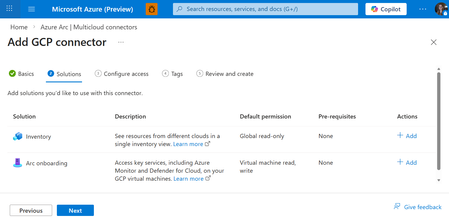
We are excited to announce that the Multicloud connector is now in preview for GCP environments. With the Multicloud connector, you can easily connect your GCP projects and AWS accounts to Azure with the following capabilities: Inventory: Get an up-to-date, comprehensive view of your cloud assets across different cloud providers. Now supporting GCP services (Compute VM, GKE, Storage, Functions, and more), you can now gain insights into your Azure, AWS, and GCP environments in a single pane of glass. The agentless inventory solution will periodically scan your GCP environment, project the discovered resources in GCP as Azure resources, including all of the GCP metadata like GCP labels. Now, you can easily view, query, and tag these resources from a centralized location. Azure Arc onboarding: Automatically Arc-enable your existing and future GCP VMs so you can leverage Azure and Microsoft services, like Azure Monitor and Microsoft Defender for Cloud. Through the multicloud connector, the Azure Arc agent will be automatically installed for machines that meet the prerequisites. How do I get started? You can easily set up the multicloud connector by following our getting started guide which provides step by step instructions on creating the connector and setting up the permissions in GCP which leveraged OIDC federation. What can I do after my connector is set up? With the inventory offering, you can see and query for all of your GCP and Azure resources via Azure Resource Graph. For Azure Arc onboarding, you can apply the Azure management services on your GCP VMs that are Arc-enabled. Learn more here. We are very excited about the expanded support in Google Cloud. Set up your multicloud connector now for free! Please let us know if you have any questions by posting on the Azure Arc forum or via Microsoft support. Here is the mutlicloud capabilities technical documentation. Check out the Ignite session here!417Views0likes0Comments
A Guide to Adaptive Cloud at Microsoft Ignite 2025
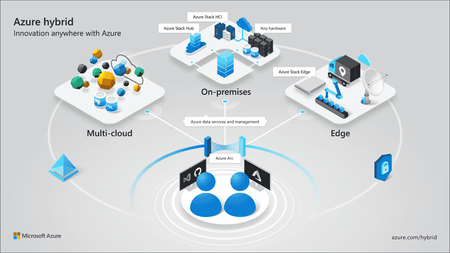
Get ready to supercharge your Ignite experience! This guide is your go‑to playbook for all things Adaptive Cloud. You’ll find clear pointers on where to learn about the latest updates for unifying hybrid, multicloud, and edge environments, with the latest updates from Azure Monitor, Azure Local, Azure Backup, and more. Connect with experts and peers, prioritize sessions, and navigate the event flow with quick links to the session catalog and resources to confirm times and locations throughout the event. We can’t wait to connect!1KViews2likes0CommentsOperate everywhere with AI-enhanced management and security
Farzana Rahman and Dushyant Gill from Microsoft discuss new AI-enhanced features in Azure that make it simpler to acquire, connect, and operate with Azure's management offerings across multiple clouds, on-premises, and at the edge. Key updates include enhanced management for Windows servers and virtual machines with Windows Software Assurance, Windows Server 2025 hotpatching support in Azure Update Manager, simplified hybrid environment connectivity with Azure Arc gateway, a multicloud connector for AWS, and Log Analytics Simple Mode. Additionally, Azure Migrate Business Case helps compare the total cost of ownership, and new Copilot in Azure capabilities that simplify cloud management and provide intelligent recommendations.2.2KViews1like1CommentHarnessing the multicloud advantage: Comparing AWS and Azure network designs
This post is part of a series on replicating apps from AWS to Azure. View all posts in this series. To simplify your app replication, understanding how AWS and Azure approach networking—such as routing, connectivity, private access, and hybrid integration—can help you quickly align infrastructure components across clouds. This ensures consistent performance, security, and connectivity for your customers as you extend your offer to Azure. You can also join ISV Success to get access to over $126K USD in cloud credits, AI services, developer tools, and 1:1 technical consults to help you replicate your app and publish to Azure Marketplace. To replicate your app faster get cloud-ready reference code to replicate AWS apps to Azure. Software development companies looking to migrate or replicate their applications from AWS to Azure need to understand how networking services in both platforms compare. While AWS and Azure offer similar networking capabilities, key differences in architecture and service offerings can impact the overall solution design. This article provides a comparative overview of the networking services in AWS and Azure, focusing on their unique features and distinctions. By understanding these differences, software companies can make more informed decisions when architecting cloud-native solutions on either platform. The article explores networking services at a high level, with a deeper dive into critical areas such as peering, routing, and elastic load balancing, where the platforms diverge most significantly. Networking services overview Virtual networks & subnets AWS uses Virtual Private Cloud (VPC) to create isolated networks, spanning all Availability Zones within a region. VPCs support public and private subnets, with VPC peering routing traffic between VPCs using private IPv4 or IPv6 addresses. Azure uses Virtual Networks (VNets), which provide isolation within a region and can span multiple Availability Zones. Azure's VNet peering connects multiple VNets, making them appear as one for connectivity purposes, routing traffic through Microsoft's private network. In AWS, subnets are confined to a specific AZ, while Azure subnets are not tied to a specific Availability Zone. This allows zonal resources to retain their private IPs even when placed in different zones within a region. Peering In AWS and Azure, transitive peering is not natively supported with standard VPC Peering connections. For example, VPC-A and VPC-C cannot communicate directly if they are only peered through VPC-B. To enable transitive routing, AWS offers Transit Gateway, which connects multiple VPCs, allowing traffic between VPC-A and VPC-C. Azure provides Azure Virtual WAN, a centralized hub-and-spoke architecture that simplifies global network connections with built-in transitive routing. VNet Peering uses static routing without BGP, while Azure Virtual WAN supports BGP for branch and ExpressRoute connectivity. Additionally, Azure Virtual WAN now supports BGP for inter-regional hub-to-hub routing, enabling dynamic route propagation across hubs, similar to AWS Transit Gateway peering across regions. See Azure Virtual WAN Pricing for cost considerations. Below is an example of Azure VNet Peering. Traffic management services AWS features Elastic Load Balancing (ELB) with Classic, Application, and Network Load Balancers. Azure has Azure Load Balancer, Azure Application Gateway, and Traffic Manager for load distribution and traffic management. Below is an application of Multi-region load balancing with Traffic Manager, Azure Firewall, and Application Gateway. AWS provides a suite of load balancers including Application Load Balancer (ALB) for Layer 7 traffic, Network Load Balancer (NLB) for high-performance Layer 4 workloads, and Classic Load Balancer (CLB) as a legacy option. These services integrate with a broad set of AWS offerings such as EC2, ECS, and Lambda, and are complemented by Global Accelerator for improving global traffic performance. Azure’s approach to traffic management is more modular. Azure Load Balancer handles Layer 4 traffic and comes in Basic and Standard SKUs for varying scale and resiliency. For Layer 7 scenarios, Azure offers Application Gateway with features like SSL termination and integrated WAF. Azure Front Door adds global Layer 7 load balancing with content acceleration, while Azure Traffic Manager enables DNS-based routing with geo-failover. These services are often used in combination to build resilient architectures, rather than mirroring AWS's load balancer offerings one-to-one. Content delivery and optimization Both AWS and Azure provide robust content delivery network (CDN) services to accelerate the global delivery of content, applications, and APIs. AWS offers CloudFront, a globally distributed CDN service that integrates seamlessly with AWS services, enabling the fast delivery of web content, videos, and APIs to end users. On the Azure side, Azure Front Door acts as a modern, high-performance CDN that also includes advanced load balancing, security features, and seamless integration with Azure services. While both services focus on enhancing global content delivery, Azure Front Door goes a step further by offering enhanced scalability and secure user experiences for content-heavy applications and APIs. Routing & gateways AWS uses route tables associated with subnets in a VPC to direct traffic within and outside the network—for example, toward Internet Gateways, NAT Gateways, or VPN/Transit Gateways. Azure uses User-Defined Routes (UDRs), which can be applied to subnets in a Virtual Network (VNet) and managed centrally via Azure Network Manager. The diagram shows a spoke network group of two VNets accessing a DNS service through a Firewall, where UDRs created by Network Manager make this routing possible. AWS relies on explicit route configurations and services like Transit Gateway for transitive routing across VPCs. Azure creates system routes by default and allows UDRs to customize traffic flow to resources like VPN Gateways, NAT Gateways, or Network Virtual Appliances (NVAs). For internet egress, Azure currently allows implicit SNAT via Standard Public IPs or Load Balancers without outbound rules, but this behavior will be retired on September 30, 2025. After that, outbound access will require explicit configuration using a NAT Gateway, Load Balancer outbound rule, or Azure Firewall. Both platforms provide VPN solutions for hybrid connectivity. AWS supports Site-to-Site VPN for linking on-premises data centers with VPCs, and Client VPN for individual users. Azure offers Site-to-Site (S2S) and Point-to-Site (P2S) VPNs, as well as VNet-to-VNet connections for secure inter-region communication. These VPN services work with their respective routing infrastructures to support secure hybrid and multi-region deployments. DNS services DNS plays a foundational role in service discovery and network communication across both AWS and Azure environments. AWS offers Route 53, a scalable DNS service that supports both public and private hosted zones. It provides features like health checks, weighted routing, and integration with AWS services for domain resolution. Azure delivers similar functionality through Azure DNS for public DNS hosting and Azure Private DNS for internal name resolution within VNets. Azure Private DNS zones can be linked to one or more VNets, enabling seamless name resolution without custom DNS servers. These services are often used alongside load balancers and private endpoints to ensure consistent, secure access to application components. Private connectivity Both AWS and Azure offer dedicated, high-performance private connections to enhance security and reduce latency for hybrid and multi-cloud architectures. AWS provides Direct Connect, which establishes a dedicated network connection from an on-premises data center to AWS. This ensures a more consistent network experience, particularly for workloads requiring low latency or high throughput. Similarly, Azure offers ExpressRoute, a private, dedicated connection from on-premises infrastructure to Azure, bypassing the public internet. These private links typically use technologies like MPLS or Ethernet, depending on the provider and partner, offering better performance and reliability than traditional VPNs. ExpressRoute connections are often used for mission-critical workloads, offering greater reliability, faster speeds, and enhanced security. Security groups and network ACLs Network-level security AWS offers Security Groups (stateful) and Network ACLs (stateless) for network-level security. Security Groups are applied at the instance level, while NACLs work at the subnet boundary, adding an extra layer of filtering. Azure uses Network Security Groups (NSGs) and Application Security Groups (ASGs), which are fully stateful and simplify rule management. NSGs can be applied at both the subnet and network interface level. While Azure lacks a direct equivalent to stateless NACLs, NSGs typically offer enough granularity for most use cases. Azure also offers more granular traffic control with User-Defined Routes (UDRs) and the option to disable "Allow forwarded traffic" in virtual network peering settings. This ensures tight control or blocking of traffic even between peered VNets. Web Application Firewall (WAF) When it comes to Web Application Firewalls, AWS and Azure differ in design and deployment models. AWS WAF can be deployed as a standalone resource and attached to services like CloudFront, API Gateway, or the Application Load Balancer. This offers a high degree of flexibility but may require more hands-on setup and configuration. In contrast, Azure WAF is designed to work in close integration with services such as Application Gateway and Azure Front Door. While not standalone, central WAF policies allow consistent policy reuse across deployments. From a performance perspective, AWS WAF is recognized for its robust application-layer controls and ability to handle high traffic loads efficiently. Azure WAF is often noted for its ease of setup and the depth of its reporting and diagnostics. Private access to PaaS services and Private Endpoints As cloud-native applications increasingly depend on managed services like storage, databases, and messaging queues, securely connecting to these services without exposing traffic to the public internet becomes a critical design consideration. In AWS, VPC Endpoints—available as Interface or Gateway types—allow private connectivity to supported services from within a VPC. Azure provides a similar capability through Private Link, leveraging Private endpoints enabling private access to Azure services such as Azure Storage, SQL Database, or even custom services behind a Load Balancer. Azure Private Link also supports private access to customer or partner services published via Azure Private Link Service. Both approaches improve security posture by keeping traffic on the cloud provider's internal backbone, reducing exposure to external threats. For software development companies building multi-tiered cloud-native applications, these features offer a straightforward way to lock down service-to-service communication without relying on public endpoints. Endpoint policy management In AWS, endpoint management is handled via VPC Endpoint Policies, API Gateway, and AWS PrivateLink. These resource-specific policies are applied to services like S3, DynamoDB, or API Gateway, offering granular control, but requiring more configuration. In contrast, Azure’s endpoint management is more centralized. Services like Azure Application Gateway, Front Door, and Private Endpoint are governed through Network Security Groups (NSGs), Azure Firewall, and WAF policies. Azure's centralized policy enforcement, particularly for Private Endpoints, provides simplified access control and reduces the need for per-service configurations. AWS offers granular control at the cost of additional configuration complexity. Service mesh for Microservices For applications composed of many microservices, managing east-west traffic, enforcing security policies, and gaining observability into service communication can become complex. A service mesh addresses these challenges by abstracting service-to-service communication into a dedicated infrastructure layer. AWS offers App Mesh, which integrates with ECS, EKS, and Fargate, providing features like traffic shifting, retries, circuit breaking, and mTLS encryption. Azure supports service meshes primarily through open-source solutions like Istio and Linkerd, facilitated by managed integrations via the AKs service mesh add-on, simplifying operations on AKS. Additionally, Azure provides Dapr, which complements service mesh by offering higher-level application concerns such as state management, pub/sub messaging and simplified service invocation. For cloud-native software development companies adopting Kubernetes or containerized architectures, a service mesh brings consistency, security, and fine-grained control to internal traffic management. Monitoring and observability Azure Network Watcher provides tools for monitoring, diagnosing, and logging network performance across IaaS resources in Azure. Key features include topology visualization, connection monitoring, and various diagnostic tools like IP flow verification, NSG diagnostics, and packet capture. Additionally, Traffic Analytics provides insights into network traffic patterns. These tools support both hybrid and fully cloud-based network infrastructures, enabling efficient troubleshooting and performance optimization. On the AWS side, VPC Flow Logs and Reachability Analyzer provide comparable visibility and connectivity diagnostics. Key Resources: Microsoft Azure Migration Hub | Microsoft Learn Azure networking documentation Compare AWS and Azure Networking Options - Azure Architecture Center | Microsoft Learn SaaS Workloads - Microsoft Azure Well-Architected Framework | Microsoft Learn Microsoft commercial marketplace documentation Metered billing for SaaS offers in Partner Center Create plans for a SaaS offer in Azure Marketplace Metered billing with Azure Managed Applications Set plan pricing and availability for an Azure Container offer in Microsoft commercial marketplace - Marketplace publisher Configure pricing and availability for a virtual machine offer in Partner Center - Marketplace publisher Get cloud-ready reference code to replicate AWS apps to Azure Get over $126K USD in benefits and technical consultations to help you replicate and publish your app with ISV Success Maximize your momentum with step-by-step guidance to publish and grow your app with App Advisor1.6KViews6likes1Comment
Preview of Arc enabled SQL Server in US Government Virginia
Introduction We are excited to announce that Azure Arc-enabled SQL Server on Windows is now in public preview for the US Government Virginia region. With Azure Arc-enabled SQL Server, U.S. government agencies and organizations can manage SQL Server instances outside of Azure from the Azure Government portal, in a secure and compliant manner. Arc-enabled SQL Server resources in US Gov Virginia can be onboarded and viewed in the Azure Government portal just like any Azure resource, giving you a single pane of glass to monitor and organize your SQL Server estate in the Gov cloud. Preview features of Azure Arc-Enabled SQL Server Currently, in the US Government Virginia region, SQL Server registration provides the following features: Connect (onboard) a SQL Server instance to Azure Arc. SQL Server inventory which includes the following capabilities in the Azure portal: View the SQL Server instance as an Azure resource. View databases as an Azure resource. View the properties for each server. For example, you can view the version, edition, and database for each instance. All other features, including Extended Security Updates (ESU), are not currently available. How to Onboard Your SQL Server Onboarding a SQL Server to Azure Arc in the Government cloud is a two-step process that you can initiate from the Azure (US Gov) portal. Step 1: Connect hybrid machines with Azure Arc-enabled servers Step 2: Connect your SQL Server to Azure Arc on a server already enabled by Azure Arc Limitations The following SQL Server features are not currently available in any US Government region: Failover cluster instance (FCI) Availability group (AG) SQL Server services like SSIS, SSRS, or Power BI Report Server Future Plans and Roadmap This public preview is a major first step in bringing Azure Arc’s hybrid data management to Azure Government, and more enhancements are on the way. We will be enabling features like Arc-based billing (PAYG) and ESU purchasing along with feature parity with public cloud in future. Conclusion The availability of Azure Arc-enabled SQL Server in the US Gov Virginia region marks an important milestone for hybrid data management in Government. If you’re an Azure Government user managing SQL Server instances, we invite you to try out this public preview. And please, share your feedback with us through the community forum or your Microsoft representatives. Learn More: SQL Server enabled by Azure Arc in US Government Preview SQL Server enabled by Azure Arc Update August 14, 2025 Arc enabled SQL Server in US Government Virginia is now generally available with support for licensing and ESU. Please see SQL Server enabled by Azure Arc in US Government418Views3likes0CommentsAnnouncing the Public Preview of the Azure Arc gateway!
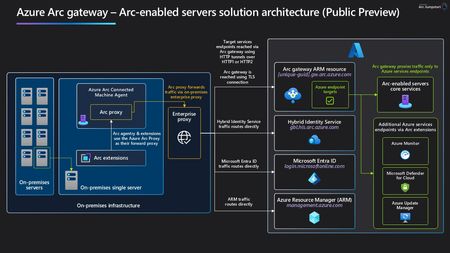
The wait is over, we are thrilled to introduce the Public Preview of the Azure Arc gateway for Arc-enabled Servers, and Arc-enabled Kubernetes! They reduce the number of required endpoints for customers to configure their Enterprise proxy when setting up for using Azure Arc services. How Does it Work? Arc gateway introduces two new components: Arc gateway – An Azure Resource with a single, unique endpoint that will handle the incoming traffic to Azure from on-prem Arc workloads. This endpoint is to be configured in customer’s enterprise proxies. Azure Arc Proxy – A component of the Arc connected machine agent that routes all Agent and extension traffic to its destination in Azure via an Arc gateway Resource. The Arc Proxy is installed on every Arc-enabled Resource within the core Arc agent. Arc gateway on Arc-enabled Servers Architecture Arc gateway on Arc-enabled Kubernetes Architecture How do I Deploy Arc gateway? At a high level, there are three steps: create an Arc gateway Resource. Get the Arc gateway URL, and configure your Enterprise proxy Either onboard your Servers/K8s clusters using the gateway resource info or update the existing Arc Server/K8s resource with the created gateway resource info. For Arc enabled Servers, you can find Arc gateway details & instructions in the Public Preview documentation, and the Arc gateway for Arc-enabled Servers Jumpstart Episode. For Arc-enabled Kubernetes, more details are available in the Public Preview Documentation. Arc gateway Endpoint Coverage, Illustrated by the Azure Monitoring Scenario For the Arc gateway public preview, we have focused on covering primarily Service Endpoints for Azure control plane traffic. Most of the data plane endpoints are not yet covered by Arc gateway. I’d like to use the Azure monitoring on Arc-enabled Servers scenario to illustrate the Endpoints covered by the Public Preview release. Below is a comparison of the list of endpoints customers must open access to in their enterprise proxy with and without Arc gateway for this common scenario. As displayed, Arc gateway cuts the list of required endpoints nearly in half and removes the need for customers to allow wildcard endpoints in their on-prem environment. Endpoints required without Arc gateway (17) Endpoints required with Arc gateway (8) Arc-enabled Servers Endpoints aka.ms download.microsoft.com packages.microsoft.com login.microsoftonline.com *.login.microsoftonline.com pas.windows.net management.azure.com *.his.arc.azure.com *.guestconfiguration.azure.com azgn*.servicebus.windows.net *.blob.core.windows.net dc.services.visualstudio.com Azure Monitor Endpoints global.handler.control.monitor.azure.com <virtual-machine-region-name>.handler.control.monitor.azure.com <log-analytics-workspace-id>.ods.opinsights.azure.com <virtual-machine-region-name>.monitoring.azure.com <data-collection-endpoint>.<virtual-machine-region-name>.ingest.monitor.azure.com Arc-enabled Servers Endpoints <URL Prefix>.gw.arc.azure.com management.azure.com login.microsoftonline.com gbl.his.arc.azure.com <region>.his.arc.azure.com packages.microsoft.com Azure Monitor Endpoints <log-analytics-workspace-id>.ods.opinsights.azure.com <data-collection-endpoint>.<virtual-machine-region-name>.ingest.monitor.azure.com We're continuing to expand the endpoint coverage and further reduce the number of endpoints required to be configured through customers' Enterprise proxies. I’d like to invite you to try out the Arc gateway Public Preview release and share any questions, comments or feedback and requests to the Public Preview Contact Form.6.6KViews3likes2Comments