ms graph
1 Topic
Unable to use MS Graph DLP Api's to use with my Entra Registered App
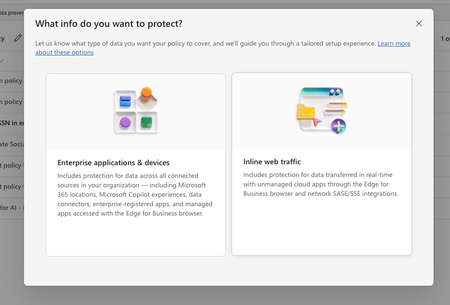
In purview, I have set of policies in DLP, where I have registered to block the US SSN in the text contents and I have created different policies in all of them I have selected the available locations: Exchange email - All accounts SharePoint sites OneDrive accounts - All accounts Teams chat and channel messages - All accounts Devices - All accounts Microsoft Defender for Cloud Apps On-premises repositories And selected action as block all, in all of them for the rule and enabled the rule (not in simulation mode) Now, I have the app registered in Entra and I try to use the following API's https://learn.microsoft.com/en-us/graph/api/userprotectionscopecontainer-compute?view=graph-rest-1.0 https://learn.microsoft.com/en-us/graph/api/userdatasecurityandgovernance-processcontent?view=graph-rest-1.0&tabs=http But whenever I use the compute api I can see i'm only getting curl -X POST https://graph.microsoft.com/v1.0/users/5fd51e08-c5f1-4298-b79b-a357eaa414ff/dataSecurityAndGovernance/protectionScopes/compute\ -H 'Authorization: Bearer <ACCESS_TOKEN>'\ -H 'Content-Type: application/json' -d '{ "activities": "uploadText,downloadText" }' { "@odata.context": "https://graph.microsoft.com/v1.0/$metadata#Collection(microsoft.graph.policyUserScope)", "value": [ { "activities": "uploadText,downloadText", "executionMode": "evaluateOffline", "locations": [ { "@odata.type": "#microsoft.graph.policyLocationApplication", "value": "b48106d9-1cdb-4d90-9485-fe2b6ee78acf" } ], "policyActions": [] } ] } My sample App's Id is showing up but always with `evaluateOffline` I don't know why it always gives 'evaluteOffline' and policyActions is always empty array Also, I can see my Entra registered app is showing up here in the value of the locations And when I use the processContent api , I always get modified in the response and nothing else like below: curl -XPOST https://graph.microsoft.com/v1.0/users/5fd51e08-c5f1-4298-b79b-a357eaa414ff/dataSecurityAndGovernance/processContent \ -H 'Authorization: <ACCESS TOKEN>'\ -H 'Content-Type: application/json' -d '{ "contentToProcess": { "contentEntries": [ { "@odata.type": "microsoft.graph.processConversationMetadata", "identifier": "07785517-9081-4fe7-a9dc-85bcdf5e9075", "content": { "@odata.type": "microsoft.graph.textContent", "data": "Please process this application for John VSmith, his SSN is 121-98-1437 and credit card number is 4532667785213500" }, "name": "Postman message", "correlationId": "d63eafd2-e3a9-4c1a-b726-a2e9b9d9580d", "sequenceNumber": 0, "isTruncated": false, "createdDateTime": "2026-04-06T00:23:20", "modifiedDateTime": "2026-04-06T00:23:20" } ], "activityMetadata": { "activity": "uploadText" }, "deviceMetadata": { "operatingSystemSpecifications": { "operatingSystemPlatform": "Windows 11", "operatingSystemVersion": "10.0.26100.0" }, "ipAddress": "127.0.0.1" }, "protectedAppMetadata": { "name": "Postman", "version": "1.0", "applicationLocation": { "@odata.type": "microsoft.graph.policyLocationApplication", "value": "b48106d9-1cdb-4d90-9485-fe2b6ee78acf" } }, "integratedAppMetadata": { "name": "Postman", "version": "1.0" } } }' In the above request I have mentioned some sample US Security SSN, but the response I get is { "@odata.context": "https://graph.microsoft.com/v1.0/$metadata#microsoft.graph.processContentResponse", "protectionScopeState": "notModified", "policyActions": [], "processingErrors": [] } But Ideally I want to see whether I can get the content is valid or not, for example in the above request, it has SSN, so ideally I should get restrictAction or something right? Or is that evaluateInline is not available or something? Note that I have purchased E5 and assigned to the user who is trying this Also, whenever I choose to create a Policy in DLP , I got two options And Lets say I choose "Enterprise applications & devices", what happens is in the Locations, I'm seeing only these as the options: And If I choose the "Inline Traffic", i'm seeing only these options In Unmanaged, I'm seeing the following And in the Enforcement Options, I have the following : And in the "Advanced DLP rules" I'm seeing only these So, can you tell me the exact steps in the Purview suite, I couldn't where to mention the Entra registered App, I searched and I couldn't find one But in the compute endpoint, https://learn.microsoft.com/en-us/graph/api/userprotectionscopecontainer-compute?view=graph-rest-1.0 I'm getting my app but only with "evaluateOffline" and with that ETag, If I use the processContent Api, its not giving anything except as I mentioned above in the postSolved125Views0likes1Comment