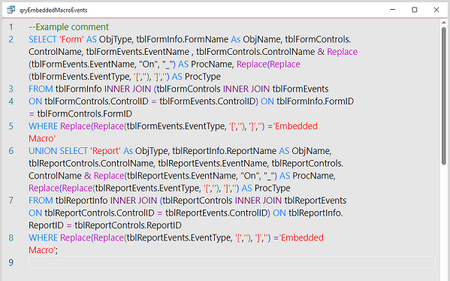
monaco editor
5 TopicsBug fixes in Microsoft Access - Current Channel Version 2605 (Build 16.0.20026.20118)
Bug Name Issue Fixed Edge Browser Control didn't render PDFs on some machines When the Edge Browser Control was used to display a PDF, on some machines the PDF would not render at all if the registry value "HKEY_CLASSES_ROOT\.pdf\Content Type" was missing. Access now provides the missing content type, so the Edge Browser Control can render the PDF. Export to SharePoint failed for tables with both lookup fields and attachment columns When exporting an Access table to a SharePoint list, if the table contained both a lookup field and an attachment column, the export could fail with an error. The export now handles this combination correctly, so the export completes successfully. Conditional Formatting color picker showed a reduced palette in Version 2604 A regression introduced in Version 2604 caused the Conditional Formatting color picker to display a smaller set of color choices than previous versions. The full legacy color palette has been restored. Some Unicode characters displayed incorrectly in objects exported to Excel When exporting an Access object whose name contained certain extended Unicode characters, the resulting file's sheet name displayed the characters incorrectly. These characters are now preserved correctly during export. Power BI Gateway couldn't refresh semantic models from .accdb files Refreshing a Power BI semantic model that connected to a .accdb file via the on-premises gateway could fail with "Unspecified error". Connection setup has been adjusted so the gateway can successfully refresh the model. Monaco SQL view: Ctrl+Z didn't undo Ctrl+Shift+K line deletion In the new Monaco-based SQL editor, pressing Ctrl+Shift+K to delete the current line removed the line, but a subsequent Ctrl+Z would not restore it. Undo now works correctly for this and similar editing operations. Document tab text didn't scale with Windows text-size setting When the Windows display setting for text size was increased, document tab labels and the record navigation bar continued to render at the standard size, while other Access UI scaled correctly. The document tabs and record navigation bar now honor the system text-size setting. Error when editing a Long Text field after a write conflict When a write conflict occurred on a record containing a Long Text field, subsequent attempts to edit the field could fail with an error. The data path now refreshes the cached field values correctly after a conflict so that further edits succeed. Access terminated unexpectedly when reading Edge Browser Control properties in form design view In form design view, retrieving the ReadyState or LocationUrl property on an Edge Browser Control could cause Access to terminate unexpectedly. Both properties now return safely in design view. "Copy" prefix was prepended instead of appended to copied object names When duplicating a database object, Access named the copy "Copy of Form1" instead of "Form1 - Copy". This made copies of related objects sort apart from their originals in the Navigation Pane. Copy-of names now append the suffix, so related objects stay together when sorted alphabetically.1.1KViews3likes8CommentsAccess fixes released in version 2602 (Build 19725.20126)
Here's a summary of bug fixes in the latest version of Access: Bug Name Issue Fixed Monaco query editor applied unwanted autoformatting to passthrough queries The Monaco SQL editor was applying automatic formatting (such as adding whitespace or changing capitalization) to passthrough queries. Since passthrough queries are sent directly to the server's SQL engine without Access interpreting them, autoformatting could alter the SQL in ways that break server-specific syntax. Autoformatting is now disabled for passthrough queries, preserving the exact SQL as written. Monaco query editor font size did not match Access settings When using the Monaco SQL editor, the font size in the query editor didn't match the font size configured in Access's client settings. An incorrect unit conversion resulted in text appearing slightly larger than expected. The conversion has been corrected so the editor font size now matches the configured setting. Datasheet selection could extend past the last column When selecting cells in a datasheet by clicking and dragging, it was possible to extend the selection rectangle past the rightmost column into an empty area. Releasing the mouse and then clicking elsewhere would leave the selection highlight drawn in that empty area, since Access did not erase the over-extended selection. The selection is now properly limited to the actual columns of the datasheet. Please continue to let us know if this is helpful and share any feedback you have.884Views2likes3CommentsAccess bug fixes — Versions 2511 through 2601
Version 2511 (Build 19426) Bug Name Issue Fixed Query Design view showed incorrect joins after selecting SQL text When using the Monaco SQL editor with a query containing multiple joins, selecting text in SQL view with Ctrl+A and then switching back to Design View could trigger a spurious alert and cause one of the joins to appear removed in the design grid. The underlying SQL wasn't actually affected, but the Design view displayed incorrect join information. This is corrected so that switching between SQL view and Design view preserves all joins accurately. Version 2512 (Build 19530) Bug Name Issue Fixed Datasheet forms with nested subforms showing errors after system changes When using datasheet forms containing nested subforms on systems where a system change occurs — such as disconnecting and reconnecting a Remote Desktop session — Access could display a GDI error. This happened because collapsed sublists held references to system brushes that were destroyed during the system change. This is fixed so that all sublists properly handle system resource changes. F4 key did not open the Properties pane in the Query SQL editor When the Monaco SQL editor was enabled, pressing F4 in the Query editor's SQL view didn't properly open the Properties pane. Instead, the pane would either flash briefly or appear incorrectly positioned in the top-left corner of the screen. The F4 shortcut now correctly opens the Properties pane in SQL view. Pressing F5 in the Query SQL editor cleared all SQL text When using the Monaco SQL editor in the Query designer, pressing F5 (Run) could clear all the SQL text from the editor. This is fixed so that running a query with F5 no longer affects the SQL text in the editor. Text not visible when renaming items in the Navigation Pane in dark themes When using the Black (or other dark) Office theme, renaming an object in the Navigation pane resulted in text that was nearly invisible due to insufficient contrast. The rename text box now uses appropriate colors that provide sufficient contrast in all themes. Advanced Filter/Sort opened a standalone query window instead of a filter window When opening a table in Datasheet view and selecting Sort & Filter > Advanced > Advanced Filter/Sort from the ribbon, Access incorrectly opened a full standalone query design window instead of the expected limited filter query window. The filter query window includes a Toggle Filter button to apply the query as a filter. This is corrected, so the command opens the proper filter window. Refreshing an Access ODBC connection in Excel returned an error When refreshing an ODBC connection to an Access database from Excel, users could receive the error "Operation is not supported for this type of object." This is resolved so that Access ODBC connections refresh successfully. Please continue to let us know if this is helpful and share any feedback you have.495Views4likes0Comments