migration
829 Topics
The Sentinel migration mental model question: what's actually retiring vs what isn't?
Something I keep seeing come up in conversations with other Sentinel operators lately, and I think it's worth surfacing here as a proper discussion. There's a consistent gap in how the migration to the Defender portal is being understood, and I think it's causing some teams to either over-scope their effort or under-prepare. The gap is this: the Microsoft comms have consistently told us *what* is happening (Azure portal experience retires March 31, 2027), but the question that actually drives migration planning, what is architecturally changing versus what is just moving to a different screen, doesn't have a clean answer anywhere in the community right now. The framing I've been working with, which I'd genuinely like to get other practitioners to poke holes in: What's retiring: The Azure portal UI experience for Sentinel operations. Incident management, analytics rule configuration, hunting, automation management: all of that moves to the Defender portal. What isn't changing: The Log Analytics workspace, all ingested data, your KQL rules, connectors, retention config, billing. None of that moves. The Defender XDR data lake is a separate Microsoft-managed layer, not a replacement for your workspace. Where it gets genuinely complex: MSSP/multi-tenant setups, teams with meaningful SOAR investments, and anyone who's built tooling against the SecurityInsights API for incident management (which now needs to shift to Microsoft Graph for unified incidents). The deadline extension from July 2026 to March 2027 tells its own story. Microsoft acknowledged that scale operators needed more time and capabilities. If you're in that camp, that extra runway is for proper planning, not deferral. A few questions I'd genuinely love to hear about from people who've started the migration or are actively scoping it: For those who've done the onboarding already: what was the thing that caught you most off guard that isn't well-documented? For anyone running Sentinel across multiple tenants: how are you approaching the GDAP gap while Microsoft completes that capability? Are you using B2B authentication as the interim path, or Azure Lighthouse for cross-workspace querying? I've been writing up a more detailed breakdown of this, covering the RBAC transition, automation review, and the MSSP-specific path, and the community discussion here is genuinely useful for making sure the practitioner perspective covers the right edge cases. Happy to share more context on anything above if useful.47Views1like3Comments
Cross tenant migration tools : New MS solution compared to Migration Wiz?
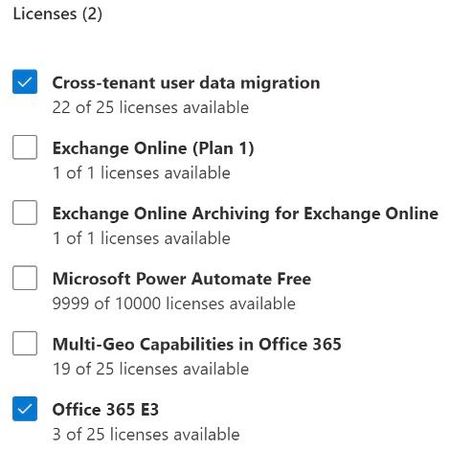
Hi, I'm looking for informations about advantages and limitations between new Microsoft Cross Tenant migration solution (Preview) and "Migration Wiz". Microsoft solution look more limited and doesn't seem to have Free/busy sync. What are the returns for those who did use MS cross tenant solution ? Thanks,1.5KViews0likes4Comments
GoDaddy to Microsoft 365 Migration Issues
Hi there, I wonder if I could get some help with an issue I've got. Currently I am attempting to migrate one user mailbox from the current GoDaddy tenant to our new Microsoft tenant, to initially test out the migration. I've followed the Migration tool in the Exchange admin center but am receiving the following error: Error: MigrationRecipientNotFoundException: A recipient wasn't found for "***@***.onmicrosoft.com". Create a recipient of the appropriate type for this migration and try again. I've got the user created in the Microsoft 365 admin center and a mailbox is set up for them. Both on GoDaddy and Microsoft it is UserMailbox recipient type. I'm using the IMAP Migration settings as outlined from the GoDaddy IMAP settings, and have since checked with GoDaddy and they give these settings: IMAP Server: imap.secureserver.net Authentication: Basic Encryption: SSL Accept untrusted certificates: Yes Port: 993 GoDaddy have also said that Basic authentication is supported by them and I have checked the Entra configuration to ensure that Basic is not blocked. I have even had the user I'm attempting to migrate log in to the temporary onmicrosoft account to make sure there are no log in issues there. I have posted this on the Answers forum as well and was pointed in this direction for further help. Any thoughts or help on this would be amazing. Thanks in advance, Oli796Views0likes6Comments
Alternatives After the Deprecation of the Azure SQL Migration Extension in Azure Data Studio
The Azure SQL Migration extension for Azure Data Studio is being deprecated and will be retired by February 28, 2026. As part of our unified and streamlined migration strategy for Azure SQL, we are consolidating all migration experiences into a consistent, scalable platform. If you are currently using the Azure SQL Migration extension, this blog will guide you through recommended replacement options for every phase of migration, whether you are moving to Azure SQL Managed Instance, SQL Server on Azure Virtual Machines, or Azure SQL Database. What is happening to the Azure SQL Migration extension in ADS? As you already know, Azure data studio will officially retire on February 28, 2026. The Azure SQL Migration extension in Azure Data Studio will also retire along with Azure Data Studio on February 28, 2026. The Azure SQL Migration extension will no longer be available in the marketplace of Azure Data Studio. What should you use instead? Below is the updated guidance for the migration tool categorized by migration phase and target. 1) Pre‑Migration: Discovery & Assessments Prior to migration, it is advisable to evaluate the SQL Server environment for readiness and to determine the right-sized Azure SQL SKU. Below are the recommended options: A) SQL Server enabled by Azure Arc Use the SQL Server migration experience in the Azure Arc portal for: Instance discovery at scale Migration assessments at scale, including: Readiness assessment for all Azure SQL targets. Performance-based, right-sized target recommendations. Projected Azure costs with the recommended target configuration. Reference: Steps to get started with the Azure Arc assessments- Deploy Azure Arc on your servers. SQL Server instances on Arc-enabled servers are automatically connected to Azure Arc. See options to optimize this. B) Automated assessments at scale using Azure DMS PowerShell and Azure CLI The Azure DataMigration modules in Azure PowerShell and Azure CLI can be used to automate assessments at scale. Learn more about how to do this. Here are the sample templates to automate the assessment workflow: Azure PowerShell DataMigration cmdlets DMS Azure CLI commands C) Azure Migrate For scenarios where assessments are required at data center level including different types of workloads like Applications, VM Servers and databases, use Azure Migrate to perform discovery and assessments at scale. Learn more about Azure Migrate. References: Review inventory Create SQL Assessment Review SQL Assessment 2) Migrations Based on the migration targets, here are the recommended tools you can use to carry out the migration: A. To Azure SQL Managed Instance The following options are available for migrating data to Azure SQL Managed Instance: 1. SQL Migration experience in Azure Arc For migrations to Azure SQL MI, leverage the streamlined SQL Migration experience in Azure Arc which lets you complete the end-to-end migration journey in a single experience. This experience provides: Evergreen assessments and right-fit Azure SQL target recommendation. Inline Azure SQL Target creation. Free Azure SQL MI Next generation General Purpose service that lets you experience the power of Azure SQL MI for free for 12 months. Near zero downtime migration using Managed Instance link powered by Distributed Availability Group technology. Secure connectivity. Reference blog: SQL Server migration in Azure Arc 2. Automated migration at scale using Azure DMS PowerShell and Azure CLI To Orchestrate migrations to Azure SQL MI at scale programmatically, use: DMS PowerShell cmdlets DMS Azure CLI commands Learn more about how to do this. B. To SQL Server on Azure Virtual Machines To migrate to SQL Server on Azure Virtual Machines, use: 1. Azure Database Migration Service (DMS) DMS supports migrating to SQL Server on Azure Virtual Machines using both online and offline methods. Your SQL Server backups can be in Azure Blob Storage or on a network SMB file share. For details on each option, see: Backups stored in Azure Blob Storage Backups maintained on network SMB file shares Note: The migration experience from SQL Server on-premises to SQL Server on Azure VM will soon be available in SQL Server enabled by Azure Arc. 2. Automated migration at scale using Azure DMS PowerShell and Azure CLI For programmatic migrations to Azure SQL Virtual Machines: DMS PowerShell cmdlets DMS Azure CLI commands Learn more about how to do this. 3. SSMS option: SQL Server Management Studio (SSMS) migration component If you can connect to both SQL Server on-premises and SQL Server running on Azure VM using SQL Server Management Studio, the migration component in SSMS can help you to migrate to SQL Server on Azure VM. For details, see SSMS Migration component. C. To Azure SQL Database Migrating a SQL Server database to Azure SQL Database typically involves migrating schema and data separately. Here are the options to perform offline and online migration to Azure SQL Database: 1. Offline migration to Azure SQL Database a. Azure Database Migration Service (DMS) portal experience Use Azure DMS portal to migrate both schema and data. Azure DMS uses Azure Data Factory and leverages the Self-hosted Integration Runtime (SHIR). Installation steps are here. b. Automated migration at scale using Azure DMS PowerShell and Azure CLI Use Azure DMS PowerShell and Azure CLI command line to orchestrate the schema and data migration to Azure SQL Database at scale: DMS PowerShell cmdlets DMS Azure CLI commands Learn more about how to do this. 2. Online migration to Azure SQL Database Using Striim To enable online migration of your mission critical databases to Azure SQL Database leverage Striim. Microsoft and Striim have entered a strategic partnership to enable continuous data replication from off-Azure SQL Servers to Azure SQL Database with near-zero downtime. For more details, refer to: Zero downtime migration from SQL Server to Azure SQL Database | Microsoft Community Hub Removing barriers to migrating databases to Azure with Striim’s Unlimited Database Migration program... To leverage the Striim program for migrations, please reach out to your Microsoft contact or submit the below feedback to get started. Summary The table below provides a summary of the available alternatives for each migration scenario. Migration Scenario Guided experience Automation experience Pre-Migration (Discovery + Assessment) SQL Migration experience in Azure Arc / Azure Migrate DMS PowerShell / Azure CLI To Azure SQL Managed Instance SQL Migration experience in Azure Arc DMS PowerShell / Azure CLI To SQL Server on Azure Virtual Machine DMS Azure Portal / SSMS migration component DMS PowerShell / Azure CLI To Azure SQL Database DMS Azure portal (offline & schema migration) / Striim (online migration) DMS PowerShell / Azure CLI (offline & schema migration) Final Thoughts Simplify your SQL migration journey and improve migration velocity to all Azure SQL targets, leverage the connected migration experiences in SQL Server enabled by Azure Arc, DMS, and SSMS. For SSMS, as a first step we brought the capabilities to perform assessment and migration to higher versions of SQL Server including to SQL Server on Azure Virtual Machines. As a next step, we are bringing cloud migration capabilities as well into SSMS. Feedback We love hearing from our customers. If you have feedback or suggestions for the product group, please use the following form: Feedback form As you begin your migration to Azure, we welcome your feedback. If you do not see suitable alternatives for any migration phases, use the feedback form to let us know so we can update the options accordingly.1.3KViews1like0Comments
Azure Migrate Physical Server Discovery - ServerDiscoveryService.exe Crash Bug
Summary The Azure Migrate appliance for physical server discovery fails to complete discovery due to a crash bug in ServerDiscoveryService.exe. The service successfully connects to target servers but crashes during WSMan transport cleanup before any discovery data is collected. Environment Appliance OS: Windows Server 2022 Standard Evaluation (Build 20348) Appliance Type: Physical server discovery (script-based installation) ServerDiscoveryService.exe Version: 2.0.3300.663 .NET Version: 8.0.22 (CoreCLR 8.0.2225.52707) Target Servers: Windows Server (various) and Linux, all on-premises Discovery Agent Version: 2.0.03300.663 Appliance Configuration Manager Version: 6.1.294.1847 Symptoms Target server validation succeeds in the appliance configuration manager CIM sessions connect successfully (logs show "TestConnection succeeded for CIM Session with HTTP protocol") Connections are immediately disposed with "Disposing all connections when the process is shutdown" No discovery data is collected Azure portal shows error 60001 with misleading "Could not load file or assembly 'Microsoft.Management.Infrastructure'" message Discovery status remains "Discovery Incomplete" for all Windows servers Root Cause The ServerDiscoveryService.exe process crashes repeatedly with an unhandled NullReferenceException in the WSMan transport finalizer. This is visible in the Windows Application Event Log: Application: ServerDiscoveryService.exe CoreCLR Version: 8.0.2225.52707 .NET Version: 8.0.22 Description: The process was terminated due to an unhandled exception. Exception Info: System.NullReferenceException: Object reference not set to an instance of an object. at System.Management.Automation.Remoting.Client.BaseClientTransportManager.CloseAsync() at System.Management.Automation.Remoting.Client.WSManClientSessionTransportManager.CloseAsync() at System.Management.Automation.Remoting.Client.BaseClientTransportManager.Finalize() The crash also triggers an access violation: Faulting application name: ServerDiscoveryService.exe, version: 2.0.3300.663 Exception code: 0xc0000005 Faulting application path: C:\Program Files\Microsoft Azure Server Discovery Service\ServerDiscoveryService.exe These crashes occur approximately every 10 minutes. Troubleshooting Completed Verified manual connectivity works: PowerShell Invoke-Command and New-CimSession both succeed from the appliance to target servers using the same credentials Verified WinRM configuration: Targets have WinRM HTTP listener on port 5985, LocalAccountTokenFilterPolicy is set to 1 Verified assemblies exist: Microsoft.Management.Infrastructure.dll is present in the GAC on both the appliance and target servers Tested both FQDNs and IP addresses: Same failure occurs with both Tested both local and domain credentials: Same failure with properly formatted credentials (domain\user) Verified time synchronization: Appliance clock is accurate Verified appliance is up to date: All components show current versions Tested with fresh appliance: Previously tried OVA-based appliance with similar results; rebuilt using Microsoft's PowerShell script installer on clean Server 2022—same issue Relevant Log Locations C:\ProgramData\Microsoft Azure\Logs\ConfigManager\ClientOperations_*.log - Shows successful CIM connections followed by immediate disposal C:\ProgramData\Microsoft Azure\Logs\ConfigManager\ApplianceOnboarding-Portal-*.log - Shows error 60000 "UnhandledException" with message "Internal error occured." (note: typo is in original) Windows Event Log (Application) - Contains the actual crash stack traces Conclusion This is a code defect in ServerDiscoveryService.exe—a null reference exception in a finalizer is a programming error that cannot be caused by configuration or environmental factors. The service connects successfully but crashes before completing its work. Request Please escalate to the Azure Migrate engineering team for a bug fix in ServerDiscoveryService.exe version 2.0.3300.663.Migrating from AWS RDS for MySQL to Azure Database for MySQL - Considerations and Approaches
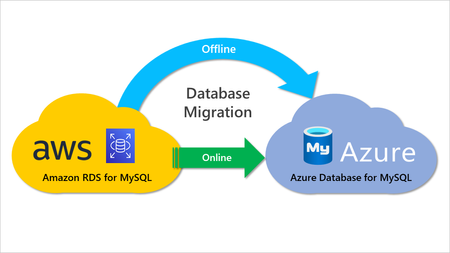
This post covers various strategies for migrating AWS RDS for MySQL to Azure Database for MySQL, how to use them to maximize efficiency and cost savings, different migration considerations, the importance of proper planning and preparation, and potential pitfalls that can arise during the process.9.6KViews3likes0Comments