migration
23 Topics
RDP microphone not working on Teams
I use RD from MACOS Version 14.0 (23A344) Sonorama. Everything worked correctly until the update, after it, the microphone when used from Teams works for a few seconds and after that a message appears saying the microphone does not work. The video, clipboard and other elements work without problems but the microphone does not, If from MACOS I try to measure the isolation level of the microphone, it still does not work. This is very important to me since my job depends on the microphone working to a local machine via RDP.1.2KViews8likes2CommentsAllow restore backed up settings from PC Remote Desktop app
On Android I miss restore settings functionality (especially connections) which I saved to file (Onedrive) on my Windows PC. Reverse direction makes sense too (backup on Android, restore on Windows). But for me the first choice will be useful, because configuring connections is much more comfortable on Windows PC with keyboard and mouse. Thank you 😉
Posibilidad de exportar todas las máquinas , para el cambio de teléfono perdido
He he envido que formatear el teléfono porque no me iba bien y desde Apple me han recomendado que no restaurase del backup para ver si el problema era de la configuración que tenía , y no hay manera de pasar todas mis máquinas de nuevo al teléfono964Views0likes2Comments- 740Views0likes2Comments

Azure AD / Entra ID and Microsoft 365 Basic
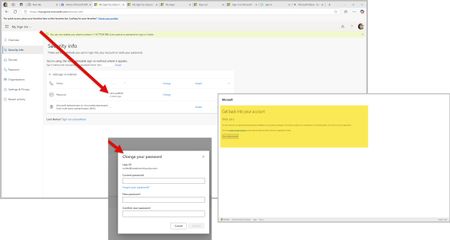
In the last few weeks, I have struggled with new technologies. This encompasses the latest on the market in Android based mobile phones and a new Ryzen 9 mini desktop computer. To eliminate both old phone apps and old laptop applications in the MS Store (Apps) update, I wiped old phone access to accounts via Edge and Google. However, old laptop, which is an HP Ryzen 3 held on to apps and preferences somewhere across systems. So, on both my new mini desktop and the old laptop, I used PowerShell to eliminate remnants of DevHome Pre and CoPilot Pre which kept popping up. Low and behold, I saw new things in my Microsoft and Google Play stores on my devices. Not sure why this would not have happened on installation... Then thinking I was ready to remove XBOX. I did this as well via PowerShell commands. So, now both my machines are work machines with the AMD graphics qualities and XBOX gaming services. Then I removed any old credentials on the old laptop that would use my email address attached to the Work and School account. However, Azure AD and Entra ID will not let me run anything as related to my own accounts. For example, a) I can't change my own password on the Azure AD / Entra ID page. When I attempt to change my password, I get a writeback error: SSPR_0010. However, you need to buy Entra ID Connect to correct this. Entra ID is a trial version to my Azure AD sign-ins so even if I exist in Entra ID and Microsoft is moving to Entra ID, why am I being forced into purchasing things to correct this issue? b) I can't enroll into Microsoft 365 Business Basic using my Work and School Account email address. The enrollment sends me to a blank screen and never enrolls. If I try a second time using my Work and School email address, I get an error that states I have to use a different email address. It seems someone besides me is using my email address here for account access because the Work and School account holds a Visio (web only version) and my Personal account holds a real one that I can't use on my new mini which uses my own email address and not gmail.com or outlook.com. c) Edge creates a blank profile on its own that does not have my profile information in it if I do not use my Work and School account email address to sign-in. I keep losing my profile on first tab load in Edge. d) The Windows 11 Pro license on my new mini request my Work and School account login. The two have nothing to do with each other except that the email address is the same for account purposes. At one point, this CoPilot screen that says "Coming Soon" did not appear and now it is back again. Can you please assist in resolving this issue? I should technically be able to remove my Windows Live account that uses my Work and School email address and recreate it on a new machine without this much of a hassle.