microsoft sentinel
2 TopicsGlitch - Microsoft Sentinel | Data connectors Page
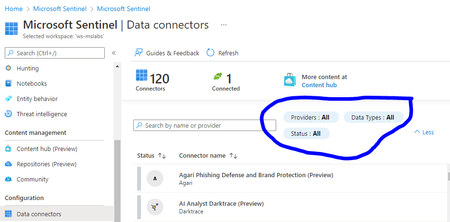
Please find below glitch which I had noticed in Microsoft Sentinel Product Page | Microsoft Azure Portal. Glitch: Go to Azure Portal -> Enable Microsoft Sentinel with existing or new workspace. Go to Microsoft Sentinel Page | Configuration | Data connectors When you on filter for Providers – For example select provider as Microsoft you are not able to select it automatically scroll again to top & doesn’t work properly When you click on filter for Status – Select either connected or not connected it doesn’t give correct information When you click on filter for Data types – Select all defined Attribute it doesn’t filter or gives correct information on the same. Basically all the mentioned filters are not functioning as required. Sharing snapshot to give me more clarity on the same. Please advise or loop me to the concern product team & revert back if more information required on the same.1.5KViews1like2Comments