microsoft scout
3 Topics
One agent, three runtimes: porting a CSA agent to Microsoft Scout and Foundry Local
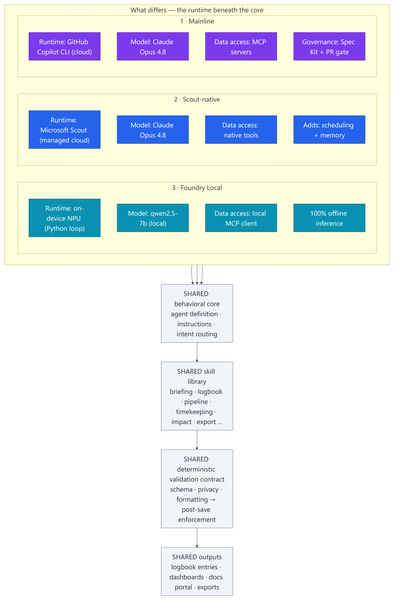
Most of my posts here are about Azure infrastructure lessons from customer engagements. This one is a little different — it's a real‑world engineering lesson from something I built to run my own practice. In my role as a Senior Cloud Solution Architect (CSA), I'm part of a grass-roots organic development team for an internal persona‑driven productivity agent called CSA‑Sherpa. It runs my daily rhythm: a morning briefing, a running logbook of wins and blockers, pipeline and timekeeping summaries, and reporting/exports. It started life in the GitHub Copilot CLI. But over the last few months two things changed the ground under it: Microsoft Scout arrived as a managed cloud agent with native tooling, scheduling, and memory; and Foundry Local made it realistic to run a capable model entirely on‑device on a Copilot+ PC's NPU — no cloud round‑trip at all. That raised a question I think a lot of people building agents will eventually ask: If I designed the framework well, can I change how the model runs without rewriting the agent? To find out, I stood the same agent up in three runtimes, then wrote a whitepaper and a comparison deck measuring what actually changed. This post explains: How one shared, deterministic core made three very different runtimes comparable What the three ports — Copilot CLI, Scout‑native, and Foundry Local (on‑device NPU) — actually took What the analysis showed, and a simple decision framework for which runtime to use when The part that stayed the same: a deterministic core The whole exercise only works because all three implementations load the same behavioral core: Agent definition — persona, behavioral rules, intent routing, workflow dispatch Instructions — conventions, session bootstrap, change‑management rules Skill library — one procedure file per workflow (morning briefing, logbook, pipeline, timekeeping, impact, ops, export…) A deterministic validation contract — schema, formatting, and privacy validators plus a post‑save enforcement chain That last point is the whole thesis: reliability belongs in code, not in the prompt. Rather than asking the model to "remember" to validate its output, a real gate (a validation step → a post‑save enforcement chain → index regeneration) enforces it every single run. This wasn't my idea in a vacuum — it follows the enterprise prompt‑engineering principles Kathiravan Thangavelu lays out in his article Prompt Engineering for Enterprise AI: Why Reliability Matters: keep deterministic logic in code, prefer schema‑driven / structured output over prompt‑enforced formatting, and replace "before you answer, verify that…" mental checklists with real machine validation. My validation gate is that principle in practice. And because that contract is identical across all three runtimes, I'm comparing three ways to execute one product — not three different products. The deterministic payoff: faster and cheaper Retrofitting those principles into the agent — moving work out of the model and into deterministic scripts — is the single change that paid off the most, on two axes at once: Faster. Letting code (not the model) gather and aggregate history cut the average model round‑trips per workflow from ~8.7 to ~5.5 — roughly a third fewer turns. Fewer turns means less waiting on generation and less back‑and‑forth to finish a task. Cheaper. The same change cut usage‑based cost ~24% — and, more importantly, held it flat as the logbook grew to hundreds of entries, because scripts carry the history the model used to re‑read every run. That's the quiet lesson: the reliability work I did for correctness turned out to be the same work that made the agent quicker and less expensive. Determinism isn't a tax on speed — here it bought all three. The work: three repositories, three runtimes Everything below the core — runtime, data access, governance, file layout — is where the effort went. 1 · Mainline — Copilot CLI + MCP. The upstream, most feature‑complete build. Runs as a primary agent in the GitHub Copilot CLI on Claude Opus 4.8; data services are discovered through MCP. It carries the heaviest governance: a Spec Kit layer (spec‑driven‑development agents, a constitution + templates, and 50+ per‑feature spec artifacts gated at PR time) plus an add‑on framework. The richest architecture — and the most complex to operate. 2 · Scout‑native. A thin wrapper loads the exact same core onto Microsoft Scout — again on Claude Opus 4.8 — but data access is re‑platformed onto Scout's native tooling instead of MCP subprocesses. No broker to configure; native tools negotiate their own auth. It adds two things the CLI can't do as cleanly: ✅ Scheduled automations — my morning briefing fires automatically on weekday mornings ✅ Cross‑session memory in place of hand‑off files The deterministic finalize gate stays fully intact. 3 · Foundry Local — on‑device NPU. The genuine outlier and the most involved port: a Python re‑implementation that runs the model — qwen2.5‑7b, an open ~7‑billion‑parameter model — 100% locally on the device's NPU (a Snapdragon X Elite Copilot+ PC) via Foundry Local's OpenAI‑compatible server. The agent loop, an MCP client, skill loading, and a distinct finalize pipeline all had to be rebuilt outside the CLI. The model never leaves the machine; only data connectors reach out when connected. The trade‑offs are real — modest throughput and a fixed context window — but so is the payoff: offline, private, near‑zero marginal cost. The effort This wasn't a weekend spike. Across the three code bases (plus a clean isolation clone I kept as an A/B baseline): ~340–380 commits per repository, three versions maintained in parallel 17 skills in each cloud build; 18 in the Foundry port ~37 scripts in the streamlined Scout build, up to ~97 in the governed Mainline build A Spec Kit governance layer with 50+ feature specs on Mainline A four‑part cost study and two written deliverables: an architecture whitepaper and a 20‑slide comparison deck The analysis and reporting The whitepaper and deck do two jobs. First, they document each runtime as a layered diagram — runtime, core, skills, scripting/validation, external services — so the differences are visible at a glance. Second, they convert the architecture fork into economics: a study that measured the actual token footprints of each repo and priced runs across billing models and hardware. The four dimensions: per‑skill cost, optimized‑vs‑out‑of‑the‑box, Copilot CLI vs Scout, and cloud vs local NPU. By the numbers The study priced measured token footprints at frontier‑model rates (treat the dollars as ±30% — the relative conclusions are far more robust than the absolute figures): Per skill: roughly $0.6–$1.4 per run usage‑based — or a single flat "premium request" under request‑based billing The determinism dividend: optimized, script‑driven skills cut model round‑trips ~8.7 → ~5.5 and usage‑based cost ~24% — and held cost flat as the logbook grew Scout vs CLI: Scout ran ~37% cheaper across a five‑command session and consumed none of the premium‑request allowance Cloud vs local: on‑device NPU inference came in 50–3,400× cheaper in cash than cloud — at the cost of throughput, context, and first‑pass reliability A full active day (~4 runs) landed around a few dollars usage‑based The headline isn't any single figure — it's the shape: cloud cents buy first‑pass reliability, on‑device near‑zero cost trades your time, and determinism makes either one cheaper and steadier. What held up The core is portable. The same agent, skills, and validation gate ran under all three runtimes. Good separation of concerns paid off. Determinism pays three ways — faster, cheaper, and more reliable (detailed above). It was the highest‑leverage change I made. Managed cloud wins the day job. Scout is the best daily driver: reliability gate intact, lower setup friction, scheduling + memory, and cheaper across a multi‑command session because it caches the bootstrap. On‑device is strategic — but reliability is the tax. Local NPU inference is dramatically cheaper in cash. We ran an in‑depth test pass across every function and closed the gaps it surfaced — yet the smaller model that makes Foundry Local possible still hallucinates and drops instructions often enough on the first pass to matter. Each re‑run is nearly free in dollars, but it costs real time to catch and correct. The winning pattern is hybrid. Draft and triage locally for ~nothing; escalate the correctness‑critical steps to cloud Opus 4.8, paying only where it buys first‑pass reliability. Three runtimes, side by side Figure: Three runtimes, one shared core. Only the top rows — runtime, model, data access, and governance — differ; the behavioral core, skill library, validation gate, and outputs are identical across all three. Capability Mainline (Copilot CLI) Scout‑native Foundry Local (NPU) Runtime Copilot CLI (cloud) Scout (cloud, managed) On‑device NPU Model Claude Opus 4.8 Claude Opus 4.8 qwen2.5‑7b (open, ~7B) Data access MCP Native tools MCP via local client Governance Spec Kit + PR gate Behavioral rules Behavioral rules Scheduling + memory ❌ ✅ ❌ Runs fully offline ❌ ❌ ✅ Marginal cost / run cloud per‑token cloud per‑token (cheaper/session) ≈ free Best for Framework development Daily production Offline / privacy / bulk When to use each Daily CSA workflows → Scout‑native. Managed, cheaper across a session, reliable, and it doesn't burn your Copilot request allowance. Building or versioning the framework → Mainline. Spec Kit governance and the add‑on system earn their keep here. Offline, air‑gapped, or sensitive data → Foundry Local. 100% on‑device inference. Bulk / high‑volume / non‑critical → Foundry Local. Zero marginal cost. Must be right on the first pass → Cloud Opus 4.8. The cents are worth it. Mixed, cost‑sensitive workload → Hybrid. Local draft → cloud escalate. Closing Thoughts The most useful reframe from this work: the three architectures aren't competitors — they're a portfolio. A managed cloud daily‑driver (Scout), a governed development platform (Mainline), and a sovereign on‑device runtime (Foundry Local). The job is to match the runtime to the task, not to crown one winner. And the same lesson that applies to Azure infrastructure applies to agents: build reliability into the system, not into good intentions. Because CSA‑Sherpa keeps its guarantees in code, I could change the entire execution model underneath it — cloud CLI, managed cloud, on‑device NPU — and the agent still behaved the same way. That portability is the dividend of a deterministic design. These workflows are genuinely complex, and that's exactly where the small model shows its limits: even after closing the gaps our testing surfaced, it still hallucinates and drops instructions often enough on the first pass to be a real cost. That's the honest trade‑off — near‑zero dollars, paid back in review‑and‑retry time — and it's why my recommendation lands on hybrid: let the small model draft where it's cheap and low‑risk, and escalate anything that has to be right the first time to cloud Opus 4.8. I use the agent in Microsoft Scout daily, as part of my personal production process. I did use AI to help draft and format this post — fittingly, the very agent it describes. The architecture, the analysis, and the conclusions are my own. Thanks for reading.481Views1like1CommentThe Agentic Workday: A Technical Deep Dive into Microsoft Scout for Healthcare and Life Sciences
The Agentic Workday: A Technical Deep Dive into Microsoft Scout for Healthcare and Life Sciences Healthcare and life sciences teams do not have a motivation problem. They have a time problem. The people closest to patients, studies, and customers spend a striking share of their week assembling information — pulling records, reconciling notes, cross-checking criteria, and stitching together the context a single decision requires. The work is essential, but most of it is assembly, not judgment. And assembly is exactly what a well-governed agent can take off their plate. That is the promise of agentic AI, and it is why Microsoft Scout — an agentic AI desktop assistant — belongs at the center of the modern HLS workday. This is a technical deep dive, not a teaser. We will walk two concrete workflows end to end: how the work happens today, how Scout would actually do it step by step, where a human stays in control, and how the whole thing stays inside your existing security and compliance boundaries. The product claims are kept functional and defensible, and the guardrails are made explicit — because in this industry the guardrails are the point. From assistant to agent: why the shift matters in HLS First-generation generative AI was reactive. You asked a question; it produced text. Helpful, but the human still did all the connecting — opening the file, navigating the portal, copying the answer into the next system. Agentic AI changes the unit of work. Instead of a single response, an agent can plan a sequence of steps, operate the tools already on your machine, draw on the sources you permit, and pause for your approval before anything consequential happens. In most industries that is a convenience. In healthcare and life sciences it is the difference between a demo and a deployable workflow, because the steps between "knowing" and "doing" are wrapped in regulated systems, sensitivity labels, and review obligations. An agent that respects those boundaries does not just save time; it makes the time savings auditable. How Microsoft Scout is grounded in your work Microsoft Scout is designed to act, not just chat. It can read and organize files, run routine multi-step tasks across your everyday applications, browse the public web for current information, and reach into your Microsoft 365 work — Outlook email and calendar, Teams messages, and documents in OneDrive and SharePoint — to assemble the context a task genuinely needs. Where clinical or proprietary systems are involved, the practical and defensible pattern is to ground Scout in permitted exports and connectors and your existing permissions, rather than assuming a built-in line into any system of record. Microsoft Scout draws on permitted sources and returns review-ready drafts — within your existing identity, permissions, and sensitivity labels. The experience HLS leaders notice is momentum. Rather than narrating every click, you describe an outcome — "prepare the prior-authorization packet for today's queue" — and Scout drafts the path, does the assembly, and brings the result back for review with its work shown. Two design choices make that adoptable in a regulated setting: a human stays in the loop on anything consequential, and every step is visible, so reviewers can trust what they sign. Deep dive 1: Prior-authorization preparation The business problem, and what it costs today Prior authorization is one of the most friction-heavy workflows in provider operations. Before a procedure or therapy can proceed, someone has to demonstrate it meets the payer's medical-necessity criteria — and that proof lives in fragments scattered across clinical notes, prior results, correspondence, and policy documents. The cost is rarely a single dramatic number; it is the steady drag of skilled coordinators and clinicians spending hours on document hunting and formatting, delays that push back care, and the rework that follows when a submission comes back incomplete. Every hour spent assembling is an hour not spent on patients or on the genuinely hard calls. The manual process today Walk the current path and the pattern is familiar: a coordinator identifies the cases in the queue, then opens system after system to locate the supporting documentation. They copy relevant notes into a working document, compare what they have against the payer's criteria for that specific service, and — often late — discover a missing result or an unanswered question. They chase it down, assemble the submission, give it a final review, and key it into the payer portal. The judgment at the end is real and valuable. Almost everything before it is assembly. The agentic how-to: how Microsoft Scout would do it Scout automates gathering, drafting, and gap-flagging; the coordinator reviews, approves, and submits. Trigger — a scheduled run. Scout starts on a schedule (for example, early each morning) against the day's work queue, so a first-pass packet is waiting before the team sits down. It can also be launched on demand for a single case. Gather from permitted sources. Operating under the coordinator's existing permissions, Scout pulls the relevant context: documentation provided through permitted exports or connectors, related Outlook email threads, and supporting files in OneDrive or SharePoint. It only ever sees what that user is already allowed to see. Draft the packet against criteria. Scout assembles a structured summary, organized to mirror the payer's medical-necessity criteria for the specific service, and lines up the supporting evidence next to each requirement. Flag gaps and questions. Crucially, it surfaces what is missing up front — an absent result, an unsigned note, an unanswered clinical question. The expensive "discovered late" moment moves to the very beginning, where it is cheap to fix. Human review and edit (checkpoint). The coordinator or clinician opens a ready draft rather than a blank page. They verify every linked source, correct anything off, and resolve the flagged gaps. This is the human-in-the-loop checkpoint, and it is non-negotiable. Approve and submit. The person — not the agent — makes the final call and submits in the payer portal. Scout prepared; the human decided. The same standards are met, but the assembly that used to consume the morning is done before review begins. The shape of the win is visible in the comparison: the standards do not move, but the order changes. Gaps are caught first, the human starts from a review-ready draft, and the rote assembly happens off the critical path. Governance and compliance None of this is adoptable unless it is safe, so the controls are the feature. Scout operates within your existing identity and permissions — it acts as the signed-in user and inherits exactly their access, no more. Microsoft Purview sensitivity labels travel with content, so classified material keeps its protections as it moves through the workflow and is not written out to unprotected destinations. Consequential actions — submitting, sending, finalizing — wait for explicit human approval. And because Scout shows its steps and the sources it touched, you get an audit-friendly trail of what was assembled, from where, and who approved it. In a setting where "show your work" is a compliance requirement, that visibility is as valuable as the speed. How to start this week You do not need a transformation program to begin. Pick one payer and one common service line with well-understood criteria. Confirm which sources are already permitted and which exports or connectors are available. Have Scout assemble draft packets for a handful of cases, and ask your coordinators to do what they always do — review and decide — while noting where the draft saved time and where it needed correction. Keep the human checkpoint firmly in place, and let the evidence from one narrow workflow make the case for the next. Deep dive 2: Field medical pre-engagement briefs The business problem, and what it costs today In medical affairs, the quality of a field medical engagement often comes down to preparation. Before a meeting with a healthcare professional, a medical science liaison needs a clear, accurate picture: relevant background, the latest approved internal materials, prior interactions, and the open scientific questions worth exploring. Pulling that together is time-consuming, and when calendars are full it is the part that gets compressed — which means well-qualified experts sometimes walk in less prepared than they would like. The cost is a softer one: engagements that are good when they could be excellent, and institutional knowledge that lives in individual inboxes rather than in a repeatable process. The manual process today Today an MSL typically prepares by hand: scanning email and notes from previous interactions, hunting for the most current approved materials, checking the calendar for context, and drafting their own talking points. Done well it is excellent; done under time pressure it is uneven. And because it is manual, the standard varies from person to person and week to week. The agentic how-to: how Microsoft Scout would do it From a scheduled trigger through source-checked drafting to a required field-medical review before the brief is final. Trigger ahead of the engagement. Scout runs on a schedule tied to upcoming engagements — for instance, the day before each scheduled meeting — so a draft brief is ready in advance. Gather context from permitted sources. Under the MSL's own permissions, it draws on approved internal materials, prior interaction notes, related Outlook threads, and calendar context. Summarize into a usable brief. Scout drafts a structured read-ahead — concise background, suggested talking points, and a short list of open scientific questions — shaped for the person to refine, not to send as-is. Check sources. It grounds the brief in approved, permitted content and shows where each element came from, so nothing rests on an unverifiable claim. Field medical review (checkpoint). The MSL edits and confirms accuracy. In medical affairs this review is essential — the human owns scientific accuracy and compliance, every time. Brief ready. The reviewed read-ahead is in hand before the meeting, and the same high standard applies to every engagement, not just the ones with time to spare. The benefit is consistency as much as speed: the floor rises, because every brief starts from a thorough, source-checked draft, and the expert's time goes to sharpening the science rather than gathering the inputs. Governance and compliance The same guardrails apply. Scout works within the MSL's identity and permissions; sensitivity labels stay attached to the materials it touches; the field medical review is a hard checkpoint before anything is finalized; and the trail of sources keeps the brief defensible. For regulated medical affairs work, an agent that drafts transparently and then steps back for human sign-off is precisely the right division of labor. How to start this week Choose one engagement type and one well-curated set of approved materials. Have Scout produce draft briefs for the next few meetings, and ask your MSLs to review and refine as they normally would. Compare the agent-drafted starting point with a blank page, and watch what happens to both preparation time and consistency across the team. Where Cowork and Microsoft 365 Copilot fit Scout is the star at the individual desktop, but it is part of a broader fabric. Microsoft Cowork extends agentic collaboration into the flow of teamwork, so momentum is shared rather than personal. Microsoft 365 Copilot keeps AI close to the documents, meetings, and messages where so much HLS work already lives. The practical sequence for most organizations is to start where the friction is sharpest — a recurring prep workflow like the two above — prove the model with the human firmly in control, and then extend across the team. The throughline: do more with less, without doing less Across both deep dives the pattern is identical. The agent does the assembling; the human does the deciding. Speed to market improves because the busywork shrinks, not because the standards do. Compliance gets easier because the agent operates inside your existing identity, permissions, and labels, and because every consequential action waits for a person. That is what makes agentic AI a fit for healthcare and life sciences specifically: it is fast and it is accountable, and in this industry you are not allowed to choose only one. Subscribe to the Microsoft Healthcare and Life Sciences blog for weekly, practical deep dives on putting Microsoft AI to work — safely — across care, research, and commercial teams. If you mapped your own highest-friction prep workflow onto the six steps above, which step would you let an agent own first — and what evidence would you need before you trusted it with the rest?How Microsoft Scout Brings Agentic AI to Everyday Healthcare and Life Sciences Work
Healthcare and life sciences teams are asked to do the impossible every day: deliver better outcomes, move faster, and stretch every dollar — all while navigating some of the most regulated, documentation-heavy workflows in any industry. The promise of AI has never been about replacing the experts who do this work. It’s about giving them their time back. That promise is entering a new phase. We’re moving from AI that answers to AI that acts — agentic AI that can carry out multi-step work across your applications, your documents, and the web, with you in control. Nowhere is the opportunity more concrete than in the daily operational grind of healthcare and life sciences. From answering to doing Most knowledge work in HLS isn’t blocked by a lack of information — it’s blocked by the effort of pulling that information together and turning it into action. Gathering the right documents. Summarizing a thread. Drafting the first version. Updating five systems with the same three facts. Microsoft Scout is designed for exactly this layer of work. Think of it as an agentic AI teammate on your desktop — one that can read and organize files, search across your email, calendar, and Teams, browse the web, and complete genuinely multi-step tasks on your behalf. Crucially, it can run on a schedule, so routine work happens before you sit down, and it keeps a human in the loop for anything that matters. Real-world ways HLS teams can do more with less Provider operations: Assemble the documentation needed for a referral or prior-authorization request, summarize the relevant history, and draft the submission — turning a 30-minute scramble into a two-minute review. Clinical research coordination: Pull together study start-up documents, track outstanding site communications, and draft consistent follow-ups, so coordinators spend their time on sites and patients rather than inboxes. Medical affairs and field medical: Prepare for an engagement by gathering the latest publications and prior interactions into a single brief, then capture a structured summary afterward — every meeting, consistently. Commercial and market access: Stand up an account briefing or a competitive news roundup on a recurring schedule, so the team starts every week informed instead of researching from scratch. The thread running through all of these is the same: reclaim capacity, increase consistency, and accelerate speed to market — doing more with the people and budget you already have. Built for the trust HLS demands In this industry, “helpful” is not enough; it has to be trustworthy. Agentic AI for healthcare and life sciences has to respect enterprise security and data boundaries, keep sensitive information under your control, and keep a person in command of consequential decisions. The goal is to automate the busywork around expert judgment — never to automate the judgment itself. A family of AI that works the way you do Scout is part of a broader shift in how Microsoft is bringing AI to work. Where Microsoft 365 Copilot brings AI into the flow of the apps you already use, and Microsoft Cowork reimagines how teams collaborate with AI, Scout focuses on agentic action at the desktop — automating end-to-end tasks and recurring workflows. Together they point to the same future: more of your day spent on the work only you can do. Start small, compound the gains You don’t need a transformation program to begin. Pick one repetitive, high-friction workflow — the weekly roundup, the recurring briefing, the documentation prep that nobody enjoys — and let agentic AI take the first pass. The time you reclaim funds the next idea. We’ll be sharing practical, healthcare- and life-sciences-specific playbooks here every week. Subscribe to the blog, and tell us in the comments: what’s the one recurring task you’d hand to an AI teammate first? Learn more about Microsoft Scout: Introducing Microsoft Scout: Your always-on personal agent | Microsoft 365 Blog Microsoft Scout (Frontier) overview | Microsoft Learn