microsoft olive
4 TopicsJourney Series for Generative AI Application Architecture - Foundation
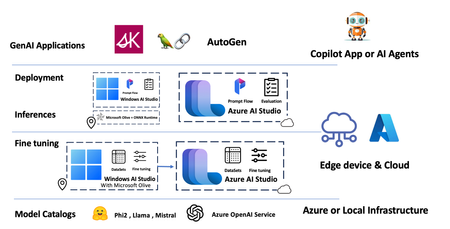
At Build last year, Microsoft CTO Kevin Scott proposed Copilot Stack to provide problem-solving ideas for Generative AI applications. Based on the Coplit Stack, community have developed many frameworks in the past year, such as Semantic Kernel, AutoGen, and LangChain. These frameworks are more biased toward front-end applications, and enterprises need a better engineering solution. This series hopes to give you some ideas based on Microsoft Cloud and related frameworks and tools.9.4KViews3likes1CommentJourney Series for Generative AI Application Architecture - Model references and evaluation models
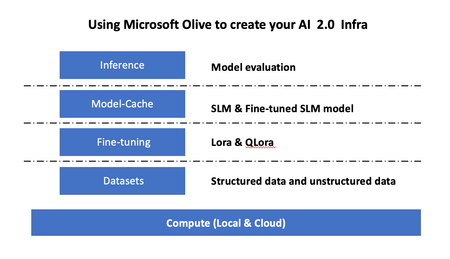
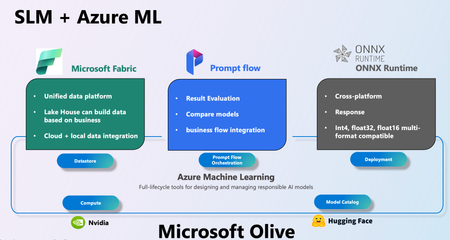
In the previous content, we integrated the entire SLMOps process through Microsoft Olive. The development team can configure everything from data, fine-tuning, format conversion, deployment, etc. through Olive.config. In this article, I hope to talk about model reference and evaluation.6KViews3likes0CommentsDeploying Custom Models with Microsoft Olive and Foundry Local
Over the past few weeks, we've been on quite a journey together. We started by exploring what makes Phi-4 and small language models so compelling, then got our hands dirty running models locally with Foundry Local. We leveled up with function calling, and most recently built a complete multi-agent quiz application with an orchestrator coordinating specialist agents. Our quiz app works great locally, but it relies on Foundry Local's catalog models — pre-optimized and ready to go. What happens when you want to deploy a model that isn't in the catalog? Maybe you've fine-tuned a model on domain-specific quiz data, or a new model just dropped on Hugging Face that you want to use. Today we'll take a model from Hugging Face, optimize it with Microsoft Olive, register it with Foundry Local, and run our quiz app against it. The same workflow applies to any model you might fine-tune for your specific use case. Understanding Deployment Options Before we dive in, let's understand the landscape of deployment options for SLM applications. There are several routes to deploying SLM applications depending on your target environment. The Three Main Paths vLLM is the industry standard for cloud deployments — containerized, scalable, handles many concurrent users. Great for Azure VMs or Kubernetes. Ollama offers a middle ground — simpler than vLLM but still provides Docker support for easy sharing and deployment. Foundry Local + Olive is Microsoft's edge-first approach. Optimize your model with Olive, serve with Foundry Local or a custom server. Perfect for on-premise, offline, or privacy-focused deployments. In keeping with the edge-first theme that's run through this series, we'll focus on the Foundry Local path. We'll use Qwen 2.5-0.5B-Instruct — small enough to optimize quickly and demonstrate the full workflow. Think of it as a stand-in for a model you've fine-tuned on your own quiz data. Prerequisites You'll need: Foundry Local version 0.8.117 or later Python 3.10+ for the quiz app (the foundry-local-sdk requires it) A separate Python 3.9 environment for Olive (Olive 0.9.x has this requirement) The quiz app from the previous article Having two Python versions might seem odd, but it mirrors a common real-world setup: you optimize models in one environment and serve them in another. The optimization is a one-time step. Installing Olive Dependencies In your Python 3.9 environment: pip install olive-ai onnxruntime onnxruntime-genai pip install transformers>=4.45.0,<5.0.0 Important: Olive is not compatible with Transformers 5.x. You must use version 4.x. Model Optimization with Olive Microsoft Olive is the bridge between a Hugging Face model and something Foundry Local can serve. It handles ONNX conversion, graph optimization, and quantization in a single command. Understanding Quantization Quantization reduces model size by converting weights from high-precision floating point to lower-precision integers: Precision Size Reduction Quality Best For FP32 Baseline Best Development, debugging FP16 50% smaller Excellent GPU inference with plenty of VRAM INT8 75% smaller Very Good Balanced production INT4 87.5% smaller Good Edge devices, resource-constrained We'll use INT4 to demonstrate the maximum compression. For production with better quality, consider INT8 — simply change --precision int4 to --precision int8 in the commands below. Running the Optimization The optimization script at scripts/optimize_model.py handles two things: downloading the model locally (to avoid authentication issues), then running Olive. The download step is important. The ONNX Runtime GenAI model builder internally requests HuggingFace authentication even for public models. Rather than configuring tokens, we download the model first with token=False, then point Olive at the local path: from huggingface_hub import snapshot_download local_path = snapshot_download("Qwen/Qwen2.5-0.5B-Instruct", token=False) Then the Olive command runs against the local copy: cmd = [ sys.executable, "-m", "olive", "auto-opt", "--model_name_or_path", local_path, "--trust_remote_code", "--output_path", "models/qwen2.5-0.5b-int4", "--device", "cpu", "--provider", "CPUExecutionProvider", "--precision", "int4", "--use_model_builder", "--use_ort_genai", "--log_level", "1", ] Key flags: --precision int4 quantizes weights to 4-bit integers, --use_model_builder reads each transformer layer and exports it to ONNX, and --use_ort_genai outputs in the format Foundry Local consumes. Run it: python scripts/optimize_model.py This process takes about a minute. When complete, you'll see the output directory structure. models/qwen2.5-0.5b-int4/model/ ├── model.onnx # ONNX graph (162 KB) ├── model.onnx.data # Quantized INT4 weights (823 MB) ├── genai_config.json # ONNX Runtime GenAI config ├── tokenizer.json # Tokenizer vocabulary (11 MB) ├── vocab.json # Token-to-ID map (2.7 MB) ├── merges.txt # BPE merges (1.6 MB) ├── tokenizer_config.json ├── config.json ├── generation_config.json ├── special_tokens_map.json └── added_tokens.json Total size: approximately 838MB — a significant reduction from the original, while maintaining usable quality for structured tasks like quiz generation. Registering with Foundry Local With the model optimized, we need to register it with Foundry Local. Unlike cloud model registries, there's no CLI command — you place files in the right directory and Foundry discovers them automatically. Foundry's Model Registry foundry cache cd # Windows: C:\Users\<username>\.foundry\cache\ # macOS/Linux: ~/.foundry/cache/ Foundry organizes models by publisher: .foundry/cache/models/ ├── foundry.modelinfo.json ← catalog of official models ├── Microsoft/ ← pre-optimized Microsoft models │ ├── qwen2.5-7b-instruct-cuda-gpu-4/ │ ├── Phi-4-cuda-gpu-1/ │ └── ... └── Custom/ ← your models go here The Registration Script The script at scripts/register_model.sh does two things: copies all model files into the Foundry cache, and creates the inference_model.json configuration file. The critical file is inference_model.json — without it, Foundry won't recognize your model: { "Name": "qwen-quiz-int4", "PromptTemplate": { "system": "<|im_start|>system\n{Content}<|im_end|>", "user": "<|im_start|>user\n{Content}<|im_end|>", "assistant": "<|im_start|>assistant\n{Content}<|im_end|>", "prompt": "<|im_start|>user\n{Content}<|im_end|>\n<|im_start|>assistant" } } The PromptTemplate defines the ChatML format that Qwen 2.5 expects. The {Content} placeholder is where Foundry injects the actual message content at runtime. If you were deploying a Llama or Phi model, you'd use their respective prompt templates. Run the registration: scripts/register_model.sh Verify Registration foundry cache ls Test the Model foundry model run qwen-quiz-int4 The model loads via ONNX Runtime on CPU. Try a simple prompt to verify it responds. Integrating with the Quiz App Here's where things get interesting. The application-level change is one line in utils/foundry_client.py: # Before: DEFAULT_MODEL_ALIAS = "qwen2.5-7b-instruct-cuda-gpu" # After: DEFAULT_MODEL_ALIAS = "qwen-quiz-int4" But that one line raised some issues worth understanding. Issue 1: The SDK Can't See Custom Models The Foundry Local Python SDK resolves models by looking them up in the official catalog — a JSON file of Microsoft-published models. Custom models in the Custom/ directory aren't in that catalog. So FoundryLocalManager("qwen-quiz-int4") throws a "model not found" error, despite foundry cache ls and foundry model run both working perfectly. The fix in foundry_client.py is a dual code path. It tries the SDK first (works for catalog models), and when that fails with a "not found in catalog" error, it falls back to discovering the running service endpoint directly: def _discover_endpoint(): """Discover running Foundry service endpoint via CLI.""" result = subprocess.run( ["foundry", "service", "status"], capture_output=True, text=True, timeout=10 ) match = re.search(r"(http://\S+?)(?:/openai)?/status", result.stdout) if not match: raise ConnectionError( "Foundry service is not running.\n" f"Start it with: foundry model run {DEFAULT_MODEL_ALIAS}" ) return match.group(1) The workflow becomes two terminals: Terminal 1: foundry model run qwen-quiz-int4 Terminal 2: python main.py The client auto-discovers the endpoint and connects. For catalog models, the existing FoundryLocalManager path works unchanged. Issue 2: Tool Calling Format For catalog models, Foundry's server-side middleware intercepts <tool_call> tags in the model's output and converts them into structured tool_calls objects in the API response. This is configured via metadata in foundry.modelinfo.json. For custom models, those metadata fields aren't recognized — Foundry ignores them in inference_model.json. The <tool_call> tags pass through as raw text in response.choices[0].message.content. Since our custom model outputs the exact same <tool_call> format, we added a small fallback parser in agents/base_agent.py — the same pattern we explored in our function calling article. After each model response, if tool_calls is None, we scan the content for tags: def _parse_text_tool_calls(content: str) -> list: """Parse <tool_call>...</tool_call> tags from model output.""" blocks = re.findall(r"<tool_call>\s*(\{.*?\})\s*</tool_call>", content, re.DOTALL) calls = [] for block in blocks: try: data = json.loads(block) calls.append(_TextToolCall(data["name"], json.dumps(data.get("arguments", {})))) except (json.JSONDecodeError, KeyError): continue return calls The model's behavior is identical; only the parsing location changes — from server-side (Foundry middleware) to client-side (our code). Part 7: Testing the Deployment With the model running in one terminal, start the quiz app in another: Terminal 1: foundry model run qwen-quiz-int4 Terminal 2: cd multi_agents_slm && python main.py Now test the full flow. Generate a quiz: Test the Full Flow Generate a quiz: Example output: The orchestrator successfully calls the generate_new_quiz tool, and the QuizGeneratorAgent produces well-structured quiz JSON. Model Limitations The 0.5B INT4 model occasionally struggles with complex reasoning or basic arithmetic. This is expected from such a small, heavily quantized model. For production use cases requiring higher accuracy, use Qwen 2.5-1.5B or Qwen 2.5-7B for better quality, or use INT8 quantization instead of INT4. The deployment workflow remains identical — just change the model name and precision in the optimization script. What You've Accomplished Take a moment to appreciate the complete journey across this series: Article What You Learned 1. Phi-4 Introduction Why SLMs matter, performance vs size tradeoffs 2. Running Locally Foundry Local setup, basic inference 3. Function Calling Tool use, external API integration 4. Multi-Agent Systems Orchestration, specialist agents 5. Deployment Olive optimization, Foundry Local registration, custom model deployment You now have end-to-end skills for building production SLM applications: understanding the landscape, local development with Foundry Local, agentic applications with function calling, multi-agent architectures, model optimization with Olive, and deploying custom models to the edge. Where to Go From Here The logical next step is fine-tuning for your domain. Medical quiz tutors trained on USMLE questions, legal assistants trained on case law, company onboarding bots trained on internal documentation — use the same Olive workflow to optimize and deploy your fine-tuned model. The same ONNX model we registered with Foundry Local could also run on mobile devices via ONNX Runtime Mobile, or be containerized for server-side edge deployment. The full source code, including the optimization and registration scripts, is available in the GitHub repository. Resources: Microsoft Olive — Model optimization toolkit Foundry Local Documentation — Setup and CLI reference Compiling Hugging Face models for Foundry Local — Official guide ONNX Runtime GenAI — Powers Foundry Local's inference Edge AI for Beginners — Microsoft's 8-module Edge AI curriculum Quiz App Source Code — Full repository with deployment scripts This series has been a joy to write. I'd love to see what you build — share your projects in the comments, and don't hesitate to open issues on the GitHub repo if you encounter challenges. Until next time — keep building, keep optimizing, and keep pushing what's possible with local AI.499Views0likes0Comments