microsoft intune
34 Topics
Call for perspectives: Endpoint Management Experiences of IT Professionals Survey
Hi Endpoint management community, we’d love to hear from you! How do you manage employee devices today? Where do you turn for guidance and support? And how are you thinking about AI-enabled ways of working? 🔗 Share your perspective in our 15-minute survey: https://lnkd.in/gmjkFx8P We’re especially interested in hearing from people in their first five years in the field, but all experience levels are welcome. If someone in your network comes to mind who has relevant experience, feel free to pass the survey along!
Feature Request: Extend Security Copilot inclusion (M365 E5) to M365 A5 Education tenants
Background At Ignite 2025, Microsoft announced that Security Copilot is included for all Microsoft 365 E5 customers, with a phased rollout starting November 18, 2025. This is a significant step forward for security operations. The gap Microsoft 365 A5 for Education is the academic equivalent of E5 — it includes the same core security stack: Microsoft Defender, Entra, Intune, and Purview. However, the Security Copilot inclusion explicitly covers only commercial E5 customers. There is no public roadmap or timeline for extending this benefit to A5 education tenants. Why this matters Education institutions face the same cybersecurity threats as commercial organizations — often with fewer dedicated security resources. The A5 license was positioned as the premium security offering for education. Excluding it from Security Copilot inclusion creates an inequity between commercial and education customers holding functionally equivalent license tiers. Request We would like Microsoft to: Confirm whether Security Copilot inclusion will be extended to M365 A5 Education tenants If yes, provide an indicative timeline If no, clarify the rationale and what alternative paths exist for education customers Are other EDU admins in the same situation? Would appreciate any upvotes or comments to help raise visibility with the product team.1.5KViews16likes4Comments
From “No” to “Now”: A 7-Layer Strategy for Enterprise AI Safety
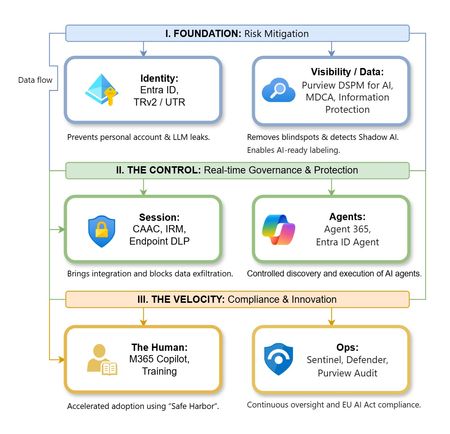
The “block” posture on Generative AI has failed. In a global enterprise, banning these tools doesn't stop usage; it simply pushes intellectual property into unmanaged channels and creates a massive visibility gap in corporate telemetry. The priority has now shifted from stopping AI to hardening the environment so that innovation can run at velocity without compromising data sovereignty. Traditional security perimeters are ineffective against the “slow bleed” of AI leakage - where data moves through prompts, clipboards, and autonomous agents rather than bulk file transfers. To secure this environment, a 7-layer defense-in-depth model is required to treat the conversation itself as the new perimeter. 1. Identity: The Only Verifiable Perimeter Identity is the primary control plane. Access to AI services must be treated with the same rigor as administrative access to core infrastructure. The strategy centers on enforcing device-bound Conditional Access, where access is strictly contingent on device health. To solve the "Account Leak" problem, the deployment of Tenant Restrictions v2 (TRv2) is essential to prevent users from signing into personal tenants using corporate-managed devices. For enhanced coverage, Universal Tenant Restrictions (UTR) via Global Secure Access (GSA) allows for consistent enforcement at the cloud edge. While TRv2 authentication-plane is GA, data-plane protection is GA for the Microsoft 365 admin center and remains in preview for other workloads such as SharePoint and Teams. 2. Eliminating the Visibility Gap (Shadow AI) You can’t secure what you can't see. Microsoft Defender for Cloud Apps (MDCA) serves to discover and govern the enterprise AI footprint, while Purview DSPM for AI (formerly AI Hub) monitors Copilot and third-party interactions. By categorizing tools using MDCA risk scores and compliance attributes, organizations can apply automated sanctioning decisions and enforce session controls for high-risk endpoints. 3. Data Hygiene: Hardening the “Work IQ” AI acts as a mirror of internal permissions. In a "flat" environment, AI acts like a search engine for your over-shared data. Hardening the foundation requires automated sensitivity labeling in Purview Information Protection. Identifying PII and proprietary code before assigning AI licenses ensures that labels travel with the data, preventing labeled content from being exfiltrated via prompts or unauthorized sharing. 4. Session Governance: Solving the “Clipboard Leak” The most common leak in 2025 is not a file upload; it’s a simple copy-paste action or a USB transfer. Deploying Conditional Access App Control (CAAC) via MDCA session policies allows sanctioned apps to function while specifically blocking cut/copy/paste. This is complemented by Endpoint DLP, which extends governance to the physical device level, preventing sensitive data from being moved to unmanaged USB storage or printers during an AI-assisted workflow. Purview Information Protection with IRM rounds this out by enforcing encryption and usage rights on the files themselves. When a user tries to print a "Do Not Print" document, Purview triggers an alert that flows into Microsoft Sentinel. This gives the SOC visibility into actual policy violations instead of them having to hunt through generic activity logs. 5. The “Agentic” Era: Agent 365 & Sharing Controls Now that we're moving from "Chat" to "Agents", Agent 365 and Entra Agent ID provide the necessary identity and control plane for autonomous entities. A quick tip: in large-scale tenants, default settings often present a governance risk. A critical first step is navigating to the Microsoft 365 admin center (Copilot > Agents) to disable the default “Anyone in organization” sharing option. Restricting agent creation and sharing to a validated security group is essential to prevent unvetted agent sprawl and ensure that only compliant agents are discoverable. 6. The Human Layer: “Safe Harbors” over Bans Security fails when it creates more friction than the risk it seeks to mitigate. Instead of an outright ban, investment in AI skilling-teaching users context minimization (redacting specifics before interacting with a model) - is the better path. Providing a sanctioned, enterprise-grade "Safe Harbor" like M365 Copilot offers a superior tool that naturally cuts down the use of Shadow AI. 7. Continuous Ops: Monitoring & Regulatory Audit Security is not a “set and forget” project, particularly with the EU AI Act on the horizon. Correlating AI interactions and DLP alerts in Microsoft Sentinel using Purview Audit (specifically the CopilotInteraction logs) data allows for real-time responses. Automated SOAR playbooks can then trigger protective actions - such as revoking an Agent ID - if an entity attempts to access sensitive HR or financial data. Final Thoughts Securing AI at scale is an architectural shift. By layering Identity, Session Governance, and Agentic Identity, AI moves from being a fragmented risk to a governed tool that actually works for the modern workplace.Why “Data in Switzerland” Is Not Enough
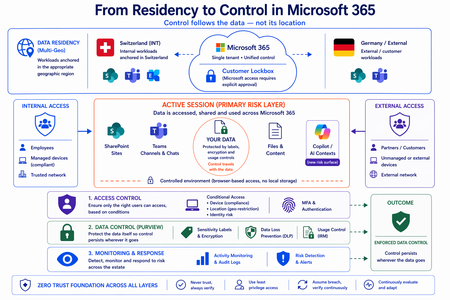
Moving from Residency to Control in Microsoft 365 Every conversation about data sovereignty in regulated industries tends to start the same way: “We use Multi-Geo. The data stays in Switzerland.” It’s the right starting point. Microsoft 365 Multi-Geo allows organizations to place selected workloads - SharePoint sites, OneDrive accounts, Teams data, or Exchange mailboxes - into specific regions, including Switzerland, while maintaining a single global tenant. This makes it possible to align sensitive data with regulatory or customer requirements without fragmenting the overall environment. But it only answers one question: Where is the data stored? It does not answer who accessed the data, from where, under which conditions, or what happened after access. That is where the real problem begins. A scenario that happens every day A Swiss engineering firm stores sensitive project documentation in Switzerland using Multi-Geo. An external contractor - working from an unmanaged device outside Switzerland - is granted access to review a file. The document opens. The data is now on a screen in an unknown location, on a device with no compliance posture, in a session with no restrictions. From the platform’s perspective, residency was enforced. From a sovereignty perspective, control was lost the moment access was granted without conditions. The file never left Switzerland. But sovereignty did. Residency is static. Control is not. The moment a document is opened, storage location stops being the relevant boundary. The file is no longer just “in Switzerland.” It moves instantly across endpoints and browsers, collaboration tools like Teams, external users and partners, and increasingly AI-driven contexts. The infrastructure remains unchanged. The data does not. From the platform’s perspective, everything is working as designed - access was granted, residency was enforced - and control was lost. Most “data in Switzerland” strategies fail at exactly this moment: when the data is used. The shift: from location to conditions If data sovereignty is the goal, the question must change. Not “Where is the data stored?” but: Under which conditions can data be accessed and used? This shift fundamentally changes the architecture. Control must be applied across three distinct layers - and all three must be connected. Layer 1: Access is conditional, not static Conditional Access extends control beyond authentication and turns it into continuous evaluation. Access decisions can depend on: Device compliance Location (geo-restriction) Identity and risk signals Multi-Geo ensures data is placed correctly. Conditional Access ensures it is reachable only under defined conditions. The two must work together - residency without access governance is an incomplete control. Layer 2: The session is the real risk surface Even with strict access controls, risk remains. A session is an exposure surface by design. During an active session, data is viewed, copied, shared, processed by applications, and connected to AI prompts. The gap does not appear at storage or authentication. It appears during active usage - inside the session. This is the layer most architectures do not explicitly address. Controls must extend into the session itself: limiting data transfer and replication, restricting interaction patterns, and enforcing policies in real time. Access is no longer a one-time event. It becomes continuously governed. This becomes even more critical as AI assistants consume content across SharePoint, Teams, Exchange, and other Microsoft 365 services. The question is no longer only where the source document resides - but whether the AI interaction itself is governed by the same access and protection controls as direct access. Layer 3: The document becomes the control point The most durable control does not sit in the network or in the session. It sits in the data itself. In regulated industries, organizations often arrive at this architecture having first evaluated sovereign or national encryption solutions. The decision to rely on native Microsoft 365 Purview encryption rather than a separate layer comes down to integration: AES-256 protection operating natively at file, user, and SharePoint level - including geo-based access restrictions - without an additional system to maintain. When protection is applied directly to the document through Microsoft Purview: Sensitivity labels define classification - automatically assigned based on content Encryption enforces access - AES-256, bound to the file itself IRM controls usage - view, copy, print, share, and presentation rights DLP governs movement across services - preventing data from leaving defined boundaries Dynamic watermarking tracks exposure - applied on open, view, or print At that point, access is enforced by the file, usage restrictions travel with it, and control persists regardless of location. The document becomes the perimeter. Platform control: limiting provider access One dimension often overlooked in sovereignty discussions is platform access itself. Even a perfectly configured tenant is only as sovereign as the controls placed on the operator. Customer Lockbox ensures that even Microsoft support cannot access customer data without explicit, logged, time-bound approval. Every access request is visible, auditable, and subject to customer veto. Data control applies not only to users - but also to the platform operating the service. Enforcement requires an integrated architecture Most organizations already have the required capabilities: Multi-Geo, Conditional Access, session control, Purview (labels, encryption, DLP, IRM), and monitoring. The issue is not capability. It is fragmentation. In practice, fragmentation looks like this: residency is configured in one project, Conditional Access policies are managed by a different team, and Purview labels were applied during a compliance initiative that never connected to the access layer. The tools exist. The signals do not flow between them. When designed as a single architecture: Data is placed intentionally - residency aligned to regulatory requirements Access is governed by context - device, location, and identity evaluated continuously Usage is controlled dynamically - session-level restrictions enforced in real time Protection is embedded in the document - encryption and IRM travel with the file Signals are connected across the platform - monitoring feeds access policy, not just audit logs “Data in Switzerland” becomes not just a statement - but an enforceable system property. Closing thought Placing data in Switzerland is the right first step. Multi-Geo makes it possible, even in global environments. But residency alone is not control. Data residency answers where information is stored. Data sovereignty requires proving who can access it, under which conditions, and what controls remain in place after access is granted. In Microsoft 365, sovereignty is no longer defined by geography alone. It is defined by the ability to enforce control wherever the data travels.Monitor logical disk space through Intune
Hi All, We have a requirement to monitor low disk space, particularly on devices with less than 1GB of available space. We were considering creating a custom compliance policy, but this would lead to blocking access to company resources as soon as the device becomes non-compliant. Therefore, we were wondering if there are any other automated methods we could use to monitor the logical disk space (primarily the C drive) using Intune or Microsoft Graph. Thanks in advance, DilanAnomalies with Conditional Access Policy "Terms of Use" Failures
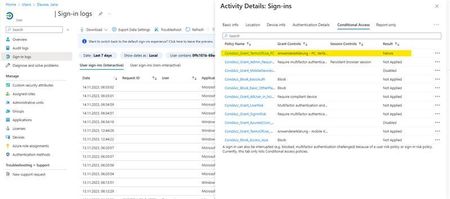
Hello Microsoft Community, I'm reaching out with a bit of a puzzle regarding our "Terms of Use" Conditional Access policy, and I'm eager to tap into the collective wisdom here for some insights. In our Entra ID User Sign-In logs, we've identified intermittent "failure" entries associated with the "Terms of Use" Conditional Access policy. Interestingly, even for users who had previously accepted the "Terms of Use". There appears to be no discernible impact, and they continue their tasks without interruption. This observation became apparent during the troubleshooting of unrelated Surface Hub and Edge Sync issues at some client sites. What adds to the complexity of the situation is that for the same users, both before and after these "failure" entries, the Conditional Access policy is marked as "success". Hence, it doesn't seem to be a straightforward case of the policy erroneously detecting non-acceptance of the "Terms of Use". The mystery lies in understanding why these intermittent "failure" entries occur for users who have already accepted the terms, especially when the policy consistently reports "success" for the same users. Furthermore, the Insights for the "Terms of Use" Conditional Access policy show around 1.48k successes and 1.43k failures in the last 90 days, yet there's no discernible impact on user functionality. Observations: "Failure" entries in Sign-In logs don't seem to disrupt users' day-to-day activities. The ratio of successes to failures is balanced, yet users experience no noticeable problems. The issue complicates troubleshooting efforts but doesn't significantly affect the user experience. I'm turning to the community for guidance on interpreting and resolving this discrepancy between "failure" entries in the Conditional Access policy logs and the seemingly unaffected user experience. Any insights into why these failures occur without user impact would be greatly appreciated. For additional context, I've attached screenshots of a user's Sign-In log entry and the insight chart from the Conditional Access policy. Sign-In log of a user (failure): Sign-In log of same user (success): Current Conditional Access insights: Thank you in advance for your time and assistance. I look forward to any guidance or solutions you can provide. Best regards, Leon TüpkerSecure Score - Enable conditional access policies to block legacy authentication.
Hi all, it reports me to block legacy authentications for all users, however I have already done so by configuring conditional access; does anyone else have the same report despite the fact that we have already implemented blocking?4.8KViews4likes48CommentsSecure score Drops Down temporarily due MS set exclusion attribute to system
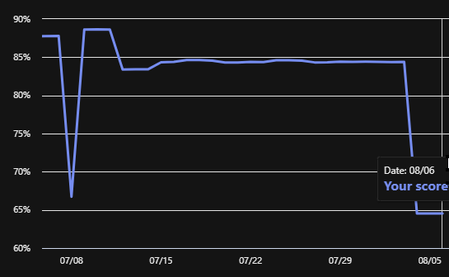
Hello, One of client encounter problem, when secure score drops down from ~85% to 64%. Last month there was one drop. Now its repeats two days in a row. Drop encounters at 3 AM (+3h time zone) when all our exclusion attributes automatically set to System. And restores ~ 11AM same day, when attributes were automatically set back to administrator which made exclusions. This is important to us and client because we have agreement to keep secure score at 80%+.
In_Memory_PE_File which failed the dynamic code trust verification
I am trying to deploy a LoB program for a customer that have a Windows Configuration, WDA Application Control policy setup in M365. The program, High QA, has path and publisher allows in the policy, and it opens without issue. The error is encountered when you open a file inside th application, nothing loads but the Event Viewer, Code Integrity/Operational catches the following error: ...\InspectionManager.exe is trying to load In_Memory_PE_File which failed the dynamic code trust verification with error code 0xC0E9002. The policy has the Dynamic Code Security option enabled. I am hoping there is something that can be done other than turning that option off? Thanks in advance.481Views0likes0CommentsEnable Windows Hello in Hybrid Environment
Hi all, we are planning to enable Windows hello for our hybrid ad joined devices. I have below questions around it before proceed with it. appreciate anyone's help. Does certificate or Cloud Kerberos configurations is a must thing? Can't we enable Windows-Hello from Microsoft Intune like we do for Azure AD standalone devices. Do we need to consider anything important if we go forward with Cloud Kerberos configurations (it seems this is the only method we don't need certificate). Because we have around 20+ domain controllers in our environment, including RODCs. Can I please have Pros and Cons of enabling Windows Hello for Hybrid environment? Thanks in advance! DilanSolved