microsoft information protection developers
59 TopicsMicrosoft Purview: Data Loss Prevention (DLP) vs. Insider Risk Management (IRM)
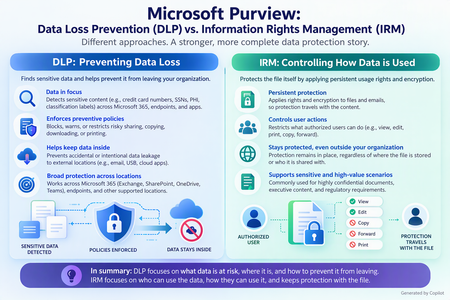
Navigating the Microsoft Purview compliance suite often leads to a common question: what sets Data Loss Prevention (DLP) apart from Insider Risk Management (IRM)? Although these two solutions frequently overlap in organizational security strategies, they address entirely different challenges. In this article, we will explore the core distinctions between them, highlighting how DLP safeguards your sensitive data, while IRM detects and manages risky user behavior before it leads to an incident. The fundamental difference is that DLP focuses on protecting sensitive data, while Insider Risk Management focuses on identifying and managing risky user behavior. Both are Microsoft Purview security and compliance capabilities, but they address different dimensions of data security. Data Loss Prevention (DLP): Determines whether sensitive information is being shared, transferred, or used in ways that violate organizational policies and can automatically prevent those actions. Insider Risk Management (IRM): Analyzes patterns of user activity and contextual signals to identify potential insider threats, including accidental data exposure, intellectual property theft, and other security violations. Side-by-side comparison Capability Purview DLP Purview Insider Risk Management Primary objective Prevent unauthorized disclosure of sensitive data Detect, investigate, and mitigate insider risks Primary focus Data and how it is handled User activities, behavioral patterns, and risk context Key question Is sensitive information leaving the organization or being shared inappropriately? Is a user exhibiting potentially risky behavior? Detection approach Content inspection, sensitivity labels, sensitive information types, and policy conditions Correlation of user activities, risk indicators, and contextual signals Typical triggers Sensitive data emailed externally, copied to USB, uploaded to unauthorized destinations Unusual downloads, repeated data exfiltration activities, or risky actions associated with departing employees Prevention capabilities Directly blocks, restricts, audits, or warns about policy violations Primarily detects and investigates; can initiate mitigation and integrate with DLP for preventive controls Risk analysis Evaluates data and activities against configured policies Correlates activities and indicators to identify potential insider risk Investigation DLP alerts, activity details, and incident reports Risk alerts, user activity timelines, investigation cases, and escalation workflows User awareness Policy tips, warnings, and notifications Primarily analyst-facing; privacy-preserving investigation workflows Privacy controls Role-based access and compliance controls Pseudonymization by default, role-based access, and auditing Typical stakeholders Security, compliance, and data protection teams Insider risk, security investigations, compliance, and authorized HR/legal stakeholders Practical example: An employee downloading confidential customer information Consider a financial services organization where an employee downloads confidential customer records and attempts to transfer them to a personal cloud storage account. Scenario A: Using Purview DLP The organization has configured DLP policies to protect customer information. What happens? An employee accesses an Excel file containing customer financial information. The employee attempts to upload the file to an unauthorized cloud storage service. DLP evaluates the content and activity against the configured policies. If the file contains protected information and the policy conditions match, DLP can block the upload. A policy notification or alert may be generated. Outcome: Sensitive customer information is prevented from leaving through the restricted channel. Important: DLP does not need to determine whether the employee has malicious intentions. It enforces the configured data protection policy. Scenario B: Using Purview Insider Risk Management Now consider the same employee, but with additional activities: Downloads unusually large amounts of confidential information. Copies files from multiple sensitive SharePoint locations. Attempts to transfer information to personal storage. Repeatedly performs activities associated with potential data exfiltration. What happens? IRM collects relevant activity signals from supported sources. It correlates those signals using configured insider risk policies. It identifies potentially risky patterns across activities. It generates risk alerts when the configured detection criteria are met. Authorized investigators can review the activity context, investigate, and determine appropriate next steps. Outcome: The organization can investigate whether the employee's behavior represents a potential insider threat. Important: IRM identifies potential risk, not proven malicious intent. An alert is not evidence that an employee has committed wrongdoing. IRM supports risk investigation and escalation workflows, including integration with Microsoft Purview eDiscovery. The biggest architectural difference: Data-centric vs. user-centric security This is probably the most important distinction when explaining these capabilities to enterprise customers. Purview DLP: Data-centric protection DLP essentially evaluates: Data sensitivity + Activity + Destination + Policy = Enforcement decision For example: Is the document classified as confidential? Does it contain credit card numbers? Is it being shared externally? Is the destination permitted? Should the activity be allowed, audited, or blocked? DLP focuses on whether a particular action involving data violates a protection policy. Purview IRM: User-centric risk detection IRM evaluates: User activities + Risk indicators + Context + Correlation = Potential insider risk For example: Is the user performing multiple potentially risky activities? Are there unusual patterns of sensitive data access or transfer? Are activities associated with a configured risk scenario? Does the combination of signals warrant investigation? IRM provides broader context around potential insider risk rather than evaluating only an individual data-sharing transaction. Can DLP and Insider Risk Management work together? Absolutely. In fact, Microsoft provides an integration called Adaptive Protection that combines their strengths. Adaptive Protection uses Insider Risk Management signals to dynamically adjust DLP enforcement based on the risk level associated with a user. This is particularly valuable because traditional DLP policies can apply consistent restrictions, while Adaptive Protection enables more context-aware enforcement. Example: Adaptive Protection Imagine an organization with three insider risk levels. User risk level IRM assessment Example DLP enforcement Minor Limited indicators of potential risk Monitor activity and generate alerts Moderate More significant indicators of potential risk Increase monitoring and notify users Elevated Significant indicators warranting stronger controls Block specified external sharing activities These are illustrative policy choices, not mandatory Microsoft defaults. How it works: IRM evaluates relevant user activity and assigns a risk level. Adaptive Protection makes that risk level available to supported enforcement policies. DLP evaluates the risk level alongside its other policy conditions. DLP applies the configured controls. As the risk level changes, applicable enforcement can change dynamically. For example, an employee at an elevated insider risk level could be prevented from sharing certain content externally, while users at lower risk levels continue working with fewer restrictions. This is where the two solutions become particularly powerful together. Does Insider Risk Management replace DLP? No. They are complementary, not competing solutions. Consider these customer requirements: Customer requirement Recommended capability Prevent employees from emailing credit card numbers externally DLP Block confidential files from being copied to USB drives DLP Prevent sensitive information from being uploaded to unauthorized cloud applications DLP Identify potential intellectual property theft IRM Investigate suspicious patterns of employee data access and transfer IRM Identify potential data exfiltration associated with departing employees IRM Apply stricter DLP restrictions to users exhibiting elevated insider risk IRM + DLP with Adaptive Protection Protect sensitive data while investigating suspicious user activity DLP + IRM One important nuance: DLP can detect and report risky activities, and IRM can contribute to mitigation. The distinction is their primary purpose and operating model, not an absolute separation between detection and prevention. Which capability should customers implement first? For customers beginning their Microsoft Purview data security journey, I would generally recommend the following sequence. Phase 1: Establish data protection with DLP Start by identifying sensitive information and understanding where it resides. Define sensitive information types and classification requirements. Implement sensitivity labels where appropriate. Configure DLP policies for Microsoft 365 workloads. Extend protection to endpoints and other supported locations. Initially use audit or simulation capabilities to assess impact before enabling blocking. Business outcome: Reduce accidental and unauthorized sensitive data exposure. Phase 2: Introduce Insider Risk Management Once the organization has foundational visibility and protection, introduce insider risk detection. Identify relevant insider risk scenarios. Establish investigation ownership and privacy safeguards. Configure appropriate risk indicators and policies. Develop alert triage and investigation workflows. Integrate with existing security and compliance processes. Business outcome: Improve the ability to detect and investigate potentially harmful insider activities. Phase 3: Enable Adaptive Protection Connect the two capabilities to establish risk-based enforcement. Configure insider risk levels. Map risk levels to DLP policy conditions. Apply proportionate restrictions based on risk. Continuously tune detection and enforcement. Business outcome: Stronger security controls where risk is elevated, with less disruption for lower-risk users. The actual deployment order should depend on the customer's highest-priority risks, licensing, regulatory obligations, and organizational readiness. How I would position this to a customer For your CAIP and Security cross-solution conversations, I would use this positioning: Microsoft Purview DLP protects sensitive information from inappropriate sharing or movement, while Microsoft Purview Insider Risk Management identifies potentially risky user activities that could lead to data loss, intellectual property theft, or security incidents. Together, through Adaptive Protection, they enable organizations to move from static data protection policies toward dynamic, risk-aware security controls. Executive-level analogy Think of these solutions as two different security mechanisms: DLP is the security checkpoint: It examines what information is moving and determines whether that movement should be permitted. IRM is the security intelligence function: It analyzes patterns of activity to identify potential insider threats that warrant investigation. Adaptive Protection connects them: It enables the checkpoint to adjust restrictions based on the risk intelligence available. My recommendation When discussing Microsoft Purview with enterprise customers, I would avoid positioning DLP and IRM as alternative products. Instead, position them as three layers of a comprehensive data security strategy: Understand the data: Discover, classify, and label sensitive information. Protect the data: Use DLP to prevent unauthorized exposure. Understand and respond to insider risk: Use IRM and Adaptive Protection to identify potential threats and dynamically strengthen enforcement. Bottom line: DLP answers, "How do we prevent sensitive data from leaking?" IRM answers, "How do we identify potentially risky insider activity?" Adaptive Protection answers, "How do we automatically adjust protection based on that risk?" References: https://learn.microsoft.com/en-us/purview/dlp-learn-about-dlp https://learn.microsoft.com/en-us/purview/insider-risk-management https://learn.microsoft.com/en-us/purview/insider-risk-management-adaptive-protection https://learn.microsoft.com/en-us/purview/insider-risk-management-adaptive-protection-guideThe CISO Cheat Sheet to Microsoft Digital Defense Report 2026
I know we’re all busy, so I’ve pulled the most important data from this year’s Microsoft Digital Defense Report into one short read. The full report is well worth exploring, but this article focuses on the numbers and trends most relevant to security leaders. This year’s edition shows that AI is lowering the time, expertise and cost required to discover and exploit weaknesses, enabling attackers to operate with greater speed, scale and autonomy. The report describes this as AI “changing the physics of cybersecurity”: attack timelines are compressing and agentic systems are beginning to automate more of the attack lifecycle. Trend 1: Time has collapsed The clearest finding is about speed. Vulnerability discovery is increasingly running ahead of remediation, while the time from discovery to weaponisation is shrinking. In the AI era, weaponisation can follow in hours. Vulnerability discovery and weaponisation now often needs only a well-written prompt. The median time from discovery in the wild to weaponisation is below 24 hours. Vulnerabilities were on track for a record estimated 72,000 CVEs in 2026. The report expects a multi-year period in which the number of known but unpatched vulnerabilities rises sharply before eventually declining. The median time from container start to first exploit attempt is 5.3 hours. The ransomware actor Storm-1175 moved from web-facing exploitation to deploying Medusa ransomware in as little as 24 hours. CISA added over 110 CVEs to its Known Exploited Vulnerabilities catalogue between November 2025 and May 2026, most within a week of disclosure. The mismatch with enterprise reality is the uncomfortable part. The report says the disclosure-to-exploitation window has shrunk to single-digit days. Between November 2025 and May 2026, CISA added more than 110 vulnerabilities to its Known Exploited Vulnerabilities catalogue, most within a week of disclosure. In one example, Storm-1175 moved from exploiting a web-facing vulnerability to deploying Medusa ransomware in as little as 24 hours. Microsoft’s Red Team makes an important point: a patch is also a disclosure. Every fix points attackers towards the flaw it closes. As AI-assisted analysis makes reversing patches faster and more reliable, the report argues that patch velocity, not simply patch availability, becomes the control that matters. Trend 2: Attack chains are gaining autonomy The report charts a clear progression: September–November 2025: AI assists in orchestrating a campaign, as in the Anthropic-reported espionage case. April–June 2026: Full-chain autonomy is demonstrated in labs. July 2026: Real-world autonomous attacks of increasing complexity appear. Two frontier models, Mythos and GPT-5.5, completed a 32-step attack chain against an emulated enterprise with no human help. The test environment had no defenders. The UK AI Security Institute reached a similar finding independently. GPT-5.5 was the second model to solve its end-to-end corporate network attack simulation, a task AISI estimates would take a human about 20 hours. Open-weight models lag closed models at orchestrating attacks by about seven months. In the wild, early July 2026 saw the first documented automated ransomware extortion attack, named JADEPUFFER by Sysdig. Microsoft has seen AI-orchestrated intrusions that share elements with it. Initial access consistently came from internet-exposed services running known-vulnerable software. The report is measured on this point. Volumes of AI-orchestrated activity remain low. In most observed real-world operations, complex end-to-end intrusions still retain meaningful human direction. The Red Team's framing is the most useful one: AI doesn't create a new class of attack, it collapses the effort needed to find and exploit existing attack paths. Trend 3: AI has become an attack surface The report's second takeaway is that attackers are already targeting AI itself. The adoption numbers explain why. 88% of enterprises are experimenting with agents, and 82% of leaders plan broader rollouts within 12–18 months. The report cites industry projections of roughly 1.3 billion agents in production by 2028. What attackers are doing to AI systems: Four techniques accounted for roughly 90% of observed attack activity in telemetry from Azure AI workloads: malicious link injection (52%), jailbreaks (16%), tool and agent abuse (12%), and identity and credential abuse (10%). Memory poisoning: An attacker who can place content anywhere an agent reads can often place it where the agent remembers. Email is the dominant pathway the Red Team has observed. Human-in-the-loop isn't a complete control: Red team testing saw approval prompts ignored, or bypassed by a policy stored in poisoned memory. Developer tools turned against their owners: The "s1ngularity" malware hijacked locally installed AI command-line tools to hunt for secrets. It leaked about 2,000 secrets and 20,000 files across 225 victims. AI browsers: In daily use at more than 40% of organisations in Microsoft's dataset, they were the initial infection vector in incidents involving 57 malware families in a May 2026 analysis. Chat histories as a target: Malicious AI-assistant extensions reached nearly 900,000 installs and more than 20,000 enterprise tenants, harvesting AI chat histories that often contain code, architecture and credentials. The identity implications are direct. Each agent needs its own identity, not one borrowed from an employee, and a named human sponsor. The report also treats revocation latency, the time to cut off a compromised agent, as a measured outcome. Trend 4: The front door is still identity AI changes the speed and personalisation of social engineering. It hasn't changed where attacks start. Initial access in Defender Experts data: User execution: 30% Valid accounts: 20% Malicious copy-and-paste: 13% Phishing: 11% Together, user execution and valid accounts account for over half of observed activity. In incident response engagements, phishing as an initial access vector jumped from 7% to 23% year on year. The standout numbers: ClickFix: Defender saw user-pasted malicious commands on more than 1.1 million unique devices between February and early May 2026, roughly an 8x increase. AiTM: URLs accounted for 45% of the identified phishing techniques in the report’s breakdown. Separately, the share of AiTM phishing and token-theft attacks more than doubled during the first six months of 2026, although the report notes that their overall share remained comparatively small. Teams vishing: Weekly confirmed malicious volume increased 502% year on year. Per attempt, 48% of vishing calls kept the victim engaged for more than 20 seconds, and 30% lasted more than one minute. When a call succeeds, attackers can persuade the victim to install a remote-management tool and complete reconnaissance in two minutes or less. Business contact impersonation (BCI): The report introduces this term for conversations that start with a trusted-looking contact. Microsoft detected more than 46 million attacks in 12 months, with a 121% spike in April 2026. The share of first-contact messages that explicitly asked for money or documents fell from 17% to 3%. The first message is deliberately bland, like "Are you at your desk?" Password attacks declined 26% year on year, which the report describes as strong evidence that MFA and passkeys are forcing attackers to pivot. That pivot includes techniques such as fatigue attacks, AiTM phishing and token theft designed to circumvent conventional MFA. Trend 5: Attackers are inheriting trust rather than breaking in The report's headline theme is that risk is increasingly interconnected. Threats travel through the trusted relationships between identities, software supply chains, partners and cloud platforms. The numbers: Supply chain: Major open-source ecosystems saw attacks roughly every ten days, accelerating through Q2 2026. Shai-Hulud 2.0 affected 25,000 repositories. Megalodon backdoored 5,561 GitHub repositories in under six hours. Trusted signing: In May 2026, Microsoft disrupted Fox Tempest, a "malware-signing-as-a-service" operation that obtained genuine certificates for ransomware loaders and infostealers. Microsoft revoked over a thousand fraudulent code-signing certificates. Legitimate access: An unsanctioned remote monitoring tool is now one of the most reliable mid-stage indicators of a human-operated intrusion. Cloud identity: Cloud identity abuse was the most observed technique against critical infrastructure, representing 78% of the technique mix in Microsoft’s data for March to June 2026. Hybrid intrusions: The Storm-2885 case showed an attacker using a privileged cloud identity to close and downgrade security alerts. The report says identity governance and alert-handling workflows deserve Tier 0 treatment. Dwell time: DART data shows a statistically significant increase in dwell time year on year, meaning organisations took longer to detect intrusions. Ransomware shows the same ecosystem pattern. Qilin led leak-site data with 16.4% of victims, up 386%. Defender detections tell a different story, with Akira at 22%. Trend 6: Defence works best when it's connected The report is not only a catalogue of threats. The strongest defensive evidence: Disruption works. Following the March 2026 disruption, Tycoon2FA activity had fallen 95% from its November 2025 peak by June. Its share of CAPTCHA-gated phishing declined from 76% in December 2025 to 12% in June 2026. Correlation is the highest-leverage variable. The report argues that how well defenders share and correlate signals across endpoint, identity, cloud, email and network is one of the highest-leverage strategic variables under their control. AI is also changing defensive operations. The report describes AI-assisted triage, incident summarisation, hunting-query generation and detection engineering as ways to accelerate investigations and allow analysts to concentrate on higher-value work. Automated disruption can compress response time. The report says that when a correlated incident reaches a defined confidence threshold, defensive systems can automatically isolate devices, disable compromised accounts, revoke sessions or quarantine affected cloud resources. It also stresses the importance of appropriate governance and human oversight for high-risk AI actions. The report also recommends changing what leaders measure. It suggests moving from patches deployed to exposure reduced, detection coverage increased and time-to-mitigate compressed. What the MDDR recommends: ten security priorities The report starts its recommendations with the foundations: Secure by Design, Secure by Default and Secure Operations, applied through identity-centric Zero Trust. Microsoft says these keep the priorities below durable as AI adds more identities, applications, agents and dependencies to govern. Govern cyber risk at leadership level. Report identity exposure, patch latency, agent permissions, critical dependencies, dwell time and recovery readiness to the board. Defend identity as the primary control plane. Deploy passkeys and phishing-resistant MFA, reduce privilege and govern human and non-human identities. Invalidate and rotate tokens and session credentials quickly. Establish governance, visibility and data controls for AI. Keep visibility of approved AI tools, services and agents, and monitor for unauthorised or unmanaged use. Apply sensitivity-aware access and data protection to the data those systems can reach. Reduce exposure and edge risk. Continuously discover internet-facing assets and patch edge devices quickly. Centralise high-fidelity logging, enforce strong authentication and combine network visibility with threat intelligence. Focus on cross-signal correlation. Correlate endpoint, identity, cloud, application, email and network signals to detect intrusions earlier. Correlation also helps defenders anticipate attack paths and likely targets. Enact a continuous threat and vulnerability management model. Combine asset visibility, vulnerability identification, threat detection and AI-accelerated insight into a single continuous programme. Validate exposure through proactive testing. Run assume-breach exercises on cloud services, SaaS platforms, APIs and workflow automation. Prioritise them by where your highest-value data is stored, accessed or aggregated. Secure software dependencies. Harden software installation, keep a software inventory and validate provenance. Monitor packages and prepare for rapid containment. Participate in collective defence. Share actionable threat indicators and victim-informed intelligence with trusted partners and law enforcement. This supports coordinated tracking, investigation and disruption. Prepare for long-horizon technology transitions. Build a cryptographic inventory and advance post-quantum planning alongside AI governance. Read together, the numbers tell one story: the attacker’s workflow is becoming faster and less expensive. AI can shorten vulnerability discovery, exploitation, secret discovery and lateral movement, while organisations still face the slower operational work of testing, coordinating and deploying safe changes across complex environments. At the same time, agent identities can proliferate faster than organisations can inventory, govern and revoke them The defining question for boards today is not whether disruption will occur, but whether the organization can continue operating, contain harm, recover quickly, and maintain trust when it does. Source: Microsoft Digital Defense Report 2026, Version 1.1. Reporting period: July 2025–June 2026.Hacking Made Easy, Patching Made Optional: A Modern Cyber Tragedy
In today’s cyber threat landscape, the tools and techniques required to compromise enterprise environments are no longer confined to highly skilled adversaries or state-sponsored actors. While artificial intelligence is increasingly being used to enhance the sophistication of attacks, the majority of breaches still rely on simple, publicly accessible tools and well-established social engineering tactics. Another major issue is the persistent failure of enterprises to patch common vulnerabilities in a timely manner—despite the availability of fixes and public warnings. This negligence continues to be a key enabler of large-scale breaches, as demonstrated in several recent incidents. The Rise of AI-Enhanced Attacks Attackers are now leveraging AI to increase the credibility and effectiveness of their campaigns. One notable example is the use of deepfake technology—synthetic media generated using AI—to impersonate individuals in video or voice calls. North Korean threat actors, for instance, have been observed using deepfake videos and AI-generated personas to conduct fraudulent job interviews with HR departments at Western technology companies. These scams are designed to gain insider access to corporate systems or to exfiltrate sensitive intellectual property under the guise of legitimate employment. Social Engineering: Still the Most Effective Entry Point And yet, many recent breaches have begun with classic social engineering techniques. In the cases of Coinbase and Marks & Spencer, attackers impersonated employees through phishing or fraudulent communications. Once they had gathered sufficient personal information, they contacted support desks or mobile carriers, convincingly posing as the victims to request password resets or SIM swaps. This impersonation enabled attackers to bypass authentication controls and gain initial access to sensitive systems, which they then leveraged to escalate privileges and move laterally within the network. Threat groups such as Scattered Spider have demonstrated mastery of these techniques, often combining phishing with SIM swap attacks and MFA bypass to infiltrate telecom and cloud infrastructure. Similarly, Solt Thypoon (formerly DEV-0343), linked to North Korean operations, has used AI-generated personas and deepfake content to conduct fraudulent job interviews—gaining insider access under the guise of legitimate employment. These examples underscore the evolving sophistication of social engineering and the need for robust identity verification protocols. Built for Defense, Used for Breach Despite the emergence of AI-driven threats, many of the most successful attacks continue to rely on simple, freely available tools that require minimal technical expertise. These tools are widely used by security professionals for legitimate purposes such as penetration testing, red teaming, and vulnerability assessments. However, they are also routinely abused by attackers to compromise systems Case studies for tools like Nmap, Metasploit, Mimikatz, BloodHound, Cobalt Strike, etc. The dual-use nature of these tools underscores the importance of not only detecting their presence but also understanding the context in which they are being used. From CVE to Compromise While social engineering remains a common entry point, many breaches are ultimately enabled by known vulnerabilities that remain unpatched for extended periods. For example, the MOVEit Transfer vulnerability (CVE-2023-34362) was exploited by the Cl0p ransomware group to compromise hundreds of organizations, despite a patch being available. Similarly, the OpenMetadata vulnerability (CVE-2024-28255, CVE-2024-28847) allowed attackers to gain access to Kubernetes workloads and leverage them for cryptomining activity days after a fix had been issued. Advanced persistent threat groups such as APT29 (also known as Cozy Bear) have historically exploited unpatched systems to maintain long-term access and conduct stealthy operations. Their use of credential harvesting tools like Mimikatz and lateral movement frameworks such as Cobalt Strike highlights the critical importance of timely patch management—not just for ransomware defense, but also for countering nation-state actors. Recommendations To reduce the risk of enterprise breaches stemming from tool misuse, social engineering, and unpatched vulnerabilities, organizations should adopt the following practices: 1. Patch Promptly and Systematically Ensure that software updates and security patches are applied in a timely and consistent manner. This involves automating patch management processes to reduce human error and delay, while prioritizing vulnerabilities based on their exploitability and exposure. Microsoft Intune can be used to enforce update policies across devices, while Windows Autopatch simplifies the deployment of updates for Windows and Microsoft 365 applications. To identify and rank vulnerabilities, Microsoft Defender Vulnerability Management offers risk-based insights that help focus remediation efforts where they matter most. 2. Implement Multi-Factor Authentication (MFA) To mitigate credential-based attacks, MFA should be enforced across all user accounts. Conditional access policies should be configured to adapt authentication requirements based on contextual risk factors such as user behavior, device health, and location. Microsoft Entra Conditional Access allows for dynamic policy enforcement, while Microsoft Entra ID Protection identifies and responds to risky sign-ins. Organizations should also adopt phishing-resistant MFA methods, including FIDO2 security keys and certificate-based authentication, to further reduce exposure. 3. Identity Protection Access Reviews and Least Privilege Enforcement Conducting regular access reviews ensures that users retain only the permissions necessary for their roles. Applying least privilege principles and adopting Microsoft Zero Trust Architecture limits the potential for lateral movement in the event of a compromise. Microsoft Entra Access Reviews automates these processes, while Privileged Identity Management (PIM) provides just-in-time access and approval workflows for elevated roles. Just-in-Time Access and Risk-Based Controls Standing privileges should be minimized to reduce the attack surface. Risk-based conditional access policies can block high-risk sign-ins and enforce additional verification steps. Microsoft Entra ID Protection identifies risky behaviors and applies automated controls, while Conditional Access ensures access decisions are based on real-time risk assessments to block or challenge high-risk authentication attempts. Password Hygiene and Secure Authentication Promoting strong password practices and transitioning to passwordless authentication enhances security and user experience. Microsoft Authenticator supports multi-factor and passwordless sign-ins, while Windows Hello for Business enables biometric authentication using secure hardware-backed credentials. 4. Deploy SIEM and XDR for Detection and Response A robust detection and response capability is vital for identifying and mitigating threats across endpoints, identities, and cloud environments. Microsoft Sentinel serves as a cloud-native SIEM that aggregates and analyses security data, while Microsoft Defender XDR integrates signals from multiple sources to provide a unified view of threats and automate response actions. 5. Map and Harden Attack Paths Organizations should regularly assess their environments for attack paths such as privilege escalation and lateral movement. Tools like Microsoft Defender for Identity help uncover Lateral Movement Paths, while Microsoft Identity Threat Detection and Response (ITDR) integrates identity signals with threat intelligence to automate response. These capabilities are accessible via the Microsoft Defender portal, which includes an attack path analysis feature for prioritizing multicloud risks. 6. Stay Current with Threat Actor TTPs Monitor the evolving tactics, techniques, and procedures (TTPs) employed by sophisticated threat actors. Understanding these behaviours enables organizations to anticipate attacks and strengthen defenses proactively. Microsoft Defender Threat Intelligence provides detailed profiles of threat actors and maps their activities to the MITRE ATT&CK framework. Complementing this, Microsoft Sentinel allows security teams to hunt for these TTPs across enterprise telemetry and correlate signals to detect emerging threats. 7. Build Organizational Awareness Organizations should train staff to identify phishing, impersonation, and deepfake threats. Simulated attacks help improve response readiness and reduce human error. Use Attack Simulation Training, in Microsoft Defender for Office 365 to run realistic phishing scenarios and assess user vulnerability. Additionally, educate users about consent phishing, where attackers trick individuals into granting access to malicious apps. Conclusion The democratization of offensive security tooling, combined with the persistent failure to patch known vulnerabilities, has significantly lowered the barrier to entry for cyber attackers. Organizations must recognize that the tools used against them are often the same ones available to their own security teams. The key to resilience lies not in avoiding these tools, but in mastering them—using them to simulate attacks, identify weaknesses, and build a proactive defense. Cybersecurity is no longer a matter of if, but when. The question is: will you detect the attacker before they achieve their objective? Will you be able to stop them before reaching your most sensitive data? Additional read: Gartner Predicts 30% of Enterprises Will Consider Identity Verification and Authentication Solutions Unreliable in Isolation Due to AI-Generated Deepfakes by 2026 Cyber security breaches survey 2025 - GOV.UK Jasper Sleet: North Korean remote IT workers’ evolving tactics to infiltrate organizations | Microsoft Security Blog MOVEit Transfer vulnerability Solt Thypoon Scattered Spider SIM swaps Attackers exploiting new critical OpenMetadata vulnerabilities on Kubernetes clusters | Microsoft Security Blog Microsoft Defender Vulnerability Management - Microsoft Defender Vulnerability Management | Microsoft Learn Zero Trust Architecture | NIST tactics, techniques, and procedures (TTP) - Glossary | CSRC https://learn.microsoft.com/en-us/security/zero-trust/deploy/overviewAnnouncing General Availability of Microsoft Purview SDK and APIs
If you are building enterprise grade custom GenAI applications or agents, you are probably familiar with the increasing data security and compliance challenges that your target customers worry about: Insufficient visibility and controls, overreliance and ethical concerns on AI outputs, and ever growing/changing regulatory compliance requirements. These concerns are not just theoretical; they directly impact whether enterprises will adopt and scale your solution. Without strong, built-in data governance and protection, even the most innovative GenAI apps can stall adoption. As a developer building AI solution, here are the top challenges around data security and governance that you should address Data leakage – inadvertent leak of sensitive data to and from AI apps Data oversharing – users accessing data, via AI apps, that they aren’t authorized to otherwise Non-compliant usage – AI apps used to generate unethical or other high-risk content We are excited to announce the general availability of Microsoft Purview APIs and SDK, as of July 1 st , to enable developers shift-left and build the agents with security and compliance in mind from day one. These APIs easily integrate with your apps or agents and help you implement enterprise-grade data security and governance, enabling secure experiences similar to what Microsoft 365 Copilot does. With Purview doing the heavy lifting to support governance and compliance, you can focus your precious investments on building core product value, while supporting your customers with a comprehensive 1-stop solution to manage data security posture and risks in a comprehensive way. What the Purview SDK enables Integrate enterprise-grade data security and compliance controls into your custom AI apps and agents — across any platform and model for the following outcomes: Prevent data oversharing by honoring label inheritance from grounding data sources Protect against data leaks and insider risks with built-in safeguards Govern AI runtime data through auditing, Data Lifecycle Management (DLM), eDiscovery (eD), and Communication Compliance (CC) Get started today! Explore Purview SDK Additional Resources API references: Microsoft Purview data security and governance Azure AI Samples integrated with Purview APIs: Serverless AI Chat with RAG Azure OpenAI and Azure AI Search Quick-start samples: API explorer app Postman collection See it in action: https://youtu.be/Ta-nrefqdb0?si=5aoZTrIoykZpY0na Partner Case Studies: EY: https://www.microsoft.com/en/customers/story/24107-ey-global-services-limited-microsoft-purview Infosys: https://www.microsoft.com/en/customers/story/24070-infosys-microsoft-purview2.1KViews4likes0CommentsHelp! Sensitivity label applied to whole tenant mistakenly with Watermark
We create a sensitivity label to have a watermark to be applied on the files on where it assigned but accidentally or due to misconfiguration, the watermark applied to whole tenant and the files, need a solution to automatically removed these watermarks from the files wherever it is applied. Please assist, TIA... .283Views0likes1CommentRethinking Data Security and Governance in the Era of AI
The era of AI is reshaping industries, enabling unprecedented innovations, and presenting new opportunities for organizations worldwide. But as organizations accelerate AI adoption, many are focused on a growing concern: their current data security and governance practices are not effectively built for the fast-paced AI innovation and ever-evolving regulatory landscape. At Microsoft, we recognize the critical need for an integrated approach to address these risks. In our latest findings, Top 3 Challenges in Securing and Governing Data for the Era of AI, we uncovered critical gaps in how organizations manage data risk. The findings exemplify the current challenges: 91% of leaders are not prepared to manage risks posed by AI 1 and 85% feel unprepared to comply with AI regulations 2 . These gaps not only increase non-compliance but also put innovation at risk. Microsoft Purview has the tools to tackle these challenges head on, helping organizations move to an approach that protects data, meets compliance regulations, and enables trusted AI transformation. We invite you to take this opportunity to evaluate your current practices, platforms, and responsibilities, and to understand how to best secure and govern your organization for growing data risks in the era of AI. Platform fragmentation continues to weaken security outcomes Organizations often rely on fragmented tools across security, compliance, and data teams, leading to a lack of unified visibility and insufficient data hygiene. Our findings reveal the effects of fragmented platforms, leading to duplicated data, inconsistent classification, redundant alerts, and siloed investigations, which ultimately is causing data exposure incidents related to AI to be on the rise 3 . Microsoft Purview offers centralized visibility across your organization’s data estate. This allows teams to break down silos, streamline workflows, and mitigate data leakage and oversharing. With Microsoft Purview, capabilities like data health management and data security posture management are designed to enhance collaboration and deliver enriched insights across your organization to help further protect your data and mitigate risks faster. Microsoft Purview offers the following: Unified insights across your data estate, breaking down silos between security, compliance, and data teams. Microsoft Purview Data Security Posture Management (DSPM) for AI helps organizations gain unified visibility into GenAI usage across users, data, and apps to address the heightened risk of sensitive data exposure from AI. Built-in capabilities like classification, labeling, data loss prevention, and insider risk insights in one platform. In addition, newly launched solutions like Microsoft Purview Data Security Investigations accelerate investigations with AI-powered deep content analysis, which helps data security teams quickly identify and mitigate sensitive data and security risks within impacted data. Organizations like Kern County historically relied on many fragmented systems but adopted Microsoft Purview to unify their organization’s approach to data protection in preparation for increasing risks associated with deploying GenAI. “We have reduced risk exposure, [Microsoft] Purview helped us go from reaction to readiness. We are catching issues proactively instead of retroactively scrambling to contain them.” – Aaron Nance, Deputy Chief Information Security Officer, Kern County Evolving regulations require continuous compliance AI-driven innovation is creating a surge in regulations, resulting in over 200 daily updates across more than 900 regulatory agencies 4 , as highlighted in our research. Compliance has become increasingly difficult, with organizations struggling to avoid fines and comply with varying requirements across regions. To navigate these challenges effectively, security leaders’ responsibilities are expanding to include oversight across governance and compliance, including oversight of traditional data catalog and governance solutions led by the central data office. Leaders also cite the need for regulation and audit readiness. Microsoft Purview enables compliance and governance by: Streamlining compliance with Microsoft Purview Compliance Manager templates, step-by-step guidance, and insights for region and industry-specific regulations, including GDPR, HIPAA, and AI-specific regulation like the EU AI Act. Supporting legal matters such as forensic and internal investigations with audit trail records in Microsoft Purview eDiscovery and Audit. Activating and governing data for trustworthy analytics and AI with Microsoft Purview Unified Catalog, which enables visibility across your data estate and data confidence via data quality, data lineage, and curation capabilities for federated governance. Microsoft Purview’s suite of capabilities provides visibility and accountability, enabling security leaders to meet stringent compliance demands while advancing AI initiatives with confidence. Organizations need a unified approach to secure and govern data Organizations are calling for an integrated platform to address data security, governance, and compliance collectively. Our research shows that 95% of leaders agree that unifying teams and tools is a top priority 5 and 90% plan to adopt a unified solution to mitigate data related risks and maximize impact 6 . Integration isn't just about convenience, it’s about enabling innovation with trusted data protection. Microsoft Purview enables a shared responsibility model, allowing individual business units to own their data while giving central teams oversight and policy control. As organizations adopt a unified platform approach, our findings reveal the upside potential not only being reduced risk but also cost savings. With AI-powered copilots such as Security Copilot in Microsoft Purview, data protection tasks are simplified with natural-language guidance, especially for under resourced teams. Accelerating AI transformation with Microsoft Purview Microsoft Purview helps security, compliance, and governance teams navigate the complexities of AI innovation while implementing effective data protection and governance strategies. Microsoft partner EY highlights the results they are seeing: “We are seeing 25%–30% time savings when we build secure features using [Microsoft] Purview SDK. What was once fragmented is now centralized. With [Microsoft] Purview, everything comes together on one platform, giving a unified foundation to innovate and move forward with confidence.” – Prashant Garg, Partner of Data and AI, EY We invite you to explore how you can propel your organization toward a more secure future by reading the full research paper at https://aka.ms/SecureAndGovernPaper. Visit our website to learn more about Microsoft Purview. 1 Forbes, Only 9% Of Surveyed Companies Are Ready To Manage Risks Posed By AI, 2023 2 SAP LeanIX, AI Survey Results, 2024 3 Microsoft, Data Security Index Report, 2024 4 Forbes, Cost of Compliance, Thomson Reuters, 2021 5 Microsoft, Audience Research, 2024 6 Microsoft, Customer Requirements Research, 20248.2KViews3likes0Comments
Microsoft Azure Information Protection Uninstall Issue
We installed AIP installer to ~3000 machines and we deployed v2.13.49.0 to all of our machines last year and didn't upgrade it. We have since had a request in to remove it from all machines, this is fine but we found when testing some were failing the uninstall. Did a bit of digging to the failures and saw we had multiple newer versions installed 2.14.90.0, 2.16.73.0, 2.16.79.0, 2.17.66.0 Did a bit more digging and saw that Windows Update has been updating some but not all. I tried to download the newer versions so I could package then send the uninstall but not all are there to download. I then went down the GUID to uninstall them which works "SORT OF" but not fully, it uninstalls the app but it is still lingering in the Add/Remove Programs window and is still showing as installed. If I click uninstall in there it goes through the uninstall process and its then gone. Problem is I do not and cannot get the other version installers as they are no longer available and wondered if anyone has hit this issue yet and if there is some sort or rip out app/script? because this is not good.3.1KViews0likes3CommentsUnlock the Power of GitHub Copilot Workspaces: A Beginner’s Guide
Unlock the Power of GitHub Copilot Workspaces: A Beginner’s Guide Dive into the world of GitHub Copilot Workspaces with our comprehensive guide designed for beginners. Learn how to set up your workspace, leverage AI-powered code suggestions, and boost your productivity. Whether you’re a seasoned developer or just starting out, discover tips and tricks to make the most of this innovative tool. Start coding smarter today!14KViews1like0CommentsSensitivity label works in Outlooks web app but not desktop app
We are currently using M365 Business Premium licence and hence are using Azure Information Protection Premium Plan 1. We created an 'Internal' sensitivity label on compliance.microsoft.com, with "assign permissions now" configuration granting co-author access to all users and groups within the organisation . The label is working in the user's Outlook web app. However, when drafting a new email in Outlook desktop app, the option to select the label is there, but when I click on the label itself it reverts back to "no label". All the users to which label policy is scoped can see the Label. but can't apply it. Some insights: 1. If I create a label with "Let users assign permission" configuration and then select the "Encrypt-Only" or "Do-Not-Forward" options. Then users can see that label and apply it in the Outlook desktop app and web. 2. If I create labels with "Assign Permission now" configuration, scope it to both file and email, grant co-author access to 'Authenticated Users', or 'all users and groups within the organisation', then users can select the label in Word/Excel etc, but not Outlook Desktop app. They can assign the same label in Outlook Web though. We are on the latest - Microsoft® Outlook® for Microsoft 365 MSO (Version 2403 Build 16.0.17425.20176) 64-bit. We use built-in labels by Office apps and never used AIP unified labelling client or the classic client.Solved1.7KViews0likes2Comments
What happens when a Policy Tip in Microsoft Data Loss Prevention is reported?
I'm creating documentation to explain the functions of policy tips, and I cannot find documentation for what happens when a Policy Tip is reported in Microsoft's Data Loss Prevention features. I've clicked on "Report" but nothing happens on my side. My only guesses are that 1. The reports go to the administrator that created the policy for evaluation and remediation, or 2. The report is sent to Microsoft for analysis like in MS Defender for 365.1.5KViews0likes3Comments