microsoft information governance
85 Topics
Best practices for maintaining emergency contact information
Hello everyone. Our organization is currently reviewing its emergency contact directory as part of our business continuity and operational processes. What best practices do you recommend for keeping emergency contact information updated and ensuring it remains available during incidents or emergencies? Thank you for your suggestions.Securing AI Agents End‑to‑End: Connecting Purview DSPM, Agent 365, and the AI Security Dashboard
The Challenge: Organizations deploying Microsoft Copilot and custom AI agents face a critical gap: security visibility is fragmented across data protection, identity governance, and threat detection tools. While Microsoft provides powerful capabilities through Purview Data Security Posture Management (DSPM), Agent 365, and the AI Security Dashboard, practitioners often struggle to understand how these components work together to deliver unified AI security posture management. This blog provides an architectural and operational blueprint for connecting these three pillars into a cohesive security framework that security architects can implement today. The Three Pillars: Capabilities Overview Microsoft Purview DSPM for AI Purview DSPM extends data‑centric security controls to AI interactions. Its key capabilities include: Sensitivity labels with EXTRACT usage rights that govern whether AI agents can read and process sensitive content Data Loss Prevention (DLP) policies that block or audit AI interactions involving confidential data across Copilot, SharePoint, OneDrive, and Teams Comprehensive audit logging that captures AI‑to‑data interactions, including user identity, agent identity, data classification, and the action taken Insider Risk Management integration that detects anomalous agent behavior patterns, such as bulk or unusual data access DSPM operates at the data layer, answering a foundational question: What sensitive information can this agent access, and what is it doing with that data? Microsoft Agent 365 Agent 365 provides a unified control plane for governing AI agent identity, access, and lifecycle across the Microsoft 365 ecosystem. Core components include: Agent Registry, backed by Entra Agent IDs, providing a unique identity for every Copilot Studio agent, custom agent, and supported third‑party AI integration Conditional Access policies that enforce real‑time access controls based on agent identity, user context, device compliance, and risk signals Centralized observability, with dashboards showing agent‑to‑agent interactions, agent‑to‑human conversations, and near real‑time telemetry Governance workflows that support agent approval, lifecycle management, suspension, and decommissioning Agent 365 operates at the identity and control layer, answering: Which agents exist, who authorized them, and what access boundaries are enforced? AI Security Dashboard The AI Security Dashboard aggregates security signals from Entra, Purview, and Defender to provide a unified risk view across all AI assets. It delivers: AI asset inventory, cataloging Copilot instances, custom agents, and third‑party models with associated risk context Misconfiguration detection, identifying agents with excessive permissions, missing conditional access policies, or DLP coverage gaps Attack path visualization, showing how compromised agents could pivot to sensitive data or escalate privileges Integration with Microsoft Security Copilot, enabling natural‑language investigation of AI security risks and incidents The Dashboard operates at the aggregation and recommendation layer, answering: What is my overall AI security posture, and where should remediation be prioritized? The Unified Architecture: How Signals Flow End-to-End Understanding the technical integration requires mapping how identity, data, and security signals flow across these three systems. Identity Foundation (Microsoft Entra): Every AI agent is assigned a unique Entra Agent ID at creation. This identity becomes the anchor for all security controls—conditional access policies in Agent 365, audit attribution in Purview, and risk correlation in the AI Security Dashboard. When a Copilot Studio agent is deployed, Entra automatically registers it with Agent 365 and propagates identity metadata to connected security services. Data Interaction Telemetry (Microsoft Purview): When an agent accesses SharePoint files, reads emails, or queries structured data, Purview captures detailed audit events that include agent identity, user context, data classification labels, and enforcement outcomes. These events flow into Purview’s unified audit log and are accessible through the Compliance portal, Microsoft Graph, and SIEM integrations. Crucially, Purview enforces sensitivity labels with EXTRACT usage rights—if a document is labeled Confidential without EXTRACT permission, the agent’s request is blocked before content reaches the AI model. Control Plane Enforcement (Agent 365): Agent 365 applies identity‑based governance by evaluating Entra signals and surfaced risk indicators. During policy evaluation, the control plane verifies whether the agent is registered, whether the invoking user satisfies authentication requirements, and whether recent signals (such as DLP violations) warrant blocking execution. Agent 365 also provides observability views that correlate agent activity with security events, helping administrators identify unmanaged or unauthorized (“shadow”) agents. Aggregated Risk View (AI Security Dashboard): The AI Security Dashboard correlates telemetry from: Entra — conditional access decisions, authentication anomalies, and privileged identity usage Purview — DLP violations, sensitivity label mismatches, and Insider Risk Management signals Defender — threat detections, application posture assessments, and suspicious activity indicators These signals are correlated by agent identity and time, then surfaced as risk cards with contextual severity and recommended remediation actions. The Dashboard does not replace the underlying tools; instead, it provides a consolidated view that helps teams focus on the most impactful risks. The diagram below illustrates how identity, data, and threat signals flow across the three AI security pillars. Figure 1: End‑to‑end AI security architecture. Enforcement happens at the data layer (Purview) and identity layer (Agent 365 via Entra). The AI Security Dashboard aggregates—rather than replaces—underlying security controls. From Architecture to Action: Telemetry & Enforcement Flow Understanding architecture is essential—but practitioners need to know when and where enforcement occurs during a real agent invocation. The sequence below illustrates runtime interaction between a user, an AI agent, and the three security pillars. The Critical Distinction: Two Enforcement Layers Enforcement occurs at two distinct points in the request lifecycle. First, Microsoft Entra validates agent identity and evaluates conditional access policies before execution begins. If the agent is not registered, if the user fails authentication requirements, or if policy conditions require blocking, execution is denied immediately. Second, when execution is permitted, Purview DSPM enforces data access controls inline. Every attempt to access documents, emails, or structured data is evaluated in real time. If a document is labeled Confidential without EXTRACT rights, Purview blocks the request and returns no sensitive content to the agent. Telemetry Generation Across the Stack Each step produces structured telemetry. Entra logs authentication attempts and policy decisions. Purview records AI interaction audit events, including enforcement outcomes. Agent 365 correlates identity and behavior signals to maintain agent posture and observability. These combined signals are surfaced in the AI Security Dashboard, which correlates activity across time and identity to present prioritized risk insights. Make the “where enforcement happens” distinction explicit (data vs. identity). Figure 2: Purview enforces data controls inline, Agent 365 enforces identity and execution controls, and the AI Security Dashboard correlates signals for prioritization. Practitioner Scenario: Detecting and Blocking Agent Data Exposure Context: Your organization deploys a custom Copilot Studio agent to summarize sales proposals stored in SharePoint. Several documents contain customer PII labeled "Highly Confidential" with no EXTRACT usage rights granted. Incident Timeline: Agent Data Exposure Detection → Remediation Detection The agent attempts to access SharePoint files through Microsoft Graph. Purview DSPM evaluates sensitivity labels and identifies restricted documents. A DLP policy blocks access and logs a violation with full context. The audit event appears in the Purview unified audit log within minutes. Visibility Agent 365 flags the blocked interaction in its observability dashboard. The AI Security Dashboard surfaces a High‑severity risk card titled “Agent accessing restricted data.” Security teams investigate the agent using Security Copilot to determine scope and recurrence. Remediation An administrator applies an Entra conditional access policy to suspend the agent. Data permissions are adjusted to restrict access or explicitly grant EXTRACT rights where justified. The AI Security Dashboard reflects a reduced risk score once controls are validated. Outcome: The incident is contained quickly, audit evidence is preserved, and the agent is restored with least‑privilege access—without disrupting legitimate business workflows. Figure 3: A single DLP violation triggers coordinated detection, investigation, and remediation across Purview, Agent 365, and the AI Security Dashboard within 30 minutes. Division of Responsibility: What Each Tool Does Tool Primary Function Key Signals Enforcement Capability Purview DSPM Data-layer protection and audit Sensitivity labels, DLP violations, data access patterns Blocks API calls violating DLP or label policies Agent 365 Identity and lifecycle governance Agent registry, conditional access hits, observability telemetry Denies agent invocation based on Entra policies AI Security Dashboard Unified risk aggregation Cross-product signals from Entra, Purview, Defender No direct enforcement—provides recommendations and prioritization Critical Distinction: Enforcement happens at two layers—Purview blocks data access violations, while Agent 365 (via Entra) blocks agent invocation. The Dashboard does not enforce policies but accelerates investigation and remediation by correlating signals that would otherwise require manual analysis across three separate consoles. Key Takeaways for Practitioners Agent identity is the integration anchor. Every security control—DLP policies, conditional access, audit logs, risk scoring—relies on Entra Agent IDs. Ensure all agents are properly registered in Agent 365 before production deployment. Purview enforces at the data layer, Agent 365 at the identity layer. Use both—Purview prevents unauthorized data exfiltration, while Agent 365 prevents unauthorized agent execution. Neither is redundant. The AI Security Dashboard is for prioritization, not replacement. Continue using Purview Compliance Portal for detailed DLP investigations and Agent 365 registry for operational monitoring. Use the Dashboard to identify which risks warrant immediate attention. Audit logs are your ground truth. All three tools consume Purview audit events. Integrate these logs with Microsoft Sentinel or your SIEM for long-term retention and advanced threat hunting. Shadow agents are your blind spot. Regularly audit the Agent 365 registry against actual AI deployments (Copilot Studio, Azure OpenAI, third-party integrations) to identify unregistered instances. As AI agents become embedded in everyday work, security teams must move beyond feature‑level understanding and adopt an end‑to‑end enforcement mindset. The combination of Purview DSPM, Agent 365, and the AI Security Dashboard provides the building blocks—but value is realized only when they are implemented as a unified model. How are you governing AI agents in your environment today? Share your experiences and patterns in the comments—especially where identity, data, and security signals intersect.4.7KViews4likes0CommentsCollecting Microsoft 365 Copilot Data with Microsoft Purview eDiscovery
Copilot Data Collection Reference Table Data Type Storage Location Item Class Collection Strategy Copilot Prompts (user questions sent to M365 Copilot) Exchange Online: Hidden folder in the user's mailbox. Compliance copies stored similar to Teams chats, but with unique item classes. IPM.SkypeTeams.Message.Copilot.<AppName> (e.g., .Word, .Excel, .Outlook, .BizChat). Additional AI-related classes may also apply: IPM.SkypeTeams.Message.ConnectedAIApp*, IPM.SkypeTeams.Message.CloudAIApp*, IPM.SkypeTeams.Message.TeamCopilot*, IPM.SkypeTeams.TeamCopilot* 1. Add the user's Exchange mailbox as a data source to the search. 2. In the condition builder you can optionally filter the search to only return Copilot prompts by adding a condition of "Item class contains any of Copilot activity". This automatically applies all relevant M365 Copilot item classes as a condition of the search. 3. Add any further additional conditions such as date range or keywords to narrow results as required. You can also use the Item Class condition to exclude M365 Copilot interactions from your collections when targeting a user’s mailbox. Notes: · Additional item classes may be added. The item class condition will be updated accordingly. Copilot Responses (AI-generated answers) Exchange Online: The same hidden folder in the user's mailbox as prompts. The same IPM.SkypeTeams.Message.Copilot.<AppName> pattern as prompts The same collection strategy used for prompts. Copilot Memories (personalized saved information Copilot "remembers") Exchange Online: Hidden CopilotMemory subfolder within the user's mailbox contacts. Stored as contact entries separate from prompts and responses. IPM.Contact Each memory item appears as a contact card within Exchange, which is distinct from the message-based item classes used for prompts/responses. 1. Add the user's Exchange mailbox as a data source to the search. 2. In the condition builder you can optionally filter the search to only return Contacts by adding a condition of "Item class contains any of Contacts". Notes: · Copilot memories will not be preserved under a legal hold or retention policy. · This will return both Copilot memories stored in contacts as well as traditional contacts from the user’s Exchange mailbox. Copilot Pages (AI-generated, user-editable documents) SharePoint Online: Stored in a user-owned SharePoint embedded container (shared with Loop workspace content and Copilot Notebooks). File format is .page. Not stored in the user's mailbox. N/A These are SharePoint files (not Exchange items), so no item class applies. Identify them in search results by the .page file extension. 1. Add the custodian’s SharePoint embedded site URL as a data source to the search. Alternatively, tenant-wide searches of all SPO sites will include all SharePoint Embedded containers 2. Optionally use the condition builder with conditions such as date range, keywords or file type to further filter results returned Facilitator agent interactions in a Team meeting chat Exchange Online: Hidden folder in all meeting attendees’ mailboxes. Compliance copies stored as Teams chats IPM.SkypeTeams.Message 1. Add the user's Exchange mailbox as a data source to the search. 2. In the condition builder you can optionally filter the search to only return Copilot prompts by adding a condition of "Item class contains any of Instant messages". 3. Add any further additional conditions such as date range or keywords to narrow results as required. Facilitator agent meeting notes (loop) SharePoint Online: Facilitator meeting notes are stored as a .loop file in a OneDrive folder titled Meetings of the user who initiated Facilitator in Teams N/A These are SharePoint files (not Exchange items), so no item class applies. Identify them in search results by the .loop file extension. 1. Add the user's OneDrive URL as a data source to the search. 2. In the condition builder you can optionally filter the search to only return loop files by adding a condition of "File type equals any of loop". 3. Add any further additional conditions such as date range or keywords to narrow results as required. Notes: · With eDiscovery premium enabled cases you can follow the standard workflow for collecting Team meeting messages and select to include cloud attachments in your collection. This will automatically pull into the export or review set any Facilitator agent meeting notes. Facilitator created word/loop documents SharePoint Online: When the facilitator agent is asked to create a word or loop document during a meeting they are stored in the requesters OneDrive in a folder called N/A These are SharePoint files (not Exchange items), so no item class applies. Identify them in search results by the .loop file extension. 1. Add the user's OneDrive URL as a data source to the search. 2. In the condition builder you can optionally filter the search to only return loop and doc files by adding a condition of "File type equals any of loop, docx". 3. Add any further additional conditions such as date range or keywords to narrow results as required. Notes: · With eDiscovery premium enabled cases you can follow the standard workflow for collecting Team meeting messages and select to include cloud attachments in your collection. This will automatically pull into the export or review set any Facilitator generated loop or word documents. Facilitator generated and assigned tasks Exchange Online: When the facilitator agent creates and assigns a task to an individual, it is created as a to-do item in the assigned individual's Exchange Mailbox IPM.Task 1. Add the user's Exchange mailbox as a data source to the search. 2. In the condition builder you can optionally filter the search to only return Tasks by adding a condition of "Item class contains any of Tasks". 3. Add any further additional conditions such as date range or keywords to narrow results as required. Application-Specific Item Classes for Prompts & Responses For more granular filtering by Copilot application, the following item class values can be used in KQL queries: Application Context Item Class Value Microsoft Copilot Chat (BizChat / Teams) IPM.SkypeTeams.Message.Copilot.BizChat Copilot in Excel IPM.SkypeTeams.Message.Copilot.Excel Copilot in Loop IPM.SkypeTeams.Message.Copilot.Loop Copilot in Outlook IPM.SkypeTeams.Message.Copilot.Outlook Copilot in PowerPoint IPM.SkypeTeams.Message.Copilot.PowerPoint Copilot in Teams IPM.SkypeTeams.Message.Copilot.Teams Copilot in Whiteboard IPM.SkypeTeams.Message.Copilot.Whiteboard Copilot in Word IPM.SkypeTeams.Message.Copilot.Word To target all Copilot applications at once, use the wildcard query ItemClass:IPM.SkypeTeams.Message.Copilot.*. For a wider list of AI data sources, see the following link: https://learn.microsoft.com/en-us/purview/edisc-search-copilot-data#data-sources-for-ai-data Important Notes for eDiscovery Practitioners Excluding Copilot Data from Broader Searches Because Copilot prompts and responses reside in the same Exchange mailbox as emails and Teams chats, they will appear in broad mailbox searches unless explicitly filtered out. To exclude Copilot items, use the condition "Item Class Contains none of Copilot activity" in the condition builder, or add (-ItemClass:IPM.SkypeTeams.Message.Copilot.*) in KQL. Some eDiscovery managers run separate searches, one for Copilot data and one for other communications, to keep collections distinct. Copilot Memories: Retention & Hold Limitations Purview retention policies and eDiscovery holds do not currently apply to Copilot memory items. Memory items remain until a user deletes them or an admin explicitly removes them via eDiscovery or Graph API. Additionally, deleting a Copilot prompt and response does not delete any memory derived from that conversation. Memories must be removed separately if required. Copilot Pages: Do Not Treat Like Prompts/Responses Copilot Pages are not stored in Exchange mailboxes. Searching only a custodian’s mailbox will not return Copilot Pages. Treat Copilot Pages the same way as you do for SharePoint content in your existing eDiscovery workflow. For collections, keyword searches will generate hits on text content within the .page file if either the SharePoint Embedded URL is included in the search or the search is a tenant-wide search of all SharePoint sites Be aware that full-text search within .page files in Purview eDiscovery review sets is not currently available. Instead you can use filters such as Subject/Title or Native File Type to locate Copilot Pages in your review set and review the content. When an eDiscovery hold is placed on a custodian’s mailbox, it does not automatically extend to the SharePoint Embedded site where the Copilot Pages are stored. Instead, ensure the hold policy includes the URL for the user-owned SharePoint Embedded site that contains the Copilot Page(s) that must be preserved. Audit Logs vs. eDiscovery for Copilot Content Audit logs record that a Copilot interaction occurred (time, user, workload context) but do not include the actual prompt or response text. To retrieve the substance of Copilot interactions, use Purview eDiscovery searches against the mailbox. Copilot Prompts and Responses: HTML Transcription Copilot prompts and responses are stored as individual messages within the user’s mailbox. When collecting Copilot interactions, enabling the “Organize conversations into HTML transcripts” premium option will convert these individual messages into HTML transcripts making for easier review and linkage between the user’s original prompt and the Copilot responses. Copilot Prompts and Responses: Contextual prompts and responses When using the Keywords condition as part of your collection in eDiscovery, it will only return items that match the keywords included in the query. This means that you may only return a part of the Copilot interaction. If using keywords in your collection query you can enable the “Include full conversation for Copilot, Teams and Viva Engage messages” premium option. This will include in the export or review set any prompts or responses from the Copilot interaction within a 12-hour window before and after each responsive item. This means that you are able to see the full context of the prompt or response that was responsive to search. Collecting Referenced Documents (Cloud Attachments) Copilot responses may reference or summarize SharePoint/OneDrive files. When collecting Copilot interactions, enabling the "Access links (cloud attachments) in messages" premium option will additionally collect the files referenced in the prompt or response and include them in the export package. This provides full evidentiary context but can significantly increase export size and processing time so consider if collecting these artifacts are relevant to the investigation. If so, look to use additional conditions such as date to effectively manage volumes or reduce the number of custodians in the collection. Facilitator agent in Microsoft Teams Meetings The Facilitator agent in Microsoft Teams is an AI-powered assistant (included with Microsoft 365 Copilot) that enhances meeting productivity by generating real-time notes, summarizing key decisions, and managing action items. It acts as an active participant, allowing for collaborative editing of notes and answering chat questions during calls. As the Facilitator works within the context of Microsoft Teams meetings (scheduled private meetings only) your existing workflows for collecting Microsoft Teams meetings chat should be used. In addition, enabling the "Access links (cloud attachments) in messages" premium setting will automatically collect any meeting note (loop) or loop or word documents created by the Facilitator agent. Copilot Retention Reference Table Data Type Microsoft Purview Retention Policy Location/Scope Copilot prompts and responses Microsoft Copilot experiences Copilot Memories (personalized saved information Copilot "remembers") Not supported Copilot Pages (AI-generated, user-editable documents) SharePoint classic and communications sites (Static Scopes only) Facilitator interactions in a Team meeting Teams chats Facilitator meeting notes (loop) OneDrive Accounts Facilitator created word/loop documents OneDrive Accounts Facilitator generated and assigned tasks Exchange mailboxes (Tasks with end dates only)5.6KViews4likes0CommentsMicrosoft Purview Data Quality Thresholds: More Control, More Trust
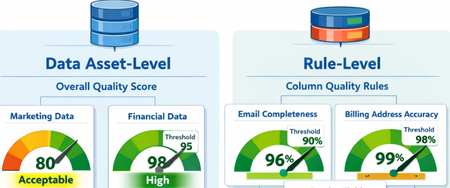
What Are Data Quality Thresholds? A data quality threshold defines the minimum acceptable score for a rule to pass. Instead of applying a single fixed standard across all data, organizations can now set expectations that align with business context and criticality. For example: An email column may require 99% completeness A product description column may only require 85% completeness Financial or regulatory data may require 100% accuracy With customizable thresholds, quality expectations become more meaningful and business-aligned. Why Does This Matter? Previously, using a single hardcoded threshold could lead to misleading quality scores. Critical data might appear “healthy” even when it didn’t meet business standards. With Data Quality Thresholds, you can: Define rule-level expectations Align quality scores with business risk Increase trust in DQ reporting Improve governance decision-making Data Asset-Level Quality Threshold Users can define data quality thresholds at the data asset level to measure how suitable a dataset is for specific business use cases. This allows organizations to quantify the overall health and fitness of a data asset before it is used in analytics, reporting, or data products. If the measured data quality score falls below the predefined threshold, the system can trigger notifications to the data asset owner or steward, prompting them to take corrective actions. It is important to note that not all data assets are equally critical. Therefore, thresholds should be context-driven and use-case specific. Example Scenario A marketing dataset used for campaign analysis may tolerate a lower quality threshold (e.g., 80%), since minor inconsistencies may not significantly impact insights. However, a financial reporting dataset used for regulatory filings may require a very high threshold (e.g., 98–100%), as even small errors can lead to compliance risks. Data Quality Rule-Level Threshold Thresholds can also be defined at the individual rule level, particularly for rules applied to specific columns. This provides more granular control and ensures that critical data elements are held to higher standards. Not all attributes have the same importance, so thresholds should reflect business criticality. Example Scenarios Email vs. Gender (Customer Contact Data) A completeness rule for a customer’s email address should have a higher threshold (e.g., 95–100%), since missing or invalid email addresses directly impact communication and engagement. In contrast, a gender attribute may have a lower threshold (e.g., 70–80%), as it is often less critical for most use cases. Billing Address vs. CRM Address A billing address is highly critical because it directly impacts: Invoice generation Tax calculations Timely delivery of invoices Therefore, the threshold for billing address quality should be very high (e.g., 98–100%). On the other hand, a CRM address used for general customer profiling may have a lower threshold, as occasional inaccuracies may not significantly affect business operations. The Impact By enabling flexible, context-aware scoring, Data Quality Thresholds help organizations move beyond generic quality checks and toward business-driven data quality management. Summary Data Quality Thresholds define the minimum acceptable score for data quality rules, allowing organizations to move beyond a one-size-fits-all approach and align quality expectations with business context and criticality. Instead of using fixed thresholds, organizations can set custom thresholds based on how important the data is. For example, financial data may require near-perfect accuracy, while less critical fields can tolerate lower thresholds. Thresholds can be applied at two levels: Data Asset Level: Measures the overall fitness of a dataset for a specific use case. Critical datasets (e.g., financial reporting) require higher thresholds than less critical ones (e.g., marketing analytics). Rule Level: Applies to individual columns or rules, ensuring that critical attributes (e.g., email, billing address) have stricter quality requirements than less important ones. This approach improves: Alignment with business risk and priorities Trust in data quality reporting Governance decision-making Focus on high-impact data issues Overall, data quality thresholds enable more meaningful, context-aware, and business-driven data quality management, helping organizations prioritize what matters most and build confidence in their data.
Optimizing OneDrive Retention Policies with Administrative Units and Adaptive Scopes
A special thank you note to Ashwini_Anand for contributing to the content of this blog. In today's digital landscape, efficient data retention management is a critical priority for organizations of all sizes. Organizations can optimize their OneDrive retention policies, ensuring efficient and compliant data management tailored to their unique user base and licensing arrangements. Scenario: Contoso Org encountered a distinct challenge - managing data retention for their diverse user base of 200,000 employees, which includes 80,000 users with F3 licenses and 120,000 users with E3 and E5 licenses. As per Microsoft licensing, F3 users are allocated only 2 GB of OneDrive storage, whereas E3 and E5 users are provided with a much larger allocation of 5 TB. This difference required creating separate retention policies for these users' groups. The challenge was further complicated by the fact that retention policies utilize the same storage for preserving deleted data. If a unified retention policy were applied to all users such as retaining data for 6 years before deletion - F3 users’ OneDrive storage could potentially fill up within a year or less (depending on usage patterns). This would leave F3 users unable to delete or save new files, severely disrupting productivity and data management. To address this, it is essential to create a separate retention policy for E3 and E5 users, ensuring that the policy applies only to these users and excludes F3 users. This blog will discuss the process of designing and implementing such a policy for the large user base based on separate licenses, ensuring efficient data management and uninterrupted productivity. Challenges with Retention Policy Configuration for large organizations 1. Adaptive Scope Adaptive scopes in Microsoft Purview allow you to dynamically target policies based on specific attributes or properties such as department, location, email address, custom Exchange attributes etc. Refer the link to get the list of supported attributes: Adaptive scopes | Microsoft Learn. Limitation: Although Adaptive scopes can filter by user properties, Contoso, being a large organization, had already utilized all 15 custom attributes for various purposes. Additionally, user attributes also couldn’t be used to segregate users based on licenses. This made it challenging to repurpose any attribute for our filter criteria to apply the retention policy to a specific set of users. Furthermore, refinable strings used in SharePoint do not work for OneDrive sites. 2. Static Scope Static scope refers to manually selected locations (e.g., specific users, mailboxes, or sites) where the policy is applied. The scope remains fixed and does not automatically adjust. Limitation: Static scope allows the inclusion or exclusion of mailboxes and sites but is limited to 100 sites and 1000 mailboxes, making it challenging to utilize for large organizations. Proposed Solution: Administrative Units with Adaptive Scope To address the above challenges, it required utilizing Administrative Units (Admin Units - is a container within an organization that can hold users, groups, or devices. It helps us to manage and organize users within an organization more efficiently, especially in large or complex environments) with Adaptive Scopes for creation of a retention policy targeting E3 and E5 licensed users. This approach allows organizations to selectively apply retention policies based on user licenses, enhancing both efficiency and governance. Prerequisites For Administrative unit - Microsoft Entra ID P1 license For Retention policy - Refer to the link: Microsoft 365 guidance for security & compliance - Service Descriptions | Microsoft Learn Configuration Steps Step 1: Create Administrative Unit: Navigate to Microsoft Entra Admin Center https://entra.microsoft.com/#home Click on ‘Identity’ and then click on ‘Show more’ Expand ‘Roles & admins’ Proceed to ‘Admin units’ -> Add. Figure 1: Create an Administrative unit and enter the name and description Define a name for the Administrative unit. Click on ‘Next: Assign roles’ No role assignment required, click on 'Next: Review + create’) Click on ‘Create’. To get more information about creating administrative unit, refer this link: Create or delete administrative units - Microsoft Entra ID | Microsoft Learn Step 2: Update Dynamic Membership: Select the Administrative Unit which is created in Step1. Navigate to ‘Properties’ Choose ‘Dynamic User’ for Membership type. Click on ‘Add a dynamic query’ for Dynamic user members. Click on ‘Edit' for Rule syntax In order to include E3 and E5 licensed users who are using OneDrive, you need to include SharePoint Online Service Plan 2 enabled users. Use the query below in the code snippet to define the dynamic membership. user.assignedPlans -any (assignedPlan.servicePlanId -eq "5dbe027f-2339-4123-9542-606e4d348a72" -and assignedPlan.capabilityStatus -eq "Enabled") 7. Click on 'Save' to update the Dynamic membership rules 8. Click on 'Save' to update the Administrative unit changes. 9. Open the Administrative Unit and click on the 'Users' tab to check if users have started to populate. Note: It may take some time to replicate all users, depending on the size of your organization. Please wait for minutes and then check again. Step 3: Create Adaptive Scope under Purview Portal: Access https://purview.microsoft.com Navigate to ‘Settings’ Expand ‘Roles & scopes’ and click on ‘Adaptive scopes’ Create a new adaptive scope, providing ‘Name’ and ‘Description’. Proceed to select the Administrative unit which was created earlier. (It takes time for the Admin/Administrative Unit to become visible. Please wait for some time if it does not appear immediately.) Click on ‘Add’ and ‘Next’ Select ‘Users’ and 'Next' Once the Admin unit is selected, we need to specify the criteria which allows to select users within the Admin unit (this is the second level of filtering available). However, in this case since we needed to select all users of the admin unit, hence the below criteria was used. Click 'Add attribute' and form the below query. Email addresses is not equal to $null Note: You can apply any other filter if you need to select a subset of users within the Admin Unit based on your business use case. Click on ‘Next’ Review and ‘Submit’ the adaptive scope. Step 4: Create Retention Policy using Adaptive Scope: Access to the portal https://purview.microsoft.com/datalifecyclemanagement/overview Navigate to ‘Policies’ and then go to ‘Retention Policies’. Create a ‘New Retention policy’, providing a ‘Name’ and ‘Description’. Click on "Next", there is no need to add Admin units here as its already defined in Adaptive scope. Figure 9: Select the 'Admin Units' as Full directory 6. Choose ‘Adaptive’ and click on ‘Next’. Click on ‘Add scopes’ and Select the previously created Adaptive scope. Under Location, select OneDrive. Figure 11: Select the Adaptive scope and location at this point. 8. Click on ‘Next’ to proceed and select the desired retention settings. 9. Click Next and Finish Outcome By implementing Admin Units with adaptive scopes, organizations can effectively overcome challenges associated with applying OneDrive retention policies for distinguished and large set of users. This approach facilitates the dynamic addition of required users, eliminating the need for custom attributes and manual user management. Users are dynamically added or removed from the policy based on license status, ensuring seamless compliance management. FAQ: Why is it important to differentiate retention policies based on user licensing tiers? It is important to differentiate retention policies based on user licensing tiers to ensure that each user group has policies tailored to their specific needs and constraints, avoiding issues such as storage limitations for users with lower-tier licenses like F3. How many Exchange custom attributes are typically available? There are typically 15 Exchange custom attributes available, which can limit scalability when dealing with a large user base. What challenge does Adaptive Scoping face when including a large number of OneDrive sites? Adaptive Scoping faces the challenge of including a large number of OneDrive sites due to limitations in the number of custom attributes allowed. While these custom attributes help in categorizing and managing OneDrive sites, the finite number of attributes available can restrict scalability and flexibility. Why are refinable strings a limitation for Adaptive Scoping in OneDrive? Refinable strings are a limitation for Adaptive Scoping in OneDrive because their usage is restricted to SharePoint only. What are the limitations of Static Scoping for OneDrive sites? Static Scoping for OneDrive sites is limited by the strict limit of including or excluding only 100 sites, making it usage limited for larger environments. Do we need any licenses to create an administrative unit with dynamic membership? Yes, a Microsoft Entra ID P1 license is required for all members of the group.Select the 'Adaptive' retention policy typeFigure 10: Select the 'Adaptive' retention policy typeHow to deploy Microsoft Purview DSPM for AI to secure your AI apps
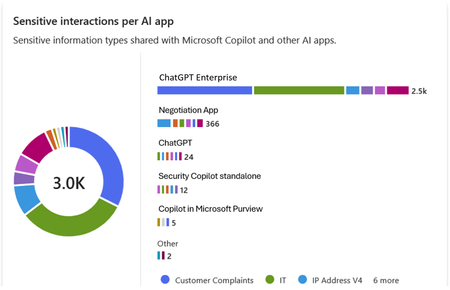
Microsoft Purview Data Security Posture Management (DSPM for AI) is designed to enhance data security for the following AI applications: Microsoft Copilot experiences, including Microsoft 365 Copilot. Enterprise AI apps, including ChatGPT enterprise integration. Other AI apps, including all other AI applications like ChatGPT consumer, Microsoft Copilot, DeepSeek, and Google Gemini, accessed through the browser. In this blog, we will dive into the different policies and reporting we have to discover, protect and govern these three types of AI applications. Prerequisites Please refer to the prerequisites for DSPM for AI in the Microsoft Learn Docs. Login to the Purview portal To begin, start by logging into Microsoft 365 Purview portal with your admin credentials: In the Microsoft Purview portal, go to the Home page. Find DSPM for AI under solutions. 1. Securing Microsoft 365 Copilot Be sure to check out our blog on How to use the DSPM for AI data assessment report to help you address oversharing concerns when you deploy Microsoft 365 Copilot. Discover potential data security risks in Microsoft 365 Copilot interactions In the Overview tab of DSPM for AI, start with the tasks in “Get Started” and Activate Purview Audit if you have not yet activated it in your tenant to get insights into user interactions with Microsoft Copilot experiences In the Recommendations tab, review the recommendations that are under “Not Started”. Create the following data discovery policy to discover sensitive information in AI interactions by clicking into it. Detect risky interactions in AI apps - This public preview Purview Insider Risk Management policy helps calculate user risk by detecting risky prompts and responses in Microsoft 365 Copilot experiences. Click here to learn more about Risky AI usage policy. With the policies to discover sensitive information in Microsoft Copilot experiences in place, head back to the Reports tab of DSPM for AI to discover any AI interactions that may be risky, with the option to filter to Microsoft Copilot Experiences, and review the following for Microsoft Copilot experiences: Total interactions over time (Microsoft Copilot) Sensitive interactions per AI app Top unethical AI interactions Top sensitivity labels references in Microsoft 365 Copilot Insider Risk severity Insider risk severity per AI app Potential risky AI usage Protect sensitive data in Microsoft 365 Copilot interactions From the Reports tab, click on “View details” for each of the report graphs to view detailed activities in the Activity Explorer. Using available filters, filter the results to view activities from Microsoft Copilot experiences based on different Activity type, AI app category and App type, Scope, which support administrative units for DSPM for AI, and more. Then drill down to each activity to view details including the capability to view prompts and response with the right permissions. To protect the sensitive data in interactions for Microsoft 365 Copilot, review the Not Started policies in the Recommendations tab and create these policies: Information Protection Policy for Sensitivity Labels - This option creates default sensitivity labels and sensitivity label policies. If you've already configured sensitivity labels and their policies, this configuration is skipped. Protect sensitive data referenced in Microsoft 365 Copilot - This guides you through the process of creating a Purview Data Loss Prevention (DLP) policy to restrict the processing of content with specific sensitivity labels in Copilot interactions. Click here to learn more about Data Loss Prevention for Microsoft 365 Copilot. Protect sensitive data referenced in Copilot responses - Sensitivity labels help protect files by controlling user access to data. Microsoft 365 Copilot honors sensitivity labels on files and only shows users files they already have access to in prompts and responses. Use Data assessments to identify potential oversharing risks, including unlabeled files. Stay tuned for an upcoming blog post on using DSPM for AI data assessments! Use Copilot to improve your data security posture - Data Security Posture Management combines deep insights with Security Copilot capabilities to help you identify and address security risks in your org. Once you have created policies from the Recommendations tab, you can go to the Policies tab to review and manage all the policies you have created across your organization to discover and safeguard AI activity in one centralized place, as well as edit the policies or investigate alerts associated with those policies in solution. Note that additional policies not from the Recommendations tab will also appear in the Policies tab when DSPM for AI identifies them as policies to Secure and govern all AI apps. Govern the prompts and responses in Microsoft 365 Copilot interactions Understand and comply with AI regulations by selecting “Guided assistance to AI regulations” in the Recommendations tab and walking through the “Actions to take”. From the Recommendations tab, create a Control unethical behavior in AI Purview Communications Compliance policy to detect sensitive information in prompts and responses and address potentially unethical behavior in Microsoft Copilot experiences and ChatGPT for Enterprise. This policy covers all users and groups in your organization. To retain and/or delete Microsoft 365 Copilot prompts and responses, setup a Data Lifecycle policy by navigating to Microsoft Purview Data Lifecycle Management and find Retention Policies under the Policies header. You can also preserve, collect, analyze, review, and export Microsoft 365 Copilot interactions by creating an eDiscovery case. 2. Securing Enterprise AI apps Please refer to this amazing blog on Unlocking the Power of Microsoft Purview for ChatGPT Enterprise | Microsoft Community Hub for detailed information on how to integrate with ChatGPT for enterprise, the Purview solutions it currently supports through Purview Communication Compliance, Insider Risk Management, eDiscovery, and Data Lifecycle Management. Learn more about the feature also through our public documentation. 3. Securing other AI Microsoft Purview DSPM for AI currently supports the following list of AI sites. Be sure to also check out our blog on the new Microsoft Purview data security controls for the browser & network to secure other AI apps. Discover potential data security risks in prompts sent to other AI apps In the Overview tab of DSPM for AI, go through these three steps in “Get Started” to discover potential data security risk in other AI interactions: Install Microsoft Purview browser extension For Windows users: The Purview extension is not necessary for the enforcement of data loss prevention on the Edge browser but required for Chrome to detect sensitive info pasted or uploaded to AI sites. The extension is also required to detect browsing to other AI sites through an Insider Risk Management policy for both Edge and Chrome browser. Therefore, Purview browser extension is required for both Edge and Chrome in Windows. For MacOS users: The Purview extension is not necessary for the enforcement of data loss prevention on macOS devices, and currently, browsing to other AI sites through Purview Insider Risk Management is not supported on MacOS, therefore, no Purview browser extension is required for MacOS. Extend your insights for data discovery – this one-click collection policy will setup three separate Purview detection policies for other AI apps: Detect sensitive info shared in AI prompts in Edge – a Purview collection policy that detects prompts sent to ChatGPT consumer, Micrsoft Copilot, DeepSeek, and Google Gemini in Microsoft Edge and discovers sensitive information shared in prompt contents. This policy covers all users and groups in your organization in audit mode only. Detect when users visit AI sites – a Purview Insider Risk Management policy that detects when users use a browser to visit AI sites. Detect sensitive info pasted or uploaded to AI sites – a Purview Endpoint Data loss prevention (eDLP) policy that discovers sensitive content pasted or uploaded in Microsoft Edge, Chrome, and Firefox to AI sites. This policy covers all users and groups in your org in audit mode only. With the policies to discover sensitive information in other AI apps in place, head back to the Reports tab of DSPM for AI to discover any AI interactions that may be risky, with the option to filter by Other AI Apps, and review the following for other AI apps: Total interactions over time (other AI apps) Total visits (other AI apps) Sensitive interactions per AI app Insider Risk severity Insider risk severity per AI app Protect sensitive info shared with other AI apps From the Reports tab, click on “View details” for each of the report graphs to view detailed activities in the Activity Explorer. Using available filters, filter the results to view activities based on different Activity type, AI app category and App type, Scope, which support administrative units for DSPM for AI, and more. To protect the sensitive data in interactions for other AI apps, review the Not Started policies in the Recommendations tab and create these policies: Fortify your data security – This will create three policies to manage your data security risks with other AI apps: 1) Block elevated risk users from pasting or uploading sensitive info on AI sites – this will create a Microsoft Purview endpoint data loss prevention (eDLP) policy that uses adaptive protection to give a warn-with-override to elevated risk users attempting to paste or upload sensitive information to other AI apps in Edge, Chrome, and Firefox. This policy covers all users and groups in your org in test mode. Learn more about adaptive protection in Data loss prevention. 2) Block elevated risk users from submitting prompts to AI apps in Microsoft Edge – this will create a Microsoft Purview browser data loss prevention (DLP) policy, and using adaptive protection, this policy will block elevated, moderate, and minor risk users attempting to put information in other AI apps using Microsoft Edge. This integration is built-in to Microsoft Edge. Learn more about adaptive protection in Data loss prevention. 3) Block sensitive info from being sent to AI apps in Microsoft Edge - this will create a Microsoft Purview browser data loss prevention (DLP) policy to detect inline for a selection of common sensitive information types and blocks prompts being sent to AI apps while using Microsoft Edge. This integration is built-in to Microsoft Edge. Once you have created policies from the Recommendations tab, you can go to the Policies tab to review and manage all the policies you have created across your organization to discover and safeguard AI activity in one centralized place, as well as edit the policies or investigate alerts associated with those policies in solution. Note that additional policies not from the Recommendations tab will also appear in the Policies tab when DSPM for AI identifies them as policies to Secure and govern all AI apps. Conclusion Microsoft Purview DSPM for AI can help you discover, protect, and govern the interactions from AI applications in Microsoft Copilot experiences, Enterprise AI apps, and other AI apps. We recommend you review the Reports in DSPM for AI routinely to discover any new interactions that may be of concern, and to create policies to secure and govern those interactions as necessary. We also recommend you utilize the Activity Explorer in DSPM for AI to review different Activity explorer events while users interacting with AI, including the capability to view prompts and response with the right permissions. We will continue to update this blog with new features that become available in DSPM for AI, so be sure to bookmark this page! Follow-up Reading Check out this blog on the details of each recommended policies in DSPM for AI: Microsoft Purview – Data Security Posture Management (DSPM) for AI | Microsoft Community Hub Address oversharing concerns with Microsoft 365 blueprint - aka.ms/Copilot/Oversharing Microsoft Purview data security and compliance protections for Microsoft 365 Copilot and other generative AI apps | Microsoft Learn Considerations for deploying Microsoft Purview AI Hub and data security and compliance protections for Microsoft 365 Copilot and Microsoft Copilot | Microsoft Learn Commonly used properties in Copilot audit logs - Audit logs for Copilot and AI activities | Microsoft Learn Supported AI sites by Microsoft Purview for data security and compliance protections | Microsoft Learn Where Copilot usage data is stored and how you can audit it - Microsoft 365 Copilot data protection and auditing architecture | Microsoft Learn Downloadable whitepaper: Data Security for AI Adoption | Microsoft Public roadmap for DSPM for AI - Microsoft 365 Roadmap | Microsoft 365
Unlocking the Power of Microsoft Purview for ChatGPT Enterprise
In today's rapidly evolving technology landscape, data security and compliance are key. Microsoft Purview offers a robust solution for managing and securing interactions with AI based solutions. This integration not only enhances data governance but also ensures that sensitive information is handled with the appropriate controls. Let's dive into the benefits of this integration and outline the steps to integrate with ChatGPT Enterprise in specific. The integration works for Entra connected users on the ChatGPT workspace, if you have needs that goes beyond this, please tell us why and how it impacts you. Important update 1: Effective May 1, these capabilities require you to enable pay-as-you-go billing in your organization. Important update 2: From May 19, you are required to create a collection policy to ingest ChatGPT Enterprise information. In DSPM for AI you will find this one click process. Benefits of Integrating ChatGPT Enterprise with Microsoft Purview Enhanced Data Security: By integrating ChatGPT Enterprise with Microsoft Purview, organizations can ensure that interactions are securely captured and stored within their Microsoft 365 tenant. This includes user text prompts and AI app text responses, providing a comprehensive record of communications. Compliance and Governance: Microsoft Purview offers a range of compliance solutions, including Insider Risk Management, eDiscovery, Communication Compliance, and Data Lifecycle & Records Management. These tools help organizations meet regulatory requirements and manage data effectively. Customizable Detection: The integration allows for the detection of built in can custom classifiers for sensitive information, which can be customized to meet the specific needs of the organization. To help ensures that sensitive data is identified and protected. The audit data streams into Advanced Hunting and the Unified Audit events that can generate visualisations of trends and other insights. Seamless Integration: The ChatGPT Enterprise integration uses the Purview API to push data into Compliant Storage, ensuring that external data sources cannot access and push data directly. This provides an additional layer of security and control. Step-by-Step Guide to Setting Up the Integration 1. Get Object ID for the Purview account in Your Tenant: Go to portal.azure.com and search for "Microsoft Purview" in the search bar. Click on "Microsoft Purview accounts" from the search results. Select the Purview account you are using and copy the account name. Go to portal.azure.com and search for “Enterprise" in the search bar. Click on Enterprise applications. Remove the filter for Enterprise Applications Select All applications under manage, search for the name and copy the Object ID. 2. Assign Graph API Roles to Your Managed Identity Application: Assign Purview API roles to your managed identity application by connecting to MS Graph utilizing Cloud Shell in the Azure portal. Open a PowerShell window in portal.azure.com and run the command Connect-MgGraph. Authenticate and sign in to your account. Run the following cmdlet to get the ServicePrincipal ID for your organization for the Purview API app. (Get-MgServicePrincipal -Filter "AppId eq '9ec59623-ce40-4dc8-a635-ed0275b5d58a'").id This command provides the permission of Purview.ProcessConversationMessages.All to the Microsoft Purview Account allowing classification processing. Update the ObjectId to the one retrieved in step 1 for command and body parameter. Update the ResourceId to the ServicePrincipal ID retrieved in the last step. $bodyParam= @{ "PrincipalId"= "{ObjectID}" "ResourceId" = "{ResourceId}" "AppRoleId" = "{a4543e1f-6e5d-4ec9-a54a-f3b8c156163f}" } New-MgServicePrincipalAppRoleAssignment -ServicePrincipalId '{ObjectId}' -BodyParameter $bodyParam It will look something like this from the command line We also need to add the permission for the application to read the user accounts to correctly map the ChatGPT Enterprise user with Entra accounts. First run the following command to get the ServicePrincipal ID for your organization for the GRAPH app. (Get-MgServicePrincipal -Filter "AppId eq '00000003-0000-0000-c000-000000000000'").id The following step adds the permission User.Read.All to the Purview application. Update the ObjectId with the one retrieved in step 1. Update the ResourceId with the ServicePrincipal ID retrieved in the last step. $bodyParam= @{ "PrincipalId"= "{ObjectID}" "ResourceId" = "{ResourceId}" "AppRoleId" = "{df021288-bdef-4463-88db-98f22de89214}" } New-MgServicePrincipalAppRoleAssignment -ServicePrincipalId '{ObjectId}' -BodyParameter $bodyParam 3. Store the ChatGPT Enterprise API Key in Key Vault The steps for setting up Key vault integration for Data Map can be found here Create and manage credentials for scans in the Microsoft Purview Data Map | Microsoft Learn When setup you will see something like this in Key vault. 4. Integrate ChatGPT Enterprise Workspace to Purview: Create a new data source in Purview Data Map that connects to the ChatGPT Enterprise workspace. Go to purview.microsoft.com and select Data Map, search if you do not see it on the first screen. Select Data sources Select Register Search for ChatGPT Enterprise and select Provide your ChatGPT Enterprise ID Create the first scan by selecting Table view and filter on ChatGPT Add your key vault credentials to the scan Test the connection and once complete click continue When you click continue the following screen will show up, if everything is ok click Save and run. Validate the progress by clicking on the name, completion of the first full scan may take an extended period of time. Depending on size it may take more than 24h to complete. If you click on the scan name you expand to all the runs for that scan. When the scan completes you can start to make use of the DSPM for AI experience to review interactions with ChatGPT Enterprise. The mapping to the users is based on the ChatGPT Enterprise connection to Entra, with prompts and responses stored in the user's mailbox. 5. Review and Monitor Data: Please see this article for required permissions and guidance around Microsoft Purview Data Security Posture Management (DSPM) for AI, Microsoft Purview data security and compliance protections for Microsoft 365 Copilot and other generative AI apps | Microsoft Learn Use Purview DSPM for AI analytics and Activity Explorer to review interactions and classifications. You can expand on prompts and responses in ChatGPT Enterprise 6. Microsoft Purview Communication Compliance Communication Compliance (here after CC) is a feature of Microsoft Purview that allows you to monitor and detect inappropriate or risky interactions with ChatGPT Enterprise. You can monitor and detect requests and responses that are inappropriate based on ML models, regular Sensitive Information Types, and other classifiers in Purview. This can help you identify Jailbreak and Prompt injection attacks and flag them to IRM and for case management. Detailed steps to configure CC policies and supported configurations can be found here. 7. Microsoft Purview Insider Risk Management We believe that Microsoft Purview Insider Risk Management (here after IRM) can serve a key role in protecting your AI workloads long term. With its adaptive protection capabilities, IRM dynamically adjusts user access based on evolving risk levels. In the event of heightened risk, IRM can enforce Data Loss Prevention (DLP) policies on sensitive content, apply tailored Entra Conditional Access policies, and initiate other necessary actions to effectively mitigate potential risks. This strategic approach will help you to apply more stringent policies where it matters avoiding a boil the ocean approach to allow your team to get started using AI. To get started use the signals that are available to you including CC signals to raise IRM tickets and enforce adaptive protection. You should create your own custom IRM policy for this. Do include Defender signals as well. Based on elevated risk you may select to block users from accessing certain assets such as ChatGPT Enterprise. Please see this article for more detail Block access for users with elevated insider risk - Microsoft Entra ID | Microsoft Learn. 8. eDiscovery eDiscovery of AI interactions is crucial for legal compliance, transparency, accountability, risk management, and data privacy protection. Many industries must preserve and discover electronic communications and interactions to meet regulatory requirements. Including AI interactions in eDiscovery ensures organizations comply with these obligations and preserves relevant evidence for litigation. This process also helps maintain trust by enabling the review of AI decisions and actions, demonstrating due diligence to regulators. Microsoft Purview eDiscovery solutions | Microsoft Learn 9. Data Lifecycle Management Microsoft Purview offers robust solutions to manage AI data from creation to deletion, including classification, retention, and secure disposal. This ensures that AI interactions are preserved and retrievable for audits, litigation, and compliance purposes. Please see this article for more information Automatically retain or delete content by using retention policies | Microsoft Learn. Closing By following these steps, organizations can leverage the full potential of Microsoft Purview to enhance the security and compliance of their ChatGPT Enterprise interactions. This integration not only provides peace of mind but also empowers organizations to manage their data more effectively. We are still in preview some of the features listed are not fully integrated, please reach out to us if you have any questions or if you have additional requirements.Microsoft Purview Data Governance - Authoring Custom Data Quality rules using expression languages
The cost of poor-quality data runs into millions of dollars in direct losses. When indirect costs—such as missed opportunities—are included, the total impact is many times higher. Poor data quality also creates significant societal costs. It can lead customers to pay higher prices for goods and services and force citizens to bear higher taxes due to inefficiencies and errors. In critical domains, the consequences can be severe. Defective or inaccurate data can result in injury or loss of life, for example due to medication errors or incorrect medical procedures, especially as healthcare increasingly relies on data- and AI-driven decision-making. Students may be unfairly denied admission to universities because of errors in entrance exam scoring. Consumers may purchase unsafe or harmful food products if nutritional labels are inaccurate or misleading. Research and industry measurements show that 20–35 percent of an organization’s operating revenue is often wasted on recovering from process failures, data defects, information scrap, and rework caused by poor data quality (Larry P. English, Information Quality Applied). Data Quality Rules To maintain high-quality data, organizations must continuously measure and monitor data quality and understand the negative impact of poor-quality data on their specific use cases. Data quality rules play a critical role in objectively measuring, enforcing, and quantifying data quality, enabling organizations to improve trust, reduce risk, and maximize the value of their data assets. Data Quality (DQ) rules define how data should be structured, related, constrained, and validated so it can be trusted for operational, analytical, and AI use cases. Data quality rules are essential guidelines that organizations establish to ensure the accuracy, consistency, and completeness of their data. These rules fall into four major categories: Business Entity rules, Business Attribute rules, Data Dependency rules, and Data Validity rules (Ref: Informit.com/articles). Business Entity Rules These rules ensure that core business objects (such as Customer, Order, Account, or Product) are well-defined and correctly related. Business entity rules prevent duplicate records, broken relationships, and incomplete business processes. Business Entity Rules Definition Example Uniqueness Every entity instance must be uniquely identifiable. Each customer must have a unique Customer ID that is never NULL. Duplicate customer records indicate poor data quality. Cardinality Defines how many instances of one entity can relate to another. One customer can place many orders (one-to-many), but an order belongs to exactly one customer. Optionality Defines whether a relationship is mandatory or optional. An order must be linked to a customer (mandatory), but a customer may exist without having placed any orders (optional). Business Attribute Rules These rules focus on individual data elements (columns/fields) within business entities. Attribute rules ensure consistency, interpretability, and prevent invalid or meaningless values. Business Attribute Rules Definition Example Data Inheritance Attributes defined in a supertype must be consistent across subtypes. An Account Number remains the same whether the account is Checking or Savings. Data Domains Attribute values must conform to allowed formats or ranges. · State Code must be one of the 50 U.S. state abbreviations · Age must be between 0 and 120 · Date must follow CCYY/MM/DD format Data Dependency Rules These rules define logical and conditional relationships between entities and attributes. Data dependency rules enforce business logic and prevent contradictory or illogical data states. Data Dependency Rules Definition Example Entity Relationship Dependency The existence of one relationship depends on another condition. Orders cannot be placed for customers with a “Delinquent” status. Attribute Dependency The value of one attribute depends on others. · If Loan Status = “Funded,” then Loan Amount > 0 and Funding Date is required · Pay Amount = Hours Worked × Hourly Rate · If Monthly Salary > 0, then Commission Rate must be NULL Data Validity Rules These rules ensure that actual data values are complete, correct, accurate, precise, unique, and consistent. Validity rules ensure data is trustworthy for reporting, regulatory compliance, and AI/ML models. Data Validity Rules Definition Example Completeness Required records, relationships, attributes, and values must exist. No NULLs in mandatory fields like Customer ID or Order Date. Correctness & Accuracy Values must reflect real-world truth and business rules. A customer’s credit limit must align with approved financial records. Precision Data must be stored with the required level of detail. Interest rates stored to four decimal places if required for calculations. Uniqueness No duplicate records, keys, definitions, or overloaded columns. A “Customer Type Code” column should not mix customer types and shipping methods. Consistency Duplicate or redundant data must match everywhere it appears. Customer address stored in multiple systems must be identical. Compliance PII and sensitive data Check and validate personal information like credit card, passport number, national id, bank account, etc. System Rules Microsoft Purview Data Quality provides both system (out-of-the-box) rules and custom rules, along with an AI-enabled data quality rule recommendation feature. Together, these capabilities help organizations effectively measure, monitor, and improve data quality by applying the right set of data quality rules. System (out-of-the-box) rules cover the majority of business attribute and data validity scenarios. List of the system rules are illustrated below (see the screenshot below). Custom Rules Custom rules allow you to define validations that evaluate one or more values within a row, enabling complex, context-aware data quality checks tailored to specific business requirements. Custom rules support all four major categories of data quality rules: Business Entity rules, Business Attribute rules, Data Dependency rules, and Data Validity rules. You can use regular expression language, Azure Data Factory expression, and SQL expression language to create custom rules. Purview Data Quality custom rule has three parts: Row expression: This Boolean expression applies to each row that the filter expression approves. If this expression returns true, the row passes. If it returns false, the row fails. Filter expression: This optional condition narrows down the dataset on which the row condition is evaluated. You activate it by selecting the Use filter expression checkbox. This expression returns a Boolean value. The filter expression applies to a row and if it returns true, then that row is considered for the rule. If the filter expression returns false for that row, then it means that row is ignored for the purposes of this rule. The default behavior of the filter expression is to pass all rows, so if you don't specify a filter expression, all rows are considered. Null expression: Checks how NULL values should be handled. This expression returns to a Boolean that handles cases where data is missing. If the expression returns true, the row expression isn't applied. Each part of the rule works similarly to existing Microsoft Purview Data Quality conditions. A rule only passes if the row expression evaluates to TRUE for the dataset that matches the filter expression and handles missing values as specified in the null expression. Examples: Ensure that the location of the salesperson is correct. Azure data factory expression language is used to author this rule. 2. Ensure "fare Amount" is positive and "trip Distance" is valid. SQL expression language is used to author this rule. 3. For each trip, check if the fare is above the average for its payment type. SQL expression language is used to author this rule. Together, above listed four categories of data quality rules: Prevent errors at the source Enforce business logic Improve trust in analytics and AI Reduce remediation costs downstream In short, high-quality data is not accidental—it is enforced through well-defined data quality rules across entities, attributes, relationships, and values. References Create Data Quality Rules in Unified Catalog | Microsoft Learn Expression builder in mapping data flows - Azure Data Factory & Azure Synapse | Microsoft Learn Expression Functions in the Mapping Data Flow - Azure Data Factory & Azure Synapse | Microsoft Learn http://www.informit.com/articles/article.aspx?p=399325&seqNum=3 Information Quality Applied, Larry P. EnglishSecure and govern AI apps and agents with Microsoft Purview
The Microsoft Purview family is here to help you secure and govern data across third party IaaS and Saas, multi-platform data environment, while helping you meet compliance requirements you may be subject to. Purview brings simplicity with a comprehensive set of solutions built on a platform of shared capabilities, that helps keep your most important asset, data, safe. With the introduction of AI technology, Purview also expanded its data coverage to include discovering, protecting, and governing the interactions of AI apps and agents, such as Microsoft Copilots like Microsoft 365 Copilot and Security Copilot, Enterprise built AI apps like Chat GPT enterprise, and other consumer AI apps like DeepSeek, accessed through the browser. To help you view, investigate interactions with all those AI apps, and to create and manage policies to secure and govern them in one centralized place, we have launched Purview Data Security Posture Management (DSPM) for AI. You can learn more about DSPM for AI here with short video walkthroughs: Learn how Microsoft Purview Data Security Posture Management (DSPM) for AI provides data security and compliance protections for Copilots and other generative AI apps | Microsoft Learn Purview capabilities for AI apps and agents To understand our current set of capabilities within Purview to discover, protect, and govern various AI apps and agents, please refer to our Learn doc here: Microsoft Purview data security and compliance protections for Microsoft 365 Copilot and other generative AI apps | Microsoft Learn Here is a quick reference guide for the capabilities available today: Note that currently, DLP for Copilot and adhering to sensitivity label are currently designed to protect content in Microsoft 365. Thus, Security Copilot and Copilot in Fabric, along with Copilot studio custom agents that do not use Microsoft 365 as a content source, do not have these features available. Please see list of AI sites supported by Microsoft Purview DSPM for AI here Conclusion Microsoft Purview can help you discover, protect, and govern the prompts and responses from AI applications in Microsoft Copilot experiences, Enterprise AI apps, and other AI apps through its data security and data compliance solutions, while allowing you to view, investigate, and manage interactions in one centralized place in DSPM for AI. Follow up reading Check out the deployment guides for DSPM for AI How to deploy DSPM for AI - https://aka.ms/DSPMforAI/deploy How to use DSPM for AI data risk assessment to address oversharing - https://aka.ms/dspmforai/oversharing Address oversharing concerns with Microsoft 365 blueprint - aka.ms/Copilot/Oversharing Explore the Purview SDK Microsoft Purview SDK Public Preview | Microsoft Community Hub (blog) Microsoft Purview documentation - purview-sdk | Microsoft Learn Build secure and compliant AI applications with Microsoft Purview (video) References for DSPM for AI Microsoft Purview data security and compliance protections for Microsoft 365 Copilot and other generative AI apps | Microsoft Learn Considerations for deploying Microsoft Purview AI Hub and data security and compliance protections for Microsoft 365 Copilot and Microsoft Copilot | Microsoft Learn Block Users From Sharing Sensitive Information to Unmanaged AI Apps Via Edge on Managed Devices (preview) | Microsoft Learn as part of Scenario 7 of Create and deploy a data loss prevention policy | Microsoft Learn Commonly used properties in Copilot audit logs - Audit logs for Copilot and AI activities | Microsoft Learn Supported AI sites by Microsoft Purview for data security and compliance protections | Microsoft Learn Where Copilot usage data is stored and how you can audit it - Microsoft 365 Copilot data protection and auditing architecture | Microsoft Learn Downloadable whitepaper: Data Security for AI Adoption | Microsoft Explore the roadmap for DSPM for AI Public roadmap for DSPM for AI - Microsoft 365 Roadmap | Microsoft 365PMPurIntroducing Microsoft Security Store
Security is being reengineered for the AI era—moving beyond static, rulebound controls and after-the-fact response toward platform-led, machine-speed defense. We recognize that defending against modern threats requires the full strength of an ecosystem, combining our unique expertise and shared threat intelligence. But with so many options out there, it’s tough for security professionals to cut through the noise, and even tougher to navigate long procurement cycles and stitch together tools and data before seeing meaningful improvements. That’s why we built Microsoft Security Store - a storefront designed for security professionals to discover, buy, and deploy security SaaS solutions and AI agents from our ecosystem partners such as Darktrace, Illumio, and BlueVoyant. Security SaaS solutions and AI agents on Security Store integrate with Microsoft Security products, including Sentinel platform, to enhance end-to-end protection. These integrated solutions and agents collaborate intelligently, sharing insights and leveraging AI to enhance critical security tasks like triage, threat hunting, and access management. In Security Store, you can: Buy with confidence – Explore solutions and agents that are validated to integrate with Microsoft Security products, so you know they’ll work in your environment. Listings are organized to make it easy for security professionals to find what’s relevant to their needs. For example, you can filter solutions based on how they integrate with your existing Microsoft Security products. You can also browse listings based on their NIST Cybersecurity Framework functions, covering everything from network security to compliance automation — helping you quickly identify which solutions strengthen the areas that matter most to your security posture. Simplify purchasing – Buy solutions and agents with your existing Microsoft billing account without any additional payment setup. For Azure benefit-eligible offers, eligible purchases contribute to your cloud consumption commitments. You can also purchase negotiated deals through private offers. Accelerate time to value – Deploy agents and their dependencies in just a few steps and start getting value from AI in minutes. Partners offer ready-to-use AI agents that can triage alerts at scale, analyze and retrieve investigation insights in real time, and surface posture and detection gaps with actionable recommendations. A rich ecosystem of solutions and AI agents to elevate security posture In Security Store, you’ll find solutions covering every corner of cybersecurity—threat protection, data security and governance, identity and device management, and more. To give you a flavor of what is available, here are some of the exciting solutions on the store: Darktrace’s ActiveAI Security SaaS solution integrates with Microsoft Security to extend self-learning AI across a customer's entire digital estate, helping detect anomalies and stop novel attacks before they spread. The Darktrace Email Analysis Agent helps SOC teams triage and threat hunt suspicious emails by automating detection of risky attachments, links, and user behaviors using Darktrace Self-Learning AI, integrated with Microsoft Defender and Security Copilot. This unified approach highlights anomalous properties and indicators of compromise, enabling proactive threat hunting and faster, more accurate response. Illumio for Microsoft Sentinel combines Illumio Insights with Microsoft Sentinel data lake and Security Copilot to enhance detection and response to cyber threats. It fuses data from Illumio and all the other sources feeding into Sentinel to deliver a unified view of threats across millions of workloads. AI-driven breach containment from Illumio gives SOC analysts, incident responders, and threat hunters unified visibility into lateral traffic threats and attack paths across hybrid and multi-cloud environments, to reduce alert fatigue, prioritize threat investigation, and instantly isolate workloads. Netskope’s Security Service Edge (SSE) platform integrates with Microsoft M365, Defender, Sentinel, Entra and Purview for identity-driven, label-aware protection across cloud, web, and private apps. Netskope's inline controls (SWG, CASB, ZTNA) and advanced DLP, with Entra signals and Conditional Access, provide real-time, context-rich policies based on user, device, and risk. Telemetry and incidents flow into Defender and Sentinel for automated enrichment and response, ensuring unified visibility, faster investigations, and consistent Zero Trust protection for cloud, data, and AI everywhere. PERFORMANTA Email Analysis Agent automates deep investigations into email threats, analyzing metadata (headers, indicators, attachments) against threat intelligence to expose phishing attempts. Complementing this, the IAM Supervisor Agent triages identity risks by scrutinizing user activity for signs of credential theft, privilege misuse, or unusual behavior. These agents deliver unified, evidence-backed reports directly to you, providing instant clarity and slashing incident response time. Tanium Autonomous Endpoint Management (AEM) pairs realtime endpoint visibility with AI-driven automation to keep IT environments healthy and secure at scale. Tanium is integrated with the Microsoft Security suite—including Microsoft Sentinel, Defender for Endpoint, Entra ID, Intune, and Security Copilot. Tanium streams current state telemetry into Microsoft’s security and AI platforms and lets analysts pivot from investigation to remediation without tool switching. Tanium even executes remediation actions from the Sentinel console. The Tanium Security Triage Agent accelerates alert triage, enabling security teams to make swift, informed decisions using Tanium Threat Response alerts and real-time endpoint data. Walkthrough of Microsoft Security Store Now that you’ve seen the types of solutions available in Security Store, let’s walk through how to find the right one for your organization. You can get started by going to the Microsoft Security Store portal. From there, you can search and browse solutions that integrate with Microsoft Security products, including a dedicated section for AI agents—all in one place. If you are using Microsoft Security Copilot, you can also open the store from within Security Copilot to find AI agents - read more here. Solutions are grouped by how they align with industry frameworks like NIST CSF 2.0, making it easier to see which areas of security each one supports. You can also filter by integration type—e.g., Defender, Sentinel, Entra, or Purview—and by compliance certifications to narrow results to what fits your environment. To explore a solution, click into its detail page to view descriptions, screenshots, integration details, and pricing. For AI agents, you’ll also see the tasks they perform, the inputs they require, and the outputs they produce —so you know what to expect before you deploy. Every listing goes through a review process that includes partner verification, security scans on code packages stored in a secure registry to protect against malware, and validation that integrations with Microsoft Security products work as intended. Customers with the right permissions can purchase agents and SaaS solutions directly through Security Store. The process is simple: choose a partner solution or AI agent and complete the purchase in just a few clicks using your existing Microsoft billing account—no new payment setup required. Qualifying SaaS purchases also count toward your Microsoft Azure Consumption Commitment (MACC), helping accelerate budget approvals while adding the security capabilities your organization needs. Security and IT admins can deploy solutions directly from Security Store in just a few steps through a guided experience. The deployment process automatically provisions the resources each solution needs—such as Security Copilot agents and Microsoft Sentinel data lake notebook jobs—so you don’t have to do so manually. Agents are deployed into Security Copilot, which is built with security in mind, providing controls like granular agent permissions and audit trails, giving admins visibility and governance. Once deployment is complete, your agent is ready to configure and use so you can start applying AI to expand detection coverage, respond faster, and improve operational efficiency. Security and IT admins can view and manage all purchased solutions from the “My Solutions” page and easily navigate to Microsoft Cost Management tools to track spending and manage subscriptions. Partners: grow your business with Microsoft For security partners, Security Store opens a powerful new channel to reach customers, monetize differentiated solutions, and grow with Microsoft. We will showcase select solutions across relevant Microsoft Security experiences, starting with Security Copilot, so your offerings appear in the right context for the right audience. You can monetize both SaaS solutions and AI agents through built-in commerce capabilities, while tapping into Microsoft’s go-to-market incentives. For agent builders, it’s even simpler—we handle the entire commerce lifecycle, including billing and entitlement, so you don’t have to build any infrastructure. You focus on embedding your security expertise into the agent, and we take care of the rest to deliver a seamless purchase experience for customers. Security Store is built on top of Microsoft Marketplace, which means partners publish their solution or agent through the Microsoft Partner Center - the central hub for managing all marketplace offers. From there, create or update your offer with details about how your solution integrates with Microsoft Security so customers can easily discover it in Security Store. Next, upload your deployable package to the Security Store registry, which is encrypted for protection. Then define your license model, terms, and pricing so customers know exactly what to expect. Before your offer goes live, it goes through certification checks that include malware and virus scans, schema validation, and solution validation. These steps help give customers confidence that your solutions meet Microsoft’s integration standards. Get started today By creating a storefront optimized for security professionals, we are making it simple to find, buy, and deploy solutions and AI agents that work together. Microsoft Security Store helps you put the right AI‑powered tools in place so your team can focus on what matters most—defending against attackers with speed and confidence. Get started today by visiting Microsoft Security Store. If you’re a partner looking to grow your business with Microsoft, start by visiting Microsoft Security Store - Partner with Microsoft to become a partner. Partners can list their solution or agent if their solution has a qualifying integration with Microsoft Security products, such as a Sentinel connector or Security Copilot agent, or another qualifying MISA solution integration. You can learn more about qualifying integrations and the listing process in our documentation here.