microsoft ignite 2024
4 Topics
Introducing Local emulator for Azure Service Bus
Azure Service Bus is a fully managed enterprise message broker offering queues and publish-subscribe topics. It decouples applications and services, providing benefits like load-balancing across workers, safe data and control routing, and reliable transactional coordination. In response to your feedback, we are pleased to announce the introduction of a local emulator for Azure Service Bus. This emulator is intended to facilitate local development experience for Service Bus, allowing developers to develop and test their code against Azure Service Bus, in isolation away from cloud interference. Why emulator? Developers across the globe love emulators! While there are numerous compelling reasons to use emulators, here are just a few of those reasons to consider: Optimized development loop: The emulator speeds up dev/testing against Azure Service Bus. Pre-migration trial: Try Azure Service Bus using your existing AMQP applications before migrating to the cloud. Isolated environment: Use the emulator for dev/test setup without network latency or cloud resource constraints. Cost-efficient: The emulator is free and can be run on your local machine for dev/test scenarios. Note: The emulator is intended only for development and testing. It should not be used for production workloads. Official support is not provided, and any issues or suggestions should be reported via GitHub. Get started with Service Bus emulator The emulator is accessible as a Docker image on Microsoft Artifact Registry, and it is platform-independent, capable of running on Windows, macOS, and Linux. You can use our automated scripts from the Installer repository or initiate the emulator container using the docker compose command. The emulator is compatible with the latest service bus client SDKs and supports a wide variety of features within Azure Service Bus. For more details, please visit aka.ms/servicebusemulator Read more about Azure Service Bus: Introduction to Azure Service Bus, an enterprise message broker - Azure Service Bus | Microsoft Learn We appreciate your feedback and encourage you to share it with us. Please provide feedback or report any issues on our GitHub repository. Wishing you a smooth ride with the Service Bus emulator, making all your tests pass! 😊24KViews2likes4Comments
Announcing the General Availability of Event Hubs Data Explorer
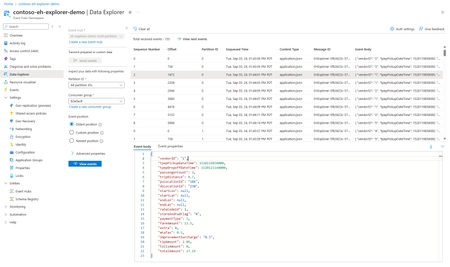
We are excited to announce the general availability of the Event Hubs Data Explorer in the Azure portal! Ever since our preview announcement in September, we've heard customers rave about how the Event Hubs Data Explorer has already made its way into their daily workflows to onboard, debug and review the data in their Event Hubs with very little effort. Customer-Centric Design We listened to your feedback and designed the Event Hubs Data Explorer to address your needs. We've had a lot of customers try this tool and share feedback on how its saving them significant time and effort when it comes to viewing their Event Hubs in action and performing basic debugging tasks. Simplified Onboarding and Debugging The Event Hubs Data Explorer is perfect for both new and experienced users. It provides a comprehensive view of event data, making it easy to test event producers and consumers. You can quickly validate your setup with custom workloads or predefined datasets, ensuring everything is configured correctly. Debugging is now more straightforward than ever. With the ability to inspect data at specific timestamps or offsets, you can quickly identify and resolve issues, optimizing your event processing workflows. Getting Started To start using the Event Hubs Data Explorer, navigate to your Event Hubs namespace in the Azure portal. From there, you can access the Data Explorer and begin sending and viewing events with just a few clicks. You can also check out the documentation here. We are excited to see how you leverage the Event Hubs Data Explorer to drive innovation and efficiency in your projects. Your feedback has been instrumental in shaping this tool, and we look forward to continuing to improve our offerings based on your insights.448Views1like0Comments