microsoft fabric
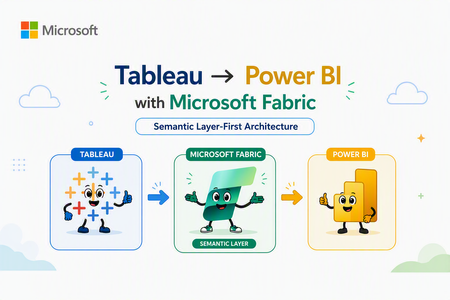
30 TopicsTableau to Power BI Migration: Semantic Layer-First Approach for Cloud Architects
Author's: Mahjabin Ahmed, Yassine El Ouardi, Lavanya Sreedhar LavanyaSreedhar, Peter Lo PeterLo, Aryan Anmol aryananmol, Shreya Harvu shreyaharvu and Rafia Aqil Rafia_Aqil In this guide, we provide practical guidance for migrating from Tableau to Power BI, with a focus on technical best practices and architecture. Unifying business intelligence on the Microsoft Fabric platform, enterprises gain closer integration with Microsoft 365 (Teams, Copilot, Excel). For cloud solution architects and BI developers, a successful migration is not just about rebuilding dashboards in a new tool. It requires thoughtful architectural planning and a shift to a more model-centric approach to BI. Why Semantic Layer-First Architecture Matters The Traditional Migration Challenge Most Tableau to Power BI migrations follow a dashboard-centric approach: teams attempt to replicate existing Tableau workbooks, calculated fields, and LOD (Level of Detail) expressions directly into Power BI reports. While this may seem efficient initially, it creates significant downstream challenges: Duplicated logic: Each report embeds its own calculations and business rules, leading to conflicting KPIs across the organization Maintenance overhead: Changes to business logic require updating dozens or hundreds of individual reports Governance gaps: Without centralized definitions, semantic drift occurs—different teams calculate "Revenue" or "Active Customer" differently Scalability issues: As data volumes grow, report-level transformations become performance bottlenecks The Semantic Layer-First Alternative Microsoft's recommended approach centers on semantic models (formerly called datasets)—centralized, governed data models that separate business logic from visualization. In this architecture: The payoff is substantial: when data evolves or business rules change, you update the semantic model once, and all dependent reports automatically reflect the changes—no manual redesign required. Understanding Migration Complexity: Simple to Very Complex Dashboards Not all Tableau dashboards are created equal. The migration strategy should align with dashboard complexity, and the semantic layer approach becomes increasingly valuable as complexity grows. Follow a Step-by-Step Migration Strategy Migrating from Tableau to Power BI is not a one-click effort – it requires a mix of automated and manual refactoring, plus a sound change management plan. Below are key strategies and best practices for a successful migration: Audit your Tableau estate: Start by taking inventory of all existing Tableau workbooks, data sources, and dashboards. Determine what needs to be migrated (focus on high-value, widely used reports first) and identify any redundant or obsolete content that can be retired rather than converted. Conduct a proof-of-concept (PoC): Before migrating everything, pick a representative complex dashboard (or a subset of your data) and perform a pilot migration. This will help you validate that Power BI can connect to your data (e.g. setting up the Power BI gateways for on-premises sources), test performance (Import vs DirectQuery modes), and experiment with replicating key visuals or calculations. Use the PoC to uncover any surprises early – for example, test that any Level of Detail expressions or table calculations in Tableau can be re-created in DAX. The lessons learned here should inform your overall project plan. Use a phased migration approach: Plan to run Tableau and Power BI in parallel for some period, rather than switching everything at once. Migrate in waves – for example, by business unit or subject area – and incorporate user feedback as you go. This phased approach reduces risk and allows your team to improve the process with each iteration. It also gives end users time to adjust gradually. Migrate high-impact dashboards first: Prioritize the migration of key reports and dashboards that are critical to the business or have the most usage. Delivering these early wins will not only surface any technical challenges to solve but will also help demonstrate the value of Power BI’s capabilities to stakeholders. Early success builds buy-in and momentum for the rest of the migration. Reimagine (don’t just replicate) the experience: It’s rarely possible – or desirable – to exactly re-create every Tableau visualization pixel-for-pixel in Power BI. Embrace the opportunity to focus on business questions and improve user experience with Power BI’s features. For example, rather than replicating a complex Tableau workaround, you might implement a cleaner solution in Power BI using native features (like bookmarks, drilldowns, or simpler navigation between pages). Engage business users and subject matter experts during this redesign to ensure the new reports meet their needs. Enable dataset reusability: One major benefit of the Power BI approach is the ability to create shared datasets and dataflows. As you migrate, look for opportunities to create central semantic models (datasets) that can serve multiple reports. For instance, if several Tableau workbooks are all using similar data about sales, you can create one central Sales dataset in Power BI. Report creators across the organization can then build different Power BI reports on that single dataset without duplicating data or logic. This reduces maintenance and promotes a “build once, reuse often” strategy. Provide training and support: Expect a learning curve for teams moving to Power BI – especially those who are very fluent in Tableau. Plan for user upskilling and training programs. Establish a support community or office hours where new users can ask questions and get help. If possible, identify Power BI champions or recruit a Power BI Center of Excellence (COE) team who can guide others. During the transition, ensure there are subject matter experts (SMEs) available to address questions and validate that the new reports are correct. Manage change and expectations: It’s important to communicate why the organization is moving to Power BI (e.g. benefits like deeper integration, lower TCO, better governance) to get buy-in from end users. Some users may be resistant to change, especially if they’ve invested a lot of time in mastering Tableau. Prepare to handle varying responses – emphasize the personal benefits (like improved performance, new capabilities, or career growth with popular skills) to encourage adoption. Also, involve influential business users early and gather their feedback, so they feel ownership in the new solution. Establish governance from Day 1: Don’t wait until after migration to think about governance. Use this chance to set up Power BI governance aligned to best practices. Decide on important aspects such as workspace naming conventions, who can create or publish content, how you’ll monitor usage and costs, and how to manage data access and security (for example, designing a strategy for RLS/OLS/CLS, and deciding when to use per-user datasets vs. organizational semantic models). Good governance will ensure your shiny new Power BI environment doesn’t sprawl into chaos over time. Allow time for adjustment and iteration: Finally, be patient and iterative. Depending on the scale of your organization and the number of Tableau assets, a full migration can take months or even a year or more. Plan realistic transition periods where both systems might coexist. Continuously refine your approach with each wave of migration. Power BI’s frequent update cadence (monthly releases) means new features may emerge even during your project – stay updated, as new capabilities could simplify your migration (for example, the introduction of field parameters or Copilot might let you modernize certain Tableau features more easily). Reimagine (don’t just replicate) the experience (Step 5): Phase 1: Assessment and Planning 1. Audit Your Tableau Estate Inventory all workbooks, data sources, and calculated fields Identify high-traffic dashboards (prioritize for early migration) Categorize by complexity (Simple/Medium/Complex/Very Complex) 2. Design Your Semantic Architecture Map Tableau data sources to Power BI data sources (DirectQuery, Import, or Direct Lake) Plan star schema for fact/dimension tables Identify shared calculations that should live in semantic models vs. report-specific logic 3. Choose Storage Modes Source Type Recommended Mode Rationale Databricks Delta Lake Direct Lake Real-time analytics, no refresh lag Azure SQL Database DirectQuery or Import Based on data volume and refresh SLAs On-Premises SQL Server Import (via Gateway) Network latency considerations Excel/CSV files Import Small reference data Phase 2: Build the Semantic Layer 1. Create Star Schema Data Models Tableau often relies on flat, denormalized datasets. Power BI performs best with star schemas: Fact tables: Transactional data (sales, orders, events) with foreign keys to dimensions Dimension tables: Descriptive attributes (customers, products, dates) with primary keys Relationships: One-to-many from dimension to fact, leveraging bidirectional filtering sparingly 2. Migrate Calculations to DAX Measures Convert Tableau calculated fields to DAX measures in the semantic model: --Example of DAX: -- Define as measure: Total Revenue = SUMX( 'Sales', 'Sales'[Quantity] * 'Sales'[Unit Price] ) 2.1 Use Copilot to Accelerate DAX Development Leverage Copilot in Power BI Desktop to generate and validate DAX: Describe the calculation in natural language Copilot suggests DAX syntax Review, test, and refine 2.2 Document your Semantic Model Invest in creating an AI-ready foundation for your semantic model. AI systems need to understand unique business contexts in order to prioritize correct information to provide consistent and reliable responses to your end users. Name Tables and Columns Clearly: Avoid ambiguity in your semantic model. Use human-readable, business-friendly names. Avoid abbreviations, acronyms, or technical terms. This improves Copilot’s ability to interpret user intent. Create Meaningful Measures: Define reusable DAX measures for key business metrics (e.g., Revenue, Profit Margin). AI features rely on these to generate insights and summaries. Document Semantic Model objects: Add descriptions and synonyms to your Tables, Columns and measures. This enhances natural language querying and improves Copilot’s contextual understanding. Build an AI Data Schema: prepare your semantic model for AI by utilizing tooling features such as Prep data for AI. Phase 3: Understanding Migration Complexity: Simple to Very Complex Dashboards Not all Tableau dashboards are created equal. The migration strategy should align with dashboard complexity, and the semantic layer approach becomes increasingly valuable as complexity grows. 1. Dashboard Conversion Best Practices Think in "pages" not "sheets": Power BI reports combine multiple visuals per page; group related visuals logically Use slicers for interactivity: Replace Tableau filters with Power BI slicers and filter pane Leverage bookmarks for navigation: Create dynamic report experiences with show/hide containers Simple Complexity Level Category Tableau Feature Power BI Equivalent Microsoft Fabric Enhancements Best Practice Notes Data Model Single custom SQL Power Query for data shaping and ETL. OneLake Shortcuts for unified data access. Use star schema for optimized performance; push logic into the semantic layer rather than visuals. Calculations Basic IF/ELSE, SUM Data Analysis Expressions (DAX) for measures and calculated columns. Copilot for Power BI to assist with DAX creation. Fabric IQ for natural language queries. Centralize calculations in semantic models for consistency and governance. Medium Complexity Level Category Tableau Feature Power BI Equivalent Fabric Enhancements Best Practice Notes Data Model Multiple custom SQL (up to 3) Connect live to databases (Azure Databricks): DirectQuery in Power BI Connect with cloud data sources: Power BI data sources OneLake Shortcuts for unified access without databricks compute cost. Semantic Models can combine multiple sources. Optimize with star schema; Prefer OneLake Shortcuts for performance; avoid heavy transformations in visuals. Calculations Nested IFs, CASE Data Analysis Expressions (DAX) for measures and calculated columns. Copilot for Power BI to assist with DAX creation. Fabric Data Agent for conversational BI. Fabric IQ for natural language queries: Fabric IQ Centralize logic in semantic models; use Copilot for automation and validation; keep calculations reusable. Reporting Tooltip format in Bar and Map visuals Select All/Clear option for Single Select dropdown Standard tooltips offer help tooltips, text, and background formatting. Dynamic tooltip will be able to create the Tooltip page and reuse it in multiple visuals The customization is so much better than the OOB tooltips Create report tooltip pages in Power BI - Power BI | Microsoft Learn Use Clear All Slicers Button. Disable Single Select, Add Clear All Slicers button, Customize the Button and Use the Button Complex Complexity Level Category Tableau Feature Power BI Equivalent Fabric Enhancements Best Practice Notes Data Model Multiple sources Create relationship using more than one column Composite Models in Power BI (DirectQuery + Import) for combining multiple sources, also connect to various cloud services. Dataflows for pre-processing. Power BI allows a relationship between 2 tables based on only one active column. OneLake Shortcuts for unified access without Azure Databricks compute cost; Microsoft Fabric Dataflows Gen2 offers multiple ways to ingest, transform, and load data efficiently. Consolidate sources into semantic models; use Direct Lake for performance; Plan and design data model to comply with star schema supported by Power BI Relationship DAX USERELATIONSHIP DAX for activating relationships in Power BI for a specific calculation Calculations LOD, window functions Data Analysis Expressions (DAX) for measures and calculated columns. Copilot to assist with complex DAX. Fabric IQ Ontology for semantic alignment. Change how visuals interact in a Power BI report. Centralize calculations in semantic layer; use variables in DAX for readability and performance. Fabric Data Agent for a conversational BI. Very Complex Complexity Level Category Tableau Feature Power BI Equivalent Fabric Enhancements Best Practice Notes Data Model Multi-source, Excel, SQL Composite Models in Power BI (DirectQuery + Import) for combining multiple sources, also connect to various cloud services. Dataflows for pre-processing. OneLake Shortcuts for unified access; Connector overview build-in support. Mirroring for real-time sync. Combine multiple sources into well-structured semantic models for consistency and optimized performance. Calculations Predictive logic Data Analysis Expressions (DAX) for measures and calculated columns. Fabric AutoML, ML models, AI Insights, Python/R, Notebook‑based ML (Spark/Scikit‑Learn), Fabric AI Functions, Fabric IQ Ontology Fabric Data Agent for a conversational BI. Centralize logic in semantic models; leverage Copilot for automation and parameter-driven workflows. Prepare for Copilot. 2. Tableau Feature Equivalents Tableau Feature Power BI Equivalent Microsoft Learn Link Calculated Fields DAX Measures DAX Documentation Parameters Field Parameters / Bookmarks Use report readers to change visuals Actions Drillthrough / Bookmarks Drillthrough Tableau Prep Power Query / Dataflows Differences between Dataflow Gen1 and Dataflow Gen2 Tableau Server Power BI Service What is Power BI? Overview of Components and Benefits Phase 4: Governance and Deployment Workspace Planning (Dev / Test / Prod Separation) A proper workspace strategy is essential for governed deployments in Fabric and Power BI. Fabric supports separate Development, Test, and Production stages using Deployment Pipelines, enabling controlled promotions of semantic models, reports, dataflows, notebooks, lakehouses, and other items. You can assign each workspace to a pipeline stage (Dev → Test → Prod) to ensure safe lifecycle management. Sensitivity Labeling (Microsoft Purview Information Protection) Sensitivity labels allow governed classification and protection of data across Fabric items. Sensitivity labels can be applied directly to Fabric items (semantic models, reports, dataflows, etc.) through the item's header flyout or the item settings. Labels from Microsoft Purview Information Protection enforce data access rules and help organizations meet compliance requirements. Endorsement & Certification (Promoted, Certified, Master Data) Endorsement improves discoverability and trust in shared organizational content. Promoted: Item creators mark content as recommended for broader use. Certified: Administrators or authorized reviewers validate content meets organizational quality standards. Master Data: Indicates authoritative single‑source‑of‑truth items such as semantic models or lakehouses. All Fabric items except dashboards can be promoted or certified; data‑containing items can be designated as Master Data. Monitoring & Capacity Planning Determine the appropriate size for fabric capacity when migrating from Tableau to PowerBI. The Fabric SKU Estimator can generate a SKU recommendation (estimate) for your capacity requirements. Ensuring performance and cost efficiency requires ongoing monitoring of your Fabric capacity. Microsoft recommends evaluating workloads using Fabric Capacity Metrics and planning SKU sizes based on real usage. Fabric uses bursting and smoothing to handle spikes while enforcing capacity limits. Monitoring helps identify high compute usage, background refreshes, and interactive workloads to optimize performance. Fabric Data Source Connections (OneLake+ Manage Connections) Microsoft Fabric is designed as an end‑to‑end analytics platform that integrates data from many different source systems into a unified environment powered by OneLake, Data Factory, Real‑Time Analytics, Dataflows , Lakehouses, Warehouses, and Mirrored Databases. The Strategic Advantage: Semantic Layer + Fabric IQ The semantic layer-first approach sets the foundation for the next evolution in enterprise analytics. Fabric IQ (announced at Ignite 2025) is Microsoft's semantic intelligence platform that auto-elevates semantic models into ontologies—structured knowledge graphs that power AI agents, Copilot experiences, and cross-domain data reasoning. What this means for your migration: Semantic models you build today become the foundation for AI-driven analytics tomorrow Data Agents can reason across multiple semantic models, answering questions that span domains Business users transition from "report consumers" to "data explorers" via natural language interfaces Conclusion: Build for the Future, Not Just for Today Migrating from Tableau to Power BI is more than a technology swap—it's an opportunity to re-architect your analytics strategy for the cloud-native, AI-powered era. The semantic layer-first approach requires upfront investment in data modeling, DAX expertise, and Fabric platform adoption. But the payoff is transformative: Consistency: Single source of truth for all business metrics Scalability: Semantic models that serve hundreds of reports and thousands of users Agility: Changes to business logic propagate instantly across the enterprise Future-readiness: Foundation for Fabric IQ, Data Agents, and AI-driven insights Start your migration with the end in mind: not just convert dashboards, but a modern, governed, AI-ready analytics platform that scales with your business. Addressing Key Migration Concerns (1) Why a semantic‑layered model approach is better than recreating Tableau dashboards A semantic‑layered modeling approach is the optimal strategy for migration and is significantly more effective than attempting to recreate Tableau dashboards exactly as they exist. By contrast, Power BI and Fabric encourage a semantic model–first architecture, where all business rules, relationships, calculations, and transformations are centralized in a governed model that serves many dashboards. The approach not only provides consistency and reuse across the enterprise but also ensures that report authors build on a single certified version of the truth. (2) How semantic-layered model approach reduces the constant redesign caused by changing data needs. A semantic‑layered modeling approach directly addresses concern about constant changes and frequent redesigns of dashboards when data evolves. With a semantic layer, changes are absorbed in the model layer—so the logic is updated once and flows automatically into all dependent reports. Combined with Fabric features like OneLake shortcuts, Direct Lake mode, and centralized governance, the semantic layer drastically reduces breakage, minimizes rework, and ensures scalability as data continues to grow and shift. Additional Resources Direct Lake in Microsoft Fabric Create Fabric Data Agents OneLake Shortcuts Write DAX queries with Copilot - DAX Prepare Your Data for AI - Power BI | Microsoft Learn5.1KViews4likes3CommentsOptimizing Oracle-to-Power BI Performance and the Path to Modern Analytics
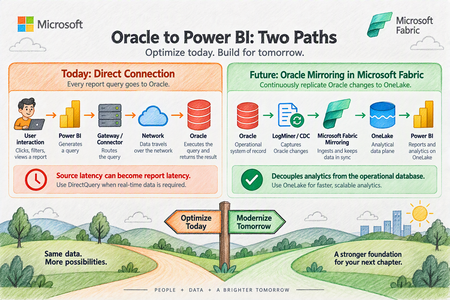
Organizations frequently rely on Oracle databases for large-scale operational workloads while using Microsoft Power BI as their enterprise analytics and visualization platform. Although connecting Power BI directly to Oracle is fully supported, performance can become challenging as datasets grow into the millions of rows. A recent enterprise scenario involving millions of Oracle records illustrates an important principle: Oracle-to-Power BI performance should not be attributed to a single component without first isolating the entire retrieval path. This article provides a practical framework for optimizing that architecture today, while also examining how Microsoft Fabric Mirroring can provide a different data-access pattern for future analytics workloads. The Performance Challenge Consider an Oracle environment containing approximately 15 million records. Testing showed substantially different behavior depending on the client used to retrieve the same Oracle data: A direct Oracle query executed through TOAD returned millions of rows in about eight minutes. Tableau connected to the same Oracle table from the same laptop and refreshed millions of rows in 20 to 30 minutes. Power BI Desktop, however, continued processing for multiple hours before the operation was terminated by network or database controls. Importantly, the Power BI query did not contain additional Power Query transformations. The customer was directly executing SQL and loading the resulting data. This is an extremely useful diagnostic comparison because it demonstrates that Oracle is capable of returning the underlying dataset considerably faster than the Power BI test. It does not, however, prove that the Power BI Oracle connector itself is the single root cause. Performance Is a Pipeline, Not a Single Component Oracle-to-Power BI performance involves several layers: A bottleneck at any one of these layers can affect overall refresh or query performance. Therefore, the first architectural principle is: Measure every layer before attempting to tune the entire solution. A troubleshooting exercise should evaluate: Oracle server-side execution time SQL execution plan Oracle provider/client behavior FetchSize behavior Network transfer Power Query evaluation Query folding Power BI model processing Report design Gateway behavior when the Power BI Service is introduced This approach avoids prematurely concluding that Oracle, Power BI, the gateway, or the connector is inherently responsible for the slowdown. Start With the Oracle Provider Power BI currently provides two important approaches for Oracle connectivity. Built-in Oracle provider Modern versions of Power BI Desktop include Microsoft's bundled Oracle Managed ODP.NET provider. This reduces the dependency on separately installing Oracle client software. For environments using the built-in provider, testing should be performed with a current Power BI Desktop release because provider behavior and defaults can change between releases. Oracle Client for Microsoft Tools Oracle Client for Microsoft Tools, or OCMT, remains another supported option. OCMT configures Oracle Data Provider for .NET and can therefore be tested independently from the built-in provider. This gives architects a useful isolation mechanism: Test A: Built-in Oracle provider vs. Test B: OCMT provider. Use the same: workstation SQL statement Oracle database table credentials network path expected row count Changing several variables simultaneously makes the results considerably harder to interpret. Understand FetchSize One of the most important areas identified during troubleshooting is FetchSize. FetchSize controls how much data the Oracle provider retrieves during each fetch operation. For large datasets, a small FetchSize can require many retrieval operations, increasing overhead. Increasing FetchSize allows the provider to retrieve more data at a time and may improve throughput. However, FetchSize tuning should be tested independently from the choice of Oracle provider. Switching to OCMT, for example, does not by itself demonstrate whether FetchSize tuning improves performance. Benchmark the same SQL and dataset using consistent test conditions and compare elapsed time and throughput. FetchSize controls how much Oracle data the provider pulls back in each retrieval batch. Think of FetchSize like the size of a delivery truck. Imagine Power BI needs to retrieve a very large dataset from Oracle. Small FetchSize: Oracle → 📦 → Power BI Oracle → 📦 → Power BI Oracle → 📦 → Power BI Oracle → 📦 → Power BI ...many retrieval operations Larger FetchSize: Oracle → 📦📦📦📦📦 → Power BI Oracle → 📦📦📦📦📦 → Power BI ...fewer retrieval operations The idea is simple: FetchSize determines how much data the Oracle provider fetches at a time. Examine Oracle Data Types FetchSize is not the only provider consideration. Schema matters. A troubleshooting package should include the table DDL rather than only a list of column names. Pay particular attention to large-object types such as: BLOB CLOB Large-object columns may materially change retrieval behavior and can make simply increasing FetchSize insufficient. Therefore capture: complete table DDL column names Oracle data types row width presence of BLOB/CLOB columns expected total result size Do not optimize FetchSize without understanding the shape of the data being transferred. Filter Rows and Columns as Early as Possible Probably the most universally applicable Power Query optimization is also one of the simplest: Do not retrieve data you do not need. Instead of retrieving every row and column and filtering afterward, reduce the dataset at Oracle whenever possible. Good Oracle SQL should therefore: select only required columns apply restrictive predicates at the source aggregate at Oracle where appropriate avoid unnecessary data transfer This matters substantially when Power BI and Oracle are separated by a network boundary. Preserve Query Folding Power Query query folding allows Power BI transformations to be translated back into SQL executed by the relational source. For relational sources such as Oracle, maintaining folding can substantially reduce the amount of work performed by the Power Query mashup engine. The preferred pattern is: Where practical: filter early remove unnecessary columns early avoid transformations that unexpectedly break folding inspect where folding stops push relational operations back into Oracle For DirectQuery, folding is particularly important because the source remains part of the interactive report-query path. Be Careful With Native SQL and Incremental Refresh Native SQL can be extremely valuable for troubleshooting. Running the same targeted SELECT statement through Power BI that is executed directly against Oracle creates a useful A/B test. It helps isolate questions such as: Is Oracle itself taking a long time? Is Power BI generating a different query? Is additional processing happening after Oracle returns the data? Is the retrieval/provider layer adding significant latency? However, architecture matters. Power BI guidance warns that later Power Query steps cannot necessarily fold after a native SQL query, and native SQL has important implications for incremental refresh. Therefore, native SQL is useful both as an optimization technique in some architectures and as a diagnostic isolation technique, but it should not automatically be substituted for a well-folded Power Query design. Prefer Import for Traditional Oracle BI Workloads If the business does not require near-real-time data, Import should generally be evaluated before DirectQuery for large Oracle analytical workloads. With Import: The latency of Oracle, networking, and the provider is mostly experienced during refresh rather than repeatedly during user interaction. This usually provides a more predictable interactive experience. DirectQuery produces a different dependency chain: As a result, source latency can become report latency. Use DirectQuery when its architectural benefits are required, rather than simply because the source database supports it. Make Incremental Refresh Truly Incremental Import does not necessarily mean repeatedly loading the entire Oracle dataset. For large fact tables, incremental refresh should be evaluated so that only required partitions are refreshed. However, there is an important condition: RangeStart and RangeEnd filtering needs to be pushed back to Oracle. If partition filters do not fold, Power BI can end up retrieving considerably more source data than expected before applying the filtering. Therefore incremental refresh testing should verify that the Oracle query generated by Power BI contains the expected predicates. Treat the Gateway as Its Own Performance Layer Once the workload moves into the Power BI Service, however, the on-premises data gateway becomes another measurable component. For production deployments examine: gateway version Oracle provider/client version CPU memory network proximity to Oracle refresh concurrency DirectQuery concurrency competing workloads Where necessary, large refresh workloads and latency-sensitive DirectQuery workloads can be isolated onto different gateway resources. Do not diagnose gateway performance from a Power BI Desktop test where the gateway is not involved. Optimize DirectQuery If It Cannot Be Avoided Sometimes Import is not viable because users require data with very low latency. If Oracle must remain behind DirectQuery, reduce unnecessary work at every level. At Oracle index frequently filtered columns appropriately review execution plans select only necessary columns reduce returned rows avoid unnecessarily expensive calculations In Power Query maintain query folding push filtering to Oracle minimize transformations requiring local evaluation In the semantic model use efficient dimensional modeling avoid unnecessary high-cardinality columns consider aggregation strategies where appropriate In reports limit visual density use selective filters avoid generating unnecessary simultaneous source queries test with realistic user concurrency DirectQuery performance needs to be assessed as an end-to-end architecture, rather than as an individual SQL benchmark. Collect Diagnostics Before Declaring a Root Cause For difficult Oracle performance cases, establish a repeatable diagnostic package. Capture: Oracle database version execution plan SQL execution duration table DDL data types row count approximate returned data size Provider built-in provider versus OCMT provider/client version FetchSize configuration Power BI Power BI Desktop version generated SQL Query Diagnostics Mashup traces Applied Steps or M code total execution time Network Oracle-to-client path throughput latency connection interruptions or timeouts Comparison clients If Tableau or another Oracle client appears dramatically faster, reproduce the same SQL, same columns, same records, same database and preferably the same machine. Only then does the comparison become a useful engineering benchmark. Future Architecture: Oracle Mirroring in Microsoft Fabric Optimizing the direct Oracle connection solves one class of problem. Microsoft Fabric Mirroring provides a different architecture altogether. Instead of repeatedly placing Oracle in the analytical query path, Fabric can continuously replicate Oracle changes into OneLake. Conceptually: Fabric Mirroring uses Oracle LogMiner to capture changes and maintain an analytical copy in OneLake. This separates many downstream analytical reads from the operational Oracle database. The key architectural advantage isn't simply "a faster connector." The advantage is decoupling analytics from the operational database. Recommended Architecture Decision Tree Requirement: traditional BI with scheduled freshness Use: Oracle → Import → Power BI semantic model. Then optimize: FetchSize provider query folding source-side filtering incremental refresh Requirement: operational or near-real-time reporting where Oracle must remain the source Evaluate: Oracle → DirectQuery → Power BI. But aggressively optimize: Oracle SQL execution plans query folding visual density provider configuration concurrency gateway architecture Requirement: enterprise analytics with frequent Oracle changes and growing BI/AI requirements Evaluate: Oracle → Fabric Mirroring → OneLake → Fabric / Power BI. This reduces repeated analytical pressure against the operational Oracle environment and creates a reusable analytical data foundation for additional workloads. A Practical Troubleshooting Sequence A useful Oracle-to-Power BI performance investigation can be organized into five phases. Phase 1: Establish the Oracle baseline Execute exactly the same query directly against Oracle. Record: SQL → rows → bytes → execution time Phase 2: Isolate the provider Run the same dataset through: Built-in Oracle provider and OCMT. Record the results independently. Phase 3: Test FetchSize Test controlled FetchSize values while holding every other variable constant. Measure throughput rather than relying on subjective impressions. Phase 4: Optimize Power Query Validate: query folding source filtering column projection transformations incremental refresh behavior Phase 5: Decide whether the architecture itself should change If extremely large Oracle datasets must continually feed analytical workloads, consider whether repeatedly querying Oracle remains the appropriate long-term design. At that point, Fabric Mirroring becomes an architectural discussion rather than simply another troubleshooting step. Final Takeaway Oracle-to-Power BI performance problems should not immediately be categorized as an Oracle problem, a Power BI problem, or a gateway problem. They are usually best investigated as a data retrieval pipeline. For existing Power BI architectures, the strongest optimization sequence is: Efficient Oracle SQL For the longer term, Microsoft Fabric Mirroring changes the architecture: Oracle becomes the operational system of record while OneLake becomes the analytical data plane. That separation can be particularly valuable as organizations expand from traditional Power BI reporting into broader Fabric analytics, data engineering and AI workloads.245Views1like0CommentsStreaming and Batch Data Architectures with Microsoft Fabric to Azure Databricks
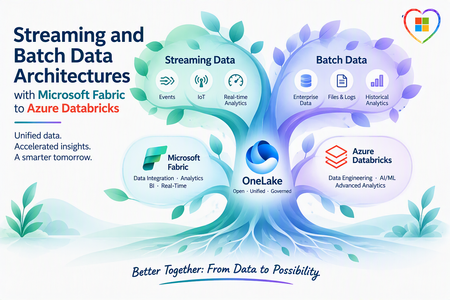
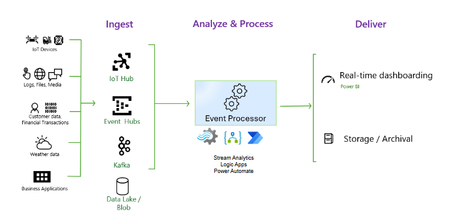
Author's: Aladdin Alchalabi AladdinAlchalabi, Oscar Alvarado oscaralvarado and Rafia Aqil Rafia_Aqil Note: This article describes a solution idea. Your cloud architect can use this guidance to help visualize the major components for a typical implementation. Use this article as a starting point to design a well-architected solution that aligns with your workload’s specific requirements. As organizations adopt Microsoft Fabric as their unified analytics platform, it has become a leading path for ingesting both streaming and batch data into Azure Databricks. This article covers integration approaches -via Microsoft Fabric- and details the five Fabric-specific paths that connect OneLake/ADLS and Databricks for end-to-end data processing. Medallion Architecture The following data flow corresponds to the architecture diagram: Data is ingested through Microsoft Fabric (via Mirroring, RTI, or Data Factory) lands data into OneLake/ADLS. With the medallion pattern, consisting of Bronze, Silver, and Gold storage layers, organizations have flexible access and extendable data processing: Bronze – Raw data entry point. Data arrives in its source format and is converted to the open, transactional Delta Lake format. Silver – Optimized for BI and data science. ETL and stream processing tasks filter, clean, transform, join, and aggregate Bronze data into curated datasets using SQL, Python, R, or Scala. Gold – Enriched data ready for analytics and reporting. Analysts use Power BI, PySpark, SQL, or Excel for insights and queries. Fabric Integration Paths Note: This architecture establishes a complete loop-back between Microsoft Fabric and Azure Databricks, enabling Gold layer tables to be seamlessly mirrored back to Microsoft Fabric for dashboarding through Azure Databricks Mirroring. The following five paths connect Microsoft Fabric to Azure Databricks: Fabric Mirroring to OneLake – A low-cost, low-latency turnkey solution that creates a replica of data from operational sources (SQL Server, Azure Cosmos DB, Oracle) in OneLake. Handles the initial load and ongoing CDC changes automatically, keeping data continuously up to date. Fabric RTI to OneLake – Fabric Real-Time Intelligence ingests streaming event data into OneLake with sub-second latency, enabling real-time analytics on live event streams. Fabric Data Factory to OneLake – Orchestrates ingestion from diverse sources not covered by Mirroring (such as Sybase or REST APIs) and lands data in OneLake, ensuring complete source coverage. OneLake to Azure Databricks – Unity Catalog connections to OneLake, secured via Managed Identities from Microsoft Entra ID, allow Databricks to query OneLake data items as a native catalog without data duplication. Fabric Data Factory to Azure Databricks (direct) – Orchestrates ingestion from diverse sources directly into Azure Data Lake Storage (ADLS), where Azure Databricks picks up the data for medallion architecture processing. Design Considerations Area Updated guidance Direct RTI-to-Databricks integration There is still no broad GA direct integration where Fabric RTI and Databricks operate as one native real-time runtime. Integration should be positioned through open protocols, Event Hubs/Kafka-style patterns, OneLake, Delta, and federation. OneLake federation in Azure Databricks OneLake federation in Azure Databricks is now the key integration story. It allows Databricks Unity Catalog to query Fabric Lakehouse and Warehouse data in OneLake without copying it. Access is read-only and depends on Fabric tenant settings, workspace permissions, and Databricks Unity Catalog setup. RTI data availability to Databricks Data ingested through Fabric RTI can be made available to Databricks by landing or exposing the data into OneLake-backed items, especially Lakehouse/Warehouse patterns. Eventhouse data can be made available in OneLake in Delta format through OneLake availability, but Databricks OneLake federation should be validated against the specific Fabric item type and access path. Existing Databricks customers Existing Databricks customers do not need to abandon Databricks. They can use Fabric RTI as the event ingestion, real-time detection, operational alerting, and business action layer, while continuing to use Databricks for engineering, ML, advanced analytics, and Unity Catalog-governed access. Activator and business action Fabric Activator is the cleanest business-user action layer. It can monitor streaming events and trigger Teams messages, email, Power Automate flows, Fabric pipelines, notebooks, Spark jobs, Dataflows, UDFs, and other downstream actions. This is a strong differentiator because it lets business users act on events without waiting for batch analytics. Operations Agents Operations Agents are in preview and should be positioned carefully. They monitor real-time data from Eventhouse or ontology sources, surface insights, recommend actions, and can connect to Activator/Power Automate action paths. They are not simply a pre-ingestion decision engine before data lands anywhere; they work from configured Fabric knowledge/data sources. Before landing in Lakehouse For decisioning before Lakehouse persistence, use Eventstream processing and Activator rules on streams. For AI-assisted operational recommendations, use Operations Agents once the relevant data is available in Eventhouse or ontology. Requirement-Specific Notes Data Ingestion Microsoft Fabric Mirroring currently supports SQL Server, Azure Cosmos DB, and Oracle as source systems. For sources not yet supported by Mirroring—such as Sybase or REST APIs—use Fabric Data Factory pipelines to ensure full coverage across all data systems. Once data is in the landing zone with the correct format, Mirroring’s CDC replication starts automatically and manages the complexity of merging changes (updates, inserts, and deletes) into Delta tables, keeping data in Fabric continuously up to date. Learn more about open mirroring Storage Format and Time Travel OneLake supports Delta tables, enabling schema evolution and time travel across all data stored in the lakehouse. Learn more about OneLake and Delta tables Security Encryption at rest: OneLake automatically encrypts all data at rest using Microsoft-managed keys, compliant with FIPS 140-2 standards. Learn more Encryption in transit: All data in transit is encrypted using TLS 1.2 or higher, securing data movement between Fabric, OneLake, and Azure Databricks. Learn more Data Governance OneLake can be registered and scanned by Microsoft Purview, enabling cataloging of stored metadata and data quality profiling. This protects sensitive information, including PHI and PII, across ingestion and analytics workflows. Learn more about Purview with Fabric Lakehouse Operations and Monitoring Use the Fabric monitor hub to track pipeline health, Spark application performance, and ingestion job status across all Fabric workloads. Learn more about the Fabric monitor hub Scenario Details This architecture applies to any organization that needs to unify streaming and batch data at scale. Common characteristics include: Multiple operational data sources (databases, SaaS applications, event streams) A requirement to process both real-time and historical data in the same platform Governance and compliance requirements for sensitive data (PHI, PII, financial records) Analytics consumers spanning BI (Power BI), data science (Databricks notebooks), and ML workloads Potential Use Cases Healthcare and life sciences – PHI/PII protection via Purview; real-time patient telemetry + batch EHR analytics Financial services – Real-time fraud detection streams + batch regulatory reporting Retail and e-commerce – Streaming clickstream analytics + batch inventory and supply chain processing Energy and utilities – IoT sensor telemetry streaming + batch consumption analytics Next Steps Get started with Microsoft Fabric Mirroring Build an ETL pipeline with Lakeflow Declarative Pipelines Configure Unity Catalog with OneLake shortcuts Monitor Fabric pipelines with the Fabric monitor hub865Views2likes0CommentsMeet the IQ's: How Microsoft is Creating Context-Aware AI
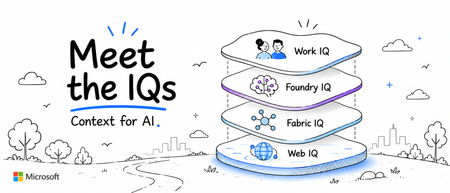
Microsoft Architect's: Allison Rose allisonrose, Lavanya Sreedhar LavanyaSreedhar, Tom Dinh Tom-Dinh, Oviya Soundararajan oviyasound and Rafia Aqil Rafia_Aqil The AI era demands more than powerful language models. It demands context a deep understanding of what enterprise data means, how it connects, and how AI systems can reason and act on it intelligently. Microsoft has been building the foundational intelligence layer that makes this possible: a family of capabilities collectively known as the IQ Platform. The Microsoft IQ Platform is not a single product but a set of complementary intelligence layers: Work IQ, Fabric IQ, Foundry IQ and Web IQ each designed to inject rich contextual understanding into a different part of the enterprise technology stack. Together, they represent Microsoft’s strategic vision for how AI can move beyond isolated answers and become a true operating system for organizational intelligence. This article unpacks each IQ, explains the problems they solve, and explores how they work together to power the next generation of AI-driven enterprise workflows. How the IQs Work Together? Work IQ, Fabric IQ, Foundry IQ, and Web IQ are not competing products or overlapping investments. They are complementary intelligence layers designed to operate across different contexts within the enterprise, and they are most powerful when combined. Work IQ brings the intelligence of Microsoft 365 to every agent and Copilot experience- connecting people, conversations, documents, and organizational signals into a semantic layer that understands how work happens. Fabric IQ brings the intelligence of enterprise data and business context- teaching AI not just what the data says, but what it means in the language of your business: entities, relationships, rules, and governed actions. Foundry IQ brings the infrastructure intelligence that enables all of this to scale- eliminating the undifferentiated plumbing of agentic AI and letting teams focus on building the workflows that actually differentiate their business. Web IQ brings fresh, external web context, helping agents consider current and relevant public information alongside the knowledge and business context inside the organization. Microsoft Web IQ grounds most of the top AI platforms, including Copilot and ChatGPT. Together, the IQ platform represents Microsoft’s answer to one of the defining challenges of the AI era: not just making AI more capable, but making AI contextually aware-grounded in the real knowledge, relationships, and intent of your organization. Fabric IQ: Teaching AI the Language of Business Microsoft Fabric is an end-to-end, unified data analytics platform centered on OneLake- a centralized data lake that stores all analytical and operational business data in open Delta format. Because every Fabric compute experience (Data Engineering, Data Warehouse, Data Factory, Power BI, and Real-Time Intelligence) natively reads from OneLake, organizations gain a single source of truth without copying or duplicating data. OneLake also provides mirroring and shortcut capabilities so existing data can be accessed in place, wherever it lives. Most organizations have made significant progress consolidating their data. The harder challenge is giving AI- and the people who use it-the ability to reason about that data in business terms, not technical ones. Outside of data professionals, businesses do not talk about tables or schemas. They talk about entities that matter to them. Fabric organizes data. Fabric IQ teaches AI what that data means. Three Layers of Business Context Fabric IQ introduces three intelligence layers that together create a unified, contextually rich environment for enterprise AI: Unified Data Layer: Delivered through OneLake and the OneLake Catalog, this provides a single source of truth for all structured and unstructured data across the organization. Business Intelligence Layer: Delivered through Power BI Semantic Models, this layer provides curated measures, hierarchies, dimensions, and trusted KPIs- translating raw data into the analytical language of your business. Operational Intelligence Layer: This is where Fabric IQ’s most distinctive capability lives: Ontology. An Ontology is a model of your business- a graph of entities (such as Patient, Provider, Product, or Account), the relationships between them, the business rules that govern them, and the actions AI agents can take. It functions as the brain that enables AI to understand business context and act on it in a governed, explainable way. Together, these three layers create shared context across all business data stored in OneLake-enabling modern businesses, people, and AI to operate as one unified system. A Real-World Example: Healthcare Consider a care management executive asking: “Which diabetic patients discharged in the last 30 days are at high risk of readmission because they missed follow-up appointments, had medication adherence issues, and recently visited the Emergency Department?” Without Fabric IQ, answering this requires analysts to manually join EHR data, appointment systems, pharmacy records, and ED utilization data- writing SQL across multiple datasets and validating business logic with clinicians. It is slow, brittle, and error-prone. Semantic models can curate data for reporting and analysis, but they do not provide enterprise-scale context integration. With Fabric IQ, an Ontology can be created with entities like Patient, Encounter, Provider, Medication, Diagnosis, Appointment, and Care Plan- each bound to Lakehouse tables, Eventhouse tables, or Materialized Views. Relationships describe how patients connect to their diagnoses, medications, appointments, and treating providers. Business rules enforce data quality, identifying missed follow-ups, recent Emergency visits, and medication gaps. The result is a shift from siloed analytics to true system-level intelligence- an organization where data, AI, and people operate from a shared understanding of the business. Foundry IQ: From Infrastructure to Intelligence Building production-grade AI agents has traditionally meant writing a significant amount of undifferentiated plumbing, custom retrieval pipelines, memory systems, ranking logic, and orchestration code just to enable core RAG and agentic capabilities. While powerful, this approach often leads to complex, hard-to-maintain codebases that distract from the real goal: solving domain-specific problems. With Foundry IQ, Microsoft is fundamentally changing that model by turning these underlying capabilities into managed platform services, allowing teams to shift from building infrastructure to focusing on intelligent workflows. Foundry IQ acts as part of Microsoft's managed platform, enabling agents to use agentic reasoning to access, process, and act on knowledge from anywhere. It is Microsoft Foundry’s way of turning the undifferentiated plumbing behind a RAG agent, such as retrieval, ranking, citations, memory, and personalization, into managed, server-side services that you provision once and call through clean interfaces. Foundry IQ allows you to remove the infrastructure you never wanted to own in the first place. What This Means in Practice Instead of stitching together retrieval pipelines, embedding logic, ranking strategies, and memory mechanisms, Foundry IQ centralizes these capabilities into a single, opinionated platform layer that agents can directly consume. Developers no longer design and maintain each component individually. The knowledge base becomes the centerpiece of the workflow. Rather than coordinating multiple services and response handlers, applications make a single call to retrieve grounded context. Vector-semantic-hybrid querying, query planning, semantic ranking, and citation generation are all encapsulated within the provisioned knowledge base-with no retrieval or embedding logic to maintain in the client application. Memory follows the same pattern of abstraction. Instead of multiple classes and helper utilities to manage storage, user profiles, summarization, and context reconstruction, Foundry IQ replaces this entire layer with a single memory provider backed by a service-managed store with built-in capabilities for chat summarization and user-profile extraction. A Real-World Example: Clinical Workflows Consider building an AI-powered clinical workflow application. Previously, features like agent memory, knowledge base retrieval for grounding, and personalization all had to be written as custom logic and wired manually into the application. This resulted in thousands of lines of code, numerous helper functions, and brittle architecture that was difficult to evolve. With Foundry IQ, that same solution can be reimagined. A single provisioning script now stands up all required services and executes the data-plane steps to create a memory store, build the search index, and provision a Foundry IQ knowledge base for agentic retrieval. Because the top-level router agent carries its own memory, it can directly answer recalled context without relying on confidence thresholds, rule-based branching, or forced workflow paths. Conversation history is handled automatically at ingress- no custom thread management system required. What remains is only what was always worth building: domain-specific logic. Citation validation against grounded evidence. Hallucination checking using LLM-as-a-judge patterns. Agent revision loops. Everything else- retrieval, ranking, memory, user profiles, conversation management- is provisioned once and consumed as a platform capability. The result: a dramatically reduced surface area for bugs, significantly less code to maintain, and teams freed to focus entirely on the work that differentiates their product. Work IQ: Making Microsoft 365 Data Meaningful For years, Microsoft has given organizations API access to their Microsoft 365 data through the Microsoft Graph- emails, calendar events, OneDrive files, Teams conversations, and more. While valuable, this access essentially treated M365 as a structured database: query an endpoint, retrieve an artifact, parse the metadata. The problem was volume and context. With thousands of signals generated every day across the organization, customers needed a way to extract not just data but meaning. In the past year, Microsoft introduced a semantic index built on top of that raw M365 data- a layer that understands not just what exists in your ecosystem, but how everything relates to one another. This intelligence layer is Work IQ, and in an increasingly agent-driven world, it fundamentally changes what AI can do for your organization. In an AI-first world, the advantage is not simply in a model’s ability to reason- it’s in the richness of the context it can reason over. The Contrast in Action Consider asking an agent a simple question: “What’s the latest on Customer Contoso?” With the Microsoft Graph API alone, the agent must stitch together multiple endpoint queries- Teams chats, SharePoint documents, email threads and attempt to piece the results into a coherent answer. It lacks any connective tissue. It doesn’t know what’s relevant, what’s meaningful, or how these isolated data sources relate to each other. The burden of reasoning falls entirely on the agent. With Work IQ, that same prompt taps into a semantic layer that has already done the connecting. The agent knows Contoso-related details span a specific SharePoint folder, identifies the active Teams channel for progress tracking, and surfaces the key people involved. The response is grounded in a web of contextual relationships not just retrieved data. Three Core Components Work IQ is enabled by three powerful components: Data: Unifies signals from files, emails, meetings, chats, and other M365 business systems to capture how work actually gets done across your organization. Memory: Enables persistent context about how people and teams work: details inferred from past conversations, explicit memories stored with Copilot, and custom instructions you’ve configured. Each interaction allows Copilot to learn more about your priorities, preferences, and working style. Inference: Brings together skills, models, and tools to move work forward. It goes beyond understanding your work to deciding what should happen next. Data captures and indexes your M365 knowledge. Memory builds a personalized understanding of how you work. Inference translates this into action. Think of Work IQ as a specialized brain trained on who you are at work within the full context of what your organization knows. Web IQ: Bringing Real-World Intelligence into Agent Context An agent can understand your business and still miss information that matters outside it. For teams researching an account, investigating a supply-chain issue, or comparing products, internal knowledge is only part of the picture. The missing context may be on a company website, in a public announcement, or in newly published guidance. Web IQ is the part of Microsoft IQ that brings in outside information. It's a set of web search and grounding APIs that give agents current evidence from the web, beyond what the model learned in training and beyond a company's internal systems. Web IQ gives developers a way to ground AI applications and agents in fresh web content through Microsoft-hosted REST and MCP interfaces. An application can retrieve current, external information when it needs it, rather than relying only on the knowledge captured during model training. Web IQ supplies the grounding content; the application determines how to combine it with other context and use it in a response. This adds a distinct dimension to the IQ story: Information beyond the organization. The goal is not to replace trusted internal knowledge, but to help people examine it alongside current, relevant external evidence. Source links keep that evidence available for review, so users can check the information behind an answer. A Real-World Example: Sales Preparation Consider a seller preparing for a customer conversation. Work IQ might explain the relationship, outstanding commitments, and business priorities, and Web IQ could contribute public context, such as a recent company announcement. Bringing these inputs together in an agent could help the seller identify a more timely question to ask, while preserving the distinction between internal account information and external evidence. Get Started Whether you’re exploring how to ground your AI applications in richer organizational context, looking to reduce the infrastructure burden of building intelligent agents, seeking to make your enterprise data more actionable, or aiming to ground agents in current web information, the Microsoft IQ Platform offers a path forward. We encourage you to explore the Microsoft Fabric documentation, Azure AI Foundry resources, the Microsoft 365 developer platform, and the Web IQ documentation to learn more about how each IQ capability can fit into your architecture. Build Microsoft IQ powered agents, this cookbook walks through it step by step: files → Web IQ → Work IQ → Fabric IQ → MCP endpoint: https://lnkd.in/edrjG99F Select Microsoft IQ in your Copilot agent settings, follow step by step instructions here: Bring your enterprise data to every agent conversation We’d love to hear how you’re thinking about context-aware AI in your organization. Share your thoughts and questions in the comments below. Links: Microsoft IQ | Unified Enterprise Intelligence for AI Work IQ overview | Microsoft Learn What is Foundry IQ? - Microsoft Foundry | Microsoft Learn Fabric IQ documentation - Microsoft Fabric | Microsoft Learn Microsoft Web IQ documentation and Quick Start | Microsoft Web IQ2.3KViews3likes1CommentStep by Step Guide to Ontology and Plan for Financial Service
What We Will Build In this guide, we will construct a complete Fabric IQ solution that accomplishes the following: First, a Lakehouse that ingests publicly available data including bank financials, P2P lending statistics, borrower demographics, and licensing information. Second, a Semantic Model that defines the analytical layer with proper dimensions, measures, and relationships. Third, an Ontology that elevates these tables into business entities such as Bank, P2P Platform, Borrower, and Loan, connected by meaningful relationships and governed by regulatory rules. Fourth, a Planning sheet that enables supervisors to forecast enforcement workloads, allocate examination budgets, and model scenarios based on live data. Step 1: Preparing the Data Foundation in Fabric Lakehouse Every Fabric IQ solution begins with data. Before we can model business semantics or build planning sheets, we need a well structured Lakehouse that holds our source data in a governed and queryable format. Creating the Lakehouse Navigate to your Fabric workspace and create a new Lakehouse. In this example, we have named it P2PLendingLH, housed within the workspace P2P Lending CrossSector Demo. The Lakehouse serves as the Bronze and Silver layer of our medallion architecture, storing both raw ingested data and transformed analytical tables. Data Sources and Tables The Lakehouse is populated with data from publicly available publications. The table structure follows a dimensional modeling pattern with clear separation between dimension tables (prefixed with dim_) and relationship tables (prefixed with rel_). The following tables form the foundation of our model: Table Name Description dim_bank Bank profiles including KBMI tier, total assets, CAR, NPL, channeling exposure percentage dim_borrower Borrower demographics with credit score, employment type, province, and risk segment dim_p2p_platform Licensed P2P lending operators with TWP90 rate, outstanding balance, and total borrowers dim_loan Individual loan records with amount, tenure, interest rate, and repayment status dim_supervisor_team supervisory teams and their regional assignments dim_channeling_agreement Bank to P2P channeling contracts and exposure limits In addition to dimension tables, several relationship tables capture the connections between entities. These include rel_bank_channels_platform (which bank funds which P2P platform), rel_borrower_takes_loan (linking borrowers to their loans), rel_loan_funded_by_bank (tracing the funding chain), rel_platform_issues_loan (connecting platforms to the loans they originate), and rel_supervisor_oversees_platform and rel_supervisor_oversees_bank (mapping supervisory responsibility). Step 2: Creating the Semantic Model With data in the Lakehouse, the next step is to create a Semantic Model that defines the analytical interface. The Semantic Model is a Power BI construct that organizes your tables into a star schema with proper relationships, hierarchies, and measures. More importantly for our purpose, this Semantic Model will later serve as the blueprint from which we generate our Ontology. Generating the Model from Lakehouse From within the Lakehouse, click on "New semantic model" in the toolbar. A dialog appears allowing you to name your model and select which tables to include. In our case, we select all dimension and relationship tables to ensure the Ontology will have full visibility into the data landscape. Figure 1. Creating a new Direct Lake semantic model from the P2PLendingLH Lakehouse, selecting dimension and relationship tables for inclusion. Notice that the dialog shows the workspace name (P2P Lending CrossSector Demo) and provides a searchable list of all available tables. The Direct Lake mode is automatically selected, which means the Semantic Model will query data directly from the Lakehouse parquet files without importing a copy. This is important for our use case because it ensures that when regulator publishes updated monthly statistics and the Lakehouse is refreshed, the Semantic Model and subsequently the Ontology will reflect the latest data. Configuring Relationships and Properties After creation, the Semantic Model opens in the editing view where you can configure relationships, add calculated measures, and define display properties. The model view shows the entity cards with their fields and the lines connecting related tables. Figure 2. The Semantic Model editor showing entity cards for dim_bank and dim_borrower, with relationship lines and the full table listing in the Data panel. In the screenshot above, you can see two of the core dimension tables. The dim_bank table contains fields such as bank_id, bank_type, channeling_exposure_pct, channeling_total, name, regulator_team, and total_assets. The dim_borrower table holds borrower_id, credit_score, employment_type, name, province, and risk_segment. The Data panel on the right reveals the complete set of tables available in this model, including all the relationship tables that define the connections between entities. At this stage, you should verify that all necessary relationships are correctly established. For example, dim_bank should connect to rel_bank_channels_platform through bank_id, and dim_p2p_platform should connect to rel_platform_issues_loan through platform_id. These relationships are what enable the Ontology to reason across domains in the next step. You may also want to add calculated measures at this point, such as a weighted average TWP90 across all platforms funded by a specific bank, or a total channeling exposure as a percentage of the bank's total assets. These measures will be carried forward into the Ontology and can be used by AI agents for natural language querying. Step 3: Generating the Ontology This is the step where the magic of Fabric IQ truly comes alive. The Ontology transforms your Semantic Model from a reporting layer into an intelligence layer. While the Semantic Model answers the question "what does the data look like," the Ontology answers the question "what does the data mean." What the Ontology Does An Ontology in Fabric IQ is a machine understandable vocabulary of your business. It consists of entity types (the things in your environment, such as Bank, Borrower, or P2P Platform), properties (the facts about those entities, such as a bank's NPL ratio or a platform's TWP90 rate), and relationships (the ways entities connect, such as a Bank channels funding to a P2P Platform). Beyond static modeling, the Ontology also supports rules and constraints that can trigger automated actions when business conditions are met. Generating from the Semantic Model To create the Ontology, open your Semantic Model and look for the "Generate Ontology" button in the toolbar. Clicking it opens the generation dialog, which presents three key value propositions: Unify models into a semantic layer allows you to align concepts across domains and modeling paradigms, bringing banking data and P2P lending data into a shared vocabulary. Model expressively enables you to capture complex relationships, domain specific rules, and actions that drive business workflows, such as triggering an alert when a P2P platform's TWP90 crosses the 5 percent regulatory threshold. Reason over events and temporal patterns means that the Ontology can use sequences and trends to inform decisions and automation, such as detecting three consecutive months of TWP90 deterioration. Figure 3. The Ontology generation dialog, creating a new Ontology named NewP2P from the existing Semantic Model within the P2P Lending CrossSector Demo workspace. In the dialog, you specify the workspace (P2P Lending CrossSector Demo) and give your Ontology a name (in this example, NewP2P). After clicking Create, Fabric IQ analyzes the Semantic Model's structure, identifies entity types from dimension tables, infers relationships from the foreign key connections, and generates a navigable graph that represents your business domain. Enriching the Ontology with Rules Once the Ontology is generated, you can enrich it with business rules that reflect regulatory requirements. For the P2P lending use case, the following rules are particularly relevant: Rule Name Condition Action Elevated TWP90 P2P Platform TWP90 exceeds 5 percent Flag platform as high risk and alert PVML supervisor Contagion Risk Bank channeling exposure to flagged P2P platform exceeds 10 percent of portfolio Alert Banking supervisor and recommend joint examination Youth Overleveraged Borrowers aged 19 to 34 represent more than 60 percent of a platform's portfolio AND TWP90 is above average Trigger consumer protection review and education program allocation CAR Threshold Bank CAR drops below 10 percent while having active P2P channeling agreements Escalate to Kepala Eksekutif Pengawas Perbankan These rules integrate with Fabric Activator, enabling the Ontology to automatically initiate business processes through alerts and automated actions. This means that when new monthly P2P statistics are ingested and a platform's TWP90 crosses the threshold, the system does not wait for an analyst to discover it manually. The rule fires, the alert is sent, and the supervisory workflow begins. Querying with Natural Language One of the most powerful capabilities enabled by the Ontology is the ability to query across domains using natural language through a Data Agent. Because the Ontology defines the business vocabulary and binds it to real data, a supervisor can ask questions like: "Which banks have channeling agreements with P2P platforms whose TWP90 is currently above 5 percent, and what is their total exposure?" The Data Agent resolves this query by traversing the Ontology graph: from the Bank entity through the channels_funding_to relationship to P2P Platform, filtering by the TWP90 property, and aggregating the channeling_total measure. Step 4: Setting Up Planning Sheets While the Ontology tells you what is happening in your business right now, the Plan item in Fabric IQ helps you decide what should happen next. Planning in Fabric IQ brings budgeting, forecasting, and scenario modeling directly into the same environment where your data lives, eliminating the disconnect between analytical insights and forward looking decisions. Creating a Planning Sheet To create a Plan, navigate to your workspace and select New Item followed by Plan (preview). After naming the plan and connecting it to your Semantic Model, you can begin building Planning sheets that pull dimensions and measures directly from the same data that powers your Ontology. In the screenshot below, we see a Planning sheet named "Planning P2P" that presents a tabular view of all P2P lending platforms alongside their key risk metrics. Figure 4. The Planning sheet showing P2P lending platforms with their TWP90 rates, total outstanding balances (in trillions of Rupiah), total borrower counts (in thousands), and risk categories. The Planning sheet is structured with the platform name and risk_category as row dimensions, and three critical measures as values: Sum of twp90_rate, Sum of total_outstanding (displayed in trillions of Rupiah), and Sum of total_borrowers (displayed in thousands). The risk_category column provides an immediate visual classification of each platform's health status, with categories such as Elevated and Very High clearly indicating where supervisory attention should be directed. Looking at the data, several insights emerge immediately. DanaBijak and DanaCepat both carry a Very High risk category, with TWP90 rates of 18.77 and 17.79 respectively. CashWagon ID shows an Elevated risk designation despite a comparatively modest TWP90 of 8.26, likely due to its substantial outstanding balance of 144.97 thousand borrowers. The aggregate row at the top reveals the industry total: a combined TWP90 of 365.38 (this is a sum across all platforms), total outstanding of 29.86 trillion Rupiah, and 7,281.55 thousand borrowers across the monitored universe. Using Planning for Supervisory Resource Allocation The real power of the Planning sheet becomes apparent when supervisors begin using it for forward looking decisions. Consider the following scenarios that can be modeled directly within the Planning interface: Enforcement Forecasting: Based on the current data showing multiple platforms in the Very High risk category, supervisors can forecast the expected volume of warning letters and administrative sanctions for the coming quarter. If historical patterns show that each Very High platform typically receives two to three rounds of correspondence before resolution, the planning sheet can project staffing requirements for the enforcement team. Budget Allocation: The Planning sheet can incorporate budget dimensions alongside risk metrics. If the current quarterly examination budget allows for on site visits to 15 platforms, the risk category column helps prioritize which platforms should be visited first. The forecast capability can then project whether the budget is sufficient given the current risk trajectory, or whether a reallocation request should be submitted.1.1KViews0likes1CommentApproaches to Integrating Azure Databricks with Microsoft Fabric: The Better Together Story!
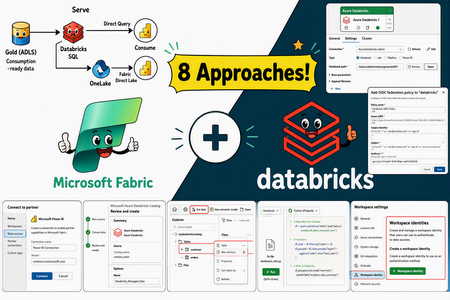
Azure Databricks and Microsoft Fabric can be combined to create a unified and scalable analytics ecosystem. This document outlines eight distinct integration approaches, each accompanied by step-by-step implementation guidance and key design considerations. These methods are not prescriptive—your cloud architecture team can choose the integration strategy that best aligns with your organization’s governance model, workload requirements and platform preferences. Whether you prioritize centralized orchestration, direct data access, or seamless reporting, the flexibility of these options allows you to tailor the solution to your specific needs.7.4KViews9likes1CommentMicrosoft Fabric Operations Agent Step by Step Walkthrough
Fabric Capacity and Workspace You need a Microsoft Fabric workspace backed by a paid capacity. Trial capacities are not supported for Operations Agent. Your capacity must be provisioned in a supported region. As of April 2026, Operations Agent is available in all Microsoft Fabric regions except South Central US and East US. If your capacity is outside the US or EU, you will also need to enable cross geo processing and storage for AI through the tenant settings. Your workspace must contain an Eventhouse with at least one KQL database. The Eventhouse is the telemetry backbone, and the KQL database holds the tables the agent will monitor. In the screenshot below, you can see a workspace named OperationAgent-WS that contains an Eventhouse (ops_eventhouse), two KQL databases (ops_db and ops_eventhouse), and a Lakehouse (ops_lakehouse). This is the environment used throughout this guide. Figure 1. Workspace contents showing the Eventhouse, KQL databases, and Lakehouse ready for the Operations Agent. Enabling the Operations Agent in the Admin Portal A Fabric administrator must enable the Operations Agent preview toggle in the Admin Portal before anyone in the organization can create an agent. Navigate to the Admin Portal, locate the section for Real Time Intelligence, and find the setting labeled Enable Operations Agents (Preview). Toggle it to Enabled for the entire organization or for specific security groups depending on your governance requirements. In addition to this toggle, ensure that Microsoft Copilot and Azure OpenAI Service are also enabled at the tenant level. The Operations Agent relies on Azure OpenAI to generate its playbook and to reason about data when conditions are met. Figure 2. The Admin Portal showing the Enable Operations Agents (Preview) toggle set to Enabled for the entire organization. Note that messages sent to Operations Agents are processed through the Azure AI Bot Service. If your capacity is outside the EU Data Boundary, data may be processed outside your geographic or national cloud boundary. Be sure to communicate this to your compliance stakeholders before enabling the feature in production tenants. Microsoft Teams Account Every person who will receive recommendations from the agent must have a Microsoft Teams account. The Operations Agent delivers its findings and action suggestions through a dedicated Teams app called Fabric Operations Agent. You can install this app from the Teams app store by searching for its name. Once installed, the agent will be able to send messages containing data summaries and recommended actions directly to the designated recipients. Creating and Configuring the Operations Agent With your prerequisites in place, you are ready to create the Operations Agent. The following steps walk you through the entire configuration process using the Fabric portal. Step 1: Create a New Operations Agent Open the Microsoft Fabric portal and navigate to your workspace. On the Fabric home page, select the ellipsis icon and then select Create. In the Create pane, scroll to the Real Time Intelligence section and select Operations Agent. A dialog will appear asking you to name your agent and select the target workspace. Choose a descriptive name that reflects the agent’s purpose. In this guide, the agent is named OperationsAgent_1 and is deployed to the OperationAgent-WS workspace. Step 2: Define Business Goals and Agent Instructions Once the agent is created, you are taken to the Agent Setup page. This page is divided into two halves. On the left side, you configure the agent’s behavior. On the right side, you see the generated Agent Playbook after saving. The first field is Business Goals, where you describe the high level objective the agent should accomplish. Write this in clear, outcome oriented language. In this demo, the business goal is set to: “Monitor data pipeline execution and alert on failures.” The second field is Agent Instructions, where you provide more specific guidance on how the agent should reason about the data. Think of this as a brief you would hand to an analyst who will be watching your systems overnight. Be explicit about the table name, the column to watch, and the condition that constitutes an alert. In this demo, the instruction reads: “Monitor pipeline_runs table. Alert when status is failed.” Together, the business goals and instructions give the underlying large language model enough context to generate an accurate playbook. The more specific your instructions, the more reliable the agent’s behavior will be. Figure 3. The Agent Setup page showing business goals, agent instructions, and the generated playbook on the right. On the right side of the screen, you can see the Agent Playbook that was generated after saving. The playbook includes a Business Term Glossary, which shows the business objects the agent inferred from your goals and data. In this case, it identified an object called PipelineRun, mapped to the pipeline_runs table, with two properties: status (the pipeline run status from the status column) and runId (the unique identifier from the run_id column). It also displays the Rules section, which contains the conditions the agent will evaluate. Review the playbook carefully. Since it is generated by an AI model, there may be occasional misinterpretations. Verify that every property maps to the correct column and that the rules reflect your intended thresholds. If something is off, update your goals or instructions and save again to regenerate the playbook. Step 3: Add a Knowledge Source Scroll down on the Agent Setup page to find the Knowledge section. This is where you connect the agent to the data it will monitor. When you first open this section, it will display a message indicating that no knowledge source has been added yet. Figure 4. The Knowledge section before any data source has been added. Select the Add Data button to browse the available data sources. A panel will appear listing the KQL databases and Eventhouses accessible within your Fabric environment. In this demo, three sources are available: ops_db in the OperationAgent-WS workspace, wms_eventhouse in the WMS-CDC-Demo workspace, and ops_eventhouse in the OperationAgent-WS workspace. Select the database that contains the table you want the agent to monitor. For this guide, select ops_db, which holds the pipeline_runs table referenced in the agent instructions. Figure 5. Selecting the knowledge source from available KQL databases and Eventhouses. Once the knowledge source is connected, the agent will be able to query this database at regular intervals (approximately every five minutes) to evaluate its rules. Make sure the table in your selected database is actively receiving data, especially if you plan to demonstrate the agent detecting a condition in real time. Step 4: Define Actions Actions are the responses the agent can recommend when it detects a condition that matches its rules. Scroll further down the Agent Setup page to find the Actions section. Select the Add Action button to define a new custom action. A dialog titled New Custom Action will appear. It has three fields. The Action Name is a short, descriptive label for the action. The Action Description explains the purpose of the action and gives the agent context about when to use it. The Parameters section allows you to define input fields that pass dynamic values (such as names, dates, or identifiers) into the Power Automate flow that will be triggered. Figure 6. The New Custom Action dialog where you define the action name, description, and optional parameters. In this demo, the action is named Send Email Alert with a description indicating that it should send an email notification when a pipeline failure is detected. Once created, you can see the action listed in the Actions section with a green status indicator showing that the action is successfully connected. Figure 7. The Actions section showing the Send Email Alert action with a connected status. Step 5: Configure the Custom Action with Power Automate After creating the action, you need to configure it by linking it to an activator item and a Power Automate flow. Select the action you just created to open the Configure Custom Action pane. In this pane, you will see several fields. First, select the Workspace where the activator item resides. In this demo, the workspace is OperationAgent-WS. Next, select the Activator, which is the Fabric item that bridges the Operations Agent and Power Automate. Here, the activator is named Email_Alert_Activator. Once the connection is created, a Connection String is generated. This string is a unique identifier that links the Operations Agent to the Power Automate flow. Select the Copy button to copy this connection string to your clipboard. You will need it in the next step. Below the connection string, you will find the Open Flow Builder button. Select this to launch the Power Automate flow designer where you will build the email notification flow. Figure 8. The Configure Custom Action pane showing the workspace, activator, connection string, and the button to open the flow builder. Step 6: Build the Power Automate Flow When you select Open Flow Builder, a new browser tab opens with the Power Automate designer. The flow is pre-configured with a trigger called When an Activator Rule is Triggered. This trigger fires whenever the Operations Agent approves an action. In the Parameters tab of the trigger, you will see a field labeled Connection String. Paste the connection string you copied from the previous step into this field. This is the critical link that connects the Power Automate flow back to your Operations Agent. If this string is incorrect or missing, the flow will not fire when the agent recommends the action. Figure 9. The Power Automate flow builder with the activator trigger and the Connection String field. Below the trigger, you can add any actions your workflow requires. For an email alert scenario, add an Office 365 Outlook action to send an email to the operations team. You can use dynamic content from the trigger to include details such as the pipeline run ID, the failure status, and any parameters passed through from the Operations Agent. Save the flow and return to the Fabric portal. Your action is now fully configured and ready to be triggered by the agent. Step 7: Generate the Playbook and Start the Agent With all configuration complete (business goals, instructions, knowledge source, and actions), select Save on the Agent Setup page. Fabric will use the underlying large language model to generate the agent’s playbook. The playbook is a structured summary of everything the agent knows: its goals, the properties it monitors, and the rules it evaluates. You can also select Generate Playbook at the top of the page to regenerate the playbook if you have made changes. Review the playbook one final time to confirm that properties map correctly to your table columns and that rules reflect the exact conditions you want to monitor. When you are satisfied, select Start in the toolbar at the top of the page. The agent will begin actively monitoring your data. It queries the knowledge source approximately every five minutes, evaluating the playbook rules against the latest data. If a condition is met, the agent uses the LLM to summarize the data, generate a recommendation, and send a message to the designated recipients through Microsoft Teams. To pause the agent at any time, select Stop. This is useful during demos when you want to control the timing of the demonstration. How the Agent Operates at Runtime Once started, the Operations Agent follows a continuous loop. Every five minutes, it queries the connected KQL database to evaluate the rules defined in the playbook. If no conditions are met, it continues silently. If a condition is matched (for example, a pipeline run with a status of "failed" appears in the pipeline_runs table), the agent proceeds through the following sequence. First, the agent uses the large language model to analyze the data that triggered the condition. It summarizes the context, identifies the relevant business object (such as a specific pipeline run), and determines which action to recommend. Second, the agent sends a message to the designated recipients through Microsoft Teams. This message contains a summary of the detected insight, the data context that triggered it, and a suggested action. Recipients can approve the action by selecting Yes or reject it by selecting No. If parameters are included (such as a run ID or a severity level), they can be reviewed and adjusted before final approval. Third, if the recipient approves the action, the agent executes it on behalf of the creator using the creator’s credentials. In this demo, approving the action would trigger the Power Automate flow that sends an email alert. It is important to note that if a recommendation is not responded to within three days, the operation is automatically canceled. After cancellation, the action can no longer be approved or interacted with.1.2KViews1like1Comment
Simplifying Migration to Fabric Real-Time Intelligence for Power BI Real Time Reports
Power BI with real-time streaming has been the preferred solution for users to visualize streaming data. Real-Time streaming in PowerBI is being retired. We recommend users to start planning the migration of their data processing pipeline to Fabric Real-Time Intelligence.8.8KViews2likes1CommentAzure Databricks & Fabric Disaster Recovery: The Better Together Story
Author's: Amudha Palani amudhapalani, Oscar Alvarado oscaralvarado, Eric Kwashie ekwashie, Peter Lo PeterLo and Rafia Aqil Rafia_Aqil Disaster recovery (DR) is a critical component of any cloud-native data analytics platform, ensuring business continuity even during rare regional outages caused by natural disasters, infrastructure failures, or other disruptions. Identify Business Critical Workloads Before designing any disaster recovery strategy, organizations must first identify which workloads are truly business‑critical and require regional redundancy. Not all Databricks or Fabric processes need full DR protection; instead, customers should evaluate the operational impact of downtime, data freshness requirements, regulatory obligations, SLAs, and dependencies across upstream and downstream systems. By classifying workloads into tiers and aligning DR investments accordingly, customers ensure they protect what matters most without over‑engineering the platform. Azure Databricks Azure Databricks requires a customer‑driven approach to disaster recovery, where organizations are responsible for replicating workspaces, data, infrastructure components, and security configurations across regions. Full System Failover (Active-Passive) Strategy A comprehensive approach that replicates all dependent services to the secondary region. Implementation requirements include: Infrastructure Components: Replicate Azure services (ADLS, Key Vault, SQL databases) using Terraform Deploy network infrastructure (subnets) in the secondary region Establish data synchronization mechanisms Data Replication Strategy: Use Deep Clone for Delta tables rather than geo-redundant storage Implement periodic synchronization jobs using Delta's incremental replication Measure data transfer results using time travel syntax Workspace Asset Synchronization: Co-deploy cluster configurations, notebooks, jobs, and permissions using CI/CD Utilize Terraform and SCIM for identity and access management Keep job concurrencies at zero in the secondary region to prevent execution Fully Redundant (Active-Active) Strategy The most sophisticated approach where all transactions are processed in multiple regions simultaneously. While providing maximum resilience, this strategy: Requires complex data synchronization between regions Incurs highest operational costs due to duplicate processing Typically needed only for mission-critical workloads with zero-tolerance for downtime Can be implemented as partial active-active, processing most workload in primary with subset in secondary Enabling Disaster Recovery Create a secondary workspace in a paired region. Use CI/CD to keep Workspace Assets Synchronized continuously. Requirement Approach Tools Cluster Configurations Co-deploy to both regions as code Terraform Code (Notebooks, Libraries, SQL) Co-deploy with CI/CD pipelines Git, Azure DevOps, GitHub Actions Jobs Co-deploy with CI/CD, set concurrency to zero in secondary Databricks Asset Bundles, Terraform Permissions (Users, Groups, ACLs) Use IdP/SCIM and infrastructure as code Terraform, SCIM Secrets Co-deploy using secret management Terraform, Azure Key Vault Table Metadata Co-deploy with CI/CD workflows Git, Terraform Cloud Services (ADLS, Network) Co-deploy infrastructure Terraform Update your orchestrator (ADF, Fabric pipelines, etc.) to include a simple region toggle to reroute job execution. Replicate all dependent services (Key Vault, Storage accounts, SQL DB). Implement Delta “Deep Clone” synchronization jobs to keep datasets continuously aligned between regions. Introduce an application‑level “Sync Tool” that redirects: data ingestion compute execution Enable parallel processing in both regions for selected or all workloads. Use bi‑directional synchronization for Delta data to maintain consistency across regions. For performance and cost control, run most workloads in primary and only subset workloads in secondary to keep it warm. Implement Three-Pillar DR Design Primary Workspace: Your production Databricks environment running normal operations Secondary Workspace: A standby Databricks workspace in a different(paired) Azure region that remains ready to take over if the primary fails. This architecture ensures business continuity while optimizing costs by keeping the secondary workspace dormant until needed. The DR solution is built on three fundamental pillars that work together to provide comprehensive protection: 1. Infrastructure Provisioning (Terraform) The infrastructure layer creates and manages all Azure resources required for disaster recovery using Infrastructure as Code (Terraform). What It Creates: Secondary Resource Group: A dedicated resource group in your paired DR region (e.g., if primary is in East US, secondary might be in West US 2) Secondary Databricks Workspace: A standby Databricks workspace with the same SKU as your primary, ready to receive failover traffic DR Storage Account: An ADLS Gen2 storage account that serves as the backup destination for your critical data Monitoring Infrastructure: Azure Monitor Log Analytics workspace and alert action groups to track DR health Protection Locks: Management locks to prevent accidental deletion of critical DR resources Key Design Principle: The Terraform configuration references your existing primary workspace without modifying it. It only creates new resources in the secondary region, ensuring your production environment remains untouched during setup. 2. Data Synchronization (Delta Notebooks) The data synchronization layer ensures your critical data is continuously backed up to the secondary region. How It Works: The solution uses a Databricks notebook that runs in your primary workspace on a scheduled basis. This notebook: Connects to Backup Storage: Uses Unity Catalog with Azure Managed Identity for secure, credential-free authentication to the secondary storage account Identifies Critical Tables: Reads from a configuration list you define (sales data, customer data, inventory, financial transactions, etc.) Performs Deep Clone: Uses Delta Lake's native CLONE functionality to create exact copies of your tables in the backup storage Tracks Sync Status: Logs each synchronization operation, tracks row counts, and reports on data freshness Authentication Flow: The synchronization process leverages Unity Catalog's managed identity capabilities: An existing Access Connector for Unity Catalog is granted "Storage Blob Data Contributor" permissions on the backup storage. Storage credentials are created in Databricks that reference this Access Connector. The notebook uses these credentials transparently—no storage keys or secrets are required. What Gets Synced: You define which tables are critical to your business operations. The notebook creates backup copies including: Full table data and schema Table partitioning structure Delta transaction logs for point-in-time recovery 3. Failover Automation (Python Scripts) The failover automation layer orchestrates the switch from primary to secondary workspace when disaster strikes. Microsoft Fabric Microsoft Fabric provides built‑in disaster recovery capabilities designed to keep analytics and Power BI experiences available during regional outages. Fabric simplifies continuity for reporting workloads, while still requiring customer planning for deeper data and workload replication. Power BI Business Continuity Power BI, now integrated into Fabric, provides automatic disaster recovery as a default offering: No opt-in required: DR capabilities are automatically included. Azure storage geo-redundant replication: Ensures backup instances exist in other regions. Read-only access during disasters: Semantic models, reports, and dashboards remain accessible. Always supported: BCDR for Power BI remains active regardless of OneLake DR setting. Microsoft Fabric Fabric's cross-region DR uses a shared responsibility model between Microsoft and customers: Microsoft's Responsibilities: Ensure baseline infrastructure and platform services availability Maintain Azure regional pairings for geo-redundancy. Provide DR capabilities for Power BI as default. Customer Responsibilities: Enable disaster recovery settings for capacities Set up secondary capacity and workspaces in paired regions Replicate data and configurations Enabling Disaster Recovery Organizations can enable BCDR through the Admin portal under Capacity settings: Navigate to Admin portal → Capacity settings Select the appropriate Fabric Capacity Access Disaster Recovery configuration Enable the disaster recovery toggle Critical Timing Considerations: 30-day minimum activation period: Once enabled, the setting remains active for at least 30 days and cannot be reverted. 72-hour activation window: Initial enablement can take up to 72 hours to become fully effective. Azure Databricks & Microsoft Fabric DR Considerations Building a resilient analytics platform requires understanding how disaster recovery responsibilities differ between Azure Databricks and Microsoft Fabric. While both platforms operate within Azure’s regional architecture, their DR models, failover behaviors, and customer responsibilities are fundamentally different. Recovery Procedures Procedure Databricks Fabric Failover Stop workloads, update routing, resume in secondary region. Microsoft initiates failover; customers restore services in DR capacity. Restore to Primary Stop secondary workloads, replicate data/code back, test, resume production. Recreate workspaces and items in new capacity; restore Lakehouse and Warehouse data. Asset Syncing Use CI/CD and Terraform to sync clusters, jobs, notebooks, permissions. Use Git integration and pipelines to sync notebooks and pipelines; manually restore Lakehouses. Business Considerations Consideration Databricks Fabric Control Customers manage DR strategy, failover timing, and asset replication. Microsoft manages failover; customers restore services post-failover. Regional Dependencies Must ensure secondary region has sufficient capacity and services. DR only available in Azure regions with Fabric support and paired regions. Power BI Continuity Not applicable. Power BI offers built-in BCDR with read-only access to semantic models and reports. Activation Timeline Immediate upon configuration. DR setting takes up to 72 hours to activate; 30-day wait before changes allowed.1.5KViews5likes0CommentsSmart Pipelines Orchestration: Designing Predictable Data Platforms on Shared Spark
Introduction In mature data platforms, scaling compute is rarely the primary challenge. Shared, elastic Spark pools already provide sufficient processing capacity for most workloads. The harder problem is achieving predictable execution when multiple pipelines compete for the same resources. In Azure Synapse, Spark pools are commonly shared across pipelines to optimize cost and utilization. While this model is efficient, it introduces a key limitation: execution order is determined by scheduling behavior, not business priority. This post describes an orchestration pattern that makes priority explicit, allowing critical workloads to run predictably on shared Spark compute without modifying Spark code, configuration, or cluster capacity. Goal This work does not aim to optimize Spark performance. Its goal is to ensure that, when pipelines share a Spark pool: latency-sensitive workloads run first heavy backfills do not delay critical pipelines execution order is deterministic under contention All of this needed to be achieved without changes to Spark configuration, notebook logic, or cluster size. Why This Problem Occurs In a naïve orchestration model, pipelines are triggered in parallel. From Spark’s perspective: all jobs are equivalent all jobs attempt to acquire executors at the same time scheduling decisions are based on availability and timing As a result, priority is implicit and often incorrect. A heavy workload may acquire executors before a lightweight but critical one simply because it requests more resources earlier. This behavior is expected from Spark. The issue lies in orchestration, not in compute. Core Concept: Priority as Execution Ordering In shared Spark platforms, priority is enforced through execution ordering, not compute tuning. The orchestration layer controls when workloads are admitted to shared compute. Once execution begins, Spark processes each workload normally. This preserves Spark’s execution model while providing deterministic workload ordering. Step 1: Workload Classification In the demo presented in this blog, workloads are classified during configuration based on business impact: Category Description Priority example Light (critical) SLA sensitive dashboard and downstream consumers High priority , low resource weight(data volume) Medium (High) Core reporting workloads Medium priority Heavy(Best Effort) Backfills and historical computes Low priority, high resource weight(data volume) This classification is external to Spark and external to code. It represents business intent, not implementation. As a future phase, classification can be automated,for example, an agent may adjust priority based on observed failure rates or execution stability. Workload classification is expressed as orchestration metadata, for example: [ {"name":"ExecDashboard","pipeline":"PL_Light_ExecDashboard","weight":1,"tier":"Critical"}, {"name":"FinanceReporting","pipeline":"PL_Medium_FinanceReporting","weight":3,"tier":"High"}, {"name":"Backfill","pipeline":"PL_Heavy_Backfill","weight":8,"tier":"BestEffort"} ] What Runs in Each Workload Category All pipelines execute on the same shared Spark pool, but the work they perform differs in scope, data volume, and sensitivity to contention. Light workloads power SLA-sensitive dashboards and downstream consumers. Their notebooks perform targeted reads with strong filtering, limited joins, and small aggregations. Execution time is short, and overall pipeline duration is dominated by executor availability rather than computation. Medium workloads represent core reporting and analytics logic. These notebooks process larger datasets, perform joins across multiple sources, and apply aggregations that are more expensive than Light workloads but still time-bounded and business-critical. Heavy workloads are best-effort pipelines such as backfills and historical recomputation. Their notebooks scan large data volumes, apply expensive transformations, and are optimized for throughput rather than responsiveness. These workloads tolerate delay but place significant pressure on shared compute when admitted concurrently. All workloads use the same Spark pool, executor configuration, and runtime. The distinction reflects business intent and execution characteristics, not Spark tuning. Example notebooks for each category are available in the accompanying GitHub repository. Step 2: Naïve Orchestration (Baseline) The following pipeline run illustrates the baseline behavior when all workloads are triggered in parallel against a shared Spark pool. All Light, Medium, and Heavy pipelines are admitted concurrently. Executor acquisition and execution order depend on timing rather than business priority, resulting in non-deterministic behavior under contention. Although Light workloads require minimal compute, they are delayed by executor contention caused by Medium and Heavy pipelines entering the Spark pool at the same time. Step 3: Smart Orchestration (Priority-Aware) Orchestration Model The same child pipelines and notebooks are reused. The parent pipeline enforces admission order: Light (Critical) Medium (High) Heavy (Best Effort) Dependencies control admission to the Spark pool. Parallelism is preserved within a priority class. Effect on Shared Spark Light workloads enter the Spark pool without contention Medium workloads run after Light completes Heavy workloads are intentionally delayed Executor acquisition aligns with business priority Light pipelines execute first and complete before medium pipelines are admitted. Heavy workloads run last by design. No Spark configuration changes are introduced. The Spark pool, notebooks, and executor configuration are identical to the naïve run. Only the orchestration graph differs. Step 4: Impact on Light Workloads Light workloads are particularly sensitive to orchestration because their runtime is dominated by queueing time, not computation. Comparing the naïve and priority-aware runs shows that Spark execution time is unchanged, but pipeline duration improves due to earlier admission to the Spark pool and immediate executor access Naïve Execution Spark execution time: short and unchanged Pipeline duration: minutes under contention Delay caused by executor unavailability Smart Execution Spark execution time: unchanged Pipeline duration closely matches compute time Immediate access to executors The improvement comes from removing admission contention, not from increasing resources. Results and Performance Compared to naïve orchestration, priority-aware orchestration ensures that Light workloads complete in minutes rather than tens of minutes under contention, while Spark execution time itself remains unchanged. Heavy workloads no longer delay latency-sensitive pipelines, and execution order is deterministic across runs. These improvements are achieved solely by controlling admission to the shared Spark pool, without modifying Spark configuration, notebook logic, or cluster capacity. Next Steps: 1. Optimizing Heavy Workloads Once heavy workloads are isolated by priority, they can be optimized independently: retries with backoff tolerance for transient failures increased executor counts or larger pools Without admission control, these optimizations increase contention, with smart orchestration, they do not impact critical pipelines. 2. Moving Beyond Static Classification In this implementation, workload classification is static and configuration-driven, which is sufficient for stabilization. A next phase is adaptive classification: collect execution metrics and failure rates detect unstable pipelines reclassify pipelines that exceed thresholds (e.g., >20% failures in a rolling window) This prevents unstable workloads from impacting critical execution paths and makes the pipeline reliable with minimal maintenance. 3. Assisted Classification with Copilot agent At scale, priority decisions benefit from automation. A Copilot-style agent can use historical execution data to recommend classification changes, grounding decisions in observed behavior while keeping engineers in control. Example: Changing workload classification from Light to Medium Consider a pipeline initially classified as Light because it powers an SLA-sensitive dashboard and typically executes quickly with minimal resource usage. Over time, execution telemetry shows a change in behavior: The pipeline fails in 4 of the last 10 runs due to transient Spark errors Average duration has increased by 3×, even when admitted early Retry attempts amplify contention for other Light workloads Based on these signals, an automated agent flags the workload as unstable and recommends reclassifying it from Light to Medium. After reclassification: The pipeline is admitted after Light workloads but before Heavy workloads It no longer blocks latency-critical paths when retries occur Execution remains predictable, while instability is isolated from critical workloads The notebook logic and Spark configuration remain unchanged, only the workload’s admission priority is updated via orchestration metadata. This approach allows the platform to adapt to changing workload characteristics while preserving deterministic execution for critical pipelines. Conclusion Parallel execution is a default, not a strategy. In shared environments, orchestration must explicitly encode business intent rather than relying on scheduler behavior. Enforcing priority at the orchestration layer restores predictability without sacrificing efficiency and provides a foundation for adaptive, policy-driven execution as platforms evolve. Links Orchestrating data movement and transformation in Azure Data Factory - Training | Microsoft Learn How to Optimize Spark Jobs for Maximum Performance: A Complete Guide GitHub repo for notebook reference: sallydabbahmsft/Smart-pipelines-orchestration Feedback: Sally Dabbah | LinkedIn925Views2likes2Comments