microsoft detection and response team (dart)
40 TopicsCustom Detection Rules as Code in Sentinel Repositories: What Your Pipeline Owns Now
While going through the June Sentinel updates I almost scrolled past this one, and I think that would have been a mistake: custom detection rules can now be managed as code in Sentinel Repositories, the same way analytics rules, playbooks, parsers and workbooks already are. You connect a GitHub or Azure DevOps repo, enable the Custom Detection Rules content type, and rules are synced on every commit. There is also a standalone path via the Bicep CLI for teams running their own pipelines. The feature is in preview per the Learn documentation, and in my view it matters more than the low-key rollout suggests. Microsoft has been positioning custom detections as the unified experience for building rules over both Defender XDR and Sentinel data since late 2025. If custom detections are becoming the primary detection type, then this preview is the moment your primary detection type becomes pipeline-managed. I spent some time in the documentation to understand what that actually means, and there is one implication I have not seen anyone talk about yet. How it works Custom detection rules use a different mechanism than every other content type in Repositories. Analytics rules deploy as Microsoft.OperationalInsights/workspaces/providers/alertRules resources, with the Microsoft.SecurityInsights provider sitting in the resource name. Custom detection rules instead use a dedicated Bicep extension. You declare it in a `bicepconfig.json` at the repo root: { "extensions": { "MicrosoftSecurity": "br:mcr.microsoft.com/bicep/extensions/microsoftsecurity:v1.0.1" } } The rule itself is a `Microsoft.Security/detectionRules` resource. This is the structure from the Microsoft documentation: extension MicrosoftSecurity resource detectionRule 'Microsoft.Security/detectionRules@2026-06-01-preview' = { id: 'custom-rule-id' displayName: 'Custom Rule Display Name' status: 'enabled' queryCondition: { queryText: 'DeviceProcessEvents | take 10 | project DeviceId, Timestamp, FileName' } schedule: { frequency: 'PT1H' } detectionAction: { alertTemplate: { title: '<ruleTitle>' description: 'Custom detection rule' severity: 'medium' tactics: [ { tactic: 'Execution' techniques: [ { technique: 'T1059' } ] } ] entityMappings: { hosts: [ { id: 'h' deviceIdColumn: 'DeviceId' } ] } } } } Rules are uniquely identified by the `id` property, which you provide in the template. Deployment is either the automatic Repositories sync or a plain `az deployment group create` against a resource group. That last part is what I like most about the design: any CI/CD system that can run Azure CLI can ship these rules. Prerequisites beyond the standard Repositories setup: a Microsoft 365 E5 license or equivalent that includes Defender XDR, and a Sentinel workspace onboarded to the Defender portal. Two preview limitations are documented: custom frequency for Sentinel-only data is not supported yet, and neither are custom details. The part that made me stop reading and think Repositories are designed as the single source of truth. The documentation is explicit that content in your repo overwrites changes made through the portal. That is the whole point of the feature, and for analytics rules it has been mostly harmless. For custom detections I see a wrinkle. When Microsoft renames tables or columns in the advanced hunting schema, those naming changes are applied automatically to queries saved in Microsoft Defender, including the queries inside custom detection rules. The docs are equally explicit that this automatic migration does not cover queries run via API or saved anywhere outside Defender. A Git repo is outside Defender. Play that forward with a current example. The `AIAgentsInfo` table stopped being accessible on July 1, 2026, replaced by the unified `AgentsInfo` table with a changed column set. A portal-managed custom detection referencing the old table got migrated automatically. The same rule managed as code did not, because the authoritative copy of the query now lives in your repo, and nothing in the sync path rewrites your Bicep files. Your repo is now the thing standing between Microsoft's server-side fix and your production detection. Either the sync starts failing, or the stale query gets reasserted over the migrated rule. The documentation does not say which of the two happens, and honestly, neither is good. No alert fires for either. And if smart deployments, which skip files that have not changed since the last deployment, apply to this content type the same way they do to the rest of Repositories, it gets slightly worse in a way I find almost funny: a stale rule would sit untouched until someone happens to edit it. What I would put in front of the merge To be clear, none of this is an argument against the feature. I want detections in Git, and I suspect most people reading this do too. It is an argument that moving custom detections into a repo moves the schema lifecycle responsibility into your review process, because the portal safety net explicitly does not reach into source control. Concretely, a PR touching detection content should be checked for references to deprecated or transitioning advanced hunting tables, for the result columns the custom detection docs recommend (`Timestamp` or `TimeGenerated`, plus `DeviceId` or `DeviceName` for Defender for Endpoint tables, plus `Timestamp` and `ReportId` from the same event for the other Defender tables), and for complete entity mappings, since entities drive how alerts group into incidents. One more detail from the custom detection docs that I suspect will trip up people coming from analytics rules, because it goes against years of muscle memory: avoid filtering on `Timestamp` or `TimeGenerated` in the query itself. The service prefilters data based on the detection lookback using ingestion time. The scheduled-analytics-rule reflex of always pinning a time window works against you here. Whether you enforce these checks with a homegrown script or a linting step in the pipeline matters less than doing it before merge rather than discovering it in the alert queue. The deployment mechanics are now solved. The content governance is yours. Full transparency: I have worked through the documentation and the sample content, but I have not yet run a retired-table scenario through the sync myself. So if you are testing the preview, I would genuinely like to hear how it behaves in your environment when a repo-managed rule references a table like `AIAgentsInfo`. That failure mode is the one I want to understand before this reaches GA. Beyond that specific case, I am curious where you all stand: are you moving custom detections into Git now, or waiting for GA? And if you already run detections as code for analytics rules, what checks have earned a permanent place in your PR pipeline? My used references: Manage content as code with Microsoft Sentinel repositories: https://learn.microsoft.com/en-us/azure/sentinel/ci-cd-custom-content Advanced hunting schema naming changes: https://learn.microsoft.com/en-us/defender-xdr/advanced-hunting-schema-changes Create custom detection rules in Microsoft Defender XDR: https://learn.microsoft.com/en-us/defender-xdr/custom-detection-rules Custom detections as the unified detection experience: https://techcommunity.microsoft.com/t5/microsoft-defender-threat-protection/custom-detections-are-now-the-unified-experience-for-creating/ba-p/4463875SolvedSecurity Copilot Agents in Defender XDR: where things actually stand
With RSAC 2026 behind us and the E5 inclusion now rolling out between April 20 and June 30, anyone planning SOC workflows or sitting on a capacity budget needs to get a clear picture of what is GA, what is preview, and what was just announced. The marketing pages tend to blur those lines. This is my sober look at the current state, with the operational details that matter for adoption decisions. What is actually shipping right now The Phishing Triage Agent is GA. It only handles user-reported phish through Defender for Office 365 P2, but for most SOCs that is a meaningful chunk of the L1 queue. Verdicts come with a natural-language rationale rather than just a label, which is the part that determines whether analysts will trust it. The agent learns from analyst confirmations and overrides, so the feedback loop matters more than the initial setup. There is a setup detail that is easy to miss: the agent will not classify alerts that have already been suppressed by alert tuning. The built-in rule "Auto-Resolve - Email reported by user as malware or phish" needs to be off, and any custom tuning rules that touch this alert type need review. If you skip this, the agent runs on an empty queue and you wonder why nothing is happening. The Threat Intelligence Briefing Agent is also GA. It produces tenant-tailored intel briefings on a regular cadence. Useful, but lower operational impact than the triage agents. Copilot Chat in Defender went GA with the April 2026 update. Conversational Q&A inside the portal, grounded in your incident and entity data. This is the lowest-risk way to get value out of Security Copilot and probably where most teams should start. Public preview, worth watching The Dynamic Threat Detection Agent is the most technically interesting one. It runs continuously in the Defender backend, correlates across Defender and Sentinel telemetry, generates its own hypotheses, and emits a dynamic alert when the evidence converges. Detection source on the alert is Security Copilot. Each alert includes the structured fields (severity, MITRE techniques, remediation) plus a narrative explaining the reasoning. For EU tenants the residency point is worth confirming with whoever owns data protection in your org: the service runs region-local, so customer data and required telemetry stay inside the designated geographic boundary. During public preview it is enabled by default for eligible customers and is free. At GA, currently targeted for late 2026, it transitions to the SCU consumption model and can be disabled. The Threat Hunting Agent is also in public preview. Natural language to KQL with guided hunting. Lower stakes, but useful for teams without deep KQL expertise on hand. Announced at RSAC, still preview Two agents got the headlines in March: The Security Alert Triage Agent extends the agentic triage approach beyond phishing into identity and cloud alerts. The longer-term direction is consolidating phishing, identity, and cloud triage under a single agent. Rollout is from April 2026, in preview. The Security Analyst Agent is the multi-step investigation agent. Deeper context across Defender and Sentinel, prioritised findings, transparent reasoning trace. Preview since March 26. Both look promising on paper, but Microsoft's history of preview features that take a long time to mature is well-documented. I would not plan production workflows around either of them yet. What you actually get with the E5 inclusion This is the licensing change most people are dealing with right now. Security Copilot has been part of the E5 product terms since January 1, 2026. Tenant rollout is phased between April 20 and June 30, 2026, with a 7-day notification before activation. The numbers: 400 SCUs per month for every 1,000 paid user licenses Capped at 10,000 SCUs per month, which you hit at around 25,000 seats Linear scaling below that, so a 3,000-seat tenant gets 1,200 SCUs per month No rollover, the pool resets monthly What is included: chat, promptbooks, agentic scenarios across Defender, Entra, Intune, Purview, and the standalone portal. Agent Builder and the Graph APIs are in. If you also run Sentinel, the included SCUs apply to Security Copilot scenarios there. What is not included: Sentinel data lake compute and storage. Those still run through Azure on the regular meters. Beyond the included pool you pay 6 USD per SCU pay-as-you-go, with 30 days notice before that mode kicks in. Practical things worth knowing before activation A few details that are easy to miss in the docs: Under System > Settings > Copilot in Defender > Preferences, switch from Auto-generate to Generate on demand. Auto-generate will burn SCUs on incidents nobody is going to look at. Generate on demand gives you direct control. In the Security Copilot portal workspace settings, check the data storage location and the data sharing toggle. Data sharing is on by default, which means Microsoft uses interaction data for product improvement. If your compliance position does not allow that, change it before agents start running. Changing it requires the Capacity Contributor role. Agent runs are not equivalent to the same number of analyst chat prompts. A triage agent processing fifty alerts in one run consumes meaningfully more SCUs than fifty manual prompts on the same data. If you have a high-volume phishing pipeline, model that out before you flip the switch broadly. The usage dashboard in the Security Copilot portal breaks down consumption by day, user, and scenario. Output quality depends on telemetry quality. Flaky connectors, gaps in log sources, or a high baseline of misconfigured alerts will produce verdicts that match. Connector health monitoring (the SentinelHealth table in Advanced Hunting is a sensible starting point) is a precondition. The agents only improve if analysts feed the override loop. If your team treats the verdicts as background noise rather than confirming or correcting them, the feedback signal is lost and calibration stays where it shipped. That is a process problem, not a product problem, but it determines whether any of this is worth the SCUs. A reasonable adoption order A rough sequence that minimises capacity surprises: Copilot Chat in Defender first. Lowest risk, immediate value through natural language Q&A in the investigation context. Phishing Triage Agent on a controlled subset, with a review cadence in place. Check the built-in tuning rules first. Watch the SCU dashboard for the first month before adding anything else. Let the Dynamic Threat Detection Agent run while it is in public preview, since it is default-on and free anyway. Compare its alerts against existing Sentinel detections. Security Alert Triage Agent for identity and cloud once the phishing baseline is stable. Establish a monthly review covering agent decisions, false-positive rate, SCU cost, and MTTD/MTTR trends. Technically, agentic triage is moving past phishing into identity and cloud, and the Dynamic Threat Detection Agent represents a genuine attempt at the false-negative problem rather than just another rule engine. Lizenziell, the E5 inclusion removes the biggest barrier to adoption that previously existed. The risk is enabling everything at once. Agents that nobody reviews are agents that consume capacity without delivering value, and the SCU dashboard is the only thing that will tell you that is happening. One agent, one use case, a 30-day baseline, then the next one. The order matters more than the speed.When the shield becomes the sword: How misconfigured PAM bridges the tiering model
In the world of identity security, few tools promise as much peace of mind as Privileged Access Management (PAM). It is often referred to as the "vault" that locks away your kingdom's keys. However, in Microsoft Incident Response – the Detection and Response Team (DART) engagements, we frequently encounter a paradox: the tool used to secure Tier 0 often becomes a quick path for threat actors to compromise it. In a recent DART engagement, a threat actor moved from a compromised helpdesk workstation to full domain compromise in under four hours. They didn't use a zero-day. They used the organization's PAM server. We have seen this story play out in real-time. An organization invests heavily in Active Directory (AD) Tiering and a premium PAM solution. They feel secure. Yet, during an incident, we trace the threat actor’s path and find they didn't burn a zero-day or crack a complex algorithm. They simply walked across a bridge the organization built themselves: a PAM server positioned in Tier 1 that held the keys to Tier 0. This isn't a failure of the product; it's a failure of positioning. This post shares what DART sees on the front lines, why "intermediaries" are the most critical link in your chain, and how to deploy PAM without rolling out a red carpet for threat actors. The foundation: A quick refresher on tiering model and PAM, PIM, and PAW concepts Before we dive into the threat actor’s tactics and techniques, let’s revisit the ground rules and define a few key concepts. The Active Directory Tiering Model is built on a simple premise: prevent credential theft propagation; ensuring that credentials with administrative access to higher-tier systems are never exposed on lower-tier systems where a threat actor may already have a foothold. Tier 0 is your control plane: Domain Controllers, PKI, and the identities that manage your authentication plane. Tier 1 houses your application servers and data. Tier 2 is the high-risk environment: user workstations and devices exposed to the internet. The golden rule of tiering is strictly one-way: higher tier admins must never expose their credentials to lower tier systems, and lower tiers must never have management access to higher tiers. The core purpose of this separation is to ensure that a compromised workstation cannot yield Domain Admin credentials. However, operational tools that bridge these tiers often inadvertently break this definitional boundary. PAM (Privileged Access Management): Solutions designed to securely vault credentials and broker administrative sessions, ensuring access to critical systems is monitored and controlled. PIM (Privileged Identity Management): Tools that manage the lifecycle of elevated roles, typically by enforcing time-bound, Just-In-Time (JIT) access to eliminate standing privileges. PAW (Privileged Access Workstation): Highly hardened, dedicated devices used exclusively for sensitive administrative tasks, physically or logically isolating tier admins from high-risk activities like email and web browsing. The front-line reality: the shared intermediary trap Imagine this scenario: A threat actor compromises a standard workstation (Tier 2) through a phishing email. Their goal is the Domain Controller (Tier 0). In a properly tiered environment, this path is blocked; there are no credentials on the workstation to steal, and no direct privilege escalation route to the Domain Controller. But then the threat actor finds an intermediary system. In many environments, we see a single PAM session host used by everyone. The Tier 1 admins use it to manage application servers, and the Tier 0 admins use it to manage Domain Controllers. This convergence creates a "Shared" or "Dirty" Intermediary. The attack path The foothold: The threat actor compromises a standard Tier 2 workstation. The escalation: The threat actor moves laterally and escalates privileges by exploiting common lower-tier misconfigurations (such as Helpdesk scenarios or exposed privileged service accounts) to compromise a Tier 1 administrator account who has full control over the Tier 1 PAM Host. The pivot: Because the PAM Session Host resides in Tier 1, the threat actor uses those compromised Tier 1 admin rights to seamlessly gain full control of the underlying operating system of the PAM host itself. The compromise: The threat actor simply waits for a Tier 0 admin to initiate a session. Because the threat actor already has full administrative control over the underlying server, it is a given that they can extract the Tier 0 credentials the moment that session begins. Note: A threat actor at this stage does not need to exploit any weakness in the PAM software itself. Because the session host logically resides within the Tier 1 boundary, any identity or system with administrative rights over that tier holds ultimate authority over the host. This administrative control provides the means to modify the host's configuration, bypass security agents, and disable runtime protections before a privileged session ever begins. Once this foundational control is established, credential material processed by the operating system for outbound privileged sessions becomes accessible. This is not a PAM product failure; it is an architectural placement failure Game over: The threat actor replays those credentials to take over the Domain Controller. Here is how that compromise looks architecturally: The core concept: PAM is an intermediary To understand why the scenario above happens, we have to look at how Microsoft defines Privileged Access Intermediaries. As detailed in our Privileged access intermediaries guidance, an intermediary is any system that stands between a user and a target resource. This includes VPNs, Jump Servers, and PAM solutions. The Golden Rule of intermediaries The security assurance of the target is only as good as the security assurance of the intermediary. If you manage a Tier 0 asset (like a Domain Controller) through a PAM server, that PAM server becomes a Tier 0 asset. If that PAM server allows logins from Tier 1 users or is reachable from Tier 2 workstations, you have effectively downgraded your Domain Controllers to the security level of a workstation. You cannot have a "Tier 1" server managing "Tier 0" assets. The math simply doesn't work. Each type of intermediary serves a different role, so the security controls won’t be identical. However, some basics apply to all of them, like quickly patching appliances, firmware, operating systems, and applications. Third-party PIM/PAM solutions are often deployed on-premises or as a Virtual Machine (VM) in an Infrastructure as a Service (IaaS) environment and are usually reachable only from internal (intranet) systems. Even if they aren’t exposed to the internet, one stolen credential could let a threat actor reach them through VPN or other remote access methods. The hidden risk: the "master key" service account The attack path above assumes a threat actor waits for a human administrator to arrive. But there is a second, more direct risk and it doesn’t require patience at all. It’s not just about where users log in; it’s about the power the software holds. Consider the Password Reset scenario. A key feature of PAM is automatically rotating Domain Admin passwords, so human admins never need to know them; credentials are simply injected into the session. However, to perform this action, the PAM Service Account itself requires massive privileges (typically Domain Admin or equivalent) to reset those target passwords. Here is the trap: If your PAM Core or Vault resides in Tier 1 (or is treated as such) but manages Tier 0 credentials, you have effectively granted Domain Admin rights to a Tier 1 asset. A threat actor doesn't even need to wait for a human administrator to log in. If they compromise the underlying server where the PAM service runs, they can extract the Service Account’s credentials. Since this account has the power to reset Domain Admin passwords, the threat actor instantly elevates to Tier 0; no session required, no waiting, no noise. This reinforces the golden rule: If a Service Account manages Tier 0, the system it runs on is Tier 0. The two attack vectors: hijacking a session and stealing the service account. Both stem from the same root cause: architectural misplacement. Fix the placement, and you eliminate both. Practical checklist: are you exposed? In DART engagements, we use this checklist to rapidly assess if a PAM deployment is a security asset or a liability. Use this to validate your own environment: The intermediary check: Does any server used to manage Domain Controllers allow inbound RDP, SMB or other management connections from standard workstations or Tier 1 servers? (If yes, you are bridged). The identity check: Do you use the same "Admin" account to log into the PAM portal for both Tier 0 and Tier 1 tasks? (If yes, you are exposing credentials). The reachability check: Can your PAM Vault/Core be reached from the general user network? (It should only be reachable from management zones). The isolation check: Are your Tier 0 Session Hosts logically and technically treated as Tier 0 assets? What good looks like: The tiered PAM architecture How do we fix this? We don't throw away PAM; we align it with the Enterprise Access Model. In DART, we advocate for a tiered PAM deployment. This doesn't necessarily mean buying three different PAM vaults. It means strictly segregating the session hosts and the control plane. The architecture of isolation Tier 0 Control Plane: The core of your PAM (the Vault, the Policy Manager) holds the keys to the kingdom. Therefore, it must be treated as Tier 0. It should only be manageable by Tier 0 admins from Tier 0 workstations. Segregated Session Hosts: You must have separate session host infrastructure for each tier. Tier 1 Session Host: Accessible from Tier 1, manages Tier 1. Blocked from talking to Domain Controllers. Tier 0 Session Host: Accessible only from Tier 0 PAWs, manages Tier 0. Totally isolated from the rest of the network. This diagram illustrates a PAM deployment that respects the tiering model: For a deeper dive into reconciling these paradigms, review Intermediaries in Securing Privileged Administration and Microsoft's guide on Partitioning Administrative Privileges. FAQ: Clearing the confusion Q: Does PAM always belong in Tier 0? A: If the PAM system manages Tier 0 credentials or provides access to Tier 0 assets, yes. The components that touch Tier 0 (Vault, Brokers, Session Hosts) must be secured at Tier 0 standards. Q: Can we use a single "hardened" session host for all tiers to save costs? A: In DART's experience, no. "Hardening" is often a configuration state that drifts or is bypassed by zero-days. Architecture beats configuration. If you bridge the network tiers, a compromised Tier 1 admin account is all a threat actor needs to gain OS-level control of that host and from there, access to Tier 0 sessions is a matter of patience, not sophistication. Q: If we have PAM, do we still need the Tiering Model? A: Absolutely. PAM doesn’t replace Tiering; when implemented correctly, it adds another layer of security and/or governance. Tiering keeps credentials and admin access separated, so threat actors can’t easily move sideways or reuse stolen hashes. PAM provides workflow, rotation, and audit trails. Q: What is the most common mistake you see? A: We frequently see organizations approach PAM as a "magic stick", believing it secures everything about credential hygiene. Yet, because they assume the tool secures itself, they treat this critical infrastructure as just another Tier-1 asset. It gets patched like a standard file server and monitored like a print server, rather than being hardened and isolated as a Tier-0 component. This mindset doesn't secure the environment; it creates a fragile bridge that threat actors can easily cross. Q: Our PAM vendor says their session host is hardened out of the box. Why is this still a risk? A: PAM vendors are right that a well-configured session host with Credential Guard enabled, application control enforced, and remote management restricted is considerably harder to exploit than a stock Windows Server. Some vendors use Kerberos constrained delegation with S4U2Proxy, meaning the machine account rather than the Domain Admin’s actual credentials authenticates to the target, which limits direct credential exposure. These are meaningful controls and we don’t dismiss them. However, application-layer hardening is defeated by OS-layer control. If the PAM host is domain-joined and sits in a Tier 1 OU, a Tier 1 Domain Admin has Group Policy, software deployment rights, and Active Directory machine account control over that host. They can push a GPO to disable Credential Guard, deploy a driver via software distribution, or alter the machine’s configuration before the next reboot, all using entirely legitimate AD administration tools. The vendor’s hardening is irrelevant once the threat actor controls the tier the machine lives in. This is precisely why tier placement is not a PAM configuration decision; it is an Active Directory architecture decision. Q: We’re cloud-first and use Entra ID. Does AD Tiering still apply to us? A: The specific tier labels change, but the principle does not. Microsoft’s Enterprise Access Model is the cloud-era evolution of AD Tiering, built around the same core concept: Control Plane (equivalent to Tier 0), Management Plane (Tier 1), and User Access / Data Plane (Tier 2). In an Entra ID environment, your Control Plane includes Global Administrators, Privileged Role Administrators, and the Conditional Access policies that govern them. A PAM or PIM solution managing those identities must be treated with the same isolation discipline. Hybrid environments, where on-premises AD and Entra ID are synchronized, carry the additional risk that a compromise of either plane can propagate to the other through synchronization. If anything, hybrid environments make strict intermediary placement more critical, not less. Conclusion PAM is a powerful tool in the defender’s arsenal; but like any powerful tool, its effectiveness depends entirely on how it is positioned. The threat actors we encounter in DART engagements don’t look for the most sophisticated path to Domain Admin. They look for the most trusted one. A PAM server in the wrong tier isn’t a hardened barrier; it’s a trusted bridge with a gold-plated sign. By aligning your PAM deployment with the principles of Privileged Access Administration, treating session hosts and service accounts as the tier of the assets they manage, not the zone they physically sit in, you close the bridge before a threat actor finds it. Build your architecture like a threat actor will find it. Because they will. Stay secure, stay tiered.1.3KViews3likes1CommentIngesting Windows Security Events into Custom Datalake Tables Without Using Microsoft‑Prefixed Table
Hi everyone, I’m looking to see whether there is a supported method to ingest Windows Security Events into custom Microsoft Sentinel Data Lake–tiered tables (for example, SecurityEvents_CL) without writing to or modifying the Microsoft‑prefixed analytical tables. Essentially, I want to route these events directly into custom tables only, bypassing the default Microsoft‑managed tables entirely. Has anyone implemented this, or is there a recommended approach? Thanks in advance for any guidance. Best Regards, Prabhu Kiran
Cloud forensics: Why enabling Microsoft Azure Key Vault logs matters
Co-authors - Christoph Dreymann - Abul Azed - Shiva P. Introduction As organizations increase their cloud adoption to accelerate AI readiness, Microsoft Incident Response has observed the rise of cloud-based threats as attackers seek to access sensitive data and exploit vulnerabilities stemming from misconfigurations often caused by rapid deployments. In this blog series, Cloud Forensics, we share insights from our frontline investigations to help organizations better understand the evolving threat landscape and implement effective strategies to protect their cloud environments. This blog post explores the importance of enabling and analyzing Microsoft Azure Key Vault logs in the context of security investigations. Microsoft Incident Response has observed cases where threat actors specifically targeted Key Vault instances. In the absence of proper logging, conducting thorough investigations becomes significantly more difficult. Given the highly sensitive nature of the data stored in Key Vault, it is a common target for malicious activity. Moreover, attacks against this service often leave minimal forensic evidence when verbose logging is not properly configured during deployment. We will walk through realistic attack scenarios, illustrating how these threats manifest in log data and highlighting the value of enabling comprehensive logging for detection. Key Vault Key Vault is a cloud service designed for secure storage and retrieval of critical secrets such as passwords or database connection strings. In addition to secrets, it can store other information such as certificates and cryptographic keys. To ensure effective monitoring of activities performed on a specific instance of Key Vault, it is essential to enable logging. When audit logging is not enabled, and there is a security breach, it is often difficult to ascertain which secrets were accessed without comprehensive logs. Given the importance of the assets protected by Key Vault, it is imperative to enable logging during the deployment phase. How to enable logging Logging must be enabled separately for each Key Vault instance either in the Microsoft Azure portal, Azure command-line interface (CLI) or Azure PowerShell. How to enable logging can be found here. Alternatively, it can be configured within the default log analytics workspace as an Azure Policy. How to use this method can be found here. By directing these logs to a Log Analytics workspace, storage account, or event hub for security information and event management (SIEM) ingestion, they can be utilized for threat detection and, more importantly, to ascertain when an identity was compromised and which type of sensitive information was accessed through that compromised identity. Without this logging, it is difficult to confirm whether any material has been accessed and therefore may need to be treated as compromised. NOTE: There are no license requirements to enable logging within Key Vault, but Log Analytics charges based on ingestion and retention for usage of that service (Pricing - Azure Monitor | Microsoft Azure) Next, we will review the structure of the Audit Logs originating from the Key Vault instance. These logs are located in the AzureDiagnostics table. Interesting fields Below is a good starting query to begin investigating activity performed against a Key Vault instance: AzureDiagnostics | where ResourceType == 'VAULTS' The "operationName" field is of particular significance as it indicates the type of operation that took place. An overview of Key Vault operations can be found here. The "Identity" field includes details about the identity responsible for an activity, such as the object identifier and UPN. Lastly, the “callerIpAddress” shows which IP address the requests originate from. The table below displays the fields highlighted and used in this article. Field name Description time Date and time in UTC. resourceId The Key Vault resource ID uniquely identifies a Key Vault in Azure and is used for various operations and configurations. callerIpAddress IP address of the client that made the request. Identity The identity structure includes various information. The identity can be a "user," a "service principal," or a combination such as "user+appId" when the request originates from an Azure PowerShell cmdlet. Different fields are available based on this. The most important ones are: identity_claim_upn_s: Specifies the upn of a user identity_claim_appid_g: Contains the appid identity_claim_idtyp_s: Shows what type of identity was used OperationName The name of the operation, for instance SecretGet Resource Key Vault Name ResourceType Always “VAULTS” requestUri_s The requested Key Vault API call contains valuable information. Each API call has its own structure. For example, the SecretGet request URI is: {vaultBaseUrl}/secrets/{secret-name}/{secret-version}?api-version=7.4. For more information, please see: https://learn.microsoft.com/en-us/rest/api/keyvault/?view=rest-keyvault-keys-7.4 httpStatusCode_d Indicates if an API call was successful A complete list of fields can be found here. To analyze further, we need to understand how a threat actor can access a Key Vault by examining the Access Policy and Azure role-based access control (RBAC) permission model used within it. Access Policy permission model vs Azure RBAC The Access Policy Permission Model operates solely on the data plane, specifically for Azure Key Vault. The data plane is the access pathway for creating, reading, updating, and deleting assets stored within the Key Vault instance. Via a Key Vault Access Policy, you can assign individual permissions and grant access to security principals such as users, groups, service principals, and managed identities, at the Key Vault scope with appropriate Control Plane privileges. This model provides flexibility by granting access to keys, secrets, and certificates through specific permissions. However, it is considered a legacy authorization system native to Key Vault. Note: The Access Policies permission model has privilege escalation risks and lacks Privileged Identity Management support. It is not recommended for critical data and workloads. On the other hand, Azure RBAC operates on both Azure's control and data planes. It is built on Azure Resource Manager, allowing for centralized access management of Azure resources. Azure RBAC controls access by creating role assignments, which consist of a security principal, a role definition (predefined set of permissions), and a scope (a group of resources or an individual resource). RBAC offers several advantages, including a unified access control model for Azure resources and integration with Privileged Identity Management. More information regarding Azure RBAC can be found here. Now, let’s dive into how threat actors can gain access to a Key Vault. How a threat actor can access a Key Vault When a Key Vault is configured with Access Policy permission, privileges can be escalated under certain circumstances. If a threat actor gains access to an identity that has been assigned the Key Vault Contributor Azure RBAC role, Contributor role or any role that includes 'Microsoft.KeyVault/vaults/write' permissions, they can escalate their privileges by setting a Key Vault access policy to grant themselves data plane access, which in turn allows them to read and modify the contents of the Key Vault. Modifying the permission model requires 'Microsoft.Authorization/roleAssignments/write' permission, which is included in the Owner and User Access Administrator roles. Therefore, a threat actor cannot change the permission model without one of these roles. Any change to the authorization mode will be logged in the Activity Logs of the subscription, as shown in the figure below: If a new Access Policy is added, it will generate the following entry within the Azure Activity Log: When Azure RBAC is the permissions model for a Key Vault, a threat actor must identify an identity within the Entra ID tenant that has access to sensitive information or one capable of assigning such permissions. Information about Azure RBAC roles for Key Vault access, specifically those who can access Secrets, can be found here. A threat actor that has compromised an identity with an Owner role is authorized to manage all operations, including resources, access policies, and roles within the Key Vault. In contrast, a threat actor with a Contributor role can handle management operations but does not have access to keys, secrets, or certificates. This restriction applies when the RBAC model is used within a Key Vault. The following section will examine the typical actions performed by a threat actor after gathering permissions. Attack scenario Let's review the common steps threat actors take after gaining initial access to Microsoft Azure. We will focus on the Azure Resource Manager layer (responsible for deploying and managing resources), as its Azure RBAC or Access Policy permissions determine what a threat actor can view or access within Key Vault(s). Enumeration Initially, threat actors aim to understand the existing organizations' attack surface. As such, all Azure resources will be enumerated. The scope of this enumeration is determined by the access rights held by the compromised identity. If the compromised identity possesses access comparable to that of a reader or a Key Vault reader at the subscription level (reader permission is included in a variety of Azure RBAC roles), it can read numerous resource groups. Conversely, if the identity's access is restricted, it may only view a specific subset of resources, such as Key Vaults. Consequently, a threat actor can only interact with those Key Vaults that are visible to them. Once the Key Vault name is identified, a threat actor can interact with the Key Vault, and these interactions will be logged within the AzureDiagnostics table. List secrets / List certificates Operation With the Key Vault Name, a threat actor could list secrets or certificates (Operation: SecretList and CertificateList) if they have the appropriate rights (while this is not the final secret, it indicates under which name the secret or certificate can be retrieved). If not, access attempts would appear as unsuccessful operations within the httpStatusCode_d field, aiding in detecting such activities. Therefore, a high number of unauthorized operations on different Key Vaults could be an indicator of suspicious activity as shown in the figure below: The following query assists in detecting potential unauthorized access patterns. Query: AzureDiagnostics | where ResourceType == 'VAULTS' and OperationName != "Authentication" | summarize MinTime = min(TimeGenerated), MaxTime = max(TimeGenerated), OperationCount=count(), UnauthorizedAccess=countif(httpStatusCode_d >= 400), OperationNames = make_set(OperationName), make_set_if(httpStatusCode_d, httpStatusCode_d >= 400), VaultName=make_set(Resource) by CallerIPAddress | where OperationNames has_any ("SecretList", "CertificateList") and UnauthorizedAccess > 0 When a threat actor uses a browser for interaction, the VaultGet operation is usually the first action when accessing a Key Vault. This operation can also be performed via direct API calls and is not limited to browser use. High-Privileged account store Next, we assume a successful attempt to access a global admin password for Entra ID. Analyzing Secret retrieval When an individual has the identifier of a Key Vault and has SecretList and SecretGet access rights, they can list all the secrets stored within the Key Vault (OperationName SecretList). In this instance, this secret includes a password. Upon identifying the secret name, the secret value can be retrieved (OperationName SecretGet). The image below illustrates what appears in the AzureDiagnostics table. The HTTP status code indicates that these actions were successful. The requestUri contains the name of the secret, such as "BreakGlassAccountTenant" for the SecretGet operation. With this information, one can ascertain what secret has been accessed. The requestUri_s format for the SecretGet operation is as follows: {vaultBaseUrl}/secrets/{secret-name}/{secret-version}?api-version=7.4 When the browser accesses the Key Vault service through the Azure portal, additional API calls are often involved due to the various views within the Key Vault services in Azure. The figure below illustrates this process. When someone accesses a specific Key Vault via a browser, the VaultGet operation is followed by SecretList. To further distinguish actions, SecretListVersion will also be used, as the Key Vault service shows different versions of a Secret, which may indicate direct browser usage. The final SecretGet Operation retrieves the actual secret. When using the Key Vault, SecretList operations can be accompanied by SecretGet operations. This is less common for emergency accounts since these accounts are infrequently used. Setting up alerts when certain secrets are retrieved can assist in identifying unusual activity. Entra ID Application certificate store In addition to storing secrets, certificates that provide access to Entra ID applications can also be managed within a Key Vault. When creating an Entra ID application with a certificate for authentication, you can automatically store that certificate within a Key Vault of your choice. Access to such certificates could allow a threat actor to leverage the access rights of the associated Entra ID application and gain access to Entra ID. For instance, if the Entra ID application possesses significant permissions, the extracted certificate could be utilized to exercise those permissions. Various Entra ID roles can be leveraged to elevate privileges; however, for this scenario, we assume the targeted application holds the "RoleManagement.ReadWrite.Directory" permission. Consequently, the Entra ID application would have the capability to assign the Global Admin role to a user account controlled by the threat actor. We have also described this scenario here. Analyzing Certificate retrieval The figure below outlines the procedure for a threat actor to download a certificate and its private key using the Key Vault API. First, the CertificateList operation displays all certificates within a Key Vault. Next, the SecretGet operation retrieves a specific certificate along with its private key (the SecretGet operation is required to obtain both the certificate and its private key). When a threat actor uses the browser through the Azure portal, the sequence of actions should resemble those in the figure below: When a Certificate object is selected within a specific Key Vault view, all certificates are displayed (Operation: CertificateList). Upon selecting a particular certificate in this view, the operations CertificateGet and CertificateListVersions are executed. Subsequently, when a specific version is selected, the CertificateGet operation will be invoked again. When "Download in PFX/PEM format" is selected, the SecretGet Operation downloads the Certificate and private key within the Browser. With the downloaded certificate, the threat actor can sign in as the Entra application and utilize the assigned permissions. Key Vault summary Detecting misuse of a Key Vault instance can be challenging, as operations like SecretGet can be legitimate. A threat actor might easily masquerade their activities among legitimate users. Nevertheless, unusual attributes, such as IP addresses or peculiar access patterns, could serve as indicators. If an identity is known to be compromised and has utilized Key Vaults, the Key Vault logs must be checked to determine what has been accessed to respond appropriately. Coming up next Stay tuned for the next blog in the Cloud Forensics series. If you haven’t already, please read our previous blog about hunting with Microsoft Graph activity logs.
Question malware detected Defender for Windows 10
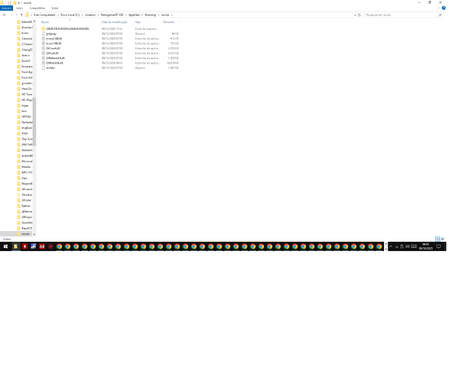
Why did my Microsoft Defender detect a malicious file in AppData\Roaming\Secure\QtWebKit4.dll (Trojan:Win32/Wacatac.C!ml) during a full scan and the Kaspersky Free and Malwarebytes Free scans didn't detect it? Was it maliciously modifying, corrupting, or deleting various files on my PC before detection? I sent it to Virus Total, the hash: 935cd9070679168cfcea6aea40d68294ae5f44c551cee971e69dc32f0d7ce14b Inside the same folder as this DLL, there's another folder with a suspicious file, Caller.exe. I sent it to Virus Total, and only one detection from 72 antivirus programs was found, with the name TrojanPSW.Rhadamanthys. VT hash: d2251490ca5bd67e63ea52a65bbff8823f2012f417ad0bd073366c02aa0b3828
Device Stuck on Restart Screen After Update - Error Code: ATTEMPTED WRITE TO READONLY MEMORY
Hi everyone, I’m experiencing an issue with my Windows device that started after a recent update. For the past three days, my device has been stuck on a restart screen with the following error message: Your device ran into a problem and needs to restart. We'll restart for you. For more information about this issue and possible fixes, visit https://www.windows.com/stopcode If you call a support person, give them this info: Stop Code: ATTEMPTED WRITE TO READONLY MEMORY I’ve tried restarting the device multiple times, but it keeps returning to this screen. I’m unable to access my system or troubleshoot further. Has anyone else encountered this issue after an update? Any suggestions on how to resolve this would be greatly appreciated. Thank you in advance for your help!Total Identity Compromise: Microsoft Incident Response lessons on securing Active Directory
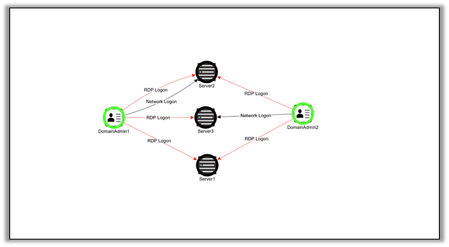
Total Identity Compromise: Microsoft Incident Response lessons on securing Active Directory When Microsoft Incident Response (formerly DART/CRSP) is engaged during an incident, almost all environments include an on-premises Active Directory component. In most of these engagements, threat actors have taken full control of Active Directory –i.e., total domain compromise. Total domain compromise often starts with the compromise of a regular non-privileged user rather than a domain admin. Threat actors can use that account to discover misconfiguration and attack paths in Active Directory that lead to full domain control. Oftentimes, threat actors leverage freely available tools such as AdFind, AD Explorer, or BloodHound to find attack paths through Active Directory environments. After total domain compromise, restoring trust back into Active Directory can take significant time and investment. To aid in our investigations, Microsoft Incident Response leverages a custom-built Active Directory enumeration tool to retrieve metadata about users, groups, permissions, group policies and more. Microsoft Incident Response uses this data to not only aid in the investigation, but also to shape attacker eviction and compromise recovery plans and to provide best practice recommendations on taking back and maintaining positive identity control. In addition to the Microsoft Incident Response custom tool, there are other tools, such as Defender for Identity, and open-source tools such as BloodHound and PingCastle, that you can use to secure Active Directory in your own environment. Across all industry verticals, Microsoft Incident Response often finds similar issues within Active Directory environments. In this blog, we will be highlighting some of the most common issues seen in on-premises Active Directory environments and provide guidance on how to secure those weaknesses. These include: Initial Access – Weak password policies, excessive privilege and poor credential hygiene, insecure account configuration Credential Access – Privileged credential exposure, Kerberoasting, insecure delegation configuration, Local Administrator Password Solution (LAPS) misconfiguration, excessive privilege via built-in groups Privilege Escalation – Access control list (ACL) abuse, escalation via Exchange permissions, Group Policy abuse, insecure trust configuration, compromise of other Tier 0 assets Initial Access Weak Password Policies It is not uncommon for Microsoft Incident Response to engage with customers where accounts have weak or easy to guess credentials, including those of privileged users such as Domain Admins. Simple password spray attacks can lead to the compromise of such accounts. If these standard user accounts are provided VPN or remote access without multi-factor authentication, the risk is increased: threat actors can connect to the VPN via devices in their control and begin reconnaissance of the environment remotely. From here, a threat actor can then attempt to escalate to Domain Admin privileges via weaknesses in Active Directory. Recommendation Where possible, Microsoft Incident Response recommends deploying passwordless authentication technology, such as Windows Hello for Business (which uses biometrics such as facial recognition or fingerprints) or FIDO2 security keys. Fully deploying passwordless authentication allows you to disallow password authentication, which eliminates password-based attack vectors (such as password sprays and phishing) for those users. If you are not yet ready to begin deploying passwordless solutions, you can increase the strength of your on-premises password policy through group policy and fine-grained password policies. Current guidance recommends longer (14 or more characters) but less complex passwords (no special characters or similar required), with users having to change them much less frequently. This discourages users from cycling through easy-to-guess passwords to satisfy complexity and rotation requirements, such as changing their password from ‘Monday10’ to ‘Monday11’. If you are licensed for Azure Active Directory P1 or higher, you can also deploy Azure Active Directory Password Protection, which can disallow your users from using easy to guess passwords even in on-premises Active Directory. You can also ban custom words unique to your business, such as the name of your company or the city in which you operate. For both passwordless and stronger password policies, if you work in a complex environment where the rollout of those solutions may take some time, start by targeting your Domain Admins and other privileged users. Your Tier 0 accounts can, and should, be held to a higher security standard. Excessive Privilege and Poor Credential Hygiene One of the most common issues found in Active Directory is accounts, particularly service accounts, being assigned too much privilege. In Microsoft Incident Response engagements, it is not uncommon to find multiple service accounts and named user accounts to be granted Domain Admin privileges. Additionally, service accounts used for applications or scripts are often granted local administrative access over all workstations and servers. Though this is an easy way to allow a product or script to function, these accounts then become a weak point in your security. Service accounts are attractive targets because the passwords are rarely rotated. Security controls for them are often weaker, and they can’t be protected by MFA. Furthermore, the passwords for these accounts are often stored in clear text, whether that be sent in email, saved to text files on devices, or used in clear text in command line arguments. The combination of many Domain Admin accounts and poor technical controls over those accounts increase the risk for credential theft. This excessive privilege also extends to too many users having local administrative rights on their own devices. If a compromised user does not have local administrative rights on their device, it is harder for a threat actor to continue to move laterally in the environment from that device. Recommendation There is no specific guidance on how many Domain Admin accounts should exist in each environment, as the requirements for privileged accounts will be unique for each environment. With that said, any requests to have additional Domain Admins should be scrutinized closely, with the preference always being to grant a lower level of privilege, particularly to service accounts. Even though adding service accounts to Domain Admins is an easy way to ensure an application works, most of these accounts can be assigned much less privilege and still function correctly. They can also often be granted access to only a subset of devices rather than all workstations and servers. If you don’t have strong controls to govern secure credential practice for your most important accounts, then the more Domain Admin level accounts you add, the more risk you incur. For service accounts, investigate whether Group Managed Service Accounts (gMSA), which can provide automatic password management, would be suitable for the workload. Insecure Account Configuration In Active Directory, misconfiguration can be a reason the security of individual user accounts is weaker than it could be. Some of the settings to scrutinize for proper configuration include: Do not require Kerberos pre-authentication. Store password using reversible encryption. Password not required. Password stored with weak encryption. Enabling any of these settings drastically reduces the security of an account. An adversary can enumerate a directory with relative ease to find any accounts that have these flags. The credentials for these accounts may then be easier for a threat actor to retrieve. Recommendation Defender for Identity, via the Secure Score portal, provides an excellent summary of these risky account flags. For each configuration item, it lists which accounts are affected and how to remediate the issue. Other tooling such as BloodHound or PingCastle can also flag these account issues. Credential Access Privileged Credential Exposure During cyber-attacks, adversaries often seek to obtain privileged credentials. These credentials are viewed as ‘crown jewels’ because they allow threat actors to complete their objectives. Once privileged credentials are obtained, they can be used to: Add additional persistence mechanisms, such as scheduled tasks, installing services, or creating additional user accounts. Disable or bypass endpoint antivirus or other security controls. Deploy malware or ransomware. Exfiltrate sensitive data. As administrators log on to devices directly or connect to devices remotely to complete their day-to-day work, they may leave behind privileged credentials. Threat actors can leverage tools such as Mimikatz or secretsdump (part of the Impacket framework) to retrieve those credentials. As privileged users log on to more and more machines, attackers have additional opportunities to locate and extract those credentials. For example, if members of the Domain Admins group regularly log on to end user workstations to troubleshoot issues, then Domain Admin credentials may be exposed on each device, increasing a threat actor’s chances of locating and extracting them. To help customers understand this privileged credential spread, Microsoft Incident Response collects logon telemetry from the event logs on devices, signals from Microsoft Defender for Endpoint, or both. From that data, a map is created of Tier 0 accounts, such as Domain Admins, logging onto devices that are not considered Tier 0, such as member servers and workstations. Figure 1: Map of Domain Admin login paths to non-Tier 0 servers. In this visual, the green circles represent Domain Admins. The red dotted lines represent RDP logons to devices, while the black dotted lines represent network logons. In this example, we can see two domain admins that have logged onto three different servers. Should a threat actor compromise one of these three servers, there is potential for theft of a Domain Admin level credential. The larger the environment, the more this issue becomes apparent. If we add additional admins and other non-Tier 0 devices, we can see the immediate impact on our footprint. Figure 2: Map of Domain Admin login paths to non-Tier 0 servers and other devices. With additional Domain Admins and those admins logging onto other non-tier 0 devices, credential exposure has increased significantly. The goal of these diagrams is to help customers visualize where privileged credentials are being left on their network and to start thinking from the mindset of a threat actor. In large and complex Active Directory environments, these diagrams can become immense, and the number of endpoints climbs into the thousands. Recommendation Microsoft’s solution to reduce privileged credential exposure is to implement the enterprise access model. This administration model seeks to reduce the spread of privileged credentials by restricting the devices that Domain Admins (and similar accounts) can log on to. In large and complex environments, it is safe to assume that some users and devices will be compromised. Your most privileged accounts should only access Tier 0 assets from hardened devices, known as privileged access workstations (PAWs). Using least-privileged access is a key part of Zero Trust principals. By reducing the opportunity to extract privileged credentials, we reduce the impact of compromise on a single device or user. Deploying the enterprise access model is a journey, and every organization is at a different stage of that journey. Regardless of your current posture, you can always reduce privilege credential spread, both through technical controls and changes to the way staff work. This table in the Microsoft Learn documentation lists various logon types and whether credentials are left on the destination device. When administering remote systems, Microsoft Incident Response recommends using methods that do not leave credentials behind wherever possible. Defender for Identity also maps these lateral movement paths, showing paths where compromise of a regular user can lead to domain compromise. These are integrated directly within user and computer objects in the Microsoft 365 Defender portal. Figure 3: Defender for Identity page for mapping a user’s lateral movement paths. The highest risk users and computers are also shown in the Secure Score portal, allowing you to remediate objects most at risk. Kerberoasting Kerberoasting is a technique used by threat actors to crack the passwords of accounts, generally service accounts, that have service principal names (SPNs) associated with them. If a regular user in Active Directory is compromised, they can request a ticket (which includes the hashed password) via tools such as Rubeus for any account with an SPN configured. The threat actor can then extract this hash from memory and attempt to crack the password offline. If they can crack the password, they can then authenticate as and assume the privileges of that service account. It is also not uncommon for Microsoft Incident Response to detect SPNs registered to privileged admin accounts or service accounts that have been added to privileged groups. Often these SPNs are configured for testing and then never removed, leaving them vulnerable to Kerberoasting. Recommendation Microsoft Incident Response recommends that you review all accounts configured with SPNs to ensure they are still required. For those that are actively in use, ensure the passwords associated for those accounts are extremely complex and rotated where practical. Defender for Identity includes logic to detect Kerberoasting activity in your environment. By taking signals from your domain controllers, Defender for Identity can help detect users enumerating your domain looking for Kerberoast-able accounts or attempts to actively exploit those accounts. Insecure Delegation Configuration Unconstrained Kerberos delegation provides the ability for an entity to impersonate other users. This helps with authentication through multi-tier applications. For example, a web server running IIS may have delegation configured to access an SQL server, which stores the data for the web site. When you log onto the web server, the web server then uses delegation to authenticate on behalf of you to SQL. In doing this, the user’s Kerberos Ticket Granting Ticket (TGT) is stored in memory on the web server. If a threat actor compromises that web server, they could retrieve those tickets and impersonate any users that had logged on. If a Domain Admin happened to log on, then the threat actor would have access to a Domain Admin TGT and could assume full control of Active Directory. Recommendation Review all the users and devices that are enabled for delegation. These are available in the Defender for Identity section of Secure Score. If delegation is required it should be restricted to only the required services, not fully unconstrained. Administrative accounts should never be enabled for delegation. You can prevent these privileged accounts from being targeted by enabling the ‘Account is sensitive and cannot be delegated’ flag on them. You can optionally add these accounts to the ‘Protected Users’ group. This group provides protections over and above just preventing delegation and makes them even more secure; however, it may cause operational issues, so it is worth testing in your environment. Local Administrator Password Solution (LAPS) Microsoft Incident Response often encounters situations where LAPS has not been deployed to an environment. LAPS is the Microsoft solution to automatically manage the password for the built-in Administrator account on Windows devices. When machines are built or imaged, they often have the same password for the built-in Administrator account. If this is never changed, a single password can give local administrative rights to all machines and may provide opportunities for lateral movement. LAPS solves this problem by ensuring each device has a unique local administrator password and rotates it regularly. Additionally, even in cases where LAPS has been deployed, sometimes it has not been fully operationalized by the business. As a result, despite LAPS managing the local administrator account on these devices, there are still user groups that have local administrative rights over all the workstations or all the servers, or both. These groups can contain numerous users, generally belonging to the service desk or other operations staff. These operational staff then use their own accounts to administer those devices, rather than the LAPS credentials. IT configurations can also exist where a secondary, non-LAPS managed account still exists with an easy to guess password, defeating the benefit gained by deploying LAPS. As noted earlier, groups with broad administrative access give threat actors additional opportunity to compromise privileged credentials. Should an endpoint where one of these accounts has logged onto become compromised, a threat actor could have credentials to compromise all the devices in the network. Recommendation It is important to not only deploy LAPS to endpoints, but to ensure that IT standard operating procedures are updated to ensure LAPS is used. This allows companies to remove privilege from administrative accounts and reduce credential theft risk across the business Additionally, it is crucial to understand which users can retrieve the LAPS password for use, since the ability to retrieve this password grants local administrative access to that device. The ability to read the LAPS password is controlled via the ‘ms-Mcs-AdmPwd’ attribute and should be audited to ensure access is only granted to users that require it. Excessive Privilege via Built-In Groups During incident response, companies often have alerting and monitoring in place for changes to groups like Domain and Enterprise Admins. These groups are widely known to hold the highest level of privilege in Active Directory. However, there are other privileged built-in groups that are attractive to threat actors and are often not held to the same level of scrutiny. Groups such as Account and Server Operators have wide ranging privilege over your Active Directory. For example, by default Server Operators can log on to Domain Controllers, restart services, backup and restore files, and more. Recommendation It is recommended that, where possible, privileged built-in groups not contain any users. Instead, the appropriate privilege should be granted specifically to users that require it. Additionally, Microsoft Incident Response recommends reviewing the current membership of those groups and adding additional alerting to changes to them in the same way you would alert on Domain or Enterprise admin changes. Privilege Escalation Access Control List Abuse Access Control Lists (ACL) misconfiguration is one of the most common issues Microsoft Incident Response finds in Active Directory environments. Active Directory ACLs are exceptionally granular, complex, and easy to configure incorrectly. It is easy to reduce the security posture of your Active Directory environment without having any operational impact on your users. As ACLs are configured in your environment through business-as-usual activities, attack paths start to form. These attack paths create an escalation path from a low privileged user to total domain control. A threat actor can take advantage of the paths created by the combination of excessive privilege and scope on ACLs. A threat actor can take advantage of the paths created by the combination of excessive privilege and scope on ACLs. Two common ACLs that Microsoft Incident Response sees regularly in Active Directory are: GenericAll – this privilege is the same as Full Control access. If a user was compromised and that user had GenericAll over a highly privileged group, then the threat actor could add additional members to that group. WriteDacl – this privilege allows manipulation of the ACL on an object. With this privilege a threat actor can change the ACL on an object such as a group. If a user was compromised and that user had WriteDacl over a highly privileged group, the threat actor could add a new ACL to that group. That new ACL could then give them access to add additional members to the group, such as themselves. These permissions are often set at the top of the Active Directory hierarchy. They are also often applied to users and groups that do not require those permissions, effectively granting those group members full domain control. The members of these groups are very rarely secured in the same way that Domain and Enterprise Admins are. In addition, Microsoft Incident Response often detects insecure ACLs on the AdminSdHolder object, which is responsible for managing permissions on protected users and groups. If an adversary can manipulate the ACL on AdminSdHolder, it will be propagated on to those protected users and groups when the SDProp process runs. The adversary will then have rights to change membership of protected groups such as Domain Admins, allowing them to add themselves. The documentation for BloodHound describes these and several other ACL ‘edges’ that can be abused for privilege escalation. Recommendation Microsoft Incident Response recommends auditing permissions through your Active Directory environment using tools such as Defender for Identity and running sanctioned audits of attack paths using BloodHound and remediating paths that can lead to domain compromise. Escalation via Exchange Permissions Prior to the use of corporate cloud email services such as Office 365, customers ran their own on-premises Exchange environments. Many customers still maintain a complete on-premises Exchange environment. On-premises Exchange and Active Directory have always been tied closely together, with Exchange maintaining high privilege through Active Directory. Even in environments that have migrated user mailboxes to Office 365, an on-premises Exchange footprint often remains. It may exist to manage users not yet migrated, for legacy applications that are not able to integrate with Office 365, or to service non-internet connected workloads. These on-premises Exchange environments often retain high privilege through Active Directory, and groups such as ‘Exchange Trusted Subsystem’ and ‘Exchange Servers’ can have a direct path to total domain control. On-premises Exchange is also often internet-facing to allow users to access resources such as Outlook Web Access. Like any internet facing service, this increases the surface area for attack. If a threat actor can obtain SYSTEM privilege on an Exchange server and Exchange still retains excessive permissions in Active Directory, then it can lead to complete domain compromise. Recommendation It is possible to decouple the privilege held by Exchange in Active Directory by deploying the split permissions model for Exchange. By deploying this model, permissions for Active Directory and Exchange are separated. After deploying the Exchange split permissions model, there are operational changes required by staff who administer both Exchange and Active Directory. If you don’t want to deploy the entire split permissions model, you can still reduce the permissions Exchange has in Active Directory by implementing the changes in the following Microsoft guidance. If you have completely migrated to Office 365 but maintain on-premises Exchange servers for ease of management, you may now be able to turn off those on-premises servers. Group Policy ACL Abuse Group Policy is often a tool used by threat actors to establish persistence (via the creation of scheduled tasks), create additional accounts, or deploy malware. It is also used as a ransomware deployment mechanism. If a threat actor has not yet compromised a Domain Admin, they may have been able to compromise an account that maintains permissions over Group Policy Objects. For instance, the ability to create, update, or even link policies may have been delegated to other groups. If an existing Group Policy is configured to run a startup script, a threat actor can change the path of that script to then have it execute a malicious payload. If a group policy exists to disable endpoint security tooling as an exemption, a threat actor could leverage the permissions to link policy by applying that policy to all devices in the environment. This would not require the threat actor to update the policy, just change the scope of it. Additionally, regular users can be given additional privileges via User Rights Assignments. These privileges are often not required by the users and are granted accidentally. Recommendation The ability to manipulate Group Policy is a highly privileged action and users and groups with delegated responsibility to manage it should be held to the same standards as Domain Admins or similar. Ensure that permissions to create, update, and link group policies are in line with least privilege principles. In large and complex environments, the number of Group Policies in use can be overwhelming and it is not clear what policies apply to which users and devices. Using tools such as Resultant Set of Policy (RSoP), you can model your Group Policy objects to see the overall effect on your users and devices. Insecure Trust Configuration SID history is a capability in Active Directory to aid in domain migration. It allows Domain Admins to simplify migration by applying the SID history (in simple terms, a list of permissions) from the old account to the new account. This helps the user retain access to resources once they are migrated. An adversary can target this capability by inserting the SIDs of groups such as Domain Admins into the SID history of an account in the trusted forest and using that account to take control of the trusting forest. This can be especially relevant during mergers and acquisitions, where trusts between Active Directory environments are configured to allow migrations. Recommendation Active Directory trusts should only be configured when absolutely required. If they are part of an acquisition or migration, then they should be decommissioned once migration is complete. For trusts that need to remain for operational reasons, SID filtering and Selective Authentication should be configured to reduce the attack path from other domains and forests. Compromise of other Tier 0 assets Historically, domain controllers have been at the center of Tier 0 infrastructure. While that is still true, Tier 0 has now expanded to include several interconnected systems. As ways of working have evolved, so has the underlying technology required to drive modern identity systems. In line with that, your Tier 0 footprint has also evolved and may now include systems such as: Active Directory Federation Services Azure Active Directory Connect Active Directory Certificate Services It also includes any other services or infrastructure, including 3 rd party providers, that form part of your identity trust chain, such as privileged access management and identity governance systems. Figure 4: Example of how Tier 0 assets connect to an identity trust chain. It is important that all systems that form part of your end-to-end identity chain are included in Tier 0, and the security controls you apply to domain controllers also apply to these systems. Due to the interconnected nature of these systems, compromise of any one of them could lead to complete domain compromise. Only Tier 0 accounts should retain local administrative privileges over these systems and, where practical, access to them should be via a privileged access workstation. Summary In large and complex environments, Microsoft Incident Response often sees combinations of the above issues that reduce identity security posture significantly. These misconfigurations allow threat actors to elevate from a single non privileged user all the way to your crown jewel Domain Admin accounts. Figure 5: Kill chain showing how domain compromise can start from a single compromised user. For example, in the above kill chain, the first user was compromised due to a weak password policy. Through the initial poor password policy, additional bad credential hygiene, and ACL misconfiguration, the domain was compromised. When you multiply all the combinations of user accounts, group access, and permissions in Active Directory, many paths can exist to Domain Admin. Attacks on Active Directory are ever evolving, and this blog covers only some of the more common issues Microsoft Incident Response observes in customer environments. Ultimately, any changes made to Active Directory can either increase or decrease the risk that a threat actor can take control of your environment. To ensure that risk is consistently decreasing, Microsoft Incident Response recommends a constant cycle of the below: Reduce Privilege – assign all access according to the principle of least privilege. Additionally, deploy the enterprise access model to reduce privileged credential exposure. Combined, these will reduce the likelihood that a single device or user compromise leads to total domain compromise. Audit Current Posture – use tools such as Defender for Identity and sanctioned use of BloodHound and PingCastle to audit your current Active Directory security posture and remediate the issues both surfaced through those tools and described in this blog. Monitor Changes – monitor for changes to your Active Directory environment that can reduce your security posture or expose additional attack paths to domain compromise. Actively Detect – alert on potential signs of compromise using Defender for Identity or custom detection rules. A message that Microsoft Incident Response often leaves customers with is that securing Active Directory requires continued governance. You can’t ‘deploy’ Active Directory security and never have to look at it again. Active Directory security is about constant improvement and ensuring those misconfigurations and attack paths are mitigated before an adversary finds them.89KViews18likes6Comments