microsoft defender
40 TopicsFight AI with AI | Multi-Agent Security Defense
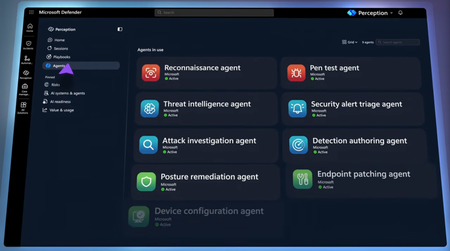
Point red, blue, and green AI agent teams at a known threat actor, confirm which vulnerabilities attackers can reach, then deploy KQL detections, harden your posture, and merge a tested code fix in minutes with Microsoft Defender. Stay in control and approve key actions before agents run them. Run Microsoft’s pre-built playbooks or build your own, and manage sessions from the Defender portal or from your terminal with the MCP plug-in. Keep token costs low with MAI Cyber Flash, a purpose-built security model inside MDASH. Dave Weston, CVP Microsoft Security, shares how Microsoft’s threat intelligence and incident response expertise power agents you direct. One prompt. Full adversary emulation. Perception agents mimic a known threat actor against your environment and check in with you before any high-impact action. Watch here. Detections deployed. Posture hardened. Code fix merged. Perception agents turn hours of work across hunters, engineers, and app owners into minutes, while you stay in control. Check it out. Find it, patch it, prove it. MAI Cyber Flash handles the full vulnerability loop inside MDASH and keeps token costs low so any team can afford AI-powered defense. Start here. 👥 Who it’s for: SOC analysts, security engineers, and red and blue teamers evaluating agentic AI for defense, plus AppSec and DevSecOps teams who own vulnerability remediation. ⏱️ Chapters: 00:00 Fight AI-powered attacks with AI agents 00:45 How AI attacks adapt mid-breach 01:39 Jailbroken and abliterated models 02:04 Inside the Project Perception security stack 03:28 Red, blue, and green agent teams 04:07 Playbooks that orchestrate agent workflows 04:43 Ask Perception if you’re protected 06:06 Red team agents emulate a threat actor 06:59 Approve high-impact agent actions 07:26 MDASH findings confirm reachable vulnerabilities 08:22 Blue team agent writes KQL detections 08:54 WAF, auth check, and tested code fix 09:36 Pull request merged into production 10:14 Session reports and MCP terminal plugin 11:02 MAI Cyber Flash keeps token costs low 11:57 Join the Project Perception preview AI helps attackers find, weaponize, and exploit vulnerabilities at a speed and scale no human team can match. Jailbroken and abliterated models generate custom tooling that adapts mid-breach, leaving defenses that hunt for known techniques chasing a target that changes every time. Project Perception answers with a full agentic security stack. It starts with trillions of daily security signals, correlates them in the Microsoft security graph, and uses multiple AI models, including purpose-built ones, to reason over risk and prioritize what matters most. Specialized agents act on that reasoning: red team agents simulate attacks and prove where you’re vulnerable, blue team agents investigate and build detections, and green team agents harden posture and remediate. Playbooks orchestrate them through proven SOC workflows, and codified actuators let agents perform the fix instead of only recommending it. In the demo, one prompt, “Is my organization protected against Onyx Sleet?”, launches threat intelligence, reconnaissance, and pen test agents. They pull MDASH code-scanning findings and confirm an internet-exposed SQL injection. A detection authoring agent writes KQL detections to cover the gap, and the posture remediation agent shields the app with a web application firewall, adds an authorization check, and produces a tested code fix merged through a pull request. Agents stop and ask before any high-impact action, so you stay in control. Every session produces a shareable report with the attack path, remediation plan, and timeline. An MCP tool plugin runs the same work from your terminal, and MAI Cyber Flash, a dedicated cybersecurity model inside MDASH, handles most vulnerability work to keep token costs low. 🔗 Related links: Get started at https://microsoft.com/perception Unfamiliar with Microsoft Mechanics? Microsoft’s Official Video Series for IT — Subscribe https://www.youtube.com/c/MicrosoftMechanicsSeries — Microsoft Tech Community: https://techcommunity.microsoft.com/t5/microsoft-mechanics-blog/bg-p/MicrosoftMechanicsBlog — Podcast: https://microsoftmechanics.libsyn.com/podcast Join us on social: — https://twitter.com/MSFTMechanics — https://www.linkedin.com/company/microsoft-mechanics/ — https://www.instagram.com/msftmechanics/ — https://www.tiktok.com/@msftmechanics Video Transcript: - AI has given attackers better weapons than they’ve ever had to quickly find, analyze, and automate the exploits for vulnerabilities at a speed and scale that isn’t humanly possible. But there is a way to address this imbalance with a new agentic security system called Project Perception, which provides the know-how and skills needed to fight weaponized AI with AI, and at the speed of AI. Now joining me to go deeper is our chief hacker and cybersecurity leader, Dave Weston. Welcome back to Mechanics. - Thanks, super happy to be here. - Last time you were on the show, AI-powered attacks, they weren’t really top of mind like they are now. But today, AI is helping attackers move a lot faster and at greater scale across virtually every single attack vector. So, what are you seeing out there? - Well, it really is a different world now, and that’s just not hype or marketing, it’s truth. AI is good at code, cyber is code, and the attackers are putting AI to work. The automated attacks we’re seeing where AI can adapt and evolve its techniques while moving through your environment are particularly worrying. For example, we saw a recent attack involving multiple hacking attempts on Mexican government organizations. And one of the craziest aspects of the attack was where AI generated bespoke tooling with a massive 17,000 lines of code across 49 different modules, meaning it adapted mid-attack, corrected its own failures, and built new capabilities as it moved through the breach. That’s a problem for traditional defenses. If you’re looking for known techniques, what do you do when the technique changes every time? The rules of cyber have changed, and today, the advantage is with the attacker. - All right, so how are attackers, then, able to use AI to their benefit? Aren’t they just using publicly available models? - They are, but they can easily jailbreak models in real time or permanently obliterate open models, where you’re modifying the LLM to remove any guardrails that stop them from doing bad things. - Right, and then at that point, the model can just do their bidding, whatever that is. - It can do whatever evil command you throw at it. So, really, the answer is to offset and fight AI with AI. If attackers are operating at machine speed, then defenders need to be as well. And that’s why we built a new cybersecurity stack with Project Perception based on Microsoft’s security expertise, threat intelligence, and incident response knowledge. The stack starts with trillions of security signals that Microsoft logs and processes every day. And we take that massive volume of data and transform it into rich, correlated security context with our security graph so it can be easily consumed efficiently without breaking the bank with tokens. We then have multiple AI models, including purpose-built ones that reason over the context to identify risk and prioritize what matters most. Then, we have specialized agents themselves that take model reasoning and can simulate attacks, build detections, author fixes, and even more. And playbooks orchestrate those agents through proven security workflows built from years of real-world security operations. And importantly, to close gaps, we have codified actuators with APIs that allow agents to perform the fix, instead of just telling you how to fix something. - So, it’s a continuously learning security system that’s really identifying risk, adapting to changing conditions, and coordinating investigation and response at scale. - Totally, and I can explain the mechanics of Perception and its components in Defender, starting with the agent team that we built. Here, under Agents, you get a picture of what runs the solution. Red team agents with red icons are designed to simulate attacks on your environment. They find the attack paths, prove where you’re actually vulnerable, and prioritize incidents by severity and exploitability. Then, the blue team agents defend. They conduct investigations, event correlation, accelerate a response, and build automated detections for you. Finally, the green team agents are the fixers. They harden your posture and remediate ahead of the attack. These agents are all specialists on their own, but they need guidance for what to work on or to focus in on. And that’s where playbooks come in. Playbooks are similar to the way people run their SOC today, standardized sets of procedures and operations to reach a known outcome. In this case, though, the work is done by teams of red, blue, and green agents. And the icons in these playbooks show you which agents are involved in which workloads. The playbooks that you’re seeing here are prebuilt by Microsoft for common security tasks, and you can build your own from scratch or after you run an agent session. - So, we know from your examples that the bad guys have agents and automation routines. And now we, or now you, the good guys, also have them, too. So, now we explained how it works. Can we run it? - Yeah, sounds good. So, when the threat actors are trending, the first question you hear is, “Are we protected from this adversary?” Instead of burning all the time and resources to manually figure this out, this is where Perception comes in as a multiplier. I’ve got Perception open in the Defender portal and I’m going to start a new agent session. Here, I can describe a task for my agents to work on, I can see top insights as recommended actions to take, or I can pick a playbook from below. In this case, I know that a threat actor named Onyx Sleet has been targeting a lot of companies in my industry. So, I’ll type in my prompt, “Is my organization protected against Onyx Sleet?” I hit Submit, and the agent team is off to the races. The planning agent works out what needs to happen and picks the right playbook to protect against the threat. This playbook triggers a threat intelligence agent to analyze the threat actor, red team agents for reconnaissance and to mimic the attacker for pen testing, a blue team agent for detections, and green agents for posture remediation with code fixes. Now, I just need to start my session using the details that are already populated. Right away, we see that this starts writing a session report that I’ll show once we’re finished. There’s a set of indicators from the threat intelligence agent on Onyx Sleet with all of the IPs, domains, and hashes. I’ll close that out to keep going. This information gets passed to the red agents, which are your attack simulators. It takes a profile and asks, “If I were Onyx Sleet, how would I breach this environment?” So, the reconnaissance agent takes a look at the indicators, and it spotted an exposed billing application. And it went after it, because Onyx Sleet likes to target web application vulnerabilities. Now, it wants to hand off to a pen test agent that knows how to specifically target this application to evaluate whether the billing app can actually be compromised. And notice, it brings me into the loop to ask my permission first. - Right, now that’s the runbook that we’ve just seen, which kind of harnesses all of your bespoke team of red and blue and green team agents. But you were also brought into the equation effectively to take one action here, in this case. So, how much of the approving do you do manually, versus just letting the agent do its thing and run YOLO? - Yeah, so any time there’s an operation of consequence, the agent will stop and ask. As the human in the loop, I can steer the process, confirm the agent’s reasoning and assumptions, and approve the actions. Governance and trust are the whole ballgame, here. So, I’ll allow this one to analyze the URL endpoints and submit it, and the recon agent will send its findings over to the pen test agent for penetration testing against this web app. The first thing it does is pull some previously discovered vulnerabilities found by MDASH, our multi-model agentic scanning system to detect code vulnerabilities, which also uses teams of agents to do the code scanning. So, we hand its findings to the pen test agent at runtime, and it narrows a big funnel of potential risk to the few that are genuinely reachable from the outside that this actor is likely to target. So, here it’s tested what MDASH flagged and confirmed the SQL injection is real and internet-exposed, alongside stored cross-site scripting vulnerabilities and a couple of identity-related issues. Now, a lot of systems will stop right here. They might be great at finding problems, but what really matters is going from finding to fixing. - So, we saw here in this case that the billing system is likely to be compromised. So, how do we go about actually fixing it so that it’s not vulnerable to attack? - Well, fortunately, with Perception, we don’t just point out problems. First, it’ll kick off to a blue agent, our detection authoring agent, which writes custom detections for each of the vulnerabilities to discover those later. There’s almost always a delay between discovering a vulnerability and actually shipping the fix. Detections buy us coverage during that window so we can see anyone knocking on the specific door related to that vulnerability. It’s authored detections, in this case, and each are coded by agents using KQL, which is great if you’re a security expert, but not a coding expert. These agents will do all that for you. Next, you’ll see that our green team posture remediation agent, as the fixer starts working on how to block the attack surface that the pen test agent exposed earlier in our billing app. In fact, here’s the remediation plan. It suggests shielding the app immediately with a web application firewall to block the SQL injection, and we can switch that to blocking mode and add an authorization check. That’s our second layer of defense. Then, the last step is an actual code fix to parameterize invoice queries. And not only do we get the code change, but we’re also able to run tests to validate the fix before we push it into production. Back in the chat, I’m good with what it recommends, so I’ll allow it. Then, Perception creates the pull requests to fix the SQL injection and merge all those changes into our production code. - And that’s taking what could have been multiple hours, sometimes days with cybersecurity experts, it’s getting that done just in a few minutes. - 100%, in fact, I’ve spent multiple hours and days on this, so that’s hours of manual work across hunters, remediation engineers, and app owners. And here, we discovered the issues, prioritized them, deployed detections, hardened postures, and even produced a code fix. The agents did the work. I just hung back, steered, and authorized specific requests a few times to proceed. And each session creates a report that you can refer back to or share. It explains who the actor was, what they did, their attack path, and it lays out the full remediation plan, along with the steps that were already taken and a detailed timeline. All your sessions can be viewed in one place where you can see what’s in progress and which sessions are awaiting human input to proceed, as well as all the sessions that Perception has completed. And because a lot of people live in the terminal, we also ship an MCP tool plugin so you can kick off and manage the same work from the command line or the tools you already use to stay in sync. - Right, so now instead of agents just triaging your alert queue, they can take action by using your guidance and codifying useful protection. So, with all this, what’s next? - Yeah, as a rule, with Perception, we always want to perform the fix and keep token usage as low as possible so that any organization can use it. And to that aim, we’ve been working with our model team on a dedicated MAI cybersecurity model. It’s called Cyber Flash, and it runs inside MDASH. And it handles roughly 90% of the queries, finding the vulnerability, patching it, and proving the fix is valid, and it defers only the hardest 10% of tasks to a much larger and much more expensive frontier model, which, in turn, keeps costs to a minimum. And it’s actually leading the CyberGym benchmark at around 96%, where most of the market sits considerably lower. So, cost effectiveness is baked into our focus. We want to level the playing field in how you’re able to defend against AI-powered attacks. - So, now we have something that keeps up with attackers to defend against auto-generated, CVE-informed attacks. So, for anyone who’s watching right now looking to get these defenses up and running in their environments, what do you recommend? - This is a rapidly evolving space, but Perception is in preview worldwide now. So, head over to aka.ms/perception to find out more and sign up. - Thanks so much for joining us today. It’s always eye-opening when we have you on the show to show the latest defenses. And thank you for joining us today, and be sure to subscribe to Mechanics if you haven’t already, and we’ll see you again soon.190Views0likes0CommentsAsk Microsoft Anything: Integrated Security Operations Center in Microsoft Defender
Curious how ISOC works in practice and what it means for the future of the SOC? Tune in October 6 at 9 a.m. PST for a live AMA with the engineers behind Integrated Security Operations Center (ISOC) in Microsoft Defender. Bring your questions and hear firsthand how we're building a shared foundation for people and agents to perceive, reason, and act across the environment, enabling defenders to spend less time managing tools and more time driving security outcomes. What is an AMA? An 'Ask Microsoft Anything' (AMA) session is an opportunity for you to engage directly with Microsoft employees! This AMA will consist of a short presentation followed by taking questions on-camera from the comment section down below! Ask your questions/give your feedback and we will have our awesome Microsoft Subject Matter Experts engaging and responding directly in the video feed. We know this timeslot might not work for everyone, so feel free to ask your questions at any time leading up to the event and the experts will do their best to answer during the live hour. This page will stay up evergreen, so come back and use it as a resource anytime. We hope you enjoy!2KViews1like27Comments
Strengthening Cybersecurity for Education‑Focused Nonprofits and Education Institutions
Cybersecurity is one of the most urgent priorities facing education‑focused nonprofits and education institutions today. Whether you’re a nonprofit delivering tutoring, literacy, STEM, or adult learning programs — or a school, district, or learning organization — you’re managing growing threat complexity with lean IT teams, rising ransomware risk, and sensitive learner and staff data to protect. Leaders across the education ecosystem need practical strategies that strengthen security without slowing down their mission. The Microsoft Elevate Education team is bringing you two powerful Signature Series webinars this spring to help education‑focused nonprofits and education institutions strengthen their cybersecurity posture from the inside out. Pick the topic and time that fits your day — or register for both. Webinar 1 | May 19, 2026 Preventing the Next Organization‑Wide Incident: Identity, Access, and Ransomware for Education‑Focused Nonprofits & Education Institutions Choose your session: 8:00 – 9:00 AM PT: https://msevents.microsoft.com/event?id=2868688952 4:00 – 5:00 PM PT: https://msevents.microsoft.com/event?id=1182185119 Webinar 2 | June 23, 2026 Self-Healing Security for Education‑Serving Organizations: Automated Investigation & Response with Microsoft Defender XDR Choose your session: 8:00 – 9:00 AM PT: https://msevents.microsoft.com/event?id=237608052 4:00 – 5:00 PM PT: https://msevents.microsoft.com/event?id=2738526889 Across both sessions, you'll learn how to: Reduce risk from over‑permissioned admin accounts and always‑on access Limit your organization’s blast radius through modern identity segmentation and access controls Automate threat investigation and response to contain incidents faster — even with a lean team Manage and approve remediation actions through a unified Action center Strengthen ransomware readiness using tools many organizations already own How This Benefits Education‑Focused Nonprofits Education‑focused nonprofits and education institutions face many of the same cybersecurity pressures — rising ransomware activity, increasingly sophisticated identity attacks, and the responsibility to protect sensitive learner, staff, and organizational data — often with limited resources and little room for disruption. These sessions tell the full cybersecurity story for organizations that teach, support, and deliver education: securing who has access and automating how you respond when threats occur. Together, they help nonprofits and education institutions move toward containment‑ready, resilient security operations that protect staff, volunteers, and the learners they serve. We hope to see you there. Microsoft Elevate EDU380Views0likes1CommentA Practical Look at Device Analytics and Risk Signals with Microsoft Intune
As organizations increasingly rely on laptops, mobile devices, and cloud‑connected applications, visibility into device health, configuration, and security posture is critical. Performance degradation, outdated configurations, and elevated device risk can negatively affect productivity and increase exposure to security threats. Microsoft provides an integrated set of services—Microsoft Intune and Microsoft Defender for Endpoint—that support modern device management, evaluate device risk, and help organizations enforce consistent security controls across their environments. This guide explains how these services work together, the role of Microsoft Configuration Manager, and how built‑in analytics and compliance signals can be used to improve device reliability and security. The Role of Microsoft Configuration Manager Microsoft Configuration Manager (formerly System Center Configuration Manager, or SCCM) is an on‑premises management platform used to deploy applications, manage software updates, enforce configuration baselines, and evaluate compliance—primarily for Windows devices. When Configuration Manager is used together with Microsoft Intune through co‑management, organizations can extend their existing on‑premises management with cloud‑based capabilities. In a co‑managed environment: Configuration Manager continues to manage traditional workloads. Microsoft Intune adds cloud‑based device management and compliance evaluation. Management workloads can be moved gradually from Configuration Manager to Intune. This approach enables organizations to support both legacy infrastructure and modern cloud‑first device management strategies during transitions or hybrid deployments. Learn more: Co-management for Windows devices - Configuration Manager | Microsoft Learn How Microsoft Defender for Endpoint Contributes to Device Security Microsoft Defender for Endpoint is a unified endpoint security platform that delivers preventive protection, post‑breach detection, automated investigation, and response. It continuously evaluates device activity and assigns device risk levels based on observed threats and security signals. Core capabilities include: Threat and vulnerability management, which identifies software vulnerabilities and security misconfigurations Attack surface reduction capabilities to limit common attack vectors Endpoint detection and response (EDR) for alerting, investigation, and forensic analysis Automated investigation and remediation to reduce manual response effort Threat intelligence derived from Microsoft’s global security telemetry When Defender for Endpoint is integrated with Microsoft Intune, device risk levels can be used within compliance policies and Conditional Access to restrict access to organizational resources when risk thresholds are exceeded. Learn more: Integrate Microsoft Defender for Endpoint with Intune for Device Compliance - Microsoft Intune | Microsoft Learn What Microsoft Intune Provides Microsoft Intune is a cloud‑based unified endpoint management (UEM) service that enables organizations to manage devices, protect organizational data, and enforce security requirements across Windows, macOS, iOS, iPadOS, and Android devices. Core Intune capabilities include: Cross‑platform device enrollment and lifecycle management Configuration profiles to apply standardized device settings Compliance policies to evaluate whether devices meet security requirements App protection policies that safeguard organizational data within applications, including on personal (BYOD) devices Integration with Microsoft Entra ID Conditional Access for access decisions based on compliance and risk By integrating Intune with Defender for Endpoint and Conditional Access, organizations can adopt a risk‑based access model that takes real‑time device health and security posture into account. Learn more: What is Microsoft Intune - Microsoft Intune | Microsoft Learn Choosing How to Use Intune and Defender for Endpoint Microsoft positions these services as complementary: Microsoft Intune focuses on device and application management, configuration, and compliance. Microsoft Defender for Endpoint focuses on endpoint threat protection, detection, and response. Many organizations deploy both to combine centralized management with advanced security capabilities. Together, they allow device configuration, security monitoring, and access control to operate as a unified system rather than isolated tools. Microsoft Intune Licensing Overview Microsoft Intune Plan 1 is included with several Microsoft subscription offerings. For nonprofits and small organizations, Microsoft 365 Business Premium includes Intune Plan 1 by default. Other plans that include Intune Plan 1 (as of March 2025) include: Microsoft 365 E3 and E5 Enterprise Mobility + Security (EMS) E3 and E5 Microsoft 365 F1 and F3 Microsoft 365 Government G3 and G5 Microsoft Intune for Education Feature availability may vary by license, and organizations should always review the official service descriptions for current inclusions and limitations. Learn more: Licenses available for Microsoft Intune - Microsoft Intune | Microsoft Learn Designing an Effective Device Enrollment Strategy An effective enrollment strategy establishes consistent management and security controls from the start. Microsoft recommends that organizations: Define security and management objectives. Select appropriate enrollment methods such as Windows Autopilot, Microsoft Entra ID join, or manual enrollment. Apply standardized configuration and security policies. Use compliance policies to evaluate device posture. Plan for scalability and long‑term device lifecycle management. Provide end‑user guidance to support adoption. Enrollment is the foundation for applying policy, evaluating compliance, and maintaining ongoing visibility into managed devices. [learn.microsoft.com] Coordinating Intune and Defender During Device Onboarding Microsoft documents a layered onboarding approach that commonly includes: App protection policies Protect organizational data within supported applications, including on unenrolled BYOD devices. Device enrollment in Intune Enables configuration management, compliance assessment, and reporting. Compliance policies Define security requirements such as OS version, encryption, password policies, and update status. Conditional Access Enforces access decisions based on Intune compliance results and Defender for Endpoint device risk levels. Configuration profiles Apply standardized security and operational settings. This approach helps ensure devices meet baseline security requirements before accessing sensitive organizational resources. Using Endpoint Analytics to Improve Device Experience Endpoint Analytics, available in Microsoft Intune, provides insights into device performance, reliability, and user experience. Microsoft positions Endpoint Analytics as an operational analytics tool, not a real‑time threat detection system With Endpoint Analytics, IT teams can: View dashboards showing startup performance, application reliability, and device health Compare devices against established performance baselines to identify underperforming endpoints Use generated scores and insights to prioritize remediation Investigate issues affecting the end‑user experience, such as slow boot times or outdated configurations These insights help organizations shift from reactive troubleshooting toward proactive device optimization. Learn more: Endpoint analytics overview - Microsoft Intune | Microsoft Learn Summary By combining Microsoft Intune, Microsoft Defender for Endpoint, and Endpoint Analytics, organizations can manage devices consistently, evaluate device health and risk, and enforce access controls based on real conditions rather than assumptions. This integrated approach supports modern work by improving visibility, strengthening security posture, and enabling IT teams to make data‑driven decisions that protect users and organizational data.749Views1like1CommentAsk Microsoft Anything: Microsoft Defender Attack Disruption
Learn more about attack disruption—Microsoft Defender’s built‑in, AI-powered capability that stops in‑progress attacks at machine speed by analyzing attacker intent, identifying compromised assets, and containing threats before they spread. Bring your questions and hear directly from product experts on real‑world scenarios and best practices. What is an AMA? An 'Ask Microsoft Anything' (AMA) session is an opportunity for you to engage directly with Microsoft employees! This AMA will consist of a short presentation followed by taking questions on-camera from the comment section down below! Ask your questions/give your feedback and we will have our awesome Microsoft Subject Matter Experts engaging and responding directly in the video feed. We know this timeslot might not work for everyone, so feel free to ask your questions at any time leading up to the event and the experts will do their best to answer during the live hour. This page will stay up evergreen so come back and use it as a resource anytime. We hope you enjoy!3.5KViews5likes25CommentsStop identity attacks in real time with Microsoft Entra ID Protection
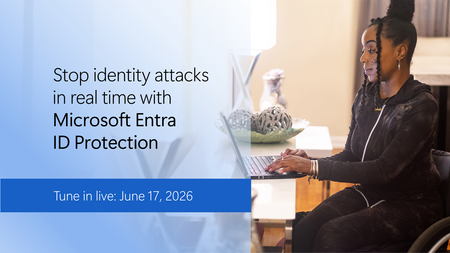
Modern identity security means stopping attacks before they escalate and extending protection beyond human users to apps and agentic identities across your identity fabric. Learn how Microsoft Entra ID Protection delivers premium, real-time identity protection with adaptive risk remediation, comprehensive detections, and expanded coverage for human and non-human identities. Powered by trillions of Microsoft Security signals and natively integrated with Microsoft Defender and Security Copilot workflows, Entra ID Protection enables faster and more accurate Conditional Access decisions that stop threats like lateral movement and privilege escalation before they spread. We'll show you how identity and security operations teams scale risk remediation with Entra ID, and how these capabilities extend across your broader identity security portfolio to strengthen protection in both cloud and hybrid environments. To learn more, read the Microsoft Entra ID Protection report. How do I participate? Registration is not required. Add this event to your calendar, then sign in to the Tech Community and select Attend to receive reminders. Post your questions in advance, or any time during the live broadcast.2.6KViews1like2CommentsSecure containers from code to runtime | Microsoft Defender
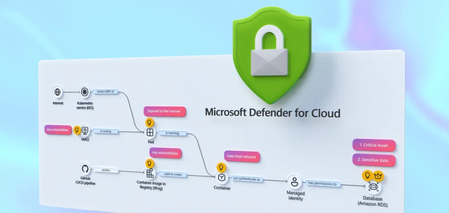
Correlate cross-cloud attacks into a single incident, catch runtime threats that image scanning misses, and block vulnerable images before they reach production. Investigate container hijacking, isolate compromised pods with Security Copilot-guided remediation, and close the loop from SOC to dev by pushing CVE fixes to GitHub and syncing resolution back to Defender. Matt McSpirit, Microsoft Azure expert, shares how to detect, investigate, and remediate container threats in one connected workflow. Expose container hijacking at runtime. Binary drift detection flags the moment a container runs anything outside its original image. Try it now. Detection to containment in one flow. Security Copilot in Defender generates your incident report, classifies the attack, and surfaces pod isolation as a guided remediation step. Check it out. Close the loop from SOC to dev. Create GitHub issues for vulnerable container dependencies, trigger Copilot’s fix as a Pull Request, and bring “resolved” status back to Defender the moment it merges. See how it works. QUICK LINKS: 00:00 — Secure containers in Microsoft Defender 01:02 — Cross-cloud incident 03:07- Runtime detection 04:10 — Investigate and build context 04:49 — Security Copilot incident report & containment 06:03 — Prevention 07:34 — Recommendations and take action 09:04 — Wrap up Link References Get started at https://aka.ms/DefenderCloudSecurity Unfamiliar with Microsoft Mechanics? As Microsoft’s official video series for IT, you can watch and share valuable content and demos of current and upcoming tech from the people who build it at Microsoft. Subscribe to our YouTube: https://www.youtube.com/c/MicrosoftMechanicsSeries Talk with other IT Pros, join us on the Microsoft Tech Community: https://techcommunity.microsoft.com/t5/microsoft-mechanics-blog/bg-p/MicrosoftMechanicsBlog Watch or listen from anywhere, subscribe to our podcast: https://microsoftmechanics.libsyn.com/podcast Keep getting this insider knowledge, join us on social: Follow us on Twitter: https://twitter.com/MSFTMechanics Share knowledge on LinkedIn: https://www.linkedin.com/company/microsoft-mechanics/ Enjoy us on Instagram: https://www.instagram.com/msftmechanics/ Loosen up with us on TikTok: https://www.tiktok.com/@msftmechanics Video Transcript: -Containers are the foundation for how modern business critical apps are built, running across Kubernetes environments and multiple clouds. These are high value targets for attackers, who are now using AI to accelerate ways to find and exploit vulnerabilities faster than humanly possible, from code to runtime. And it’s hard to respond effectively when security signals and responsibilities are fragmented across different teams and tools. The challenge isn’t just finding security issues, it’s understanding how they connect across the lifecycle from development to production. -So, rather than treating supply chain and runtime as separate problems, Microsoft Defender for Cloud brings them together into a single, unified model to catch issues early in code by identifying vulnerabilities and misconfigurations, prioritizing risk across clusters, workloads, and configurations, and detecting and responding to threats in your running containers in near real time, all while tracing them back to the source to put the right mitigations in place. So let me walk you through a multi-stage attack across a containerized environment to show this in action from the perspective of a SOC analyst. I’m in Microsoft Defender in the incidents view, filtered to container related incidents, and I can see four related to containers. -Let’s start with this one: a multi-stage incident involving multiple users. And notice this is already correlated into a single incident, not multiple alerts. You can see it’s flagged as high impact, with a critical asset label, and the crown icon in the incident graph showing asset criticality. On the left, is the attack story with alerts listed in chronological order, color-coded by severity. If we go back to the incident graph, container resources are in black, and related identities and services are in white. This is runtime threat detection correlated across layers. -In this case, Defender has detected 19 alerts for this incident in near-real time and stitched them into a single timeline. So, let’s walk through the attack. Here we can see the initial access signal was from a Kubernetes API request from a proxy IP address. Identity compromise and escalation then occurred with credentials accessed from a service principal. And finally, Defender for Cloud’s cross-cloud correlation surfaces lateral movement spanning environments, revealing a brute-force attack originating from an exposed Azure Kubernetes cluster targeting an AWS Relational Database service resource. -Back in the graph, you’ll notice a blue icon, this indicates there are related attack paths. And if we ungroup similar nodes, we see a user indicated by the blue icon, and we can pivot directly into the attack path view. Here’s where it gets interesting. This is where we connect runtime activity back to security posture and exposure. It’s concluded that the container is internet-exposed with high-severity vulnerabilities, and it’s using a managed identity to access a protected storage account. We’ll come back to this in a moment to see if we can fix the root cause. So, we can see this wasn’t just an isolated runtime event; there was a clear path from exposure to exploitation. -So let’s move on to the second incident in our queue. This is another multi-stage attack. This time focused on initial access and discovery across multiple endpoints. In the Incident Graph, we can see a number of containers were accessed. Then in the attack story, we can see they were hijacked to be used as Cryptocoin miners. Now, containers should be immutable, only running what was in the original image. But this alert shows the initial binary drift. This signals to Defender that the container is executing something it was never built to run. And if we review the activities for this alert, we can see a suspicious parent process, and a shim file being used to execute it. And if we move to the right in evidence, we can see all the details for the process, file, pod and cluster. This is where runtime detection becomes critical, because this activity isn’t visible through image scanning or posture alone. -From here, we can investigate and build full context around the attack. For that, let’s drill into our Kubernetes cluster and start hunting to take a look at the processes run, across both control plane and data plane signals. There are tables that log these events for querying, CloudProcessEvents for runtime activity and CloudAuditEvents for control plane actions. Let’s run a query in the audit events table to search for the creation of a cluster-admin role binding. This would grant full administrative access to the cluster. Here, we can see the role binding and associated subject. It confirms our assumption that the privilege escalation did happen. Next, we can leverage Security Copilot to transition from investigation to response using guided recommendations informed by the attack insights uncovered. Here, Copilot has already generated an incident report. -At the top, we have a summary of the attack from correlated signals. If we expand it, under Credential Access, we see compromised identity activity. Under Discovery, there are network scanning tools. Under Execution, we see confirmation that the container was modified to run crypto mining processes. And below that, the Triage section then lets you classify the incident as true positive, informational, or false positive with corresponding subcategories. I’ll choose a True Positive Multi-stage attack. And Copilot also suggests two remediation actions: terminate the pod to stop activity or isolate the pod to contain the threat. So let’s follow that guidance and isolate the pod. So I’ll close Copilot and return to our Incident graph, then ungroup similar nodes again. Now selecting the Pod, under Actions, I can isolate the Pod. I’ll add a reason. And then I just need to confirm. And just like that, we’ve moved from detection to investigation and containment in a single flow. -So far, we’ve focused on detecting, responding to active threats. But security doesn’t start at runtime. And this is where Defender for Cloud helps your DevOps teams harden your environment to prevent issues from reaching production in the first place. Using policies, you can put rules in place to prevent containers with issues from being deployed. So for that, in the Azure portal in Defender for Cloud, under Environment Settings, we’ll head over to our Security Rules. -Here, we’ve already created a handful of rules to deny or audit activities. For example, if I take a look at this one to block vulnerable deployments of AI applications, this rule is configured to automatically deny deployment of any image violating the policy. It’s scoped specifically to the namespace of our AI applications. In the Configurations tab, we can see that this rule is set to trigger when a container image contains a high or critical severity vulnerability, with any count higher than zero. With our policy in place, let’s test it out by attempting to deploy a container image that contains a few high-severity vulnerabilities. This is exactly what happens with supply chain attacks. For that, from Cloud Shell, I’ll run an AKS command first to get my credentials. -Now I can execute my command. I’ll paste in this Kube Control command to run an image, including its location and namespace details. And immediately, we can see that the run was denied, stating that the image contains 415 CVEs, and we allowed zero in our policy. So it’s blocked. What’s more, Defender for Cloud continuously scans what’s in your registries and running environments in near real time, surfacing the risks that matter and turning them into clear, actionable fixes. Next over in Recommendations, we can see findings identified by Defender for Cloud with several critical risks highlighted, related to the same incident that we saw earlier in the Defender portal. And these are its recommendations. -Let’s look at this one to update busybox. Looks like this version has 13 known vulnerabilities. And digging into the Remediation Insights tab, we can see more details across the development phases. The Take Action button tells us to assign an owner and to create a GitHub issue. I can create the GitHub issue from here. And if I head over to what our dev team would see in GitHub, you can see the details for the ticket, with deployment info, matching CVEs for this version, and below there, there are the remediation guidelines to mitigate the issue. From there, we can assign the issue to GitHub Copilot, and the GitHub Copilot Coding Agent will generate a draft Pull request fixing the CVEs for review. Once the pull request is actioned and complete and the version is updated, we can see that the CVEs were resolved. And finally as a developer, we can merge the pull request to get our app back into a healthy state. I’m going to return back to Microsoft Defender and our app recommendation, clicking on the GitHub issues shows that everything was resolved, and it sent the updated status back to Defender where your SOC lives. -So, that’s a hands-on look at how Microsoft Defender helps secure your container environments end to end. It doesn’t just detect security issues, it helps you to respond faster by connecting security signals across the entire lifecycle, from development through production. To learn more or get started, visit aka.ms/DefenderCloudSecurity. Be sure to subscribe to Microsoft Mechanics for the latest tech updates. And thanks for watching.739Views1like1CommentAsk Microsoft Anything: Microsoft Defender expands protection to AWS RDS
This highlights Microsoft’s existing protection for open‑source relational databases in Azure and extends the same database‑focused security signals, risk context, and investigation capabilities to AWS RDS: helping organizations strengthen database security the way modern applications are actually deployed. What is an AMA? An 'Ask Microsoft Anything' (AMA) session is an opportunity for you to engage directly with Microsoft employees! This AMA will consist of a short presentation followed by taking questions on-camera from the comment section down below! Ask your questions/give your feedback and we will have our awesome Microsoft Subject Matter Experts engaging and responding directly in the video feed. We know this timeslot might not work for everyone, so feel free to ask your questions at any time leading up to the event and the experts will do their best to answer during the live hour. This page will stay up so come back and use it as a resource anytime. We hope you enjoy!4.1KViews5likes11CommentsZero Out Your Incident Queue - Human-led Microsoft Defender Experts for XDR
Offload high-severity incidents, gain full visibility into every investigation, and follow clear, guided remediation steps so you can contain attacks quickly and confidently, day or night. Extend your security operations with always-on managed detection and response and proactive threat hunting, so you can uncover hidden risks early, stop threats threats they spread, and strengthen your defenses to prevent future attacks. Maynald Savatdy, Microsoft Defender Expert, shows how to detect, contain, and hunt threats across your environment with support from human experts. Stay protected at all hours. Extend security coverage to nights, weekends, & holidays without staffing new shifts. Defender Experts for XDR includes managed detection and response and proactive threat hunting. Reduce response time and uncertainty. Take guided remediation steps from human experts instead of guessing what to do next. See how Microsoft Defender Experts for XDR works. Uncover hidden threats early. Microsoft Defender Experts proactively hunts across your environment and acts on contextual alerts before exploits become public. See it here. QUICK LINKS: 00:00 — Microsoft Defender Experts 00:54–24/7 Security Coverage 01:35 — Visibility & guidance actions 03:34 — Incidents and alerts 04:25 — Social engineering attack 05:36 — Defender Experts for hunting 06:34 — Wrap up Link References Get started at https://aka.ms/DefenderExperts Unfamiliar with Microsoft Mechanics? As Microsoft’s official video series for IT, you can watch and share valuable content and demos of current and upcoming tech from the people who build it at Microsoft. Subscribe to our YouTube: https://www.youtube.com/c/MicrosoftMechanicsSeries Talk with other IT Pros, join us on the Microsoft Tech Community: https://techcommunity.microsoft.com/t5/microsoft-mechanics-blog/bg-p/MicrosoftMechanicsBlog Watch or listen from anywhere, subscribe to our podcast: https://microsoftmechanics.libsyn.com/podcast Keep getting this insider knowledge, join us on social: Follow us on Twitter: https://twitter.com/MSFTMechanics Share knowledge on LinkedIn: https://www.linkedin.com/company/microsoft-mechanics/ Enjoy us on Instagram: https://www.instagram.com/msftmechanics/ Loosen up with us on TikTok: https://www.tiktok.com/@msftmechanics Video Transcript: -What if your security team had elite defenders available 24/7 ready to detect, respond, investigate, and hunt threats across your environment? Every day you may need to look at dozens or hundreds of incidents, and anyone of them could pose an existential threat to your organization. This is where our human-led Microsoft Defender Experts for XDR, our managed detection and response service and team come in, to work through those incidents for you. They work behind the scenes to bring deep expertise in triaging and investigating incidents, augmenting your SOC team. And you can track progress directly in Microsoft Defender. -In fact, I’m part of the global Microsoft Defender Experts team and we represent Microsoft’s own experienced security analysts and threat hunters. People who live and breathe cybersecurity. We’ve managed some of the worst situations and developed deep understanding of all the ways systems and endpoints can be compromised. We work around the clock, including after hours, weekends, and holidays, to augment your team. Defender Experts for XDR also includes a dedicated Defender Experts for Hunting service. This augments your team with our trained engineers that proactively hunt down risks and vulnerabilities across different entry points and services. If you are part of a larger organization with an expert SecOps team, you can also get Defender Experts for Hunting as a standalone service. Our human-led team of experts will work with bespoke tooling and queries, including AI. -In fact, we’ll uncover and work through advanced threats using up-to-the-second intel that automated systems might miss and correlate data from live raw sources that may not yet have been published. Let’s start in Microsoft Defender. You’re looking at the Incidents view, and normally, to stay protected, you’d need to triage these incidents and work them yourself. These are legitimate attacks unique to your organization and infrastructure. There could be dozens or hundreds of active incidents. The Defender Experts team will triage and work the incident queue for you as an opt-in managed service to augment your security team. In fact, right from the Home screen of the Defender portal, you’ll see the latest incidents that have been worked through by our Defender Experts team. These are stats for the number of investigated incidents and how many were resolved directly or with your help. -Let’s click in to see all incidents for the ones that need your attention. This status means that the recommended actions needs to be taken by someone on your team. This could be due to credential resets or policy configuration changes only your team may be authorized to perform. If I click into the incident for initial access involving one user, right up top you’ll see that it’s been assigned to Defender Experts. By default, any medium or high severity incident will get our attention. You can see the managed response provided by the Defender Expert who worked on the incident. There’s a detailed summary of what happened, how the incident started, the scope of entities and services impacted, any discovered indicators of compromise, in this case, email information and a malicious phishing URL, along with which entities were investigated. And below that are details for the Advanced Hunting Queries that were used. -Here you can see our Defender analyst was able to query emails containing the suspicious URL, which devices connected to that URL, the emails from the compromised sender account, then finally who clicked on the URL in the emails from that compromised account. And you can see the Awaited Actions below that you as the customer would need to take care of, like taking action to create an indicator that automatically blocks traffic to the URL, a password reset for the affected user, and requiring the user to sign in again by revoking their sessions. So you have full visibility into what our Defender Experts worked on and any guidance for actions that you need to take. Additionally, our Defender Experts can raise incidents and alerts themselves when suspicious activity is detected. This incident with the Defender Experts prefix was raised as both an incident and alert by our team. It’s a Teams Phishing Activity involving initial access, execution, and privilege escalation. -From the Managed Response summary, we can see the details of the attack, which the team was able to contain, and if I scroll down, you can see the specific actions completed. They first disabled the targeted account, then created an indicator to block the suspicious domain, and they were able to block incoming Teams messages from the malicious actor along with all of the related IP addresses. So as you saw, these are hands-on interventions. When something suspicious pops up, we don’t just send an alert. Our team digs in, validates what’s happening, and guides you through any containment and remediation steps that we can’t directly perform. -Let me expand on a social engineering attack to gain remote access, similar to this Teams incident I showed earlier, and how we addressed it. It started when we investigated an alert that was triggered when a user installed a remote viewing and management tool on their work device. At first glance, this type of software isn’t inherently malicious. It’s often used for legitimate IT support. However, our analysts noticed a pattern that didn’t align with normal behavior. The installation followed a series of junk emails sent to the user, an email bombing attack, and a Teams message claiming to be from Technical Support. Once installed, the adversary began using legitimate system paths to gain deeper access. Our team quickly disabled the user and attacker accounts and lines of communication, isolated the device and notified the customer, stopping the attack before it spread further into the network. -Leveraging Microsoft Threat Intelligence and access to global security data for broader querying, we identified the threat actor. Following the containment, our hunters then initiated proactive searches across other customer tenants and issued intelligence-driven notifications to prevent the spread and further compromise. This is just a recent example of how attackers combine social engineering with their tactics, techniques, and procedures. Beyond reactive support, Defender Experts for Hunting, as the name suggests, proactively hunts for threats in your environment and across the ecosystem. This the Defender Experts custom alert. It’s an overview of suspicious activity, complete with context, severity, and details. Clicking into the Summary tab, there’s a tile view of alerts, recommended queries, evidence and more. Last July, before any public CVE was announced, our team observed unusual activity on a SharePoint server where the W3WP executable was seen invoking PowerShell commands with Base64 encoding, behavior that typically signals an exploit attempt. -Using advanced hunting queries, we were able to confirm this was not just an isolated event. Based on our queries, we could confirm the attackers were actively probing weaknesses in other environments. We used the results to find the list of over 100 organizations that were vulnerable to this attack and proactively warned them of their exposure even before the exploit became widely known with guidance on how to address it. -So, whether you’re a small team looking to scale your security operations, or a large enterprise needing deeper threat insights, Microsoft Defender Experts gives you the confidence of knowing elite defenders are watching your back. To learn more or get started, head to aka.ms/DefenderExperts and keep watching Microsoft Mechanics for the latest tech updates. Thanks for watching.365Views0likes0Comments