microsoft defender 365
4 TopicsMicrosoft Defender for Office 365: New “Move to Quarantine” Feature Coming Soon
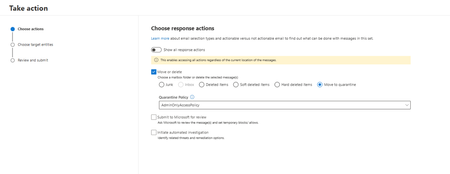
Microsoft introducing Move to Quarantine, a new remediation action in Microsoft Defender for Office 365. It enables security teams to move potentially malicious email messages from users' mailboxes directly to Microsoft Defender quarantine. This provides a safer and more flexible way to contain suspicious messages that bypassed initial detection while preserving the ability to investigate, release, or permanently delete them later. This capability is available with Microsoft Defender for Office 365 Plan 2, including eligible Microsoft 365 subscriptions that include Plan 2. Rollout schedule General Availability (Worldwide): Beginning in early November 2026 and expected to complete by mid-December 2026 Remediate malicious email that was delivered in Office 365 - Microsoft Defender for Office 365 | Microsoft Learn23Views0likes0Comments
Editing 'Risky sign-in' policy in Microsoft Defender for Cloud Apps
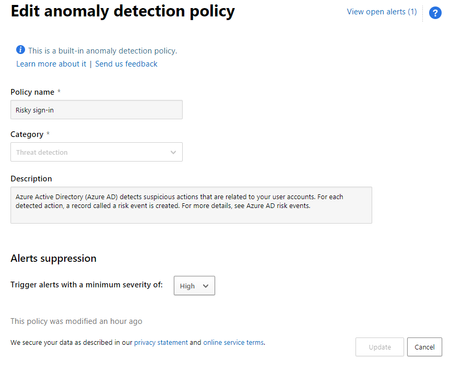
Hi Guys, I wonder if I can edit the 'Risky sign-in' policy in Microsoft Defender for Cloud Apps, It looks like I can only edit the 'Trigger alerts with a minimum severity of'. I am trying to exclude certain IP, so I won't get alert when someone is logging in from it. I already added this IP to the whitelist option in 'Tag as a Corporate IP and add to whitelist', but I still get alerts when there is any activity from this IP. Thank you for your help.4.2KViews0likes2Comments
Test Impossible Travel Alert
Hello there I am trying to test the Impossible Travel Alert in the Microsoft Defender for Cloud Apps. For that, I use the NordVPN to login from 2 different Countries and to generate the Impossible Travel. Somehow, no Impossible Travel Alert is generated. I just get the alert "Risky sign-in: Anonymous IP adress". Could it be, that this is because I use NordVPN and that the Impossible Travel Alert gets surpressed by the Risky sign-in Alert? Thanks for your HelpImplement Microsoft Defender for office365 for exchange on premises server
Dear All, we want to implement MDO for our exchange server and would like to know if this is feasible. current environment: hybrid environment with centralized mail flow towards exchange server 2016. 80% user are on premise and 20% cloud mailboxes. MX record are pointing to on premise should be flow through on premise. If MDO need to be apply, only was is to point the mx record to office365 for EOP right. is there any other options for safe link and safe attachment policy to apply on premise mailboxes. Thank you all2.2KViews0likes1Comment