microsoft ai
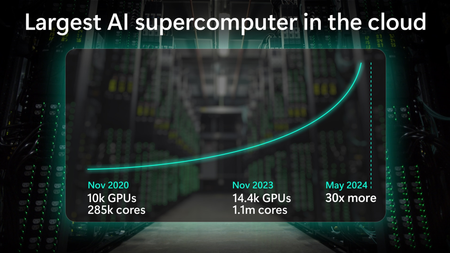
3 TopicsWhat runs GPT-4o and Microsoft Copilot? | Largest AI supercomputer in the cloud | Mark Russinovich
Microsoft has built the world’s largest cloud-based AI supercomputer that is already exponentially bigger than it was just 6 months ago, paving the way for a future with agentic systems.18KViews2likes0CommentsAzure Arc | On-prem + Multi-cloud Management
In this video, we explore how Azure Arc simplifies hybrid and multi-cloud operations by providing a single, consistent control plane for managing your entire infrastructure across Linux and Windows, on-prem, in Azure, or in any cloud. Once connected, you can patch Windows and Linux together with Azure Update Manager, enforce CIS benchmarks and Azure Security Baselines through Azure Policy, and pull consistent inventory, tags, and RBAC across your whole estate. Auto-recover unbootable Windows Server 2025 machines with Quick Machine Recovery, audit and configure WinRE using built-in Azure Policy. Run your virtual machines as Azure Virtual Desktop session hosts on Nutanix, VMware, Hyper-V, or using physical Windows hardware. Satya Vel, Azure Arc Principal Group PDM Manager, shares how to make Azure your operational standard for every workload, anywhere it runs. Learn more about Azure Arc at https://aka.ms/AzureArcServer, or join the community at https://aka.ms/ArcServerForumSignup Organize, filter, & manage inventory at scale. Centralize visibility into servers, VMs, and Kubernetes clusters across on‑prem, AWS, GCP, and Azure from a single control plane. Check out Azure Arc. Policy-as-code, everywhere your servers run. Azure Arc extends Azure Policy to on-prem, AWS, and GCP resources — pre-built CIS and security baselines included. Try it. AVD, off-Azure. Azure Virtual Desktop for hybrid environments turns any Azure Arc-enabled Windows VM or physical server into a session host. Get started. QUICK LINKS: 00:00 — Azure Arc in hybrid environments 00:46 — Transitioning to Azure Arc 02:35 — Unified management 03:43 — How to bring in servers and containers 04:48 — Inventory management 05:30 — Patching 06:48 — Auto-manage future updates 08:25 — One-time update 09:32 — Configuration in a hybrid environment 11:05 — Auditing Windows machines 11:34 — Microsoft Defender for Cloud 13:06 — Desktop virtualization 13:51 — Wrap up Link References For more information go to https://aka.ms/AzureArc Unfamiliar with Microsoft Mechanics? As Microsoft’s official video series for IT, you can watch and share valuable content and demos of current and upcoming tech from the people who build it at Microsoft. Subscribe to our YouTube: https://www.youtube.com/c/MicrosoftMechanicsSeries Talk with other IT Pros, join us on the Microsoft Tech Community: https://techcommunity.microsoft.com/t5/microsoft-mechanics-blog/bg-p/MicrosoftMechanicsBlog Watch or listen from anywhere, subscribe to our podcast: https://microsoftmechanics.libsyn.com/podcast Keep getting this insider knowledge, join us on social: Follow us on Twitter: https://twitter.com/MSFTMechanics Share knowledge on LinkedIn: https://www.linkedin.com/company/microsoft-mechanics/ Enjoy us on Instagram: https://www.instagram.com/msftmechanics/ Loosen up with us on TikTok: https://www.tiktok.com/@msftmechanics Video Transcript: - If you’re managing servers and containers today, you’re probably operating across on-prem multiple clouds and using different tools for each. Azure Arc changes that by providing a single way to manage servers, Kubernetes, and containers across Linux and Windows, on-prem, in any cloud, and at the edge. Since launching in 2019, Azure Arc has gained strong momentum, enabling consistent patching, configuration, compliance, and advanced resilience features like remote recovery even for machines that cannot boot and more. And to explore how Azure Arc works in real hybrid environments, I’m joined by our resident management expert, Satya Vel. Welcome. - Hi, Jeremy. It’s great to be on the show. It’s been a while. - Yeah, it has been a while. Thanks for joining us today. And why don’t we jump right into this? So if I’m coming from maybe a traditional server management background using things like Ansible, VMware vSphere, maybe System Center, what does it take then to transition to Azure Arc, and why would I do it and is it worth the effort? - That’s a fair question. Those are all proven powerful tools. That said, it’s challenging moving between multiple tools to manage what you have. What we are seeing today is more of a people and process change. Most enterprises are now hybrid by default, on-prem, multi-cloud, multiple operating systems managed by a central operations team. And what those teams want most is consistency. Azure extends its management capabilities to servers and Kubernetes clusters wherever they run using Azure Arc. That’s where the value of cloud native innovation shows up, beyond basic monitoring of servers and clusters, like the health and status of each resource. With Azure Arc, you can collect richer operational and security data and query it at a massive scale. All these are now actionable insights. You can use them to improve your security posture to close vulnerabilities faster. They’ll let you more easily fix compliance drift to realign resources with your policies and maintain day-to-day operations. This includes modern patching, all applied across your multi-cloud and hybrid estate. And finally, Azure Arc centralizes governance by bringing consistent tags for grouping along with unified identity and access management using RBAC for connected resources. That way everything is controlled the same way regardless of where it runs from a single control plane without duplication or drift. So to answer your earlier question, it is totally worth it, and Azure Arc is really the glue that brings it all together. - Okay, so why don’t we make this real for everyone watching? Can you show us the unified management experience and what that looks like with Azure Arc? - Sure thing, and that’s the best part. In fact here I’m managing my on-prem and multi-cloud environment using Azure services enabled by Azure Arc. Notice I have everything from a Windows server to Kubernetes clusters running on AWS, different Linux distros. There’s even a Windows client Desktop VM and more. All right here. And I can drill into any of these items to see its specs as well as what’s configured. I can take a look at whether it’s compliant with my configuration policies. For example, this test resource has a few non-compliant policies that I might want to take a look into. And the great thing is everything is in one spot. I don’t need to move between consoles to see everything. Once these resources are enrolled, everything is automated and rule-based. I can look for servers and workloads as they are provisioned or updated, and monitor them 24/7. Then based on the configuration status it finds, it can take actions and get items into a compliant state. - Okay, so we’re going to get to what the management experiences look like in a minute, but let’s go back a step. So what happens if I’ve got infrastructure and I want to bring that into Azure Arc? What does that experience look? - This process is super straightforward and simple. Let me show you. You can bring servers and containers running in any cloud on-premises and on any hypervisor under management with Azure Arc. To onboard resources to Azure Arc, we have a few different methods. The any environment option is the most flexible, where you can use scripts for Linux and Windows, or an installer. This is a lightweight agent that you can install on your Linux and Windows servers. You can use your preferred deployment method to run the scripts on your servers and clusters, like this one for Linux, which downloads the agent, installs it and connects it to Azure Arc. And if you have existing tools like Ansible Automation Controller, formerly known as Ansible Tower, we have published a playbook that makes it super simple to onboard your machines. And this playbook is published in the Ansible Galaxy, which is the official community hub. - Okay, so now we’ve got everything in. Now moving into the next thing that people manage a lot every day, inventory. So how does Azure Arc change that? - So I briefly showed the different locations and platforms that could run under Azure Arc. But there’s more to it. All my servers and clusters are in one view. It spans on-prem as I search for Azure Local, then I’ll filter for AWS as well as GCP services. And I can see Azure VMs plus my on-prem servers listed together with a consistent tagging and status information. I define everything based on their location and platforms in Azure, so it’s super easy to see where everything is running, and there’s less chance that any infrastructure falls through the cracks. - Beyond inventory management, something else that we do every day is patch management. So can Azure ARC handle patch management for servers and infrastructure outside of Azure? - Absolutely. This is an area where Azure Arc can help a lot. Today, patching often means different tools for different environments: WSUS or SCCM for Windows, scripts for Linux, or separate crowd portals. And with Azure Arc, this all happens consistently from one place. You can see Azure Update Manager, which I have opened here. Each server has an update status indicating if it’s got pending updates or not. Azure Update Manager continuously assesses the update compliance of your managed servers on a schedule. And you can manually trigger assessments by selecting resources and hitting check for updates. Now, you can see I have both Linux and Windows machines missing updates, and even though these are different OS types, I can update them together with just a few clicks if I want. But before I do that, notice this on-prem Windows Server 2016 machine that needs to be updated. Here, a benefit of managing your Windows and SQL Server infrastructure on Azure is that the service offers extended security updates so you can run them longer in support without disruption to business critical applications. Let’s get back to updating these machines. The nice thing is that you only have to set the right policy and logic one time to manage updates automatically in the future. To save a little time, I’ll select every machine. From here, I can schedule updates for these resources where first I’ll fill in the basics for my subscription and resource group. Then the instance details like the configuration name and the region. The maintenance scope using the guest option lets me target my resources. Then under schedule, I can select the start date as well as the time, how many hours and minutes I want the maintenance window to be, the frequency of repeats in hours, days, weeks, or months. Then in the resources tab, if I want to add more servers, I can group everything I want in the same maintenance schedule. Likewise, you’d use this grouping for staggered rollouts. Importantly, using dynamic scopes, I can also make sure that any new resources are targeted as they come online based on defined filters like the resource groups they’re in, the resource types, locations, operating systems or tags. In updates, I can target the type of updates I want, for example, only critical and security updates. Finally, I can add pre and post events to run before and after the update, like redirecting an app to an informational page saying that the resource is being serviced and when it’ll be back online. Of course, I can tag this as well. And then I just need to review and click create. - And the favorite thing I just saw there was the dynamic scoping that you can apply as a set it and forget it setting basically. So what happens though, if I’ve got an update that’s really critical that I need to push out immediately, can I do that? - Not a problem. You can do that as well. For that, you’ll select one or more resources and choose one time updates so that it gets applied immediately. I just need to confirm the machines, then choose the update type or any exclusions that I want to define. I’ll keep everything in scope here. Then in properties I can determine the reboot behavior I want and maximum maintenance window time in minutes. From there, I can review and install. That will push the update to my selected servers, whether they are in the cloud or on-premise, so it’s one place to get resources into update compliance. And in case you want to stagger updates over a longer period of time for large patch management jobs, you can orchestrate updates using groups. - So the main thing is here you control the timing, like only patching during off hours and approvals and you get to decide which updates to apply, so it’s super flexible. Now, software updates are one type of configuration management, but what other types of configurations can you manage here? - Configuration management in hybrid environments is complex. You traditionally use group policy, desired state configuration or scripts for Windows, and then separate tools like Ansible, remote scripting or manual commands of SSH for Linux. All this can be done centrally from Azure Arc. It extends Azure policy to any resource. And you can use Microsoft provided built-in policy baselines covering common security requirements. For example, the security baseline contains best practices and controls that we’ve defined for cloud services running on Linux and Windows. And above that, you can also see CIS Benchmark policy, which is an internationally recognized standard spanning OS platforms used to protect against cyber attacks. I’ll apply this baseline, then I’ll choose the Red Hat Enterprise Linux 9 Benchmark. And searching across 300 CIS Benchmark policies, I’ll look for passwords. And there are 24 policies defined. And then for Firewall, you can see four more. And these are just a few examples that are pre-configured. So once you assign these to your resources, Azure continuously monitors each machine for compliance. So you can use policy as code across your entire state with Azure policy controls that automatically stay current as standards like CIS evolve. We also recently added the ability to audit and enable WinRE through Azure Arc, improving recoverability even for machines that can’t boot. As you can see, there are a couple of new policies for auditing machines that do not have WinRE enabled and configuring WinRE on Windows machine. With quick machine recovery on Windows Server 2025, that also means for broader issues with known fixes, we’ll automatically recover machines that are not bootable. - And that’s really a great resiliency option. But what about security, compliance, and configurations and assessments? Can we do something there? - For that, you can use Microsoft Defender for Cloud. This lets you standardize security agents and settings across machines and containers wherever they run. In the Defender portal, you can see that the same way Azure Resources spanned Azure, AWS, GCP, and other environments, those same resources are visible here too. Defender continuously assesses connected resources for security posture. This includes what I showed before in the Security Baseline and CIS Benchmark. It detects threats in real time with associated security alerts and how they are trending. You get a complete breakdown by compute with your virtual machines and their associated risks. And the same is true for your connected containers running in Kubernetes. If I move over to cloud assets here you can see all the virtual machines, Kubernetes clusters that we saw in Azure Arc. And clicking into any of these, like this Ubuntu VM will show me all of its details. Scrolling down, I get a view of its risk factors. And below that, you’ll see that this one has 82 risk-based recommendations to improve its security. - And one of the big upsides of Microsoft Defender is that shared visibility, so everything logs to the same place. So if you think about assumed breach, it means that you won’t have any blind spots then as attackers are moving laterally through your environment. So that means security teams, they see what you see. So why don’t we move on though to desktop virtualization. What can Azure Arc do to help me there? - Sure, Azure Arc unlocks the ability to run Azure Virtual Desktop, or AVD, for short, outside of Azure so it can run on your own infrastructure, either via Azure Local or something new we recently announced: Azure Virtual Desktop for hybrid environments. This means any existing on-prem server can be configured as a AVD session host as long as it’s attached to Azure Arc. The management is in the VM layer using a management extension. It’s flexible, and Nutanix AHV, VMware vSphere, Hyper-V, or physical Windows Server can work. So with Azure Arc, you have full control over the entire infrastructure’s lifecycle from inventory, configuration management and policy enforcement all from one place. And the good news is that if you own Software Assurance, you can access services enabled by Azure Arc as part of your license for inventory, configuration, and update management. - That was a great tour and update of Azure Arc. So thanks for joining us today, Satya. And if you want to learn more about Azure Arc and try it out for yourself, just go to aka.ms/AzureArc for more information. Or as an admin search for Arc, A-R-C, in the Azure Portal to get started. And keep watching Microsoft Mechanics for the latest updates. We’ll see you again soon.289Views1like0Comments