microsoft agent framework
8 Topics
Agentic Mentor: A Specification-Driven, Multi-Agent Learning Tool
Project Overview Rather than relying on the model to know when the student understands, we built a pipeline where progress itself is gated: a student cannot move forward until they can demonstrate they understood what was just built. And rather than depending on commercial, token-billed APIs to make this teaching possible, the system is designed to run on locally hosted or free-tier models, keeping it accessible to students and institutions alike. As our contribution to Microsoft, we've handed over the full public repository behind Agentic Mentor. Given how central token-based services have become to software development, we see real potential for this approach in initiatives like GitHub Education, where affordable, agentic tools for students matter. In this post, we'll walk through what motivated the project, how Agentic Mentor works under the hood, and what we learned putting it to the test on a real piece of university coursework. The Project Journey This project was completed over three months. The first few weeks were spent on background research and requirements elicitation. We reviewed the literature on AI-assisted learning, specification-driven development and prompt ambiguity, elicited functional and non-functional requirements from our client supervisor at Microsoft, Lee Stott, and our academic supervisors, and broke the work into components we could build and test independently. This told us what was realistically achievable in the time we had, and which features were core to the tool rather than desirable extras. Implementation was coordinated through GitHub, with the team meeting daily to keep parallel work in sync and weekly meetings with both our supervisors and our client to report progress and check we were still building the right thing. We worked this way because the shape of the tool was still settling once implementation began, and that frequency of contact meant a wrong assumption surfaced in days rather than weeks. The most consequential decision of the project came out of those conversations. Agentic Mentor had been proposed as an assessment tool, but the AI does not write the assessment brief, so it cannot be relied on to read it as the academic intended, and grading on top of that reading would carry the model's misunderstanding into a student's mark. We pivoted to a learning tool, and the design of the pipeline followed from there. The final month went on completing both interfaces and evaluating the system, first against SpecBench as a correctness check, then against a real master's-level coursework. Two problems surfaced. Our GPU infrastructure went offline, so we moved to free-tier cloud models and scheduled runs around quota resets. And one of the questions the system generated turned out to be subtly wrong, and we had read it and accepted it without question, which is the automation bias we had spent the project writing about. Technical Details Agentic Mentor is built as a multi-agent, specification-driven pipeline. It has four agents; Research, Ingestion, Mentoring, and Viva. Each agent was implemented using the Microsoft Agent Framework. We chose to give each phase its own dedicated agent so that every stage could be equipped with the specific tools its task required, rather than relying on one general-purpose agent to handle the whole assignment. The agents run linearly, with each one writing its output to disk and the orchestrator passing the resulting file paths to the next stage. This design lets a session pause and resume. An overview of Agentic Mentor's architecture is seen in the figure below. Research Agent. This stage grounds the pipeline in external context. It uses GitHub and arXiv MCP servers to gather relevant literature and existing implementations. MCP gave the agent a uniform interface to both sources, meaning further ones could be added later simply by connecting another server, without reworking the agent itself. Ingestion Agent. Built around GitHub SpecKit, an open-source toolkit for spec-driven development, this agent converts the assignment brief and research context into structured specification files. Rather than letting the model resolve ambiguities in the brief on its own, SpecKit's clarification step surfaces unclear points directly to the student, who must answer before the pipeline continues. This choice keeps the student engaged in design decisions rather than letting the model make them silently. Mentoring Agent. This is where the student and the model actually build the project together, phase by phase, with the agent writing code and explaining its reasoning as it goes. Progress is gated: the student cannot move to the next phase until every task is complete, and a short multiple-choice checkpoint has been passed. The checkpoint tests understanding of what was just built rather than simply advancing on request. Viva Agent. Once implementation is complete, this agent interviews the student. Answers are checked against key points prepared in advance, with feedback given after each response and a full transcript saved for later review. How Microsoft's tools shaped the project. The Microsoft Agent Framework was the backbone that made the multi-agent design practical: it let us build four functionally distinct agents that could each carry their own tools and responsibilities while still communicating cleanly through a shared orchestration layer. Together with GitHub SpecKit's structured approach to specification-driven development, these tools gave Agentic Mentor a technical foundation that would have been considerably harder to assemble from scratch, and were central to making the pipeline's phase-gated, specification-first design actually work in practice rather than remaining a concept on paper. Demo This demo video shows an end-to-end demonstration of the VS Code extension of Agentic Mentor. Results and outcomes We evaluated Agentic Mentor in two phases: a benchmark check for basic correctness, followed by a real master's-level coursework that better matched the system's intended use. Phase 1: Code Correctness We used SpecBench to evaluate Agentic Mentor’s code correctness. SpecBench is a benchmark of 30 systems-level programming tasks with pre-existing test suites. We ran six of them using a locally served Qwen3.6-27B model. Our results show that tasks with common structural logic scored well, such as json_parser achieving a 97.7% pass rate. However, more complex tasks performed worse. On crypto_primitives, hallucinations prevented a testable solution being produced at all. This result reflects the limits of a small local model such as Qwen3.6-27B. However, the success of some tasks show that smaller local models have promise. Phase 2: Student Understanding The second phase evaluated the system against a real academic assignment on Test-Driven Development, which the team had previously completed without Agentic Mentor. Claude Sonnet 5 was used to reduce hallucinations and improve reasoning. We combined our own assessment as students with an interview with Jens Krinke, the module leader who set and assessed the coursework. From our perspective, we found that Agentic Mentor made a large, loosely specified project easier to approach, and the questions at each stage required active recall which helped us understand the assignment better. It improved on our original attempt by constructing a synthetic repository with known test–production pairs as concrete acceptance criteria, linking test and production files by co-occurrence in commit history rather than naming conventions, and producing unit test coverage within a properly separated project structure. The assessment of its understanding was less favourable. Jens rated its comprehension as comparable to a typical student's, but no better: it treated commit history as capable of confirming the presence of TDD, when it can only reveal the degree of its absence, and it missed an implicit hint regarding commit size. Lessons Learned Building Agentic Mentor taught our team a great deal about coding agents, local models, and the practical challenges of applying AI in education. These lessons shaped both the tool itself and how we think about deploying AI in learning contexts. Knowing where the tool fits. One of our clearest takeaways was that Agentic Mentor works best on well-specified, undergraduate-level assignments rather than open-ended, research-style coursework. Our evaluation on SpecBench's json_parser task, where the tool achieved a 97.7% pass rate, showed just how effective it can be on concrete, well-bounded problems. Our Test-Driven Development case study showed the same tool struggling once the task demanded interpreting ambiguous or partially hidden objectives. Even so, our own experience using the tool showed genuine improvements in our learning outcomes and even surfaced implementation ideas we hadn't considered ourselves, which reinforced our belief in the promise of agentic learning tools when applied to the right kind of problem. Navigating the local model trade-off. Our extensive experimentation with locally hosted models taught us that there is a trade-off between accessibility and quality. Local models performed well on smaller, simpler tasks, but as task complexity grew, code correctness declined and hallucinations became more frequent. This was a valuable lesson in engineering trade-offs: a fully local, cost-free deployment is achievable in principle, but a genuinely effective one currently depends on access to larger, cloud-hosted models. Rethinking what the tool should be for. Perhaps our biggest shift in thinking came from an idea we abandoned. We originally envisioned Agentic Mentor as an assessment tool, capable of evaluating a student's understanding for official grading. Working through the implementation made clear why that vision doesn't hold up: an AI system that didn't generate the assessment brief itself cannot be guaranteed to interpret an educator's intent correctly. This is a limitation of natural language interpretation that is well documented in the literature we reviewed. Recognizing this early enough to change course was itself a valuable exercise in engineering judgment, and it led us to reposition Agentic Mentor as a learning tool focused on helping students engage with agentic AI, rather than an assessment tool that asks AI to make judgments it isn't equipped to make reliably. Implications for Educators Our experience building and evaluating Agentic Mentor highlighted three critical takeaways for educators looking to integrate AI into their classrooms. Watch out for automation bias. Our academic evaluation revealed that the AI agents occasionally held technical misconceptions, which raised up the risk of automation bias; one of the biggest risks in AI-assisted education. When an AI speaks with absolute confidence, it’s incredibly easy to believe it. If students trust the model's outputs without sufficient questioning, they bypass the critical thinking the coursework was meant to provoke. Educational AI needs built-in friction to force the AI to highlight its own uncertainties and encourage students to question the output. Be careful using AI as an Assessment tool. The discovery of the AI’s technical misconceptions also suggests caution using AI for grading or formal assessment. Because the model can misunderstand core concepts the exact same way a student might, it cannot reliably evaluate student comprehension. This also led us to pivot Agentic Mentor strictly to a learning tool. AI is an excellent tool for supporting student learning through phased tasks, but it is not currently reliable enough to act as an autonomous judge of a student's underlying understanding. Agentic Development is reshaping software engineering. As agentic development reshapes software engineering, educators must shift their focus from teaching students how to write code manually, to teaching them how to prompt coding agents. This includes using practices such as specification-driven development, which reduces AI errors in code by preventing ambiguities in natural language prompts. Future Development The limitations we encountered while building Agentic Mentor point to two clear directions for further development. Both would make the system a more reliable learning tool for students. Validation agent Agentic Mentor currently interprets a project with the same gaps and misconceptions a typical student might bring to it. Because the system presents its output with confidence, those gaps can be passed on unchallenged. We propose extending the pipeline with a validation agent. This component would be dedicated to interrogating the questions and conclusions the system produces. Its purpose would be to introduce a deliberate layer of hesitation, surfacing assumptions explicitly rather than allowing them to reach the student as established fact. The intended outcome is a reduction in automation bias, encouraging students to engage critically with the system's output rather than accepting it uncritically. Integration with academic platforms As long as the system's understanding of an assignment is constrained in the same ways a student's is, it cannot be relied upon to identify a task's critical elements. A future version could accept explicit input from educators, specifying those critical elements in advance along with guidance on how students should be directed through them. This would require Agentic Mentor to move beyond a standalone local tool and integrate with the institution's existing education platform. Such integration would give educators direct control over the system's behaviour, making it both more trustworthy and more productive as a learning aid. Conclusion Agentic Mentor was built to help students learn from their coding coursework rather than simply complete it, embedding the learning process into the structure of the system instead of relying on vibe coding. We found that a model cannot be trusted to be consistently correct. Running on smaller local models trades capability for accessibility. And measuring student understanding is difficult without a large user study. Agentic Mentor nonetheless represents a step towards integrating AI-assisted development into education while preserving student understanding. With adequate guardrails against automation bias, it can serve as an accessible tool that adapts the learning process to the changes AI has brought to software development. Call to Action The challenge of "one-click" AI code generation in education is here to stay, but with Agentic Mentor, we aim to keep students actively engaged in problem-solving rather than bypassing it. We invite you to explore our work and help us build the future of AI in education. Explore the Code: Visit the Agentic Mentor GitHub Repository Run It Your Way: Execute the orchestrator via the CLI (see the main README), or use our custom GUI by running the VS Code Extension (located in the agentic-mentor-extension folder). Tools: Our pipeline is built on the Microsoft Agent Framework for multi-agent routing and GitHub SpecKit to enforce strict Specification-Driven Development. Team Our team involved in developing this project included 6 members. All of us are Masters students at UCL, studying either Software Systems Engineering or Artificial Intelligence and Data Engineering. Mark Connor – Team Leader – Software Engineer GitHub URL: https://github.com/markjconnor LinkedIn URL: http://www.linkedin.com/in/mark-connor2003 Alexander Filippov – Software Engineer GitHub URL: https://github.com/ucabavf LinkedIn URL: https://www.linkedin.com/in/alexander-f-003a5721b Weeraya Hew – Software Engineer GitHub URL: https://github.com/tingwry LinkedIn URL: https://www.linkedin.com/in/weeraya-hew-924a19261 Tanishka Jaikrishnia – Software Engineer GitHub URL: https://github.com/tanishkajaikrishnia LinkedIn URL: https://www.linkedin.com/in/tanishka-jaikrishnia-96b652274/ Pranav Kannan – Software Engineer GitHub URL: https://github.com/pranavk295 LinkedIn URL: https://www.linkedin.com/in/pranav-kannan-0b2a11221 Gabriel Mardakhaev – Software Engineer GitHub URL: https://github.com/gabmardakhaev LinkedIn URL: https://www.linkedin.com/in/gabriel-mardakhaev Special Thanks to Contributors We want to express our deepest gratitude to the following contributors, whose ongoing support and dedication led to the success of this project. Lee Stott, Principal Cloud Advocate Microsoft He Ye, Academic Supervisor, UCL Jens Krinke, Senior Lecturer and Academic Supervisor, UCL 769Views0likes1Comment
Evaluating the Evaluator: How to Test an LLM Judge with Microsoft Agent Framework
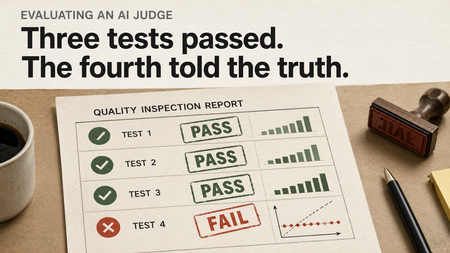
The four verdicts, up front Consistency: mean CV across posts 5.30% Pipeline format checks: pipeline pass rate 100% Rubric adherence (strict judge): 5.00 / 5, mean math drift 0.05 pts Calibration vs. labels: Pearson r = 0.51, MAE = 22.9 pts Three of those say the model is healthy. The last one is the only one that compared the model against anything real, and it tells a different story. Where we left off In Post 1 I built Viral or Fail, three Microsoft Agent Framework agents that pressure-test a gaming social post before you publish it. A Content Creator drafts the post, an Algorithm Simulator scores it the way a recommendation system might, and an Audience Persona reacts the way an actual viewer would. The whole thing runs on the GitHub Models free tier, with no paid API keys. That post ended on a cliffhanger I left deliberately open. The Algorithm Simulator scored the post 75/100, but how do I know the Simulator itself is any good? How consistent are its scores? Do they track real engagement? Would a human social strategist agree with its rubric weights? This post answers that empirically. I built four tests: consistency, pipeline format checks, rubric adherence, and calibration. Three came back healthy. The fourth caught a problem structural enough that it changed how I think about evaluating LLM judges in general. The surprising part isn't that the model failed somewhere but that it passed the three tests you naturally reach for first, and only failed the one most will skip. Why I built my own harness The Microsoft Agent Framework ships a real evaluation surface. You get evaluate_agent, LocalEvaluator, an @evaluator decorator, and the EvalItem / EvalResults data types. It's well designed, and for production agents it's the right choice. It also pairs most naturally with Azure AI Foundry. The path of least resistance assumes you already have an Azure project, a model deployment, and the budget for cloud-tier LLM-as-judge calls. Post 1 went the other way on purpose: zero paid keys, GitHub Models free tier only. To keep that footing, I wrote a small in-house harness that mirrors the call shape of evaluate_agent. The framework's evaluation surface is provider-agnostic in principle, but it leans toward Azure in practice. What the SDK hands you for free on Azure, you can rebuild for yourself on GitHub Models in as you would see shortly, and the patterns transfer directly when you upgrade. The harness is one file, roughly 150 lines. The trick that makes it more than a wrapper is that it tries to import the SDK's primitives first and only defines its own if they aren't there yet: try: from agent_framework import EvalItem, EvalResults, evaluator _USING_SDK_PRIMITIVES = True except ImportError: # agent-framework-core==1.0.0rc1 doesn't ship these yet, # so we define local equivalents with the same shape. @dataclass class EvalItem: query: str response: str expected_output: str | None = None scores: dict[str, float] = field(default_factory=dict) repetition: int = 0 # ... EvalResults, evaluator defined the same way The day Microsoft ships these types, the suite picks them up with no code change. An evaluator looks like this: @evaluator def correlates_with_truth(response: str, expected_output: str) -> float: sim = parse_weighted_total(response) if sim is None or expected_output is None: return 0.0 truth = float(expected_output) return 1.0 - (abs(sim - truth) / 100.0) If you've used the SDK's @evaluator, you've used this one. Same parameter-name dispatch (query, response, expected_output), same return convention (a float in [0, 1]). The runner wraps a retry-aware async loop around a list of these. GitHub Models caps this model at about 15 requests per minute, so the loop sleeps 4.5 seconds between calls (12 a minute, comfortably under the cap). When it does hit a 429 it waits 30 seconds and up, rather than the short exponential backoff it uses for ordinary transient failures. Boring glue code, and important glue code. When you eventually move to Azure, you swap runner.run(...) for evaluate_agent(...) and nothing else in your codebase has to change. What 'good' even means for a judge Before running anything, it's worth being precise about what "good" even means for a judge agent. There are four versions of it, and they split into two camps. The first three are process checks. They probe the model against itself. No external reference data, just the model and its own outputs. Consistency means same input, same output. Run the Simulator twice on the same post and the scores should land in roughly the same place. If they don't, the score is noise. Pipeline format checks ask whether each agent followed its required output shape. Did the Creator produce platform-native text? Did the Simulator emit a parseable weighted total? Did the Persona stay in character? These are the cheapest tests of all, just regex and keyword matching, no LLM judge needed. Rubric adherence is harder. The Simulator's prompt asks it to score five weighted criteria and report a weighted total. Did it actually do that, or did it list the criteria and then invent a number? Checking this needs an LLM. The cloud-tier equivalent is FoundryEvals.TaskAdherence, and I'll build the free-tier version below. The fourth check is a different animal. Validation against ground truth. Calibration asks whether the Simulator's scores correlate with real engagement. It's the same operation you'd run on any predictive model: predict, compare against a labeled set, report correlation and error. It's the only check that tells you the model is correct rather than merely consistent and well-formatted, and it's the only one that needs data the model didn't produce. That's the thesis of this post, and the reason the order matters. The three process checks can all come back green and still tell you nothing about the validation result. And because validation needs ground truth, the design of the ground-truth dataset becomes part of the result. I'll be explicit about that when we get there. The posts under test Every test runs against the same thing: a 10-post golden dataset of gaming social posts I wrote and hand-labeled. Each entry carries the post content, its real-world engagement numbers, a normalized engagement_score from 0 to 100, and a label (viral, decent, flop, or outlier). Here's the viral Valorant post that Test 1 keeps referencing, in full: json { "id": "post_001", "platform": "Twitter/X", "topic": "Valorant Champions 2025", "content": "EG winning Champions 2025 was the most underrated moment in Valorant esports history and people still don't talk about it enough.\n\nDemon1 carried that grand final on a level we won't see again until at least Champions '26. The map veto into Bind alone deserves a documentary.", "real_engagement": { "impressions": 2100000, "likes": 45000, "shares_or_retweets": 8000, "replies_or_comments": 1200, "engagement_rate_pct": 2.58 }, "engagement_score": 82, "label": "viral", "notes": "Hot take + esports nostalgia + named callout (Demon1) drove QRTs from competing fanbases." } The full set is in the repo at evals/golden_dataset.json: two viral hits, four decent posts, three flops, and one outlier, across Twitter/X, TikTok, YouTube, and Instagram. Test 1: Consistency The easiest test to write. Run the Simulator ten times on the same post with identical input. Compute the mean, standard deviation, and coefficient of variation. Repeat across five posts spanning viral, decent, flop, and outlier labels. The harness call is one line: runner = EvalRunner(rate_limit_sleep=4.5) # 12 RPM, under the cap results = await runner.run( agent=agent, queries=[_build_simulator_prompt(p) for p in selected], evaluators=[weighted_total_score], # parses the score out of each run num_repetitions=NUM_REPETITIONS, # 10 ) Fifty Simulator runs in total. Group by query, compute std/mean per post, then average the resulting CVs. Mean coefficient of variation across the five posts: 5.30%. With the rubric pinned, the Simulator is meaningfully non-deterministic, but it isn't chaotic. Most scores cluster within about four points of the per-post mean. That's the headline, and it's fine. Now look at the chart again. post_001 (the viral Valorant Champions post, mean 70.3) and post_003 (the decent Steam Deck OLED post, mean 72.4) sit at almost the same place on the x-axis. The decent post averages slightly higher than the viral one. Across ten reps each. Twenty data points, and the Simulator can't reliably tell which one is supposed to be the success. If you trace the mean diamonds left to right, the decent post outranks both viral posts. A consistency test won't flag this as a problem, because the Simulator is being consistent. It consistently rates these two posts in the same band. The problem is what that band means. If consistency were your only check, you'd close the laptop and ship. Hold onto that. It comes back. Test 4: Pipeline format checks Now zoom out from a single agent and run the full Viral or Fail pipeline (Creator, then Simulator, then Persona) on five live trending gaming topics, applying format-level checks to each agent's output. The checks are deliberately cheap. For the Creator: does the output contain Twitter/X-native vocabulary (the keyword list looks for things like thread, ratio, QRT, take, based)? For the Simulator: is there a parseable weighted total between 0 and 100? For the Persona (TryHard_Tyler, the competitive esports fan, in this run): does the output use any of the persona's keywords, like diff, cope, goated, ratio, cap? Five topics, fetched live from Google Trends: xbox game pass, the hobbit mtg collector booster, crimson desert patch notes, xbox, olden era steam. Per-agent pass rate: Creator 100%, Simulator 100%, Persona 100%. Pipeline pass rate 100%. The format checks are doing their job. Every agent produced output in the shape it was supposed to, on every topic. No regex misses, no missing weighted totals, no out-of-character personas. This is the point where, if you'd only run consistency and pipeline checks, you'd write the triumphant report. "Our agents are reliable. CV under 6%. Pipeline pass rate 100%. Ship it." That report would be true. It would also be wrong about whether the model is correct, because format adherence is not output validity. Keep going. Test 3: Rubric adherence, and a free-tier LLM-as-judge Format checks tell you what the output looks like. Rubric adherence asks whether the Simulator actually did the work it was prompted to do: score five weighted criteria, sum them correctly, and explain each score with platform-mechanic reasoning rather than vibes. There's no regex for that. You need an LLM to read the Simulator's full evaluation and judge whether it followed its own rubric. That's an LLM-as-judge, and the cloud-tier equivalent is FoundryEvals.TaskAdherence on Azure. Since we're staying free, I built it. The judge is just another Agent with a stricter system prompt: JUDGE_SYSTEM_PROMPT = """You are a Rubric Adherence Judge — strict and skeptical. You evaluate whether another AI agent ACTUALLY followed its scoring rubric, not just whether it produced output that looks like it did. You will check three things, in order of severity (the strictest failing check sets the score): A. MATHEMATICAL FIDELITY (most important). Compute sum(criterion_score × weight) yourself from the agent's per-criterion scores. Compare it to the agent's stated WEIGHTED TOTAL. If they differ by more than 2 points, the agent is doing the rubric wrong even if it looks correct on the surface. Report the difference as `math_diff`. B. REASONING SPECIFICITY. Each criterion's justification must reference platform-specific algorithm mechanics — "FYP retention threshold", "QRT velocity", "average view duration". Generic praise ("strong hook", "good engagement") is GENERIC and lowers the score. Classify reasoning as "specific", "mixed", or "generic". C. COVERAGE. Every criterion in the rubric must be explicitly scored. Missing criteria fail this check. ... Be strict. Format-following ≠ rubric-following.""" The full prompt is in the repo. The key decision is point A: the judge recomputes the math itself. That catches the failure where an agent lists every criterion with a score, but the weighted total it reports doesn't actually equal the weighted sum. That kind of quiet drift is exactly what format checks miss. The judge returns strict JSON: adherence_score (1 to 5), math_diff, reasoning_quality, criteria_present, missing_criteria, weight_drift, plus a few sentences of reasoning. Test 3 doesn't go through runner.run; it orchestrates the two agents by hand, one post at a time, so the judge sees the Simulator's full evaluation: for post in posts: sim_text = await call_agent_with_retry(simulator, build_simulator_prompt(post)) verdict = await judge.judge( rubric=PLATFORM_RULES[post["platform"]], post_content=post["content"], evaluation_output=sim_text, ) Run across all 10 posts in the golden dataset, here's what comes back. Mean adherence score: 5.00 / 5. Mean absolute math drift: 0.05 points (max 0.25). Reasoning quality classified "specific" on 100% of evaluations. Zero missing criteria, zero weight drift. This was not the result I expected. I built the judge to be strict on purpose, after my first version turned out too lenient (more on that in the bugs section). The strict version recomputes the weighted sum, classifies generic praise as a failure, and demands platform-mechanic citations. The Simulator passed every dimension anyway. The per-post reasoning is genuinely fun to read. On the Activision Blizzard flop, the judge noted that the Simulator's reasoning leaned on engagement velocity, quote-retweet incentives, topicality timing, and hashtag discoverability rather than generic praise. On the GTA 6 viral TikTok, it cited pattern interrupts, trending-cluster signals, and share-velocity drivers. That's the language I asked for, and the Simulator is producing it. So the Simulator does the rubric correctly. The math is right, the reasoning is specific, every criterion is covered. By every internal measure, it works. You can probably see where this is going. There's exactly one thing left to check, and it's the most expensive and most important one. Test 2: Calibration, the reckoning This one isn't a test in the same sense as the first three. They asked whether the model was malfunctioning. This asks whether it's correct, which is a different question entirely, because it's the only one that needs data the model didn't produce. And because it's a validation, what I validate against matters as much as the model. So before running anything, here's exactly what the ground truth is: a 10-post golden dataset that I built, not measured. I wrote the post content myself in platform-native style, then assigned each post an engagement_score from a back-of-envelope formula (impressions x engagement rate x shareability), calibrated against publicly observable performance for similar posts. The set spans two viral hits, four decent posts, three flops, and one deliberate outlier (a post that got ratio'd into orbit, with high reach and terrible reception). So when I show you a Pearson r in a moment, hold it loosely. The exact number is partly a function of how I designed the labels. The shape of the failure (whether the Simulator's predictions cluster, spread, invert, or track the labels) is what's actually informative, because the shape doesn't depend on the labels being precise. It only depends on them being roughly ordered: viral out-ranks decent, decent out-ranks flop. Whether viral is 91 against flop 18, or viral 85 against flop 25, doesn't change which way the comparison runs. With that on the table: run the Simulator once per post, compute Pearson r and Spearman rho, compute MAE. Pearson r = 0.51. Spearman rho = 0.52. MAE = 22.9 points. That r-value isn't a small problem. Here's what it means in practice, post by post: Post Topic Label Truth Simulator Error 001 Valorant Champions 2025 viral 82 69.75 12.25 002 GTA 6 reveal reaction viral 91 65.75 25.25 003 Steam Deck OLED price decent 55 71.00 16.00 004 Genshin Impact 5.0 pulls decent 48 65.00 17.00 005 Hollow Knight: Silksong decent 60 76.50 16.50 006 Xbox Showcase 2025 decent 42 74.75 32.75 007 Activision Blizzard acquisition flop 18 59.50 41.50 008 5 games to play this weekend flop 22 37.00 15.00 009 Pentiment retrospective flop 15 60.75 45.75 010 Concord shutdown post-mortem outlier 50 57.00 7.00 The pattern is structural. The Simulator's natural output band is roughly 60 to 76. Posts that should clear 80 get pulled down to 65 to 70. Posts that should land below 25 get pulled up toward 60, with one flop (post_008, the "5 games this weekend" listicle) the only exception at 37. The model has an attractor zone in the middle of the scale and refuses to leave it. Look at the most accurate prediction in the table. It's post_010, the outlier (truth 50, Simulator 57, error 7). Why is it the most accurate? Because 50 happens to sit inside the attractor zone. The Simulator's bias accidentally cancels out for posts that are supposed to be average. It isn't accurate, it's wrong in a way that lands near the truth for one specific case. This was the test I almost didn't run. It needs labeled data, which is annoying to gather, and three out of four tests had already declared the model healthy. By every internal measure, the Simulator was working as designed. It just couldn't tell viral from decent. It rated the GTA 6 reaction TikTok (truth 91) at 66, and the Steam Deck OLED post (truth 55) at 71. The model is consistent, rubric-faithful, and format-stable, and on real cases it literally inverts virality and decentness. The shape of that failure (flops pulled up hard, by 15, 42, and 46 points; virals pulled down by 12 and 25; the whole range collapsed into a narrow band) is what survives the synthetic-label uncertainty. If the labels were simply inaccurate, you'd see scatter. A symmetric squeeze toward the middle requires the Simulator itself to be conservative. The Pearson r of 0.51 (p around 0.13, not significant on n = 10) is the number to hold loosely. The squeeze is the result. Running this against measured engagement metrics is the natural Post 3, and I'd expect the qualitative finding to hold. Bugs the suite caught along the way This is something I want to keep doing in my write-ups. I usually publish the clean, glamorous version (here's what I built, here's what I learned, the end), which quietly erases the bugs that taught me the most about how the system actually behaves. So here are three real ones the eval suite caught while I was running it. The production parser regex was silently failing. Post 1's viral_or_fail.py extracts the Simulator's weighted total with a regex like Weighted\s*Total[^\n]+. That works for same-line layouts (Weighted Total: 73/100). It does not work for the multi-line layout the model produces about half the time: **WEIGHTED TOTAL:** = 22.5 + 15 + 14 + 12.75 + 9 = **73.25/100** When the regex misses, the production code silently falls back to a default of 50. Which means the public Viral or Fail demo had been quietly showing readers 50/100 on many of its runs since Post 1 went live. The eval suite caught it on the very first call: parse_weighted_total returned None, the harness logged it loudly, and the bug had nowhere to hide. The fix strips the bold markers, finds the header, then scans a few non-blank lines past it, preferring N/100, then a trailing = N, then the first number it sees: clean = response.replace("**", "") header = _WT_HEADER_RE.search(clean) # r"Weighted\s*Total\s*:?" if not header: return None after = clean[header.end():] window = [] for raw in after.splitlines()[: _WT_LOOKAHEAD_LINES + 1]: line = raw.strip() if not line and window: break if line: window.append(line) blob = " ".join(window) # prefer "N/100", then a trailing "= N", then the first number found That regex hunt alone justified the whole exercise. The Google Trends "Games" topic is contaminated. Test 4 originally fetched live trending topics and got back "kentucky derby 2026", "kentucky oaks", and "fanduel" alongside the actual gaming. The cause: Google's taxonomy bundles horse racing, gambling, and sportsbooks under the same Games topic ID it uses for video games, and the trends_tool.py filter from Post 1 was matching on that topic ID alone. The fix was a two-layer filter: require the games topic and not topic 17 (Sports), plus a small denylist for gambling keywords. Now the results come back as xbox game pass, crimson desert, and the hobbit mtg collector booster, with no horse racing. The first version of the judge was too lenient. My initial RubricAdherenceJudge rewarded "every criterion explicitly scored." But the Simulator's system prompt forces exactly that, so the judge handed out 5/5 trivially across all 10 posts and told me nothing. I tightened it to recompute the weighted sum and report math_diff, and to classify reasoning as specific, mixed, or generic based on whether justifications cite platform mechanics. Even under the strict judge the Simulator still scored 5/5, but now I'd earned that result instead of getting it for free. Why this matters in production I built four tests to evaluate the Algorithm Simulator from Post 1. Three of them (consistency, rubric adherence, pipeline format checks) declared it healthy. The fourth, calibration, compared its scores against labeled engagement and found systematic bias: the predictions are squashed into a narrow band regardless of how the post actually performed. A flop with engagement of 18 gets a 60. A viral hit with engagement of 91 gets a 66. The model isn't broken in any visible way. It's just consistently, faithfully, formally wrong. That's exactly why validation against ground truth isn't optional. It's the only check that catches a model doing everything right except being correct. Format, consistency, and rubric-coverage tests tell you the model isn't malfunctioning. They cannot tell you it's correct. They test the process, and only validation tests the output. A model can have a flawless process and still produce numbers that don't track reality. Now zoom out. Viral or Fail's Simulator is low stakes. Worst case, a creator publishes a post the Simulator liked and it flops. Embarrassing, not dangerous. The same failure at higher stakes is dangerous, and the same shape shows up everywhere in production AI. Ask a language model to be "objective" and it hedges toward the middle. Content moderation agents under-flag clearly harmful content and over-flag clearly benign content, because both extremes feel risky to the model. Resume screeners compress every candidate into a 60-to-80 band and call the lack of spread "fairness." Code-review bots return a comfortable 7/10 on a PR with real problems and on a PR with none. Support routing labels almost everything "medium priority" and quietly breaks the downstream automation that relied on the signal meaning something. Each of those has shipped in real deployments and then underperformed for months before anyone noticed. The teams weren't careless. They had observability, CI, process checks. What they lacked was a labeled validation set. And without one, a confidently miscalibrated model looks identical to a working one. A model that's wrong randomly gets caught, because outliers get flagged and reviewed. A model that's wrong consistently gets trusted, because it never trips an alarm. Once a downstream product depends on the miscalibrated output, the bias gets amplified at scale. Most production AI systems are not validated this way. Most LLM-as-judge components in agentic systems have never had their predictions compared against any external ground truth at all. And when something does feel off, teams reach for fine-tuning. But you can't fine-tune what you haven't characterized, and characterization is exactly what calibration testing produces. Without it, fine-tuning is guesswork in an engineering costume. "It works in eval" usually means it passed process checks, which is not the same thing as working. So evaluation is a discipline, not a phase. It belongs in the same loop as deployment, not as a one-off before launch. Internal-process checks belong in CI. Validation against labels belongs on a schedule. Both should alert when they regress, and both should be visible to the people accountable for the model's decisions. If there's one thing to take from this post: build a validation step into your eval suite from day one, even with synthetic labels, and especially if you can't get measured ones yet. Process tests keep you safe from regressions. Only the validation step keeps you honest about whether the model is right. What's next: the cloud-tier upgrade path Everything here runs on the GitHub Models free tier. That's deliberate, and it also means I've built the free-tier version of three things Microsoft already does better at production scale. The first is FoundryEvals in agent_framework_azure_ai. My RubricAdherenceJudge is a homemade FoundryEvals.TaskAdherence. Foundry's version uses Azure-hosted judges on a managed pipeline, with calibration handled internally and a portal for tracking runs over time. Same structural test, but operationally serious. The same idea applies to Relevance, Coherence, Groundedness, IntentResolution, and the rest of the catalogue. If you've built the harness from this post, swapping it for evaluate_agent plus FoundryEvals is mostly an import change. The second is the AI Red Teaming Agent. I didn't run any safety evaluation in this suite. The Audience Persona is the agent most likely to drift into unsafe territory, and the natural counterpart to quality evaluation is adversarial probing with PyRIT. The AI Red Teaming Agent wires that straight into Foundry. That's a Post 4. The third is observability. DevUI gives you real-time visualization of agent sessions, and OpenTelemetry traces flow into Azure Monitor. Both earn their keep when an eval flags a regression and you need to walk back through the failing run to find the cause. And then there's Post 3: the calibration test against real engagement data. If you have a Twitter, YouTube, or TikTok dataset with both post content and post-hoc engagement metrics, and you'd be open to collaborating, I'd love to hear from you. The full eval suite is on GitHub: github.com/HamidOna/viral-or-fail. Run pip install -r requirements.txt, set GITHUB_TOKEN, and run python -m evals.run_all. Six to eight minutes start to finish on the free tier. The suite runs, the JSONs write, the plots render, and you'll see the same thing I did: the easy tests will tell you everything is fine. The last test will tell you what's actually happening.389Views0likes0CommentsGetting Started with Foundry Local: A Student Guide to the Microsoft Foundry Local Lab
If you want to start building AI applications on your own machine, the Microsoft Foundry Local Lab is one of the most useful places to begin. It is a practical workshop that takes you from first-time setup through to agents, retrieval, evaluation, speech transcription, tool calling, and a browser-based interface. The material is hands-on, cross-language, and designed to show how modern AI apps can run locally rather than depending on a cloud service for every step. This blog post is aimed at students, self-taught developers, and anyone learning how AI applications are put together in practice. Instead of treating large language models as a black box, the lab shows you how to install and manage local models, connect to them with code, structure tasks into workflows, and test whether the results are actually good enough. If you have been looking for a learning path that feels more like building real software and less like copying isolated snippets, this workshop is a strong starting point. What Is Foundry Local? Foundry Local is a local runtime for downloading, managing, and serving AI models on your own hardware. It exposes an OpenAI-compatible interface, which means you can work with familiar SDK patterns while keeping execution on your device. For learners, that matters for three reasons. First, it lowers the barrier to experimentation because you can run projects without setting up a cloud account for every test. Second, it helps you understand the moving parts behind AI applications, including model lifecycle, local inference, and application architecture. Third, it encourages privacy-aware development because the examples are designed to keep data on the machine wherever possible. The Foundry Local Lab uses that local-first approach to teach the full journey from simple prompts to multi-agent systems. It includes examples in Python, JavaScript, and C#, so you can follow the language that fits your course, your existing skills, or the platform you want to build on. Why This Lab Works Well for Learners A lot of AI tutorials stop at the moment a model replies to a prompt. That is useful for a first demo, but it does not teach you how to build a proper application. The Foundry Local Lab goes further. It is organised as a sequence of parts, each one adding a new idea and giving you working code to explore. You do not just ask a model to respond. You learn how to manage the service, choose a language SDK, construct retrieval pipelines, build agents, evaluate outputs, and expose the result through a usable interface. That sequence is especially helpful for students because the parts build on each other. Early labs focus on confidence and setup. Middle labs focus on architecture and patterns. Later labs move into more advanced ideas that are common in real projects, such as tool calling, evaluation, and custom model packaging. By the end, you have seen not just what a local AI app looks like, but how its different layers fit together. Before You Start The workshop expects a reasonably modern machine and at least one programming language environment. The core prerequisites are straightforward: install Foundry Local, clone the repository, and choose whether you want to work in Python, JavaScript, or C#. You do not need to master all three. In fact, most learners will get more value by picking one language first, completing the full path in that language, and only then comparing how the same patterns look elsewhere. If you are new to AI development, do not be put off by the number of parts. The early sections are accessible, and the later ones become much easier once you have completed the foundations. Think of the lab as a structured course rather than a single tutorial. What You Learn in Each Lab https://github.com/microsoft-foundry/foundry-local-lab Part 1: Getting Started with Foundry Local The first part introduces the basics of Foundry Local and gets you up and running. You learn how to install the CLI, inspect the model catalogue, download a model, and run it locally. This part also introduces practical details such as model aliases and dynamic service ports, which are small but important pieces of real development work. For students, the value of this part is confidence. You prove that local inference works on your machine, you see how the service behaves, and you learn the operational basics before writing any application code. By the end of Part 1, you should understand what Foundry Local does, how to start it, and how local model serving fits into an application workflow. Part 2: Foundry Local SDK Deep Dive Once the CLI makes sense, the workshop moves into the SDK. This part explains why application developers often use the SDK instead of relying only on terminal commands. You learn how to manage the service programmatically, browse available models, control model download and loading, and understand model metadata such as aliases and hardware-aware selection. This is where learners start to move from using a tool to building with a platform. You begin to see the difference between running a model manually and integrating it into software. By the end of this section, you should understand the API surface you will use in your own projects and know how to bootstrap the SDK in Python, JavaScript, or C#. Part 3: SDKs and APIs Part 3 turns the SDK concepts into a working chat application. You connect code to the local inference server and use the OpenAI-compatible API for streaming chat completions. The lab includes examples in all three supported languages, which makes it especially useful if you are comparing ecosystems or learning how the same idea is expressed through different syntax and libraries. The key learning outcome here is not just that you can get a response from a model. It is that you understand the boundary between your application and the local model service. You learn how messages are structured, how streaming works, and how to write the sort of integration code that becomes the foundation for every later lab. Part 4: Retrieval-Augmented Generation This is where the workshop starts to feel like modern AI engineering rather than basic prompting. In the retrieval-augmented generation lab, you build a simple RAG pipeline that grounds answers in supplied data. You work with an in-memory knowledge base, apply retrieval logic, score matches, and compose prompts that include grounded context. For learners, this part is important because it demonstrates a core truth of AI app development: a model on its own is often not enough. Useful applications usually need access to documents, notes, or structured information. By the end of Part 4, you understand why retrieval matters, how to pass retrieved context into a prompt, and how a pipeline can make answers more relevant and reliable. Part 5: Building AI Agents Part 5 introduces the concept of an agent. Instead of a one-off prompt and response, you begin to define behaviour through system instructions, roles, and conversation state. The lab uses the ChatAgent pattern and the Microsoft Agent Framework to show how an agent can maintain a purpose, respond with a persona, and return structured output such as JSON. This part helps learners understand the difference between a raw model call and a reusable application component. You learn how to design instructions that shape behaviour, how multi-turn interaction differs from single prompts, and why structured output matters when an AI component has to work inside a broader system. Part 6: Multi-Agent Workflows Once a single agent makes sense, the workshop expands the idea into a multi-agent workflow. The example pipeline uses roles such as researcher, writer, and editor, with outputs passed from one stage to the next. You explore sequential orchestration, shared configuration, and feedback loops between specialised components. For students, this lab is a very clear introduction to decomposition. Instead of asking one model to do everything at once, you break a task into smaller responsibilities. That pattern is useful well beyond AI. By the end of Part 6, you should understand why teams build multi-agent systems, how hand-offs are structured, and what trade-offs appear when more components are added to a workflow. Part 7: Zava Creative Writer Capstone Application The Zava Creative Writer is the capstone project that brings the earlier ideas together into a more production-style application. It uses multiple specialised agents, structured JSON hand-offs, product catalogue search, streaming output, and evaluation-style feedback loops. Rather than showing an isolated feature, this part shows how separate patterns combine into a complete system. This is one of the most valuable parts of the workshop for learner developers because it narrows the gap between tutorial code and real application design. You can see how orchestration, agent roles, and practical interfaces fit together. By the end of Part 7, you should be able to recognise the architecture of a serious local AI app and understand how the earlier labs support it. Part 8: Evaluation-Led Development Many beginner AI projects stop once the output looks good once or twice. This lab teaches a much stronger habit: evaluation-led development. You work with golden datasets, rule-based checks, and LLM-as-judge scoring to compare prompt or agent variants systematically. The goal is to move from anecdotal testing to repeatable assessment. This matters enormously for students because evaluation is one of the clearest differences between a classroom demo and dependable software. By the end of Part 8, you should understand how to define success criteria, compare outputs at scale, and use evidence rather than intuition when improving an AI component. Part 9: Voice Transcription with Whisper Part 9 broadens the workshop beyond text generation by introducing speech-to-text with Whisper running locally. You use the Foundry Local SDK to download and load the model, then transcribe local audio files through the compatible API surface. The emphasis is on privacy-first processing, with audio kept on-device. This section is a useful reminder that local AI development is not limited to chatbots. Learners see how a different modality fits into the same ecosystem and how local execution supports sensitive workloads. By the end of this lab, you should understand the transcription flow, the relevant client methods, and how speech features can be integrated into broader applications. Part 10: Using Custom or Hugging Face Models After learning the standard path, the workshop shows how to work with custom or Hugging Face models. This includes compiling models into optimised ONNX format with ONNX Runtime GenAI, choosing hardware-specific options, applying quantisation strategies, creating configuration files, and adding compiled models to the Foundry Local cache. For learner developers, this part opens the door to model engineering rather than simple model consumption. You begin to understand that model choice, optimisation, and packaging affect performance and usability. By the end of Part 10, you should have a clearer picture of how models move from an external source into a runnable local setup and why deployment format matters. Part 11: Tool Calling with Local Models Tool calling is one of the most practical patterns in current AI development, and this lab covers it directly. You define tool schemas, allow the model to request function calls, handle the multi-turn interaction loop, execute the tools locally, and return results back to the model. The examples include practical scenarios such as weather and population tools. This lab teaches learners how to move beyond generation into action. A model is no longer limited to producing text. It can decide when external data or a function is needed and incorporate that result into a useful answer. By the end of Part 11, you should understand the tool-calling flow and how AI systems connect reasoning with deterministic software behaviour. Part 12: Building a Web UI for the Zava Creative Writer Part 12 adds a browser-based front end to the capstone application. You learn how to serve a shared interface from Python, JavaScript, or C#, stream updates to the browser, consume NDJSON with the Fetch API and ReadableStream, and show live agent status as content is produced in real time. This part is especially good for students who want to build portfolio projects. It turns backend orchestration into something visible and interactive. By the end of Part 12, you should understand how to connect a local AI backend to a web interface and how streaming changes the user experience compared with waiting for one final response. Part 13: Workshop Complete The final part is a summary and extension point. It reviews what you have built across the previous sections and suggests ways to continue. Although it is not a new technical lab in the same way as the earlier parts, it plays an important role in learning. It helps you consolidate the architecture, the terminology, and the development patterns you have encountered. For learners, reflection matters. By the end of Part 13, you should be able to describe the full stack of a local AI application, from model management to user interface, and identify which area you want to deepen next. What Students Gain from the Full Workshop Taken together, these labs do more than teach Foundry Local itself. They teach how AI applications are built. You learn operational basics such as model setup and service management. You learn application integration through SDKs and APIs. You learn system design through RAG, agents, multi-agent orchestration, and web interfaces. You learn engineering discipline through evaluation. You also see how text, speech, custom models, and tool calling all fit into one local-first development workflow. That breadth makes the workshop useful in several settings. A student can use it as a self-study path. A lecturer can use it as source material for practical sessions. A learner developer can use it to build portfolio pieces and to understand which AI patterns are worth learning next. Because the repository includes Python, JavaScript, and C#, it also works well for comparing how architectural ideas transfer across languages. How to Approach the Lab as a Beginner If you are starting from scratch, the best route is simple. Complete Parts 1 to 3 in your preferred language first. That gives you the essential setup and integration skills. Then move into Parts 4 to 6 to understand how AI application patterns are composed. After that, use Parts 7 and 8 to learn how larger systems and evaluation fit together. Finally, explore Parts 9 to 12 based on your interests, whether that is speech, tooling, model customisation, or front-end work. It is also worth keeping notes as you go. Record what each part adds to your understanding, what code files matter, and what assumptions each example makes. That habit will help you move from following the labs to adapting the patterns in your own projects. Final Thoughts The Microsoft Foundry Local Lab is a strong introduction to local AI development because it treats learners like developers rather than spectators. You install, run, connect, orchestrate, evaluate, and present working systems. That makes it far more valuable than a short demo that only proves a model can answer a question. If you are a student or learner developer who wants to understand how AI applications are really built, this lab gives you a clear path. Start with the basics, pick one language, and work through the parts in order. By the time you finish, you will not just have used Foundry Local. You will have a practical foundation for building local AI applications with far more confidence and much better judgement.802Views0likes0CommentsLangchain Multi-Agent Systems with Microsoft Agent Framework and Hosted Agents
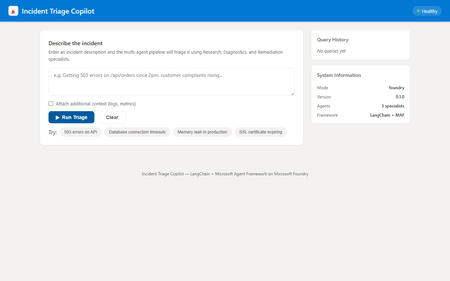
If you have been building AI agents with LangChain, you already know how powerful its tool and chain abstractions are. But when it comes to deploying those agents to production — with real infrastructure, managed identity, live web search, and container orchestration — you need something more. This post walks through how to combine LangChain with the Microsoft Agent Framework ( azure-ai-agents ) and deploy the result as a Microsoft Foundry Hosted Agent. We will build a multi-agent incident triage copilot that uses LangChain locally and seamlessly upgrades to cloud-hosted capabilities on Microsoft Foundry. Why combine LangChain with Microsoft Agent Framework? As a LangChain developer, you get excellent abstractions for building agents: the @tool decorator, RunnableLambda chains, and composable pipelines. But production deployment raises questions that LangChain alone does not answer: Where do your agents run? Containers, serverless, or managed infrastructure? How do you add live web search or code execution? Bing Grounding and Code Interpreter are not LangChain built-ins. How do you handle authentication? Managed identity, API keys, or tokens? How do you observe agents in production? Distributed tracing across multiple agents? The Microsoft Agent Framework fills these gaps. It provides AgentsClient for creating and managing agents on Microsoft Foundry, built-in tools like BingGroundingTool and CodeInterpreterTool , and a thread-based conversation model. Combined with Hosted Agents, you get a fully managed container runtime with health probes, auto-scaling, and the OpenAI Responses API protocol. The key insight: LangChain handles local logic and chain composition; the Microsoft Agent Framework handles cloud-hosted orchestration and tooling. Architecture overview The incident triage copilot uses a coordinator pattern with three specialist agents: User Query | v Coordinator Agent | +--> LangChain Triage Chain (routing decision) +--> LangChain Synthesis Chain (combine results) | +---+---+---+ | | | v v v Research Diagnostics Remediation Agent Agent Agent Each specialist agent has two execution modes: Mode LangChain Role Microsoft Agent Framework Role Local @tool functions provide heuristic analysis Not used Foundry Chains handle routing and synthesis AgentsClient with BingGroundingTool , CodeInterpreterTool This dual-mode design means you can develop and test locally with zero cloud dependencies, then deploy to Foundry for production capabilities. Step 1: Define your LangChain tools Start with what you know. Define typed, documented tools using LangChain’s @tool decorator: from langchain_core.tools import tool @tool def classify_incident_severity(query: str) -> str: """Classify the severity and priority of an incident based on keywords. Args: query: The incident description text. Returns: Severity classification with priority level. """ query_lower = query.lower() critical_keywords = [ "production down", "all users", "outage", "breach", ] high_keywords = [ "503", "500", "timeout", "latency", "slow", ] if any(kw in query_lower for kw in critical_keywords): return "severity=critical, priority=P1" if any(kw in query_lower for kw in high_keywords): return "severity=high, priority=P2" return "severity=low, priority=P4" These tools work identically in local mode and serve as fallbacks when Foundry is unavailable. Step 2: Build routing with LangChain chains Use RunnableLambda to create a routing chain that classifies the incident and selects which specialists to invoke: from langchain_core.runnables import RunnableLambda from enum import Enum class AgentRole(str, Enum): RESEARCH = "research" DIAGNOSTICS = "diagnostics" REMEDIATION = "remediation" DIAGNOSTICS_KEYWORDS = { "log", "error", "exception", "timeout", "500", "503", "crash", "oom", "root cause", } REMEDIATION_KEYWORDS = { "fix", "remediate", "runbook", "rollback", "hotfix", "patch", "resolve", "action plan", } def _route(inputs: dict) -> dict: query = inputs["query"].lower() specialists = [AgentRole.RESEARCH] # always included if any(kw in query for kw in DIAGNOSTICS_KEYWORDS): specialists.append(AgentRole.DIAGNOSTICS) if any(kw in query for kw in REMEDIATION_KEYWORDS): specialists.append(AgentRole.REMEDIATION) return {**inputs, "specialists": specialists} triage_routing_chain = RunnableLambda(_route) This is pure LangChain — no cloud dependency. The chain analyses the query and returns which specialists should handle it. Step 3: Create specialist agents with dual-mode execution Each specialist agent extends a base class. In local mode, it uses LangChain tools. In Foundry mode, it delegates to the Microsoft Agent Framework: from abc import ABC, abstractmethod from pathlib import Path class BaseSpecialistAgent(ABC): role: AgentRole prompt_file: str def __init__(self): prompt_path = Path(__file__).parent.parent / "prompts" / self.prompt_file self.system_prompt = prompt_path.read_text(encoding="utf-8") async def run(self, query, shared_context, correlation_id, client=None): if client is not None: return await self._run_on_foundry(query, shared_context, correlation_id, client) return await self._run_locally(query, shared_context, correlation_id) async def _run_on_foundry(self, query, shared_context, correlation_id, client): """Use Microsoft Agent Framework for cloud-hosted execution.""" from azure.ai.agents.models import BingGroundingTool agent = await client.agents.create_agent( model=shared_context.get("model_deployment", "gpt-4o"), name=f"{self.role.value}-{correlation_id}", instructions=self.system_prompt, tools=self._get_foundry_tools(shared_context), ) thread = await client.agents.threads.create() await client.agents.messages.create( thread_id=thread.id, role="user", content=self._build_prompt(query, shared_context), ) run = await client.agents.runs.create_and_process( thread_id=thread.id, agent_id=agent.id, ) # Extract and return the agent’s response... async def _run_locally(self, query, shared_context, correlation_id): """Use LangChain tools for local heuristic analysis.""" # Each subclass implements this with its specific tools ... The key pattern here: same interface, different backends. Your coordinator does not care whether a specialist ran locally or on Foundry. Step 4: Wire it up with FastAPI Expose the multi-agent pipeline through a FastAPI endpoint. The /triage endpoint accepts incident descriptions and returns structured reports: from fastapi import FastAPI from agents.coordinator import Coordinator from models import TriageRequest app = FastAPI(title="Incident Triage Copilot") coordinator = Coordinator() @app.post("/triage") async def triage(request: TriageRequest): return await coordinator.triage( request=request, client=app.state.foundry_client, max_turns=10, ) The application also implements the /responses endpoint, which follows the OpenAI Responses API protocol. This is what Microsoft Foundry Hosted Agents expects when routing traffic to your container. Step 5: Deploy as a Hosted Agent This is where Microsoft Foundry Hosted Agents shines. Your multi-agent system becomes a managed, auto-scaling service with a single command: # Install the azd AI agent extension azd extension install azure.ai.agents # Provision infrastructure and deploy azd up The Azure Developer CLI ( azd ) provisions everything: Azure Container Registry for your Docker image Container App with health probes and auto-scaling User-Assigned Managed Identity for secure authentication Microsoft Foundry Hub and Project with model deployments Application Insights for distributed tracing Your agent.yaml defines what tools the hosted agent has access to: name: incident-triage-copilot-langchain kind: hosted model: deployment: gpt-4o identity: type: managed tools: - type: bing_grounding enabled: true - type: code_interpreter enabled: true What you gain over pure LangChain Capability LangChain Only LangChain + Microsoft Agent Framework Local development Yes Yes (identical experience) Live web search Requires custom integration Built-in BingGroundingTool Code execution Requires sandboxing Built-in CodeInterpreterTool Managed hosting DIY containers Foundry Hosted Agents Authentication DIY Managed Identity (zero secrets) Observability DIY OpenTelemetry + Application Insights One-command deploy No azd up Testing locally The dual-mode architecture means you can test the full pipeline without any cloud resources: # Create virtual environment and install dependencies python -m venv .venv source .venv/bin/activate pip install -r requirements.txt # Run locally (agents use LangChain tools) python -m src Then open http://localhost:8080 in your browser to use the built-in web UI, or call the API directly: curl -X POST http://localhost:8080/triage \ -H "Content-Type: application/json" \ -d '{"message": "Getting 503 errors on /api/orders since 2pm"}' The response includes a coordinator summary, specialist results with confidence scores, and the tools each agent used. Running the tests The project includes a comprehensive test suite covering routing logic, tool behaviour, agent execution, and HTTP endpoints: curl -X POST http://localhost:8080/triage \ -H "Content-Type: application/json" \ -d '{"message": "Getting 503 errors on /api/orders since 2pm"}' Tests run entirely in local mode, so no cloud credentials are needed. Key takeaways for LangChain developers Keep your LangChain abstractions. The @tool decorator, RunnableLambda chains, and composable pipelines all work exactly as you expect. Add cloud capabilities incrementally. Start local, then enable Bing Grounding, Code Interpreter, and managed hosting when you are ready. Use the dual-mode pattern. Every agent should work locally with LangChain tools and on Foundry with the Microsoft Agent Framework. This makes development fast and deployment seamless. Let azd handle infrastructure. One command provisions everything: containers, identity, monitoring, and model deployments. Security comes free. Managed Identity means no API keys in your code. Non-root containers, RBAC, and disabled ACR admin are all configured by default. Get started Clone the sample repository and try it yourself: git clone https://github.com/leestott/hosted-agents-langchain-samples cd hosted-agents-langchain-samples python -m venv .venv && source .venv/bin/activate pip install -r requirements.txt python -m src Open http://localhost:8080 to interact with the copilot through the web UI. When you are ready for production, run azd up and your multi-agent system is live on Microsoft Foundry. Resources Microsoft Agent Framework for Python documentation Microsoft Foundry Hosted Agents Azure Developer CLI (azd) LangChain documentation Microsoft Foundry documentation1.8KViews0likes0CommentsBuild an Offline Hybrid RAG Stack with ONNX and Foundry Local
If you are building local AI applications, basic retrieval augmented generation is often only the starting point. This sample shows a more practical pattern: combine lexical retrieval, ONNX based semantic embeddings, and a Foundry Local chat model so the assistant stays grounded, remains offline, and degrades cleanly when the semantic path is unavailable. Why this sample is worth studying Many local RAG samples rely on a single retrieval strategy. That is usually enough for a proof of concept, but it breaks down quickly in production. Exact keywords, acronyms, and document codes behave differently from natural language questions and paraphrased requests. This repository keeps the original lexical retrieval path, adds local ONNX embeddings for semantic search, and fuses both signals in a hybrid ranking mode. The generation step runs through Foundry Local, so the entire assistant can remain on device. Lexical mode handles exact terms and structured vocabulary. Semantic mode handles paraphrases and more natural language phrasing. Hybrid mode combines both and is usually the best default. Lexical fallback protects the user experience if the embedding pipeline cannot start. Architectural overview The sample has two main flows: an offline ingestion pipeline and a local query pipeline. The architecture splits cleanly into offline ingestion at the top and runtime query handling at the bottom. Offline ingestion pipeline Read Markdown files from docs/ . Parse front matter and split each document into overlapping chunks. Generate dense embeddings when the ONNX model is available. Store chunks in SQLite with both sparse lexical features and optional dense vectors. Local query pipeline The browser posts a question to the Express API. ChatEngine resolves the requested retrieval mode. VectorStore retrieves lexical, semantic, or hybrid results. The prompt is assembled with the retrieved context and sent to a Foundry Local chat model. The answer is returned with source references and retrieval metadata. The sequence diagram shows the difference between lexical retrieval and hybrid retrieval. In hybrid mode, the query is embedded first, then lexical and semantic scores are fused before prompt assembly. Repository structure and core components The implementation is compact and readable. The main files to understand are listed below. src/config.js : retrieval defaults, paths, and model settings. src/embeddingEngine.js : local ONNX embedding generation through Transformers.js. src/vectorStore.js : SQLite storage plus lexical, semantic, and hybrid ranking. src/chatEngine.js : retrieval mode resolution, prompt assembly, and Foundry Local model execution. src/ingest.js : document ingestion and embedding generation during indexing. src/server.js : REST endpoints, streaming endpoints, upload support, and health reporting. Getting started To run the sample, you need Node.js 20 or newer, Foundry Local, and a local ONNX embedding model. The default model path is models/embeddings/bge-small-en-v1.5 . cd c:\Users\leestott\local-hybrid-retrival-onnx npm install huggingface-cli download BAAI/bge-small-en-v1.5 --local-dir models/embeddings/bge-small-en-v1.5 npm run ingest npm start Ingestion writes the local SQLite database to data/rag.db . If the embedding model is available, each chunk gets a dense vector as well as lexical features. If the embedding model is missing, ingestion still succeeds and the application remains usable in lexical mode. Best practice: local AI applications should treat model files, SQLite data, and native runtime compatibility as part of the deployable system, not as optional developer conveniences. Code walkthrough 1. Retrieval configuration The sample makes its retrieval behaviour explicit in configuration. That is useful for testing and for operator visibility. export const config = { model: "phi-3.5-mini", docsDir: path.join(ROOT, "docs"), dbPath: path.join(ROOT, "data", "rag.db"), chunkSize: 200, chunkOverlap: 25, topK: 3, retrievalMode: process.env.RETRIEVAL_MODE || "hybrid", retrievalModes: ["lexical", "semantic", "hybrid"], fallbackRetrievalMode: "lexical", retrievalWeights: { lexical: 0.45, semantic: 0.55, }, }; Those defaults tell you a lot about the intended operating profile. Chunks are small, the number of returned chunks is low, and the fallback path is explicit. 2. Local ONNX embeddings The embedding engine disables remote model loading and only uses local files. That matters for privacy, repeatability, and air gapped operation. env.allowLocalModels = true; env.allowRemoteModels = false; this.extractor = await pipeline("feature-extraction", resolvedPath, { local_files_only: true, }); const output = await this.extractor(text, { pooling: "mean", normalize: true, }); The mean pooling and normalisation step make the vectors suitable for cosine similarity based ranking. 3. Hybrid storage and ranking in SQLite Instead of adding a separate vector database, the sample stores lexical and semantic representations in the same SQLite table. That keeps the local footprint low and the implementation easy to debug. searchHybrid(query, queryEmbedding, topK = 5, weights = { lexical: 0.45, semantic: 0.55 }) { const lexicalResults = this.searchLexical(query, topK * 3); const semanticResults = this.searchSemantic(queryEmbedding, topK * 3); if (semanticResults.length === 0) { return lexicalResults.slice(0, topK).map((row) => ({ ...row, retrievalMode: "lexical", })); } const fused = [...combined.values()].map((row) => ({ ...row, score: (row.lexicalScore * lexicalWeight) + (row.semanticScore * semanticWeight), })); fused.sort((a, b) => b.score - a.score); return fused.slice(0, topK); } The important point is not just the weighted fusion. It is the fallback behaviour. If semantic retrieval cannot provide results, the user still gets lexical grounding instead of an empty context window. 4. Retrieval mode resolution in ChatEngine ChatEngine keeps the runtime behaviour predictable. It validates the requested mode and falls back to lexical search when semantic retrieval is unavailable. resolveRetrievalMode(requestedMode) { const desiredMode = config.retrievalModes.includes(requestedMode) ? requestedMode : config.retrievalMode; if ((desiredMode === "semantic" || desiredMode === "hybrid") && !this.semanticAvailable) { return config.fallbackRetrievalMode; } return desiredMode; } This is a sensible production design because local runtime failures are common. Missing model files or native dependency mismatches should reduce quality, not crash the entire assistant. 5. Foundry Local model management The sample uses FoundryLocalManager to discover, download, cache, and load the configured chat model. const manager = FoundryLocalManager.create({ appName: "gas-field-local-rag" }); const catalog = manager.catalog; this.model = await catalog.getModel(config.model); if (!this.model.isCached) { await this.model.download((progress) => { const pct = Math.round(progress * 100); this._emitStatus("download", `Downloading ${this.modelAlias}... ${pct}%`, progress); }); } await this.model.load(); this.chatClient = this.model.createChatClient(); this.chatClient.settings.temperature = 0.1; This gives the app a better local startup experience. The server can expose a status stream while the model initialises in the background. User experience and screenshots The client is intentionally simple, which makes it useful during evaluation. You can switch retrieval mode, test questions quickly, and inspect the retrieved sources. The landing page exposes retrieval mode directly in the UI. That makes it easy to compare lexical, semantic, and hybrid behaviour during testing. The sources panel shows grounding evidence and retrieval scores, which is useful when validating whether better answers are coming from better retrieval or just model phrasing. Best practices for ONNX RAG and Foundry Local Keep lexical fallback alive. Exact identifiers and runtime failures both make this necessary. Persist sparse and dense features together where possible. It simplifies debugging and operational reasoning. Use small chunks and conservative topK values for local context budgets. Expose health and status endpoints so users can see when the model is still loading or embeddings are unavailable. Test retrieval quality separately from generation quality. Pin and validate native runtime dependencies, especially ONNX Runtime, before tuning prompts. Practical warning: this repository already shows why runtime validation matters. A local app can ingest documents successfully and still fail at model initialisation if the native runtime stack is misaligned. How this compares with RAG and CAG The strongest value in this sample comes from where it sits between a basic local RAG baseline and a curated CAG design. Dimension Classic local RAG This hybrid ONNX RAG sample CAG Context assembly Retrieve chunks at query time, often lexically, then inject them into the prompt. Retrieve chunks at query time with lexical, semantic, or fused scoring, then inject the strongest results into the prompt. Use a prepared or cached context pack instead of fresh retrieval for every request. Main strength Easy to implement and easy to explain. Better recall for paraphrases without giving up exact match behaviour or offline execution. Predictable prompts and low query time overhead. Main weakness Misses synonyms and natural language reformulations. More moving parts, larger local asset footprint, and native runtime compatibility to manage. Coverage depends on curation quality and goes stale more easily. Failure behaviour Weak retrieval leads to weak grounding. Semantic failure can degrade to lexical retrieval if designed properly, which this sample does. Prepared context can be too narrow for new or unexpected questions. Best fit Simple local assistants and proof of concept systems. Offline copilots and technical assistants that need stronger recall across varied phrasing. Stable workflows with tightly bounded, curated knowledge. Samples Related samples: - Foundry Local RAG - https://github.com/leestott/local-rag - Foundry Local CAG - https://github.com/leestott/local-cag - Foundry Local hybrid-retrival-onnx https://github.com/leestott/local-hybrid-retrival-onnx Specific benefits of this hybrid approach over classic RAG It captures paraphrased questions that lexical search would often miss. It still preserves exact match performance for codes, terms, and product names. It gives operators a controlled degradation path when the semantic stack is unavailable. It stays local and inspectable without introducing a separate hosted vector service. Specific differences from CAG CAG shifts effort into context curation before the request. This sample retrieves evidence dynamically at runtime. CAG can be faster for fixed workflows, but it is usually less flexible when the document set changes. This hybrid RAG design is better suited to open ended knowledge search and growing document collections. What to validate before shipping Measure retrieval quality in each mode using exact term, acronym, and paraphrase queries. Check that sources shown in the UI reflect genuinely distinct evidence, not repeated chunks. Confirm the application remains usable when semantic retrieval is unavailable. Verify ONNX Runtime compatibility on the real target machines, not only on the development laptop. Test model download, cache, and startup behaviour with a clean environment. Final take For developers getting started with ONNX RAG and Foundry Local, this sample is a good technical reference because it demonstrates a realistic local architecture rather than a minimal demo. It shows how to build a grounded assistant that remains offline, supports multiple retrieval modes, and fails gracefully. Compared with classic local RAG, the hybrid design provides better recall and better resilience. Compared with CAG, it remains more flexible for changing document sets and less dependent on pre curated context packs. If you want a practical starting point for offline grounded AI on developer workstations or edge devices, this is the most balanced pattern in the repository set.536Views0likes0CommentsCreating a Fun Multi-Agent Content Strategy System with Microsoft Agent Framework
This tutorial walks you through building a multi-agent content strategy system using Microsoft's AutoGen framework. Three specialised AI agents — a Content Creator, an Algorithm Simulator, and an Audience Persona — collaborate to help gaming content creators pressure-test their social media posts before publishing. Using live Google Trends data and platform-specific scoring rubrics for TikTok, Twitter/X, YouTube, and Instagram, the system generates content, predicts how each platform's algorithm would distribute it, and simulates authentic audience reactions. The tutorial covers core multi-agent patterns including role specialisation, structured evaluation, iterative feedback loops, and resilient tool integration — all running on GitHub Models' free tier.1.1KViews0likes0CommentsBuilding a Local Research Desk: Multi-Agent Orchestration
Introduction Multi-agent systems represent the next evolution of AI applications. Instead of a single model handling everything, specialised agents collaborate—each with defined responsibilities, passing context to one another, and producing results that no single agent could achieve alone. But building these systems typically requires cloud infrastructure, API keys, usage tracking, and the constant concern about what data leaves your machine. What if you could build sophisticated multi-agent workflows entirely on your local machine, with no cloud dependencies? The Local Research & Synthesis Desk demonstrates exactly this. Using Microsoft Agent Framework (MAF) for orchestration and Foundry Local for on-device inference, this demo shows how to create a four-agent research pipeline that runs entirely on your hardware—no API keys, no data leaving your network, and complete control over every step. This article walks through the architecture, implementation patterns, and practical code that makes multi-agent local AI possible. You'll learn how to bootstrap Foundry Local from Python, create specialised agents with distinct roles, wire them into sequential, concurrent, and feedback loop orchestration patterns, and implement tool calling for extended functionality. Whether you're building research tools, internal analysis systems, or simply exploring what's possible with local AI, this architecture provides a production-ready foundation. Why Multi-Agent Architecture Matters Single-agent AI systems hit limitations quickly. Ask one model to research a topic, analyse findings, identify gaps, and write a comprehensive report—and you'll get mediocre results. The model tries to do everything at once, with no opportunity for specialisation, review, or iterative refinement. Multi-agent systems solve this by decomposing complex tasks into specialised roles. Each agent focuses on what it does best: Planners break ambiguous questions into concrete sub-tasks Retrievers focus exclusively on finding and extracting relevant information Critics review work for gaps, contradictions, and quality issues Writers synthesise everything into coherent, well-structured output This separation of concerns mirrors how human teams work effectively. A research team doesn't have one person doing everything—they have researchers, fact-checkers, editors, and writers. Multi-agent AI systems apply the same principle to AI workflows, with each agent receiving the output of previous agents as context for their own specialised task. The Local Research & Synthesis Desk implements this pattern with four primary agents, plus an optional ToolAgent for utility functions. Here's how user questions flow through the system: This architecture demonstrates three essential orchestration patterns: sequential pipelines where each agent builds on the previous output, concurrent fan-out where independent tasks run in parallel to save time, and feedback loops where the Critic can send work back to the Retriever for iterative refinement. The Technology Stack: MAF + Foundry Local Before diving into implementation, let's understand the two core technologies that make this architecture possible and why they work so well together. Microsoft Agent Framework (MAF) The Microsoft Agent Framework provides building blocks for creating AI agents in Python and .NET. Unlike frameworks that require specific cloud providers, MAF works with any OpenAI-compatible API—which is exactly what Foundry Local provides. The key abstraction in MAF is the ChatAgent . Each agent has: Instructions: A system prompt that defines the agent's role and behaviour Chat client: An OpenAI-compatible client for making inference calls Tools: Optional functions the agent can invoke during execution Name: An identifier for logging and observability MAF handles message threading, tool execution, and response parsing automatically. You focus on designing agent behaviour rather than managing low-level API interactions. Foundry Local Foundry Local brings Azure AI Foundry's model catalog to your local machine. It automatically selects the best hardware acceleration available (GPU, NPU, or CPU) and exposes models through an OpenAI-compatible API. Models run entirely on-device with no data leaving your machine. The foundry-local-sdk Python package provides programmatic control over the Foundry Local service. You can start the service, download models, and retrieve connection information—all from your Python code. This is the "control plane" that manages the local AI infrastructure. The combination is powerful: MAF handles agent logic and orchestration, while Foundry Local provides the underlying inference. No cloud dependencies, no API keys, complete data privacy: Bootstrapping Foundry Local from Python The first practical challenge is starting Foundry Local programmatically. The FoundryLocalBootstrapper class handles this, encapsulating all the setup logic so the rest of the application can focus on agent behaviour. The bootstrap process follows three steps: start the Foundry Local service if it's not running, download the requested model if it's not cached, and return connection information that MAF agents can use. Here's the core implementation: from dataclasses import dataclass from foundry_local import FoundryLocalManager @dataclass class FoundryConnection: """Holds endpoint, API key, and model ID after bootstrap.""" endpoint: str api_key: str model_id: str model_alias: str This dataclass carries everything needed to connect MAF agents to Foundry Local. The endpoint is typically http://localhost:<port>/v1 (the port is assigned dynamically), and the API key is managed internally by Foundry Local. class FoundryLocalBootstrapper: def __init__(self, alias: str | None = None) -> None: self.alias = alias or os.getenv("MODEL_ALIAS", "qwen2.5-0.5b") def bootstrap(self) -> FoundryConnection: """Start service, download & load model, return connection info.""" from foundry_local import FoundryLocalManager manager = FoundryLocalManager() model_info = manager.download_and_load_model(self.alias) return FoundryConnection( endpoint=manager.endpoint, api_key=manager.api_key, model_id=model_info.id, model_alias=self.alias, ) Key design decisions in this implementation: Lazy import: The foundry_local import happens inside bootstrap() so the application can provide helpful error messages if the SDK isn't installed Environment configuration: Model alias comes from MODEL_ALIAS environment variable or defaults to qwen2.5-0.5b Automatic hardware selection: Foundry Local picks GPU, NPU, or CPU automatically—no configuration needed The qwen2.5 model family is recommended because it supports function/tool calling, which the ToolAgent requires. For higher quality outputs, larger variants like qwen2.5-7b or qwen2.5-14b are available via the --model flag. Creating Specialised Agents With Foundry Local bootstrapped, the next step is creating agents with distinct roles. Each agent is a ChatAgent instance with carefully crafted instructions that focus it on a specific task. The Planner Agent The Planner receives a user question and available documents, then breaks the research task into concrete sub-tasks. Its instructions emphasise structured output—a numbered list of specific tasks rather than prose: from agent_framework import ChatAgent from agent_framework.openai import OpenAIChatClient def _make_client(conn: FoundryConnection) -> OpenAIChatClient: """Create an MAF OpenAIChatClient pointing at Foundry Local.""" return OpenAIChatClient( api_key=conn.api_key, base_url=conn.endpoint, model_id=conn.model_id, ) def create_planner(conn: FoundryConnection) -> ChatAgent: return ChatAgent( chat_client=_make_client(conn), name="Planner", instructions=( "You are a planning agent. Given a user's research question and a list " "of document snippets (if any), break the question into 2-4 concrete " "sub-tasks. Output ONLY a numbered list of tasks. Each task should state:\n" " • What information is needed\n" " • Which source documents might help (if known)\n" "Keep it concise — no more than 6 lines total." ), ) Notice how the instructions are explicit about output format. Multi-agent systems work best when each agent produces structured, predictable output that downstream agents can parse reliably. The Retriever Agent The Retriever receives the Planner's task list plus raw document content, then extracts and cites relevant passages. Its instructions emphasise citation format—a specific pattern that the Writer can reference later: def create_retriever(conn: FoundryConnection) -> ChatAgent: return ChatAgent( chat_client=_make_client(conn), name="Retriever", instructions=( "You are a retrieval agent. You receive a research plan AND raw document " "text from local files. Your job:\n" " 1. Identify the most relevant passages for each task in the plan.\n" " 2. Output extracted snippets with citations in the format:\n" " [filename.ext, lines X-Y]: \"quoted text…\"\n" " 3. If no relevant content exists, say so explicitly.\n" "Be precise — quote only what is relevant, keep each snippet under 100 words." ), ) The citation format [filename.ext, lines X-Y] creates a consistent contract. The Writer knows exactly how to reference source material, and human reviewers can verify claims against original documents. The Critic Agent The Critic reviews the Retriever's work, identifying gaps and contradictions. This agent serves as a quality gate before the final report and can trigger feedback loops for iterative improvement: def create_critic(conn: FoundryConnection) -> ChatAgent: return ChatAgent( chat_client=_make_client(conn), name="Critic", instructions=( "You are a critical review agent. You receive a plan and extracted snippets. " "Your job:\n" " 1. Check for gaps — are any plan tasks unanswered?\n" " 2. Check for contradictions between snippets.\n" " 3. Suggest 1-2 specific improvements or missing details.\n" "Start your response with 'GAPS FOUND' if issues exist, or 'NO GAPS' if satisfied.\n" "Then output a short numbered list of issues (or say 'No issues found')." ), ) The Critic is instructed to output GAPS FOUND or NO GAPS at the start of its response. This structured output enables the orchestrator to detect when gaps exist and trigger the feedback loop—sending the gaps back to the Retriever for additional retrieval before re-running the Critic. This iterates up to 2 times before the Writer takes over, ensuring higher quality reports. Critics are essential for production systems. Without this review step, the Writer might produce confident-sounding reports with missing information or internal contradictions. The Writer Agent The Writer receives everything—original question, plan, extracted snippets, and critic review—then produces the final report: def create_writer(conn: FoundryConnection) -> ChatAgent: return ChatAgent( chat_client=_make_client(conn), name="Writer", instructions=( "You are the final report writer. You receive:\n" " • The original question\n" " • A plan, extracted snippets with citations, and a critic review\n\n" "Produce a clear, well-structured answer (3-5 paragraphs). " "Requirements:\n" " • Cite sources using [filename.ext, lines X-Y] notation\n" " • Address any gaps the critic raised (note if unresolvable)\n" " • End with a one-sentence summary\n" "Do NOT fabricate citations — only use citations provided by the Retriever." ), ) The final instruction—"Do NOT fabricate citations"—is crucial for responsible AI. The Writer has access only to citations the Retriever provided, preventing hallucinated references that plague single-agent research systems. Implementing Sequential Orchestration With agents defined, the orchestrator connects them into a workflow. Sequential orchestration is the simpler pattern: each agent runs after the previous one completes, passing its output as input to the next agent. The implementation uses Python's async/await for clean asynchronous execution: import asyncio import time from dataclasses import dataclass, field @dataclass class StepResult: """Captures one agent step for observability.""" agent_name: str input_text: str output_text: str elapsed_sec: float @dataclass class WorkflowResult: """Final result of the entire orchestration run.""" question: str steps: list[StepResult] = field(default_factory=list) final_report: str = "" async def _run_agent(agent: ChatAgent, prompt: str) -> tuple[str, float]: """Execute a single agent and measure elapsed time.""" start = time.perf_counter() response = await agent.run(prompt) elapsed = time.perf_counter() - start return response.content, elapsed The StepResult dataclass captures everything needed for observability: what went in, what came out, and how long it took. This information is invaluable for debugging and optimisation. The sequential pipeline chains agents together, building context progressively: async def run_sequential_workflow( question: str, docs: LoadedDocuments, conn: FoundryConnection, ) -> WorkflowResult: wf = WorkflowResult(question=question) doc_block = docs.combined_text if docs.chunks else "(no documents provided)" # Step 1 — Plan planner = create_planner(conn) planner_prompt = f"User question: {question}\n\nAvailable documents:\n{doc_block}" plan_text, elapsed = await _run_agent(planner, planner_prompt) wf.steps.append(StepResult("Planner", planner_prompt, plan_text, elapsed)) # Step 2 — Retrieve retriever = create_retriever(conn) retriever_prompt = f"Plan:\n{plan_text}\n\nDocuments:\n{doc_block}" snippets_text, elapsed = await _run_agent(retriever, retriever_prompt) wf.steps.append(StepResult("Retriever", retriever_prompt, snippets_text, elapsed)) # Step 3 — Critique critic = create_critic(conn) critic_prompt = f"Plan:\n{plan_text}\n\nExtracted snippets:\n{snippets_text}" critique_text, elapsed = await _run_agent(critic, critic_prompt) wf.steps.append(StepResult("Critic", critic_prompt, critique_text, elapsed)) # Step 4 — Write writer = create_writer(conn) writer_prompt = ( f"Original question: {question}\n\n" f"Plan:\n{plan_text}\n\n" f"Extracted snippets:\n{snippets_text}\n\n" f"Critic review:\n{critique_text}" ) report_text, elapsed = await _run_agent(writer, writer_prompt) wf.steps.append(StepResult("Writer", writer_prompt, report_text, elapsed)) wf.final_report = report_text return wf Each step receives all relevant context from previous steps. The Writer gets the most comprehensive prompt—original question, plan, snippets, and critique—enabling it to produce a well-informed final report. Adding Concurrent Fan-Out and Feedback Loops Sequential orchestration works well but can be slow. When tasks are independent—neither needs the other's output—running them in parallel saves time. The demo implements this with asyncio.gather . Consider the Retriever and ToolAgent: both need the Planner's output, but neither depends on the other. Running them concurrently cuts the wait time roughly in half: async def run_concurrent_retrieval( plan_text: str, docs: LoadedDocuments, conn: FoundryConnection, ) -> tuple[str, str]: """Run Retriever and ToolAgent in parallel.""" retriever = create_retriever(conn) tool_agent = create_tool_agent(conn) doc_block = docs.combined_text if docs.chunks else "(no documents)" retriever_prompt = f"Plan:\n{plan_text}\n\nDocuments:\n{doc_block}" tool_prompt = f"Analyse the following documents for word count and keywords:\n{doc_block}" # Execute both agents concurrently (snippets_text, r_elapsed), (tool_text, t_elapsed) = await asyncio.gather( _run_agent(retriever, retriever_prompt), _run_agent(tool_agent, tool_prompt), ) return snippets_text, tool_text The asyncio.gather function runs both coroutines concurrently and returns when both complete. If the Retriever takes 3 seconds and the ToolAgent takes 1.5 seconds, the total wait is approximately 3 seconds rather than 4.5 seconds. Implementing the Feedback Loop The most sophisticated orchestration pattern is the Critic–Retriever feedback loop. When the Critic identifies gaps in the retrieved information, the orchestrator sends them back to the Retriever for additional retrieval, then re-evaluates: async def run_critic_with_feedback( plan_text: str, snippets_text: str, docs: LoadedDocuments, conn: FoundryConnection, max_iterations: int = 2, ) -> tuple[str, str]: """ Run Critic with feedback loop to Retriever. Returns (final_snippets, final_critique). """ critic = create_critic(conn) retriever = create_retriever(conn) current_snippets = snippets_text for iteration in range(max_iterations): # Run Critic critic_prompt = f"Plan:\n{plan_text}\n\nExtracted snippets:\n{current_snippets}" critique_text, _ = await _run_agent(critic, critic_prompt) # Check if gaps were found if not critique_text.upper().startswith("GAPS FOUND"): return current_snippets, critique_text # Gaps found — send back to Retriever for more extraction gap_fill_prompt = ( f"Previous snippets:\n{current_snippets}\n\n" f"Gaps identified:\n{critique_text}\n\n" f"Documents:\n{docs.combined_text}\n\n" "Extract additional relevant passages to fill these gaps." ) additional_snippets, _ = await _run_agent(retriever, gap_fill_prompt) current_snippets = f"{current_snippets}\n\n--- Gap-fill iteration {iteration + 1} ---\n{additional_snippets}" # Max iterations reached — run final critique final_critique, _ = await _run_agent(critic, f"Plan:\n{plan_text}\n\nExtracted snippets:\n{current_snippets}") return current_snippets, final_critique This feedback loop pattern significantly improves output quality. The Critic acts as a quality gate, and when standards aren't met, the system iteratively improves rather than producing incomplete results. The full workflow combines all three patterns—sequential where dependencies require it, concurrent where independence allows it, and feedback loops for quality assurance: async def run_full_workflow( question: str, docs: LoadedDocuments, conn: FoundryConnection, ) -> WorkflowResult: """ End-to-end workflow showcasing THREE orchestration patterns: 1. Planner runs first (sequential — must happen before anything else). 2. Retriever + ToolAgent run concurrently (fan-out on independent tasks). 3. Critic reviews with feedback loop (iterates with Retriever if gaps found). 4. Writer produces final report (sequential — needs everything above). """ wf = WorkflowResult(question=question) # Step 1: Planner (sequential) plan_text, elapsed = await _run_agent(create_planner(conn), planner_prompt) wf.steps.append(StepResult("Planner", planner_prompt, plan_text, elapsed)) # Step 2: Concurrent fan-out (Retriever + ToolAgent) snippets_text, tool_text = await run_concurrent_retrieval(plan_text, docs, conn) # Step 3: Critic with feedback loop final_snippets, critique_text = await run_critic_with_feedback( plan_text, snippets_text, docs, conn ) # Step 4: Writer (sequential — needs everything) writer_prompt = ( f"Original question: {question}\n\n" f"Plan:\n{plan_text}\n\n" f"Snippets:\n{final_snippets}\n\n" f"Stats:\n{tool_text}\n\n" f"Critique:\n{critique_text}" ) report_text, elapsed = await _run_agent(create_writer(conn), writer_prompt) wf.final_report = report_text return wf This hybrid approach maximises both correctness and performance. Dependencies are respected, independent work happens in parallel, and quality is ensured through iterative feedback. Implementing Tool Calling Some agents benefit from deterministic tools rather than relying entirely on LLM generation. The ToolAgent demonstrates this pattern with two utility functions: word counting and keyword extraction. MAF supports tool calling through function declarations with Pydantic type annotations: from typing import Annotated from pydantic import Field def word_count( text: Annotated[str, Field(description="The text to count words in")] ) -> int: """Count words in a text string.""" return len(text.split()) def extract_keywords( text: Annotated[str, Field(description="The text to extract keywords from")], top_n: Annotated[int, Field(description="Number of keywords to return", default=5)] ) -> list[str]: """Extract most frequent words (simple implementation).""" words = text.lower().split() # Filter common words, count frequencies, return top N word_counts = {} for word in words: if len(word) > 3: # Skip short words word_counts[word] = word_counts.get(word, 0) + 1 sorted_words = sorted(word_counts.items(), key=lambda x: x[1], reverse=True) return [word for word, count in sorted_words[:top_n]] The Annotated type with Field descriptions provides metadata that MAF uses to generate function schemas for the LLM. When the model needs to count words, it invokes the word_count tool rather than attempting to count in its response (which LLMs notoriously struggle with). The ToolAgent receives these functions in its constructor: def create_tool_agent(conn: FoundryConnection) -> ChatAgent: return ChatAgent( chat_client=_make_client(conn), name="ToolHelper", instructions=( "You are a utility agent. Use the provided tools to compute " "word counts or extract keywords when asked. Return the tool " "output directly — do not embellish." ), tools=[word_count, extract_keywords], ) This pattern—combining LLM reasoning with deterministic tools—produces more reliable results. The LLM decides when to use tools and how to interpret results, but the actual computation happens in Python where precision is guaranteed. Running the Demo With the architecture explained, here's how to run the demo yourself. Setup takes about five minutes. Prerequisites You'll need Python 3.10 or higher and Foundry Local installed on your machine. Install Foundry Local by following the instructions at github.com/microsoft/Foundry-Local, then verify it works: foundry --help Installation Clone the repository and set up a virtual environment: git clone https://github.com/leestott/agentframework--foundrylocal.git cd agentframework--foundrylocal python -m venv .venv # Windows .venv\Scripts\activate # macOS / Linux source .venv/bin/activate pip install -r requirements.txt copy .env.example .env CLI Usage Run the research workflow from the command line: python -m src.app "What are the key features of Foundry Local and how does it compare to cloud inference?" --docs ./data You'll see agent-by-agent progress with timing information: Web Interface For a visual experience, launch the Flask-based web UI: python -m src.app.web Open http://localhost:5000 in your browser. The web UI provides real-time streaming of agent progress, a visual pipeline showing both orchestration patterns, and an interactive demos tab showcasing tool calling capabilities. CLI Options The CLI supports several options for customisation: --docs: Folder of local documents to search (default: ./data) --model: Foundry Local model alias (default: qwen2.5-0.5b) --mode: full for sequential + concurrent, or sequential for simpler pipeline --log-level: DEBUG, INFO, WARNING, or ERROR For higher quality output, try larger models: python -m src.app "Explain multi-agent benefits" --docs ./data --model qwen2.5-7b Validate Tool/Function Calling Run the dedicated tool calling demo to verify function calling works: python -m src.app.tool_demo This tests direct tool function calls ( word_count , extract_keywords ), LLM-driven tool calling via the ToolAgent, and multi-tool requests in a single prompt. Run Tests Run the smoke tests to verify your setup: pip install pytest pytest-asyncio pytest tests/ -v The smoke tests check document loading, tool functions, and configuration—they do not require a running Foundry Local service. Interactive Demos: Exploring MAF Capabilities Beyond the research workflow, the web UI includes five interactive demos showcasing different MAF capabilities. Each demonstrates a specific pattern with suggested prompts and real-time results. Weather Tools demonstrates multi-tool calling with an agent that provides weather information, forecasts, city comparisons, and activity recommendations. The agent uses four different tools to construct comprehensive responses. Math Calculator shows precise calculation through tool calling. The agent uses arithmetic, percentage, unit conversion, compound interest, and statistics tools instead of attempting mental math—eliminating the calculation errors that plague LLM-only approaches. Sentiment Analyser performs structured text analysis, detecting sentiment, emotions, key phrases, and word frequency through lexicon-based tools. The results are deterministic and verifiable. Code Reviewer analyses code for style issues, complexity problems, potential bugs, and improvement opportunities. This demonstrates how tool calling can extend AI capabilities into domain-specific analysis. Multi-Agent Debate showcases sequential orchestration with interdependent outputs. Three agents—one arguing for a position, one against, and a moderator—debate a topic. Each agent receives the previous agent's output, demonstrating how multi-agent systems can explore topics from multiple perspectives. Troubleshooting Common issues and their solutions: foundry: command not found : Install Foundry Local from github.com/microsoft/Foundry-Local foundry-local-sdk is not installed : Run pip install foundry-local-sdk Model download is slow: First download can be large. It's cached for future runs. No documents found warning: Add .txt or .md files to the --docs folder Agent output is low quality: Try a larger model alias, e.g. --model phi-3.5-mini Web UI won't start: Ensure Flask is installed: pip install flask Port 5000 in use: The web UI uses port 5000. Stop other services or set PORT=8080 environment variable Key Takeaways Multi-agent systems decompose complex tasks: Specialised agents (Planner, Retriever, Critic, Writer) produce better results than single-agent approaches by focusing each agent on what it does best Local AI eliminates cloud dependencies: Foundry Local provides on-device inference with automatic hardware acceleration, keeping all data on your machine MAF simplifies agent development: The ChatAgent abstraction handles message threading, tool execution, and response parsing, letting you focus on agent behaviour Three orchestration patterns serve different needs: Sequential pipelines maintain dependencies; concurrent fan-out parallelises independent work; feedback loops enable iterative quality improvement Feedback loops improve quality: The Critic–Retriever feedback loop catches gaps and contradictions, iterating until quality standards are met rather than producing incomplete results Tool calling adds precision: Deterministic functions for counting, calculation, and analysis complement LLM reasoning for more reliable results The same patterns scale to production: This demo architecture—bootstrapping, agent creation, orchestration—applies directly to real-world research and analysis systems Conclusion and Next Steps The Local Research & Synthesis Desk demonstrates that sophisticated multi-agent AI systems don't require cloud infrastructure. With Microsoft Agent Framework for orchestration and Foundry Local for inference, you can build production-quality workflows that run entirely on your hardware. The architecture patterns shown here—specialised agents with clear roles, sequential pipelines for dependent tasks, concurrent fan-out for independent work, feedback loops for quality assurance, and tool calling for precision—form a foundation for building more sophisticated systems. Consider extending this demo with: Additional agents for fact-checking, summarisation, or domain-specific analysis Richer tool integrations connecting to databases, APIs, or local services Human-in-the-loop approval gates before producing final reports Different model sizes for different agents based on task complexity Start with the demo, understand the patterns, then apply them to your own research and analysis challenges. The future of AI isn't just cloud models—it's intelligent systems that run wherever your data lives. Resources Local Research & Synthesis Desk Repository – Full source code with documentation and examples Foundry Local – Official site for on-device AI inference Foundry Local GitHub Repository – Installation instructions and CLI reference Foundry Local SDK Documentation – Python SDK reference on Microsoft Learn Microsoft Agent Framework Documentation – Official MAF tutorials and user guides MAF Orchestrations Overview – Deep dive into workflow patterns agent-framework-core on PyPI – Python package for MAF Agent Framework Samples – Additional MAF examples and patterns2.3KViews2likes2CommentsChoosing the Right Intelligence Layer for Your Application
Introduction One of the most common questions developers ask when planning AI-powered applications is: "Should I use the GitHub Copilot SDK or the Microsoft Agent Framework?" It's a natural question, both technologies let you add an intelligence layer to your apps, both come from Microsoft's ecosystem, and both deal with AI agents. But they solve fundamentally different problems, and understanding where each excels will save you weeks of architectural missteps. The short answer is this: the Copilot SDK puts Copilot inside your app, while the Agent Framework lets you build your app out of agents. They're complementary, not competing. In fact, the most interesting applications use both, the Agent Framework as the system architecture and the Copilot SDK as a powerful execution engine within it. This article breaks down each technology's purpose, architecture, and ideal use cases. We'll walk through concrete scenarios, examine a real-world project that combines both, and give you a decision framework for your own applications. Whether you're building developer tools, enterprise workflows, or data analysis pipelines, you'll leave with a clear understanding of which tool belongs where in your stack. The Core Distinction: Embedding Intelligence vs Building With Intelligence Before comparing features, it helps to understand the fundamental design philosophy behind each technology. They approach the concept of "adding AI to your application" from opposite directions. The GitHub Copilot SDK exposes the same agentic runtime that powers Copilot CLI as a programmable library. When you use it, you're embedding a production-tested agent, complete with planning, tool invocation, file editing, and command execution, directly into your application. You don't build the orchestration logic yourself. Instead, you delegate tasks to Copilot's agent loop and receive results. Think of it as hiring a highly capable contractor: you describe the job, and the contractor figures out the steps. The Microsoft Agent Framework is a framework for building, orchestrating, and hosting your own agents. You explicitly model agents, workflows, state, memory, hand-offs, and human-in-the-loop interactions. You control the orchestration, policies, deployment, and observability. Think of it as designing the company that employs those contractors: you define the roles, processes, escalation paths, and quality controls. This distinction has profound implications for what you build and how you build it. GitHub Copilot SDK: When Your App Wants Copilot-Style Intelligence The GitHub Copilot SDK is the right choice when you want to embed agentic behavior into an existing application without building your own planning or orchestration layer. It's optimized for developer workflows and task automation scenarios where you need an AI agent to do things, edit files, run commands, generate code, interact with tools, reliably and quickly. What You Get Out of the Box The SDK communicates with the Copilot CLI server via JSON-RPC, managing the CLI process lifecycle automatically. This means your application inherits capabilities that have been battle-tested across millions of Copilot CLI users: Planning and execution: The agent analyzes tasks, breaks them into steps, and executes them autonomously Built-in tool support: File system operations, Git operations, web requests, and shell command execution work out of the box MCP (Model Context Protocol) integration: Connect to any MCP server to extend the agent's capabilities with custom data sources and tools Multi-language support: Available as SDKs for Python, TypeScript/Node.js, Go, and .NET Custom tool definitions: Define your own tools and constrain which tools the agent can access BYOK (Bring Your Own Key): Use your own API keys from OpenAI, Azure AI Foundry, or Anthropic instead of GitHub authentication Architecture The SDK's architecture is deliberately simple. Your application communicates with the Copilot CLI running in server mode: Your Application ↓ SDK Client ↓ JSON-RPC Copilot CLI (server mode) The SDK manages the CLI process lifecycle automatically. You can also connect to an external CLI server if you need more control over the deployment. This simplicity is intentional, it keeps the integration surface small so you can focus on your application logic rather than agent infrastructure. Ideal Use Cases for the Copilot SDK The Copilot SDK shines in scenarios where you need a competent agent to execute tasks on behalf of users. These include: AI-powered developer tools: IDEs, CLIs, internal developer portals, and code review tools that need to understand, generate, or modify code "Do the task for me" agents: Applications where users describe what they want—edit these files, run this analysis, generate a pull request and the agent handles execution Rapid prototyping with agentic behavior: When you need to ship an intelligent feature quickly without building a custom planning or orchestration system Internal tools that interact with codebases: Build tools that explore repositories, generate documentation, run migrations, or automate repetitive development tasks A practical example: imagine building an internal CLI that lets engineers say "set up a new microservice with our standard boilerplate, CI pipeline, and monitoring configuration." The Copilot SDK agent would plan the file creation, scaffold the code, configure the pipeline YAML, and even run initial tests, all without you writing orchestration logic. Microsoft Agent Framework: When Your App Is the Intelligence System The Microsoft Agent Framework is the right choice when you need to build a system of agents that collaborate, maintain state, follow business processes, and operate with enterprise-grade governance. It's designed for long-running, multi-agent workflows where you need fine-grained control over every aspect of orchestration. What You Get Out of the Box The Agent Framework provides a comprehensive foundation for building sophisticated agent systems in both Python and .NET: Graph-based workflows: Connect agents and deterministic functions using data flows with streaming, checkpointing, human-in-the-loop, and time-travel capabilities Multi-agent orchestration: Define how agents collaborate, hand off tasks, escalate decisions, and share state Durability and checkpoints: Workflows can pause, resume, and recover from failures, essential for business-critical processes Human-in-the-loop: Built-in support for approval gates, review steps, and human override points Observability: OpenTelemetry integration for distributed tracing, monitoring, and debugging across agent boundaries Multiple agent providers: Use Azure OpenAI, OpenAI, and other LLM providers as the intelligence behind your agents DevUI: An interactive developer UI for testing, debugging, and visualizing workflow execution Architecture The Agent Framework gives you explicit control over the agent topology. You define agents, connect them in workflows, and manage the flow of data between them: ┌─────────────┐ ┌──────────────┐ ┌──────────────┐ │ Agent A │────▶│ Agent B │────▶│ Agent C │ │ (Planner) │ │ (Executor) │ │ (Reviewer) │ └─────────────┘ └──────────────┘ └──────────────┘ Define Execute Validate strategy tasks output Each agent has its own instructions, tools, memory, and state. The framework manages communication between agents, handles failures, and provides visibility into what's happening at every step. This explicitness is what makes it suitable for enterprise applications where auditability and control are non-negotiable. Ideal Use Cases for the Agent Framework The Agent Framework excels in scenarios where you need a system of coordinated agents operating under business rules. These include: Multi-agent business workflows: Customer support pipelines, research workflows, operational processes, and data transformation pipelines where different agents handle different responsibilities Systems requiring durability: Workflows that run for hours or days, need checkpoints, can survive restarts, and maintain state across sessions Governance-heavy applications: Processes requiring approval gates, audit trails, role-based access, and compliance documentation Agent collaboration patterns: Applications where agents need to negotiate, escalate, debate, or refine outputs iteratively before producing a final result Enterprise data pipelines: Complex data processing workflows where AI agents analyze, transform, and validate data through multiple stages A practical example: an enterprise customer support system where a triage agent classifies incoming tickets, a research agent gathers relevant documentation and past solutions, a response agent drafts replies, and a quality agent reviews responses before they reach the customer, with a human escalation path when confidence is low. Side-by-Side Comparison To make the distinction concrete, here's how the two technologies compare across key dimensions that matter when choosing an intelligence layer for your application. Dimension GitHub Copilot SDK Microsoft Agent Framework Primary purpose Embed Copilot's agent runtime into your app Build and orchestrate your own agent systems Orchestration Handled by Copilot's agent loop, you delegate You define explicitly, agents, workflows, state, hand-offs Agent count Typically single agent per session Multi-agent systems with agent-to-agent communication State management Session-scoped, managed by the SDK Durable state with checkpointing, time-travel, persistence Human-in-the-loop Basic, user confirms actions Rich approval gates, review steps, escalation paths Observability Session logs and tool call traces Full OpenTelemetry, distributed tracing, DevUI Best for Developer tools, task automation, code-centric workflows Enterprise workflows, multi-agent systems, business processes Languages Python, TypeScript, Go, .NET Python, .NET Learning curve Low, install, configure, delegate tasks Moderate, design agents, workflows, state, and policies Maturity Technical Preview Preview with active development, 7k+ stars, 100+ contributors Real-World Example: Both Working Together The most compelling applications don't choose between these technologies, they combine them. A perfect demonstration of this complementary relationship is the Agentic House project by my colleague Anthony Shaw, which uses an Agent Framework workflow to orchestrate three agents, one of which is powered by the GitHub Copilot SDK. The Problem Agentic House lets users ask natural language questions about their Home Assistant smart home data. Questions like "what time of day is my phone normally fully charged?" or "is there a correlation between when the back door is open and the temperature in my office?" require exploring available data, writing analysis code, and producing visual results—a multi-step process that no single agent can handle well alone. The Architecture The project implements a three-agent pipeline using the Agent Framework for orchestration: ┌─────────────┐ ┌──────────────┐ ┌──────────────┐ │ Planner │────▶│ Coder │────▶│ Reviewer │ │ (GPT-4.1) │ │ (Copilot) │ │ (GPT-4.1) │ └─────────────┘ └──────────────┘ └──────────────┘ Plan Notebook Approve/ analysis generation Reject Planner Agent: Takes a natural language question and creates a structured analysis plan, which Home Assistant entities to query, what visualizations to create, what hypotheses to test. This agent uses GPT-4.1 through Azure AI Foundry or GitHub Models. Coder Agent: Uses the GitHub Copilot SDK to generate a complete Jupyter notebook that fetches data from the Home Assistant REST API via MCP, performs the analysis, and creates visualizations. The Copilot agent is constrained to only use specific tools, demonstrating how the SDK supports tool restriction. Reviewer Agent: Acts as a security gatekeeper, reviewing the generated notebook to ensure it only reads and displays data. It rejects notebooks that attempt to modify Home Assistant state, import dangerous modules, make external network requests, or contain obfuscated code. Why This Architecture Works This design demonstrates several principles about when to use which technology: Agent Framework provides the workflow: The sequential pipeline with planning, execution, and review is a classic Agent Framework pattern. Each agent has a clear role, and the framework manages the flow between them. Copilot SDK provides the coding execution: The Coder agent leverages Copilot's battle-tested ability to generate code, work with files, and use MCP tools. Building a custom code generation agent from scratch would take significantly longer and produce less reliable results. Tool constraints demonstrate responsible AI: The Copilot SDK agent is constrained to only specific tools, showing how you can embed powerful agentic behavior while maintaining security boundaries. Standalone agents handle planning and review: The Planner and Reviewer use simpler LLM-based agents, they don't need Copilot's code execution capabilities, just good reasoning. While the Home Assistant data is a fun demonstration, the pattern is designed for something much more significant: applying AI agents for complex research against private data sources. The same architecture could analyze internal databases, proprietary datasets, or sensitive business metrics. Decision Framework: Which Should You Use? When deciding between the Copilot SDK and the Agent Framework, or both, consider these questions about your application. Start with the Copilot SDK if: You need a single agent to execute tasks autonomously (code generation, file editing, command execution) Your application is developer-facing or code-centric You want to ship agentic features quickly without building orchestration infrastructure The tasks are session-scoped, they start and complete within a single interaction You want to leverage Copilot's existing tool ecosystem and MCP integration Start with the Agent Framework if: You need multiple agents collaborating with different roles and responsibilities Your workflows are long-running, require checkpoints, or need to survive restarts You need human-in-the-loop approvals, escalation paths, or governance controls Observability and auditability are requirements (regulated industries, enterprise compliance) You're building a platform where the agents themselves are the product Use both together if: You need a multi-agent workflow where at least one agent requires strong code execution capabilities You want Agent Framework's orchestration with Copilot's battle-tested agent runtime as one of the execution engines Your system involves planning, coding, and review stages that benefit from different agent architectures You're building research or analysis tools that combine AI reasoning with code generation Getting Started Both technologies are straightforward to install and start experimenting with. Here's how to get each running in minutes. GitHub Copilot SDK Quick Start Install the SDK for your preferred language: # Python pip install github-copilot-sdk # TypeScript / Node.js npm install @github/copilot-sdk # .NET dotnet add package GitHub.Copilot.SDK # Go go get github.com/github/copilot-sdk/go The SDK requires the Copilot CLI to be installed and authenticated. Follow the Copilot CLI installation guide to set that up. A GitHub Copilot subscription is required for standard usage, though BYOK mode allows you to use your own API keys without GitHub authentication. Microsoft Agent Framework Quick Start Install the framework: # Python pip install agent-framework --pre # .NET dotnet add package Microsoft.Agents.AI The Agent Framework supports multiple LLM providers including Azure OpenAI and OpenAI directly. Check the quick start tutorial for a complete walkthrough of building your first agent. Try the Combined Approach To see both technologies working together, clone the Agentic House project: git clone https://github.com/tonybaloney/agentic-house.git cd agentic-house uv sync You'll need a Home Assistant instance, the Copilot CLI authenticated, and either a GitHub token or Azure AI Foundry endpoint. The project's README walks through the full setup, and the architecture provides an excellent template for building your own multi-agent systems with embedded Copilot capabilities. Key Takeaways Copilot SDK = "Put Copilot inside my app": Embed a production-tested agentic runtime with planning, tool execution, file edits, and MCP support directly into your application Agent Framework = "Build my app out of agents": Design, orchestrate, and host multi-agent systems with explicit workflows, durable state, and enterprise governance They're complementary, not competing: The Copilot SDK can act as a powerful execution engine inside Agent Framework workflows, as demonstrated by the Agentic House project Choose based on your orchestration needs: If you need one agent executing tasks, start with the Copilot SDK. If you need coordinated agents with business logic, start with the Agent Framework The real power is in combination: The most sophisticated applications use Agent Framework for workflow orchestration and the Copilot SDK for high-leverage task execution within those workflows Conclusion and Next Steps The question isn't really "Copilot SDK or Agent Framework?" It's "where does each fit in my architecture?" Understanding this distinction unlocks a powerful design pattern: use the Agent Framework to model your business processes as agent workflows, and use the Copilot SDK wherever you need a highly capable agent that can plan, code, and execute autonomously. Start by identifying your application's needs. If you're building a developer tool that needs to understand and modify code, the Copilot SDK gets you there fast. If you're building an enterprise system where multiple AI agents need to collaborate under governance constraints, the Agent Framework provides the architecture. And if you need both, as most ambitious applications do, now you know how they fit together. The AI development ecosystem is moving rapidly. Both technologies are in active development with growing communities and expanding capabilities. The architectural patterns you learn today, embedding intelligent agents, orchestrating multi-agent workflows, combining execution engines with orchestration frameworks, will remain valuable regardless of how the specific tools evolve. Resources GitHub Copilot SDK Repository – SDKs for Python, TypeScript, Go, and .NET with documentation and examples Microsoft Agent Framework Repository – Framework source, samples, and workflow examples for Python and .NET Agentic House – Real-world example combining Agent Framework with Copilot SDK for smart home data analysis Agent Framework Documentation – Official Microsoft Learn documentation with tutorials and user guides Copilot CLI Installation Guide – Setup instructions for the CLI that powers the Copilot SDK Copilot SDK Getting Started Guide – Step-by-step tutorial for SDK integration Copilot SDK Cookbook – Practical recipes for common tasks across all supported languages1.7KViews3likes0Comments