microsoft 365 groups
11 Topics
Setup of Microsoft 365 Groups dynamic
Hello everyone! I am trying to setup our Microsoft 365 groups to be dynamic based on some criteria set and to also act as a distribution list. All of this works however I have users that need access to the sharepoint site that is tied to the Microsoft 365 group but should not receive the emails that get sent to the group. They need to be able to edit just like a normal user. Any thoughts?620Views0likes0Comments
Error in installation: Office 2021 Pro instead of Office 365 Family is installed
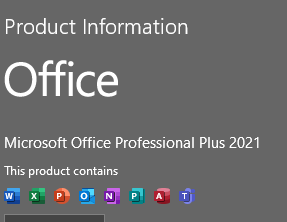
Prior to signing up for Office 365 Family, in march 2022, three of my PCs had office 2021 pro installed. only one of the three PCs has its license key registered (or maybe attached) to my Microsoft account. On the other two machines, I was able to do a full uninstall, then install office 365 Family with no issues at all. When I do the full uninstall of Office 2021 pro on the linked PC; even with the help of the 'Microsoft Support and Recovery Assistant'. When I attempt to add that PC to my list of 365 Family subscriptions, the account product information says: Additionally, the linked PC does NOT show on the list of subscribed devices either. however, when I run the Microsoft Support and Recovery Assistant again; it finds only office 365 and uninstalls it, not both 365 and Pro 2021. all three PCs are Win 11 Pro 64-bit with valid product keys. The download for the 365 Family was also 64-bit for each PC. Would manually changing the license key to the 365 family key do the trick? Also, would that free the office pro-2021 key for future use? Thank you for your assistance. John Gray1.5KViews0likes1Comment
Microsoft 365 multiple group creation
Hi, I need to create over 600 Microsoft 365 groups in a tenant which is a huge task by hand. Is there a way to create these groups based on a excel template with the following columns: Group type . Name . Description . Owners . Email . Privacy . Add MS Teams Microsoft 365 <name> None UserA; UserB <email> Private Yes Thanks/Brgds joao646Views0likes0Comments
External emails via O365 to on-prem DL issues
Our MX are pointed to O365 about 2 weeks ago so far all looks good. However, today I noticed when an email from external mailto:send@xyz.com is sent to a DL which is on-prem exchange 2010. the on-prem 2 users are not able to receive that email. Right now 2 users have been identified including me. There could be more. This DL has about 130 users that are o365 hosted and on-prem. Message tracking don't show my email address or the message was delivered to me. There is one server which is receiving emails from O365 or the receive connector is setup to receive emails from O365. Any thoughts where do I start? Thank you1.5KViews0likes1CommentLearn How the Belgian Police Migrated, Mobilized, and Managed Their Move to Office 365
https://avept.it/2Ul7zot The Belgian Police realized they needed to make the move to Office 365 to ensure the entire country’s police force were agile and able work from anywhere, in a secure way. Learn how they were able to move quickly to Office 365, increase their security capabilities and get their users mobilized today! https://avept.it/2Ul7zot848Views1like0Comments
O365 E3 deployment
Good Morning, I am investigating Office 365 for a NHS Community Care Group and GP's(Surgeries/Medical Practices) We will need to use E3 licences because the EPR (Electronic Patient System - S1/EMIS) systems need a local install of Word. Will no doubt be using SCCM, as we are deploying Windows 10 first (awaiting licences). I know we need to remove Office 10 first and this can be done via SCCM. SCCM will update PC's and Users will activate O365 ( we maybe using Accenture /NHS Digital hybrid system that works with NHS email security), but how do we install the local version(Office 2019), do the users need to click Download local install or can this be done via SCCM. In GP land, a user will need to move from one desktop to another dependent on Job Task or Location. In CCG, they all have laptops. Thank you all for your time, any small bit of information will be most appreciated Ralph1.5KViews0likes2CommentsMigrate Office 365 Groups to another tenant
How can I migrate an Office 365 group, including conversations and calendar, to a new tenant? I found how to migrate individuals using pst files. I found how to migrate from on premises to Office 365 using PowerShell. But nothing about Office 365 to Office 365 migration.14KViews0likes3Comments