microsoft 365 groups
15 TopicsOffice ProPlus access to Group Files? Don't see my groups. Ref: April Updates for Insiders
In the April 2017 Insider Update I read about easy access to Group files: Quickly access your sites and groups Use the File menu to work with documents, workbooks, and presentations, and stored in your frequently used sites and groups. Now, I am on insider releases, both for Office desktop apps and Office 365 backend. But I don't see group files in my Word, Excel and PowerPoint. It's july, so I start to wonder if I'm missing something. Do I need to turn something on, change a setting? Do some active stuff in my groups to make this visible? What I see is a long list of yellow folders from my SharePoint, grouped by "Last Week" and "older".
Excel Windows Client co-authoring
Hey everyone - I have read a few other posts on this topic, but none of them seem to be a smoking gun for me. I am trying to co-author an excel document with other members of my team. We are all running version 16.0.8431.2242. Here is how we are attempting: 1. We have an excel document that is part of an Office 365 Group. 2. The O365 group is synced to our machine using OneDrive for Business. 3. The excel file has been shared with the members of the team. 4. Whenever we attempt to get more than 1 person in the file, the additional authors receive a message that the file is locked for editing. According to what I have been reading, the version we are running should support co-authoring in the windows client app, correct? I haven't seen many mentions of attempting this via groups / OFB - but if that is what is causing the issue - how should we be doing this? Thanks Steve2.6KViews0likes6Comments
onenote
Hey, I have used OneNote for more than 4 years, though this time I have lost lots of my notebooks, and in frustration went forth and back between OneNote and pen and paper. OneNote is a great tool, but I don’t feel secure using it, I would like to get that feeling of security. Right now, my notebooks are shattered over different notebook versions and different accounts due to OneNote's shift from OneNote 2016 to OneNote 10 and back and the natural shift from primary school to high school. I need a way to combine all my OneNote, so they are synchronized and saved both on my OneNote desktop and on my OneNote profile on the internet. I need to be able to make a backup of my OneNote as a PDF or word file that is readable, and I can save on my computer, so I will always have my notes even If problems, deletion of a version, or changes of a version happens to OneNote. I also need the ability to give a copy of my notes away, in such a way that when the receiver gets the notes the copy of the note will be theirs and they can change the notes as much as they want without affecting my version of the note. The receiver should still have the notebook even If my version expires or I lose access. I really hope you can help me achieve these things so I Can have use of the powerful tools of OneNote in the future without stress or fear of losing my notes. I hope I can help others in my generation with this problem when I have learned how to deal with it from you.1.7KViews0likes1Comment
Office Home & Business 2019 license no longer recognized after reinstall ("No license found")
Hello everyone, I'm looking for some help because Microsoft Support has not been able to solve this issue. I own a genuine perpetual license of Office Home & Business 2019 for Mac, linked to my Microsoft account since August 2019. The license is still listed under Services & Subscriptions, but Office no longer activates. My hardware MacBook Pro (Retina, 13-inch, Late 2012) Model: MacBookPro10,2 Intel Core i5 8 GB RAM macOS Ventura 13.7.8 Installed using OpenCore Legacy Patcher Office version originally working: 16.78 Later tested with 16.101 and 16.93 Same result on every version What happened Office had already been successfully activated and worked normally. I was able to: create documents edit documents save documents After restarting the Mac, Office suddenly requested activation again. Since then it has never activated successfully. Initially Office failed to activate with an unknown error. After completely uninstalling and reinstalling Office using Microsoft's installer, the activation process changed. I can now successfully sign in with my Microsoft account, but after authentication Office displays: "No license found for this account." My Office Home & Business 2019 license is still present in my Microsoft account under Services & Subscriptions. Even though my Microsoft account clearly owns Office Home & Business 2019 for Mac. Microsoft account The license appears correctly under: Services & Subscriptions Office Home & Business 2019 for Mac Added to my account on August 7, 2019. The website instructs me to open an Office application and sign in to activate. Everything I've already tried Uninstalled Office completely Installed Office again using Microsoft's installer Installed Office 16.78 Installed Office 16.93 Updated to Office 16.101 Removed Office containers Removed Group Containers Deleted OneAuth cache Deleted Entrabroker cache Removed activation tokens Cleared Office preferences Signed out and signed back into Microsoft account Deleted Office credentials from Keychain Reinstalled Microsoft AutoUpdate Verified no MDM profile exists Verified Internet Accounts Verified Microsoft account Microsoft Support remotely accessed my Mac and repeated all troubleshooting steps Nothing solved the issue. Additional information Running: defaults read com.microsoft.office returns: OfficeActivationLicense = NoLicense although: OfficeActivationEmailAddress = email address removed for privacy reasons is correctly detected. The activation window successfully reaches Microsoft's login page. Office now asks for my Microsoft account credentials. Authentication completes successfully. After a few seconds Office reports: "No license found for this account." It then offers only two options: Buy Microsoft 365 Use another account Microsoft Support remotely connected to my Mac, completely removed Office, installed a newer official installer, and the problem remained exactly the same. My question Has anyone experienced this after reinstalling Office 2019? Could this be: a licensing server issue? an incompatibility introduced after Office 2019 reached end of support? an activation problem related to OpenCore Legacy Patcher? something else? I would really appreciate any suggestions. Thank you very much. Additional notes: The Office license has been associated with the same Microsoft account since 2019. The same installation was successfully activated and worked normally before the problem started. The issue only appeared after restarting the Mac. Microsoft Support has already remotely accessed my computer and could not resolve the problem.1.4KViews2likes9Comments
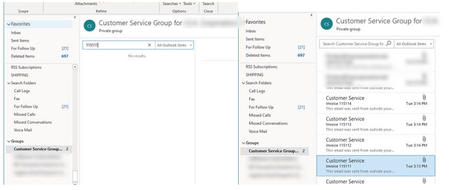
Searching in Groups does not work
have one user that when they try to search inside any of the groups it always says No Results. When they search in there regular mailbox it works perfectly fine. Its only happening to this one user everyone else works fine. Windows 10 Enterprise1.1KViews0likes3Comments
Can we detach Viva Connections from teams ?
Hello Everyone , Is there a way that we can create Viva Connections as a separate application (Detached from MS Teams) ? It would be helpful because we need it to be a standalone not to be linked in MS teams. Also Please enlighten me if we can create a Sharepoint Site as a windows/mac desktop application. It would be great to know thanks.Need some help in deciding the office 365 tool
Hey Everyone, I'm eager to develop a universal portal for certain users, resembling a webpage with a more intuitive user interface and a more robust user experience. What pre-built solutions within the Microsoft Office 365 suite could facilitate this? As per my analysis - Sharepoint Online and Power pages seem to be some of the solutions. Just want to hear about all the tools so that I can arrive at a solution. Thanks 🙂User Authentication Bandwith
We have proposed M365 Apps for enterprise for one of the BFSI Customer. They currently use Proxy server for Connecting across internet. They have doubts if their Current setup would be able to match the authentication bandwidth requirement for M365 Apps. Do we have any idea on how much bandwidth is consumed when the user is authenticated in M365 Apps??How to exclude none Entra registered devices from 365 app update
Hi, Looking for some advice if possible, we have been using the 365 app update for all of our devices and the inventory has imported our Citrix virtual machines, the knowledge base articles suggest to exclude these through an Entra AD group, We are unable to do this as these machines are not Entra registered, they just have 365 apps installed on them. These VM's are none persistent and the updates have been causing issue to users during the day when working so we have paused the update on all devices for now. Thanks in advance!