microsoft 365 defender
46 Topics
VPN Integration not persistent
Hello, We tried to configure https://learn.microsoft.com/en-us/defender-for-identity/vpn-integration from supported Cisco VPN GW. We established the RADIUS Accounting logs to be sent to DC with MDI sensors installed. Yet when we enabled this in Defender Portal (Settings > Identities > VPN) by checking the box and inserting the shared secret, the configuration is not persistent. We hit save, and we are presented with the success green message, but once we refresh the page or go elsewhere in the portal, the checkbox is not checked. Has anyone encountered the same issue? Thanks, Simon
Very High Increase in CPU activity after Update Microsoft Defender for Identity sensor
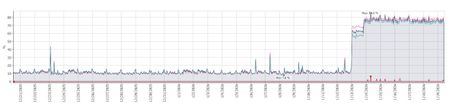
All our servers that are running this sensor (DCs, Certificate servers, AD Connect servers) showed a massive increase in average CPU utilization from virtually straight after the sensor was automatically updated to version 2.254.19112.470 (late night UK time). Two of our DCs are sitting on 100% CPU today and we can't find anything to resolve it. Has anyone else seen this since running this version and if so what actions did you take ? How would we go back to rolling back to the previous version when it appears it will just be automatically updated soon after ? This is our monitoring of CPU utilization from one of the majorly affected DCs but every server with the sensor had the exact same graph showing a major increase in CPU at the same date and time i.e. just after the sensor was updated.Solved1.8KViews4likes7CommentsDefender for Identity health issues - Not Closing
We have old issues and they're not being "Closed" as reported. Are we missing something or is this "Microsoft Defender for Identity" Health Issues process broken? Thanks! Closed: A health issue is automatically marked as Closed when Microsoft Defender for Identity detects that the underlying issue is resolved. If you have the Azure ATP (workspace name) Administrator role, you can also manually close a health issue.944Views0likes2Comments
Incorrect Secure Score recommendation - Remove unnecessary replication permissions
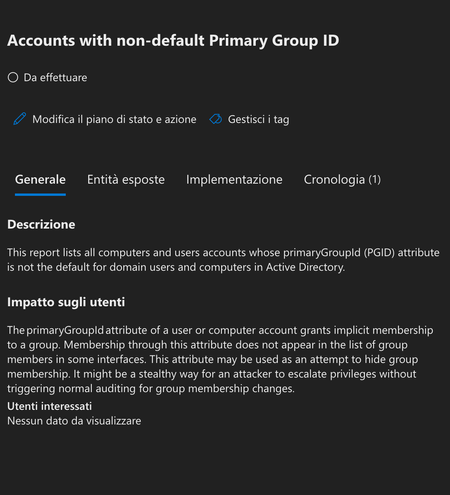
Hi, In our environment, we got the "Remove unnecessary replication permissions for Entra Connect AD DS Connector Account" secure score recommendation. Based on the https://learn.microsoft.com/en-us/defender-for-identity/remove-replication-permissions-microsoft-entra-connect replication permission is needed when PHS is in use. We are using PTA, but PHS is also enabled as a fallback. On the Entra Connect server I ran the following: Import-Module ADSyncDiagnostics Invoke-ADSyncDiagnostics -PasswordSync The result is: Password Hash Synchronization cloud configuration is enabled If I remove the replication permission, we soon receive an alert that password hash sync did not occour. Is it normal? I would say that the sensor should be able to detect PHS usage hence not recommending to remove the permissions. Thank you in advance, DanielSolved756Views0likes3CommentsAttack simulation Payload editor - recently broken?
Hello, Just last Wednesday, Jan. 8th, I created a new custom payload and was happy with the testing of the email. I logged in today and noticed that a majority of the formatting had been removed. I found this post: https://answers.microsoft.com/en-us/msoffice/forum/all/phishing-attack-simulation-payload-editor-is/88232e12-9744-4d87-9566-3fd5d8c2ed3a Seems like he is having the same issue I am facing. Nothing is centering and many of the blocks I have created are gone (ie the External email, banner). Anyone else having these issues or has anyone found a way to "fix" it. Here is a snip of the same payload, one sent Wednesday, the other Monday: Monday, Jan. 13th: Any help would be appreciated.251Views0likes1Comment
Missing remediation actions
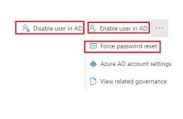
Hi everyone, Remediation actions such as Disable/Enable user in AD, Force password reset are currently not available through the Defender portal (user page, advanced hunting). Anyone aware of this change? https://learn.microsoft.com/en-us/defender-for-identity/remediation-actions#supported-actionsSolvedMDI not firing alert - "Suspicious additions to sensitive groups (external ID 2024)"
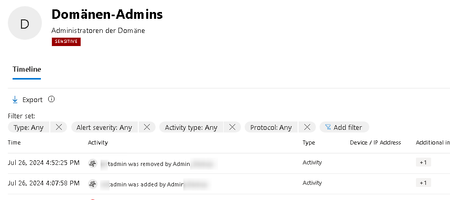
Hi everyone, i have checked our MDI installation with the Powershell - it is all green. Also the action itself is in the portal. The group is marked sensitive by default. A user gets added by another Domain Admin. This should fire an high alert? But nothin happens. Is there any setting i am missing? We started with a "german AD" so the group names are in German. But this cannot make any difference. BR Stephan796Views0likes2Comments