microsoft 365 defender
17 Topics
Unable to find the security alert in M365 Defender referenced in an email alert.
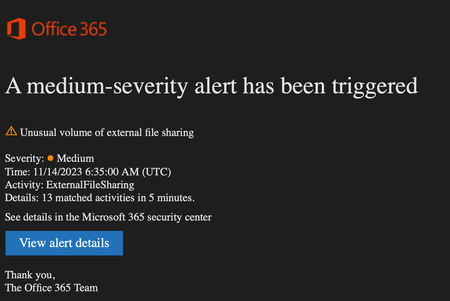
This happens a lot. I get these emails from Office365Alerts notifying our team that "A medium-severity alert has been triggered". At the bottom of the email is a link to "View alert details". When I click that, the site shows an error: "Can't find it. Either what you are looking for doesn't exist or you need to use a different search string." So, then I go to the Alerts view and filter to show everything (at least I think I am) but there's nothing related to this particular alert (unusual volume of file sharing). Where did it go? EDIT: Including a screenshot of another email I got today. The result of clicking the 'View alert details' is again the same.22KViews3likes23Comments
Email Sending Limits Alert
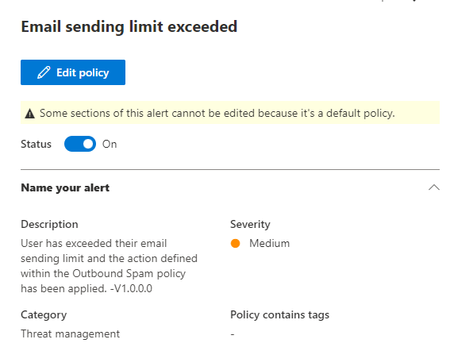
Is there a way to lower the threshold for this alert? It is currently set to 10,000 emails and we would like to be notified at a lower level if there is an account that sends a bunch of emails out. If I cannot edit this one, can I create another that does the same alert but sooner?Solved4.7KViews0likes8Comments
Mail Flow Rule (Transport Rule) Name Missing In Quarantine Details
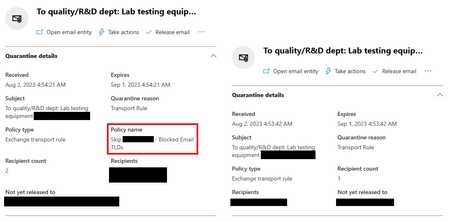
Since August 2, around 5:00 AM Microsoft stopped showing the name of the Mail Flow Rule (Transport Rule) responsible for quarantined emails in the Policy Name field. It now only shows the name of the Policy (defined under the Threat Policies) if it was responsible for the Quarantine. Most of our emails are quarantined because of Transport Rules (Policy Type: Exchange Transport Rule), and not being able to see what Transport Rule was responsible for the quarantined email is a huge problem with false positives, as it will be extremely hard to determine what Transport Rule needs to be edited to prevent the false positive in the future. Attached is a screen shot of 2 email details side-by-side, same external email sent just minutes after each other (during the time the Policy Name went in and out), the one shows Policy Name (the name of the Transport Rule), and the other not. I looked if it was maybe moved to another location or renamed, but that is not the case. Does anyone else has this same problem? Did you find a way to solve it?Solved2.6KViews0likes5CommentsDefender for Endpoint for Kiosks
Hello Hello I have Windows 10 machines,, where users sign in with a local ad account. This account is not synced to the cloud. The question is is there a way to onboard and license these machines to Defender for Endpoint? What license would satisfy this requirement? Thanks2.4KViews0likes1Comment
Security Admin Center Tenant Allow/Block List Not Able to Block IPv4?
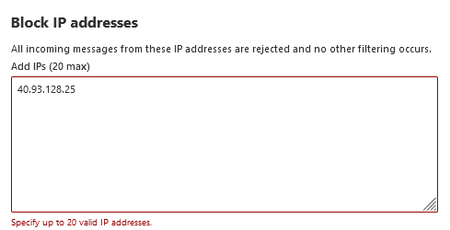
While using the Security Admin Center Tenant Allow/Block List we have been able to block specific email addresses and IPv6 IP addresses but are unable to block IPv4 IP addresses. We have tried both using the console and the CLI but have turned up unsuccessful both times when it comes to IPv4. A large majority of the phishing attempts that we encounter come from IPv4 addresses but we have been unable to block any of these. Will there ever be functionality for IPv4 within the Tenant Allow/Block list or is the only option to use conditional access policies? Also why is this enterprise tool only functional with IPv6 and without documentation stating that it does not work for IPv4?2.1KViews4likes6Comments
whitelist exernal domain correct method in Exchange online or EOP
Hi HR department will use a third-party tool to bulk send emails to employees. I was provided the sender domains and IPs. I want to avoid the emails going to junk folder or quarantine. What is the best way to whitelist the sender domains? I it thru the tenant allow list, anti-spam inbound policy allow sender list or mail flow exchange rule?1.7KViews0likes2CommentsUsers Submissions
Hi, I'm starting with O365 defender, so maybe this is a dumb question, sorry. Some users report the e-mails as phishing and I can see this submissions in O365 defender, no problem so far. When I analyze one of this submissions and choose "Mark and notify as Phishing", for example. The sender is automatic blocked to reach any other user through e-mail in my organization or my action only apply for the user who reported, or not even that and applies only for the specific analyzed message? Thanks in advance.1.3KViews0likes3CommentsDefender Tenant allow/block list
Hi Could someone please she some light on the questions below. Thank you! I need to fully understand what exactly the Tenant Allow/Block lists does is for the two features below. My understanding. domains and addresses are basically, domains I have manually tagged as allowed or block in the quarantine page. Spoofed servers: allow external senders to send as your domain. But why not just add them to the SPF record.1.3KViews0likes2Comments