microsoft 365 defender
46 Topics
Very High Increase in CPU activity after Update Microsoft Defender for Identity sensor
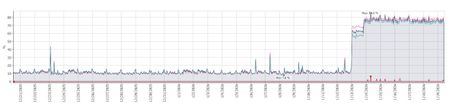
All our servers that are running this sensor (DCs, Certificate servers, AD Connect servers) showed a massive increase in average CPU utilization from virtually straight after the sensor was automatically updated to version 2.254.19112.470 (late night UK time). Two of our DCs are sitting on 100% CPU today and we can't find anything to resolve it. Has anyone else seen this since running this version and if so what actions did you take ? How would we go back to rolling back to the previous version when it appears it will just be automatically updated soon after ? This is our monitoring of CPU utilization from one of the majorly affected DCs but every server with the sensor had the exact same graph showing a major increase in CPU at the same date and time i.e. just after the sensor was updated.Solved1.5KViews4likes7Comments
Missing features in Security portal
With the Azure ATP portal we where able to do a lot more of investigation for on premises actions. We are in a large hybrid environment. Is there a way to access the old portal to get back that timeline for a user? The things we are missing out on currently that we found are the following: Password resets, where able to see that easy at the users timeline. Users being added to or removed from groups and who did it Failed logins to on premises resources You can no longer search for groups Can't export the same data as in the ATP portal. Some of us used this daily and are having trouble to figure out how to get the correct information now. I'm aware that we can see some of those things in the users audit logs for example but would be nice to be able to see it in the timeline as before.Solved3.4KViews2likes3CommentsDefender for Identity documentation refreshed
Hi everyone, Just an informational note for our fantastic community of MDI advocates... Our incredible technical content developers have just concluded a mammoth exercise in updating all Defender for Identity documentation to reflect MDI's new home in Microsoft 365 Defender. aka.ms/MDIDocs For those still transitioning from using the classic MDI portal, don't worry - the documentation for that experience still exists and is accessible from the table of contents on the left of the screen. For anybody who has pages bookmarked, they should redirect without any issues. Thanks!
VPN Integration not persistent
Hello, We tried to configure https://learn.microsoft.com/en-us/defender-for-identity/vpn-integration from supported Cisco VPN GW. We established the RADIUS Accounting logs to be sent to DC with MDI sensors installed. Yet when we enabled this in Defender Portal (Settings > Identities > VPN) by checking the box and inserting the shared secret, the configuration is not persistent. We hit save, and we are presented with the success green message, but once we refresh the page or go elsewhere in the portal, the checkbox is not checked. Has anyone encountered the same issue? Thanks, Simon
Missing remediation actions
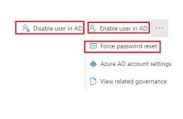
Hi everyone, Remediation actions such as Disable/Enable user in AD, Force password reset are currently not available through the Defender portal (user page, advanced hunting). Anyone aware of this change? https://learn.microsoft.com/en-us/defender-for-identity/remediation-actions#supported-actionsSolved