microservices
119 Topics
How Microsoft Intune team upgraded a .NET service with GitHub Copilot modernization
Microsoft's Customer Zero blog series gives an insider view of how Microsoft builds and operates Microsoft using our trusted, enterprise-grade platform. Learn best practices from our engineering teams through real-world lessons, architectural patterns, and operational strategies for building, operating, and scaling AI-powered systems across the organization. A hosting platform transition gave our team an opportunity to modernize a Microsoft Intune enrollment service to .NET 8. I used GitHub Copilot modernization to assist with that work while retaining responsibility for design decisions and validation. Using GitHub Copilot modernization, I saved more than four weeks on the first library alone. The more durable outcome was the working method built around the agent: three working files that I kept alongside the code and owned myself, rather than leaving that state to the model, that let a months-long migration be paused, corrected and resumed without re-deriving the analysis every time. What follows is how that worked in practice, including where the agent stopped helping. The Challenge: retiring a hosting platform without carrying the framework forward My team owns a Platform as-a Service (PaaS) service that supports devices enrolling into Intune at the start of their enrollment journey. Microsoft Intune is a cloud-based endpoint management service that secures and manages an organization's devices and apps. It lets a company’s IT team manage and secure employees’ laptops, phones, tablets, apps, and company data from one central service. It supports Android, iOS/iPadOS, Linux, macOS, tvOS, visionOS, and Windows devices. This Service was running on .NET Framework 4.7.2, hosted on a non-AKS hosting platform. I moved it to Azure Kubernetes Service (AKS) hosting environment which is what started the work. The modernization combined two related but distinct changes: moving the workload to AKS and modernizing the application code to .NET. 8. The heaviest part was dependency mapping. A key part of the migration was mapping dependencies across shared libraries, namespaces, and APIs, including Intune owned and even team-owned libraries, some of which also needed modern .NET-compatible packages. The service had a substantial codebase with dependencies across multiple libraries, namespaces, and APIs. Some APIs were unchanged, some were renamed, and some had no direct replacement and required a design decision. These APIs were most often from internal Intune libraries. Without reusable mappings, those questions recur across projects and files. To maintain continuity across the migration as this was a long-term project, I kept an explicit record of decisions, completed work, and the next steps. The service spans several libraries and multiple endpoints that support about 20 plus different enrollment flows across Windows, Linux, Android, iOS, and macOS platforms. A single pull request covering the full migration was not possible, so I divided the work into increments small enough to review, test, and merge, or to isolate by enrollment flow, with a way to stop one day and pick up the next without paying the analysis cost twice. The Solution: a modernization agent with engineer-owned working content I started the side-by-side .NET framework service to .NET 8 service migration by hand, then brought in GitHub Copilot. In my early tests, I needed .NET migration-specific domain context beyond what I had established in my copilot session. The limitation was missing domain context, not an inability to generate code, and that is the gap a purpose-built tool closes. GitHub Copilot modernization is an agent built on GitHub Copilot, with Microsoft's language teams supplying domain knowledge. For .NET, its recommendations draw on current assembly and NuGet package analysis rather than relying only on patterns learned during model training. GitHub Copilot modernization is now available in Visual Studio, Visual Studio Code, GitHub Copilot CLI, GitHub Copilot app, and GitHub.com. When I did this migration, it was available only in Visual Studio and Visual Studio Code. For this migration, I chose GitHub Copilot modernization in Visual Studio through GitHub Copilot Chat in agent mode. I tested the modernization agent against work it could already check, running it over the same project and classes that I had migrated by hand and comparing the two. They were very close. That comparison, rather than anything in the tool's description, is what established enough confidence to point it at code nobody had migrated or analyzed manually yet. Once I started using the modernization agent, I realized that it was able to map .NET specific and global libraries as well as the API calls efficiently. The agent analyzed well but did not reliably retain migration state across sessions. Returning to the work could trigger a new assessment that overwrote prior artifacts. To avoid this, the more transferable part of my approach was the working context I built around the agent: a migration plan (migrationplan.md), a progress record (progress.md), and context notes. The agent generated a migrationPlan.md and progress.md at my request; I added the context from my notes from my previous sessions and manual migration and kept all three current in my local repository. The context preserved mappings I had already established by hand, so the agent could reuse settled decisions instead of researching them again. I kept them in my local repository rather than checking them in. The migrationplan.md broke the work into phases and day-sized tasks, and the progress.md file was updated after each increment. The next session could resume the recorded task instead of reassessing the codebase. When a migration increment surfaced a build issue, fixing it meant a side conversation, and the thread of the main work got lost in it. To avoid this, I started recording each failure under that day's task: what failed, what was tried, and what was ruled out. That gave the investigation somewhere to live without overwriting the main work. The current agents experience records task failures in progress-details.md. The Migrationplan.md is an editable markdown file, not opaque internal state, and I edited it when needed. Where a generated step was wrong for the service, or I wanted smaller increments of work per pull request, or to migrate a scenario before another, or to focus on one API path per pull request, or even to change the ordering, I updated the file with the correct information and the agent picked up the revision and carried on rather than reverting to its own plan. That made the editable plan especially useful when the migration approach changed. Plan granularity is also how I controlled pull request size. I used the plan to constrain each increment: for example, three model files and a view file, or one small end-to-end enrollment flow at a time, or one controller at a time, or sometimes not even a whole controller, just one API path, I made this judgement depending on the complexity of the scenario I wanted to migrate. Small increments stayed reviewable, and a broken build left a smaller surface to investigate. Supplying the build error and asking the agent to re-examine that increment produced a focused follow-up change. I began using the .NET modernize agent with an internal library, that supports Windows client calls made over Simple Object Access Protocol (SOAP). Before discovering the tool, I had already side-by-side migrated the .NET framework version of that library into another .NET8 successor library and had updated portions of the service’s windows enrollment flow. I used the mapping I had made between framework and .NET 8 libraries and APIs during this migration as a context for the tool, allowing each migration pass to reuse and add to the mappings established in previous one. The tool’s recommendations closely aligned with my manual migration approach on redo of the first library, which built my confidence in its output. I then used it for my next two internal library migrations, and the remaining Apple and Android enrollment flows in the service. The Impact: what the approach saved, and what it did not The internal library that handles Windows enrollment calls was estimated and took roughly six weeks of work but the tool completed it in one and a half weeks, a 75% schedule reduction, and on the second internal library dependency, also estimated at six weeks, I saved time again. I was able to reapply those savings to the remaining enrollment flows as I continued the service migration. The saving came from work that did not have to happen twice. Mappings settled in one phase were reused in the next rather than rediscovered. Project file conversion and NuGet package resolution, which is mechanical but voluminous, moved to the agent. What stayed with me was review, integration, the decisions, and the containerization and move to AKS itself. Without the agent, I would have needed to prioritize the migration more exclusively, which would have cut into the other project work I was delivering at the same time. Where the agent stopped helping In my experience, public libraries and Microsoft-wide libraries mapped well. Intune-internal libraries did not. In a subsequent internal prototype, I tested the agent on another service with different migration dependencies. For Intune-internal libraries, it could not identify which modern NuGet package or API replaced each dependency because those mappings were not available in its context. It still removed some of the mechanical work, but the mappings themselves stayed manual. During the prototype, I also built skills that work as a wrapper for the modernization agent that provides this internal migration context. I checked those skills into our internal repository so other Microsoft Intune engineering teams can use them internally through a plugin. What another team should take from this Validate it against work already done by hand to gain confidence. Running the agent over classes you have already migrated manually and comparing the output is cheap, and it gives you evidence for deciding whether to use the agent on code it has not yet migrated. Own the plan, not just the prompt. The agent writes its own plan and progress files to the repository. Read them and correct them, and it will follow your edits. For what it can't know, such as internal library mappings or your team's coding conventions, add a custom skill to the repository, and the agent will follow that too. Control pull request size through the plan rather than after the fact. Break pull requests into small increments. Scoping an increment to one controller, one API path, or a small end-to-end scenario keeps the change reviewable and testable, with a clear boundary for investigating migration issues. Reuse dependency mapping instead of rediscovering them. A large part of time savings come from carrying mappings established in previous phases into subsequent ones, even across libraries and services. Mechanical work like project conversion and NuGet package resolution can be handed off to the agent while you retained responsibility for integration, review and design decisions. Looking ahead The application-layer modernization is finished, while parity validation and the AKS traffic rollout continues. The reusable skills are checked into an internal repository and available to Intune engineering teams through an internal plugin, so another library or service can reuse established dependency-mapping work as well as Intune internal guidelines. I also shared the method and its measured time savings through Intune learning sessions, show and tell, Teams posts, and a newsletter. Learn more about GitHub Copilot modernization for .NET at https://dotnet.microsoft.com/platform/modernize and about Microsoft Intune at What is Microsoft Intune? - Microsoft Intune | Microsoft Learn.450Views0likes0CommentsIntroducing Azure Container Apps Sandboxes: Secure Infrastructure for Agentic Workloads
Today we are announcing the public preview of Azure Container Apps Sandboxes - a new first-class resource type that gives you fast, secure, ephemeral compute environments with built-in suspend and resume. This is the underlying infrastructure on which products like Cloud sandboxes in GitHub Copilot, Foundry Hosted Agents, and Azure Container Apps Express are built, you now have the opportunity to build your solutions leveraging this infrastructure. Azure Container Apps Sandboxes unlocks two massive opportunities. For platform developers and ISVs, sandboxes give you the same isolated compute fabric that powers many Microsoft products. You get the building blocks to create your own multi-tenant platform on proven, enterprise-scale infrastructure. For AI agents, sandboxes become a self-configurable tool that lets agents extend their own capabilities on the fly. An agent can spin up a fresh sandbox in milliseconds and use it to execute untrusted code, compile source, test HTTP requests against a live app, launch a browser session, or tackle whatever needs a quick and scalable infrastructure. On one side it empowers humans to build platforms, on the other it empowers agents to build their own capabilities. Both get enterprise-grade isolation, instant startup, and snapshot-based persistence out of the box. We'll walk through the resource model, sandbox lifecycle, the features that set Sandboxes apart - like snapshots, lifecycle policies, network egress controls, volumes, and managed identities - and show you how to get started with the portal and CLI. What Are Container Apps Sandboxes? Container Apps Sandboxes are secure, isolated compute environments that start in sub-second time, scale to thousands, and cost nothing when idle. Each sandbox runs in its own hardware-isolated microVM boundary - fully separated from the host, the platform, and every other sandbox. You bring your own Open Container Initiative (OCI) image, and Sandboxes handle the rest: provisioning from prewarmed pools, strong multi-tenant isolation, and snapshot-based suspend/resume that preserves full memory and disk state across sessions. There are many ways Sandboxes can help you build your next project - here are a few: Your own build & test systems - wire a Sandbox into your CI/CD flow to run builds while your laptop stays cool. Agents that can run anything safely - an agent spawns a sandbox, executes work inside it, and returns the output with no agent host privileges required. Agent swarms - decompose a research question, spawn N sandbox workers in parallel (each pinned to its own image and egress policy), and synthesize the result. Early access customers are already unlocking significant benefits by leveraging Azure Container Apps Sandboxes. "With Azure Container Apps sandboxes, SitecoreAI can safely enable agents to take real action. The combination of multi-tenant isolation, rapid scale-out, and full automation allows Sitecore to run long-lived, autonomous agents that securely execute code, manage workflows, and interact with enterprise systems within secure, governed environments. With this foundation, we can build agents that do real work: assembling content, personalizing experiences, and optimizing campaigns in production. Agents that operate continuously, learn from results, and improve over time, so our customers get better outcomes without giving up control." - Mo Cherif, VP of AI and Innovation, Sitecore "We got early access to Azure Container Apps Sandboxes, and got the first prototype integrated with Atlas AI in hours, and it's already shaping a new Atlas AI capability that we plan to launch in preview in Q3. It gives every Atlas AI agent a safe, sandboxed workspace (file system, terminal, code execution) on a customer's live data in Cognite Data Fusion. The value: Industrial process, reliability, and production engineers spend days and weeks on questions like "which wells are underperforming and why?" These questions are tractable but expensive, so they are asked rarely and decisions are made on gut feel. With this, an agent pulls the data, runs the analysis, cross-references maintenance and inspection records, and returns a cited draft in minutes. Sandboxes make it practical: Aligned feature set, per-customer isolation, pause/resume across multi-day investigations, scale-to-zero economics." - Kelvin Sundli, Product manager, Atlas AI, Cognite Resource Model: Sandbox Groups and Sandboxes The top-level ARM resource is Microsoft.App/SandboxGroups. A Sandbox Group is the management boundary for a collection of sandboxes that share configuration - think of it like a Container Apps Environment, but purpose-built for sandboxes. When you create a Sandbox Group, you specify: Subscription, Resource Group, and Region Sandbox defaults (optional): default CPU, memory, disk, max sandbox count, and default idle timeout Networking: optionally deploy into a custom VNet with a dedicated subnet for private networking Identity: System or user assigned Entra identity. Individual sandboxes are created within a Sandbox Group. Each sandbox has its own source (disk image or snapshot), resource tier, lifecycle policy, network egress policy, environment variables, ports, volumes, and connections. Sandbox Lifecycle Sandboxes have a well-defined lifecycle with the following states: State Description Creating Provisioning the sandbox from a disk image or snapshot Running Actively executing - backed by a live microVM Idle System-suspended after inactivity; can auto-resume on the next request Suspended Full state (memory + disk) preserved as a snapshot; no compute costs Resuming Restoring from a suspended or idle state - sub-second for most workloads Stopped User-initiated stop; can be resumed Stopping Graceful shutdown in progress Deleting Teardown in progress The key insight here is the distinction between Idle and Suspended. When a sandbox goes idle (e.g., no traffic for a configured timeout), the system can automatically suspend it and capture a snapshot. When a new request arrives, the sandbox resumes transparently. This gives you scale-to-zero economics with stateful compute - something that wasn't possible before without significant custom engineering. Disk Images: Bring Your Own Container Sandboxes boot from Disk Images - Open Container Initiative (OCI) images converted into an optimized root filesystem format. You point to any OCI image (public or private registry), and the platform builds a bootable disk image from it. You can start with public, pre-built images maintained by the platform (for example, Ubuntu base images), or bring your own private images. For private registries, you can authenticate with username/token or use a user-assigned managed identity for Azure Container Registry (ACR) – integrated with Azure as you expect. Snapshots: Full-State Persistence Snapshots capture the complete state of a running sandbox - memory, disk, and all running processes. When you resume a sandbox from a snapshot, every process, open file handle, and in-memory data structure is restored exactly as it was. A snapshot captures the full state of a running sandbox: memory pages, disk, processes. Two ways to make one - automatically on suspend, or manually on demand. Three things they're great for: Checkpointing mid-task so a long-running agent can resume exactly where it left off Cloning an environment that's already warm - dependencies installed, caches populated, services running Shipping a "ready-to-go" state that resumes in sub-second instead of cold-booting Snapshots are free during the preview, after which they will be stored as Azure Blob Storage at standard rates. Each snapshot records the source sandbox, resource allocation (CPU, memory, disk), and container metadata - so what you get back is exactly what you snapshotted. Resource Tiers Every sandbox is assigned to a resource tier that determines its CPU, memory, and disk allocation: Tier CPU Memory Disk XS 0.25 vCPU 0.5 GiB 5 GiB S 0.5 vCPU 1 GiB 10 GiB M (default) 1vCPU 2 GiB 20 GiB L 2 vCPU 4 GiB 40 GiB XL 4 vCPU 8 GiB 80 GiB When creating a sandbox from a snapshot, the resource tier is inherited from the snapshot and cannot be changed - this ensures the restored environment has the exact resources it was running with when the snapshot was taken. Lifecycle Policies: Auto-Suspend and Auto-Delete Every sandbox can be configured with lifecycle policies that automate state transitions and cleanup: Auto-Suspend Idle timeout: How long a sandbox can sit idle before being suspended (configurable: 1m, 2m, 5m, 10m, 30m, 60m) Suspend mode: Disk + Memory (default): Full snapshot including memory state - resume picks up exactly where you left off, with all processes and in-memory data intact. Disk: Only the disk is preserved; the VM restarts fresh on resume. Useful when you only need file persistence, not process continuity. Auto-Delete Automatically delete sandboxes after a configurable number of days of inactivity Prevents accumulation of abandoned sandboxes that consume snapshot storage These lifecycle policies are what make Sandboxes economically viable at scale. A platform serving thousands of tenants can configure aggressive idle timeouts (say, 60 seconds) with Memory suspend mode, and each tenant's sandbox disappears from the billing meter almost immediately - but resumes in sub-second time the moment they return. Network Egress Policy For scenarios involving untrusted code - AI agents executing LLM-generated scripts, multi-tenant SaaS with user-submitted workloads - controlling outbound network access is critical. Sandboxes provide a per-sandbox Network Egress Policy: Default action: Allow or Deny all outbound traffic Host rules: Domain-pattern rules (e.g., *.github.com → Allow) to permit specific destinations Custom CIDR rules: Network-level rules for IP ranges (e.g., 10.0.0.0/8 → Deny) Skip egress proxy: Option to bypass the egress proxy entirely when custom VNet routing handles policy enforcement This means you can run a sandbox in a deny-by-default posture and allowlist only the specific endpoints it needs (your API server, a package registry, etc.) - without setting up NSGs or firewall appliances. Managed Volumes: Persistent and Shared Storage Sandboxes support two types of mountable volumes, both managed by Microsoft: Volume Type Backed By Best For Managed Azure Blob Azure Blob Storage Shared data across sandboxes, file uploads/downloads, persistent artifacts Managed Data Disk Azure Disk Storage High-performance storage for databases, build caches, large working sets - only available to one sandbox at a time Blob volumes come with a built-in file explorer in the portal - you can browse, upload, download, create folders, and drag-and-drop files directly. Data Disk volumes provide dedicated block storage with configurable sizes. Secrets and Identity Secrets Sandbox Groups support key-value secrets scoped to the group. Secrets can be created, edited, and referenced by sandboxes within the group. These secrets can be used in egress policies to modify requests with transform or header-injection rules, without exposing the secrets to code running inside the sandbox. Managed Identity Sandbox Groups support both system-assigned and user-assigned managed identities, with full RBAC role assignment management. This means your sandboxes can authenticate to Azure services (Key Vault, Storage, Cosmos DB, etc.) without managing credentials - the same identity model you use everywhere else in Azure. MCP Connectors and Triggers ACA Sandboxes now supports managed connectors through the Model Context Protocol (MCP), giving sandboxes access to external APIs - including Microsoft 365, Salesforce, ServiceNow, GitHub, and 1,400+ other systems - without managing credentials directly. Attach a Connector Gateway to your sandbox group, and every sandbox in the group can call external APIs through a standardized MCP interface at runtime. Pair connectors with triggers to build event-driven automation: route an Outlook email to a sandbox that triages it with an AI agent, or react to a SharePoint file upload by extracting and processing the document all without writing glue code. Triggers can fire a shell command inside a sandbox or invoke an HTTP endpoint the sandbox exposes, so your automation shapes fit naturally around your workload. The integration is built on the new Connector Namespace service (az connector-namespace), the same runtime behind Logic Apps and Power Platform connectors, now available as a programmable layer for sandboxes. See the end-to-end samples for runnable azd up-deployable examples covering email triage and document automation scenarios. The Portal Experience Azure Container Apps Sandboxes are only available in the new Azure Container Apps portal that provides a rich, IDE-like experience for working with sandboxes. Creating a Sandbox The portal offers multiple creation paths: Standard Sandbox - full configuration control over source, resources, lifecycle, networking, and volumes GitHub Copilot Sandbox - preset, Copilot CLI ready to go, GitHub credentials can be wired through the Access Token before the sandbox is created Claude Sandbox - Claude CLI pre-installed, ready for agentic coding inside the sandbox Using Coding Agents (Copilot CLI / Claude Code) If you live inside Copilot CLI or Claude Code, you don't need to learn a new CLI. Install the azure-sandbox skill once and your agent picks up the right skills: # GitHub Copilot CLI # Add as a plugin marketplace /plugin marketplace add microsoft/azure-container-apps # Install all skills /plugin install sandboxes@Azure-Container-Apps # Claude Code claude plugin add microsoft/azure-container-apps The skill runs prerequisite checks silently (az --version, az account show, node --version, aca --version), prompts only if something's missing, and maps natural-language asks to the right aca commands. Bundled runbooks cover Copilot CLI BYOK (bring your own Azure OpenAI key), the deploy-a-web-app walkthrough, and shell setup. Sandbox Detail Page Once your sandbox is running, the detail page gives you immediate access to the sandbox terminal and additional details, such as - Network Audit - real-time egress traffic log showing allowed and denied requests Monitor - live CPU, memory, disk, and network utilization charts Connectors - attached connections with an "Add" action Volumes - mounted volumes with an "Add" action Log Stream - streaming container logs Processes - running process list inside the sandbox Files - file explorer to browse the sandbox filesystem The toolbar actions let you manage the state of the sandbox - Resume or Stop. In the Ellipsis menu (⁝) you can find additional settings to manage network Egress Policy and ingress (Add port), take a Snapshot of the sandbox, Commit (save disk state as a new disk image), set Lifecycle Policy or permanently Delete the sandbox. Finally, you can see additional Details in a side panel. Getting Started with the CLI and Python SDK All sandbox and sandbox-group operations go through the aca CLI. There are no az containerapp sandbox commands, - az is only used for az login, az account show, and resource-group management. Install (CLI) # Mac, Linux curl -fsSL https://aka.ms/aca-cli-install | sh # Windows irm https://aka.ms/aca-cli-install-ps | iex Run aca --help to get started. Install (Python SDK) pip install azure-containerapps-sandbox For more details, quick start and examples on ACA CLI and Python SDK, please go to https://sandboxes.azure.com Evolution from Dynamic Sessions If you've used Azure Container Apps Dynamic Sessions, Sandboxes are the next evolution of that capability. Everything Sessions can do, Sandboxes can do - and significantly more: Capability Dynamic Sessions Sandboxes Sub-second startup ✓ ✓ Strong isolation ✓ ✓ Custom container images ✓ ✓ Custom VNet integration ✓ (Partial) ✓ Suspend/resume with Memory and Disk snapshots - ✓ Lifecycle policies (auto-suspend, auto-delete) - ✓ Network egress policy (per-sandbox) - ✓ Persistent managed volumes (Blob, Data Disk) - ✓ Managed identity (system + user-assigned) - ✓ Secrets management - ✓ Configurable resource tiers - ✓ Direct access to sandbox in Portal experience - ✓ We will continue to support Dynamic Sessions, but all new investment goes into Sandboxes. If you're building new workloads on isolated ephemeral compute, start with Sandboxes. How It All Fits Together ACA Sandboxes is a platform primitive. It's the foundation on which multiple Microsoft products are already built - including ACA Express, Cloud sandboxes in GitHub Copilot, and Foundry Hosted Agents. When you build on Sandboxes, you're building on the same infrastructure that powers Microsoft's own portfolio. This is the evolution of what we shared with Project Legion in 2024. Legion described the internal infrastructure; Sandboxes exposes it as a customer-facing primitive that you can use directly. What's Next • Deeper Azure integrations - first-class connectivity with Azure networking, identity, storage, and AI services • Enhanced SDK and CLI - richer programmatic experiences for managing sandboxes at scale • More Microsoft services built on Sandboxes - this is just the beginning Get Started Today • Portal: https://sandboxes.azure.com/ • Documentation: Azure Container Apps Sandboxes • Pricing: Azure Container Apps Pricing (per-second vCPU/memory billing, scale-to-zero, snapshots at Blob Storage rates) We'd love to hear your feedback. You can ask questions, or file issues on the Azure Container Apps GitHub (prefix with [Sandbox] for Sandboxes-specific issues).9.8KViews3likes1CommentAzure Container Apps Sandboxes, Now Generally Available
Agents Act. You Set the Limits. Your platform needs to run untrusted code. Agents choose actions at runtime, from installing packages to calling APIs. In a multi-tenant service, you have to support both without letting one customer's code reach another customer's data. That requires an execution environment you control for each tenant, session, or task. Azure Container Apps Sandboxes is that execution environment, as a service. Each sandbox is a hardware-isolated microVM with its own Linux kernel. It starts in under a second, and you decide per sandbox what it can reach, how large it is, and how long it lives. For each user, controlling which credentials their agent can use and what it can reach is key. Untrusted code must stay isolated from other workloads and the host kernel. Preserving a session state without giving up scale to zero or instant startup is important, as is visibility into what each agent did. Let's unpack these one at a time. Control What Your Agents Can Reach The first question about an agent is not what it can do, but what it can reach. Per-sandbox egress policies answer that: an external proxy evaluates every outbound request against rules you set - by host, domain pattern, or CIDR. You can start with a default 'Deny' action and allow only the endpoints the task needs, so a prompt injection or a compromised dependency has nowhere to go. Network Audit shows you what was allowed and what was denied. Approved endpoints usually need credentials, and handing an API key to an agent means the key can be logged, echoed into a response, or carried off somewhere you did not intend. Transform rules can inject authentication headers outside the sandbox. The agent sends a request with no secret in it, the proxy adds the credential outside the sandbox, and the call goes through. The agent gets access to the service without ever getting the API key. When a static allowlist cannot express the rule you need, an egress webhook hands each request to your own service before it leaves. You can build a service that reviews all outbound calls, approves some and rejects others. Good results depend on the agent reaching the right data, and the data that matters usually sits on your private network. Outbound, VNet integration places the sandbox group on a dedicated subnet, so agents can reach internal APIs, databases, and services behind private endpoints. Egress rules are still enforced: routing is chosen per rule, so a call to an internal database is filtered, transformed, and recorded in Network Audit exactly like a call to the open internet. Inbound, a Private Endpoint brings the sandbox service into your VNet, so your own applications reach into your sandboxes without crossing the public internet. Run Untrusted Code Without Sharing a Kernel Each sandbox runs in a hardware-isolated microVM with its own Linux kernel and virtual hardware, with memory separation enforced through CPU virtualization. In contrast, typical container runtimes isolate processes while sharing the host kernel. In a sandbox, code calls into its own guest kernel, so the blast radius of a kernel exploit is one sandbox. You get that boundary with ACA Sandboxes. Inside that boundary, the filesystem is yours to choose. The quickest way to start is by creating a sandbox based on a platform-provided disk image: Public image Ready for ubuntu General-purpose Linux execution and development tools nginx Running a web server copilot, claude GitHub Copilot CLI or Claude Code workflows azure-dev Azure development with CLI tools and multiple language runtimes python-3.12-code-interpreter Isolated Python execution through REST and MCP python-3.11 to python-3.14 Python workloads node-22, node-24 Node.js workloads dotnet-8 to dotnet-10 .NET workloads php-8.3, php-8.4 PHP-FPM workloads Availability and versions change over time, please check the portal's catalog for the current list. Images are provided as is. For a custom environment with your own code and dependencies, you can bring a container image from a public or private registry. The platform converts it into an optimized, bootable disk image containing your application, agent harness, runtimes, and toolchain. For a private registry, you authenticate with registry credentials or a managed identity for Azure Container Registry. You can also start from a sandbox you already have running. A disk snapshot captures the filesystem as a new disk image, while a memory snapshot captures disk and memory together, so a sandbox created from it resumes where the original left off. Installed dependencies, or a cloned repo, are set up once, and every sandbox created from the snapshot starts with them. Give Every Task Its Own Sandbox A sandbox starts in under a second, and that is why it is practical to give every task its own machine. When a machine takes minutes to come up, everything ends up sharing that same space. When it starts instantly, each task, user, or tool call runs in isolation, and gets deleted when the work is done. Thousands at a time. Sandboxes are sized when created by selecting a resource tier. These range from 0.25 vCPU with 0.5 GiB of memory and a 5 GiB disk, enough for a short script or a quick evaluation, to 4 vCPU with 8 GiB of memory and an 80 GiB disk for compilation and heavier analysis, with multiple steps in between. Programmatically you can go up to 16 vCPU with 32 GiB of memory and a 320 GiB disk for the most demanding work. Sandboxes do not have to be discarded by hand. Lifecycle policies stop a sandbox once it goes idle, capturing the disk and optionally the memory. It can resume on a start command or automatically on arriving network traffic. A policy can also auto-delete a sandbox that has been stopped long enough, so abandoned work does not linger. Keep State and Bring Your Data Most agent tasks are short - run a script, or return a result. That is not the limit. A long-running agent needs state that outlives single runs, and volumes attach persistent storage to a sandbox at a path you choose. Code reads and writes to it through ordinary filesystem calls, and the data stays after the sandbox is deleted. There are three kinds: A Data Disk mounts to one sandbox at a time and gives it a fast, fully POSIX-compatible filesystem on local disk, which suits a working database, a build cache, or an agent's accumulated memory. An Azure Blob volume mounts to many sandboxes at once, for sharing a large read-heavy dataset rather than supporting concurrent writers. Azure Blob BYO volume (bring your own) does the same for blob storage you already own, referenced by resource ID. See What Your Sandboxes Are Doing Observability is how you know what a fleet of short-lived sandboxes did. Telemetry is opt-in and configured per sandbox when you create it, and it streams out while the sandbox runs, so you can go back to a run that finished hours ago. A sandbox emits four categories of data, and you choose which of them to collect: Category What it carries Console logs The stdout and stderr streams from each sandbox Sandbox metrics (platform) Platform-managed CPU usage, memory consumption, and network I/O per sandbox, sampled on an interval you set OpenTelemetry Signals emitted by your own application; the sandbox injects the OTLP endpoint, so an SDK you already use exports with no extra configuration Network egress decisions One record per outbound request, with the allow or deny decision the egress policy made Each category is then pointed at a destination: any OTLP-compatible collector, Log Analytics through the Logs Ingestion API, or Application Insights. They mix freely, so console logs can go to your collector while egress decisions go to Log Analytics. The credential that writes to the destination never enters the sandbox. OTLP resolves their from a sandbox-group secret, Log Analytics authenticates with a managed identity on the group. Separate from what a sandbox exports, the platform publishes cores and memory to Azure Monitor on the sandbox group, and that is what the portal shows for a Sandbox group. Sandbox group totals come by default, and you can opt-in for per sandbox details if you need that level of granularity. Use It From Code, a Shell, or a Browser Every one of these operations is available from code, a shell, a template, or a browser, so the choice comes down to what you are doing at the time. When the sandbox is part of your application, use an SDK. Today available for Python and TypeScript, with .NET on the way. An app or service you build creates sandboxes, writes and reads files, runs commands, mounts volumes, and captures snapshots as native objects in the language you use. When the work is scripted, the ACA CLI covers the same surface from Bash or PowerShell: aca sandbox create --disk ubuntu or aca sandbox snapshot. Commands accept label selectors, so automation and CI act on -l name=build-agent instead of tracking generated IDs. When the group itself is managed in source control, define it as infrastructure as code. Microsoft.App/sandboxGroups is a first-class ARM resource, so a Bicep template attaches a managed identity, links a delegated VNet subnet, and assigns data-plane roles. An ACA Terraform provider (Preview) covers the same group-level controls for teams standardized on Terraform. Sandboxes portal Designing a new resource type from scratch let us rethink the portal experience along with it. The creation flow asks the minimal set of questions - a disk image and resource tier - and you have a running sandbox. The Advanced section allows you to go deeper to ports, volumes, lifecycle policies, egress policies, logging and more. All there when you need it. What you see afterward is tailored the same way. A sandbox group gives you the overview of all sandboxes in that group: how many exist and how many are running, cores and memory in use over time. The most recent sandboxes with their state and size, and the disk images and snapshots the group can build from. A single sandbox gives you the machine: a terminal, live CPU, memory, storage, and network, a log stream, running processes, the files on disk, mounted volumes, and the egress traffic it generated with each request marked allowed or denied. You get that same experience wherever you start. Reach sandboxes from the Azure portal, alongside the rest of your resources and under the same subscriptions, RBAC, and policies, or go straight to the standalone ACA Sandboxes portal. It is the same experience either way, so there is nothing to relearn and nothing you can only do in one of them. How Much Does It Cost? Three types of charges: vCPU, per core-second while the sandbox runs. Memory, per GiB-second while the sandbox runs. Storage, per GiB stored, for as long as you keep it. The resource tier of the sandbox determines the amount of vCPU and GiB of memory. These rates are on the Container Apps pricing page. Storage is charged (coming soon) at Premium Azure Blob ZRS rates and covers: Custom Disk Images, including Disk Snapshots. The platform converts your OCI container image into a bootable disk image. You pay to store one copy of that image for as long as you keep it, regardless of how many sandboxes boot from it. The OS disk each of those sandboxes runs on is not billed. Snapshots are the combined memory and disk snapshots of your sandboxes, including those taken automatically when a sandbox stops. Optional Data Disk Volumes and Azure Blob Volumes that can be attached to sandboxes. Thank You and What Comes Next General availability is not the destination, it is where many more of you get to start. During public preview that we announced in June 2026, the usage surpassed quickly a million sandboxes created every day. Our team worked closely with early customers that provided valuable feedback that shaped the product as it's today. From teams running real workloads on sandboxes ranging from cloud-native SaaS companies like Templafy to global organizations like KPMG and Cognite. KPMG built their Cowork AI Agent for their global workforce on ACA Sandboxes. Cognite uses ACA Sandboxes in their industrial Atlas AI system. Lastly, the Department for Education, South Australia - uses ACA sandboxes to power their EdChat - A safe place for every learner. We run the EdChat so students can learn by writing code and exploring data alongside AI, across 60,000 students and more than 40,000 staff. That model only works if every student gets an environment of their own, with clear guardrails, and can come back later to find their work exactly as they left it. Building that in house meant owning the machinery behind it. We estimate that moving to Azure Container Apps Sandboxes lets us retire close to 50,000 lines of code written to manage custom code interpreter and state ourselves. It is the per-user execution model that scales for our school system, and a lower maintenance burden for us. Cody Little, AI Technical Lead, Department for Education, South Australia In addition, many internal customers at Microsoft adopted ACA Sandboxes to build and enhance their products for their customers. Among those Microsoft Foundry built hosted agents, Copilot Studio hosts agents you create - both on ACA Sandboxes and – our very own Azure Container Apps Express built a modern and fast serverless container platform on sandboxes. Their feedback and your feedback set the next priorities, and we are grateful to you for it. Three focus areas of work that follow: Sandbox groups get more control and visibility, so a platform team can observe sandboxes, audit and enforce policies at the sandbox group level. Broad extensibility with more SDKs and tighter integration with VS Code. Lastly, extensive interoperability with Connectors and Triggers (now in preview) that will provide even larger customizability and on-behalf-of authentication (OBO), so agents securely reach the systems needed to do their job. Next Steps Open the ACA Sandboxes portal and create a group with a sandbox. Clone the samples repo and start with the working code. Read the documentation for the quick starts and the reference behind everything above. We appreciate your feedback, please submit it in the ACA Sandboxes portal, or open an issue in the Azure Container Apps repo Issues · microsoft/azure-container-apps.2.8KViews3likes0Comments
Enterprise Adoption Guide for Azure SRE Agent, Part 1: Deploying Your First Azure SRE Agent
We have learned a lot from talking with teams that are bringing Azure SRE Agent into their day-to-day operations. Across those conversations, we have seen a common set of questions emerge as teams move from exploring an initial use case to adopting SRE Agent more broadly. Some teams are starting with a simple question: “Where should we begin?” Others have already seen value in reducing operational toil and improving incident response and are asking what comes next. How do we expand from one successful use case to more workflows? Can multiple teams share the same agent safely? When should we use one SRE Agent versus multiple agents? How should agents collaborate? And how do we deploy and govern them consistently across the enterprise? This two-part guide shares the patterns we have seen and our recommendations for navigating that journey, from the first use case to broader enterprise adoption. Our recommendation is to start with one operational problem your team understands, learn what the agent needs to solve it effectively, and expand from there. The goal is not to design your enterprise topology on day one. It is to make each next decision with better evidence. Part 1: Deploying Your First Azure SRE Agent Which operational problem should we start with? How do I run the first use case? Should I use SRE Agent’s built-in capabilities or customize it? How do we turn a successful first use case into more automated operational workflows? Part 2: From One Team to Enterprise-Wide Adoption How do we share an SRE Agent with more users? How do we expand from one team to multiple teams, and do we need one SRE Agent or multiple? How do we codify, deploy, and govern SRE Agents at enterprise scale? Part 1 focuses on proving and expanding the operational value. Part 2 addresses the questions that appear when more users, teams, and agents become involved. 1. Which operational problem should we start with? A strong first use case is a recurring, bounded problem that the team feels today and understands well enough to judge. Focus on work that affects reliability, consumes engineering time, slows incident response, or creates avoidable cost. Start with the operational pain your team feels most. Choose one well-bounded problem that matters to the team and is familiar enough to judge. If you are unsure where to begin, start by asking SRE Agent to investigate an issue or incident your team is already looking at. Give it the observed symptom or question, let it bring together telemetry, dependencies, source code, and recent changes, and see whether it can identify where the problem is likely occurring. That investigation can include root-cause analysis, deployment correlation, Azure resource health, and dependency analysis. The examples below are some of the use cases we have seen customers implement. Alert investigation: correlate alerts with telemetry, dependencies, source code, and recent changes to explain what happened and identify the next step. Incident auto-triage: collect the initial evidence, identify likely ownership and severity, remove known false positives, and prepare the incident for the responding team. Proactive availability: perform proactive health checks, reliability risks, degraded signals, or unhealthy dependencies before they become customer-facing incidents. Deployment correlation: correlate a failure or degradation with recent deployments, configuration changes, feature releases, and infrastructure updates. Production deployment validation: evaluate post-deployment telemetry, logs, dependencies, and service-health criteria to confirm that a production release is healthy. FinOps proactive cost optimization: identify unexpected cost changes, underused resources, and rightsizing opportunities before spend becomes a larger problem. Certificate expiry monitoring: identify certificates approaching expiration, determine the affected services and owners, and initiate the appropriate follow-up. 2. How do I run the first use case? Should I use SRE Agent’s built-in capabilities or customize it? Once the team has selected the operational pain it wants to address, the next step is to prove that SRE Agent can improve the outcome. Two questions matter at this stage: how should we set up SRE Agent to execute the first use case, and do we need to customize beyond its built-in capabilities? Keep the first use case deliberately small. Connect only the context required to solve the selected problem. For deployment validation, that may be the relevant telemetry source, code repository, deployment history, and runbook, not every repository, monitoring system, or resource the team may eventually use. For more guidance on setting up the first SRE Agent, see Getting the best out of Azure SRE Agent. Begin with diagnostic or read-only access. Use the agent’s managed identity and Azure RBAC as the starting point for Azure resource access. Grant only the resource scopes and permissions required for the use case. As the workflow demonstrates a need to perform write actions, add the narrowest permission at the narrowest practical scope rather than granting broad access up front. Test the agent against a few recent historical incidents the team understands. Use these cases to confirm that the agent can reach the right telemetry, code, deployment history, and operational knowledge, and to expose missing context before a live incident. Then use SRE Agent alongside the team’s normal response process when a real issue occurs. This is where teams begin to build trust: the agent surfaces the relevant evidence, identifies where the problem is likely occurring, connects it to a dependency or recent change, explains its reasoning, and helps responders reach the diagnosis faster. Define the outcomes you want to accomplish. Measure the outcome in the system that already records it, for example, mean time to resolution in the incident platform, alert volume or false-positive rate in monitoring, deployment failure or rollback rate in CI/CD. Choose the measure that matches the pain that justified the use case. Establish a baseline, then use an SRE Agent live report or an existing dashboard to track the result. 2.1 When do I customize SRE Agent, and do I need a skill, custom subagent, or tool? Always start small with SRE Agent’s built-in capabilities. Then add only what the workflow needs. Start with the expert skills and tools that come with SRE Agent. Out of the box, SRE Agent combines Azure-specific product knowledge and built-in operational capabilities for diagnosing issues and finding probable root causes across Azure. This expertise spans all of Azure, including compute, storage, networking, data, monitoring, and management services. Its native integrations connect Azure Monitor, Application Insights, and Log Analytics, GitHub, and Azure DevOps so the agent can correlate infrastructure state, telemetry, deployments, work items, and source code. General-purpose tools, including Azure CLI, Kusto queries, and code analysis, let it gather deeper evidence within its assigned permissions. For example, it can trace network connectivity, troubleshoot gateway and load-balancing paths, query application telemetry and logs, and correlate a degradation with a recent code or deployment change. Add a custom skill when SRE Agent needs to understand how your environment or organization works. Before writing a new skill, browse the plugin marketplace and the public Azure SRE Agent Plugins repository to see whether an existing plugin covers the scenario. A skill can teach the agent how to use and interpret a third-party telemetry source such as Dynatrace, which dashboards or signals matter, how your runbooks and escalation processes work, or how your organization performs a workflow such as pull-request validation, release-risk analysis, or compliance review. Even with a native integration, adding your operating instructions as a skill can help the agent find the right evidence faster. Add a custom tool when part of the workflow must run consistently. Use deterministic code when the agent must perform the same calculation, execute a predefined query, call an external API, or generate a report in an exact format every time. A skill explains when and how your organization performs the task; a tool performs the required action consistently. Prefer an existing built-in or connector tool before adding a custom Python tool, HTTP or Kusto tool, or MCP connector. Use a skill and tool together when the workflow needs both organizational guidance and deterministic execution. For example, a skill can describe how your organization evaluates deployment risk, while a tool calculates the risk score or generates the required report. For most workflows, built-in capabilities plus a custom skill are sufficient. Add a custom tool only when the workflow requires repeatable execution, external-system access, or an exact output. 2.2 When do I need a custom subagent? A custom subagent is a specialist within SRE Agent designed for a focused operational workflow. For most use cases, start with a skill. A skill is enough when the main SRE Agent needs to understand and apply your team’s instructions as part of a broader conversation or investigation. Create a custom subagent when you want to control the scope of that workflow, package a focused set of instructions, skills, and tools, test or invoke it independently, or connect it to a trigger. The use case itself does not determine the choice. The same deployment-validation guidance can remain a skill when an engineer asks the main agent to apply it during an investigation. Package that skill in a deployment-validation agent when the workflow should stay within a defined scope, use selected tools, and run after a deployment through an incident, schedule, HTTP trigger, or another workflow. Start with a skill. Use a custom subagent when the workflow needs tighter scope, focused instructions and tools, independent invocation, or trigger-based automation. 3. How do we turn a successful first use case into more automated operational workflows? Once the first use case proves the value, look at what the team still does manually around it. Where are engineers repeatedly gathering the same evidence, running the same diagnostics, monitoring the same risks, preparing the same updates, or handing off the same follow-up work? Use live reports to bring together incident, service-health, reliability, and cost signals so recurring patterns and remaining operational toil are easier to see. When the team understands the work and the result is repeatable, it is ready to become an automated workflow. Begin with the context already connected to the agent. Reuse the same telemetry, repositories, runbooks, resource access, and team knowledge where they apply. Add another source only when the workflow needs evidence the agent cannot currently reach. There are different ways to start that automation. Use a: Response plan when an incident or alert should start the investigation Scheduled task for recurring health, capacity, compliance, or reporting work HTTP trigger when a pipeline, external monitoring system, or another workflow should invoke the agent Start these workflows in Review mode, where a person can evaluate the agent’s reasoning and proposed actions. Autonomous mode is a good fit for actions the team has already approved its operators to perform without case-by-case review. Start with a human in the loop, build confidence in the workflow, and move approved actions to Autonomous mode when the team is comfortable allowing the agent to perform them on its own. Start automating the work the team now understands. Use the right trigger for each workflow, and use live reports to make the next source of operational toil visible. Continue to Part 2: From One Team to Enterprise-Wide Adoption Every team has operational work it wishes were faster, more consistent, or less manual. What is the recurring operational problem your team would most like to solve with SRE Agent? And what could we build or improve to make it easier to turn that problem into a trusted workflow? In part 1, we explored how your organization can go from zero to one with adoption of Azure SRE Agent to address this operational toil in your organization. We'd love for you to share your experience and ideas in the comments below. Your feedback will help us understand where teams need more guidance, better starting points, or new product capabilities. To continue on to scaling Azure SRE Agent across your enterprise, go on to: Part 2: From One Team to Enterprise-Wide Adoption. Next steps Continue to Part 2: From One Team to Enterprise-Wide Adoption. Open Azure SRE Agent and start your first use case. Create and set up an Azure SRE Agent. Explore the public SRE Agent templates for infrastructure as code, export, verification, and CI/CD examples.1.4KViews0likes0CommentsMeet the Hosted Skills Canvas: Build, Run, and Debug in GitHub Copilot
Build, run, and debug event-driven AI apps right inside GitHub Copilot. The new Azure Functions Hosted Skills canvas brings instructions, triggers, and live results into one workspace—so you can spend less time switching tools and more time building. 1KViews2likes0Comments
Virtual nodes on Azure Container Instances: a new compute layer for AKS
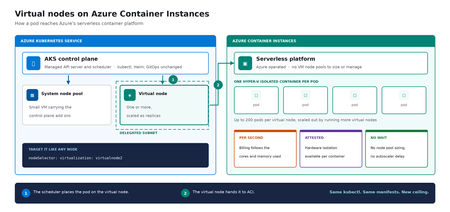
Meet virtual nodes on ACI Azure Kubernetes Service (AKS) gives you managed Kubernetes: the full Kubernetes API without operating the control plane yourself. Virtual nodes on Azure Container Instances go a step further, letting your pods run directly on Azure's serverless container platform, with the elasticity and with no capacity planning and no waiting for machines. Whether you already run AKS or want a managed Kubernetes that bursts without node management, this is for you. In short: virtual nodes on ACI attach Azure's serverless container platform to your cluster as Kubernetes nodes. Pods run as Hyper-V isolated containers, sized per pod rather than packed onto a fixed VM, up to 200 pods per virtual node. Run multiple virtual nodes, scaled as replicas, for more. They behave like any other pod: same kubectl, Helm, and GitOps. Kubernetes has always assumed a fixed set of machines underneath it. That assumption shapes everything above it: you size a node pool for a specific VM type in a specific region, you plan for peak rather than for average, and every workload on a node shares the same kernel and the same security boundary. Virtual nodes on ACI relaxs that assumption, which is what makes both elastic capacity and per container isolation possible without a different Kubernetes. If you've used the original AKS virtual nodes add-on (Virtual Kubelet based), this is not a rebrand. It is a new implementation that integrates far more deeply with Kubernetes, lifts most prior limitations (init containers, persistent volumes, managed identity, richer networking), and adds confidential containers as a first-class capability. The migration guide can be found here. Two capabilities carry the rest of this post: effortless burst capacity, and confidential containers. How virtual nodes on ACI work ACI runs every container as a Hyper-V isolated container, which means each one gets its own lightweight virtual machine boundary rather than sharing a kernel with its neighbors. Azure operates that platform. A virtual node connects it to your cluster. The cluster's control plane, the component that decides where each container runs, sees two kinds of destination: a small pool of virtual machines carrying cluster services, and one or more virtual nodes. From the application manifest's perspective, nothing changes. The pod lands on a virtual node; the virtual node hands it off to ACI. See Microsoft Learn: virtual nodes on ACI for the official capability and current limits. Virtual nodes on ACI in practice The rest of this post is hands on. You do not need to be a Kubernetes expert to follow it. kubectl is the command line tool for talking to a cluster, Helm installs packaged software into one, and a manifest is a text file describing what you want to run. If you have a cluster, everything below runs against it as written. The manifests behind the examples live in a companion demo repo. Setup is documented officially, and you can reproduce this end to end from the ACI virtual nodes documentation and the microsoft/virtualnodesOnAzureContainerInstances Helm repo. One requirement before you start: deploy into a delegated ACI subnet, meaning a subnet in your virtual network set aside for the ACI platform to place containers in. Size it for peak pod count plus headroom, since every pod consumes an address from it for its lifetime. Demo manifest files can be found in this repo, a personal sample repo provided as is and not a supported Microsoft artifact. Enable virtual nodes on ACI The virtual node is deployed via Helm. The Microsoft GitHub repo is itself a Helm repository, so a single helm install is all you strictly need. Cloning first, shown here, just makes it easier to customize values. Running kubectl get nodes afterward confirms the node registered. git clone https://github.com/microsoft/virtualnodesOnAzureContainerInstances.git helm install <yourReleaseName> ./virtualnodesOnAzureContainerInstances/Helm/virtualnode kubectl get nodes The virtual node appears alongside any existing capacity, ready to accept work. A virtual node is a Kubernetes node You target it the same way you would target any node. These few lines in a manifest say "run this on the virtual node": nodeSelector: virtualization: virtualnode2 kubernetes.io/os: linux tolerations: - key: virtual-kubelet.io/provider operator: Exists effect: NoSchedule That is the entire integration surface. No new API to learn, no separate deployment pipeline, no application changes. kubectl describe, kubectl logs, and kubectl exec, the standard commands for inspecting and troubleshooting, all work as they would anywhere else, including opening a shell inside a container running in a Hyper-V isolated boundary. Scaling stays trivial. kubectl scale deployment demo-deployment --replicas=10 lands every replica on the same virtual node, with no VMSS scale event, no provisioning latency, no climbing node-count chart. The same flow scales just as cleanly to hundreds. Cost follows the same shape. Each pod is billed per second against the cores and memory it requests, at ACI rates, and billing stops when the pod stops. Logs and metrics flow through the same path you already use, so existing dashboards and alerts keep working. One annotation makes a pod confidential Turning a regular container into a confidential one takes a single addition to its manifest: a policy that pins exactly which images, commands, environment variables, mounts, and capabilities are permitted inside the Trusted Execution Environment. The format is a base64 encoded Rego document, called a CCE (Container Confidential Enforcement) policy. You do not write that policy by hand. A tool generates it from the manifest you already have: az extension add -n confcom az confcom acipolicygen --virtual-node-yaml ./hello-world-deployment.yaml The tool pulls each image, hashes its layers, builds the allow-list, and injects the annotation back into the manifest. kubectl apply, and you're done. (acipolicygen has prerequisites of its own, including a working Docker installation; see the confcom documentation.) Here is why this is a genuinely new isolation primitive rather than a stronger version of an existing one. Most container security policy is enforced by software in the cluster, which means an attacker who compromises the host can potentially bypass it. This policy is enforced by the guest operating system inside the TEE instead. The underlying hardware, AMD SEV-SNP, also produces an attestation report, retrievable from inside the container, which is a cryptographic proof that the workload running is the workload you specified and nothing tampered with it. That is the guarantee regulated industries have been asking for, and increasingly the one AI workloads running untrusted code need too. The same per pod boundary is also what makes multi-tenancy on a single cluster realistic, though multi-tenancy in production still depends on your network and identity boundaries, which sit outside what the isolation layer itself provides. Background: Microsoft Learn: confidential containers on ACI. Wrapping up Virtual nodes on ACI give containers on Azure two things that were previously hard to deliver cleanly on Kubernetes: Effortless burst capacity on Azure's serverless container platform, billed per second for the cores and memory used, with no capacity planning and no waiting for machines. Confidential containers with hardware attested, per container isolation inside a Trusted Execution Environment. Virtual nodes are additive, not a replacement. Traditional node pools remain the right home for steady state, DaemonSet, and persistent volume workloads, and AKS features such as Node Auto Provisioning and Virtual Machine Node Pools already make that baseline more flexible. Virtual nodes on ACI absorb the spikes, the short-lived jobs, and the specialized isolation work on top. Where to start New to containers on Azure? Start with a small AKS cluster and add a virtual node from day one. You get a managed Kubernetes environment without having to guess your peak capacity in advance, and the elastic layer is there the first time you need it. Already running AKS? Add a virtual node to an existing cluster and move one bursty or short lived workload to it. Nothing else changes, and the comparison is immediate. Evaluating platforms? The capability that is hard to find elsewhere is the confidential containers path: hardware attested isolation per container, reachable through a standard Kubernetes manifest. The result: virtual nodes on ACI expand what AKS can run, with more capacity and stronger isolation, without changing the Kubernetes operating model you already use. Same kubectl, same manifests, same GitOps. New ceiling. For the high-level overview, official documentation, and Helm details, the Microsoft Learn is the source of truth. The companion repo holds the demo manifests used in this post. Acknowledgements I'd like to thank Gurpreet Virdi, Partner Group Engineering Manager, whose guidance shaped this post from the first outline through to publication. Her product leadership ensured this post reflects both the technical depth and the customer value of virtual nodes on ACI. Thanks to Gabriel Fuhrman, Senior Software Engineer, for his detailed technical review. His feedback refined the technical content and significantly improved the accuracy and depth of this post. Christopher Little, Principal CSA, shaped the enterprise adoption perspective, and Adam Sharif, CSA, reviewed the post from the earliest draft. Thanks also to Kirthi Maguluri, Senior Product Manager, and Varun Shandilya, Principal Product Manager, for their review of the blog.792Views1like0CommentsIPv6 Dual-Stack Endpoints for Azure Container Registry (Public Preview)
By Johnson Shi, Aviral Takkar, Bin Du Introduction Two of the most common networking questions we hear from teams running Azure Container Registry (ACR) are: "Can my registry serve clients on IPv6 networks?" — Teams operating IPv6-only or dual-stack networks need their container registry reachable over IPv6. "How do we start moving registry traffic toward IPv6 without breaking anything?" — Organizations guarding against IPv4 address exhaustion, or operating under IPv6 transition mandates, want a migration path that doesn't disrupt existing IPv4 clients. Today, we're announcing the public preview of IPv6 dual-stack endpoints for Azure Container Registry for public endpoints and firewall rules, with IPv6 over private endpoints planned for GA. Set your registry's endpoint protocol to IPv4AndIPv6 , and its endpoints become reachable over both IPv4 and IPv6 — so IPv4-only, dual-stack, and IPv6-capable clients all connect to the same registry, each over whichever protocol their network stack selects. Key Takeaways ACR registries now support an endpointProtocol setting with two values: IPv4 (default) and IPv4AndIPv6 (dual stack, preview). Dual stack is additive — your registry continues serving IPv4 clients exactly as before. There is no IPv6-only mode. Dual stack requires dedicated data endpoints to be enabled ( --data-endpoint-enabled true ), and dedicated data endpoints require the Premium SKU. The service enforces this requirement. You can enable it today with Azure CLI 2.87.0 via az acr update --endpoint-protocol IPv4AndIPv6 . FQDN-based client firewall rules keep working unchanged; IP-based allowlists need to account for IPv6 traffic. Limitation: This public preview covers IPv6 for the registry's public endpoints and firewall rules only. IPv6 over private endpoints is planned for a future release. Limitation: ACR Tasks isn't supported on a registry that has IPv6 dual-stack enabled. Tasks does not work when the endpoint protocol isIPv6 dual-stack, including quick builds (with az acr build) and quick task runs (with az acr run). Support is planned for a future release. How to enable it On an existing registry (Azure CLI 2.87.0 or later) Dual stack requires dedicated data endpoints, so enable both in a single update: az acr update --name <your-registry> --data-endpoint-enabled true --endpoint-protocol IPv4AndIPv6 If dedicated data endpoints are already enabled, set the endpoint protocol on its own: az acr update --name <your-registry> --endpoint-protocol IPv4AndIPv6 Verify the configuration: az acr show --name <your-registry> --query "{endpointProtocol:endpointProtocol, dataEndpointEnabled:dataEndpointEnabled}" { "dataEndpointEnabled": true, "endpointProtocol": "IPv4AndIPv6" } Note: If your clients sit behind a firewall and you're enabling dedicated data endpoints for the first time, add firewall rules for <your-registry>.<region>.data.azurecr.io before enabling — switching from *.blob.core.windows.net to dedicated data endpoints changes where layer blobs are downloaded from. See Dedicated data endpoints for details. Reverting to IPv4 Dual stack is reversible at any time: az acr update --name <your-registry> --endpoint-protocol IPv4 Reverting the endpoint protocol leaves dedicated data endpoints enabled; disable them separately if desired. Scope of this preview This public preview enables IPv6 for the registry's public endpoints — the login server, dedicated data endpoints, and regional endpoints (if enabled). IPv6 over private endpoints isn't part of this preview. Support is planned for a future release. Until then, registries reached through a private endpoint continue to use IPv4. Additionally, IPv6 dual-stack support for ACR Tasks, including support for `az acr build` and `az acr run`, are not supported in the public preview. Support is planned for a future release. Requirements and how features compose Requirement Why Premium SKU Dedicated data endpoints are a Premium feature. Dedicated data endpoints enabled IPv4AndIPv6 requires dataEndpointEnabled: true ; the service rejects the setting otherwise. Azure CLI 2.87.0+ Adds --endpoint-protocol to az acr update . For geo-replicated registries, the endpoint protocol is a registry-level setting, and dedicated data endpoints exist in every replica region. Firewall guidance: rules based on registry FQDNs — the login server, dedicated data endpoints, and regional endpoints (if enabled) — continue to work unchanged for dual-stack registries; only IP-address-based allowlists need updating for IPv6. To learn more, see IPv6 dual-stack endpoints in Azure Container Registry (preview) and the ACR endpoint reference. If you have further questions about IPv6 dual-stack endpoints or dedicated data endpoints, reach out to us on the Azure Container Registry GitHub repository or file feedback through the Azure portal.382Views1like0CommentsDesigning for High Availability: The Operational Reference for Running a Geo-Replicated ACR
By Johnson Shi, Zoey (Zhuyu) Li, Huangli Wu Introduction Three of the most common questions we hear from enterprise teams running geo-replicated Azure Container Registries (ACR) are: "How do I control which region serves my traffic?" — When my AKS clusters are spread across regions, can I pin each one to its co-located replica, or am I stuck with however the global endpoint routes? "What happens during a regional incident — is failover automatic or do I have to act?" — If the registry in one region degrades, does the global endpoint reroute on its own, or do I need to manually disable the affected replica? "What happens after the region recovers — does traffic return on its own?" — Is there a cooldown, a quarantine, or any manual step before failback? We answer those head-on, then go deeper on the operational details that come up when you actually run a geo-replicated registry: authentication across endpoint switches, throttling under load concentration, eventual-consistency failure modes, home region outage scope, webhooks, and private endpoint interaction. We draw on the official geo-replication docs, the global endpoint health-aware failover blog, the regional endpoints engineering design implementation, the regional endpoints public preview and private preview announcements, and the ACR reference for various registry endpoints, . This post also draws notes from the ACR product team on roadmap items that aren't yet documented elsewhere. Key Takeaways Health-aware failover is automatic. When the registry in a region degrades, the global endpoint reroutes away from it on the order of minutes, evaluated per-registry. No customer action required. Failback is automatic too. Once health-aware failover marks a region healthy again, the global endpoint resumes routing to it. There is no cooldown period. Health-aware failover applies only to global endpoint operations. It does not apply to regional endpoints (you're talking to one replica, period) or to dedicated data endpoints (the redirect is per-region). Health-aware failover is not triggered by throttling. It responds to regional ACR service health and Azure infrastructure health, not HTTP 429 responses. Use regional endpoints to manage per-replica throttling. Regional endpoints (Step 2a) give you explicit per-region URLs for workloads that need affinity, capacity planning, push/pull consistency, troubleshooting, or client-side failover. Use myregistry.<region>.geo.azurecr.io . Regional endpoints are available on Premium SKU registries. For workloads that don't need pinning, do nothing (Step 2b). The global endpoint plus health-aware failover handles routing automatically. Re-authenticate when switching endpoints. Each global or regional endpoint is its own authenticated surface; re-auth via az acr login , SDK auth, or the Kubernetes ACR credential provider on endpoint change. Don't run a long-lived DNS cache for the global endpoint. ACR purges DNS server-side on disable and during failover; a long-lived client cache works against that. For production workloads, enable dedicated data endpoints for security and DNS predictability on layer downloads. ACR is working on bounded staleness consistency for cross-replica eventual-consistency failure modes; see the FAQ. Background What is ACR geo-replication? Geo-replication is a Premium SKU feature that turns a single ACR registry into a multi-region, multi-write service. Every geo-replica in every region is writable — you can push, pull, and delete from any of them — and content syncs asynchronously between replicas under an eventual consistency model. Per-push replication time scales with the size and number of images being pushed. Similarly, when creating a new geo-replica, the time to populate the new geo-replica scales with the total size of the registry. A geo-replicated registry exposes a global endpoint at myregistry.azurecr.io . Behind that endpoint, ACR uses an internal traffic manager to direct each request to the replica with the best network performance profile for the caller — usually the closest replica, but not always. When clients are equidistant from multiple replicas, or when the closest replica is experiencing Azure infrastructure degradation, requests may be routed elsewhere. A geo-replicated registry also exposes a regional endpoint at myregistry.<region>.geo.azurecr.io , which allows clients to pin API requests to a specific geo-replica in lieu of global endpoints, which has Azure-managed routing among geo-replicas. Zone redundancy is always enabled for geo-replicas in regions where Azure has multiple availability zones — in those regions, ACR automatically spreads replica data across multiple availability zones within each region to protect against zonal outages. Endpoints and data endpoints: what goes where A common point of confusion: when you push or pull, not every request goes to the same place. The registry endpoints (global endpoint and regional endpoints), as well as the data endpoint, do different jobs. Your choice of data endpoint configuration has real consequences for security and resilience. Two kinds of traffic flow during a typical pull: Registry API traffic — authentication, manifest reads/writes, tag resolution, referrers, repository operations, blob location lookups, listing, metadata. This is everything except the actual layer (blob) bytes. All these API requests go to the global endpoint ( myregistry.azurecr.io ) or, if you've pinned your clients to call these APIs to a specific geo-replica, a geo-replica's regional endpoint ( myregistry.<region>.geo.azurecr.io ). Behind the scenes, the global endpoint internally proxies these requests to a specific geo-replica. Layer (blob) downloads — when the client asks for a blob, the registry doesn't serve the bytes itself. It returns an HTTP 307 redirect to a regional data endpoint (separate endpoint from the global endpoint or regional endpoints), and the client follows the redirect to download the layer from that region. Where that 307 sends you depends on whether you've enabled the registry's dedicated data endpoints feature: Configuration Layer downloads redirect to Default (no dedicated data endpoints) *.blob.core.windows.net (the underlying Azure storage account) Dedicated data endpoints enabled myregistry.<region>.data.azurecr.io for the region you were routed to Private endpoints enabled myregistry.<region>.data.azurecr.io for the region you were routed to Regional by design. Dedicated data endpoints always land you on a specific geo-replica's data endpoint — there is no "global data endpoint." With the global endpoint as your registry endpoint, the 307 redirect picks the data endpoint for whichever region the global endpoint chose to serve you. With a regional endpoint pinned to a specific region, the 307 always redirects you to that same region's data endpoint — never cross-region. Why dedicated data endpoints matter. Dedicated data endpoints are a Premium SKU feature that exists primarily to address security and firewall scoping. By default, layer downloads redirect to *.blob.core.windows.net — a wildcard storage FQDN. Firewall rules to allow that wildcard either let all Azure storage accounts through or none of them, which raises data exfiltration concerns and isn't tightly scoped to your registry. Dedicated data endpoints replace the wildcard with a fully qualified domain in your registry's own domain — myregistry.<region>.data.azurecr.io — so firewall rules can be scoped tightly to your specific registry, in your specific regions. That same design choice can also make layer downloads more predictable during routing changes. With dedicated data endpoints, the data endpoint FQDN is known ahead of time and lives in the registry's domain — one predictable hostname per region, configured once. Without them, the layer download has to resolve a wildcard storage FQDN that points to whichever storage account the registry happens to have provisioned, which is a separate DNS resolution path with its own routing behavior and its own caching profile. Dedicated data endpoints simplify the DNS picture by aligning the data path with the registry path and keeping the entire pull experience inside one set of predictable, scoped FQDNs. For any geo-replicated registry where security and high availability matter, enable dedicated data endpoints. Note: Health-aware failover applies only to operations against the global endpoint, not to regional endpoints or dedicated data endpoints. Take note that health-aware failover only kicks in and directs traffic away from a geo-replica when an Azure region is experiencing significant infrastructure degradation. At this stage, it does not kick in to redirect traffic to another geo-replica if a client's data plane API requests are throttled. See the relevant section below for the full scope when health-aware auto failover kicks in or not. The three traffic control tools ACR geo-replication gives you three complementary tools for controlling where traffic lands. Each one solves a different class of problem, and customers most often run into trouble when they reach for the wrong one. We name them up front and use these names throughout the post: Tool Who controls it What it does Use cases Health-aware failover Platform (automatic) Reroutes the global endpoint away from a region whose registry can't reliably serve requests Regional incidents, automatic recovery Replica enable/disable for global routing Customer (manual) Excludes a specific replica from global endpoint routing without deleting it; data continues syncing DR rehearsals, planned maintenance, quarantining a replica without losing it Regional endpoints Customer (per request) Dedicated per-region URLs ( myregistry.<region>.geo.azurecr.io ) that bypass the internal traffic manager entirely Pinning AKS clusters to co-located replicas, push/pull consistency, capacity planning, troubleshooting, client-side failover Health-aware failover and replica enable/disable both act on the global endpoint. Regional endpoints are a separate URL surface that coexists with the global endpoint — enabling them does not disable the global endpoint myregistry.azurecr.io . You can use both simultaneously and choose per workload. The behavior in question When the registry in one region experiences a real degradation, there are three possible answers to "what happens?": (A) Nothing automatic. The customer must manually disable the affected region's endpoint to stop traffic from being routed there. (B) The system detects the regional front-door failure and reroutes within seconds. (C) A per-registry health evaluation detects the degradation and reroutes the global endpoint within minutes, with no customer action. After the region recovers, routing resumes automatically. The answer today is (C). Before health-aware failover, customers were stuck closer to (A) — the system could see whether the regional reverse proxy responded, but not whether the registry could actually serve real pull and push traffic end to end. Health-aware failover closes that gap. We walk through all three tools in the next section, in order: setting up geo-replication, using regional endpoints to pin specific workloads, keeping the global endpoint for everything else, the manual replica disable mechanism, re-enabling participation in global routing, and what to expect when health-aware failover triggers. Walkthrough The following steps assume an existing Premium SKU registry and the Azure CLI logged in. We use myregistry as the registry name, myrg as the resource group, and eastus as the home region. Substitute <your-registry> , <your-rg> , and <your-region> for your environment. Prerequisites A Premium SKU ACR registry (geo-replication requires Premium) Azure CLI ( az ) installed and logged in For regional endpoints (Step 2a): Azure CLI 2.86.0 or later. All regional endpoints commands ( --regional-endpoints , az acr show-endpoints , az acr login --endpoint ) are available natively in Azure CLI 2.86.0+. If you previously installed the acrregionalendpoint private preview CLI extension, uninstall it with az extension remove --name acrregionalendpoint to prevent conflicts with the built-in CLI commands. Step 1: Add a West US replica to a registry that lives in East US Geo-replication requires the Premium SKU. The create call below fails on Basic or Standard. # Confirm the registry is Premium az acr show --name myregistry --resource-group myrg \ --query sku.name --output tsv # Premium # Create a West US geo-replica az acr replication create --registry myregistry --location westus # Confirm both replicas are present az acr replication list --registry myregistry --output table NAME LOCATION PROVISIONING STATE STATUS REGION ENDPOINT ENABLED ------ ---------- -------------------- -------- ----------------------- eastus eastus Succeeded online True westus westus Succeeded online True Pushes and pulls continue working through the existing replica throughout initial sync. Because the registry is multi-region, multi-write, the existing replica keeps serving traffic while the new replica catches up in the background. Initial replica seeding time is a function of registry size — the total number and cumulative size of images already in the registry that need to be replicated to the new replica — not the size of any single image. Step 2a: Pin workloads to specific regions using regional endpoints Use regional endpoints when a workload needs explicit per-region control. The five common cases: Regional affinity — an AKS cluster in East US should pull from the East US replica, every time, without ever hopping to a more distant replica because of a network performance fluctuation. Predictable routing — workloads that need to know exactly which replica will serve them, for benchmarking, capacity planning, or in-region traffic SLAs. Push/pull consistency — pinning both ends of a publish-then-deploy flow to the same replica eliminates eventual-consistency races. Troubleshooting — reproducing an issue on a specific replica requires sending traffic to that specific replica. Client-side failover — customers with their own health checks and business rules want to implement failover on their own terms, on signals only they can see. Enable regional endpoints on the registry: az acr update -n myregistry -g myrg --regional-endpoints enabled When enabled, ACR automatically creates per-region login server URLs for every existing geo-replica. No per-region configuration is needed. Note: Regional endpoints can be enabled on any Premium SKU registry, even without geo-replication. A registry without geo-replication has a single geo-replica in the home region, which gets one regional endpoint URL. However, the feature is most useful when your registry has at least two geo-replicas, where you can pin different workloads to different replicas for routing control and capacity distribution. Push to a specific region using its regional endpoint: # Log in to the West US regional endpoint az acr login --name myregistry --endpoint westus # Tag and push using the regional endpoint URL docker tag myapp:v1 myregistry.westus.geo.azurecr.io/myapp:v1 docker push myregistry.westus.geo.azurecr.io/myapp:v1 Pin AKS deployments to their co-located replica by using regional endpoint URLs in the deployment manifest. The example below shows two clusters in different regions; each cluster references the regional endpoint for its own region's replica (assuming replicas exist in both eastus and westeurope ): # East US-based AKS cluster pulls from the East US replica apiVersion: apps/v1 kind: Deployment metadata: name: myapp-eastus spec: template: spec: containers: - name: myapp image: myregistry.eastus.geo.azurecr.io/myapp:v1 --- # West Europe-based AKS cluster pulls from the West Europe replica apiVersion: apps/v1 kind: Deployment metadata: name: myapp-westeurope spec: template: spec: containers: - name: myapp image: myregistry.westeurope.geo.azurecr.io/myapp:v1 This eliminates cross-region pulls when global routing would otherwise prefer a different replica for a given client, and it gives you a per-region traffic profile you can plan capacity against. Regional endpoint operational tips View all endpoints. Use az acr show-endpoints to see all endpoint URLs for your registry — global, regional (if enabled), and dedicated data endpoints (if enabled): az acr show-endpoints --name myregistry --resource-group myrg Import from a specific geo-replica. When importing images between registries, you can use a regional endpoint to import from a specific geo-replica of the source registry. This is useful when you want predictable network paths or need to import from a replica in a specific region: az acr import \ --name mydownstreamregistry \ --source myupstreamregistry.westeurope.geo.azurecr.io/myapp:v1 \ --image myapp:v1 Firewall rules for regional endpoints. If you use firewall rules, allow access to the following endpoints for each geo-replica that clients connect to: Endpoint Purpose myregistry.<region>.geo.azurecr.io Regional endpoint for registry operations myregistry.azurecr.io Global endpoint (if also used) myregistry.<region>.data.azurecr.io Layer downloads (if using private endpoints or dedicated data endpoints) *.blob.core.windows.net Layer downloads (if not using private endpoints or dedicated data endpoints) For the full list of endpoint types and FQDN patterns, see the ACR reference for various registry endpoints. DNS-based routing without changing manifests. If you don't want to maintain different deployment manifests per region, you can keep all manifests pointing to the global endpoint ( myregistry.azurecr.io ) and use software-defined networking or a regional traffic manager to resolve the global endpoint to the appropriate regional endpoint based on the originating region's traffic. This achieves the same co-location goals as regional endpoints — predictable routing and reduced latency — without embedding region-specific URLs in your deployment manifests. Step 2b: Keep using the global endpoint for everything else For workloads that don't need explicit pinning, do nothing. The global endpoint at myregistry.azurecr.io continues to work exactly as before, and the global endpoint plus health-aware failover gives you intelligent routing across replicas without configuration. ACR picks the best replica for each client based on network performance and reroutes during regional incidents. Regional endpoints coexist with the global endpoint — enabling them does not disable myregistry.azurecr.io . You can use both simultaneously and choose per workload, mixing pinned workloads (Step 2a) with workloads that ride the global endpoint (Step 2b) in the same registry. Step 3: Take a replica out of global endpoint routing Use this when you need to keep a replica alive but stop it from serving global-endpoint traffic — for DR rehearsals, planned maintenance, or troubleshooting an isolated replica. # Exclude the West US replica from global endpoint routing az acr replication update --registry myregistry --name westus \ --global-endpoint-routing false Confirm the change: az acr replication list --registry myregistry --output table NAME LOCATION PROVISIONING STATE STATUS REGION ENDPOINT ENABLED ------ ---------- -------------------- -------- ----------------------- eastus eastus Succeeded online True westus westus Succeeded online False Requests to myregistry.azurecr.io no longer route to West US. The replica still receives replicated content — and continues to replicate its own content out to other replicas — and storage quota and per-replica costs continue to accrue. If regional endpoints are enabled, the West US regional endpoint URL also continues to work; --global-endpoint-routing controls only the replica's participation in global endpoint routing. A note on naming. The CLI flag --global-endpoint-routing (on az acr replication update ) and the regional endpoints feature (enabled via az acr update --regional-endpoints enabled ) are two different things despite the similar names. --global-endpoint-routing controls whether a replica participates in global endpoint routing. The regional endpoints feature creates per-region URLs ( myregistry.<region>.geo.azurecr.io ) that bypass the global endpoint entirely. They are independent controls. In Azure CLI 2.86.0 and later, the old --region-endpoint-enabled flag has been renamed to --global-endpoint-routing . The old flag name is deprecated and will be removed in Azure CLI 2.87.0 (June 2026). If you have existing scripts or automation that use --region-endpoint-enabled , update them to use --global-endpoint-routing . CLI flags quick reference: Flag Scope Purpose --regional-endpoints Registry-level ( az acr create or az acr update ) Enables dedicated regional endpoint URLs ( myregistry.<region>.geo.azurecr.io ) for all geo-replicas. --global-endpoint-routing Per-geo-replica ( az acr replication create or az acr replication update ) Controls whether the global endpoint routes traffic to a specific geo-replica. Set to false to temporarily exclude a geo-replica from global routing. --data-endpoint-enabled Registry-level ( az acr create or az acr update ) Enables dedicated data endpoints ( myregistry.<region>.data.azurecr.io ) for layer blob downloads. Auto-enabled when at least one private endpoint is configured. This bidirectional sync during disable is intentional. When you re-enable the replica, every image pushed to the registry while the replica was disabled — from any region — is already present, so the replica can serve traffic immediately with no catch-up window. If we stopped syncing on disable, re-enabling would leave the replica with stale data and force a long catch-up before it could safely serve pulls. Step 4: Re-enable the replica to participate in global endpoint routing Re-enable the replica: az acr replication update --registry myregistry --name westus \ --global-endpoint-routing true NAME LOCATION PROVISIONING STATE STATUS REGION ENDPOINT ENABLED ------ ---------- -------------------- -------- ----------------------- eastus eastus Succeeded online True westus westus Succeeded online True There is no cooldown. The global endpoint resumes routing requests to the West US replica as soon as the change takes effect on ACR's side. Because data continued syncing while the replica was disabled (Step 3), the replica is immediately ready to serve pulls — no catch-up window. Note on DNS during disable/enable. When you take a replica out of global routing, ACR purges its own DNS records for that replica from the global endpoint on a fast path — there is no waiting on a published TTL on ACR's side. If clients run their own DNS cache for the global endpoint, however, those clients will keep resolving to the disabled replica until the client cache expires. We can't control client-side caches. The recommendation: do not run a long-lived DNS cache for the global endpoint. A short-lived DNS pin for the duration of a single push (covered in the DNS and Client-Side Considerations section) is fine and even helpful — but a long-lived DNS cache will make --global-endpoint-routing false look broken from the client's perspective. Step 5: What to expect when health-aware failover triggers Health-aware failover is automatic. ACR evaluates registry health on a per-registry basis, and when a registry in a region can't reliably serve requests, the global endpoint reroutes that registry's traffic to a healthy replica. There is no customer-invocable trigger — that's the point. End-to-end timing is on the order of minutes — fast enough to catch real regional degradation, slow enough to ride out transient errors that resolve on their own. DNS TTL may add additional propagation delay before all clients switch to the new region. Scope of health-aware failover. Health-aware failover applies only to operations against the global endpoint — the registry API calls (auth, get manifest, get tag, get referrers, get blob location). It evaluates health when those API calls come in; it does not trigger mid-operation. Two important consequences: Regional endpoints are not in scope. When you talk to a regional endpoint like myregistry.westus.geo.azurecr.io , you're talking to that one replica. There is no automatic reroute. If you've pinned a workload to a regional endpoint and that region degrades, you implement client-side failover by switching the workload to a different regional endpoint. Dedicated data endpoints are not in scope. Once a registry endpoint has redirected you to a dedicated data endpoint, you stay on that region's data endpoint for the duration of the layer download. There is no automatic reroute of an in-flight blob download. The region targeted by the redirect is decided up front by whichever registry endpoint served the blob-location call: the global endpoint chooses based on its per-registry health evaluation, and a regional endpoint always targets its own region. The signals you can use to confirm a failover is in progress: # Check replication status az acr replication list --registry myregistry --output table You can also check Resource Health for the registry in the Azure portal — navigate to your registry and select Resource health under the Help section to see platform-side degradation signals. You'll typically see: Increased pull latency as traffic shifts to a more distant replica Resource Health flagging known issues in the affected region Replication status indicating which replicas are online After the region recovers, the per-registry health evaluation marks it healthy again and the global endpoint resumes routing — automatic, no cooldown, no customer action. Note that health is evaluated per registry, not per region: if a degradation affects only a subset of registries in a region, only those registries are rerouted, and other registries in the same region continue to be served locally with no unnecessary latency penalty. Not triggered by throttling. Health-aware failover is DNS-based and responds to regional ACR service health and Azure infrastructure health. It does not reroute traffic based on HTTP 429 (throttling) responses. If a geo-replica is throttling your requests but the region's infrastructure is healthy, the global endpoint continues routing you to that geo-replica. To manage throttling, use regional endpoints to spread workloads across multiple geo-replicas for better capacity distribution. Note on long-running pushes during a failover. A multi-layer push that spans a failover boundary can land layers and the manifest on different replicas — exactly the failure mode that DNS bouncing produces during a single push. ACR is actively tightening health-aware failover behavior to minimize cross-replica scatter during these scenarios, and the recommendation today remains: pin pushes to a single replica via a regional endpoint when push/pull consistency matters. Common Questions Q1. Performance impact during initial replica creation on a live registry Because ACR is multi-region, multi-write, the existing replica continues serving pull and push traffic throughout the period when a new replica is being seeded. Replication is asynchronous and content propagates in the background; the time to populate a new geo-replica scales with the size of the registry — the cumulative number and total size of images already in the registry — not with any single image. The docs do not publish a quantified degradation percentage or a throttling window for this period, and they do not promise zero performance impact — the safe operating assumption for a live production registry is that existing replicas continue serving traffic normally, with the new replica catching up in the background. Q2. Restricted/updating state during initial sync There is no "restricted" state for the registry during normal replica creation. Writes, control-plane operations, and pushes/pulls against existing replicas continue normally. The only time configuration changes are unavailable is during a home region outage — see the relevant FAQ item later on for the full data-plane-versus-control-plane breakdown. Q3. Cooldown periods and non-straightforward failback scenarios There is no cooldown before failback, manual or automatic. Re-enabling a replica's participation in global endpoint routing takes effect immediately on ACR's side. Health-aware failover returns traffic to a region as soon as its per-registry health evaluation passes again. The failback case that is not seamless: if a recently pushed image has not yet replicated to the failover region, a pull from that region may not find the image until replication catches up. This is a function of eventual consistency, not failback timing — and it's part of a broader class of issues we cover in Q4. Q4. Common pull and push failure modes during the eventual-consistency window DNS bouncing during a single push is one well-known problem, but it isn't the only one. The eventual-consistency window between geo-replicas surfaces in several recurring failure modes worth knowing about: Push-then-immediate-pull-cross-region. Pushing myapp:v1 to one region and immediately pulling it from a different region can fail with manifest unknown until replication catches up. This shows up most painfully in CI/CD pipelines where one CI runner pushes an image and thousands of pods across other regions all try to pull from their local geo-replicas at the same time. Today, customers work around this with indeterminate sleeps before scheduling expensive compute, or with retry logic, or by waiting on a replication-complete signal — none of which is a clean planning story. Tag overwrite races. Pushing myapp:v1 , then re-pushing myapp:v1 shortly after with a fix (same tag, different digest), can leave different replicas resolving the same tag to different digests during the eventual-consistency window. Delete propagation. Deleting a tag or repository in one region takes some time to propagate to other replicas. Pulls from regions where the delete hasn't yet propagated can return the supposedly-deleted content. Mid-push failover scatter. A multi-layer push that spans a health-aware failover boundary or a DNS bouncing event can land layers on one replica and the manifest on another, surfacing as manifest validation errors or blob unknown on subsequent pulls. What ACR is doing about this. We're working on bounded staleness consistency for pushed images across all geo-replicas worldwide, which addresses these four failure modes directly. This will be covered in an upcoming blog post. If you're hitting eventual-consistency brittleness today and want to talk through your scenario, reach out to us on the Azure Container Registry GitHub repository — we want the customer signal to land in the design. Mitigations available today: Pin pushes to a single replica via a regional endpoint. Every sub-request in the push — login, blob uploads, manifest upload — goes to the same replica, eliminating the DNS bouncing and mid-push scatter classes entirely. Use a short-lived client-side DNS cache like dnsmasq scoped to the duration of a single push, only when you're not using regional endpoints. Do not run a long-lived DNS cache for the global endpoint — it interferes with --global-endpoint-routing false and with health-aware failover routing. Build retry logic into pulls that immediately follow a cross-region push. Either retry with backoff or check replication status with ACR webhooks before pulling. ACR can detect and notify you when an image or tag is available for pull in a geo-replica (say geo-replica B), after it has been pushed to another geo-replica (geo-replica A) and background replication has succeeded to geo-replica B. Design publish steps to be idempotent so retries triggered by mid-push failover are safe. Q5. Auth behavior across endpoint switches For safety, treat each global endpoint and each regional endpoint as its own authenticated surface. All registry APIs except the actual blob downloads (auth, manifests, tag resolution, referrers) flow through whichever endpoint you've chosen. If you switch from the global endpoint to a regional endpoint, or from one regional endpoint to another, re-authenticate. That means az acr login , fresh SDK auth, or — for AKS — letting the Kubernetes ACR credential provider handle re-auth, which it does automatically when the endpoint changes. Q6. Throttling under failover and pinning Throttling limits on registry API operations are per-replica, not per-registry. This has two operational implications: During health-aware failover, traffic that was spread across replicas can shift heavily onto whichever replicas remain in the global endpoint's routing pool. Capacity plan to spread traffic across two or three healthy replicas during a failover scenario rather than concentrating onto one — the global endpoint's routing already does this for you when multiple healthy replicas exist, but registries with only two regions configured can hit per-replica limits more easily during a failover. To mitigate, use regional endpoints to spread workloads across multiple geo-replicas and plan per-replica capacity. When pinning via regional endpoints (Step 2a), you concentrate traffic on whichever replica you've pinned to. If you've pinned all your AKS clusters to a single regional endpoint, you may hit that replica's per-region throttling limits at peak. Mitigations: pin different workloads to different regional endpoints across multiple regions for better topology mapping and capacity distribution, or use the global endpoint (Step 2b) for workloads where you don't need explicit pinning so ACR's routing can spread load. We're also working on improving the throttling metrics surfaced during health-aware failover events. Note: Health-aware failover does not reroute traffic based on HTTP 429 (throttling). If you're experiencing throttling but the region's infrastructure is healthy, the global endpoint continues routing you there. Use regional endpoints to explicitly spread load across replicas for capacity planning. Q7. Home region outage scope Geo-replication provides high availability for the data plane. During a home region outage, the control plane is unavailable, which means you can't create or delete replicas, modify network rules, or change replication settings until the home region recovers. ACR Tasks are also bound to the home region and don't run while it's unavailable. The data plane keeps working: Global endpoint continues routing pulls and pushes to healthy replicas. Regional endpoints continue working — you talk directly to specific replicas, and your client-side logic decides which region to use. Authentication, manifests, blob downloads, webhooks continue functioning through any healthy replica. The home region of a registry is fixed at creation and cannot be changed afterward. Microsoft's registry relocation guidance describes a redeployment procedure — creating a new registry in a different region — not an in-place change to an existing registry's home region. Note: If your registry uses a customer-managed key, review the key vault failover and redundancy guidance for maximum resilience. Key vault availability directly affects the registry's ability to encrypt and decrypt data. Q8. Webhooks during failover Webhooks fire from the replica that received the push. Because ACR also replicates content to other geo-replicas, webhooks fire from each geo-replica as the image syncs to it — so a single push results in webhook events from the receiving replica plus an event from each replica as replication completes. During a failover where pushes are routed to a different region, webhooks from those pushes fire from the new region; once the original region recovers and replication catches up, webhook events fire from there too. Webhook consumers should be designed to handle multiple events per pushed image and deduplicate as needed. Q9. Private endpoints with regional endpoints and dedicated data endpoints When a private endpoint is created against a registry, the private endpoint covers all of the registry's endpoint surfaces — the global endpoint, every regional endpoint (if regional endpoints are enabled), and every regional dedicated data endpoint. A single private endpoint in one VNet can reach the global endpoint (which routes you to a suitable replica), any regional endpoint in the same or a different region, and any region's dedicated data endpoint for blob downloads. The trade-off is private IP allocation: each endpoint surface consumes IPs in the VNet. With many replicas plus regional endpoints plus dedicated data endpoints all enabled, private endpoint creation can fail if the VNet runs out of available private IPs. IP address consumption per feature: Configuration IPs consumed per VNet Initial private endpoint (global endpoint + home region dedicated data endpoint) 2 Each geo-replication region added +1 (regional dedicated data endpoint) Regional endpoints enabled +1 per geo-replica Example: A registry with 3 geo-replicas and regional endpoints enabled consumes 7 private IPs per VNet: 1 (global) + 3 (data) + 3 (regional). Without regional endpoints, the same registry requires 4 private IPs: 1 (global) + 3 (data). Subnet sizing: Use at minimum a /27 (32 addresses) subnet for PE subnets on geo-replicated registries, and /24 where possible. To check how many private IPs are already consumed on a subnet: az network vnet subnet show \ --name <subnet-name> \ --vnet-name <vnet-name> \ --resource-group <resource-group> \ --query "{addressPrefix:addressPrefix, usedIPs:length(ipConfigurations || \`[]\`)}" \ --output table See the ACR private endpoints documentation for the full IP-allocation math and sizing guidance. Q10. Geo-replica creation stuck for private endpoint-enabled registries When creating a geo-replica for a registry that has private endpoints configured, the replica provisioning can get stuck in a Creating state if the identity performing the operation doesn't have sufficient permissions to create private endpoint networking resources. Solution: Manually delete the geo-replica that got stuck in the provisioning state. Ensure the identity has the permission Microsoft.Network/privateEndpoints/privateLinkServiceProxies/write before creating the geo-replica again. Also verify that every PE subnet connected to the registry has free IP capacity — if any PE subnet across any connected VNet does not have enough free IPs, the replication provisioning fails and rolls back. The replica appears briefly in a Creating state and then is removed. The resulting error does not identify which subnet or VNet is exhausted. Q11. Metrics, logs, and alerts for the three phases We map each phase to the signals available in the Monitoring Guidance section below. The headline: Resource Health (in the Azure portal) and az acr replication list give you the platform-side signals; Azure Monitor platform metrics are collected automatically, and resource logs require Diagnostic Settings to be enabled on the customer side. Behavior summary Scenario Automatic? Customer Action Required Notes Registry in a region degrades Yes None Health-aware failover; per-registry; minutes-scale; global endpoint operations only Region recovers after a degradation event Yes None No cooldown Pin AKS clusters to co-located replicas No Use regional endpoint URLs in deployment manifests (Step 2a) Coexists with global endpoint No pinning needed for most workloads Yes None — keep using myregistry.azurecr.io (Step 2b) Global endpoint plus health-aware failover Push/pull from the same replica (consistency) No Use a regional endpoint for both push and pull Eliminates DNS bouncing and mid-push scatter Capacity planning per region No Spread workloads across multiple regional endpoints Per-replica throttling; avoid concentrating on one replica DR rehearsal: take a replica out of global routing No az acr replication update --global-endpoint-routing false Data continues syncing both directions; costs continue accruing Re-enable replica participation in global routing No az acr replication update --global-endpoint-routing true No cooldown; replica is immediately ready Switch a workload between endpoints No Re-auth ( az acr login , SDK auth, or Kubernetes ACR credential provider) Each endpoint is its own authenticated surface Initial replica seeding on a live registry N/A None Existing replica continues serving traffic; seeding time scales with registry size Long-running push during a failover No Retry; design publishes to be idempotent Pin via regional endpoint to avoid mid-push scatter; ACR is tightening this behavior Pull of a recently pushed image from a different region No Wait for replication, retry with backoff, or check replication status Eventual consistency; bounded staleness consistency in development Home region outage Data plane: yes; control plane: no Use global or regional endpoints for data plane operations Control plane (replica config, network rules) requires home region DNS and Client-Side Considerations DNS bouncing during a single push is the most common geo-replication push problem in customer threads, and it warrants a section of its own. The failure mode. A docker push is a sequence of HTTP requests: blob uploads for each layer, then a manifest upload that references those layers by digest. If the Linux DNS resolver on the client doesn't cache myregistry.azurecr.io consistently for the duration of the push, individual sub-requests can resolve to different replicas. Because replication is eventually consistent, the manifest can land on a replica that doesn't yet have the layers it references, and the manifest validation fails. The two mitigations: Regional endpoints pin the push to a single replica end-to-end. Every sub-request — login, blob uploads, manifest upload — goes to the same replica. This is the cleanest fix and the one we recommend for any pipeline where push/pull consistency matters. A short-lived client-side DNS cache like dnsmasq scoped to the duration of a single push. For Linux VMs in Azure, follow the DNS name resolution options guidance. The pin should last the push and no longer. For other clients performing pushes, you can customize your stack's DNS resolver to have a similar short-lived DNS cache to pin the global endpoint's resolved DNS for only the duration of an image push operation. A note on long-lived DNS caching for the global endpoint. Don't run a long-lived DNS cache for myregistry.azurecr.io . ACR purges its own DNS records on the server side when a replica is taken out of global routing (Step 3) and during health-aware failover; a long-lived client-side cache will keep clients pointed at the old region after our purge, which makes both the manual disable mechanism and health-aware failover look broken from the client's perspective. Retry behavior: In-flight pushes during a failover may fail. Design publish steps to be idempotent so retries are safe. Pipelines that push in one region and immediately pull from a different region should retry with backoff or check replication status — eventual consistency means the pull may race ahead of replication. ACR is working on bounded staleness consistency that addresses this directly by enabling proxying (on ACR infrastructure) an image pull request from one geo-replica (if it does not have the image) to another geo-replica that has the image; see the relevant FAQ item. Note: Specific retry counts, back-off intervals, and push timeout values are application-layer decisions. The platform behavior is documented; the retry policy belongs to your client. Monitoring Guidance We map the three phases to the signals available from each source. Where a signal requires customer-side configuration, we flag it. Phase A: Initial replication (after creating a new replica) az acr replication list and az acr replication show — confirm the new replica reaches provisioningState: Succeeded and status: online , and view per-replica status. Azure Monitor platform metrics — push count, pull count, and other registry metrics are collected automatically and visible in the Azure portal under Metrics. No customer configuration is needed to view platform metrics. To export metrics or enable resource logs (detailed operation logs), configure Diagnostic Settings on the registry. Phase B: Failover (planned via replica disable, or automatic via health-aware failover) Per-replica regionEndpointEnabled state via az acr replication list — confirms whether a manual disable took effect, i.e. which replicas are currently eligible for global endpoint routing. Note: this flag reflects the manual configuration for configuring a geo-replica's global endpoint routing eligibility; it does not indicate whether health-aware failover has actively rerouted traffic away from a replica. Resource Health for the registry (in the Azure portal under Help > Resource health) — surfaces platform-side degradation signals during incidents. ACR does not yet expose a definitive "this region is currently serving your traffic" signal; Resource Health and client-side latency changes are the best available indicators. Pull latency from clients — increased latency from a more distant replica is the client-observable signal that traffic has rerouted. Azure Monitor platform metrics — visible per-region in the Azure portal Metrics blade. To export metrics or query them programmatically, enable Diagnostic Settings. Phase C: Failback (replica returns to global routing) az acr replication list — confirms regionEndpointEnabled: True (manual) or online status across all replicas (automatic). Pull latency normalizing as clients reach the recovered replica again. Resource Health clearing for the registry (visible in the Azure portal). Note: The health-aware failover blog calls out ongoing work to surface richer signals — including notifications for when routing changes and which region is currently serving your traffic. The signals listed above are what's available today. Pricing Considerations Storage billing vs. storage quota: Storage is billed per geo-replica — a 1 GiB image replicated to 5 geo-replicas is charged as 5 GiB of storage (1 GiB × 5 geo-replicas). However, storage quota (the tier's maximum storage limit) counts the image only once — the same 1 GiB image counts as 1 GiB toward your tier's maximum, not 5 GiB. Data transfer: Geo-replication can reduce costs by enabling in-region image pushes and pulls, which avoids cross-region data transfer charges during these push or pull operations. However, cross-region data transfer charges still apply when ACR replicates pushed content to other geo-replicas as part of eventual consistency. Disabled replicas still cost: When you take a replica out of global routing with --global-endpoint-routing false , storage and per-replica costs continue accruing because data continues syncing bidirectionally. For more information, see ACR pricing. Cleanup Run these commands to undo the walkthrough setup. Order matters: disable regional endpoints before deleting replicas, since regional endpoint URLs depend on which replicas exist. # Disable regional endpoints if you enabled them in Step 2a az acr update -n myregistry -g myrg --regional-endpoints disabled # Re-enable any replicas you disabled in Step 3 (no-op if already enabled) az acr replication update --registry myregistry --name westus \ --global-endpoint-routing true # Delete the West US replica created in Step 1 az acr replication delete --registry myregistry --name westus # Confirm only the home region replica remains az acr replication list --registry myregistry --output table Note: Replica deletion is a control-plane operation that requires the home region to be available. During a home region outage, replica configuration cannot be modified. Summary Table Question Answer When should I use regional endpoints vs the global endpoint? Use regional endpoints (Step 2a) for workloads that need affinity, predictable routing, push/pull consistency, troubleshooting, or client-side failover. Use the global endpoint (Step 2b) for everything else and let health-aware failover handle routing. What should I enable for secure, resilient layer downloads? Enable dedicated data endpoints. They scope firewall rules tightly to your registry and replace wildcard storage DNS with predictable per-region FQDNs. How do I avoid DNS-bouncing manifest validation failures on push? Pin pushes to a single replica via a regional endpoint. A short-lived client-side dnsmasq for the push duration is also fine if you're not using regional endpoints. Should I run a long-lived DNS cache for the global endpoint? No. ACR purges DNS server-side on disable and during failover; client-side caching works against that. Do I need to re-auth when switching endpoints? Yes. Each global or regional endpoint is its own authenticated surface. az acr login , SDK auth, or the Kubernetes ACR credential provider handles the re-auth. What happens during a home region outage? Data plane keeps working through any replica via the global endpoint or regional endpoints. Control plane operations (replica configuration, network rules) are unavailable until the home region recovers. The home region is fixed at registry creation. What's ACR doing about eventual-consistency pain? Bounded staleness consistency for cross-replica pushed images is in development and will be covered in an upcoming blog post. Reach out via GitHub if you want to share your scenario. For the full automation matrix — what's automatic, what requires customer action, and what to expect for each scenario — see the behavior summary above. If you have further questions about ACR geo-replication routing, pinning, capacity planning, eventual consistency, or failover behavior, reach out to us on the Azure Container Registry GitHub repository or file feedback through the Azure portal.457Views0likes0CommentsRegional Endpoints for Azure Container Registry Geo-Replication — Now in Public Preview
By Johnson Shi, Zoey (Zhuyu) Li, Huangli Wu What's new Regional endpoints for geo-replicated Azure Container Registries are now in public preview. See the feature's official MS Learn documentation. If you've been following since the private preview announcement, here's what changed: No feature flag registration. No subscription enrollment so all Azure subscriptions and customers can now use this feature. No CLI extension. Regional endpoints commands are built into Azure CLI 2.86.0+ natively. If you installed the private preview acrregionalendpoint extension, uninstall it to avoid conflicts. Native CLI and portal support. With Azure CLI 2.86.0+, enable regional endpoints for all geo-replicas of a registry with az acr create --regional-endpoints enabled or az acr update --regional-endpoints enabled . The Azure portal also supports configuring regional endpoints natively. CLI flag rename for configuring a geo-replica's global endpoint routing (an existing separate feature). The existing flag --region-endpoint-enabled (on az acr replication create/update ) has been renamed to --global-endpoint-routing . Key clarifications: "--global-endpoint-routing" (formerly "--region-endpoint-enabled" on "az acr replication create / az acr replication update") — controls whether a specific geo-replica participates in global endpoint routing. This is an existing feature that is different from the new registry-level "--regional-endpoints" feature being discussed in this post. "--regional-endpoints" (on az "acr create / az acr update") — enables or disables the regional endpoints feature at the registry level for all geo-replicas. This is the feature discussed in this post. See the endpoint reference for the full breakdown of the various registry endpoints (global endpoints, regional endpoints, and data endpoints). Regional endpoints are available on Premium SKU registries in all Azure public cloud regions. What are regional endpoints? Regional endpoints give you dedicated, per-region login server URLs for each geo-replica with the following URL pattern: myregistry.eastus.geo.azurecr.io myregistry.westeurope.geo.azurecr.io Regional endpoints coexist with the registry's global endpoint ( myregistry.azurecr.io ) — enabling regional endpoints doesn't disable a registry's global endpoint that is backed by Azure-managed routing. You can choose per workload: You can use the global endpoint with automatic Azure-managed routing with health-aware failover, where Azure will route your requests to the geo-replica with the best network performance profile to the client. You can use a regional endpoint when you need explicit control or routing to a specific geo-replica. Other resources: For the full background on why regional endpoints exist and the problems they solve, see the private preview blog post. For the complete operational deep dive — health-aware failover, throttling considerations, storage quota and pricing, eventual consistency, home region outage behavior, DNS propagation, private endpoint interaction, capacity planning, and monitoring guidance — see How ACR geo-replication handles failover, failback, and traffic redirection. For the behind-the-scenes engineering implementation — architectural overview and the engineering system design of the feature — see Determinism over magic: the engineering design behind Azure Container Registry Regional Endpoints. Getting started Enable regional endpoints on an existing registry: az acr update -n myregistry -g myrg --regional-endpoints enabled View all registry endpoint URLs, including the registry global endpoint, geo-replica regional endpoints, and data endpoints: az acr show-endpoints --name myregistry --resource-group myrg Using regional endpoints Authenticate to a specific regional endpoint: az acr login --name myregistry --endpoint eastus Push to a specific geo-replica. Images and tags pushed to a geo-replica via regional endpoints still propagate to all other geo-replicas under eventual consistency. docker tag myapp:v1 myregistry.eastus.geo.azurecr.io/myapp:v1 docker push myregistry.eastus.geo.azurecr.io/myapp:v1 Pull an image: docker pull myregistry.eastus.geo.azurecr.io/myapp:v1 You can specify regional endpoints directly in Kubernetes deployment manifests if you need to pin workloads to specific regions. This ensures clusters in specific regions always pull from their colocated replica, providing predictable routing and reduced latency. By using different regional endpoints in each cluster's manifests, you can choose to guarantee that each cluster pulls from its local replica instead of relying on Azure-managed routing. East US cluster deployment: apiVersion: apps/v1 kind: Deployment metadata: name: myapp-eastus spec: template: spec: containers: - name: myapp image: myregistry.eastus.geo.azurecr.io/myapp:v1 West Europe cluster deployment: apiVersion: apps/v1 kind: Deployment metadata: name: myapp-westeurope spec: template: spec: containers: - name: myapp image: myregistry.westeurope.geo.azurecr.io/myapp:v1 When to use regional endpoints Scenario What to do Most workloads Keep using the global endpoint ( myregistry.azurecr.io ). Health-aware failover handles routing automatically. Pin AKS clusters to co-located replicas Use regional endpoint URLs in deployment manifests. CI/CD push-then-pull consistency Pin pushes to a regional endpoint to avoid eventual-consistency races. Client-side failover Switch between regional endpoints based on your own health checks. Capacity planning Spread workloads across multiple regional endpoints to avoid per-replica throttling. Troubleshooting Target a specific geo-replica to reproduce or isolate an issue. What changed from private preview Private preview Public preview Feature flag registration required ( az feature register ) No registration needed Subscription private preview enrollment and propagation wait Immediately available to all Azure subscriptions for all Premium SKU registries in all Azure public cloud regions. Separate CLI extension ( acrregionalendpoint ) Built into Azure CLI 2.86.0+ natively No registry-level CLI flag az acr update --regional-endpoints enabled enables regional endpoints for all geo-replicas --region-endpoint-enabled flag for controlling a geo-replica's global endpoint routing via az acr replication update Flag for controlling a geo-replica's global endpoint routing renamed to --global-endpoint-routing No portal support Native Azure portal support for enabling regional endpoints for new registries (during creation) and for existing registries Private preview docs in Azure/acr Full documentation on MS Learn Enabling regional endpoints in the Azure portal You can enable regional endpoints directly from the Azure portal for both new registries (during creation), as well as existing registries: If you were in the private preview 1. Uninstall the CLI extension. The private preview CLI extension conflicts with the built-in commands in Azure CLI 2.86.0+. Remove it: az extension remove --name acrregionalendpoint Verify it's gone: az extension list --query "[?name=='acrregionalendpoint']" -o table 2. Ensure you're running Azure CLI 2.86.0 or later. Regional endpoints commands are available natively starting in Azure CLI 2.86.0. Check your version: az version 3. Update scripts that use --region-endpoint-enabled for controlling global endpoint routing for a geo-replica. The old flag name for controlling a geo-replica's global endpoint routing configuration is deprecated and will be removed in Azure CLI 2.87.0 (June 2026). Update to --global-endpoint-routing : # Old (deprecated) az acr replication update --registry myregistry --name westus \ --region-endpoint-enabled false # New az acr replication update --registry myregistry --name westus \ --global-endpoint-routing false Why the rename? The old flag name --region-endpoint-enabled was confusing — it sounded like it controlled the regional endpoints feature, but it actually controlled whether a geo-replica participates in global endpoint routing. The new name --global-endpoint-routing says exactly what it does. For a full breakdown of all three CLI flags and how they relate, see the endpoint reference. Learn more Full documentation: Geo-replication in Azure Container Registry — Regional endpoints — prerequisites, CLI commands, network considerations, private endpoint integration, and troubleshooting. Operational deep dive: How ACR geo-replication handles failover, failback, and traffic redirection — health-aware failover, throttling, eventual consistency, DNS considerations, monitoring, pricing, and a full walkthrough. Behind-the-scenes engineering implementation: Determinism over magic: the engineering design behind Azure Container Registry Regional Endpoints — architectural details and the engineering system design behind the feature. Endpoint reference: Azure Container Registry endpoint reference — all endpoint types, URL formats, and CLI flags in one place. Private endpoints: Connect privately to a registry using private endpoints — IP allocation math, subnet sizing, and NIC queries for registries with regional endpoints. Firewall rules: Configure firewall access rules — which FQDNs to allow for regional endpoints. Feedback We'd love to hear how you're using regional endpoints and what we can improve. Reach out via: Azure Container Registry GitHub repository — issues, feature requests, and discussion Azure portal feedback — use the feedback button in the Azure portal on your registry's page Regional endpoints are on the path to GA. Your feedback directly shapes the feature's direction.669Views1like1Comment