machine learning
393 TopicsHow Do We Know AI Isn’t Lying? The Art of Evaluating LLMs in RAG Systems
🔍 1. Why Evaluating LLM Responses is Hard In classical programming, correctness is binary. Input Expected Result 2 + 2 4 ✔ Correct 2 + 2 5 ✘ Wrong Software is deterministic — same input → same output. LLMs are probabilistic. They generate one of many valid word combinations, like forming sentences from multiple possible synonyms and sentence structures. Example: Prompt: "Explain gravity like I'm 10" Possible responses: Response A Response B Gravity is a force that pulls everything to Earth. Gravity bends space-time causing objects to attract. Both are correct. Which is better? Depends on audience. So evaluation needs to look beyond text similarity. We must check: ✔ Is the answer meaningful? ✔ Is it correct? ✔ Is it easy to understand? ✔ Does it follow prompt intent? Testing LLMs is like grading essays — not checking numeric outputs. 🧠 2. Why RAG Evaluation is Even Harder RAG introduces an additional layer — retrieval. The model no longer answers from memory; it must first read context, then summarise it. Evaluation now has multi-dimensions: Evaluation Layer What we must verify Retrieval Did we fetch the right documents? Understanding Did the model interpret context correctly? Grounding Is the answer based on retrieved data? Generation Quality Is final response complete & clear? A simple story makes this intuitive: Teacher asks student to explain Photosynthesis. Student goes to library → selects a book → reads → writes explanation. We must evaluate: Did they pick the right book? → Retrieval Did they understand the topic? → Reasoning Did they copy facts correctly without inventing? → Faithfulness Is written explanation clear enough for another child to learn from? → Answer Quality One failure → total failure. 🧩 3. Two Types of Evaluation 🔹 Intrinsic Evaluation — Quality of the Response Itself Here we judge the answer, ignoring real-world impact. We check: ✔ Grammar & coherence ✔ Completeness of explanation ✔ No hallucination ✔ Logic flow & clarity ✔ Semantic correctness This is similar to checking how well the essay is written. Even if the result did not solve the real problem, the answer could still look good — that’s why intrinsic alone is not enough. 🔹 Extrinsic Evaluation — Did It Achieve the Goal? This measures task success. If a customer support bot writes a beautifully worded paragraph, but the user still doesn’t get their refund — it failed extrinsically. Examples: System Type Extrinsic Goal Banking RAG Bot Did user get correct KYC procedure? Medical RAG Was advice safe & factual? Legal search assistant Did it return the right section of the law? Technical summariser Did summary capture key meaning? Intrinsic = writing quality. Extrinsic = impact quality. A production-grade RAG system must satisfy both. 📏 4. Core RAG Evaluation Metrics (Explained with Very Simple Analogies) Metric Meaning Analogy Relevance Does answer match question? Ask who invented C++? → model talks about Java ❌ Faithfulness No invented facts Book says started 2004, response says 1990 ❌ Groundedness Answer traceable to sources Claims facts that don’t exist in context ❌ Completeness Covers all parts of question User asks Windows vs Linux → only explains Windows Context Recall / Precision Correct docs retrieved & used Student opens wrong chapter Hallucination Rate Degree of made-up info “Taj Mahal is in London” 😱 Semantic Similarity Meaning-level match “Engine died” = “Car stopped running” 💡 Good evaluation doesn’t check exact wording. It checks meaning + truth + usefulness. 🛠 5. Tools for RAG Evaluation 🔹 1. RAGAS — Foundation for RAG Scoring RAGAS evaluates responses based on: ✔ Faithfulness ✔ Relevance ✔ Context recall ✔ Answer similarity Think of RAGAS as a teacher grading with a rubric. It reads both answer + source documents, then scores based on truthfulness & alignment. 🔹 2. LangChain Evaluators LangChain offers multiple evaluation types: Type What it checks String or regex Basic keyword presence Embedding based Meaning similarity, not text match LLM-as-a-Judge AI evaluates AI (deep reasoning) LangChain = testing toolbox RAGAS = grading framework Together they form a complete QA ecosystem. 🔹 3. PyTest + CI for Automated LLM Testing Instead of manually validating outputs, we automate: Feed preset questions to RAG Capture answers Run RAGAS/LangChain scoring Fail test if hallucination > threshold This brings AI closer to software-engineering discipline. RAG systems stop being experiments — they become testable, trackable, production-grade products. 🚀 6. The Future: LLM-as-a-Judge The future of evaluation is simple: LLMs will evaluate other LLMs. One model writes an answer. Another model checks: ✔ Was it truthful? ✔ Was it relevant? ✔ Did it follow context? This enables: Benefit Why it matters Scalable evaluation No humans needed for every query Continuous improvement Model learns from mistakes Real-time scoring Detect errors before user sees them This is like autopilot for AI systems — not only navigating, but self-correcting mid-flight. And that is where enterprise AI is headed. 🎯 Final Summary Evaluating LLM responses is not checking if strings match. It is checking if the machine: ✔ Understood the question ✔ Retrieved relevant knowledge ✔ Avoided hallucination ✔ Provided complete, meaningful reasoning ✔ Grounded answer in real source text RAG evaluation demands multi-layer validation — retrieval, reasoning, grounding, semantics, safety. Frameworks like RAGAS + LangChain evaluators + PyTest pipelines are shaping the discipline of measurable, reliable AI — pushing LLM-powered RAG from cool demo → trustworthy enterprise intelligence. Useful Resources What is Retrieval-Augmented Generation (RAG) : https://azure.microsoft.com/en-in/resources/cloud-computing-dictionary/what-is-retrieval-augmented-generation-rag/ Retrieval-Augmented Generation concepts (Azure AI) : https://learn.microsoft.com/en-us/azure/ai-services/content-understanding/concepts/retrieval-augmented-generation RAG with Azure AI Search – Overview : https://learn.microsoft.com/en-us/azure/search/retrieval-augmented-generation-overview Evaluate Generative AI Applications (Microsoft Learn – Learning Path) : https://learn.microsoft.com/en-us/training/paths/evaluate-generative-ai-apps/ Evaluate Generative AI Models in Microsoft Foundry Portal : https://learn.microsoft.com/en-us/training/modules/evaluate-models-azure-ai-studio/ RAG Evaluation Metrics (Relevance, Groundedness, Faithfulness) : https://learn.microsoft.com/en-us/azure/ai-foundry/concepts/evaluation-evaluators/rag-evaluators RAGAS – Evaluation Framework for RAG Systems : https://docs.ragas.io/137Views0likes0Comments
Building Multi-Agent Orchestration Using Microsoft Semantic Kernel: A Complete Step-by-Step Guide
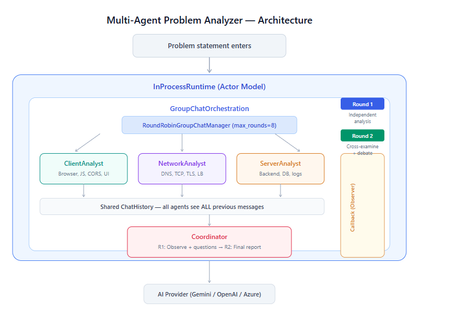
What You Will Build By the end of this guide, you will have a working multi-agent system where 4 specialist AI agents collaborate to diagnose production issues: ClientAnalyst — Analyzes browser, JavaScript, CORS, uploads, and UI symptoms NetworkAnalyst — Analyzes DNS, TCP/IP, TLS, load balancers, and firewalls ServerAnalyst — Analyzes backend logs, database, deployments, and resource limits Coordinator — Synthesizes all findings into a root cause report with a prioritized action plan These agents don't just run in sequence — they debate, cross-examine, and challenge each other's findings through a shared conversation, producing a diagnosis that's better than any single agent could achieve alone. Table of Contents Why Multi-Agent? The Problem with Single Agents Architecture Overview Understanding the Key SK Components The Actor Model — How InProcessRuntime Works Setting Up Your Development Environment Step-by-Step: Building the Multi-Agent Analyzer The Agent Interaction Flow — Round by Round Bugs I Found & Fixed — Lessons Learned Running with Different AI Providers What to Build Next 1. Why Multi-Agent? The Problem with Single Agents A single AI agent analyzing a production issue is like having one doctor diagnose everything — they'll catch issues in their specialty but miss cross-domain connections. Consider this problem: "Users report 504 Gateway Timeout errors when uploading files larger than 10MB. Started after Friday's deployment. Worse during peak hours." A single agent might say "it's a server timeout" and stop. But the real root cause often spans multiple layers: The client is sending chunked uploads with an incorrect Content-Length header (client-side bug) The load balancer has a 30-second timeout that's too short for large uploads (network config) The server recently deployed a new request body parser that's 3x slower (server-side regression) The combination only fails during peak hours because connection pool saturation amplifies the latency No single perspective catches this. You need specialists who analyze independently, then debate to find the cross-layer causal chain. That's what multi-agent orchestration gives you. The 5 Orchestration Patterns in SK Semantic Kernel provides 5 built-in patterns for agent collaboration: SEQUENTIAL: A → B → C → Done (pipeline — each builds on previous) CONCURRENT: ↗ A ↘ Task → B → Aggregate ↘ C ↗ (parallel — results merged) GROUP CHAT: A ↔ B ↔ C ↔ D ← We use this one (rounds, shared history, debate) HANDOFF: A → (stuck?) → B → (complex?) → Human (escalation with human-in-the-loop) MAGENTIC: LLM picks who speaks next dynamically (AI-driven speaker selection) We use GroupChatOrchestration with RoundRobinGroupChatManager because our problem requires agents to see each other's work, challenge assumptions, and build on each other's analysis across two rounds. 2. Architecture Overview Here's the complete architecture of what we're building: 3. Understanding the Key SK Components Before we write code, let's understand the 5 components we'll use and the design pattern each implements: ChatCompletionAgent — Strategy Pattern The agent definition. Each agent is a combination of: name — unique identifier (used in round-robin ordering) instructions — the persona and rules (this is the prompt engineering) service — which AI provider to call (Strategy Pattern — swap providers without changing agent logic) description — what other agents/tools understand about this agent agent = ChatCompletionAgent( name="ClientAnalyst", instructions="You are ONLY ClientAnalyst...", service=gemini_service, # ← Strategy: swap to OpenAI with zero changes description="Analyzes client-side issues", ) GroupChatOrchestration — Mediator Pattern The orchestration defines HOW agents interact. It's the Mediator — agents don't talk to each other directly. Instead, the orchestration manages a shared ChatHistory and routes messages through the Manager. RoundRobinGroupChatManager — Strategy Pattern The Manager decides WHO speaks next. RoundRobinGroupChatManager cycles through agents in a fixed order. SK also provides AutomaticGroupChatManager where the LLM decides who speaks next. max_rounds is the total number of messages per agent or cycle. With 4 agents and max_rounds=8, each agent speaks exactly twice. InProcessRuntime — Actor Model Abstraction The execution engine. Every agent becomes an "actor" with its own kind of mailbox (message queue). The runtime delivers messages between actors. Key properties: No shared state — agents communicate only through messages Sequential processing — each agent processes one message at a time Location transparency — same code works in-process today, distributed tomorrow agent_response_callback — Observer Pattern A function that fires after EVERY agent response. We use it to display each agent's output in real-time with emoji labels and round numbers. 4. The Actor Model — How InProcessRuntime Works The Actor Model is a concurrency pattern where each entity is an isolated "actor" with a private mailbox. Here's what happens inside InProcessRuntime when we run our demo: runtime.start() │ ├── Creates internal message loop (asyncio event loop) │ orchestration.invoke(task="504 timeout...", runtime=runtime) │ ├── Creates Actor[Orchestrator] → manages overall flow ├── Creates Actor[Manager] → RoundRobinGroupChatManager ├── Creates Actor[ClientAnalyst] → mailbox created, waiting ├── Creates Actor[NetworkAnalyst] → mailbox created, waiting ├── Creates Actor[ServerAnalyst] → mailbox created, waiting └── Creates Actor[Coordinator] → mailbox created, waiting Manager receives "start" message │ ├── Checks turn order: [Client, Network, Server, Coordinator] ├── Sends task to ClientAnalyst mailbox │ → ClientAnalyst processes: calls LLM → response │ → Response added to shared ChatHistory │ → callback fires (displayed in Notebook UI) │ → Sends "done" back to Manager │ ├── Manager updates: turn_index=1 ├── Sends to NetworkAnalyst mailbox │ → Same flow... │ ├── ... (ServerAnalyst, Coordinator for Round 1) │ ├── Manager checks: messages=4, max_rounds=8 → continue │ ├── Round 2: same cycle with cross-examination │ └── After message 8: Manager sends "complete" → OrchestrationResult resolves → result.get() returns final answer runtime.stop_when_idle() → All mailboxes empty → clean shutdown The Actor Model guarantees: No race conditions (each actor processes one message at a time) No deadlocks (no shared locks to contend for) No shared mutable state (agents communicate only via messages) 5. Setting Up Your Development Environment Prerequisites Python 3.11 or 3.12 (3.13+ may have compatibility issues with some SK connectors) Visual Studio Code with the Python and Jupyter extensions An API key from one of: Google AI Studio (free), OpenAI Step 1: Install Python Download from python.org. During installation, check "Add Python to PATH". Verify: python --version # Python 3.12.x Step 2: Install VS Code Extensions Open VS Code, go to Extensions (Ctrl+Shift+X), and install: Python (by Microsoft) — Python language support Jupyter (by Microsoft) — Notebook support Pylance (by Microsoft) — IntelliSense and type checking Step 3: Create Project Folder mkdir sk-multiagent-demo cd sk-multiagent-demo Open in VS Code: code . Step 4: Create Virtual Environment Open the VS Code terminal (Ctrl+`) and run: # Create virtual environment python -m venv sk-env # Activate it # Windows: sk-env\Scripts\activate # macOS/Linux: source sk-env/bin/activate You should see (sk-env) in your terminal prompt. Step 5: Install Semantic Kernel For Google Gemini (free tier — recommended for getting started): pip install semantic-kernel[google] python-dotenv ipykernel For OpenAI (paid API key): pip install semantic-kernel openai python-dotenv ipykernel For Azure AI Foundry (enterprise, Entra ID auth): pip install semantic-kernel azure-identity python-dotenv ipykernel Step 6: Register the Jupyter Kernel python -m ipykernel install --user --name=sk-env --display-name="Semantic Kernel (Python 3.12)" You can also select if this is already available from your environment from VSCode as below: Step 7: Get Your API Key Option A — Google Gemini (FREE, recommended for demo): Go to https://aistudio.google.com/apikey Click "Create API Key" Copy the key Free tier limits: 15 requests/minute, 1 million tokens/minute — more than enough for this demo. Option B — OpenAI: Go to https://platform.openai.com/api-keys Create a new key Copy the key Option C — Azure AI Foundry: Deploy a model in Azure AI Foundry portal Note the endpoint URL and deployment name If key-based auth is disabled, you'll need Entra ID with permissions Step 8: Create the .env File In your project root, create a file named .env: For Gemini: GOOGLE_AI_API_KEY=AIzaSy...your-key-here GOOGLE_AI_GEMINI_MODEL_ID=gemini-2.5-flash For OpenAI: OPENAI_API_KEY=sk-...your-key-here OPENAI_CHAT_MODEL_ID=gpt-4o For Azure AI Foundry: AZURE_OPENAI_ENDPOINT=https://your-resource.cognitiveservices.azure.com AZURE_OPENAI_CHAT_DEPLOYMENT_NAME=gpt-4o AZURE_OPENAI_API_KEY=your-key Step 9: Create the Notebook In VS Code: Click File > New File Save as multi_agent_analyzer.ipynb In the top-right of the notebook, click Select Kernel Choose Semantic Kernel (Python 3.12) (or your sk-env) Your environment is ready. Let's build. 6. Step-by-Step: Building the Multi-Agent Analyzer Cell 1: Verify Setup import semantic_kernel print(f"Semantic Kernel version: {semantic_kernel.__version__}") from semantic_kernel.agents import ( ChatCompletionAgent, GroupChatOrchestration, RoundRobinGroupChatManager, ) from semantic_kernel.agents.runtime import InProcessRuntime from semantic_kernel.contents import ChatMessageContent print("All imports successful") Cell 2: Load API Key and Create Service For Gemini: import os from dotenv import load_dotenv load_dotenv() from semantic_kernel.connectors.ai.google.google_ai import ( GoogleAIChatCompletion, GoogleAIChatPromptExecutionSettings, ) from semantic_kernel.contents import ChatHistory GEMINI_API_KEY = os.getenv("GOOGLE_AI_API_KEY") GEMINI_MODEL = os.getenv("GOOGLE_AI_GEMINI_MODEL_ID", "gemini-2.5-flash") service = GoogleAIChatCompletion( gemini_model_id=GEMINI_MODEL, api_key=GEMINI_API_KEY, ) print(f"Service created: Gemini {GEMINI_MODEL}") # Smoke test settings = GoogleAIChatPromptExecutionSettings() test_history = ChatHistory(system_message="You are a helpful assistant.") test_history.add_user_message("Say 'Connected!' and nothing else.") response = await service.get_chat_message_content( chat_history=test_history, settings=settings ) print(f"Model says: {response.content}") For OpenAI: import os from dotenv import load_dotenv load_dotenv() from semantic_kernel.connectors.ai.open_ai import ( OpenAIChatCompletion, OpenAIChatPromptExecutionSettings, ) from semantic_kernel.contents import ChatHistory service = OpenAIChatCompletion( ai_model_id=os.getenv("OPENAI_CHAT_MODEL_ID", "gpt-4o"), ) print(f"Service created: OpenAI {os.getenv('OPENAI_CHAT_MODEL_ID', 'gpt-4o')}") # Smoke test settings = OpenAIChatPromptExecutionSettings() test_history = ChatHistory(system_message="You are a helpful assistant.") test_history.add_user_message("Say 'Connected!' and nothing else.") response = await service.get_chat_message_content( chat_history=test_history, settings=settings ) print(f"Model says: {response.content}") Cell 3: Define All 4 Agents This is the most important cell — the prompt engineering that makes the demo work: from semantic_kernel.agents import ChatCompletionAgent # ═══════════════════════════════════════════════════ # AGENT 1: Client-Side Analyst # ═══════════════════════════════════════════════════ client_agent = ChatCompletionAgent( name="ClientAnalyst", description="Analyzes problems from the client-side: browser, JS, CORS, caching, UI symptoms", instructions="""You are ONLY **ClientAnalyst**. You must NEVER speak as NetworkAnalyst, ServerAnalyst, or Coordinator. Every word you write is from ClientAnalyst's perspective only. You are a senior front-end and client-side diagnostics expert. When given a problem statement, analyze it EXCLUSIVELY from the client side: 1. **Browser & Rendering**: DOM issues, JavaScript errors, CSS rendering, browser compatibility, memory leaks, console errors. 2. **Client-Side Caching**: Stale cache, service worker issues, local storage corruption. 3. **Network from Client View**: CORS errors, preflight failures, request timeouts, client-side retry storms, fetch/XHR configuration. 4. **Upload Handling**: File API usage, chunk upload implementation, progress tracking, FormData construction, content-type headers. 5. **UI/UX Symptoms**: What the user sees, error messages displayed, loading states. ROUND 1: Provide your independent analysis. Do NOT reference other agents. List your top 3 most likely causes with evidence. Every response MUST be at least 200 words. ROUND 2: You MUST: - Reference NetworkAnalyst and ServerAnalyst BY NAME - State specifically where you AGREE or DISAGREE with their findings - Answer the Coordinator's questions from your perspective - Add NEW cross-layer insights you see from the client perspective - Do NOT just say 'I agree' — provide substantive technical reasoning Be specific, evidence-based, and prioritize findings by likelihood.""", service=service, ) # ═══════════════════════════════════════════════════ # AGENT 2: Network Analyst # ═══════════════════════════════════════════════════ network_agent = ChatCompletionAgent( name="NetworkAnalyst", description="Analyzes problems from the network side: DNS, TCP, TLS, firewalls, load balancers, latency", instructions="""You are ONLY **NetworkAnalyst**. You must NEVER speak as ClientAnalyst, ServerAnalyst, or Coordinator. Every word you write is from NetworkAnalyst's perspective only. You are a senior network infrastructure diagnostics expert. When given a problem statement, analyze it EXCLUSIVELY from the network layer: 1. **DNS & Resolution**: DNS TTL, propagation delays, record misconfigurations. 2. **TCP/IP & Connections**: Connection pooling, keep-alive, TCP window scaling, connection resets, SYN floods. 3. **TLS/SSL**: Certificate issues, handshake failures, protocol version mismatches. 4. **Load Balancers & Proxies**: Sticky sessions, health checks, timeout configs, request body size limits, proxy buffering. 5. **Firewall & WAF**: Rule blocks, rate limiting, request inspection delays, geo-blocking, DDoS protection interference. ROUND 1: Provide your independent analysis. Do NOT reference other agents. List your top 3 most likely causes with evidence. Every response MUST be at least 200 words. ROUND 2: You MUST: - Reference ClientAnalyst and ServerAnalyst BY NAME - State specifically where you AGREE or DISAGREE with their findings - Answer the Coordinator's questions from your perspective - Add NEW cross-layer insights you see from the network perspective - Do NOT just say 'I am ready to proceed' — provide substantive technical analysis Be specific, evidence-based, and prioritize findings by likelihood.""", service=service, ) # ═══════════════════════════════════════════════════ # AGENT 3: Server-Side Analyst # ═══════════════════════════════════════════════════ server_agent = ChatCompletionAgent( name="ServerAnalyst", description="Analyzes problems from the server side: backend app, database, logs, resources, deployments", instructions="""You are ONLY **ServerAnalyst**. You must NEVER speak as ClientAnalyst, NetworkAnalyst, or Coordinator. Every word you write is from ServerAnalyst's perspective only. You are a senior backend and infrastructure diagnostics expert. When given a problem statement, analyze it EXCLUSIVELY from the server side: 1. **Application Server**: Error logs, exception traces, thread pool exhaustion, memory leaks, CPU spikes, garbage collection pauses. 2. **Database**: Slow queries, connection pool saturation, lock contention, deadlocks, replication lag, query plan changes. 3. **Deployment & Config**: Recent deployments, configuration changes, feature flags, environment variable mismatches, rollback candidates. 4. **Resource Limits**: File upload size limits, request body limits, disk space, temporary file cleanup, storage quotas. 5. **External Dependencies**: Upstream API timeouts, third-party service degradation, queue backlogs, cache (Redis/Memcached) issues. ROUND 1: Provide your independent analysis. Do NOT reference other agents. List your top 3 most likely causes with evidence. Every response MUST be at least 200 words. ROUND 2: You MUST: - Reference ClientAnalyst and NetworkAnalyst BY NAME - State specifically where you AGREE or DISAGREE with their findings - Answer the Coordinator's questions from your perspective - Add NEW cross-layer insights you see from the server perspective - Do NOT just say 'I agree' — provide substantive technical reasoning Be specific, evidence-based, and prioritize findings by likelihood.""", service=service, ) # ═══════════════════════════════════════════════════ # AGENT 4: Coordinator # ═══════════════════════════════════════════════════ coordinator_agent = ChatCompletionAgent( name="Coordinator", description="Synthesizes all specialist analyses into a final root cause report with prioritized action plan", instructions="""You are ONLY **Coordinator**. You must NEVER speak as ClientAnalyst, NetworkAnalyst, or ServerAnalyst. You synthesize — you do NOT do domain-specific analysis. You are the lead engineer who synthesizes the team's findings. ═══ ROUND 1 BEHAVIOR (your first turn, message 4) ═══ Keep this SHORT — maximum 300 words. - Note 2-3 KEY PATTERNS across the three analyses - Identify where specialists AGREE (high-confidence) - Identify where they CONTRADICT (needs resolution) - Ask 2-3 SPECIFIC QUESTIONS for Round 2 Round 1 MUST NOT: assign tasks, create action plans, write reports, or tell agents what to take lead on. Observation + questions ONLY. ═══ ROUND 2 BEHAVIOR (your final turn, message 8) ═══ Keep this FOCUSED — maximum 800 words. Produce a structured report: 1. **Root Cause** (1 paragraph): The #1 most likely cause with causal chain across layers. Reference specific findings from each specialist. 2. **Confidence** (short list): - HIGH: Areas where all 3 agreed - MEDIUM: Areas where 2 of 3 agreed - LOW: Disagreements needing investigation 3. **Action Plan** (numbered, max 6 items): For each: - What to do (specific) - Owner (Client/Network/Server team) - Time estimate 4. **Quick Wins vs Long-term** (2 short lists) Do NOT repeat what specialists already said verbatim. Synthesize, don't echo.""", service=service, ) # ═══════════════════════════════════════════════════ # All 4 agents — order = RoundRobin order # ═══════════════════════════════════════════════════ agents = [client_agent, network_agent, server_agent, coordinator_agent] print(f"{len(agents)} agents created:") for i, a in enumerate(agents, 1): print(f" {i}. {a.name}: {a.description[:60]}...") print(f"\nRoundRobin order: {' → '.join(a.name for a in agents)}") Cell 4: Run the Analysis from semantic_kernel.agents import GroupChatOrchestration, RoundRobinGroupChatManager from semantic_kernel.agents.runtime import InProcessRuntime from semantic_kernel.contents import ChatMessageContent from IPython.display import display, Markdown # ╔══════════════════════════════════════════════════════════╗ # ║ EDIT YOUR PROBLEM STATEMENT HERE ║ # ╚══════════════════════════════════════════════════════════╝ PROBLEM = """ Users are reporting intermittent 504 Gateway Timeout errors when trying to upload files larger than 10MB through our web application. The issue started after last Friday's deployment and seems worse during peak hours (2-5 PM EST). Some users also report that smaller file uploads work fine but the progress bar freezes at 85% for large files before timing out. """ # ════════════════════════════════════════════════════════════ agent_responses = [] def agent_response_callback(message: ChatMessageContent) -> None: name = message.name or "Unknown" content = message.content or "" agent_responses.append({"agent": name, "content": content}) emoji = { "ClientAnalyst": "🖥️", "NetworkAnalyst": "🌐", "ServerAnalyst": "⚙️", "Coordinator": "🎯" }.get(name, "🔹") round_num = (len(agent_responses) - 1) // len(agents) + 1 display(Markdown( f"---\n### {emoji} {name} (Message {len(agent_responses)}, Round {round_num})\n\n{content}" )) MAX_ROUNDS = 8 # 4 agents × 2 rounds = 8 messages exactly task = f"""## Problem Statement {PROBLEM.strip()} ## Discussion Rules You are in a GROUP DISCUSSION with 4 members. You can see ALL previous messages. There are exactly 2 rounds. ### ROUND 1 (Messages 1-4): Independent Analysis - ClientAnalyst, NetworkAnalyst, ServerAnalyst: Analyze from YOUR domain only. Give your top 3 most likely causes with evidence and reasoning. - Coordinator: Note patterns across the 3 analyses. Ask 2-3 specific questions. Do NOT assign tasks yet. ### ROUND 2 (Messages 5-8): Cross-Examination & Final Report - ClientAnalyst, NetworkAnalyst, ServerAnalyst: You MUST reference the OTHER specialists BY NAME. State where you agree, disagree, or have new insights. Answer the Coordinator's questions. Provide SUBSTANTIVE analysis. - Coordinator: Produce the FINAL structured report: root cause, confidence levels, prioritized action plan with owners and time estimates. IMPORTANT: Each agent speaks as THEMSELVES only. Never impersonate another agent.""" display(Markdown(f"## Problem Statement\n\n{PROBLEM.strip()}")) display(Markdown(f"---\n## Discussion Starting — {len(agents)} agents, {MAX_ROUNDS} rounds\n")) # Build and run orchestration = GroupChatOrchestration( members=agents, manager=RoundRobinGroupChatManager(max_rounds=MAX_ROUNDS), agent_response_callback=agent_response_callback, ) runtime = InProcessRuntime() runtime.start() result = await orchestration.invoke(task=task, runtime=runtime) final_result = await result.get(timeout=300) await runtime.stop_when_idle() display(Markdown(f"---\n## FINAL CONCLUSION\n\n{final_result}")) Cell 5: Statistics and Validation print("═" * 55) print(" ANALYSIS STATISTICS") print("═" * 55) emojis = {"ClientAnalyst": "🖥️", "NetworkAnalyst": "🌐", "ServerAnalyst": "⚙️", "Coordinator": "🎯"} agent_counts = {} agent_chars = {} for r in agent_responses: agent_counts[r["agent"]] = agent_counts.get(r["agent"], 0) + 1 agent_chars[r["agent"]] = agent_chars.get(r["agent"], 0) + len(r["content"]) for agent, count in agent_counts.items(): em = emojis.get(agent, "🔹") chars = agent_chars.get(agent, 0) avg = chars // count if count else 0 print(f" {em} {agent}: {count} msg(s), ~{chars:,} chars (avg {avg:,}/msg)") print(f"\n Total messages: {len(agent_responses)}") total_chars = sum(len(r['content']) for r in agent_responses) print(f" Total analysis: ~{total_chars:,} characters") # Validation print(f"\n Validation:") import re identity_issues = [] for r in agent_responses: other_agents = [a.name for a in agents if a.name != r["agent"]] for other in other_agents: pattern = rf'(?i)as {re.escape(other)}[,:]?\s+I\b' if re.search(pattern, r["content"][:300]): identity_issues.append(f"{r['agent']} impersonated {other}") if identity_issues: print(f" Identity confusion: {identity_issues}") else: print(f" No identity confusion detected") thin = [r for r in agent_responses if len(r["content"].strip()) < 100] if thin: for t in thin: print(f" Thin response from {t['agent']}") else: print(f" All responses are substantive") Cell 6: Save Report from datetime import datetime timestamp = datetime.now().strftime("%Y%m%d_%H%M%S") filename = f"analysis_report_{timestamp}.md" with open(filename, "w", encoding="utf-8") as f: f.write(f"# Problem Analysis Report\n\n") f.write(f"**Generated:** {datetime.now().strftime('%Y-%m-%d %H:%M:%S')}\n") f.write(f"**Agents:** {', '.join(a.name for a in agents)}\n") f.write(f"**Rounds:** {MAX_ROUNDS}\n\n---\n\n") f.write(f"## Problem Statement\n\n{PROBLEM.strip()}\n\n---\n\n") for i, r in enumerate(agent_responses, 1): em = emojis.get(r['agent'], '🔹') round_num = (i - 1) // len(agents) + 1 f.write(f"### {em} {r['agent']} (Message {i}, Round {round_num})\n\n") f.write(f"{r['content']}\n\n---\n\n") f.write(f"## Final Conclusion\n\n{final_result}\n") print(f"Report saved to: {filename}") 7. The Agent Interaction Flow — Round by Round Here's what actually happens during the 8-message orchestration: Round 1: Independent Analysis (Messages 1-4) Msg Agent What They See What They Do 1 ClientAnalyst Problem statement only Analyzes from client perspective: upload chunking, progress bar freezing at 85%, CORS, content-type headers 2 NetworkAnalyst Problem + ClientAnalyst's analysis Gives INDEPENDENT analysis despite seeing msg 1: load balancer timeouts, proxy body size limits, TCP window scaling 3 ServerAnalyst Problem + msgs 1-2 Gives INDEPENDENT analysis: recent deployment regression, request body parser, thread pool exhaustion, disk space 4 Coordinator Problem + msgs 1-3 Observes patterns: "All three mention timeout configuration. ClientAnalyst and NetworkAnalyst both point to body size. Question: Was the deployment a backend-only change or did it include infra?" Round 2: Cross-Examination (Messages 5-8) Msg Agent What They Do 5 ClientAnalyst "I agree with NetworkAnalyst that the load balancer timeout is likely a factor — the 85% freeze point matches the 30-second LB timeout for a 10MB upload on our average upload speed. However, I disagree with ServerAnalyst about thread pool exhaustion because the UI shows a clean 504, not a connection reset." 6 NetworkAnalyst "ServerAnalyst's point about the recent deployment is critical — if the new request parser is 3x slower, that would push uploads past the LB timeout. I can confirm the LB has a 30s idle timeout. The fix is both: increase LB timeout AND optimize the parser." 7 ServerAnalyst "Responding to Coordinator's question: The deployment was backend-only — a new multipart parser using streaming instead of buffered reads. ClientAnalyst is correct that the 504 is from the LB, not the app. The app itself returns 200 after 45 seconds, but the LB kills the connection at 30." 8 Coordinator Produces final structured report with root cause: "The backend deployment introduced a slower multipart parser (45s vs 15s for 10MB). The load balancer's 30s timeout kills the connection at ~85% progress. Fix: immediate — increase LB timeout to 120s. Short-term — optimize parser. Long-term — implement chunked uploads with progress resumption." Notice: The Round 2 analysis is dramatically better than Round 1. Agents reference each other by name, build on each other's findings, and the Coordinator can synthesize a cross-layer causal chain that no single agent could have produced. I made a small adjustment to the issue with Azure Web Apps. Please find the details below from testing carried out using Google Gemini: 8. Bugs I Found & Fixed — Lessons Learned Building this demo taught me several important lessons about multi-agent systems: Bug 1: Agents Speaking Only Once Symptom: Only 4 messages instead of 8. Root cause: The agents list was missing the Coordinator. It was defined in a separate cell and wasn't included in the members list. Fix: All 4 agents must be in the same list passed to GroupChatOrchestration. Bug 2: NetworkAnalyst Says "I'm Ready to Proceed" Symptom: NetworkAnalyst's Round 2 response was just "I'm ready to proceed with the analysis" — no actual content. Root cause: The Coordinator's Round 1 message was assigning tasks ("NetworkAnalyst, please check the load balancer config"), and the agent was acknowledging the assignment instead of analyzing. Fix: Added explicit constraint to Coordinator: "Round 1 MUST NOT assign tasks — observation + questions ONLY." Bug 3: ServerAnalyst Says "As NetworkAnalyst, I..." Symptom: ServerAnalyst's response started with "As NetworkAnalyst, I believe..." Root cause: LLM identity bleeding. When agents share ChatHistory, the LLM sometimes loses track of which agent it's currently playing. This is especially common with Gemini. Fix: Identity anchoring at the very top of every agent's instructions: "You are ONLY ServerAnalyst. You must NEVER speak as ClientAnalyst, NetworkAnalyst, or Coordinator." Bug 4: Gemini Gives Thin/Empty Responses Symptom: Some agents responded with just one sentence or "I concur." Root cause: Gemini 2.5 Flash is more concise than GPT-4o by default. Without explicit length requirements, it takes shortcuts. Fix: Added "Every response MUST be at least 200 words" and "Answer the Coordinator's questions" to every specialist's instructions. Bug 5: Coordinator's Report is 18K Characters Symptom: The Coordinator's Round 2 response was absurdly long — repeating everything every specialist said. Fix: Added word limits: "Round 1 max 300 words, Round 2 max 800 words" and "Synthesize, don't echo." Bug 6: MAX_ROUNDS Math Symptom: With MAX_ROUNDS=9, ClientAnalyst spoke a 3rd time after the Coordinator's final report — breaking the clean 2-round structure. Fix: MAX_ROUNDS must equal (number of agents × number of rounds). For 4 agents × 2 rounds = 8. 9. Running with Different AI Providers The beauty of SK's Strategy Pattern is that you change ONE LINE to switch providers. Everything else — agents, orchestration, callbacks, validation — stays identical. Gemini setup: from semantic_kernel.connectors.ai.google.google_ai import GoogleAIChatCompletion service = GoogleAIChatCompletion( gemini_model_id="gemini-2.5-flash", api_key=os.getenv("GOOGLE_AI_API_KEY"), ) OpenAI Setup from semantic_kernel.connectors.ai.open_ai import OpenAIChatCompletion service = OpenAIChatCompletion( ai_model_id="gpt-4o", api_key=os.getenv("OPEN_AI_API_KEY"), ) 10. What to Build Next Add Plugins to Agents Give agents real tools — not just LLM reasoning - looks exciting right ;) class NetworkDiagnosticPlugin: (description="Pings a host and returns latency") def ping(self, host: str) -> str: result = subprocess.run(["ping", "-c", "3", host], capture_output=True, text=True) return result.stdout class LogSearchPlugin: (description="Searches server logs for error patterns") def search_logs(self, pattern: str, hours: int = 1) -> str: # Query your log aggregator (Splunk, ELK, Azure Monitor) return query_logs(pattern, hours) Add Filters for Governance Intercept every agent call for PII redaction and audit logging: .filter(filter_type=FilterTypes.FUNCTION_INVOCATION) async def audit_filter(context, next): print(f"[AUDIT] {context.function.name} called by agent") await next(context) print(f"[AUDIT] {context.function.name} returned") Try Different Orchestration Patterns Replace GroupChat with Sequential for a pipeline approach: # Instead of debate, each agent builds on the previous orchestration = SequentialOrchestration( members=[client_agent, network_agent, server_agent, coordinator_agent] ) Or Concurrent for parallel analysis: # All specialists analyze simultaneously, Coordinator aggregates orchestration = ConcurrentOrchestration( members=[client_agent, network_agent, server_agent] ) Deploy to Azure Move from InProcessRuntime to Azure Container Apps for production scaling. The agent code doesn't change — only the runtime. Summary The key insight from building this demo: multi-agent systems produce better results than single agents not because each agent is smarter, but because the debate structure forces cross-domain thinking that a single prompt can never achieve. The Coordinator's final report consistently identifies causal chains that span client, network, and server layers — exactly the kind of insight that production incident response teams need. Semantic Kernel makes this possible with clean separation of concerns: agents define WHAT to analyze, orchestration defines HOW they interact, the manager defines WHO speaks when, the runtime handles WHERE it executes, and callbacks let you OBSERVE everything. Each piece is independently swappable — that's the power of SK from Microsoft. Resources: GitHub: github.com/microsoft/semantic-kernel Docs: learn.microsoft.com/semantic-kernel Orchestration Patterns: learn.microsoft.com/semantic-kernel/frameworks/agent/agent-orchestration Discord: aka.ms/sk/discord Disclaimer: The sample scripts provided in this article are provided AS IS without warranty of any kind. The author is not responsible for any issues, damages, or problems that may arise from using these scripts. Users should thoroughly test any implementation in their environment before deploying to production. Azure services and APIs may change over time, which could affect the functionality of the provided scripts. Always refer to the latest Azure documentation for the most up-to-date information. Thanks for reading this blog! I hope you found it helpful and informative for building AI agents with SK (Semantic Kernel) 😀93Views3likes0CommentsRSAC 2026: What the Sentinel Playbook Generator actually means for SOC automation
RSAC 2026 brought a wave of Sentinel announcements, but the one I keep coming back to is the playbook generator. Not because it's the flashiest, but because it touches something that's been a real operational pain point for years: the gap between what SOC teams need to automate and what they can realistically build and maintain. I want to unpack what this actually changes from an operational perspective, because I think the implications go further than "you can now vibe-code a playbook." The problem it solves If you've built and maintained Logic Apps playbooks in Sentinel at any scale, you know the friction. You need a connector for every integration. If there isn't one, you're writing custom HTTP actions with authentication handling, pagination, error handling - all inside a visual designer that wasn't built for complex branching logic. Debugging is painful. Version control is an afterthought. And when something breaks at 2am, the person on call needs to understand both the Logic Apps runtime AND the security workflow to fix it. The result in most environments I've seen: teams build a handful of playbooks for the obvious use cases (isolate host, disable account, post to Teams) and then stop. The long tail of automation - the enrichment workflows, the cross-tool correlation, the conditional response chains - stays manual because building it is too expensive relative to the time saved. What's actually different now The playbook generator produces Python. Not Logic Apps JSON, not ARM templates - actual Python code with documentation and a visual flowchart. You describe the workflow in natural language, the system proposes a plan, asks clarifying questions, and then generates the code once you approve. The Integration Profile concept is where this gets interesting. Instead of relying on predefined connectors, you define a base URL, auth method, and credentials for any service - and the generator creates dynamic API calls against it. This means you can automate against ServiceNow, Jira, Slack, your internal CMDB, or any REST API without waiting for Microsoft or a partner to ship a connector. The embedded VS Code experience with plan mode and act mode is a deliberate design choice. Plan mode lets you iterate on the workflow before any code is generated. Act mode produces the implementation. You can then validate against real alerts and refine through conversation or direct code edits. This is a meaningful improvement over the "deploy and pray" cycle most of us have with Logic Apps. Where I see the real impact For environments running Sentinel at scale, the playbook generator could unlock the automation long tail I mentioned above. The workflows that were never worth the Logic Apps development effort might now be worth a 15-minute conversation with the generator. Think: enrichment chains that pull context from three different tools before deciding on a response path, or conditional escalation workflows that factor in asset criticality, time of day, and analyst availability. There's also an interesting angle for teams that operate across Microsoft and non-Microsoft tooling. If your SOC uses Sentinel for SIEM but has Palo Alto, CrowdStrike, or other vendors in the stack, the Integration Profile approach means you can build cross-vendor response playbooks without middleware. The questions I'd genuinely like to hear about A few things that aren't clear from the documentation and that I think matter for production use: Security Copilot dependency: The prerequisites require a Security Copilot workspace with EU or US capacity. Someone in the blog comments already flagged this as a potential blocker for organizations that have Sentinel but not Security Copilot. Is this a hard requirement going forward, or will there be a path for Sentinel-only customers? Code lifecycle management: The generated Python runs... where exactly? What's the execution runtime? How do you version control, test, and promote these playbooks across dev/staging/prod? Logic Apps had ARM templates and CI/CD patterns. What's the equivalent here? Integration Profile security: You're storing credentials for potentially every tool in your security stack inside these profiles. What's the credential storage model? Is this backed by Key Vault? How do you rotate credentials without breaking running playbooks? Debugging in production: When a generated playbook fails at 2am, what does the troubleshooting experience look like? Do you get structured logs, execution traces, retry telemetry? Or are you reading Python stack traces? Coexistence with Logic Apps: Most environments won't rip and replace overnight. What's the intended coexistence model between generated Python playbooks and existing Logic Apps automation rules? I'm genuinely optimistic about this direction. Moving from a low-code visual designer to an AI-assisted coding model with transparent, editable output feels like the right architectural bet for where SOC automation needs to go. But the operational details around lifecycle, security, and debugging will determine whether this becomes a production staple or stays a demo-only feature. Would be interested to hear from anyone who's been in the preview - what's the reality like compared to the pitch?43Views0likes0CommentsAgentic AI in IT: Self-Healing Systems and Smart Incident Response (Microsoft Ecosystem Perspective)
Modern IT infrastructures are evolving rapidly. Organizations now run workloads across hybrid cloud environments, microservices architectures, Kubernetes clusters, and distributed applications. Managing this complexity with traditional monitoring tools is becoming increasingly difficult. https://dellenny.com/agentic-ai-in-it-self-healing-systems-and-smart-incident-response-microsoft-ecosystem-perspective/56Views0likes0Comments
Now in Foundry: Qwen3.5 Medium Model Series
This week's spotlight focuses on the Qwen3.5 Medium Model Series, now available in Microsoft Foundry. All three models are Vision Language Models (VLMs) built with early-fusion multimodal training, a 262K native context window, and support for 201 languages, released under Apache 2.0. They range from a 27B dense model optimized for latency-sensitive deployments to a 122B sparse Mixture-of-Experts (MoE) model that activates only 10B parameters per inference call, delivering frontier-class multimodal performance at lower inference cost. Models of the week What the Qwen3.5 Medium Model Series brings Before looking at each model individually, three architectural advances apply to all three and are worth understanding: Unified Vision-Language training (early fusion): Rather than attaching a separate vision encoder to a text model as an afterthought, Qwen3.5 trains on text and image tokens together from the beginning. This can enable stronger reasoning over diagrams, charts, and documents compared to prior Qwen3-VL models, which used a separate vision pipeline. Gated Delta Networks: A novel linear attention mechanism that replaces standard self-attention in most transformer layers. Combined with sparse MoE routing in the two larger models, this hybrid can deliver high-throughput inference at lower latency than equivalent dense architectures. Scalable RL across agent environments: Post-training uses reinforcement learning scaled across large multi-agent environments, contributing to strong performance on instruction-following and agentic task benchmarks. On vision-language reasoning tasks like MMMU and MathVista, these are models small enough to run on local hardware, yet competitive with large, frontier models on multimodal benchmarks. Qwen3.5-27B Model Specs Parameters / size: 27B (dense) Context length: 262,144 tokens Primary task: Vision Language Model (image-text-to-text) Why it's interesting (Spotlight) The dense baseline of the family: Unlike its MoE siblings, Qwen3.5-27B activates all 27B parameters on every forward pass. This gives it predictable, consistent latency per token—an important property for real-time applications and latency-sensitive deployments where MoE routing variability is a concern. Instruction-following leader across the family: Scores 95.0 on IFEval, the highest in the family (vs 93.4 for 122B-A10B and 91.9 for 35B-A3B), and 76.5 on IFBench—making it the strongest choice for structured-output tasks, complex multi-step instruction chains, and agent scaffolds that rely on precise format compliance. Try it You're building a visual quality inspection system for a circuit board manufacturer. Deploy Qwen3.5-27B in Microsoft Foundry to process images captured by a production line camera. Manufacturing sample prompt: Given an image of a printed circuit board (PCB), identify visible defects such as solder bridges, missing components, or misaligned pads. Return a JSON object with defect type, approximate board location, and severity (low / medium / high). Flag any board containing at least one high-severity defect for immediate rework routing. Qwen3.5-35B-A3B Model Specs Parameters / size: 35B total, 3B activated per forward pass (MoE) Context length: 262,144 tokens Primary task: Vision Language Model (image-text-to-text) Why it's interesting (Spotlight) The throughput-optimized pick: With only 3B parameters active per token despite a 35B parameter pool, this model delivers performance close to much larger dense models at substantially lower inference cost. 256-expert MoE routing at compact scale: Routes each token through 8 of 256 routed experts plus 1 shared expert. This breadth of specialization at a scale that only activates 3B parameters makes the 35B-A3B well-suited for high-throughput serving scenarios where cost per inference matters. Try it You're building a contract review assistant for an in-house legal team at a multinational company. Deploy Qwen3.5-35B-A3B in Microsoft Foundry to process scanned contract pages provided as images. Legal document sample prompt: Given a page from a commercial services agreement, extract all defined terms, identify obligation and liability clauses, and flag any termination conditions that deviate from standard commercial practice. Return a structured summary with clause type, section reference, and a one-sentence plain-language explanation of each flagged item. Qwen3.5-122B-A10B Model Specs Parameters / size: 122B total, 10B activated per forward pass (MoE) Context length: 262,144 tokens Primary task: Vision Language Model (image-text-to-text) Why it's interesting (Spotlight) Highest capability in the family: Leads across most benchmarks—76.9 on MMMU-Pro, 83.9 on MMMU, and 86.7 on MMLU-Pro. It also leads the family on SuperGPQA at 67.1 and MMLU-Redux at 94.0, reflecting stronger expert-level knowledge depth. Vision + language reasoning at scale: With the largest routing pool (256 experts, 8 routed + 1 shared) and 10B active parameters, this model handles the most demanding multimodal tasks in the family—long-document analysis over images, multi-step visual reasoning, and complex cross-modal instruction following at extended context lengths. Try it You're building an earnings research assistant for an investment team. Deploy Qwen3.5-122B-A10B in Microsoft Foundry to analyze earnings presentation slides submitted as images. Financial research sample prompt: Given a slide containing a combination of charts, tables, and management commentary, extract key financial metrics (revenue, EBITDA, year-over-year growth), interpret the trend shown in any charts, and generate a two-paragraph analyst summary suitable for a morning briefing. Flag any metrics that deviate materially from prior-quarter guidance and indicate the direction of the deviation. Getting started You can deploy open-source Hugging Face models directly in Microsoft Foundry by browsing the Hugging Face collection in the Foundry model catalog and deploying to managed endpoints in just a few clicks. You can also start from the Hugging Face Hub. First, select any supported model and then choose "Deploy on Microsoft Foundry", which brings you straight into Azure with secure, scalable inference already configured. Learn how to discover models and deploy them using Microsoft Foundry documentation. Follow along the Model Mondays series and access the GitHub to stay up to date on the latest Read Hugging Face on Azure docs Learn about one-click deployments from the Hugging Face Hub on Microsoft Foundry Explore models in Microsoft Foundry1.7KViews0likes0CommentsBuilding with Azure OpenAI Sora: A Complete Guide to AI Video Generation
In this comprehensive guide, we'll explore how to integrate both Sora 1 and Sora 2 models from Azure OpenAI Service into a production web application. We'll cover API integration, request body parameters, cost analysis, limitations, and the key differences between using Azure AI Foundry endpoints versus OpenAI's native API. Table of Contents Introduction to Sora Models Azure AI Foundry vs. OpenAI API Structure API Integration: Request Body Parameters Video Generation Modes Cost Analysis per Generation Technical Limitations & Constraints Resolution & Duration Support Implementation Best Practices Introduction to Sora Models Sora is OpenAI's groundbreaking text-to-video model that generates realistic videos from natural language descriptions. Azure AI Foundry provides access to two versions: Sora 1: The original model focused primarily on text-to-video generation with extensive resolution options (480p to 1080p) and flexible duration (1-20 seconds) Sora 2: The enhanced version with native audio generation, multiple generation modes (text-to-video, image-to-video, video-to-video remix), but more constrained resolution options (720p only in public preview) Azure AI Foundry vs. OpenAI API Structure Key Architectural Differences Sora 1 uses Azure's traditional deployment-based API structure: Endpoint Pattern: https://{resource-name}.openai.azure.com/openai/deployments/{deployment-name}/... Parameters: Uses Azure-specific naming like n_seconds, n_variants, separate width/height fields Job Management: Uses /jobs/{id} for status polling Content Download: Uses /video/generations/{generation_id}/content/video Sora 2 adapts OpenAI's v1 API format while still being hosted on Azure: Endpoint Pattern: https://{resource-name}.openai.azure.com/openai/deployments/{deployment-name}/videos Parameters: Uses OpenAI-style naming like seconds (string), size (combined dimension string like "1280x720") Job Management: Uses /videos/{video_id} for status polling Content Download: Uses /videos/{video_id}/content Why This Matters? This architectural difference requires conditional request formatting in your code: const isSora2 = deployment.toLowerCase().includes('sora-2'); if (isSora2) { requestBody = { model: deployment, prompt, size: `${width}x${height}`, // Combined format seconds: duration.toString(), // String type }; } else { requestBody = { model: deployment, prompt, height, // Separate dimensions width, n_seconds: duration.toString(), // Azure naming n_variants: variants, }; } API Integration: Request Body Parameters Sora 1 API Parameters Standard Text-to-Video Request: { "model": "sora-1", "prompt": "Wide shot of a child flying a red kite in a grassy park, golden hour sunlight, camera slowly pans upward.", "height": "720", "width": "1280", "n_seconds": "12", "n_variants": "2" } Parameter Details: model (String, Required): Your Azure deployment name prompt (String, Required): Natural language description of the video (max 32000 chars) height (String, Required): Video height in pixels width (String, Required): Video width in pixels n_seconds (String, Required): Duration (1-20 seconds) n_variants (String, Optional): Number of variations to generate (1-4, constrained by resolution) Sora 2 API Parameters Text-to-Video Request: { "model": "sora-2", "prompt": "A serene mountain landscape with cascading waterfalls, cinematic drone shot", "size": "1280x720", "seconds": "12" } Image-to-Video Request (uses FormData): const formData = new FormData(); formData.append('model', 'sora-2'); formData.append('prompt', 'Animate this image with gentle wind movement'); formData.append('size', '1280x720'); formData.append('seconds', '8'); formData.append('input_reference', imageFile); // JPEG/PNG/WebP Video-to-Video Remix Request: Endpoint: POST .../videos/{video_id}/remix Body: Only { "prompt": "your new description" } The original video's structure, motion, and framing are reused while applying the new prompt Parameter Details: model (String, Optional): Your deployment name prompt (String, Required): Video description size (String, Optional): Either "720x1280" or "1280x720" (defaults to "720x1280") seconds (String, Optional): "4", "8", or "12" (defaults to "4") input_reference (File, Optional): Reference image for image-to-video mode remix_video_id (String, URL parameter): ID of video to remix Video Generation Modes 1. Text-to-Video (Both Models) The foundational mode where you provide a text prompt describing the desired video. Implementation: const response = await fetch(endpoint, { method: 'POST', headers: { 'Content-Type': 'application/json', 'api-key': apiKey, }, body: JSON.stringify({ model: deployment, prompt: "A train journey through mountains with dramatic lighting", size: "1280x720", seconds: "12", }), }); Best Practices: Include shot type (wide, close-up, aerial) Describe subject, action, and environment Specify lighting conditions (golden hour, dramatic, soft) Add camera movement if desired (pans, tilts, tracking shots) 2. Image-to-Video (Sora 2 Only) Generate a video anchored to or starting from a reference image. Key Requirements: Supported formats: JPEG, PNG, WebP Image dimensions must exactly match the selected video resolution Our implementation automatically resizes uploaded images to match Implementation Detail: // Resize image to match video dimensions const targetWidth = parseInt(width); const targetHeight = parseInt(height); const resizedImage = await resizeImage(inputReference, targetWidth, targetHeight); // Send as multipart/form-data formData.append('input_reference', resizedImage); 3. Video-to-Video Remix (Sora 2 Only) Create variations of existing videos while preserving their structure and motion. Use Cases: Change weather conditions in the same scene Modify time of day while keeping camera movement Swap subjects while maintaining composition Adjust artistic style or color grading Endpoint Structure: POST {base_url}/videos/{original_video_id}/remix?api-version=2024-08-01-preview Implementation: let requestEndpoint = endpoint; if (isSora2 && remixVideoId) { const [baseUrl, queryParams] = endpoint.split('?'); const root = baseUrl.replace(/\/videos$/, ''); requestEndpoint = `${root}/videos/${remixVideoId}/remix${queryParams ? '?' + queryParams : ''}`; } Cost Analysis per Generation Sora 1 Pricing Model Base Rate: ~$0.05 per second per variant at 720p Resolution Scaling: Cost scales linearly with pixel count Formula: const basePrice = 0.05; const basePixels = 1280 * 720; // Reference resolution const currentPixels = width * height; const resolutionMultiplier = currentPixels / basePixels; const totalCost = basePrice * duration * variants * resolutionMultiplier; Examples: 720p (1280×720), 12 seconds, 1 variant: $0.60 1080p (1920×1080), 12 seconds, 1 variant: $1.35 720p, 12 seconds, 2 variants: $1.20 Sora 2 Pricing Model Flat Rate: $0.10 per second per variant (no resolution scaling in public preview) Formula: const totalCost = 0.10 * duration * variants; Examples: 720p (1280×720), 4 seconds: $0.40 720p (1280×720), 12 seconds: $1.20 720p (720×1280), 8 seconds: $0.80 Note: Since Sora 2 currently only supports 720p in public preview, resolution doesn't affect cost, only duration matters. Cost Comparison Scenario Sora 1 (720p) Sora 2 (720p) Winner 4s video $0.20 $0.40 Sora 1 12s video $0.60 $1.20 Sora 1 12s + audio N/A (no audio) $1.20 Sora 2 (unique) Image-to-video N/A $0.40-$1.20 Sora 2 (unique) Recommendation: Use Sora 1 for cost-effective silent videos at various resolutions. Use Sora 2 when you need audio, image/video inputs, or remix capabilities. Technical Limitations & Constraints Sora 1 Limitations Resolution Options: 9 supported resolutions from 480×480 to 1920×1080 Includes square, portrait, and landscape formats Full list: 480×480, 480×854, 854×480, 720×720, 720×1280, 1280×720, 1080×1080, 1080×1920, 1920×1080 Duration: Flexible: 1 to 20 seconds Any integer value within range Variants: Depends on resolution: 1080p: Variants disabled (n_variants must be 1) 720p: Max 2 variants Other resolutions: Max 4 variants Concurrent Jobs: Maximum 2 jobs running simultaneously Job Expiration: Videos expire 24 hours after generation Audio: No audio generation (silent videos only) Sora 2 Limitations Resolution Options (Public Preview): Only 2 options: 720×1280 (portrait) or 1280×720 (landscape) No square formats No 1080p support in current preview Duration: Fixed options only: 4, 8, or 12 seconds No custom durations Defaults to 4 seconds if not specified Variants: Not prominently supported in current API documentation Focus is on single high-quality generations with audio Concurrent Jobs: Maximum 2 jobs (same as Sora 1) Job Expiration: 24 hours (same as Sora 1) Audio: Native audio generation included (dialogue, sound effects, ambience) Shared Constraints Concurrent Processing: Both models enforce a limit of 2 concurrent video jobs per Azure resource. You must wait for one job to complete before starting a third. Job Lifecycle: queued → preprocessing → processing/running → completed Download Window: Videos are available for 24 hours after completion. After expiration, you must regenerate the video. Generation Time: Typical: 1-5 minutes depending on resolution, duration, and API load Can occasionally take longer during high demand Resolution & Duration Support Matrix Sora 1 Support Matrix Resolution Aspect Ratio Max Variants Duration Range Use Case 480×480 Square 4 1-20s Social thumbnails 480×854 Portrait 4 1-20s Mobile stories 854×480 Landscape 4 1-20s Quick previews 720×720 Square 4 1-20s Instagram posts 720×1280 Portrait 2 1-20s TikTok/Reels 1280×720 Landscape 2 1-20s YouTube shorts 1080×1080 Square 1 1-20s Premium social 1080×1920 Portrait 1 1-20s Premium vertical 1920×1080 Landscape 1 1-20s Full HD content Sora 2 Support Matrix Resolution Aspect Ratio Duration Options Audio Generation Modes 720×1280 Portrait 4s, 8s, 12s ✅ Yes Text, Image, Video Remix 1280×720 Landscape 4s, 8s, 12s ✅ Yes Text, Image, Video Remix Note: Sora 2's limited resolution options in public preview are expected to expand in future releases. Implementation Best Practices 1. Job Status Polling Strategy Implement adaptive backoff to avoid overwhelming the API: const maxAttempts = 180; // 15 minutes max let attempts = 0; const baseDelayMs = 3000; // Start with 3 seconds while (attempts < maxAttempts) { const response = await fetch(statusUrl, { headers: { 'api-key': apiKey }, }); if (response.status === 404) { // Job not ready yet, wait longer const delayMs = Math.min(15000, baseDelayMs + attempts * 1000); await new Promise(r => setTimeout(r, delayMs)); attempts++; continue; } const job = await response.json(); // Check completion (different status values for Sora 1 vs 2) const isCompleted = isSora2 ? job.status === 'completed' : job.status === 'succeeded'; if (isCompleted) break; // Adaptive backoff const delayMs = Math.min(15000, baseDelayMs + attempts * 1000); await new Promise(r => setTimeout(r, delayMs)); attempts++; } 2. Handling Different Response Structures Sora 1 Video Download: const generations = Array.isArray(job.generations) ? job.generations : []; const genId = generations[0]?.id; const videoUrl = `${root}/${genId}/content/video`; Sora 2 Video Download: const videoUrl = `${root}/videos/${jobId}/content`; 3. Error Handling try { const response = await fetch(endpoint, fetchOptions); if (!response.ok) { const error = await response.text(); throw new Error(`Video generation failed: ${error}`); } // ... handle successful response } catch (error) { console.error('[VideoGen] Error:', error); // Implement retry logic or user notification } 4. Image Preprocessing for Image-to-Video Always resize images to match the target video resolution: async function resizeImage(file: File, targetWidth: number, targetHeight: number): Promise<File> { return new Promise((resolve, reject) => { const img = new Image(); const canvas = document.createElement('canvas'); const ctx = canvas.getContext('2d'); img.onload = () => { canvas.width = targetWidth; canvas.height = targetHeight; ctx.drawImage(img, 0, 0, targetWidth, targetHeight); canvas.toBlob((blob) => { if (blob) { const resizedFile = new File([blob], file.name, { type: file.type }); resolve(resizedFile); } else { reject(new Error('Failed to create resized image blob')); } }, file.type); }; img.onerror = () => reject(new Error('Failed to load image')); img.src = URL.createObjectURL(file); }); } 5. Cost Tracking Implement cost estimation before generation and tracking after: // Pre-generation estimate const estimatedCost = calculateCost(width, height, duration, variants, soraVersion); // Save generation record await saveGenerationRecord({ prompt, soraModel: soraVersion, duration: parseInt(duration), resolution: `${width}x${height}`, variants: parseInt(variants), generationMode: mode, estimatedCost, status: 'queued', jobId: job.id, }); // Update after completion await updateGenerationStatus(jobId, 'completed', { videoId: finalVideoId }); 6. Progressive User Feedback Provide detailed status updates during the generation process: const statusMessages: Record<string, string> = { 'preprocessing': 'Preprocessing your request...', 'running': 'Generating video...', 'processing': 'Processing video...', 'queued': 'Job queued...', 'in_progress': 'Generating video...', }; onProgress?.(statusMessages[job.status] || `Status: ${job.status}`); Conclusion Building with Azure OpenAI's Sora models requires understanding the nuanced differences between Sora 1 and Sora 2, both in API structure and capabilities. Key takeaways: Choose the right model: Sora 1 for resolution flexibility and cost-effectiveness; Sora 2 for audio, image inputs, and remix capabilities Handle API differences: Implement conditional logic for parameter formatting and status polling based on model version Respect limitations: Plan around concurrent job limits, resolution constraints, and 24-hour expiration windows Optimize costs: Calculate estimates upfront and track actual usage for better budget management Provide great UX: Implement adaptive polling, progressive status updates, and clear error messages The future of AI video generation is exciting, and Azure AI Foundry provides production-ready access to these powerful models. As Sora 2 matures and limitations are lifted (especially resolution options), we'll see even more creative applications emerge. Resources: Azure AI Foundry Sora Documentation OpenAI Sora API Reference Azure OpenAI Service Pricing This blog post is based on real-world implementation experience building LemonGrab, my AI video generation platform that integrates both Sora 1 and Sora 2 through Azure AI Foundry. The code examples are extracted from production usage.615Views0likes0CommentsWhat is trending in Hugging Face on Microsoft Foundry? Feb, 2, 2026
Open‑source AI is moving fast, with important breakthroughs in reasoning, agentic systems, multimodality, and efficiency emerging every day. Hugging Face has been a leading platform where researchers, startups, and developers share and discover new models. Microsoft Foundry brings these trending Hugging Face models into a production‑ready experience, where developers can explore, evaluate, and deploy them within their Azure environment. Our weekly Model Monday’s series highlights Hugging Face models available in Foundry, focusing on what matters most to developers: why a model is interesting, where it fits, and how to put it to work quickly. This week’s Model Mondays edition highlights three Hugging Face models, including a powerful Mixture-of-Experts model from Z. AI designed for lightweight deployment, Meta’s unified foundation model for image and video segmentation, and MiniMax’s latest open-source agentic model optimized for complex workflows. Models of the week Z.AI’s GLM-4.7-flash Model Basics Model name: zai-org/GLM-4.7-Flash Parameters / size: 30B total -3B active Default settings: 131,072 max new tokens Primary task: Agentic, Reasoning and Coding Why this model matters Why it’s interesting: It utilizes a Mixture-of-Experts (MoE) architecture (30B total parameters and 3B active parameters) to offer a new option for lightweight deployment. It demonstrates strong performance on logic and reasoning benchmarks, outperforming similar sized models like gpt-oss-20b on AIME 25 and GPQA benchmarks. It supports advanced inference features like "Preserved Thinking" mode for multi-turn agentic tasks. Best‑fit use cases: Lightweight local deployment, multi-turn agentic tasks, and logical reasoning applications. What’s notable: From the Foundry catalog, users can deploy on a A100 instance or unsloth/GLM-4.7-Flash-GGUF on a CPU. ource SOTA scores among models of comparable size. Additionally, compared to similarly sized models, GLM-4.7-Flash demonstrates superior frontend and backend development capabilities. Click to see more: https://docs.z.ai Try it Use case Best‑practice prompt pattern Agentic coding (multi‑step repo work, debugging, refactoring) Treat the model as an autonomous coding agent, not a snippet generator. Explicitly require task decomposition and step‑by‑step execution, then a single consolidated result. Long‑context agent workflows (local or low‑cost autonomous agents) Call out long‑horizon consistency and context preservation. Instruct the model to retain earlier assumptions and decisions across turns. Now that you know GLM‑4.7‑Flash works best when you give it a clear goal and let it reason through a bounded task, here’s an example prompt that a product or engineering team might use to identify risks and propose mitigations: You are a software reliability analyst for a mid‑scale SaaS platform. Review recent incident reports, production logs, and customer issues to uncover edge‑case failures outside normal usage (e.g., rare inputs, boundary conditions, timing/concurrency issues, config drift, or unexpected feature interactions). Prioritize low‑frequency, high‑impact risks that standard testing misses. Recommend minimal, low‑cost fixes (validation, guardrails, fallback logic, or documentation). Deliver a concise executive summary with sections: Observed Edge Cases, Root Causes, User Impact, Recommended Lightweight Fixes, and Validation Steps. Meta's Segment Anything 3 (SAM3) Model Basics Model name: facebook/sam3 Parameters / size: 0.9B Primary task: Mask Generation, Promptable Concept Segmentation (PCS) Why this model matters Why it’s interesting: It handles a vastly larger set of open-vocabulary prompts than SAM 2, and unifies image and video segmentation capabilities. It includes a "SAM 3 Tracker" mode that acts as a drop-in replacement for SAM 2 workflows with improved performance. Best‑fit use cases: Open-vocabulary object detection, video object tracking, and automatic mask generation What’s notable: Introduces Promptable Concept Segmentation (PCS), allowing users to find all matching objects (e.g., "dial") via text prompt rather than just single instances. Try it This model enables users to identify specific objects within video footage and isolate them over extended periods. With just one line of code, it is possible to detect multiple similar objects simultaneously. The accompanying GIF demonstrates how SAM3 efficiently highlights players wearing white on the field as they appear and disappear from view. Additional examples are available at the following repository: https://github.com/facebookresearch/sam3/blob/main/assets/player.gif Use case Best‑practice prompt pattern Agentic coding (multi‑step repo work, debugging, refactoring) Treat SAM 3 as a concept detector, not an interactive click tool. Use short, concrete noun‑phrase concept prompts instead of describing the scene or asking questions. Example prompt: “yellow school bus” or “shipping containers”. Avoid verbs or full sentences. Video segmentation + object tracking Specify the same concept prompt once, then apply it across the video sequence. Do not restate the prompt per frame. Let the model maintain identity continuity. Example: “person wearing a red jersey”. Hard‑to‑name or visually subtle objects Use exemplar‑based prompts (image region or box) when text alone is ambiguous. Optionally combine positive and negative exemplars to refine the concept. Avoid over‑constraining with long descriptions. Using the GIF above as a leading example, here is a prompt that shows how SAM 3 turns raw sports footage into structured, reusable data. By identifying and tracking players based on visual concepts like jersey color so that sports leagues can turn tracked data into interactive experiences where automated player identification can relay stats, fun facts, etc when built into a larger application. Here is a prompt that will allow you to start identifying specific players across video: Act as a sports analytics operator analyzing football match footage. Segment and track all football players wearing blue jerseys across the video. Generate pixel‑accurate segmentation masks for each player and assign persistent instance IDs that remain stable during camera movement, zoom, and player occlusion. Exclude referees, opposing team jerseys, sidelines, and crowd. Output frame‑level masks and tracking metadata suitable for overlays, player statistics, and downstream analytics pipelines. MiniMax AI's MiniMax-M2.1 Model Basics Model name: MiniMaxAI/MiniMax-M2.1 Parameters / size: 229B-10B Active Default settings: 200,000 max new tokens Primary task: Agentic and Coding Why this model matters Why it’s interesting: It is optimized for robustness in coding, tool use, and long-horizon planning, outperforming Claude Sonnet 4.5 in multilingual scenarios. It excels in full-stack application development, capable of architecting apps "from zero to one”. Previous coding models focused on Python optimization, M2.1 brings enhanced capabilities in Rust, Java, Golang, C++, Kotlin, Objective-C, TypeScript, JavaScript, and other languages. The model delivers exceptional stability across various coding agent frameworks. Best‑fit use cases: Lightweight local deployment, multi-turn agentic tasks, and logical reasoning applications. What’s notable: The release of open-source weights for M2.1 delivers a massive leap over M2 on software engineering leaderboards. https://www.minimax.io/ Try it Use case Best‑practice prompt pattern End‑to‑end agentic coding (multi‑file edits, run‑fix loops) Treat the model as an autonomous coding agent, not a snippet generator. Explicitly require task decomposition and step‑by‑step execution, then a single consolidated result. Long‑horizon tool‑using agents (shell, browser, Python) Explicitly request stepwise planning and sequential tool use. M2.1’s interleaved thinking and improved instruction‑constraint handling are designed for complex, multi‑step analytical tasks that require evidence tracking and coherent synthesis, not conversational back‑and‑forth. Long‑context reasoning & analysis (large documents / logs) Declare the scope and desired output structure up front. MiniMax‑M2.1 performs best when the objective and final artifact are clear, allowing it to manage long context and maintain coherence. Because MiniMax‑M2.1 is designed to act as a long‑horizon analytical agent, it shines when you give it a clear end goal and let it work through large volumes of information—here’s a prompt a risk or compliance team could use in practice: You are a financial risk analysis agent. Analyze the following transaction logs and compliance policy documents to identify potential regulatory violations and systemic risk patterns. Plan your approach before executing. Work through the data step by step, referencing evidence where relevant. Deliver a final report with the following sections: Key Risk Patterns Identified, Supporting Evidence, Potential Regulatory Impact, Recommended Mitigations. Your response should be a complete, executive-ready report, not a conversational draft. Getting started You can deploy open‑source Hugging Face models directly in Microsoft Foundry by browsing the Hugging Face collection in the Foundry model catalog and deploying to managed endpoints in just a few clicks. You can also start from the Hugging Face Hub. First, select any supported model and then choose "Deploy on Microsoft Foundry", which brings you straight into Azure with secure, scalable inference already configured. Learn how to discover models and deploy them using Microsoft Foundry documentation. Follow along the Model Mondays series and access the GitHub to stay up to date on the latest Read Hugging Face on Azure docs Learn about one-click deployments from the Hugging Face Hub on Microsoft Foundry Explore models in Microsoft Foundry1.2KViews0likes0CommentsBeyond the Model: Empower your AI with Data Grounding and Model Training
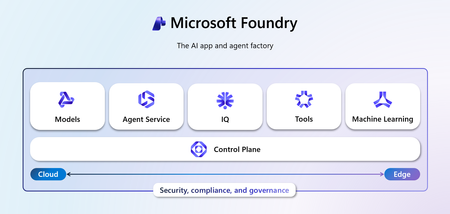
Discover how Microsoft Foundry goes beyond foundational models to deliver enterprise-grade AI solutions. Learn how data grounding, model tuning, and agentic orchestration unlock faster time-to-value, improved accuracy, and scalable workflows across industries.959Views6likes4CommentsUnlocking Efficient and Secure AI for Android with Foundry Local
The ability to run advanced AI models directly on smartphones is transforming the mobile landscape. Foundry Local for Android simplifies the integration of generative AI models, allowing teams to deliver sophisticated, secure, and low-latency AI experiences natively on mobile devices. This post highlights Foundry Local for Android as a compelling solution for Android developers, helping them efficiently build and deploy powerful on-device AI capabilities within their applications. The Challenges of Deploying AI on Mobile Devices On-device AI offers the promise of offline capabilities, enhanced privacy, and low-latency processing. However, implementing these capabilities on mobile devices introduces several technical obstacles: Limited computing and storage: Mobile devices operate with constrained processing power and storage compared to traditional PCs. Even the most compact language models can occupy significant space and demand substantial computational resources. Efficient solutions for model and runtime optimization are critical for successful deployment. Concerns about the app size: Integrating large AI models and libraries can dramatically increase application size, reducing install rates and degrading other app features. It remains a challenge to provide advanced AI capabilities while keeping the application compact and efficient. Complexity of development and integration: Most mobile development teams are not specialized in machine learning. The process of adapting, optimizing, and deploying models for mobile inference can be resource intensive. Streamlined APIs and pre-optimized models simplify integration and accelerate time to market. Introducing Foundry Local for Android Foundry Local is designed as a comprehensive on-device AI solution, featuring pre-optimized models, a cross-platform inference engine, and intuitive APIs for seamless integration. Initially announced at //Build 2025 with support for Windows and MacOS desktops, Foundry Local now extends its capabilities to Android in private preview. You can sign up for the private preview https://aka.ms/foundrylocal-androidprp for early evaluation and feedback. To meet the demands of production deployments, Foundry Local for Android is architected as a dedicated Android app paired with an SDK. The app manages model distribution, hosts the AI runtime, and operates as a specialized background service. Client applications interface with this service using a lightweight Foundry Local Android SDK, ensuring minimal overhead and streamlined connectivity. One Model, Multiple Apps: Foundry Local centralizes model management, ensuring that if multiple applications utilize the same model in Foundry Local, it is downloaded and stored only once. This approach optimizes storage and streamlines resource usage. Minimal App Footprint: Client applications are freed from embedding bulky machine learning libraries and models. This avoids ballooning app size and memory usage. Run Separately from Client Apps: The Foundry Local operates independently of client applications. Developers benefit from continuous enhancements without the need for frequent app releases. Customer Story: PhonePe PhonePe, one of India's largest consumer payments platforms that enables access to payments and financial services to hundreds of millions of people across the country. With Foundry Local, PhonePe is enabling AI that allows their users to gain deeper insights into their transactions and payments behavior directly on their mobile device. And because inferencing happens locally, all data stays private and secure. This collaboration addresses PhonePe's key priority of delivering an AI experience that upholds privacy. Foundry Local enables PhonePe to differentiate their app experience in a competitive market using AI while ensuring compliance with privacy commitments. Explore their journey here: PhonePe Product Showcase at Microsoft Ignite 2025 Call to Action Foundry Local equips Android apps with on-device AI, supporting the development of smarter applications for the future. Developers are able to build efficient and secure AI capabilities into their apps, even without extensive expertise in artificial intelligence. See more about Foundry Local in action in this episode of Microsoft Mechanics: https://aka.ms/FL_IGNITE_MSMechanics We look forward to seeing you light up AI capabilities in your Android app with Foundry Local. Don’t miss our private preview: https://aka.ms/foundrylocal-androidprp. We appreciate your feedback, as it will help us make our product better. Thanks to the contribution from NimbleEdge which delivers real-time, on-device personalization for millions of mobile devices. NimbleEdge's mobile technology expertise helps Foundry Local deliver a better experience for Android users.564Views0likes0CommentsGet to know the core Foundry solutions
Foundry includes specialized services for vision, language, documents, and search, plus Microsoft Foundry for orchestration and governance. Here’s what each does and why it matters: Azure Vision With Azure Vision, you can detect common objects in images, generate captions, descriptions, and tags based on image contents, and read text in images. Example: Automate visual inspections or extract text from scanned documents. Azure Language Azure Language helps organizations understand and work with text at scale. It can identify key information, gauge sentiment, and create summaries from large volumes of content. It also supports building conversational experiences and question-answering tools, making it easier to deliver fast, accurate responses to customers and employees. Example: Understand customer feedback or translate text into multiple languages. Azure Document IntelligenceWith Azure Document Intelligence, you can use pre-built or custom models to extract fields from complex documents such as invoices, receipts, and forms. Example: Automate invoice processing or contract review. Azure SearchAzure Search helps you find the right information quickly by turning your content into a searchable index. It uses AI to understand and organize data, making it easier to retrieve relevant insights. This capability is often used to connect enterprise data with generative AI, ensuring responses are accurate and grounded in trusted information. Example: Help employees retrieve policies or product details without digging through files. Microsoft FoundryActs as the orchestration and governance layer for generative AI and AI agents. It provides tools for model selection, safety, observability, and lifecycle management. Example: Coordinate workflows that combine multiple AI capabilities with compliance and monitoring. Business leaders often ask: Which Foundry tool should I use? The answer depends on your workflow. For example: Are you trying to automate document-heavy processes like invoice handling or contract review? Do you need to improve customer engagement with multilingual support or sentiment analysis? Or are you looking to orchestrate generative AI across multiple processes for marketing or operations? Connecting these needs to the right Foundry solution ensures you invest in technology that delivers measurable results.112Views0likes0Comments