m365 copilot
9 Topics95% Efficiency creating Contract Renewal J&A with M365 Copilot
Episode 1: “The COR Files – Automating the Annual Grind” In the world of federal procurement, Contracting Officer’s Representatives (CORs) are the unsung heroes. Managing contracts, ensuring they contracts are executed effectively and in compliance with the FAR. Among their many responsibilities, every contract requires full and open competition unless "the agency head determines that it is not in the public interest" (FAR 6.302-7); or maybe it's due to use of brand name (FAR 11.104). No matter the reason, when an exception is required the COR will prepare a Justification and Approval (J&A) document showing salient physical, functional, or performance characteristics of the solution. During a recent Prompt Design engagement at the Microsoft Innovation Hub, Washington DC, a COR walked us through the process they have to do for each of the 800 contracts their office manages. Each year, as many as 800 contracts go through a J&A. Depending on familiarity with the contract this can take 4-5 hours of research, organization, documentation, and even creating a presentation. We have over 100 people who, as a tertiary responsibility, must create these or risk a contract being lost and the organization has to start from zero in bidding the solution again. However, in 30 minutes of brainstorming and testing, their Prompt Design team developed the following M365 Copilot prompt. The COR then used Copilot in PowerPoint to automatically generate a slide deck from the output, applied the agency PowerPoint template, and they were done. The result? What normally took half a day was completed in under 30 minutes. Under 5 minutes to create the salient characteristics and the PowerPoint slides, the remaining time reviewing the content and validating its accuracy. “As a Contracting Officer's Representative, I want to develop salient characteristics about [NAME OF TECH] to write a justification and approval using my OneDrive folders [REFERENCE FOLDER NAME OF TECHNOLOGY DOCUMENTATION]. Reference old procurement documents [REFERENCE FOLDER NAME OF SAMPLE PROCUREMENT DOCUMENTS] to help understand the expected format.” When scaled across an agency managing 800 IT contracts, the COR estimates a potential savings of as much as 3,600 hours annually and more than 95% efficiency gained. What ways has your agency successfully used M365 Copilot to gain efficiencies in the annual grind? Copilot+Alt+Gov COPILOT+ALT+GOV is a series dedicated to sharing government use cases for generative AI from real government employees. In the spirit of reproducing these results in as many agencies as possible, we will work to share as much information about the process, the use cases, and the impact of these use cases. If you have a use case YOU want to share, reach out to and me, we'd love to work with you on it! Learn more at aka.ms/copilotgov452Views3likes0CommentsMastering Agent Governance in Microsoft 365
The "Mastering Agent Governance in Microsoft 365" series is based on the Administering and Governing Agents whitepaper published by Microsoft and designed to educate IT leaders, compliance officers, and decision-makers about the importance of governance for AI agents in Microsoft 365, particularly in highly regulated industries like Healthcare and Life Sciences (HLS). The six-episode series cover the growing role of agents, the risks of unmanaged agents, and the strategic importance of governance frameworks. Empowering innovation while protecting patient data and ensuring compliance In the age of AI-powered productivity, agents—automated digital assistants built with tools like Microsoft 365 Copilot, SharePoint, and Copilot Studio—are transforming how work gets done. From streamlining clinical documentation to automating regulatory reporting, agents are becoming indispensable in Healthcare and Life Sciences (HLS). But with great power comes great responsibility. Why Governance Can’t Be an Afterthought In highly regulated industries like HLS, where data sensitivity and compliance are paramount, the rise of autonomous agents introduces new risks: Unauthorized data access could expose protected health information (PHI). Unmonitored agent behavior could lead to regulatory violations. Lack of lifecycle controls could result in outdated or insecure agents operating in production environments. Agent governance isn’t just an IT concern—it’s a business imperative. It ensures that innovation doesn’t outpace compliance, and that every agent deployed aligns with organizational policies, security standards, and regulatory frameworks like HIPAA, GDPR, and FDA 21 CFR Part 11. Understanding the Agent Landscape Microsoft 365 supports a spectrum of agent creators: End Users using SharePoint or Copilot templates to automate simple tasks. Makers building more complex agents in Copilot Studio. Developers crafting sophisticated, enterprise-grade agents with Azure AI and Teams Toolkit. Each persona requires a different level of oversight. For example, a clinical researcher using SharePoint to build a data retrieval agent may need minimal governance, while a developer building a patient-facing chatbot must adhere to strict data protection and validation protocols. Governance in Action Microsoft provides a layered governance model: Tool Controls: Define what agent creators can do within tools like Copilot Studio and SharePoint. Content Controls: Ensure agents only access data they’re authorized to use, leveraging Microsoft Purview for sensitivity labeling and DLP. Agent Management: Monitor usage, enforce lifecycle policies, and block non-compliant agents via the Microsoft 365 Admin Center. This framework allows organizations to empower innovation while maintaining control—critical in environments where patient safety and regulatory compliance are non-negotiable. The Business Case for Governance For HLS organizations, agent governance delivers tangible benefits: Reduced compliance risk through proactive policy enforcement. Improved operational efficiency by enabling safe automation. Greater trust from patients, regulators, and internal stakeholders. In short, governance is the foundation that allows agents to scale safely and sustainably.2.8KViews2likes3CommentsStudy and Learn Agent: your study coach, built for learning
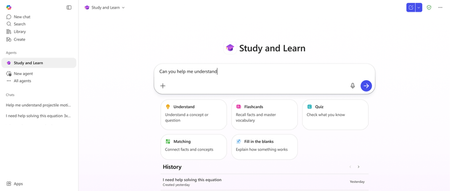
It's 11 pm. A student is at the kitchen table with a chemistry problem they can't crack, an essay due tomorrow, and a quiz in the morning. They open their laptop, open an AI chatbot, and in thirty seconds, they have an answer, an essay, and a study guide. The thinking didn't happen. The grade might still come. That moment is why so many educators and IT leaders feel a knot in their stomach about AI in the classroom. The concerns are real, and we built with them firmly in view. Now picture the same student, same kitchen table, same 11 pm. This time the Study and Learn Agent is beside them. Patient. Tireless. Knows the material because the student is studying with their own notes. Asks the right question at the right moment. Pushes them to try first, then helps them see what they missed. Quizzes them. Introduces flashcards, fill-in-the-blanks and matching activities. Helps them build and check their understanding. The student does the thinking. The Study and Learn Agent coaches the thinking. Most students have not had access to that kind of support. Potential is equally distributed, but opportunity is not. Today, with the general availability of the Study and Learn Agent in Microsoft 365 Copilot, every student K12 and Higher Education with a Microsoft Education license can get personalized coaching when they need it, where they need it, at no extra cost. Study and Learn Agent is in the left navigation and works across any subject the learner is studying. It explains concepts, supports writing without doing the writing for the students, gives step-by-step coaching on problems, generates flashcards, runs quizzes, and creates activities to build and check understanding. The agent is designed to lead with a question so the learner stays in the driver's seat. It is available in English (US) and coming to additional languages in the coming weeks. ⚙️For IT admins — read this first Study and Learn Agent runs inside Microsoft 365 Copilot Chat. For your K-12 students aged 13–17, Copilot Chat is OFF by default. You have to turn it on. Until you do, students in your tenant cannot access Study and Learn. The good news: Study and Learn is available to all licenses A1 / A3 / A5, and the agent is available from the left navigation bar of M365 Copilot app and in the Chat dropdown at https://aka.ms/studyandlearn. Action: Enable Copilot Chat for your 13–17 student group in the Microsoft 365 admin center using these resources: Full step-by-step video tutorial: https://aka.ms/enablecopilotchatvideo IT documentation: Education Tenant Identifier Student Age Groups 🎉What is available at GA Conversations that coach: Scaffolded conversations on any subject or topic K12 through HED for: Understanding concepts Working through step-by-step problems Getting writing support The agent recognizes the kind of help a learner needs and adapts the conversation accordingly. Soon, images will show inline in explanations to make abstract concepts concrete — especially for visual subjects like biology, geography, and chemistry. Practice activities that stick: Flashcards to learn terms and definitions, vocabulary, and recall facts Quizzes with multiple choice and open-ended questions with per-answer explanations Fill-in-the-blank for understanding how things work, or the sequence of connected events or facts in a process Matching activities that connect terms to definitions, causes to effects, concepts to examples — building the mental web that makes knowledge usable All activities are created with the learner’s own materials, or with just a topic name. Quizzes can also be created using a web-linked resource Students can chat with the agent during and after completing an activity to get immediate and remediation help with the agent still not giving away answers Responsible AI and data privacy: Study and Learn is built into the Microsoft 365 Education environment that schools already manage, giving IT administrators familiar controls and enterprise-grade data and privacy protection rooted in Microsoft's responsible AI principles. Students get a structured, accountable AI experience, and schools get a credible, learning-first option they can deploy with confidence. An AI literacy resource teaches responsible AI use from the very first interaction. Coming soon! Inline images: GA ships with links to images, images embedded in the flow of the conversation are coming soon Multiple languages: Study and Learn has been optimized for and Generally Available in English (US). Additional languages will become available in the coming weeks. Explanation and engagement callouts: Visual call outs for questions, tips and moments of persistence 💡Built on learning science The pedagogy is the product. The Study and Learn Agent is grounded in four research-based principles about what makes learning stick. They aren't a layer on top of the experience — they shape what the agent does in every interaction. Adaptive scaffolding: meeting students where they are by activating what they already know, then providing enough support to stretch them into what's next. In practice, this is why the agent opens a chemistry problem by asking what the learner already understands about molar mass — not by launching into a worked solution. It then tunes its support — worked examples, hints, or step-by-step guidance — to match. The result is a learner who stays productively engaged instead of overwhelmed or under-challenged. Productive struggle: asking before telling, so students retrieve, attempt, and reason their way toward answers. This is why the agent invites a first attempt before offering help, and why it surfaces a misconception as a question rather than a correction. Mistakes become data, not failure — the moments where actual learning happens. Active learning: practice that sticks, with retrieval-based activities including flashcards, fill-in-the-blanks, quizzes, and matching. The agent generates activities from the learner's own materials and lets them re-attempt the items they missed. Learners can pause during an activity and chat with the agent about a card they don't understand — building clarity in the moment, without the agent giving the answer away. Pulling knowledge out of memory, with feedback in the loop, is what builds durable understanding. Application and transfer: giving students the agency to go deeper, apply their learning, or reinforce it with an activity. This is why the agent invites learners to teach concepts back, apply ideas to new problems, and connect what they're studying to real-world contexts. It's the kind of work that builds flexible understanding beyond a single test. We built this with learning science researchers, cognitive scientists, and educators in the room from the beginning. 👩🏽🏫For educators The best way to understand what Study and Learn does differently is to spend a few minutes with it. Open it at aka.ms/studyandlearn and try it with your Microsoft Education account in the M365 Copilot app on a unit you're teaching next week. Take the professional development course at aka.ms/studyandlearnmodule to get a deep dive overview, and earn a badge! Most educators tell us this is the moment the design clicks — noticing where the agent asks a question instead of giving an answer. A few things educators in our preview have found useful: Pointing learners to it for a specific moment in an assignment can be more effective than a blanket "you can use this." Something as simple as "if you get stuck on problem 4, ask Study and Learn to walk you through it after you've taken a first attempt" tends to shape how learners engage. The activities lend themselves to specific moments. Flashcards before a vocabulary check. Matching for a unit on cell biology. A quiz the day before a test, with the agent's per-answer explanations as a self-review loop. The agent itself is a useful AI literacy artifact. Some educators use its behavior as a discussion starter — "notice that it didn't give you the answer? Why do you think that is?" — to open up conversations about how to use AI well. A short framing for learners helps a lot. Naming up front that the agent will ask questions before helping, push them to try first, and quiz them on what they missed — and why that's the design — shifts how learners engage. One small tip worth passing on: the more specifically a learner can name what's tripping them up, the better the agent can help. "I can't picture what's happening here" gives the agent more to work with than "I don't get it." Feedback shapes what we ship next. There's an OCV form linked from inside the agent, and educator input has driven much of the roadmap so far. 🫱🏼🫲🏾The bet For decades, the students who got one-on-one coaching outperformed the students who didn't. That gap was a function of access — who had a tutor, who had a teacher with bandwidth, who had a parent at the kitchen table. AI is the first technology in the history of education with a real shot at closing it. That's the bet we are making. AI as a coach. Built on learning science. Built into the tools schools already trust. Available to every student, not just the ones whose families can afford it. Study and Learn is the first move. Open Microsoft 365 Copilot. Look in the left navigation. The coach is there as long as Copilot Chat is enabled. Get going at https://aka.ms/studyandlearn Resources: Enable Copilot Chat step-by-step video tutorial Educator professional development Support documentation Anoo Padte is Principal Product Manager for AI in Education at Microsoft.1.2KViews1like0CommentsWhat's New in Microsoft EDU webinar - August 2025
Join us on Wednesday, August 20th, 2025 for our latest "What's New in Microsoft EDU" webinar! These 30-minute webinars are put on by the Microsoft Education Product Management group and happen once per month, this month both 8:00am Pacific Time and 4:00pm Pacific time to cover as many global time zones as possible around the world. And don’t worry – we’ll be recording these and posting on our Microsoft Education YouTube channel in the new “What’s New in Microsoft EDU” playlist, so you’ll always to able to watch later or share with others! Here is our August 2025 webinar agenda: Microsoft Copilot and Copilot Chat for students 13+ M365 Copilot updates for Educators and Students Learning Zone public preview and the Copilot+ PC Microsoft 365 LTI for Learning Management Systems Learning Accelerator updates Microsoft 365 app updates AMA - Ask Microsoft EDU Anything (Q&A) We look forward to having you attend the event! How to sign up OPTION 1: August 20th, Wednesday @ 8:00am Pacific Time Register here OPTION 2: August 20th, Wednesday @ 4:00pm Pacific Time Register here This is what the webinar portal will look like when you register: Look forward to seeing you there! Mike Tholfsen Group Product Manager Microsoft EDU1.7KViews1like0Comments