lsass
8 Topics
Windows Server 2025 DC — LSASS handle leak identified via WinDbg — authz!AuthzpDeQueueThreadWorker
Hello All!! Im having a problem, LSASS crashes on a Windows Server 2025 Domain Controller, I identified what appears to be the root cause using WinDbg memory dump analysis. Sharing this hoping someone else has seen it or Microsoft can confirm. The Problem LSASS handle count grows continuously over time and eventually crashes with a 0xC0000005 access violation (Event ID 1015). After a reboot the cycle repeats. The growth rate correlates with authentication load and faster during peak hours, slower overnight. WinDbg Dump Analysis Captured LSASS dump at high handle count and ran !handle 0 f: Token handles: overwhelmingly dominant Everything else: negligible Every leaked token shows: GrantedAccess: 0x8 (TOKEN_QUERY only) PointerCount: overflowed to negative integer Running !findstack authz 2 shows multiple worker threads all sitting in: authz!AuthzpDeQueueThreadWorker What Was Tested And Eliminated Stopped or disabled each individually and measured handle growth rate — zero meaningful difference from any: - Antivirus (all components) - Backup software - Application services - VSS snapshots - Hardware management agents etc.. Environment OS: Windows Server 2025, fully patched with the latest updates including April LSASS update. Role: Domain Controller DNS PAM: Not active. Conclusion Token handles are opened with TOKEN_QUERY access inside authz!AuthzpDeQueueThreadWorker and never released. Reference counter overflows to negative integer. Growth rate scales directly with authentication load. Current workaround: reboots during off hours. Has anyone else seen this pattern on Windows Server 2025? Is there a known fix or Microsoft acknowledgment for this specific authz token handle leak?1.6KViews4likes5CommentsServer 2019 Domain Controllers: lsass.exe terminated unexpectedly with status code -1073741819
Basically my issue matches https://learn.microsoft.com/en-us/answers/questions/612097/windwos-2019-lsass-exe-terminated-unexpectedly-wit?source=docs exactly. We have Server 2019 DCs running on VMware vSphere 7.0 U3c. The non-PDC DCs are randomly rebooting with the below event log message: EventID : 1074 MachineName : DC19** Data : {} Index : 544467 Category : (0) EntryType : Information Message : The process wininit.exe has initiated the restart of computer DC19RP on behalf of user for the following reason: No title for this reason could be found Reason Code: 0x50006 Shutdown Type: restart Comment: The system process 'C:\Windows\system32\lsass.exe' terminated unexpectedly with status code -1073741819. The system will now shut down and restart. Source : User32 ReplacementStrings : {wininit.exe, DC19**, No title for this reason could be found, 0x50006...} InstanceId : 2147484722 TimeGenerated : 4/23/2023 5:07:58 AM TimeWritten : 4/23/2023 5:07:58 AM UserName : NT AUTHORITY\SYSTEM The servers are all patched to the current CU - 2023-04 (KB5025229), so they should all have the most recent KB I've found that addresses lsass.exe crashes (KB5010791) installed. I've also noticed that shortly before the lsass.exe crash, there will be an event log similar to the one below, although each references a different WMI filter: EventID : 1065 MachineName : DC19** Data : {} Index : 544466 Category : (0) CategoryNumber : 0 EntryType : Error Message : The processing of Group Policy failed. Windows could not evaluate the Windows Management Instrumentation (WMI) filter for the Group Policy object cn={***},cn=policies,cn=system,DC=fabrikam,DC=com. This could be caused by RSOP being disabled or Windows Management Instrumentation (WMI) service being disabled, stopped, or other WMI errors. Make sure the WMI service is started and the startup type is set to automatic. New Group Policy objects or settings will not process until this event has been resolved. Source : Microsoft-Windows-GroupPolicy ReplacementStrings : {4, 714, 0, 136750...} InstanceId : 1065 TimeGenerated : 4/23/2023 5:07:58 AM TimeWritten : 4/23/2023 5:07:58 AM UserName : NT AUTHORITY\SYSTEM Once the server is back up and running after the reboot crash, WMI appears to be working fine, and I'm not seeing any other errors specifically referencing WMI itself in the period leading up to the crash.4.6KViews1like2Comments
Event ID 36871 error keeps logging in a repeating pattern
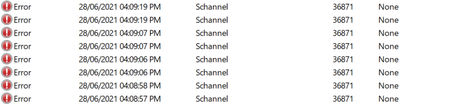
Hello, I accidentally came across the following error in Event Viewer: "A fatal error occurred while creating a TLS client credential. The internal error state is 10013." Source: Schannel Event ID: 36871 Process ID points to LSASS I filtered out the results to only reveal errors of the same source (Schannel), and the earliest record registered was nearly a month ago. However the first time it logged multiple entries during a single session and then never showed up again for about a month. The first entries also had a partially different message "The certificate received from the remote server was issued by an untrusted certificate authority. Because of this, none of the data contained in the certificate can be validated. The TLS connection request has failed. The attached data contains the server certificate." and a different event ID: 36882 More than 20 days later, the current error ID 36871 logged a single entry once and didn't show up again until a couple of days ago. Over the past two days it has been logging too many times (typically 8 entries per hour) and it repeats precisely in the same pattern. Today I'm starting to notice it's logging even more entries compared to yesterday, but also in a consistent pattern. I tried looking online for an explanation and a solution but everything I found was way beyond my limited technical understanding. All I could grasp (potentially) that it has to do with establishing secure connections with the server (I don't know which server are they talking about), with some pages mentioning something about .NET framework. Please note: I'm having this issue on a personal (unmanaged) laptop running Windows 10 Home (21H1), and typically connected to my home WiFi network. I would really appreciate if someone can help me with the following questions: For an average user (like myself), should I even worry about this error being logged on my laptop? Can I safely ignore it? (considering that I haven't noticed any performance issues or other problems, besides the error itself being logged) I recently installed the latest https://support.microsoft.com/en-us/topic/june-21-2021-kb5003537-cumulative-update-preview-for-net-framework-3-5-and-4-8-for-windows-10-version-2004-windows-server-version-2004-windows-10-version-20h2-and-windows-server-version-20h2-and-windows-version-21h1-49ea0d2c-9328-4b01-a81e-1dc0b8d53548 Could it possibly be the one to blame for this type of error? I also tried checking all the other updates and changes I have done on my computer over the past month, but couldn't really find anything that particularly coincide with the error being logged in that pattern. I tried connecting my laptop to a mobile hotspot around the time when the error logs (according to the timely pattern I spotted). The error didn't log while being connected to that hotspot, but it appeared again shortly after I connected back to WiFi. Could that possibly mean the error has to do with the WiFi connection or my ISP rather than anything on the laptop iteself? Please help Update: I tried connecting my laptop to the same hotspot a bit longer, and after an hour the same error logged, but so far it only generated one entry.21KViews0likes0Comments
Windows 10 Restart after Login
We have some machines on our domain that's crashing upon login. They get the "Your PC Will Automatically Restart in One Minute" then they are forced to restart. After the restart, they're able to login again and continue working until the next day. Machines affected are running Windows 10 1809 with the latest patches. Event Viewer Log shows that LSASS.exe crashed on the first boot with error c0000008 and then all services failed to authenticate after, which probably caused the crash. "A critical system process, C:\WINDOWS\system32\lsass.exe, failed with status code c0000008. The machine must now be restarted." Any help is appreciated! Thanks!Solved46KViews1like24Comments