live events
9 Topics
Audio quality when using Teams Townhall with rtmp-in.
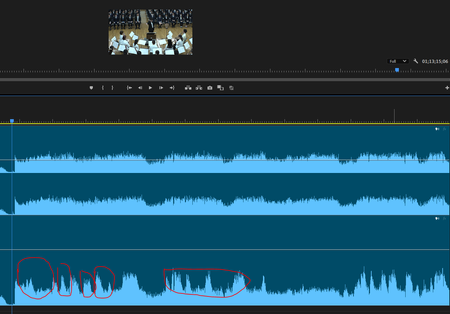
Hi everyone I have broadcast a live music (orchestra) concert using Teams Townhall with rtmp-in (using Blackmagic Design web presenter). When I checked the archive recorded on Teams, I realized that the volume of the music is being ducked automatically. All my audio sources are mixed down with a professional digital mixer before streaming to Teams so basically they have a good balanced. I have another back-up recorded data and it does not have the same problem, so i think it is caused by the algorithm of Teams, and even if I am using an external encoder?? Is there a method to fix this problem? I have compared the data recorded by the external device and teams. The ducking is quite obvious. Lower: Recorded on Teams Townhall Thank you Cheers Carson236Views1like0CommentsWays to ignore Chat and notification sound during Teams live event
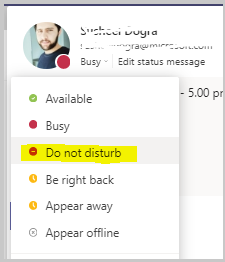
Hello Everyone, I know many of you are already hosting Teams live events but might have heard different types of notifications sounds during the live events. This can very be distracting, unprofessional or disturbing. Please find some important ways to ignore these dings and pings sound during the event: 1. Go to the settings of your Teams Client and choose your status to DND (Do not disturb), by doing that you will not hear any ping sound while receiving any message , though you will be receiving all the messages from others but silently. Checkout the below screenshot as a reference : 2. Second way , If you go the right bottom corner of your system's task bar and hit the notification center and click on the below icon shown in the screenshot and set it to PRIORITY only , you could actually avoid the unexpected sounds from your system during the event : 3. And the last way would be , go to the start menu of your windows and type FOCUS ASSIST , open the setting and choose PRIORITY ONLY I hope this will help you to produce the events more efficiently. Cheers !! #6.5KViews1like2Comments