linux
23 Topics
Finding the Elusive MDE PUA Audit Events on Linux
Potentially Unwanted Applications, or PUA, they aren't necessarily malware, but they are applications you probably don't want running across your environment either. Microsoft defines potentially unwanted applications as software that can adversely affect endpoint performance or use. Examples include advertising software, software bundlers, and applications that use behaviors intended to evade security products. Microsoft Defender can also consider an application's reputation when determining whether software qualifies as potentially unwanted. That sounds straightforward. On Windows, it generally is. On Linux, finding the resulting audit events requires knowing exactly where to look. And that is where things get interesting. PUA, PUP… Same Neighborhood, Slightly Different Address Before going further, it is worth clearing up some terminology. Across the security industry, you will commonly encounter both PUP, or Potentially Unwanted Program, and PUA, or Potentially Unwanted Application. The terms are frequently used for software that isn't necessarily malicious but has characteristics that make its presence undesirable, such as intrusive advertising, bundling additional software, or other behavior the user might not have knowingly requested. Microsoft uses Potentially Unwanted Application (PUA) as its product and detection terminology. Microsoft specifically distinguishes PUA from malware. A PUA might cause poor system performance, display unexpected advertisements, install other software, or have a poor reputation because of undesirable behavior, but those characteristics don't automatically make the application malware. Microsoft's classification criteria include examples such as: Advertising software that displays advertisements or promotions, including injecting advertisements into webpages. Bundling software that offers to install additional software that isn't digitally signed by the same entity, or that itself qualifies as PUA. Evasion software that actively attempts to avoid detection by security products or behaves differently when security software is present. Applications that have developed a poor reputation based on undesirable behavior. Microsoft's broader software-classification model also distinguishes between unknown software, malware, unwanted software, and other classifications. Software can therefore be legitimate and functional while still meeting Microsoft's criteria for classification as potentially unwanted. For the rest of this article, we'll use PUA, because that is the terminology used by Microsoft Defender and, more importantly for our investigation, the Linux product logs identify these detections explicitly as: potentially_unwanted_application That string is going to become very useful once we start looking for the supposedly elusive audit events. PUA Audit and Block on Windows On Windows, PUA protection is part of Microsoft Defender Antivirus. Administrators can configure Defender to identify applications that Microsoft considers potentially unwanted and determine how those applications should be handled. Microsoft documents PUA protection and provides the AMTSO Potentially Unwanted Application test file (Feature Settings Check - Potentially Unwanted Applications - AMTSO) as its standard demonstration scenario. Microsoft's demonstration documentation identifies Windows, Windows Server, macOS, and Linux among the supported operating systems for the PUA demonstration. The two operating modes we're interested in are conceptually simple: Audit Defender identifies the PUA but doesn't block it. This is useful when you want to understand the potential impact of enabling PUA protection before enforcing it. Block Defender identifies the PUA and takes the configured protection action. On Windows, for a device onboarded to Microsoft Defender for Endpoint – that telemetry and audit information is available in the XDR Security portal. You can find PUA detections in the Additional Fields of the AntivirusDetection action type in the DeviceEvents table – and an alert will fire when in PUA is in block mode: DeviceEvents | where ActionType == "AntivirusDetection" | extend x = parse_json(AdditionalFields) | project Timestamp, DeviceName, FolderPath, FileName, SHA256, ThreatName = tostring(x.ThreatName), WasExecutingWhileDetected = tostring(x.WasExecutingWhileDetected), WasRemediated = tostring(x.WasRemediated) | where ThreatName startswith_cs 'PUA:' Microsoft Defender Antivirus events can be investigated through: Applications and Services Logs > Microsoft > Windows > Windows Defender > Operational Defender detection events can provide information such as the threat name, threat ID, category, path, detection origin, detection type, and detection source. That makes auditing and troubleshooting reasonably familiar territory for Windows administrators. The experience on Linux, however, is different. PUA Protection on Linux Microsoft Defender for Endpoint on Linux also supports PUA protection. Microsoft documents three PUA actions: Off: PUA protection is disabled. Audit: PUA files are reported in the product logs, but no remediation is performed. Block: PUA files are reported and action is taken against them. The distinction between Audit and Block is particularly important. In PUA Audit mode: PUA files are reported in the product logs. They aren't reported in the Defender portal through this PUA mechanism. No infection record is stored in threat history. No action is taken against the file. In Block mode: The detection is reported in the product logs. It is reported in the Defender portal. A record is stored in threat history. Defender takes action on the PUA. PUA behavior can be configured locally with mdatp. To configure Audit: sudo mdatp threat policy set --type potentially_unwanted_application --action audit To configure Block: sudo mdatp threat policy set --type potentially_unwanted_application --action block There is one important distinction worth calling out here: PUA Audit mode isn't the same thing as the broader Microsoft Defender for Endpoint Antivirus Passive Mode on Linux. PUA Audit is specifically the handling policy for applications that are detected and classified as potentially unwanted. For this article, we're testing and focusing on PUA Audit. A Windows PUA on Linux? Yes. Here's where the test gets more interesting. The AMTSO PUA test artifact is a Windows executable. At first glance, that doesn't seem particularly useful when we're trying to validate PUA protection on Linux. After all, we're testing on Linux. But Defender's file inspection isn't limited to applications that can execute natively on the operating system. A Windows PE file sitting on a Linux filesystem can still be inspected and classified. And we can demonstrate that directly. Microsoft's PUA demonstration directs administrators to the AMTSO Potentially Unwanted Application test file, and Microsoft's current demonstration documentation includes Linux among the supported operating systems. On our Linux test machine, we downloaded: PotentiallyUnwanted.exe The important point is that we don't need to execute the Windows executable on Linux. In our testing, simply causing filesystem activity against the file was sufficient to make Defender inspect it. The file initially resided in: /home/ritter/Downloads/PotentiallyUnwanted.exe We then used the Linux graphical file manager to move it into: /home/ritter/Music/PotentiallyUnwanted.exe That was enough to generate another PUA Audit observation. The Defender record showed: "scan_reason":"move" And, more importantly, Defender classified the file as: "name":"PUA:Win32/EICAR_Test_File" with: "type":"potentially_unwanted_application" and: "status":"infected" The event also recorded information about the process responsible for the filesystem operation. In our test, moving the file graphically resulted in the process being recorded as: /usr/bin/nautilus So although the test artifact is a Windows executable, MDE running on Linux still inspected and classified it as PUA:Win32/EICAR_Test_File. That's exactly what we needed. So Where Is the Audit Event? This is the elusive part. If you immediately start looking in the Defender portal or expect PUA Audit to behave like PUA Block, you're likely to come away wondering whether anything happened. Microsoft's Linux documentation tells us that Audit-mode PUA files are reported in the product logs and that no infection record is stored in threat history. Fair enough. But that naturally leads to another question: Which product log? Instead of guessing, we asked Linux. A recursive grep across the MDE log directory provides a simple way to find anything containing the PUA classification string: sudo grep -RniH 'potentially_unwanted' /var/log/microsoft/mdatp/ Where: R searches recursively. n displays the matching line number. i makes the search case-insensitive. H forces grep to display the filename. And there it was. On our test system, the PUA Audit records were located in: /var/log/microsoft/mdatp/microsoft_defender_core_err.log If you only want to determine which log files contain PUA records: sudo grep -Rli 'potentially_unwanted' /var/log/microsoft/mdatp/ Once you've identified the log, you can search it directly: sudo grep -ni 'potentially_unwanted' /var/log/microsoft/mdatp/microsoft_defender_core_err.log Or include surrounding lines for additional context: sudo grep -ni -B5 -A10 'potentially_unwanted' /var/log/microsoft/mdatp/microsoft_defender_core_err.log Our test produced records containing information similar to: [Audit]: Source: { "$type":"real_time", "scan_reason":"move", "process":{ "path":"/usr/bin/nautilus" } }, File: /home/ritter/Music/PotentiallyUnwanted.exe, Threat: { "name":"PUA:Win32/EICAR_Test_File", "type":"potentially_unwanted_application", "status":"infected" } And there it is. The PUA audit event exists. You just have to go spelunking through the local Defender product logs to find it. The Microsoft documentation is technically correct: PUA Audit detections are written to the product logs. Knowing what string to search for and which log actually contained the events on our test system makes that guidance considerably more actionable. That's Fine for One Server. What About 1,000? Running grep on a test machine is easy. Running grep individually across hundreds or thousands of Linux servers obviously isn't the operational model we want. Once we know where the information resides, however, the problem changes from a Defender problem into a log collection problem. And that's a much easier problem to solve. One option is Azure Monitor Agent (AMA). AMA supports collecting custom text logs from Linux systems through an Azure Monitor Data Collection Rule (DCR) and sending those records to a Log Analytics workspace. Conceptually: A DCR can be configured to collect the Defender text log identified during testing. Azure Monitor supports Linux custom-text-log file patterns and wildcards for appropriate log-file collection scenarios. Azure Monitor Custom Text Logs also supports ingestion-time transformations, allowing records to be filtered or formatted before they're written to the destination table. That creates an interesting opportunity. Rather than collecting every line from a verbose Defender diagnostic log, a collection strategy could focus on the records containing: potentially_unwanted_application Once centralized in Log Analytics, those records become queryable with KQL. For example, if the records were ingested into a custom table called MDEPUAAudit_CL, an initial investigation could start with: MDEPUAAudit_CL | where RawData contains "potentially_unwanted" From there, the raw records could be parsed for useful reporting fields including: Host Timestamp File path Detection name PUA classification Scan reason Initiating process First occurrence Last occurrence Number of observations Turning Audit Mode into a Deployment Tool This is ultimately where the exercise becomes useful. PUA Audit doesn't have to be merely a configuration checkbox. It can become a pre-enforcement assessment mechanism. The workflow looks something like this: Instead of asking: "What happens if we turn PUA Block on?" we can start answering a much better question: "What has Defender already identified as PUA while we've been running in Audit?" And now we know where the answer is hiding. Reference Live link Detect and block potentially unwanted applications with Microsoft Defender for Endpoint on Linux https://learn.microsoft.com/en-us/defender-endpoint/linux-pua Detect and block potentially unwanted applications with Microsoft Defender Antivirus https://learn.microsoft.com/en-us/defender-endpoint/detect-block-potentially-unwanted-apps-microsoft-defender-antivirus How Microsoft identifies malware and potentially unwanted applications https://learn.microsoft.com/en-us/unified-secops/criteria Potentially unwanted applications (PUA) demonstration https://learn.microsoft.com/en-us/defender-endpoint/defender-endpoint-demonstration-potentially-unwanted-applications AMTSO Feature Settings Check: Potentially Unwanted Applications https://www.amtso.org/feature-settings-check-potentially-unwanted-applications/ Microsoft Defender Antivirus event IDs and error codes https://learn.microsoft.com/en-us/defender-endpoint/troubleshoot-microsoft-defender-antivirus Microsoft Defender for Endpoint on Linux resources https://learn.microsoft.com/en-us/defender-endpoint/linux-resources Collect text file from virtual machine with Azure Monitor https://learn.microsoft.com/en-us/azure/azure-monitor/vm/data-collection-log-text Collect logs from text files with Azure Monitor Agent and ingest to Microsoft Sentinel https://learn.microsoft.com/en-us/azure/sentinel/connect-custom-logs-ama Collect guest log data from virtual machines with Azure Monitor https://learn.microsoft.com/en-us/azure/azure-monitor/vm/data-collection DeviceEvents table in the Advanced Hunting schema https://learn.microsoft.com/en-us/defender-xdr/advanced-hunting-deviceevents-table Microsoft Defender XDR Advanced Hunting schema tables https://learn.microsoft.com/en-us/defender-xdr/advanced-hunting-schema-tablesGuidance for handling CVE-2025-31324 using Microsoft Security capabilities
Short Description Recently, a CVSS 10 vulnerability, CVE-2025-31324, affecting the "Visual Composer" component of the SAP NetWeaver application server, has been published, putting organizations at risk. In this blog post, we will show you how to effectively manage this CVE if your organization is affected by it. Exploiting this vulnerability involves sending a malicious POST request to the "/developmentserver/metadatauploader" endpoint of the SAP NetWeaver application server, which allows allow arbitrary file upload and execution. Impact: This vulnerability allows attackers to deploy a webshell and execute arbitrary commands on the SAP server with the same permissions as the SAP service. This specific SAP product is typically used in large organizations, on Linux and Windows servers across on-prem and cloud environments - making the impact of this vulnerability significant. Microsoft have already observed active exploits of this vulnerability in the wild, highlighting the urgency of addressing this issue. Mapping CVE-2025-31324 in Your Organization The first step in managing an incident is to map affected software within your organization’s assets. Using the Vulnerability Page Information on this CVE, including exposed devices and software in your organization, is available from the vulnerability page for CVE-2025-31324. Using Advanced Hunting This query searches software vulnerable to the this CVE and summarizes them by device name, OS version and device ID: DeviceTvmSoftwareVulnerabilities | where CveId == "CVE-2025-31324" | summarize by DeviceName, DeviceId, strcat(OSPlatform, " ", OSVersion), SoftwareName, SoftwareVersion To map the presence of additional, potentially vulnerable SAP NetWeaver servers in your environment, you can use the following Advanced Hunting query: *Results may be incomplete due to reliance on activity data, which means inactive instances of the application - those installed but not currently running, might not be included in the report. DeviceProcessEvents | where (FileName == "disp+work.exe" and ProcessVersionInfoProductName == "SAP NetWeaver") or FileName == "disp+work" | distinct DeviceId, DeviceName, FileName, ProcessVersionInfoProductName, ProcessVersionInfoProductVersion Where available, the ProcessVersionInfoProductVersion field contains the version of the SAP NetWeaver software. Optional: Utilizing software inventory to map devices is advisable even when a CVE hasn’t been officially published or when there’s a specific requirement to upgrade a particular package and version. This query searches for devices that have a vulnerable versions installed (you can use this link to open the query in your environment): DeviceTvmSoftwareInventory | where SoftwareName == "netweaver_application_server_visual_composer" | parse SoftwareVersion with Major:int "." Minor:int "." BuildDate:datetime "." rest:string | extend IsVulnerable = Minor < 5020 or BuildDate < datetime(2025-04-18) | project DeviceId, DeviceName, SoftwareVendor, SoftwareName, SoftwareVersion, IsVulnerable Using a dedicated scanner You can leverage Microsoft’s lightweight scanner to validate if your SAP NetWeaver application is vulnerable. This scanner probes the vulnerable endpoint without actively exploiting it. Recommendations for Mitigation and Best Practices Mitigating risks associated with vulnerabilities requires a combination of proactive measures and real-time defenses. Here are some recommendations: Update NetWeaver to a Non-Vulnerable Version: All NetWeaver 7.x versions are vulnerable. For versions 7.50 and above, support packages SP027 - SP033 have been released and should be installed. Versions 7.40 and below do not receive new support packages and should implement alternative mitigations. JIT (Just-In-Time) Access: Cloud customers using Defender for Servers P2 can utilize our "JIT" feature to protect their environment from unnecessary ports and risks. This feature helps secure your environment by limiting exposure to only the necessary ports. The Microsoft research team has identified common ports that are potential to be used by these components, so you can check or use JIT for these. It is important to mention that JIT can be used for any port, but these are the most common ones. Learn more about the JIT capability Ports commonly used by the vulnerable application as observed by Microsoft: 80, 443, 50000, 50001, 1090, 5000, 8000, 8080, 44300, 44380 Active Exploitations To better support our customers in the event of a breach, we are expanding our detection framework to identify and alert you about the exploitation of this vulnerability across all operating systems (for MDE customers). These detectors, as all Microsoft detections, are also connected to Automatic Attack Disruption, our autonomous protection vehicle. In cases where these alerts, alongside other signals, will allow for high confidence of an ongoing attack, automatic actions will be taken to contain the attack and prevent further progressions of the attack. Coverage and Detections Currently, our solutions support coverage of CVE-2025-31324 for Windows and Linux devices that are onboarded to MDE (in both MDE and MDC subscriptions). To further expand our support, Microsoft Defender Vulnerability management is currently deploying additional detection mechanisms. This blog will be updated with any changes and progress. Conclusion By following these guidelines and utilizing end-to-end integrated Microsoft Security products, organizations can better prepare for, prevent and respond to attacks, ensuring a more secure and resilient environment. While the above process provides a comprehensive approach to protecting your organization, continual monitoring, updating, and adapting to new threats are essential for maintaining robust security.6.7KViews0likes0CommentsMicrosoft Defender for Endpoint for Linux and Microsoft Defender for Servers
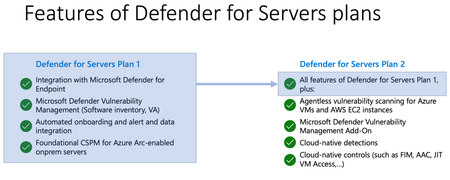
When it comes to protecting servers in hybrid and multicloud environments, Microsoft Defender for Servers as part of Microsoft Defender for Cloud is the solution you might be looking for. However, with all the features, dependencies, and complexity, it might become challenging to always make the right decision when planning, integrating, and deploying Defender for Servers across your environment. With this blog, we are focusing on deployment and integration of Microsoft Defender for Endpoint with Microsoft Defender for Servers on Linux machines.
Network Protection and Web Protection for macOS and Linux
When we first launched Network Protection for Windows and built powerful Web Protection and Microsoft Defender for Cloud Apps (MDA) capabilities on top of it, we knew our vision to bring you our proxy-less endpoint first architecture would remain incomplete until we delivered for macOS and Linux. That day has arrived, and we could not be more excited to share that Network and Web Protection for macOS is now Generally Available and in Public Preview for Linux.