linux
19 Topics
Edge on Linux
Hello, I work on IT industry and I often use linux distros. The main requirements for the browser is a support for various types of operating systems, like MacOS, Linux and Windows, because I need to sync my bookmarks, passwords and history between different platforms to continue my current tasks. If Edge will not be available under linux, I will not change my current browser. So, is there any chance to see Edge as native application on Linux? I know, that at this moment there is no support for office and similar applications created by microsoft, but you could use shortcuts for web version (office online, one note online, etc). You are doing a grat job and edge for android rocks, but no support for linux is dissapointing.44KViews46likes47Comments
MS Edge - Sidebar and copilot not working on Linux Ubuntu v24 LTS
Sidebar not syncing or accepting new app additions (+). Copilot button is dead/inactive. Sidebar settings are well configured. Using the latest version of the Ubuntu OS and MS Edge. Functionality appears to be absent as product was released without full functionality....Lame!28KViews45likes59Comments
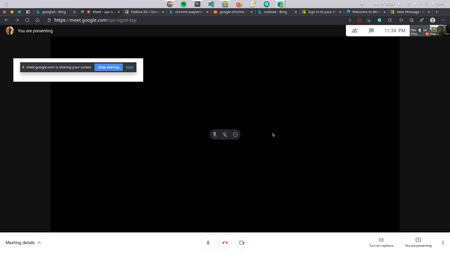
Screen Share on Linux Build on Wayland does not work
Screen Sharing on Linux build on Wayland needs chrome://flags/#enable-webrtc-pipewire-capturer to be enabled. I've seen this flag on all browsers based on chromium but not Edge, is there a particular reason? In a covid-19 world where online classes and meetings are very important, this flag might be the deal-breaker for many. Please consider adding this flag ( : I'm on the latest Edge Dev but on Arch Linux22KViews1like2Comments
Sync on Linux
Enjoying the user experience of Edge on Linux. The only thing that I'm missing in order to fully 'devote' myself to the browser is sync (bookmarks/tabs/etc) across devices. Is there currently a rough estimate on when this feature will be available? I tried searching for a discussion but I did not see anything. Thank you!15KViews23likes31CommentsHow to view and manage your Microsoft passwords on Linux/Chrome/ChromeOS (Without Edge or mobile)
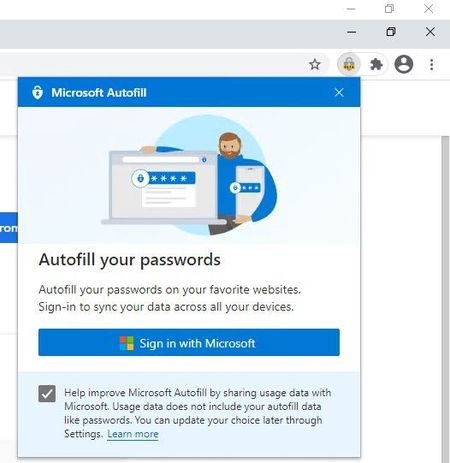
1. install Google Chrome (or other Chromium based browsers, including Edge itself) 2. install Microsoft Autofill extension 3. Sign into your Microsoft account in the extension 4. Access your Passwords safely and hassle-free * you do Not need to sign in to Google account for this. ** this works on Mac and Windows too, basically any environment where you can install this extension in. The extension also has Import feature, so you can import your passwords at once from a file and save them to your Microsoft account. Questions & answers about Microsoft Authenticator app - Azure AD | Microsoft Docs Q: How are my passwords protected by the Authenticator app? A: Authenticator app already provides a high level of security for multi-factor authentication and account management, and the same high security bar is also extended to managing your passwords. Strong authentication is needed by Authenticator app: Signing into Authenticator requires a second factor. This means that your passwords inside Authenticator app can't be accessed even if someone has your Microsoft account password. Autofill data is protected with biometrics and passcode: Before you can autofill password on an app or site, Authenticator requires biometric or device passcode. This ensures that even if someone else has access to your device, they cannot fill or see your password, as they’d be unable to provide the biometric or device PIN. Furthermore, a user cannot open the Passwords page unless they provide biometric or PIN, even if they turn off App Lock in app settings. Encrypted Passwords on the device: Passwords on device are encrypted, and encryption/decryption keys are never stored and always generated on-the-fly. Passwords are only decrypted when user wants to, that is, during autofill or when user wants to see the password, both of which require biometric or PIN. Cloud and network security: Your passwords on the cloud are encrypted and decrypted only when they reach your device. Passwords are synced over an SSL-protected HTTPS connection, which ensures no attacker can eavesdrop on sensitive data when it is being synced. We also ensure we check the sanity of data being synced over network using cryptographic hashed functions (specifically, hash-based message authentication code).10KViews2likes4Comments
[Wayland] PWAs no longer appear as separate app windows — all group under main Edge icon
Hi, Since around 2025-09-07 to 2025-09-10, I’ve noticed that on GNOME (Wayland) all installed PWAs (even across different profiles) now appear grouped under the main Edge browser icon in the GNOME Shell dash/taskbar. Previously, each PWA would open in its own window group with its own icon. This is still the behavior in Chromium/Brave/Chrome, and can be restored there by editing the PWA’s .desktop file to set: StartupWMClass=<same value as Icon> However, Edge now seems to ignore StartupWMClass completely on Wayland, breaking workspace separation and making task switching hard. Environment: Ubuntu 25.04 GNOME 48.0 / Mutter (Wayland) Kernel 6.14.0-29 Intel Iris Xe GPU Edge (latest stable, observed post 2025-09-13) Repro steps: Install any PWA (e.g. Outlook, Teams, Spotify) from Edge Launch it (from any profile) Observe that it appears grouped under the main Edge browser icon Expected: PWA shows under its own icon and window group like in Chromium-based browsers Actual: All PWAs are bundled into the main Edge window group Editing StartupWMClass in the .desktop file no longer helps This regression makes PWAs much harder to manage on Wayland. Please route to the Linux/Wayland team if possible. Thanks!3.7KViews13likes20Comments
App Mode / Kiosk Mode in Linux
Hello I am trying to figure out how to launch edge in kiosk mode. Using latest version of microsoft-edge dev on Linux. Launching EDGE with the command arguments: "microsoft-edge -app="http://foo.bar" does NOT work and only launches EDGE normally. OS: Ubuntu 22.04 jammy Kernel: 5.17.3-051703-generic DE: Gnome422.9KViews0likes1Comment
Edge Linux: Collections and Workspaces
Hey y'all, I use Edge Dev on both Linux (at home) and Windows (at work). I started using Collections recently, and I was upset to find it doesn't work on Edge Linux (yes, my packages are up to date). Although I haven't tried Workspaces yet, it's not working either on Linux. Even if you enable it, it doesn't show up. I can see that the tab expands, but the button doesn't appear. With Collections, enabling has no effect at all. Is this a known bug, or it just doesn't work on Edge Linux yet? Ubuntu 22.04.2 LTS x86_64. Version 115.0.1851.0 (Official build) dev (64-bit).2.8KViews3likes5Comments
Edge on Linux Mint; update didn't work, Edge won't start anymore - solved
Hi, I updated Edge on Linux Mint 18 to the latest version, but it seems the update broke Edge. It doesn't start anymore, I get a spinning wheel for a while, and that's it. The update procedure was basically the same as in Windows, I clicked the notification icon in the top right corner, and had Edge update & restart. Strangely enough, I didn't get a popup to run the update through the admin account, as is usual for updates. I did notice after the first try that the Edge update was also visible in the Update Manager, but that didn't solve the issue after running that process as well. So now Edge doesn't run. Any tips here? cheers! rob edit: it seems a full reboot of Linux did the trick. No idea what happened here, but at least if works again. 😉2.8KViews0likes0Comments