legacy
12 Topics
[Downloads UI] Legacy UI is used when a download comes from a pop-up window
What is the issue? Edge now uses a modern-UI for handling downloads: an icon on the toolbar, just after the end of the Address Bar, which shows a vertical-list of downloads. However, when a download starts from a pop-up window, such as from the Microsoft Update Catalog site, the old-UI is used instead, which feels a bit inconsistent! Expected outcome That only the modern-UI will be used. Proposed solutions My preferred-solution would be to add a setting into Edge where the user can ask for pop-ups to load into a new tabs, instead of separate windows -- Internet Explorer 11 had such a setting. This would then mean pop-up content gets treated like any-other tab, and so would use the modern-UI. Alternatively, when a download starts from a pop-up window, the parent-window should come to the foreground, and the download then begin in that window. Before posting here, have you submitted feedback via the "Send Feedback" feature in Edge? Yes Browser and Operating System Edge 90.0.818.62 (Official build) (64-bit) Windows 10 Home (64-bit) Version 20H2 (Build 19042.985; May 2021 update-level)1KViews0likes0Comments
Painted Full screen Browser controls
Deleted MissyQ posinha Just updated the canary to version 85.0.563.0 and when I did full screen the browser, I was shocked. This is how the new browser controls look. And this is how the legacy browser controls look. Please make the controls look like edge legacy. The middle button is abnormally large. More of it, chromium edge browser controls are simply drawn and not real window browser controls. They are just simulated to act as browser controls by taking mouse click events in the area as input. I got to know all this when the browser controls were simply static and not getting focussed on mouse hover. Suggestion: You are developing a polished browser, and these painted controls won't simply be appealing. Also, this would hurt the performance of the browser. You are using desktop API right. Instead, you could have used window controls in full-screen mode with just the middle button changed to toggle button. Please take note of this and change these buttons from painted to actual buttons. Why do you take the overhead of handling input and focus? Even Mozilla firefox has real window controls in full-screen mode.780Views2likes0CommentsFeature Resquest - More video formats to be playable
Since now there is a flag for media foundation video playback, so I suppose the supported video formats must be increased from just mp4 to several more like mkv, etc. which at present it doesn't support. It would be good if more formats are supported as many people like me use browser for everything from media playback to document editing. So it would be nice if the media formats list is extended. You don't have to worry for the codec as the Windows Decryption module would decrypt it.1KViews1like1CommentPotential Improvement - Content Decryption Unproductive CPU utilisation
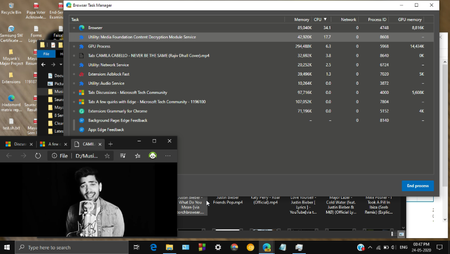
MissyQDeleted Utility: Media Foundation Content Decryption Module Service consumes a lot of extra unwanted CPU as in the below screenshot it can be seen to be consuming 15% CPU in Browser Task Manager which it is consuming in vain by doing extra work of transferring the media data to the Windows Decription Module. Instead try optimizing it by sharing the bowser's media data with decryption module and render it by just drawing output frames of decryption module. This way it will be optimized like Films and Tv app which hardly consumes 1% CPU and just consumes GPU. Try to remove this middle decryption layer service as it is not performing any productive computation. The reason this small performance issue I am highlighting is that as the playback rate increases the CPU usage of this service increases which is not a good sign. I have conveyed it through feedback. This Video Playback through Media Foundation is a very important flag which if optimized will make it best upcoming built-in browser and this feature will also save much battery if optimized. o1.6KViews0likes1CommentHighlight pdf color not visible non chromium browser
Deleted@Neon01 The text that we highlight using chromium edge highlighter isn't visible in the legacy edge browser. While the text that we highlight using legacy edge highlighter is visible in the chromium edge browser. Kindly rectify this glitch.730Views0likes0CommentsTaskbar peek in fullsreen mode
Edge chromium currently hides the taskbar in fullscreen mode. User has to press Win + T or Win keys every time to display taskbar while in fullscreen. When being fullscreen taskbar should be visible when the mouse is brought down near the taskbar. Edge legacy had this feature. Kindly work on it. I am attaching a screenshot from the deg legacy.6.9KViews9likes7CommentsFullscreen Dropdown doesn't have a close and minimize button
The Enable Fullscreen Dropdown button is a very good feature but lacks certain improvements which needs to be published. Every time when I want to close the browser when it is already full screen, I first had to toggle fullscreen. Then I had to close the browser. Also there is no minimize button, both these features were there in edge classic. Kindly add these. Also when certain HTML elements such as video elements or frames are made fullscreen using the attribute fullscreen, the fullscreen dropdown doesn't appear instead traditional circled x appears. Such as when youtube videos are made full screen using fullscreen button on videos, the dropdown doesn't appear. Kindly make these minimize and close button available in fullscreen dropdown. These too was present in edge legacy. Lastly, the fullscreen dowpdown activation area in fullscreen mode and pdf toolbar activation area in fullscreen mode coincide, which makes it impossible to use pdf toolbar in fullscreen mode when using dropdown. This too was present in edge legacy.7KViews3likes11Comments[FIXED] Legacy Edge extensions on Windows store after installing the new Edge
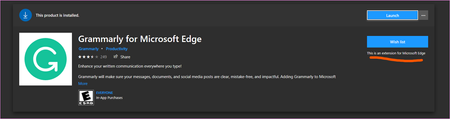
Today I came across this extension when browsing Windows store https://www.microsoft.com/store/productId/9P59WXTBHZZM I could install it without any issue but the thing is it doesn't work when I have the Stable version of Chromium based Edge installed. clicking "launch" opens the new Edge only, nothing else happens. I think the proper way to handle this situation is to either hide these extensions from Windows store once the new Edge is installed, OR show a message to user that: "it's not compatible with the current installed version of Edge browser". My suggestion is to add the new Chromium based Add-ons to the Windows store to be easily available and installed by users. https://microsoftedge.microsoft.com/Solved5.2KViews4likes8CommentsMicrosoft is Adding Classic ‘Edge Mode’ to New Edge Browser
Microsoft is developing a new 'Edge Mode' that lets users visit sites using the same rendering engine as Classic Edge to continue using legacy web applications. In the Chromium-based Microsoft Edge, users can enable a feature called 'Internet Explorer Mode' that causes the browser to emulate Internet Explorer 11. This mode is designed for organizations that need to utilize web apps that were designed for the legacy browser. When Internet Explorer mode is enabled, the Internet Explorer icon will appear in the address bar and sites that you visit will think you are running Internet Explorer 11. Edge in Internet Explorer Mode If Internet Explorer mode is enabled, the Microsoft Edge Dev and Canary builds have also added a new option called 'Open sites in Edge mode'. While nothing official has been announced about this feature, it will most likely allow the browser to emulate Classic Edge. Open sites in Edge mode To use this feature, an Edge flag named "Enable IE Integration" at edge://flags/#edge-internet-explorer-integration must be set to 'IE Mode'. Enable IE Integration flag Once configured, users can then launch the new Microsoft Edge program with the '--ie-mode-test' command line argument to enable the Internet Explorer mode feature. Launch with --ie-mode-test argument Once that feature is enabled, an additional 'Open sites in Edge mode' option will become available under Options -> More Tools. This new mode does not appear to do anything as of yet. Still being developed This feature is still being developed as can be seen by the browser user-agents being sent when using these emulation modes. When a browser visits a web site, a user-agent string is sent to the web site with each request that can be used to identify the name and version of the browser. This user-agent can then be used by the site to determine what features the browser supports and any code changes that need to be made so that the web site renders properly. Below are the various user-agent strings sent by Microsoft Edge, Classic Edge, and the IE and Edge modes. New Microsoft Edge browser user-agent: Mozilla/5.0 (Windows NT 10.0; Win64; x64) AppleWebKit/537.36 (KHTML, like Gecko) Chrome/81.0.4023.0 Safari/537.36 Edg/81.0.396.0 Classic Microsoft Edge user-agent: Mozilla/5.0 (Windows NT 10.0; Win64; x64) AppleWebKit/537.36 (KHTML, like Gecko) Chrome/70.0.3538.102 Safari/537.36 Edge/18.19013 Internet Explorer Mode user-agent: Mozilla/5.0 (Windows NT 10.0; WOW64; Trident/7.0; rv:11.0) like Gecko Edge Mode user-agent: Mozilla/5.0 (Windows NT 10.0; Win64; x64) AppleWebKit/537.36 (KHTML, like Gecko) Chrome/81.0.4023.0 Safari/537.36 Edg/81.0.396.0 As you can see, when in Internet Explorer Mode the user agent is set to the one used by Internet Explorer 11. Edge Mode, though, still uses the same user-agent as the new Microsoft Edge rather than Classic Edge, which indicates that this feature is still in its infancy and being developed. As with all Microsoft software features, this one may not make it to Release, but based on the availability of IE Mode, we can expect that it will. Source16KViews3likes10CommentsTutorial: How to run Legacy and Chromium-based Edge simultaneously side by side Without Group Policy
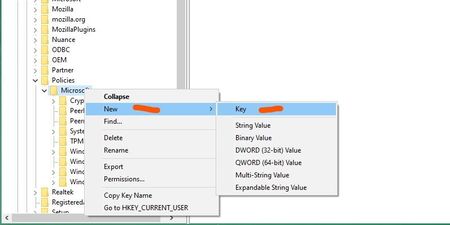
1. Uninstall Chromium Edge either from Control panel or from Windows 10 settings => Apps 2. Go to Registry Editor by typing "regedit" in Windows 10 search 3. Navigate to: HKEY_LOCAL_MACHINE\SOFTWARE\Policies\Microsoft OR paste this in the address bar area of Registry editor Computer\HKEY_LOCAL_MACHINE\SOFTWARE\Policies\Microsoft 4. Right-click on "Microsoft" and create a new key And name it "EdgeUpdate" (without quotes) 5. Then right-click on "EdgeUpdate", go to New and create a new DWord 32-bit and call it "Allowsxs" (without quotes) Allowsxs 6. Set its value to 1 7. Exit Registry Editor 8. now go to www.microsoft.com/Edge to download Edge stable again. install it and after that you will be able to access both Legacy and new Edge from start menu or Windows 10 search. Source: https://docs.microsoft.com/en-us/deployedge/microsoft-edge-update-policies#allowsxs This tutorial is for using only Registry editor, there is also another method to do this which is through Group Policy https://docs.microsoft.com/en-au/deployedge/microsoft-edge-sysupdate-access-old-edge#how-to-enable-a-side-by-side-experience-with-both-versions-of-microsoft-edge for that you also will need the policy files which you can get from here: https://www.microsoft.com/en-us/edge/business/download18KViews4likes9Comments