kubernetes
10 TopicsAzure Availability Zone Mapping and VM Resilience Analysis Guidance using SRE.AZURE.COM Agent
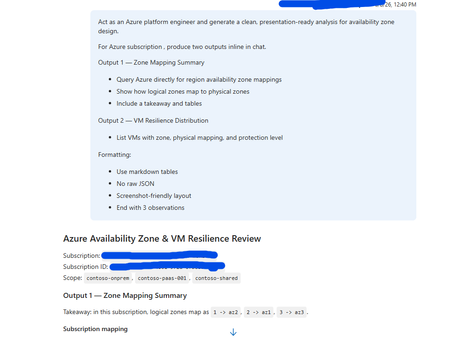
Overview This guidance, supported and tested using SRE.Azure.com, helps Azure platform engineers understand how Availability Zones are mapped within their subscription and how virtual machines (VMs) are distributed across those zones. SRE.Azure.com enables discovery and analysis of zone mappings, VM placement, and infrastructure resilience. Why This Matters Azure uses logical zones (1, 2, 3), but these map differently to physical datacenter zones (az1, az2, az3) in each subscription. This means workloads in the same logical zone across subscriptions may not be physically co-located. Understanding this is critical for high availability, disaster recovery, compliance, and resilience planning. Example sub-prod-eastus-01 -> Zone 1 → az3 sub-prod-eastus-01 -> Zone 2 → az1 sub-prod-eastus-01 -> Zone 3 → az2 sub-prod-weu-01 -> Zone 1 → az1 sub-prod-weu-01 -> Zone 2 → az2 sub-prod-weu-01 -> Zone 3 → az3 Key takeaway: Logical zone numbers do not guarantee physical separation across subscriptions. What SRE.Azure.com agent Enables - Discover logical-to-physical zone mappings - Analyze VM distribution across zones - Identify resilience gaps - Generate presentation-ready reports Suggested Prompt “Act as an Azure platform engineer and generate a clean, presentation-ready analysis for availability zone design. For Azure subscription <subscription-id>, produce two outputs inline in chat. Output 1 — Zone Mapping Summary - Query Azure directly for region availability zone mappings - Show how logical zones map to physical zones - Include a takeaway and tables Output 2 — VM Resilience Distribution - List VMs with zone, physical mapping, and protection level Formatting: - Use markdown tables - No raw JSON - Screenshot-friendly layout - End with 3 observations” Example output: And so on …… Next Steps: Get Started | Azure SRE Agent What is SRE Agent? | Azure SRE Agent363Views2likes0CommentsEnd-to-end TLS with AKS, Azure Front Door, Azure Private Link Service, and NGINX Ingress Controller
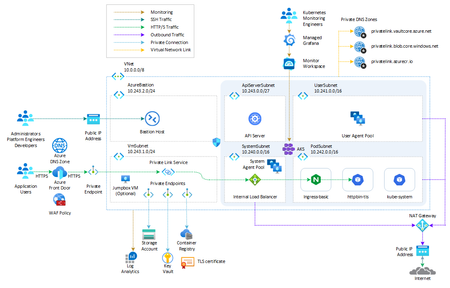
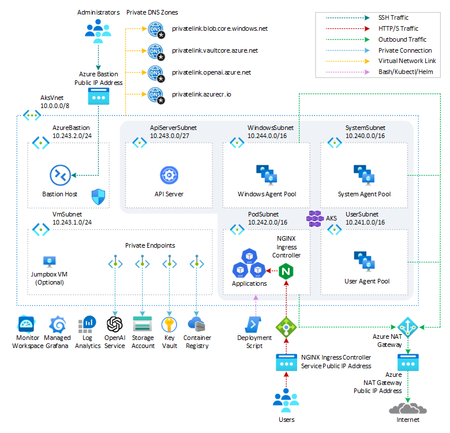
This article shows how Azure Front Door Premium can be set to use a Private Link Service to expose an AKS-hosted workload via NGINX Ingress Controller configured to use a private IP address on the internal load balancer.17KViews4likes4CommentsFastTrack for Azure (FTA) program retiring December 2024
ATTENTION: As of December 31st, 2024, the FastTrack for Azure (FTA) program will be retired. FTA will support any projects currently in motion to ensure successful completion by December 31st, 2024, but will no longer accept new nominations. For more information on available programs and resources, visit: Azure Migrate, Modernize, and Innovate | Microsoft Azure1.5KViews1like0CommentsUnderstanding the New AKS Deployment Safeguards
Azure Kubernetes Service (AKS) recently introduced deployment safeguards to enhance the reliability and security of your Kubernetes deployments. These safeguards enforce best practices, ensuring that deployments are smooth and issues are minimized. In this article we'll follow through the options and see how they work in real time.3.5KViews2likes0CommentsCreate an Azure OpenAI, LangChain, ChromaDB, and Chainlit chat app in AKS using Terraform
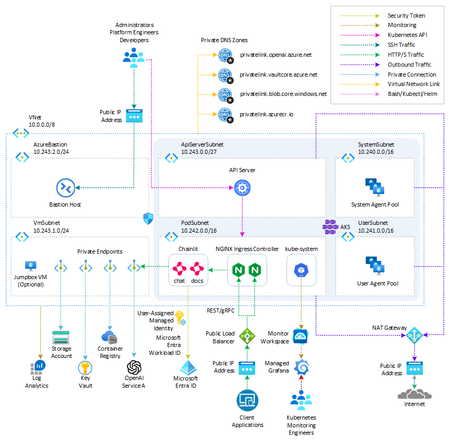
This sample shows how to create two AKS-hosted chat applications that use OpenAI, LangChain, ChromaDB, and Chainlit using Python and deploy them to an AKS environment built in Terraform.29KViews12likes4CommentsAzure OpenAI Service Multitenant Load Balancing and Token Per Minute Tracking via Prometheus Metrics
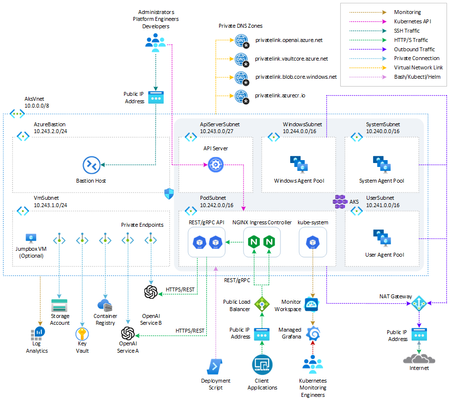
This example shows how a multitenant service can distribute requests evenly among multiple Azure OpenAI Service instances and manage tokens per minute (TPM) for multiple tenants.18KViews4likes0Comments